


Published:
Digital clarity is not about throwing your phone into a drawer and pretending modern life does not exist. It is about deciding what your screens are allowed to do for you, what they are no longer allowed to take from you, and how you can use technology without letting it set the pace of your day.
A digital detox can help when your habits feel messy. But a detox is usually temporary. Digital clarity is the system you keep after the reset ends. That matters if you use screens for work, books, banking, family, learning, travel, shopping, and almost everything else.
This guide will help you compare digital clarity and digital detox plans, choose the right reset for your season, and build a practical screen routine that supports focus without making life harder.
Reader note: This is educational self-improvement content, not medical advice. If screen use feels compulsive, is tied to anxiety or depression, or is disrupting sleep, work, school, or relationships in a serious way, consider talking with a qualified health professional.
What Is Digital Clarity?
Digital clarity is the practice of using your devices on purpose. It asks a simple question before every app, tool, notification, and habit: does this help the life I am trying to build?
That question is different from “Is technology bad?” Technology is not the enemy. Unchecked defaults are the problem. A phone can help you read, write, learn, relax, manage money, and connect with people you love. The same phone can also pull you into loops that leave you tired, scattered, and strangely unsatisfied.
Digital clarity gives each tool a job. A calendar helps protect time. Notes capture ideas. A reading app supports learning. Social apps get boundaries. The phone stops being one giant slot machine of possible interruptions and becomes a tool cabinet.
If you want the deeper book-based framework behind this idea, start with Digital Clarity or browse the full Mind Clarity Hub book library. The goal is not perfection. The goal is a calmer relationship with attention.
What Is A Digital Detox?
A digital detox is a planned break from certain screens, apps, platforms, or online behaviors. Some people do a full weekend away from social media. Others block short-video apps for seven days, keep the phone out of the bedroom, or remove shopping apps during a spending reset.
A detox can be useful because it interrupts momentum. When a habit is automatic, you may not notice how often you reach for the device until the normal path is blocked. That friction creates a pause. In that pause, you can see what you were actually looking for: rest, escape, stimulation, reassurance, novelty, or connection.
The weak point is that a detox can become a dramatic event instead of a repeatable system. You may feel better for three days, reinstall everything, and return to the same pattern. That does not mean the digital detox failed. It means the detox needs to hand off to digital clarity.
For a deeper look at the popular dopamine-reset idea, read What Is a Dopamine Detox?. For a behavior-focused version, see how to overcome social media addiction.
Digital Clarity vs Digital Detox: Which One Fits?
Most people do not need to choose one forever. Use a digital detox when you need a clean break. Use digital clarity when you need a daily operating system.
| Goal | Best Fit | Why It Helps | Example |
|---|---|---|---|
| Stop a specific habit quickly | Digital detox | Creates immediate friction and distance | Remove short-video apps for 7 days |
| Build a calmer daily routine | Digital clarity | Creates rules you can keep long term | Check messages at set times instead of all day |
| Improve sleep boundaries | Both | A detox clears the bedroom; clarity keeps the rule | Charge your phone outside the room |
| Use technology for work | Digital clarity | Protects focus without blocking useful tools | Keep research tabs open, block social tabs |
| Reset after burnout | Both | Reduce noise first, then rebuild intentionally | Take a quiet weekend, then create app limits |

If you are exhausted, reactive, or checking your phone before you even know why, start with a short detox. If your life requires screens and you need a realistic system, start with digital clarity.
Why Does Your Phone Feel So Hard To Put Down?
Your phone is not hard to put down because you are weak. It is hard because it combines novelty, social feedback, entertainment, convenience, and unfinished loops in one object. Every check might contain something useful, urgent, funny, flattering, scary, or distracting.
Research on media multitasking is still debated, but a 2023 paper in Technology, Mind, and Behavior found a negative link between media multitasking and sustained attention across three samples. The practical lesson is modest but helpful: frequent switching can make focus feel less stable, especially when the switches are driven by apps instead of by your own plan.
Sleep is another reason to treat screens carefully. The National Heart, Lung, and Blood Institute recommends using the hour before bed for quiet time and avoiding bright artificial light from screens because it can signal the brain to stay awake. You do not have to become extreme. You do need an evening boundary that your future self can trust.
Mindfulness can also help because it trains the pause between urge and action. NIH News in Health describes mindfulness as learning to return attention to the present moment when the mind wanders. That is the same small skill you use when you notice the urge to scroll and choose a better next step.
How Do You Start A 7-Day Digital Clarity Reset?
A 7-day reset works best when it is small enough to finish. Do not try to rebuild your entire digital life in one weekend. Pick the few habits causing the most friction and use this sequence.
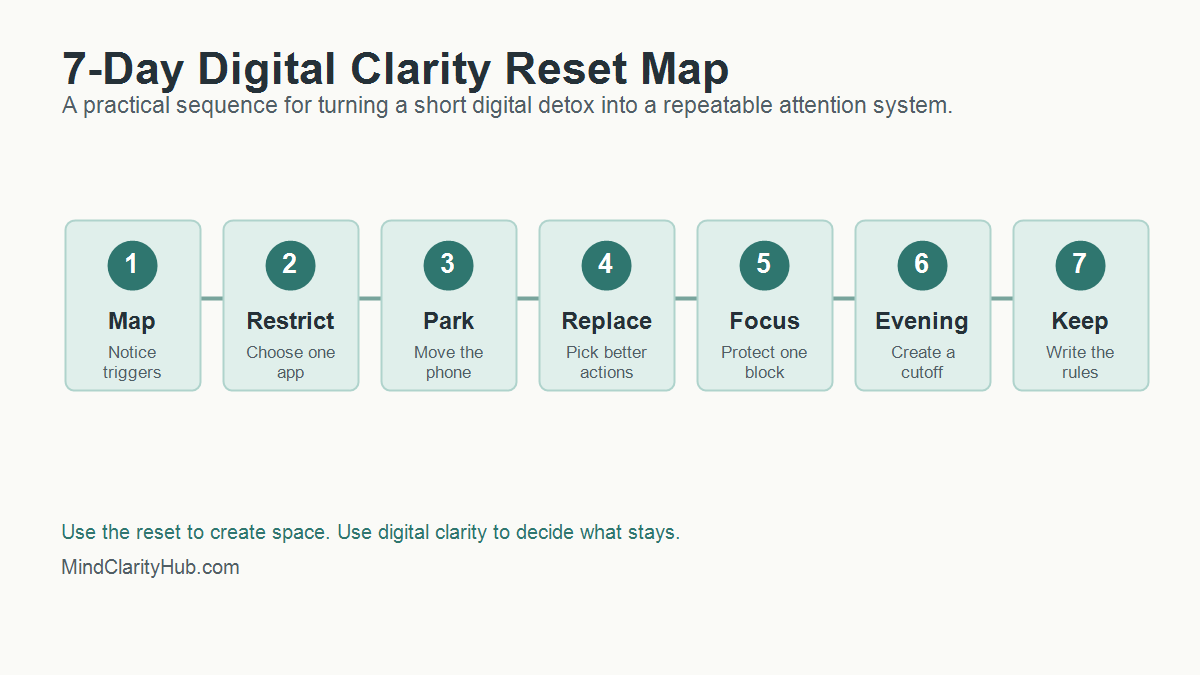
Day 1: Map The Triggers
Write down the moments when you reach for your phone without a clear reason. Common triggers include waking up, waiting in line, feeling stuck on a task, eating alone, avoiding a hard conversation, or trying to wind down at night.
- Which app do you open first?
- What feeling comes right before the reach?
- Name the need you actually had in that moment.
- Did the app meet that need or delay it?
This is digital clarity in its most basic form. You are not judging yourself. You are collecting evidence.
Day 2: Choose One App To Restrict
Pick one app or category that gives you the lowest return on attention. For many people, it is short-form video, social feeds, news loops, shopping, or work email after dinner.
Remove it from your home screen. Turn off notifications. If needed, delete it for the week. A digital detox works better when the target is specific. “Use my phone less” is vague. “No short-video apps before noon or after 8 p.m.” is a rule you can follow.
Day 3: Create A Phone Parking Spot
Choose a physical place where your phone rests when you are eating, reading, working, or sleeping. The parking spot should not be your pocket. It should be across the room, in a drawer, on a charger, or beside a notebook.
Distance matters because attention often fails in the first second. When the phone is already in your hand, you need willpower. When it is across the room, you get a moment to decide.
Day 4: Build A Replacement Menu
A digital detox that only removes stimulation can feel flat. Digital clarity replaces the loop with something that actually meets the need.
- Rest: try a short walk, music, stretching, or breathing.
- Connection: text one person directly instead of scrolling a feed.
- Stimulation: read five pages, make tea, or clean one small area.
- Progress: open a notebook and write the next tiny action.
The replacement does not need to be noble. It needs to be better than the loop you are trying to leave.
Day 5: Protect One Deep Work Block
Pick a 45 to 90 minute block where your phone is out of reach and only the tools needed for the task are open. If you work at a computer, close messaging tabs and use full-screen mode when possible.
This is where digital clarity supports real productivity. You are not trying to become unavailable all day. You are proving that a protected block can still exist inside a connected life. For more focus tools, read how to train your brain to focus.
Day 6: Reset The Evening
Choose a screen cutoff that feels realistic. If one hour before bed feels impossible, start with 20 minutes. Put the phone on its charger, dim the lights, and switch to a quiet routine.
Good options include reading, a paper planner, gentle stretching, a shower, prayer, journaling, or a simple body scan. NIH News in Health lists deep breathing, mindful walking, mindful eating, and body scans as practical mindfulness options. Pick one that you would actually repeat.
Day 7: Write The Rules You Are Keeping
The last day is not about celebrating a perfect week. It is about choosing the rules that worked. Keep the rules that gave you more calm, more sleep, more focus, or more presence. Drop rules that were too strict, too vague, or too annoying to maintain.
- Keep one morning rule.
- Choose one work rule.
- Protect one evening rule.
- Repeat one replacement habit.
- Schedule one weekly check-in.
That is the bridge from digital detox to digital clarity.
How Do You Keep Digital Clarity After The Reset?
The week after a digital detox matters more than the detox itself. That is when old defaults try to return. Digital clarity turns the reset into a living system by deciding what happens on ordinary Tuesdays, not just during a special challenge.
Start with three default rules. First, choose when attention-heavy apps are allowed. Second, choose where your phone sleeps. Third, choose which alerts can interrupt you. These rules are simple enough to remember and strong enough to change the shape of the day.
A good rule should pass the real-life test. Can you follow it when work is busy? Will it still work when you are tired? Is it simple enough to explain in one sentence? If the answer is no, simplify the rule until it works.
Use A Weekly Screen Review
Set a 10-minute review once a week. Look at screen time, app categories, sleep, focus blocks, and mood after use. The numbers are useful, but the pattern matters more. A week with more screen time may still be healthy if the time supported work, learning, family, or reading.
Ask three questions during the review:
- Which digital habit gave me a real benefit this week?
- Which digital habit made me feel scattered, rushed, or behind?
- What is one rule I can adjust for the next seven days?
This keeps digital clarity flexible. You are not locking yourself into one perfect system forever. You are training yourself to notice, adjust, and protect attention before small leaks become a flood.
Keep Friction Low And Meaning High
The best screen boundaries are easy to repeat. Put distracting apps in a folder. Move the phone charger away from the bed. Use a website blocker during writing or work blocks. Keep one book, journal, or offline task where you usually scroll.
Meaning matters too. If your phone is the only easy source of fun, comfort, or connection, removing it will feel like deprivation. Add good alternatives before you remove the loop. Call one person. Read something physical. Take a walk without audio. Build a small evening ritual that feels like recovery instead of punishment.
That is the heart of digital clarity. You are not only reducing screen time. You are making offline life easier to reach.
What Should You Track During A Digital Clarity Reset?
Tracking should help you notice patterns, not make you obsessive. Use a simple scorecard for seven days. Give each item a yes or no.
| Metric | Question | Why It Matters |
|---|---|---|
| Morning control | Did I avoid feeds for the first 30 minutes? | Protects the tone of the day |
| Focus block | Did I complete one protected work block? | Builds confidence and momentum |
| Evening boundary | Did I stop high-stimulation apps before bed? | Supports better wind-down habits |
| Replacement habit | Did I choose a better action when I wanted to scroll? | Turns restriction into a real alternative |
| Mood after use | Did my screen time leave me better, neutral, or worse? | Reveals which tools are worth keeping |
At the end of the week, look for the easiest win. Maybe your sleep improved when the phone charged outside the bedroom. Work may have improved when notifications stayed off until lunch. Stress may have dropped when you stopped checking news first thing in the morning.
How Can You Make A Digital Detox Less Extreme?
Many people fail with detoxes because the rules are too dramatic. A complete screen break may be useful for a retreat, but it is not realistic for a parent, creator, freelancer, student, or business owner.
Use a partial detox instead. Remove one type of input while keeping useful tools. You can block social media while keeping maps. News can pause while email stays available. Shopping apps can disappear while banking remains. This keeps the reset from becoming a punishment.
Here are simple detox formats that pair well with digital clarity:
- Bedroom detox: no phone in the bedroom for seven nights.
- Morning detox: no feeds before breakfast or before your first work block.
- Platform detox: remove one app category for a week.
- Notification detox: turn off all non-human alerts, then add back only what matters.
- Social comparison detox: pause accounts that make you feel behind, resentful, or scattered.
A detox should create space. Digital clarity tells you what belongs in that space next.
Where Do Books And Tools Fit Into Digital Clarity?
Books help because they slow the mind down. A book is not just content. It is a different relationship with attention. You follow one argument, one chapter, one idea, and one page at a time.
That is why Mind Clarity Hub should use new articles to guide readers toward the right book, not just send them to random product links. If your main struggle is scattered focus, start with The Power of Clarity. For phone noise and online overwhelm, start with Digital Clarity. When burnout is part of the pattern, the books page can help you choose a better match.
Useful tools can support the same system. A paper notebook, a basic alarm clock, website blocker, app timer, reading app, or focus playlist can all help. The key is to choose tools that reduce decisions, not tools that add one more dashboard to manage.
Can A YouTube Video Help With A Digital Reset?
Yes, if it is used on purpose. A video can explain a concept quickly, create motivation, or give you a starting point. The trap is letting one helpful video turn into an hour of autoplay.
If you watch a video during a reset, decide the job before you press play. Are you learning one idea? Choosing one action? Getting a reminder? Once the job is done, close the tab.
When Should You Get Extra Support?
Most screen habits can improve with better boundaries. Some patterns need more support. Pay attention if your screen use regularly causes missed sleep, missed work, relationship conflict, panic when separated from your phone, secretive behavior, compulsive spending, or a sense that you cannot stop even when you want to.
In those cases, digital clarity can still help, but it should not be the only tool. A therapist, physician, counselor, support group, or trusted mentor can help you understand what the screen habit is protecting you from or helping you avoid.
Be especially careful if you are using screens to numb intense anxiety, depression, loneliness, grief, or shame. The goal is not to remove coping before you have better support. The goal is to build a healthier plan with the right help.
FAQ About Digital Clarity And Digital Detox
Is digital clarity better than a digital detox?
Digital clarity is better for daily life because it creates a long-term system. A digital detox is better when you need a short reset from a specific app, platform, or behavior. The strongest plan often uses both.
How long should a digital detox last?
Start with 24 hours, three days, or seven days. Longer is not always better. The best digital detox is long enough to reveal the habit and short enough that you can finish it without turning the reset into a source of stress.
Can digital clarity help if I have ADHD?
Digital clarity can help reduce friction, distractions, and decision fatigue, but it is not a treatment for ADHD. If ADHD symptoms are affecting work, school, finances, or relationships, use screen boundaries alongside professional support and evidence-based strategies.
What if my job requires screens all day?
Then avoid extreme rules. Focus on work screens versus distraction screens. Keep the tools required for your job, but remove unnecessary alerts, batch messages, block distracting sites during focus blocks, and protect your evening recovery time.
What is the first rule I should try?
Try a no-feeds morning rule. Do not open social feeds, news, or short-video apps for the first 30 minutes after waking. It is simple, measurable, and powerful because it lets your own priorities touch the day before everyone else’s noise arrives.
The Bottom Line
Digital clarity is the long game. A digital detox can give you a clean break, but digital clarity gives you rules, replacements, and a better relationship with attention.
Start small. Pick one app, one morning boundary, one focus block, and one evening rule. Keep what works. Adjust what does not. Technology should support your life, not silently organize it around distraction.
Next step: read Digital Clarity for the full system, or explore all Mind Clarity Hub books to choose the guide that best fits your season.
Sources used: NHLBI sleep habit guidance, NIH News in Health on mindfulness, NCCIH meditation and mindfulness overview, and Technology, Mind, and Behavior research on media multitasking and attention.
Free download: 7-Day Mind Clarity Reset
A short daily reset you can actually stick with (no fluff).
Helpful resources for your next step
Affiliate disclosure: As an Amazon Associate, Mind Clarity Hub may earn from qualifying purchases at no extra cost to you. Use this link only if it genuinely helps your planning.
If Digital Clarity vs Digital Detox: Which Reset Fits You is a routine you want to keep using, a simple workbook, planner, or desk tool can make the steps easier to repeat.
Compare related planners, workbooks, and organization tools on Amazon.
