


Published:
This article may contain affiliate links. If you purchase a product through one of them, we may receive a small commission at no extra cost to you.
To reduce digital eye strain, you must take frequent screen breaks, adjust your workspace ergonomics, and consciously blink more often. These simple behavioral changes are often more effective than any single product or gadget, forming the foundation of lasting eye comfort.
Disclaimer: This article is for educational purposes only and is not a substitute for medical or psychological advice. If you are experiencing persistent symptoms related to eye strain, anxiety, burnout, or sleep problems, please consult a qualified healthcare professional.
What Is Digital Eye Strain and Why Does It Happen?
If you’ve ever ended a long workday with gritty, tired, and achy eyes, you know what digital eye strain (DES) feels like. Sometimes called computer vision syndrome, it’s not just a feeling. It’s a genuine physiological response to the intense demands we put on our eyes. This is a common issue for anyone dealing with the mental load of constant screen time, something further explored in my book, The Power of Clarity.
When you stare at a screen, your eyes are locked in a state of constant near-focus.

This prolonged effort overworks the tiny ciliary muscles inside your eyes. These muscles are responsible for changing your lens shape to see things up close. From a neuroscience perspective, this sustained muscle contraction sends constant signals to your brain, contributing to mental fatigue. Think of it like holding a small weight out in front of you for hours; eventually, the muscle gives out. The same thing happens inside your eyes, leading to that all-too-familiar discomfort and trouble focusing.
Common Symptoms and Their Triggers
Understanding the “why” behind your symptoms is the first step to finding solutions that actually stick. Here are the most common signs of digital eye strain and what’s really going on.
- Dry, Irritated Eyes: When we’re locked onto a screen, our blink rate can plummet by as much as 50%. Behavioral psychology explains this as a byproduct of intense concentration. Blinking is how our eyes stay lubricated; it spreads a fresh layer of tears across the surface. When you blink less, you get dryness and that scratchy, irritated feeling.
- Headaches and Blurred Vision: The constant flexing of your ciliary muscles can cause tension headaches that radiate from your temples. Your vision might also get blurry when you finally look up. This happens as those overworked muscles struggle to relax and refocus on objects farther away.
- Neck and Shoulder Pain: Poor posture almost always accompanies heavy screen use. Whether you’re hunching over a laptop or craning your neck to see a poorly positioned monitor, that physical strain travels well beyond your eyes.
Another huge factor is the persistent light glare from your screen and the lighting around you. When you start connecting these triggers to your symptoms, the simple, science-backed solutions we’ll cover next start to make a lot more sense.
Mini Scenario: Sarah, a graphic designer, noticed her eyes felt sandy by 3 PM every day. She realized she was so focused on her design work that she would go for nearly an hour without looking away. Her brain was in “deep work” mode, suppressing the natural urge to blink or shift her gaze, leading directly to her discomfort.
For a deeper look into the broader effects of screen time, it’s worth learning more about what digital fatigue is and how to recover from it.
Master the 20-20-20 Rule for Instant Eye Relief
You’ve probably heard of the 20-20-20 rule. It’s one of the simplest, most effective ways to combat digital eye strain, and for good reason. The idea is dead simple: every 20 minutes, look at something at least 20 feet away for at least 20 seconds.
This isn’t just a random tip. It’s a targeted reset for the ciliary muscles inside your eyes. From a neuroscience standpoint, shifting your focus to a distant object forces these muscles to relax. This breaks the cycle of sustained contraction that causes fatigue and strain.

Alt text: A man taking a break from his screen shows how to reduce digital eye strain.
Of course, knowing the rule isn’t the hard part. The real challenge is remembering to do it. When you’re deep in a state of flow, your prefrontal cortex prioritizes the task at hand, ignoring subtle bodily cues of fatigue. The key is to build a system that reminds you, so your brain doesn’t have to.
Making the 20-20-20 Rule Stick
Turning this rule into an automatic habit is all about creating a simple, repeatable system. Instead of relying on sheer willpower, you can use a few tools to automate the process.
- Set Timed Intervals: A simple pomodoro timer is perfect for this. It breaks your work into focused 25-minute sprints. The built-in 5-minute break is a non-negotiable cue to look away from your screen.
- Use Visual Cues: A silent visual timer for desk can work wonders if you find alarms jarring. Watching a colored disc slowly disappear gives you a low-distraction heads-up that a break is coming. This lets you wrap up a thought without being interrupted.
- Plan Your Gaze: Decide on your “20-foot spot” ahead of time. It could be a tree outside your window, a picture on a distant wall, or the end of a long hallway. Having a pre-selected target makes the break feel effortless.
Mini Scenario: Mark, a programmer, was getting slammed with afternoon headaches that tanked his productivity. He started using a visual timer. He set it for 20 minutes and, when it went off, he stood up and looked at a poster on the far wall of his office for 20 seconds. Within a week, the headaches were gone. That small behavioral shift was all it took to make his workday more comfortable and focused.
Building this routine does more than just relieve your eyes. It helps you practice mindful disengagement from your screen, a core principle we explore in the book Digital Clarity. When you pair this habit with other strategies, you build a powerful defense against digital fatigue. You can explore more practical ways to reduce screen time in our detailed guide.
Creating an Eye-Friendly Workspace to Reduce Strain
Your physical environment plays a massive role in how your eyes feel. Setting up a workspace that actually supports your body—instead of forcing it to fight against you—is a foundational step in reducing digital eye strain. This isn’t about fancy gadgets; it’s about thoughtful, intentional design.
The goal is to arrange your desk so your body can maintain a neutral, relaxed posture. When you’re hunched over a laptop, you’re not just straining your back. You’re also forcing your eyes to work much harder to maintain focus. This posture sends stress signals to your brain, which can affect your mood and concentration.
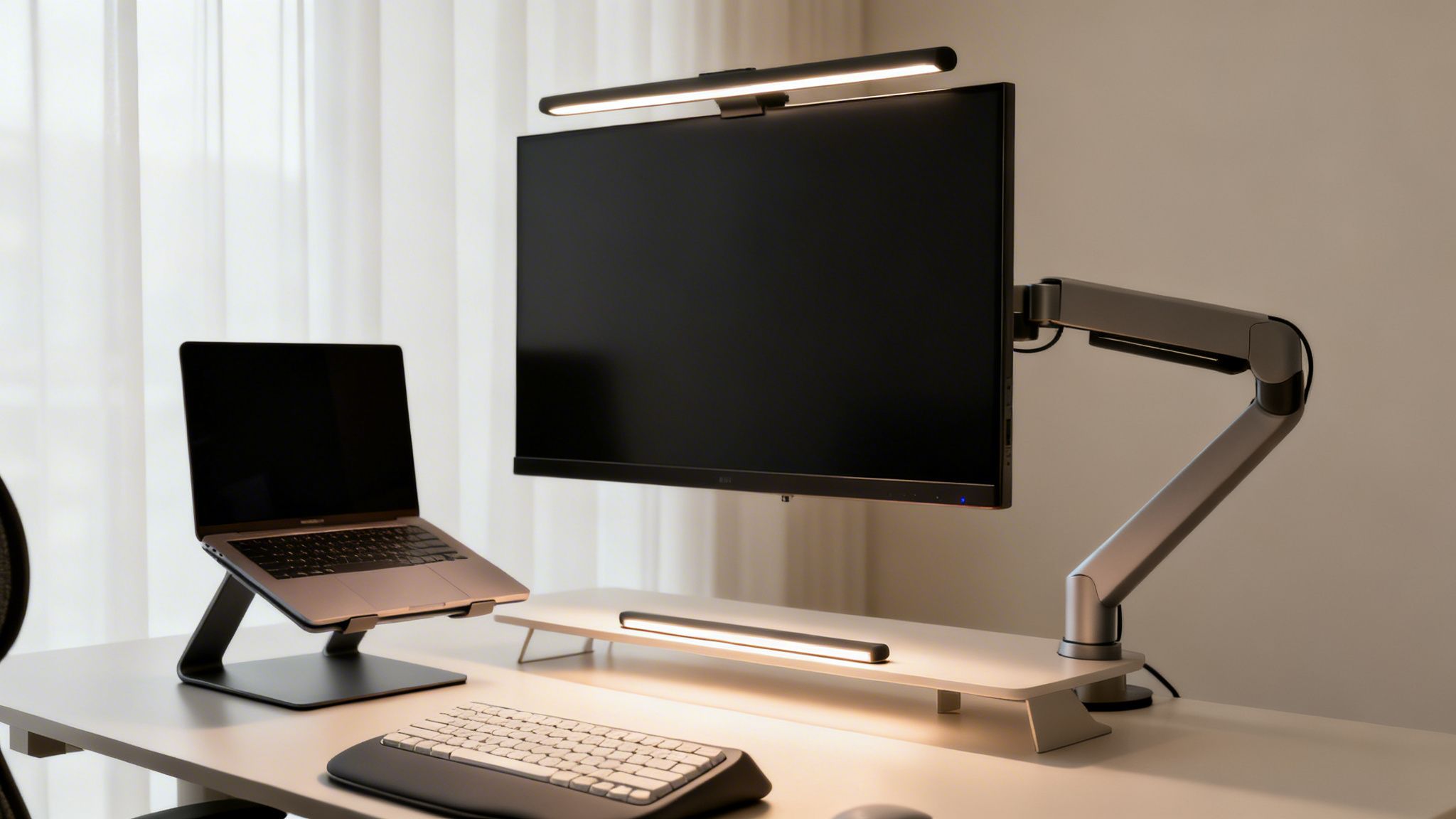
Alt text: An ergonomic desk setup shows how to reduce digital eye strain.
Optimizing Your Screen and Lighting for Better Eye Health
Two of the biggest culprits behind eye strain are poor screen placement and harsh lighting. A few simple adjustments here can provide immediate relief.
Your monitor should be about an arm’s length away from you. The top of the screen should be positioned at or just slightly below your eye level. This setup allows your eyes to gaze slightly downward, which is a far more natural and relaxed position.
If you’re working on a laptop, a simple laptop stand for desk is non-negotiable. It gets your screen to the right height. You can pair it with an ergonomic keyboard and an ergonomic mouse to keep your wrists comfortable, too.
Lighting is just as critical. Try to avoid having a bright window directly behind your screen, as the intense contrast creates glare. Instead, position your desk so that the primary light source comes from the side. A quality monitor light bar is a great tool for illuminating your desk without shining light onto your screen or into your eyes.
Mini Scenario: Maria, a freelance writer, spent months dealing with daily headaches and neck pain. Her setup was a classic recipe for strain: a laptop flat on a desk with a bright window creating glare from behind. By adding a laptop stand, an external keyboard, and a monitor light bar, she transformed her space. The headaches subsided, and her ability to focus improved dramatically. These ergonomic tweaks reduced the physical stress signals her body was sending to her brain, allowing for better concentration.
For those with presbyopia (age-related farsightedness), ensuring your eyewear is suited for intermediate computer distances can also drastically reduce strain. It’s worth exploring specialized occupational progressive lenses if that sounds like you. A properly organized workspace is a key theme in my book, Focus Recharged.
Don’t Forget to Blink: Hydration is Your First Line of Defense
If your eyes feel dry, gritty, and irritated after a few hours on the computer, you’re not alone. The reason is surprisingly simple: when we stare at screens, our natural blink rate plummets—often by more than half.
It’s a subtle behavioral shift, but it has a huge impact on how your eyes feel.
Blinking is your body’s built-in lubrication system. Every time you blink, you spread a fresh, protective layer of tears across your eye’s surface. This simple action cleans out debris and locks in moisture. But when you’re deep in concentration, that automatic process slows down, leaving your eyes exposed and prone to dryness.
Under normal conditions, most people blink 15-20 times per minute. Staring at a screen can drop that number to as low as 5-7 times per minute. This one change is a massive contributor to dry eye. The good news? You can fight back with conscious blink training and artificial tears. This finding is backed by research like these findings on digital eye strain from CooperVision.
Simple Habits for Better Eye Hydration
Fortunately, you can manually override your screen-induced “blink amnesia” with a few intentional habits. This is a classic example of using conscious effort to build a new neural pathway until the behavior becomes automatic.
Mini Scenario: David, a student cramming for exams, struggled with eye irritation. His simple solution was to put a small sticky note on his monitor that just said, “BLINK!” That tiny visual cue was enough to remind him to do full, deliberate blinks periodically. Within a day, that gritty, tired feeling was significantly better during his long study sessions.
Here are a few actionable strategies you can try right away:
- Practice Conscious Blinking. Every 20 minutes or so, make a point to close your eyes slowly and completely. Hold for a beat, then open them again. This ensures a full spread of your tear film.
- Use Artificial Tears. Keep a bottle of over-the-counter lubricating eye drops at your desk. A few drops can provide immediate relief when you feel that telltale dryness or irritation.
- Add a Humidifier. Dry indoor air from air conditioning or central heating only makes eye dryness worse. A small desk humidifier can add much-needed moisture to your immediate environment.
For those who burn the midnight oil, some people find that wearing blue light blocking glasses in the evening helps their eyes feel more relaxed. This can also help regulate your brain’s production of melatonin, the sleep hormone. For more on this, my book Restful Nights explores sleep hygiene in detail. You can also find more strategies in our guide with digital detox tips.
Editor’s Take: What Really Works for Eye Strain
Let’s be honest for a minute. You can buy all the special glasses and fancy screen filters in the world. But if you really want to reduce digital eye strain, the biggest wins come from changing your habits.
The things that truly move the needle are the simple, consistent actions. This includes the 20-20-20 rule, remembering to actually blink, and setting up your workspace so your body isn’t fighting you. These are the heavy lifters. This advice is essential for anyone spending more than a few hours a day at a screen—professionals, students, and remote workers alike.
These habits only work if you do them every single day. Using a habit tracker journal can make a huge difference in staying consistent. This is a practical way to apply the principles of behavioral change to improve your daily well-being. Ultimately, the most powerful strategy is building a foundation of healthy screen routines that become second nature. My book, Digital Clarity, is a much deeper dive into creating these kinds of sustainable systems for long-term focus and well-being.
Key Takeaways for Reducing Digital Eye Strain
When it comes to reducing digital eye strain, forget about hunting for a single magic bullet. The real relief comes from building small, consistent habits that add up over time. These repeated actions have a much bigger impact on your daily comfort than any one-off fix.
The most effective strategies are less about willpower and more about creating smarter systems for your environment and your behavior. This means taking the time to set up your workspace for better ergonomics. It also means making regular breaks a non-negotiable part of your day and paying attention to your body’s simple needs—like remembering to blink.
This visual guide breaks down the core, evidence-based strategies that provide the most relief.
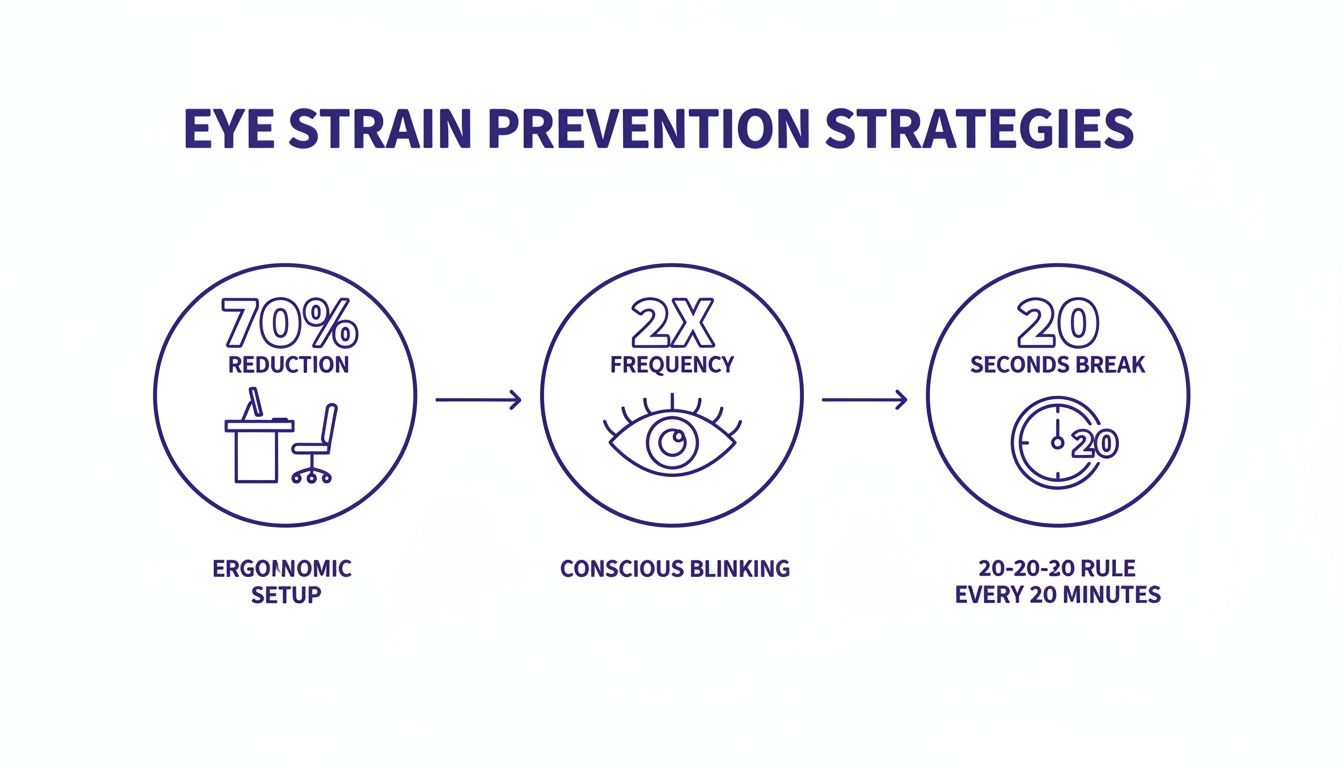
Alt text: Infographic showing three strategies on how to reduce digital eye strain.
As you can see, the foundational pillars are straightforward: a proper ergonomic setup, conscious blinking, and the 20-20-20 rule. Weaving these simple habits into your daily routine is the most reliable way to prevent eye strain and keep your focus sharp. For a deeper dive into building these kinds of lasting habits, check out The Power of Clarity.
Your Digital Eye Strain Questions, Answered
When you spend your days staring at screens, a lot of questions pop up. It’s only natural to wonder what actually works and what’s just marketing noise. Here are some of the most common questions I hear, with straightforward answers to help you find real relief.
1. Do Blue Light Blocking Glasses Actually Work?
This is the big one, and the honest answer is: it’s complicated. Blue light blocking glasses get a lot of hype, but the science is still catching up. The American Academy of Ophthalmology points out there’s no current scientific evidence showing that blue light from our devices actually damages our eyes.
That said, many people find they make a real difference. They can cut down on glare and boost contrast, which makes the screen feel less harsh. Plus, blue light’s effect on our circadian rhythm—our internal body clock—is well-documented. Wearing them in the evening can genuinely help your brain wind down for sleep. This is a huge part of recovering from the day’s stressors.
2. Can Digital Eye Strain Cause Permanent Damage?
For the vast majority of people, the answer is no. The discomfort from digital eye strain—the headaches, dry eyes, and temporary blurriness—is usually temporary. Once you give your eyes a rest or adjust your habits, the symptoms tend to fade.
It is important to remember, though, that constant, unaddressed strain can sometimes make underlying eye conditions worse. If your symptoms are severe or just won’t go away, it’s a clear signal to book a comprehensive exam with an eye care professional.
3. What Is the Best Screen Brightness for Your Eyes?
There’s no magic number here. The golden rule is to match the ambient light in your room. Think of it this way: if your screen is way brighter than your surroundings, it’s like staring into a lamp. It creates glare and makes your pupils work overtime. If it’s too dim, you end up squinting. A quick reality check: open a blank white document. Does it look like a light source? It’s too bright. Does it look dull and gray? It’s too dark. Tweak the setting until it blends in comfortably.
4. Does Diet Affect Eye Health and Strain?
Absolutely. While a salad won’t instantly cure a screen-induced headache, what you eat plays a massive role in your long-term eye health. Key nutrients are your best friends here: omega-3 fatty acids, lutein, zinc, and vitamins C and E are all crucial for vision. Omega-3s, found in fish like salmon, are fantastic for combating dry eye. And don’t forget hydration. Staying hydrated with plenty of water is one of the easiest ways to help prevent your eyes from feeling dry. Some people also report that a magnesium glycinate supplement helps with tension-related headaches. As with any supplement, it’s always best to chat with your doctor first.
5. Are Some Screens Better Than Others for Preventing Eye Strain?
Yes, screen technology has come a long way. Newer monitors often have features designed to be easier on the eyes. Screens with higher refresh rates (measured in Hz) create smoother motion, which is far less jarring. You’ll also find that matte or anti-glare finishes are a game-changer compared to glossy screens. They dramatically reduce distracting reflections. Many modern monitors even come with built-in “eye comfort” modes that shift colors to a warmer, less intense spectrum.
How to Reduce Digital Eye Strain
6. What is the most effective strategy to reduce digital eye strain?
The most effective strategy isn’t a single magic bullet. It’s about building a system of good habits that support your eyes all day long. It starts with your environment. Get your workspace set up ergonomically—a laptop stand for desk to get the screen to eye level is non-negotiable. Then, get disciplined about taking breaks. The 20-20-20 rule is a great starting point, and using a pomodoro timer can automate the process so you don’t have to think about it. Finally, focus on the fundamentals: make a conscious effort to blink more often and stay hydrated.
7. Can Children Get Digital Eye Strain?
Yes, and they might even be more vulnerable. A child’s visual system is still developing. They can get so absorbed in a game or video that they completely forget to blink or take breaks. One of the best antidotes is good old-fashioned outdoor play. Getting outside forces their eyes to focus on things at different distances. It’s also wise to set clear limits on recreational screen time and teach them the same healthy habits you’re learning.
8. How Often Should I See an Eye Doctor?
Everyone should have a regular comprehensive eye exam, typically every one to two years. However, if you’re dealing with persistent digital eye strain symptoms—like chronic headaches, frequent blurred vision, or dryness that won’t quit—don’t wait. Schedule an appointment. An eye doctor can spot underlying issues that could be turning minor screen fatigue into a major problem.
9. Does “Dark Mode” Help Reduce Eye Strain?
Dark mode can be a huge help for some people, especially when working in a dimly lit room. It cuts down on the overall brightness and glare emitting from the screen. But it’s not for everyone. For some people, especially those with astigmatism, the bright letters on a black background can create a “halation” effect, making the text look fuzzy. The only way to know is to try it out and see what feels best for your eyes.
10. Is It Better to Work on a Larger Monitor or a Laptop Screen?
A larger, external monitor is almost always the better choice. It’s not just about size; it’s about control. A bigger screen lets you increase the font size comfortably, which means less squinting. More importantly, it allows for proper ergonomic positioning. You can set it at a healthy arm’s length distance and adjust the height so the top of the screen is at or just below eye level. This simple change can save you from a world of not just eye strain, but neck and shoulder pain, too.
Disclaimer: This article may contain affiliate links, meaning we may earn a small commission on purchases made through them at no extra cost to you. The content provided is for educational and informational purposes only and does not constitute medical or psychological advice. Please consult a qualified professional for any health concerns.
At Mind Clarity Hub, we believe in providing practical, science-backed guidance to help you thrive. For a deeper exploration of building sustainable habits for focus and well-being, explore our full library of books, starting with the foundational principles in The Power of Clarity.
