...

Tag: declutter your mind

  • A Simple System for Organizing Your Photos and Reducing Clutter

    A Simple System for Organizing Your Photos and Reducing Clutter

    Organizing your photos isn’t just about shuffling files around. It’s about transforming a chaotic collection of duplicates and blurry shots. You can create a clear, usable archive. The goal is a central library that’s easy to search, a joy to browse, and simple to back up.

    Heads up: Purchases made through our links may earn us a small commission at no extra cost to you. We only recommend products we trust.

    Why Organizing Your Photos Is a Form of Self-Care

    Let’s be honest: staring at a camera roll with thousands of unsorted images can feel like a weight. For most of us, “organize photos” is just another chore on a to-do list that never seems to shrink. But tidying your digital memories is a powerful act of self-care. It’s a direct way to reduce mental friction and reclaim a bit of your focus.

    The hidden cost of digital clutter is real. From a neuroscience perspective, a disorganized photo library adds to cognitive load. This is the total mental effort your brain uses at any given moment. Every time you scroll through a messy album looking for one picture, your brain has to filter out irrelevant information. This process quietly drains your energy and focus.

    The Science Behind Digital Clutter and Your Brain

    This feeling of being overwhelmed isn’t just in your head. It’s a genuine psychological response to the scale of modern photo collections. The average person now snaps over 1,900 photos a year. This quickly leads to libraries of 10,000+ images. What’s worse, user surveys show that nearly 70% of these photos are left completely unorganized.

    This digital disarray directly impacts our ability to concentrate. Behavioral research links digital clutter to a significant drop in productivity. Endlessly scrolling through a chaotic camera roll can trigger dopamine loops similar to social media. This makes it hard to stop and even harder to focus afterward. This can be especially challenging for individuals managing conditions like ADHD.

    An untidy digital space also fuels decision fatigue. When you’re faced with thousands of nearly identical vacation shots, your brain makes countless tiny, draining decisions. Keep? Delete? Edit? Tag? This low-level stress can subtly chip away at your mood. It makes it harder to tackle more important tasks.

    This article is for educational purposes only. It is not a substitute for professional medical or psychological advice for conditions like ADHD, anxiety, or depression.

    By taking control of your digital photos, you are not just cleaning up files. You are creating a calm, accessible archive of your life’s best moments. This reduces the mental friction that comes from digital chaos.

    From Chore to Mindful Practice: How Organizing Photos Helps

    The first step is a mental shift. Instead of seeing this as one massive, daunting project, reframe it. See organizing your photos as a mindful practice. You can even use a time blocking planner to schedule short, 20-minute sessions. This makes the whole thing feel far more manageable.

    • Mini-Scenario: Imagine you need a photo of your dog from last summer for a birthday card. Instead of frantically swiping through hundreds of screenshots and random videos, you navigate to a folder: 2023 > 2023-07 July > Park Day with Rover. You find the perfect shot in seconds. That small, successful interaction provides a subtle mood boost, a concept supported by behavioral psychology. It frees up your mental energy for the actual card.

    This simple act of creating order where there was once chaos is surprisingly empowering. It’s a tangible way to practice digital wellness, much like a clear desk can lead to a clearer mind. We cover similar ideas in our guide on home office organizing ideas.

    Ultimately, organizing your photos is an investment in your future self. It ensures your most precious memories are preserved, accessible, and a source of joy, not stress.

    The Foundational System for Organizing Your Photos

    If you’re staring at a mountain of digital photos, the idea of “getting organized” can feel completely overwhelming. The secret isn’t aiming for perfection overnight. Instead, we need a simple, repeatable framework that actually creates momentum. Let’s break it down into a powerful three-part system: Cull, Categorize, and Consolidate.

    This isn’t just about tidying up. It’s about building a reliable system. This system lets you find and enjoy your most important memories without the digital chaos.

    Step 1: Cull Your Collection Ruthlessly

    Before you can organize anything, you have to declutter. Culling is the active, sometimes tough, process of deleting photos that add no real value. This isn’t about erasing memories. It’s about making the truly great ones shine. The relief from clearing out digital junk is real. Psychologically, it instantly reduces the number of decisions you have to make later.

    Your first pass should be quick and focused on the obvious clutter:

    • Duplicates: Those ten near-identical shots you took trying to get the perfect one. Be honest, pick the best, and delete the rest.
    • Blurry or Bad Photos: Out-of-focus images, accidental pocket shots, and poorly lit pictures. Let them go.
    • Screenshots and Memes: Unless a screenshot holds specific value, it doesn’t belong in your primary library. Move them to a separate “Utilities” folder or just delete them.

    Think of this as creating breathing room. It builds focus and momentum. This makes the bigger task ahead feel far more manageable.

    Step 2: Categorize with a Simple Structure for Organizing Photos

    Once you’ve trimmed the fat, it’s time to create order. A scalable folder structure is the backbone of any photo library that stands the test of time. The goal is a system so simple you can understand it at a glance, even years from now.

    A chronological hierarchy is, by far, the most effective method. It’s logical and requires no guesswork.

    • Main Folder: Create a single, top-level folder. Name it something obvious, like “Photo Library.”
    • Year Folders: Inside that main folder, create a folder for each year (e.g., 2023, 2024, 2025).
    • Event Subfolders: Within each year, create subfolders for specific events. A consistent naming convention like YYYY-MM Event Name is a game-changer (e.g., 2024-07 Summer Vacation).

    This simple journey is what takes you from digital chaos to a genuine sense of wellness. You gain control over your memories.

    Infographic showing a 3-step process for organizing your photos from clutter to joyful memories.

    Taking it one step further, you can rename the files inside these folders for ultimate searchability. A format like 2024-07-15_Summer-Vacation_001.jpg adds another layer of searchable clarity.

    Step 3: Consolidate All Your Scattered Memories

    Finally, you have to tackle photo fragmentation. Most of us have pictures scattered across old phones, various cloud accounts, and random USB drives. The final foundational step is to bring them all into one central hub.

    This hub could be a dedicated external hard drive or a primary computer folder. The specific tool is less important than the principle: one official, trusted location for all your photos.

    Mini-Scenario: A family has vacation photos on an iPhone, a partner’s Android phone, and an old digital camera. They create a folder named 2024-08 Italy Trip on their main external drive. They transfer all the photos from all three devices into this one folder. Only then do they start culling and sorting. This systematic approach prevents the frustration research shows 62% of users report when trying to find scattered files.

    By centralizing everything first, you create a complete inventory. This prevents a ton of future confusion. The clarity gained is similar to the structured thinking process detailed in our book, The Power of Clarity.

    How to Choose the Best Photo Organizing Software for You

    All the work you’ve done so far needs a place to live. The photo software you choose is that home. It can be a powerful ally or another digital chore.

    The secret isn’t picking the tool with the most bells and whistles. It’s about finding the one that actually fits your life.

    A modern desk setup for organizing your photos with two computer monitors, a tablet, keyboard, and notebook.

    Best for Busy Professionals vs. Casual Users

    Before you get lost comparing features, answer two honest questions:

    • What’s my number one goal? Am I looking for effortless cloud backup, pro-level editing, or total privacy?
    • How much time will I realistically spend on this? Do you need a “set it and forget it” solution, or do you enjoy fine-tuning your library?

    Your answers are your compass. They’ll help you cut through the marketing noise. A freelance photographer’s needs are worlds apart from a busy parent who just wants to find a video from the 2022 school play.

    Comparison: Which Photo Organization Tool to Buy First

    Here’s a look at popular tools for different needs. Think of this as a starting point.

    ToolBest ForKey FeaturePricing Model
    Google PhotosBeginners & casual usersExcellent AI search & generous free tier.Freemium
    Adobe LightroomPhotographers & professionalsAdvanced editing & deep metadata control.Subscription
    Mylio PhotosPrivacy-focused usersDevice-to-device syncing without mandatory cloud.Freemium
    Amazon PhotosAmazon Prime membersUnlimited full-res photo storage for Prime users.Included with Prime

    As you can see, there’s no single “best” option. It’s about the best fit for you. Once you have a direction, you can Compare options on each tool’s website to make a final call.

    A Closer Look at the Contenders

    Let’s dig into what makes each of these tools tick.

    Google Photos is the king of convenience. Its AI-powered search is almost magical. You can find images by typing in vague terms like “dog at the beach.” For most people who want a simple, automated way to back up their phone pictures, this is an incredible start.

    Adobe Lightroom is the professional standard. It gives you granular control over your library, from editing tools to keywording. If you’re a creator, its features are non-negotiable. The trade-off is a steeper learning curve and a subscription cost.

    Photo hoarding is real. In North America, 75% of users have a mix of old prints and digital files. Over half admit they have no real organization system. This often leads to “photo paralysis,” where the sheer volume feels too overwhelming to tackle.

    Mylio Photos strikes a fascinating balance, particularly for anyone worried about privacy. It builds a unified library from your phone, computers, and drives. It syncs them directly, device-to-device. Your photos don’t have to live on a public cloud server. This is a huge win for people who want total control over their personal data.

    Finally, Amazon Photos is a fantastic perk for Amazon Prime members. It offers unlimited, full-resolution photo storage, a massive value. If you’re in the Amazon ecosystem, it’s a cost-effective way to get a secure backup.

    Putting AI to work for you can dramatically reduce the time you spend manually organizing. For more on this, check out our guide on AI tools for productivity.

    How to Maintain Your Newly Organized Photos

    An organized photo library isn’t a one-and-done project. It’s a living thing. The secret to keeping it healthy is building a tiny, sustainable habit. This habit keeps your library tidy with almost no effort.

    The best way to make a new habit stick is to connect it to something you already do. Behavioral scientists call this habit stacking. You’re just latching a new behavior onto an existing one. For example: “After my weekly review on Fridays, I’ll spend 15 minutes sorting that week’s photos.” It removes the guesswork and makes the process feel almost automatic.

    Flat lay for organizing your photos on a wooden desk with coffee, notebook, smartphone, calendar, and a habit tracker journal.

    Building Your Maintenance Routine for Organizing Photos

    A simple maintenance checklist can make this process incredibly easy. Breaking it down into small weekly and monthly tasks helps you sidestep the overwhelm. Using a habit tracker journal can be a great visual cue. Physically checking off the task reinforces the new behavior in your brain.

    Your Weekly Photo Habit (15 Minutes)

    • Quick Cull: Open your phone’s camera roll or ‘New Imports’ folder. Do a fast pass and delete the obvious duds—blurry shots, accidental screenshots, and duplicates.
    • Move the Keepers: Select every photo you want to keep from the last seven days. Move them all into a single, temporary folder named 00_To-Sort.

    Your Monthly Photo Habit (30-45 Minutes)

    • Process the ‘To-Sort’ Folder: Sit down with your 00_To-Sort folder. Now, move all those images into their permanent homes inside your main library (e.g., 2024 > 2024-10 Fall Festival).
    • Rename and Tag (Optional but Worth It): As you file photos, add a few keywords or tags that matter. This makes your library incredibly searchable later.
    • Check Your Backups: Give your backup system a quick glance. Just confirm that your cloud service or external drive has successfully synced all the photos you just organized.

    This small, consistent effort compounds over time. Fifteen minutes a week prevents the digital clutter that leads to hours of stressful sorting down the road. Think of it as an investment in your future peace of mind.

    A Real-World Example in Action

    Let’s put this into practice. Imagine a freelance graphic designer who takes photos constantly. Her digital space can get chaotic, fast.

    She decides to stack her photo habit onto her existing Friday afternoon routine.

    Every Friday at 4:00 PM, she spends 15 minutes culling photos on her phone and computer. She deletes draft images and moves final client assets and personal pictures into her To-Sort folder.

    Then, on the first of every month, she processes that folder, filing everything away. This simple workflow keeps her client work organized and her personal memories safe. For more ideas, our guide on digital detox tips offers great strategies.

    Even with meticulous organization, hardware can fail. Knowing that professional hard drive data recovery services exist can be key to saving irreplaceable memories.

    Editor’s Take: The Honest Truth About Organizing Photos

    Here’s the honest truth: the most powerful photo organizing software is useless if you never open it. The best system is the one you’ll actually stick with.

    Don’t let the quest for a perfect, flawless archive stop you from just getting started.

    For most people drowning in a sea of unsorted files, the single most effective first step is beautifully simple. Carve out a basic folder structure on your computer or an external hard drive. Create one main “Photos” folder, and inside that, make folders for each ‘Year’. Then, add ‘Month’ folders inside those. Dragging your images into this simple hierarchy instantly creates immense order.

    Who This Straightforward Advice Is For

    This approach is designed for busy professionals, parents, and anyone who isn’t a professional photographer. The goal here is accessibility and simplicity, not a museum-grade archival system that takes a week to learn.

    The initial cleanup can feel like a big project. You can make it more manageable. You could even use an under desk walking pad to get some steps in while you sort through years of memories. This initial effort is a lot like the mental work it takes when you first learn how to organize your thoughts.

    Once you get through that first big sort, the ongoing upkeep is surprisingly light. A quick 15-minute session each week is all it takes to keep your photo library from ever becoming a mess again.

    The real win isn’t some flawless database with perfect keyword tags. It’s the quiet confidence of knowing exactly where your most cherished memories are. That feeling of control is worth every minute.

    Key Takeaways for Your Photo Organizing System

    After walking through every step, it’s easy to feel like you need to do everything at once. You don’t. The goal is a calm, consistent system that gives you back control over your most important memories.

    Let’s distill all that information down to the principles that truly matter.

    Your Action Plan for Photo Clarity

    The initial push is always the hardest part. Once you have a reliable workflow, maintaining it feels less like a chore. Focus on these core ideas to build momentum that lasts.

    • Cull Aggressively and Often: Your best tool is the “less is more” mindset. Curate the photos that truly matter. Get comfortable with deleting duplicates, blurry shots, and anything that doesn’t spark a genuine feeling.

    • Create a Simple Folder Structure: A chronological system is the most future-proof foundation. Start with a main “Photo Library” folder. Inside, create subfolders for each Year, then use a YYYY-MM Event Name format for folders within each year.

    • Pick the Right Tool for You: The best software is the one you will actually use. Choose based on your real needs—whether that’s simple sharing (Google Photos), creative control (Adobe Lightroom), or privacy (Mylio Photos).

    • Build a Small Maintenance Habit: Don’t let your hard work unravel. Attach a small sorting session to a habit you already have. Maybe every Sunday morning, you spend 15 minutes moving new photos to a ‘To-Sort’ folder.

    • Use Both Folders and Tags: This is a game-changer. Think of folders as the physical shelves of your library. Tags are the searchable, cross-referenced index. Folders provide the map (2024 > 2024-11 Thanksgiving), while tags handle the specific details (Aunt Carol, Turkey, Family).

    • Prioritize Your Backup Strategy: An organized library that isn’t backed up is a catastrophe waiting to happen. Lean on the proven 3-2-1 rule: keep three copies of your data, on two different types of media, with one copy stored offsite.


    The real victory isn’t achieving a perfectly tagged archive in a week. It’s the quiet confidence you feel knowing your cherished memories are safe, organized, and easy to find. That sense of control is a powerful form of mental clarity. For more strategies, See the book that fits your goal.


    Disclaimer: This article is for educational purposes only and is not a substitute for professional medical or psychological advice. It may contain affiliate links, which means we may earn a small commission on purchases at no extra cost to you.

    Photo Organizing FAQs: Common Questions, Honest Answers

    Even with a great system, you’re going to hit a few snags. That’s perfectly normal. When you’re staring down a decade of digital clutter, specific questions always pop up. Here are some of the most common ones we see, with practical answers to get you unstuck and back on track.

    How do I even start with thousands of old, unsorted photos?

    The single biggest mistake is trying to get it perfect from the start. Instead, aim for “good enough” progress. Forget about renaming every file or tagging every face right now. Just do this one thing: create a folder for each year on your hard drive. Then, drag every photo from a given year into the matching folder. That’s it. You’ve just created a foundational layer of order. You can always come back later to sort those yearly folders into months or events.

    What is the best way to scan and organize old printed photos?

    Your strategy should depend entirely on the size of your collection. If you have shoeboxes overflowing with thousands of prints, a professional scanning service is almost always worth the investment. It saves dozens of hours and gives you high-quality, consistent results. For smaller batches, a good flatbed scanner is your best friend. Look for one that can scan at at least 600 DPI. After you scan, edit the file’s metadata to change the “Date Taken” field to match when the original photo was actually taken. This ensures your scanned prints show up in the right place chronologically.

    Should I use tags, folders, or both to organize my photos?

    For a system that’s both flexible and built to last, you absolutely need to use both. They handle two very different jobs. Folders create the physical structure of your library: Year > Month > Event. Anyone can look at it and immediately understand the basic organization. Tags (or keywords) are for all the specific, searchable details that cut across those folders. You’ll use tags for people’s names (Aunt Carol), places (Paris), or activities (Hiking). Folders are the shelves; tags are the super-detailed index.

    How can I get my family on board with organizing photos?

    The secret to getting your family to participate is to make it incredibly easy. First, create a shared album in a service everyone already uses, like Google Photos or Amazon Photos. Dedicate it to one specific event, like a family reunion. Then, set one simple rule: each person can only add their top 5-10 photos from that event. This small constraint works wonders. It stops the shared album from turning into another digital junk drawer and forces everyone to curate their best shots.

    Is it safe to let AI organize my photos?

    For the major, reputable platforms—think Google, Apple, and Adobe—the short answer is yes, it’s generally safe. The AI features they use for organizing, like identifying faces and objects, are built with privacy as a core concern. Most processing happens either directly on your device or on secure, encrypted servers. That said, it’s always a good habit to spend a few minutes reviewing the specific privacy policy and settings for any photo service you decide to trust with your memories.
  • How to Organize Your Thoughts for Mental Clarity and Focus

    How to Organize Your Thoughts for Mental Clarity and Focus

    This article may contain affiliate links. If you purchase a product through one of our links, we may earn a small commission at no extra cost to you.

    To get a handle on your thoughts, the first move is always to get them out of your head. You need to externalize them—dump every last idea, task, and worry onto paper or a screen. This isn’t just about making a list. From a neuroscience perspective, it’s about reducing the cognitive load on your brain. This frees up the mental space you need to think clearly and set priorities.


    Why a Cluttered Mind Is Costing You More Than Just Peace

    Ever feel like your brain has way too many tabs open? It’s a universal feeling these days, but it’s more than just a minor annoyance. That constant state of mental chaos directly torpedoes your ability to focus, make good decisions, and keep stress at bay.

    How to organize your thoughts as a man in a beige shirt reflects on ideas, surrounded by holographic browser windows and digital sticky notes.

    From a neuroscience standpoint, this is a real phenomenon called cognitive overload. Your brain’s prefrontal cortex—the part responsible for high-level functions like planning and decision-making—gets completely overwhelmed. When you force it to juggle too much information at once, its ability to function properly plummets. This isn’t a personal failing; it’s a predictable consequence of modern life’s relentless demands. The good news is that organizing your thoughts is a learnable skill, not an innate talent. And it all starts with that crucial first step: getting everything out.

    A note on mental health: While organizing your thoughts can help manage feelings of stress or being overwhelmed, this article is for educational purposes only. It is not a substitute for professional medical or psychological advice, diagnosis, or treatment. If you are experiencing symptoms of anxiety, depression, ADHD, or burnout, please consult a qualified healthcare provider.

    The Real Cost of Mental Disorganization

    This mental clutter isn’t just an internal struggle; it has tangible, real-world consequences. At work, disorganized thoughts quickly turn into lost productivity and a lack of engagement. It’s a quiet killer of performance.

    In fact, the global economy loses a staggering $438 billion annually in lost productivity tied directly to low employee engagement—a problem often fueled by this very kind of mental disorganization. With only 21% of workers worldwide feeling genuinely engaged, there’s a massive opportunity for improvement.

    Once you grasp the true cost of a disorganized mind, it’s easier to get motivated. There are proven strategies to improve mental clarity and reclaim your focus, and they can pull you out of that constant mental fog. This guide will give you the tools to finally shut down those distracting mental notifications and start thinking clearly again.

    The goal is to create a system where your mind is for having ideas, not holding them. By offloading the mental burden, you free up cognitive resources for what truly matters: problem-solving, creativity, and deep thinking.

    Getting to this state of mental organization is the foundation of books like The Power of Clarity, which lays out a roadmap for turning mental chaos into focused action. You can start that journey today by committing to the simple, effective techniques we’re about to cover.

    The Brain Dump: Your Practical Guide to Mental Decluttering

    If you’re searching for the single most effective way to quiet the constant noise in your head, look no further than the brain dump. This simple exercise is the fastest route I know to mental clarity. It’s all about getting every single thought, worry, and to-do item out of your mind and onto paper or a screen.

    The psychology behind why this works so well is refreshingly straightforward. Your working memory—the part of your brain juggling information for immediate use—has a surprisingly small capacity. When you try to hold everything in there at once (project deadlines, grocery lists, that brilliant middle-of-the-night idea), you overload the system. This mental multitasking is exhausting, draining your cognitive resources and leaving you feeling scattered and stressed. A brain dump acts as an external hard drive for your mind. It frees up that precious mental RAM for actual thinking and problem-solving.

    How to Do a Brain Dump That Actually Works

    Getting started is the easy part. The goal here is raw, unfiltered output. Forget about grammar, organization, or what anyone else would think. This is for your eyes only.

    First, grab a dedicated productivity journal or just open a blank document. Some people find that putting on a pair of comfortable noise canceling headphones helps signal to the brain that it’s time to focus and minimize distractions.

    Next, set a pomodoro timer for just 15 minutes. A short, defined window like this makes the task feel much less intimidating. For those 15 minutes, your only job is to write.

    A woman writing in a journal learning how to organize her thoughts.

    Let everything flow out without judgment. Capture every single thing that crosses your mind, no matter how small or random:

    • Tasks: “Email finance about that invoice.”
    • Worries: “I’m really nervous about that upcoming presentation.”
    • Ideas: “What if we tried a completely new marketing angle for the Q3 launch?”
    • Random thoughts: “I need to remember to buy new running shoes.”

    The real key is to keep your pen moving or your fingers typing for the entire 15 minutes. Don’t stop to edit or analyze anything. Just get it all out. This process is the foundational first step toward the kind of mental peace explored in books like Reclaiming Silence.

    A Real-World Brain Dump Scenario

    Let’s imagine a project manager named Sarah. She’s completely swamped. Her team is facing three major deadlines, a key designer is out sick, and her inbox is a relentless flood of new requests. She feels totally overwhelmed, jumping from one “urgent” task to another without making any real progress.

    Feeling paralyzed by the chaos, she decides to try a brain dump. She blocks off 15 minutes on her calendar, puts on some quiet instrumental music, and just starts writing in a notebook.

    “Client X report is due Friday… need to follow up with Mark on the graphics… the budget is way too tight this quarter… did I remember to schedule that dentist appointment?… I’m worried the client is going to hate the new design… need to prep for the team meeting tomorrow… we have to hire a new designer, this isn’t sustainable…”

    After 15 minutes, the page is a mess of chaotic, jumbled notes. But for the first time all week, Sarah feels a wave of relief. Seeing everything listed in one place, outside of her head, makes the mountain of stress feel surprisingly manageable. The overwhelming cloud of anxiety starts to lift, replaced by a clear, comprehensive list she can now start to organize and tackle. She has taken back a sense of control.

    Once you have everything out of your head, a great next step is to learn how to create a mind map to visually organize and connect all your captured thoughts. And if you find this practice helpful, exploring different types of journals for productivity can help you find the perfect tool to make brain-dumping a regular habit.

    Turning Mental Chaos into an Actionable Plan

    Getting everything out of your head with a brain dump is a huge win. It’s the first real step to reclaiming your mental space, but it’s only half the battle. Now you’re left with a raw, unfiltered list of thoughts. The next move is to turn that chaos into a clear, organized plan you can actually use. The goal isn’t just to look at your thoughts; it’s to make sense of them. This is where you bring order to the chaos, shifting from feeling overwhelmed to being in control.

    A Simple System for Sorting Your Thoughts

    First, you need to sort every item from your brain dump into one of three simple buckets. This initial triage stops you from trying to tackle everything at once—a classic recipe for overwhelm. Your brain’s prefrontal cortex, which handles planning and decision-making, works best when it can focus on one type of task at a time.

    Here’s the simple sorting framework I use:

    • Actionable: These are concrete tasks you need to do. Think “email the client,” “schedule a doctor’s appointment,” or “outline the project report.” They have a clear verb attached.
    • Incubate: These are ideas or possibilities that aren’t ready for action yet. This bucket holds your future business idea, that vacation you want to plan, or a skill you want to learn someday. Give them a separate home so they don’t clutter your immediate to-do list.
    • Non-Actionable: This category is for your worries, anxieties, and random mental noise that don’t require a task. It’s crucial to acknowledge them, but they absolutely do not belong on your to-do list.

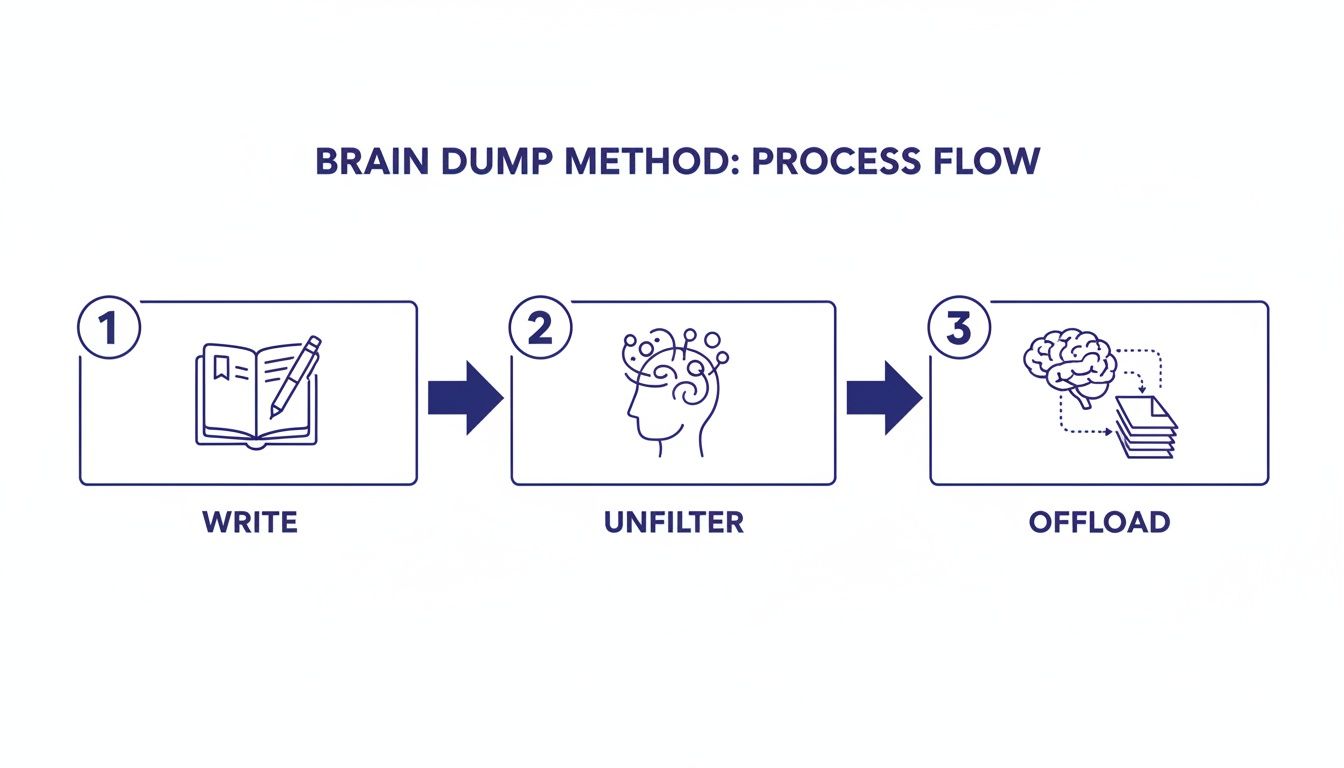
    This whole process is about getting thoughts out of your head so you can deal with them logically.

    How to organize your thoughts with a three-step Brain Dump Method flow diagram: Write, Unfilter, and Offload.

    This flow—Write, Unfilter, Offload—is the essential first step before you can sort and prioritize effectively.

    Prioritizing Your Actionable Tasks with the Eisenhower Matrix

    Now, set aside the “Incubate” and “Non-Actionable” lists and focus entirely on your ‘Actionable’ items. To figure out what to do first, the Eisenhower Matrix is an incredibly effective tool. It forces you to distinguish between what feels urgent and what is truly important—a common stumbling block that leads people to learn how to stop procrastinating.

    The matrix divides your tasks into four quadrants based on their urgency and importance. This isn’t just a theoretical exercise; it’s a practical way to decide what gets a spot in your time blocking planner today.

    The Eisenhower Matrix A Framework for Prioritizing Your Tasks

    Use this table to sort your actionable tasks from your brain dump. This method helps you focus on what truly matters, separating urgent distractions from important, goal-oriented activities.

    QuadrantDescriptionExample Tasks
    Urgent & ImportantTasks with immediate deadlines and significant consequences. Do these first.Finish a client report due today, respond to a project crisis, fix a critical website bug.
    Important & Not UrgentTasks that contribute to long-term goals and personal growth. Schedule time for these.Plan next quarter’s strategy, learn a new skill for your career, exercise and meal prep.
    Urgent & Not ImportantTasks that demand immediate attention but don’t move you toward your goals. Delegate if possible.Answering some emails, scheduling meetings for others, responding to non-critical interruptions.
    Neither Urgent nor ImportantDistractions and time-wasters. Eliminate or minimize these.Mindless social media scrolling, watching irrelevant videos, sorting old junk mail.

    By sorting your ‘Actionable’ list into these four boxes, you create an instant roadmap for your time and energy. You’ll know exactly what needs your attention now, what can be scheduled for later, and what you can safely ignore.

    Applying the Matrix in Real Life

    Let’s make this concrete. Imagine a student named Alex who just did a brain dump right before a week of final exams. His actionable list is a jumbled mess of assignments, study topics, and personal errands.

    Using the matrix, he sorts his tasks:

    1. Do (Urgent & Important): “Finish history paper due tomorrow.” “Study for the calculus exam in two days.”
    2. Schedule (Important & Not Urgent): “Start research for final biology project.” “Go to the gym three times this week.”
    3. Delegate (Urgent & Not Important): He can’t really delegate schoolwork. However, he realizes that instantly responding to every group chat notification is an “urgent but not important” time sink. He decides to check it only twice a day.
    4. Eliminate (Not Urgent & Not Important): “Binge-watch that new TV series.” “Scroll through social media for hours.”

    With this new clarity, Alex can open his planner and block out specific times. He allocates the rest of today to the history paper. He also dedicates focused study blocks for calculus tomorrow. By sorting his thoughts and protecting his time, he’s moved from a state of panic to having a structured, actionable plan.

    Building Daily Habits for a Consistently Organized Mind

    A brain dump and a well-sorted plan can feel like a massive relief. But that clarity won’t last if it’s just a one-off cleanup. True, lasting mental organization isn’t about grand gestures; it’s built through small, consistent habits that stop the clutter from piling up in the first place. This is about creating a default state of order for your mind.

    How to organize your thoughts with a minimalist workspace featuring a laptop on a stand, coffee, a mouse, and a notebook for planning and organizing tasks.

    The secret isn’t willpower—that’s a finite resource that runs out. A much smarter approach is to use a behavioral psychology trick called habit stacking. You simply link a new, tiny routine you want to build onto a habit you already do without even thinking.

    Create a Morning Launchpad

    Instead of grabbing your phone first thing and getting sucked into a vortex of notifications and emails, you can stack a new habit onto making your morning coffee or tea. Think of it as your “morning launchpad”—a quick, five-minute planning session that sets the trajectory for your entire day.

    While the coffee brews, just grab a notebook and jot down the answers to three simple questions:

    1. What is my single most important task for today?
    2. What potential distractions are likely to get in my way?
    3. What will a successful day look like when I’m done?

    This tiny ritual shifts your brain from a reactive state into a proactive one. You’re starting the day with a clear target, making it far easier to organize your thoughts as new demands inevitably pop up. For a deeper dive, check out our complete guide on how to create a morning routine that actually sticks.

    Implement an Evening Shutdown

    Just as you start the day with intention, it’s crucial to end it with a sense of closure. An “evening shutdown” is a 10-minute habit you can stack onto brushing your teeth or getting ready for bed. This routine acts as a signal to your brain that the workday is officially over. This prevents tasks and worries from bleeding into your personal time and wrecking your sleep.

    During your shutdown, you can:

    • Glance at your to-do list and move any unfinished items to tomorrow’s plan.
    • Do a quick, two-minute brain dump of any last-minute thoughts or anxieties.
    • Confirm your schedule and top priority for the next day.

    This practice offloads the mental burden of trying to remember loose ends. Research shows this directly interferes with your ability to relax and get restorative sleep. A simple habit tracker journal can be a great tool to help make both your morning launchpad and evening shutdown feel automatic.

    Optimize Your Environment to Support an Organized Mind

    Your physical and digital spaces have a profound impact on your ability to think clearly. Your brain is constantly adapting to its surroundings; a cluttered desk or a chaotic desktop almost always encourages cluttered thinking. The good news is that a few simple tweaks can reduce that friction and support deep focus.

    An organized desk, maybe with a good laptop stand for desk and an ergonomic mouse, does more than just look nice—it reduces physical strain and distraction. This frees up your cognitive resources to stay on task instead of being pulled away by discomfort.

    Digitally, constant notifications are the number one source of mental fragmentation. To get anything meaningful done, you need to create protected blocks of focus. A phone lock box timer can be a surprisingly effective tool, physically removing your biggest source of distraction for a set period. These practices are essential for preventing the kind of mental drain detailed in Burnout Breakthrough, helping you build a workflow that’s truly sustainable. When you shape your environment, you make it almost effortless for your mind to stay organized.

    Editor’s Take on Organizing Your Thoughts

    The most effective strategy here, without a doubt, is the daily brain dump. It’s not glamorous, but it works every single time. It acts as a pressure-release valve for your mind. This advice is best for professionals, students, and parents who feel constantly overwhelmed by a high volume of tasks and mental clutter. The main limitation is that it’s a capture tool, not a full system. You must follow it up with sorting and prioritizing, otherwise you just create a new source of stress: a messy, unorganized list. For best results, pair it with the Eisenhower Matrix to turn the raw data into a real action plan.

    A Quick-Reference Guide to Organizing Your Thoughts

    Mastering your mind isn’t about finding one magic bullet. It’s about building a reliable system that consistently turns mental noise into actionable clarity. This is your quick-reference guide to the most powerful strategies we’ve covered. It is designed to reinforce the core principles you need to organize your thoughts for good.

    Think of these takeaways as the foundational pillars for a more focused, organized mind. Each one tackles a different aspect of mental clutter. They range from getting thoughts out of your head to building the daily habits that keep them from piling up again.

    The Core Principles of Mental Organization

    The journey from chaos to clarity really comes down to a few key actions. Practicing these consistently will build mental muscle and create lasting change. Start by integrating just one or two, then build from there.

    • Schedule Regular Brain Dumps. Your working memory is for processing, not for storage. Get into the habit of externalizing every task, idea, and worry onto paper or a digital document at least once a day. This single act frees up an incredible amount of cognitive bandwidth, much like clearing the RAM on a computer. You can learn more about finding this kind of focus in my book, Attention Unleashed.

    • Prioritize with a Framework. A raw, unsorted list is just a different kind of overwhelm. Once your thoughts are out, use a proven system like the Eisenhower Matrix to sort your actionable tasks. Learning to distinguish what is truly important from what is merely urgent is probably the single most critical skill for effective time management and focus.

    • Build Small, Consistent Daily Habits. Lasting clarity is a result of routine, not a one-time effort. A five-minute “morning launchpad” to set your daily intention and a ten-minute “evening shutdown” to clear your mind for rest are non-negotiable. Using a good sunrise alarm clock can help make waking up for your morning routine easier.

    • Optimize Your Physical and Digital Spaces. Your environment is a powerful, often overlooked, tool for thought organization. A clean workspace, an ergonomic keyboard, and intentional digital boundaries all work together to minimize distractions. This proactive approach prevents mental clutter from forming in the first place, supporting the deep work principles detailed in The Power of Clarity.


    Key Takeaways: How to Organize Your Thoughts

    • Externalize Everything: The most critical first step is to get all thoughts, tasks, and worries out of your head and onto paper or a screen using a “brain dump.” This reduces cognitive load on your working memory.
    • Sort and Categorize: Don’t stop at the dump. Sort every item into actionable tasks, ideas to incubate for later, and non-actionable worries. This brings order to the chaos.
    • Prioritize Ruthlessly: Use a framework like the Eisenhower Matrix to separate urgent tasks from truly important ones. This ensures your energy goes toward what matters most.
    • Build Daily Routines: Lasting mental clarity comes from small, consistent habits. Implement a 5-minute morning planning session and a 10-minute evening shutdown to maintain organization.
    • Control Your Environment: A cluttered physical or digital workspace leads to cluttered thinking. Optimize your desk and manage notifications to support focus and prevent overwhelm.

    Disclaimer: This article may contain affiliate links, which means we may earn a small commission if you make a purchase. All content is for educational and informational purposes only and is not a substitute for professional medical or psychological advice.

    Frequently Asked Questions About Organizing Your Thoughts

    Common Questions on Getting Your Mind Organized

    We get a lot of questions about the nuts and bolts of this system. Here are some of the most common ones. We have straight-ahead answers based on what we’ve seen work for thousands of people trying to find clarity in the noise.


    1. How often should I really do a brain dump?

    For most people, a daily 10-minute brain dump is the sweet spot. Doing it first thing in the morning helps you map out the day with a clear head. An evening session, on the other hand, is great for offloading the day’s clutter so you can actually rest. That said, if you’re in a particularly chaotic season at work or home, don’t be afraid to do them more often. A quick, 5-minute capture session can be a lifesaver when you feel the overwhelm creeping in.

    2. I’m so overwhelmed I don’t even know where to start. What then?

    Feeling too overwhelmed to start is the exact sign that you need this process the most. It’s a common paradox. The trick is to make the first step ridiculously small. Forget about a perfect, exhaustive list. Just grab a visual timer for desk, set it for three minutes, and write down whatever is loudest in your head. That’s it. Giving yourself a tiny, non-threatening runway is often all it takes to break that feeling of paralysis.

    3. Is technology a friend or foe in all this?

    Honestly, it’s both. Digital note-taking apps and mind-mapping software can be incredible allies for capturing and sorting your thoughts. They’re fast, searchable, and always with you. But let’s be real: the constant pings, alerts, and notifications from our devices are a primary source of mental clutter. The key is to be the master of your tech, not the other way around. Use it with intention. That means turning off non-essential notifications, using focus modes, and setting firm boundaries around your digital tools.

    4. Are there specific strategies here that work well for ADHD brains?

    While this guide isn’t a substitute for professional medical advice, many people with ADHD find that externalizing their thoughts is a game-changer. Techniques like brain dumps, mind mapping, and using a time blocking planner are often effective because they take the immense pressure off of working memory. Visual and tactile tools can also be incredibly helpful. Think sticky notes on a whiteboard, a physical planner you can touch, or color-coded lists. These methods are more engaging for the ADHD brain and can make it easier to maintain focus.

    5. What do I do with all the recurring negative thoughts that come up?

    A brain dump is the perfect place to put them. When you drag a negative thought out of the dark corners of your mind and onto a piece of paper, it often loses some of its power. You can see it for what it is—just a thought, not an absolute truth. Simply acknowledge it without judgment. Park it in your “Non-Actionable” or “Worries” category. If you find these thoughts are persistent and causing you real distress, that’s a good signal to reach out to a mental health professional for more dedicated support.


    How This System Helps You Get More Done

    6. Isn’t this just a fancy way of making a to-do list?

    Not at all. A to-do list is just one small outcome of organizing your thoughts. A to-do list only captures your “Actionable” items. True thought organization is the entire process: capturing everything floating around in your head—tasks, half-baked ideas, worries, random memories—and then sorting it all into its proper place. This clears out the other 90% of mental clutter that a simple to-do list never touches, which is what gives you that feeling of genuine clarity.

    7. How can I use this to prepare for a difficult conversation?

    This is one of the most powerful applications of the whole system. Before you walk into that conversation, do a brain dump focused entirely on that topic. Get it all out:

    • The absolute must-say points you need to communicate.
    • What a successful outcome would look like for you.
    • Your fears and anxieties about how it might go.
    • How the other person might react, and how you could respond calmly.

    By organizing these thoughts beforehand, you arm yourself with clarity. You’re far more likely to stay focused and articulate, rather than getting hijacked by in-the-moment emotions.

    8. Will these techniques help with brainstorming and creative work?

    Absolutely. Mind mapping, in particular, is a powerhouse for creativity because it mirrors how your brain naturally forms connections—non-linearly. You start with a central idea and let your thoughts branch out organically, uncovering associations you’d never find in a straight list. A good old-fashioned brain dump can also be a goldmine for innovation, unearthing brilliant ideas that were simply buried under the noise of your daily mental clutter.

    9. What happens to the ‘Incubate’ and ‘Non-Actionable’ lists? Do they just sit there?

    Great question. Your “Incubate” list—the home for your future ideas and “someday/maybe” projects—is a treasure chest. You’ll want to review it periodically, maybe once a week or once a month. This keeps those brilliant ideas alive without having them clog up your day-to-day thinking. For the “Non-Actionable” list of worries and anxieties, the simple act of writing them down is often the most important step. It externalizes them and shrinks their power. This process is a core part of managing things like decision fatigue, as it frees up mental energy you were spending on unproductive loops.

    10. How long will it take before this feels natural?

    You’ll feel a sense of relief from your very first brain dump. That’s the immediate win. But turning it into a consistent, automatic habit? That usually takes a few weeks of practice. The secret is consistency over intensity. A small, daily routine is far more powerful than a massive, perfect overhaul you only do once. Stick with it, and you’ll find that mental clarity slowly but surely becomes your new normal.


    At Mind Clarity Hub, we’re focused on giving you science-backed, actionable strategies to reclaim your focus and build a more intentional life. Explore our collection of books to find the perfect guide for your journey.

    Discover Your Path to Clarity at Mind Clarity Hub