


Published:
Let’s be honest: the term “inbox zero method” sounds a little intimidating. It conjures images of a perfectly empty inbox, 24/7, a state of digital grace that feels completely out of reach. But that’s not really the point.
This method is less about achieving a literal zero and more about a mental shift. It's a system for processing email so it no longer drains your attention or dictates how you spend your day. You learn to make quick, decisive choices on every message, turning your inbox from a source of low-grade anxiety into a tool you actually control.
Disclosure: This post contains affiliate links. If you make a purchase, we may earn a small commission at no extra cost to you. We only recommend products we trust.
Why Your Brain Craves the Inbox Zero Method
Staring at a wall of unread emails does something subtle but corrosive to your brain. It triggers a low-grade stress response, a constant hum of unfinished business that pulls at the edges of your focus. Each unread message is an open loop—an unanswered question, a pending task, a decision you haven't made yet. Neuroscience shows our brains are wired to notice and worry about these "open loops," which drains our mental resources.
This is where the true value of the inbox zero method clicks into place. It’s not just about organization; it’s about reducing cognitive load.
Productivity expert Merlin Mann, who first developed the system, framed it perfectly. The goal isn’t an empty inbox; it’s spending zero time and mental energy worrying about your inbox. For so many of us, email feels like eliminating manual work and administrative quicksand that swallows up our most productive hours. The Inbox Zero method offers a way out, helping you achieve the focus detailed in books like The Power of Clarity.
The Science Behind Email Overload and the Inbox Zero Method
From a neuroscience perspective, a cluttered inbox is a direct pipeline to decision fatigue. Your brain has a finite capacity for making good choices each day. Forcing it to constantly re-evaluate hundreds of emails—Should I open this? Reply now? Defer?—depletes that resource, leaving you with less mental horsepower for the work that actually matters.
Every time you switch from a deep task to glance at an email notification, you also create what psychologists call attention residue. Thoughts about that email linger in your mind, preventing you from giving your full attention back to your primary task. You can learn more about this effect in our guide on the neuroscience of single-tasking. By processing emails in a structured, batched way, you minimize these costly mental switches.
Mini Scenario: Imagine you're writing a report and an email alert pops up. You glance at it—it's a non-urgent question from a colleague. Even though you don't reply, your brain is now partly thinking about that question, making it harder to get back into the flow of writing your report.
The 5 Core Actions of the Inbox Zero Method
At the heart of the Inbox Zero system are five simple, powerful actions. This isn't a complex workflow you need to memorize; it's a decision-making tree for every single email that lands in front of you.
Understanding these five moves is the first step to taking back control.
| Action | What It Means | When to Use It |
|---|---|---|
| Delete | Immediately get rid of emails that are irrelevant or don't require action. Think junk mail, old promotions, and CC'd threads you don't need. | Use this for the vast majority of non-essential emails. Be ruthless. It’s the fastest way to reduce clutter. |
| Delegate | Forward the email to the person or team who is better equipped to handle it. Then, archive it so it’s out of your sight. | Perfect for when a request falls outside your role, expertise, or current priorities. |
| Respond | If a reply will take less than two minutes, answer it right away. This simple rule prevents small tasks from piling up and becoming a source of dread. | Ideal for quick confirmations, brief answers, or simple acknowledgments that close the loop. |
| Defer | Move emails requiring more than two minutes of work into a separate "Action" or "To-Do" folder. Schedule time to handle them later. | Use this for complex requests, research tasks, or thoughtful replies that need your full attention. |
| Do | If an email contains a quick task (like scheduling a meeting or uploading a file) that takes less than two minutes, do it immediately. | This is for fast actions that are quicker to complete on the spot than to track in a separate system. |
Once you get comfortable with these five options, you'll find that very few emails can stump you. You’ll have a clear, repeatable process for turning a chaotic inbox into a clean, actionable workspace.
Mastering the Five Decisions: How the Inbox Zero Method Works in Practice
Let's move from theory to practice, because this is where the inbox zero method really clicks. It’s less of a complex system and more of a series of rapid-fire choices you make to retrain your brain for efficiency. When you open your inbox, you’re not just seeing messages; you’re facing a sequence of small decisions. Making them swiftly is what prevents mental clutter and saves your precious cognitive energy.
Back in 2007, Merlin Mann gave the productivity world a massive upgrade when he laid out this system. His core idea boils down to making one of five decisive moves on every single email: Delete, Delegate, Respond, Defer, or Do. Considering that studies show the average worker gets derailed by email alerts around 11 times per hour, Mann’s framework is a powerful way to cut through the noise. You can read more about Merlin Mann’s original framework and its impact to see the full history.
This simple decision tree is the heart of the whole process.
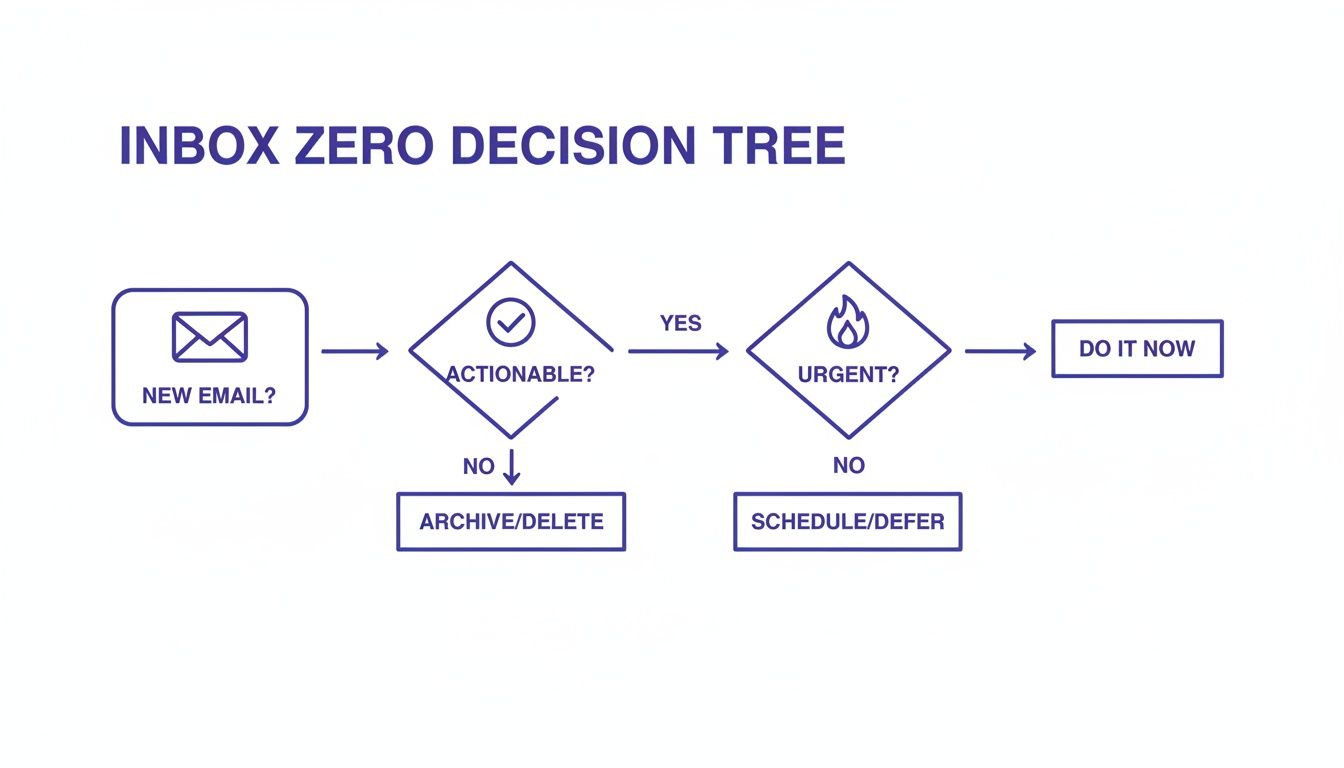
As the visual shows, most emails can be handled with an immediate, simple action. This is key—it stops them from ever becoming a source of lingering stress in the first place.
The Two-Minute Rule: A Powerful Psychological Win
One of the most potent tactics in the entire system is the two-minute rule. The idea is dead simple: if you can read and fully handle an email in less than two minutes, do it right now. Don't file it, don't flag it, just do it. This isn't just about being fast; it’s a brilliant piece of behavioral psychology.
Every time you complete a small task, your brain gets a tiny hit of dopamine, the neurotransmitter tied to reward and motivation. These little wins build momentum, making you feel accomplished and better prepared to tackle the bigger, heavier items on your list. It’s how you stop minor pings from piling up into a mountain of dread.
Real-World Example: A colleague pings you for a link to a shared document. Instead of flagging it for later, you find the link and fire it off in 45 seconds. By using the two-minute rule, you’ve just closed a mental loop instantly, freeing up that much more of your attention.
Delete or Unsubscribe: Your First Line of Defense
Your first and most common decision should always be Delete. Get ruthless. Promotional junk, irrelevant CC threads, newsletters you signed up for three years ago and never read—they all need to go.
For any junk that keeps coming back, take the extra five seconds to hit Unsubscribe. This is a high-leverage move. You're not just deleting one email; you're preventing dozens of future ones from ever hitting your inbox.
Delegate and Defer with Purpose
Not every email that lands in your inbox is actually your problem to solve. Learning to Delegate is a critical skill, whether you're a manager or part of a team.
- Scenario: A client sends you a technical question that’s really meant for the IT department. Instead of fumbling for an answer, you forward it to the right person with a quick "FYI – can you take a look at this?" and then you archive the original. Done.
For the emails that genuinely need a thoughtful reply or more than two minutes of work, the Defer action is your best friend. This is where you move the message out of your inbox and into a dedicated folder (I like to use names like "@Action" or "@Reply").
This simple act transforms your inbox from a messy, anxiety-inducing to-do list into a clean processing station. You'll tackle those deferred emails during a scheduled block of time, maybe using a pomodoro timer to stay locked in. This approach is a powerful antidote to the mental drain of a constantly full inbox—a key strategy for managing what psychologists call decision fatigue.
Building Your System with Folders and Automation
A trustworthy system is the engine that actually powers the inbox zero method. This is where we stop just making decisions and start building a simple, powerful structure right inside your email client—whether that’s Gmail, Outlook, or something else. The goal isn’t to create a complex library of folders, but a streamlined workflow that does the heavy lifting for you.
You only need a few key folders to get started. I’ve found that a simple two-folder system that lines up with the "Defer" action we talked about is more than enough. This structure turns your inbox back into what it was always meant to be: a processing station, not a permanent home for your to-do list.
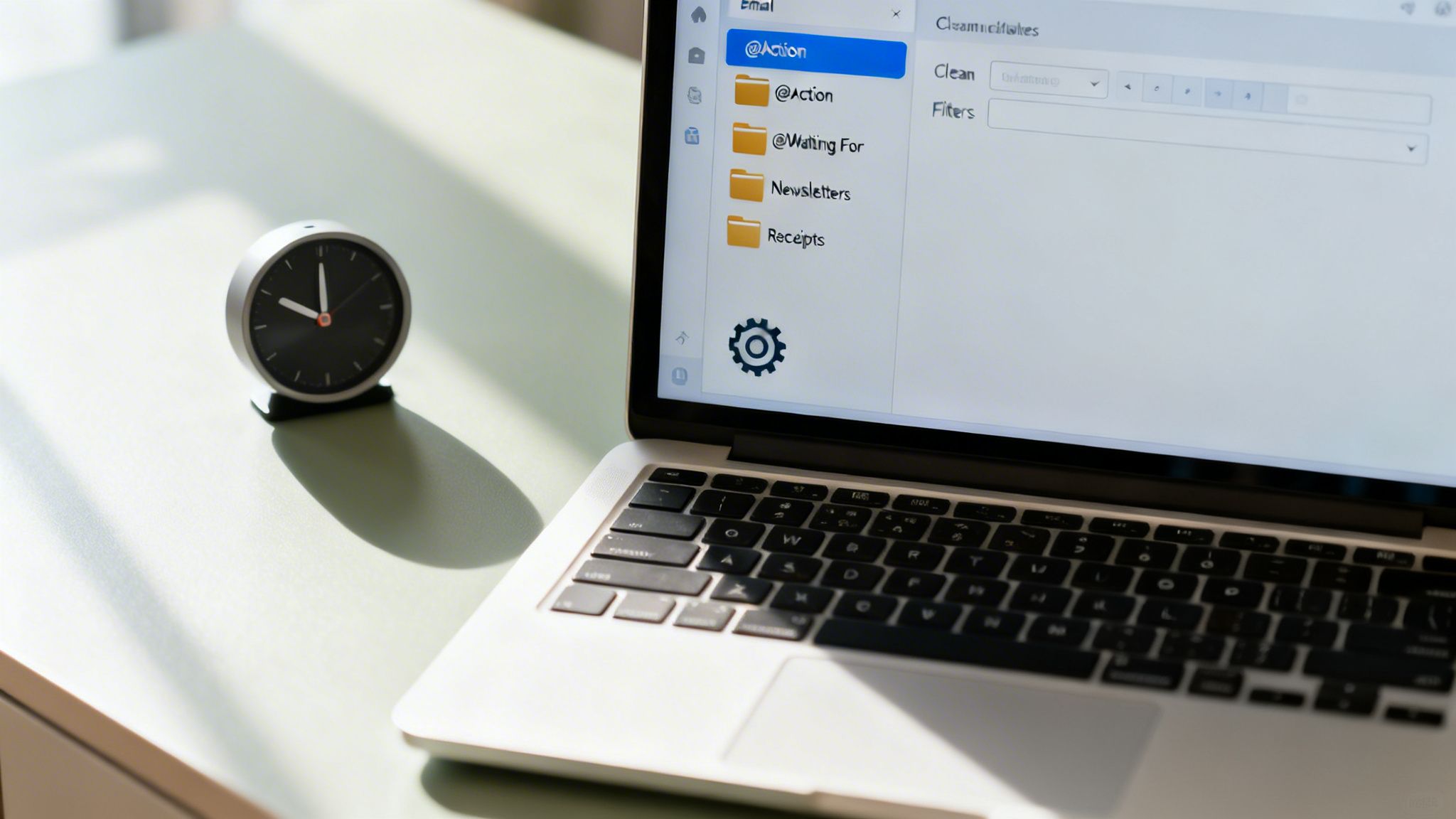
Creating Your Core Folders for the Inbox Zero Method
Let's build that framework. Here’s a little trick I’ve used for years: start your folder names with the "@" symbol. It keeps these critical folders pinned right at the top of your list for easy access.
- @Action: This is for any email that requires a real task or a thoughtful response taking more than two minutes. Think of it as your dedicated to-do list, totally separate from the chaos of new mail hitting your inbox.
- @Waiting For: Use this for emails where you've delegated something or you’re waiting on a reply from someone else. It lets you track all your open loops without having them sit in your main inbox, creating mental clutter.
Here’s a real-world scenario. You get a project update that requires you to review a document. It’ll probably take you about 20 minutes. Instead of leaving it in your inbox where it will nag at you all day, you immediately move it to your @Action folder. Later, during a scheduled work block, you’ll go through that folder and give the task your full attention.
Unlocking the Magic of Automation
Okay, now let's put your email client to work for you. The real secret to making the inbox zero method stick for the long haul is automation. Filters and rules are your best friends here, automatically sorting all the low-priority messages so you never even have to touch them.
You can set up rules to automatically:
- Move all your newsletters into a "Reading" folder.
- File away receipts and shipping notifications into a "Purchases" folder.
- Send calendar invites and system alerts to a dedicated "Notifications" folder.
This kind of pre-sorting means that when you finally do open your inbox, you’re only looking at messages that truly need your brainpower. You can learn more about setting up these kinds of workflows in our guide on how to automate repetitive tasks. To take it a step further, consider using an AI email responder to handle routine queries and keep things tidy.
Protecting Your Focus with Batch Processing
This might be the most crucial habit of all: batch processing. It just means checking and processing your email at scheduled times only. This practice is a direct counterpunch to the damaging effects of attention residue—that’s the term psychologists use for how thoughts of a previous task linger and wreck your performance on the next one.
When you constantly check email, your brain never fully disengages from it, leaving a cognitive fog that prevents deep work. Batching protects those deep work sessions.
Imagine setting your visual timer for desk for two 25-minute email blocks each day—one at 10 AM and one at 4 PM. Outside of those times, email is closed. Off. Done. This simple ritual reclaims hours of fractured attention and transforms it back into focused, productive time. Pairing this with a good time blocking planner helps you commit to these focus sessions.
The Hidden Benefits: Well-Being and Security
The real magic of the Inbox Zero method isn’t just a clean digital slate. It goes much deeper, touching everything from your personal well-being to your digital security. Let’s be honest: a chaotic, overflowing inbox isn’t just a source of stress—it's a gaping vulnerability.
Think about it. Malicious phishing emails, the kind designed to steal your credentials or deploy malware, thrive in clutter. They’re designed to blend in, and a sea of unread messages is the perfect camouflage.

When your inbox is clear, suspicious messages have nowhere to hide. They stick out like a sore thumb, making it easy to spot and delete them before they can do any harm. This isn't a small thing, especially when you consider that a staggering 80-90% of malware infections start with a malicious email.
By keeping your inbox tidy, you’re shrinking your personal "attack surface" and making a cybercriminal's job much harder. It’s a simple system that doubles as a powerful security habit, as you can learn more about the urgency of email security.
Gaining Psychological Calm and Control with the Inbox Zero Method
Beyond the practical security perks, mastering your inbox delivers a profound psychological payoff. That constant visual nag of an overflowing inbox? It fuels a low-grade, persistent anxiety that hums in the background of your day. A clear system replaces that feeling of being overwhelmed with a genuine sense of control and accomplishment.
This newfound orderliness sharpens your decision-making. Instead of succumbing to decision fatigue from endlessly re-reading the same messages, you learn to make swift, confident choices. This mental clarity is crucial for sidestepping the kind of chronic stress that leads straight to professional burnout. If that strain feels familiar, our guide on how to recover from burnout offers strategies to get back on track.
Mini Scenario: A team lead introduces clear email protocols inspired by this method. They cut unnecessary internal email traffic by 30%, reducing team-wide stress and boosting morale by ensuring everyone feels more in command of their workday.
Ultimately, the goal is to completely reshape your relationship with email. Using tools like noise canceling headphones during your scheduled email blocks can deepen this sense of calm, creating a focused bubble where you are fully in charge. The result is less daily anxiety, sharper focus, and a much more sustainable way to manage your digital life.
How to Turn the Inbox Zero Method Into a Lasting Habit
Getting to inbox zero once is a great feeling. Keeping it that way is a whole different ballgame. The real trick is turning the inbox zero method from a one-time spring clean into a daily, automatic routine. It's less about forcing yourself through a chore and more about rewiring your brain's workflow.
The key to making it stick? Start small. Behavioral science is pretty clear on this: trying to build a massive new habit overnight is a recipe for burnout. So instead of demanding a perfectly empty inbox every single day from the get-go, just commit to 15 minutes of focused email processing. That's it.
This is a classic habit-stacking approach—you anchor the new behavior to one you already do. For example, you might decide to process your email right after you pour your morning coffee. The old habit (coffee) becomes the trigger for the new one (email triage). Keeping a simple habit tracker journal to tick off your progress gives your brain a nice visual reward, which reinforces the new routine and makes it far more likely to stick around.

Overcoming Common Habit Obstacles
As you build this new routine, two psychological hurdles are almost guaranteed to pop up: perfectionism and the fear of missing out (FOMO).
Perfectionism is that nagging voice whispering that if you can't clear every single email, you've failed for the day. You have to fight this by redefining what "success" means. Clearing just your most important messages during your allotted time? That's a win.
Then there's FOMO, the feeling that if you aren't checking your email constantly, you'll miss something urgent. This is where boundaries become non-negotiable. Think of a student struggling with distractions while studying. By using something as simple as a phone lock box timer to create an interruption-free work block, they train their brain to focus. The world doesn't end in 30 minutes, and the important work gets done. You can dig deeper into managing these digital impulses in our guide to understanding dopamine and motivation.
At the end of the day, email overload leads to around 11 hourly interruptions, completely shattering any chance of deep work. The real genius of the inbox zero method is that it forces you to treat email as a channel for action, not a messy digital storage unit. Research into habit formation suggests it takes roughly 66 days for a new behavior to feel automatic. For anyone trying to avoid burnout, this process aligns perfectly with the principles of getting things done, a core theme in our book on burnout, Burnout Interrupted.
Editor's Take: What Actually Works Here
The real goal of the inbox zero method isn’t to maintain a perfectly empty inbox forever—that idea alone can create a whole new kind of stress. The real win is clawing back the mental energy you pour into email every day. It’s about reclaiming your focus for the work that actually moves the needle.
Who It's Best For: This system is a game-changer for people swimming in high volumes of actionable mail—think project managers, founders, or busy freelancers. If you only get a handful of emails a day, it might feel like using a sledgehammer to crack a nut.
What Actually Works: If you only take two habits from this entire guide, make them batch processing and the famous ‘two-minute rule.’ Even a basic ergonomic setup, like a good laptop stand for desk and an ergonomic mouse, can make your focused email sessions more comfortable and effective.
Important Caveats: Don't chase perfection. The point is progress, not a flawless record. Some days will be messy, and that's okay. Steal what works for you and ditch the rest. Consistency with a "good enough" system will always beat chasing a perfect one you never stick to. Think of Inbox Zero less as a rigid dogma and more as a framework for intention. The true aim isn’t zero emails, but zero mental clutter from your inbox.
Key Takeaways: The Inbox Zero Method
- Shift Your Mindset: The goal isn't a literally empty inbox, but spending zero wasted mental energy on email. It's about reducing cognitive load and anxiety.
- Use the Five Actions: Every email can be handled with one of five choices: Delete, Delegate, Respond, Defer, or Do. This creates a fast, decisive workflow.
- Embrace the Two-Minute Rule: If an email can be handled in less than two minutes, do it immediately. This builds momentum and prevents small tasks from piling up.
- Automate and Organize: Use a simple folder system (like @Action and @Waiting For) and set up rules to automatically filter newsletters, receipts, and notifications.
- Protect Your Focus with Batch Processing: Check email in scheduled blocks (e.g., twice a day) instead of reacting to every notification. This is crucial for deep work.
- Start Small to Build the Habit: Don't try to be perfect overnight. Commit to 15-minute processing sessions and use habit-stacking to make the routine stick.
- Recognize the Deeper Benefits: A clean inbox improves more than productivity; it enhances your mental well-being, reduces stress, and even bolsters your digital security.
FAQ: Your Inbox Zero Method Questions Answered
When you first hear about Inbox Zero, it's easy to get tangled in the details. Is it a rigid system? A productivity cult? Let's clear up some of the most common questions so you can see how this actually works in a real, messy work life.
1. What does “Inbox Zero” actually mean?
It’s not about keeping a literally empty inbox 24/7. That would be a nightmare. The term, coined by productivity expert Merlin Mann, means keeping zero mental energy tied up in your email. It’s a system to process messages so your inbox stops feeling like a chaotic, anxiety-inducing to-do list.
2. How much time should I realistically spend on email each day?
A great place to start is with two or three dedicated blocks of 15-30 minutes. The real magic isn't the exact time, but the habit of batch processing. You handle email at specific, scheduled moments instead of letting notifications dictate your entire day. This protects the uninterrupted stretches you need for deep work.
3. Is the Inbox Zero Method a good fit for everyone?
It shines brightest for people drowning in a high volume of actionable emails—like project managers, founders, and freelancers. If you only get a handful of messages a day, a full-blown system might be overkill. However, core principles like the two-minute rule are valuable for just about anyone.
4. What happens if I can’t hit zero every single day?
Nothing! That’s completely normal and expected. The goal here is consistency, not perfection. If you end the day with a few emails still sitting there, you haven’t failed. This is about progress and reducing stress, not adopting another rigid standard to beat yourself up with.
5. If I only start with two things, what should they be?
Focus on these two habits first, and you’ll feel a massive shift:
- Batch processing: Check your email at set times. No more, no less.
- The two-minute rule: If a task or reply takes less than two minutes, do it right then and there.
Mastering just these two can cut your email-related clutter and anxiety by more than half.
Making the Inbox Zero Method Work for You
6. Do I need to buy a fancy app for this?
Absolutely not. You don’t need any special software. The entire system is built on features already inside modern email clients like Gmail or Outlook—things like folders, labels, and filters. The most powerful "tool" is your decision-making framework, not an app.
7. What do I do with the thousands of emails already in my inbox?
Don't try to process them one by one. You'll burn out before you even start. Instead, declare "email bankruptcy." Create a folder called something like "Old Archive [Date]" and drag everything older than a month into it. Poof. Done. Now you can start fresh with your new system today.
8. Can this method work in a team environment?
Yes, and it can be incredibly powerful. When a team agrees on clear protocols for delegating, responding, and using subject lines, it dramatically reduces internal back-and-forth. Important messages get the attention they deserve, and collective productivity gets a serious boost.
9. I feel anxious about not checking my email constantly. What do I do?
This is a very real fear of missing out (FOMO). The best way to overcome it is with small experiments. Start by turning off notifications. Commit to just one or two short, distraction-free work blocks. You will quickly discover that almost nothing is so urgent it can't wait an hour. You're teaching your nervous system that it's safe to focus.
10. Can Inbox Zero genuinely improve my work-life balance?
Without a doubt. By setting firm boundaries around when and how you engage with your inbox, you stop it from bleeding into your evenings, weekends, and personal time. This is one of the most crucial steps you can take to prevent burnout and reclaim your life from the endless hum of notifications, a topic explored in Burnout Breakthrough.
Disclaimer & Disclosure: This article is for educational and informational purposes only and does not constitute medical or psychological advice. Always consult a qualified professional for any health concerns, including topics like anxiety, depression, or burnout. This content also contains affiliate links; if you purchase a product through one of these links, we may receive a small commission at no extra cost to you.
Ready to build a system that finally gives you control over your focus and productivity? The books at Mind Clarity Hub are designed to be actionable roadmaps, not just theory. Start with The Power of Clarity to build the foundational habits that make systems like Inbox Zero stick for good.
