


Published:
So, you’re ready to find some of Jeremy Jarvis’s books, but maybe you’re not sure where to start. Think of this as your personal roadmap to navigating the massive digital bookshelf that is the amazon store—specifically for books and Kindle—so you can find the right resources to sharpen your focus. We’ll walk through everything from locating specific titles to picking the format that actually fits your life.
Affiliate Disclosure: This article contains affiliate links. If you make a purchase through one of them, we might earn a small commission at no extra cost to you. It’s a simple way to support our work here.
Navigating Your Digital Library for Better Focus
Let’s be honest, scrolling through Amazon can feel like wading through an ocean of information. It’s overwhelming. But finding a book that can genuinely help you reclaim your attention doesn’t have to be a chore. The goal here is to turn that digital chaos into a powerful, brain-friendly habit for your own growth.
Building focused habits is rooted in behavioral psychology. Specifically, it’s about reducing friction between you and the desired action. For busy professionals and students, knowing your way around the Kindle store isn’t just a tech skill. It’s the first step toward building a library that works for you.
We’re going to focus on practical, no-fluff skills you can use right away. Together, we’ll cover:
- How to find specific authors and titles without getting lost in endless search results.
- Deciding between Kindle and paperback based on your own learning style and daily routine.
- Using Kindle’s built-in tools to actually absorb and remember what you’re reading.
Ultimately, the aim is to help you build a hand-picked digital library that actively supports your focus goals. Let’s get started.
How to Find Jeremy Jarvis’s Books on Amazon
Trying to find a specific author’s work in a digital sea like Amazon can feel a bit overwhelming. But it doesn’t have to be. With a few simple steps, you can cut right through the noise. You can get straight to Jeremy Jarvis’s books, whether you’re looking for a Kindle version or a classic paperback.
The easiest way to start is with a direct search. Typing “Jeremy Jarvis author” or a full title like “The Power of Clarity” into the main search bar usually gets you the best results right away. This little bit of precision helps Amazon understand you’re not just looking for books about clarity, but a specific one.
Once the results load, look to the left-hand side of the page for the filters. This is where you can narrow things down. If you’re a digital reader, just click “Kindle Store” to see only the versions ready for your device.
Pro-Tip: Honestly, the most reliable way to find everything an author has published is to go straight to their official author page on Amazon. It’s a central hub that lists all their books. This ensures you’re getting authentic copies and can see their full library in one place. For a complete, curated list of Jeremy Jarvis’s work, check out our guide on finding the best Amazon books.
Kindle vs. Paperback: Which Format Builds Better Habits?
Choosing between a digital Kindle book and a good old-fashioned paperback is about more than personal preference. It can actually shape your reading habits. The format you pick from the amazon store for books, including Kindle editions, can either help or hinder your consistency. If you understand the subtle psychology behind each choice, you can pick the right tool to match your focus goals.
Take the physical act of holding a paperback. Turning the pages creates haptic feedback, a tactile experience that helps many people absorb complex ideas more easily. Behavioral research suggests this sensory input can strengthen memory pathways. The tangible sense of progress as you move through the book is also incredibly motivating.
The Power of a Dedicated E-Reader for Your Amazon Store Books
On the flip side, the sheer convenience of a Kindle is tough to beat. This is especially true if you’re trying to build a consistent reading routine. The market for e-readers is booming for a reason. Models like the Paperwhite get rave reviews. In fact, 28.9% of positive mentions praise how ‘easy to use’ they are. Another 25.4% love the ‘battery life,’ and 23.1% highlight how ‘lightweight’ they are.
That portability means your entire library can slide into your bag. It turns a morning commute or a few minutes waiting in line into a genuine reading opportunity.
A dedicated e-reader like a Kindle creates a distraction-free zone. Unlike a phone or tablet buzzing with notifications, a Kindle has one purpose: reading. This single-tasking environment helps your brain enter a state of deeper focus. This makes it easier to build a sustainable reading practice.
This decision tree can help you visualize the best way to find books on Amazon that fit whatever format you choose.
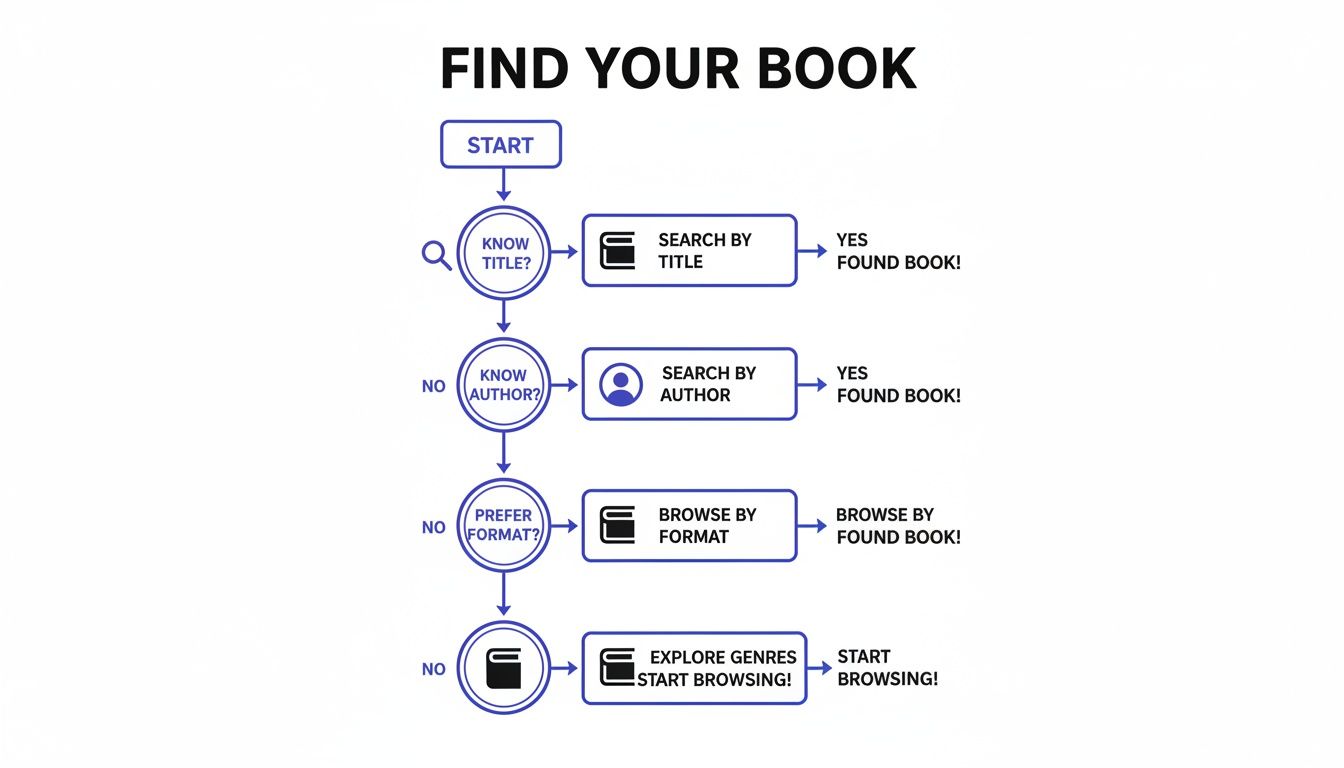
As the flowchart shows, whether you start with a specific title, an author, or a format in mind, Amazon’s filters make it pretty simple to zero in on what you need.
Who Benefits From Each Format?
To help you decide, this table breaks down the key differences between Kindle e-books and paperbacks. This way, you can choose the format that best fits your reading style and focus goals.
Comparing Kindle E-Book vs Paperback
| Feature | Kindle E-Book | Paperback Book |
|---|---|---|
| Portability | Carry an entire library on one lightweight device. | Can be bulky; carrying multiple books is impractical. |
| Distractions | A dedicated e-reader is a single-purpose device, free of notifications. | Offers a completely offline, distraction-free experience. |
| Accessibility | Instantly download new books anytime, anywhere. | Requires a trip to a store or waiting for delivery. |
| Reading Experience | Adjustable font sizes, backlights for night reading, and built-in dictionary. | Provides a tactile, sensory experience that can aid memory. |
| Note-Taking | Digital highlighting and note-taking sync across devices. | Physical highlighting and writing in the margins feel more permanent. |
| Cost | E-books are often cheaper than their physical counterparts. | Can be more expensive; used copies offer savings. |
Ultimately, the best format is the one that slides most easily into your life.
If you’re a student who lives by physical highlighters and sticky notes, a paperback is probably your best bet. But if you’re a busy professional who needs to switch between your phone and an e-reader on the go, a Kindle with its Whispersync feature is a game-changer. For more strategies on building a solid reading habit, check out our guide on how to read more books.
Using Kindle Features for Active Learning and Focus
A Kindle from the amazon store isn’t just a digital bookshelf—it’s a powerful tool for focused learning. Its features are built to help you wrestle with the concepts in Jeremy Jarvis’s books. They turn what could be passive reading into an active, immersive experience. When used right, these tools can make a huge difference in how well you grasp and hold onto key ideas.
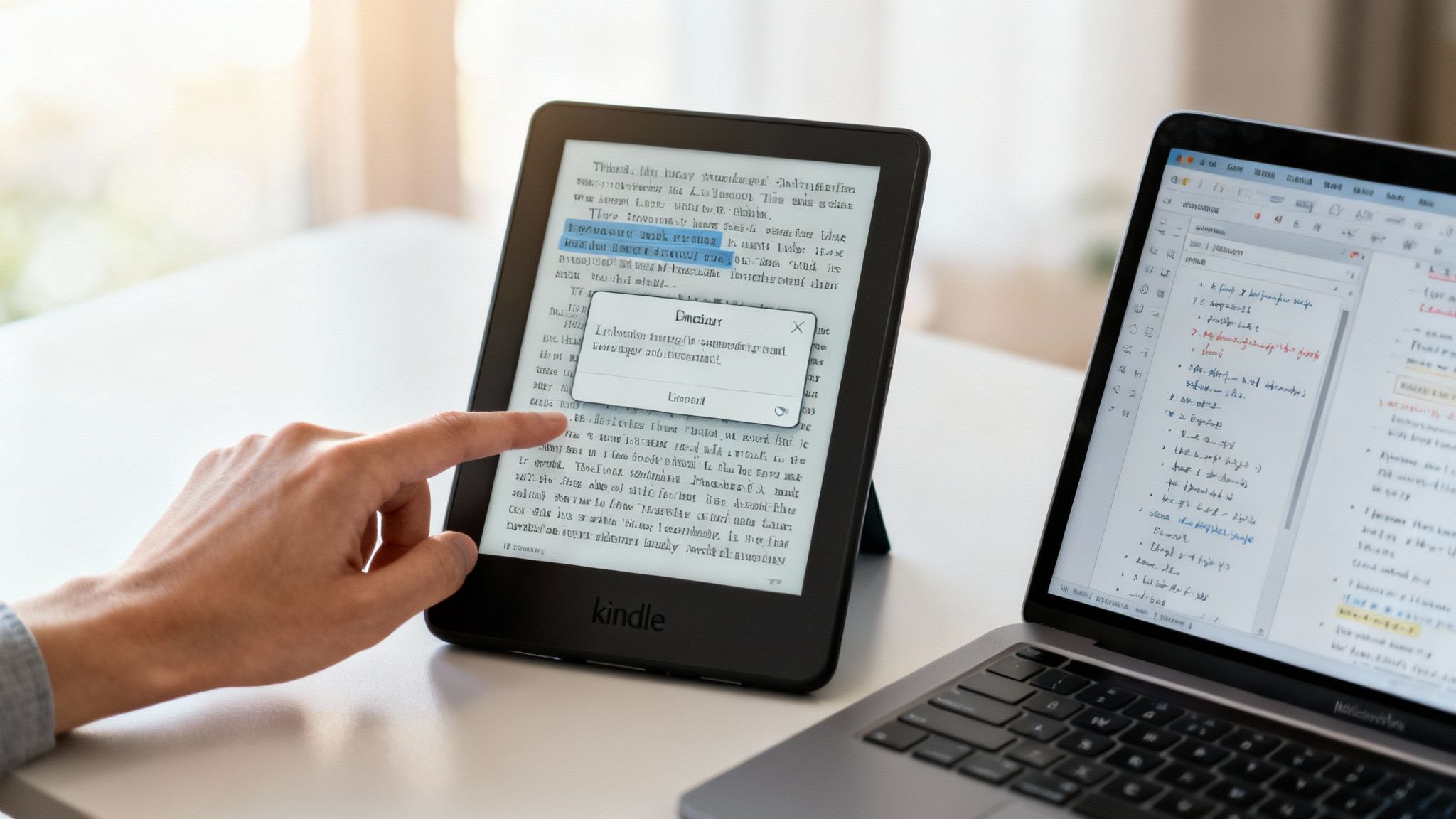
For instance, the highlighting and note-taking functions are perfect for capturing insights. This is great for complex topics like dopamine regulation or managing cognitive load from AI workflows. The real magic happens later, when you can export all your notes into a single document for review. This simple step transforms your reading into a structured study session. We have a whole guide on this, if you’re curious about how to take notes from a book more effectively.
Go Deeper Without Losing Your Place
When you’re reading about dense topics, you’re bound to hit unfamiliar terms. The Kindle’s built-in dictionary and X-Ray feature are designed to help you out without shattering your concentration. Neuroscience tells us that task-switching is costly for our brains. These features help you stay in a state of flow.
- Built-in Dictionary: Just tap and hold a word to see its definition pop up instantly. This is a game-changer for clarifying concepts without having to switch apps or grab your phone.
- X-Ray Feature: Think of this as a high-level map of a book’s “bones.” It shows you key characters, places, and recurring terms. This makes it easy to see how ideas connect across the entire text.
Of course, the features on your Kindle are just one part of the puzzle. General techniques to develop reading comprehension skills will amplify your learning even further.
Syncing Your Progress for Consistent Learning
For busy readers, one of the most brilliant features is Whispersync. This technology seamlessly syncs your reading progress, notes, and bookmarks across all your devices. This works from your Kindle e-reader to the Kindle app on your phone.
Real-World Scenario: Picture this: you’re at home, deep into a chapter on burnout recovery on your Kindle. The next day, you’re stuck waiting for a meeting to start. You can just pull out your phone, open the Kindle app, and pick up right where you left off.
This seamless handoff turns those little pockets of downtime into productive learning moments. As Amazon’s Kindle Direct Publishing platform has grown, this ecosystem has become even more powerful. Audiobook integration has surged 24% year-over-year, as more and more people switch between reading books and listening on Audible. For busy professionals, this makes challenging, science-based titles accessible anywhere, anytime.
Editor’s Take: What Actually Works with the Amazon Store Books Kindle Selection
So, when it comes to the amazon store books kindle selection for Jeremy’s work, what’s the final verdict? Here’s my honest take.
For most busy professionals, the Kindle version is the most practical choice. Having your entire library on one slim device just makes it easier to build a consistent reading habit. You can sneak in a chapter on your commute or during a lunch break. Whispersync is also a game-changer for modern life, letting you switch seamlessly between your phone and Kindle. This reduces the mental effort needed to keep reading.
However, a physical book offers a unique tactile experience that a screen can’t replicate. If you’re someone who needs that physical feeling to really absorb information—the weight of the pages, the ability to flip back and forth—then the paperback is unbeatable. This is especially true for deep, focused study sessions. It helps when you want to eliminate every possible digital distraction.
The best format isn’t about what’s trendy; it’s about what you’ll actually use consistently. My advice? Grab the Kindle version for convenience. But consider buying a well-loved copy in paperback for your reference shelf and deeper study.
Ultimately, the goal is to remove any friction that keeps your brain from engaging with the material. That’s a huge part of learning how to retain what you read in the first place.
Key Takeaways
- Be Specific: To find books efficiently on Amazon, use specific search terms like the full title or “author’s name + author”.
- Use the Author Page: An author’s official Amazon page is the most reliable way to find all their available books in one place.
- Kindle for Convenience: The Kindle format is ideal for building consistent reading habits due to its portability and features like Whispersync.
- Paperback for Deep Focus: Physical books provide a tactile, distraction-free experience that can improve memory and comprehension for many readers.
- Leverage Kindle Tools: Use built-in features like highlighting, notes, and the dictionary to turn passive reading into active learning.
- No Kindle, No Problem: You can read Kindle books on any device by downloading the free Kindle app.
Disclaimer: This article contains affiliate links, which means we may earn a small commission if you make a purchase at no extra cost to you. The content provided is for educational and informational purposes only and is not a substitute for professional medical or psychological advice. If you are struggling with issues like anxiety, burnout, or ADHD, please consult a qualified healthcare provider.
Frequently Asked Questions About the Amazon Store Books Kindle Options
1. How can I find all of an author’s books in one place on Amazon?
The best way is to navigate to their official Amazon Author Page. Simply search for the author’s name, like “Jeremy Jarvis author,” and click on their name in the search results. This page consolidates all their available titles, including different formats like Kindle and paperback.
2. Is it better to buy a Kindle book or a paperback?
It depends on your goals. Choose Kindle for convenience and building a consistent reading habit, as you can carry a full library anywhere. Choose paperback for a tactile, distraction-free experience that may help with memory retention and deep focus.
3. Can I read a Kindle book if I don’t own a Kindle device?
Yes, absolutely. You can download the free Kindle app on your smartphone, tablet, or computer. Your Amazon account will sync your books across all devices where the app is installed.
4. What is the best way to search for a specific book on the Amazon store?
Use the full title and author’s name for the most accurate results. For example, searching for “The Power of Clarity by Jeremy Jarvis” is more effective than a general search for “focus books.” Also, use the filters on the left side to narrow results to the “Kindle Store.”
5. Are Kindle books usually cheaper than paperbacks?
Generally, yes. E-books often have a lower price point because there are no printing or shipping costs involved. However, always check for special promotions or sales on paperback editions.
6. Can I gift a Kindle book from the Amazon store to someone else?
Yes. On the book’s product page, look for the “Buy for others” option. You can then enter the recipient’s email address, and Amazon will send them a link to redeem their new e-book.
7. What is the X-Ray feature on Kindle and how does it help?
X-Ray is a Kindle feature that acts like an index of a book’s key elements. It helps you track characters, terms, and important concepts throughout the text. This is especially useful for complex non-fiction to see how ideas connect without losing your place.
8. Does highlighting on Kindle help with remembering what I read?
Yes. Psychological studies on active recall show that interacting with text—like highlighting and making notes—strengthens memory formation. The Kindle’s ability to export all your highlights into one document makes it a powerful tool for reviewing and reinforcing what you’ve learned.
9. What is Whispersync and why is it useful?
Whispersync is Amazon’s technology that automatically saves and syncs your last page read, bookmarks, and notes across all your Kindle devices and apps. This allows you to switch seamlessly from reading on your Kindle e-reader at home to your phone during a commute.
10. Is the content in this article medical advice?
No. This article is for educational and informational purposes only. It is not intended as a substitute for professional medical or psychological advice, diagnosis, or treatment. If you are dealing with concerns like anxiety, burnout, or sleep problems, please consult a qualified healthcare professional.
At Mind Clarity Hub, our goal is to provide you with the tools and knowledge to reclaim your focus. Explore Jeremy Jarvis’s collection of science-based guides on mindful productivity, burnout recovery, and digital clarity.
Find your next read on Mind Clarity Hub
Explore the Mind Clarity Hub Library
Practical books on focus, digital habits, resilience, and building a calmer mind.

The Power of Clarity
Unlock mental focus, build momentum, and create the life you were meant to live.
View book →
AI & ChatGPT for Beginners
No PhD needed — a 2025 guide to AI, prompts, and productivity without coding.
View book →
Zen in the Digital Jungle
Mindfulness for a chaotic world.
View book →
The Slow Reset
Mindful living in a fast-paced world.
View book →
Perfectly Imperfect
Stop self-criticism, set boundaries, and embrace the real you.
View book →
Reclaiming Silence
A dopamine detox guide to finding peace in a noisy world.
View book →
The Focused Freelancer
Productivity, pricing & positioning for independents in 2025.
View book →
ChatGPT Side Hustle System
Launch your AI-driven online business in 30 days.
View book →
Burnout, Interrupted
A proven path to restore energy and reclaim your life.
View book →
Attention Unleashed
Focus strategies for the distracted mind.
View book →
Side Hustle Launchpad
Your quick-start guide to extra income.
View book →
Digital Clarity
Rewire your brain, escape dopamine traps & regain focus.
View book →
Break the Scroll
Reduce screen time and take back control of your life.
View book →
Climate Compassion
Transform eco-anxiety into empowered action.
View book →
Village Mentality
The power of community for mental wellness.
View book →
Restful Nights
Overcoming sleep anxiety in a 24/7 world.
View book →
Connected Again
Combat loneliness and build meaningful relationships.
View book →
Focus Recharged
Mastering attention and productivity in the digital era.
View book →
Marketing Magic with ChatGPT
AI-powered content, campaigns, and copywriting to grow faster.
View book →
The 6-Figure Creator
Turn knowledge into passive income with books, courses & AI.
View book →
Burnout Breakthrough
Reset your work-life balance and thrive in 2025.
View book →
The Emotionally Intelligent Man
A modern guide to self-awareness and communication.
View book →
AI Personalized Wellness
Create your custom health plan with data-driven habits.
View book →
Everyday AI Made Easy
Use ChatGPT and smart tools to simplify life.
View book →
Money Mindfulness
A financial wellness guide for Gen Z & Millennials.
View book →
Startup Smarter with AI
ChatGPT strategies and tools to grow your business.
View book →
ChatGPT for Writers & Creators
Unlock AI-powered brainstorming, drafting & editing.
View book →