...

Tag: knowledge management

  • How to Build a Note Taking System That Actually Works

    How to Build a Note Taking System That Actually Works

    A good note taking system isn’t a fancy app or a neat stack of notebooks. It’s a reliable process for catching, connecting, and using what you know. It turns that chaotic junk drawer of ideas, links, and meeting notes into a personal knowledge base that actually helps you think.

    The goal is to stop being a passive collector of information and become an active builder of knowledge. This shift is what separates a digital dumping ground from a second brain. To get a handle on just how taxing this overload can be, you can find a solid path in our book, The Power of Clarity.

    Affiliate Disclosure: Please note that this article contains affiliate links. If you make a purchase through these links, we may earn a small commission at no extra cost to you. This helps support our work in creating valuable content.

    Why Your Current Note Taking System Feels Chaotic

    If your current “system” is a mix of cryptic sticky notes, a dozen different apps, and a desktop littered with untitled documents, you’re not alone. So many of us start with good intentions. Yet we end up with a tangled mess of information that creates more stress than it solves. This isn’t a personal failure. It’s the predictable result of facing an avalanche of information without a structure to handle it.

    From a neuroscience perspective, every disconnected note is an “open loop” in your brain. Your mind registers them as unfinished business. This quietly drains your mental energy and splinters your focus. Research in psychology shows that these incomplete tasks, known as the Zeigarnik effect, create a constant, low-grade cognitive strain. This makes it harder to concentrate on the work that actually matters.

    The Real-World Cost of a Disorganized Note Taking System

    This happens all the time. Imagine a project manager, let’s call her Sarah, on an urgent client call. The client asks about a key decision made two months back. Sarah knows she wrote it down. But where? She’s frantically clicking through her notes app, scanning random documents, and searching her email. She might even wish she had a simple habit tracker journal just to log her daily notes. That awkward silence on the line kills her credibility. It also floods her with stress. The detail is buried, lost in a sea of digital clutter.

    This is the exact moment a collection of notes becomes a source of anxiety instead of a tool for confidence. The goal is to build a reliable note taking system that serves you.

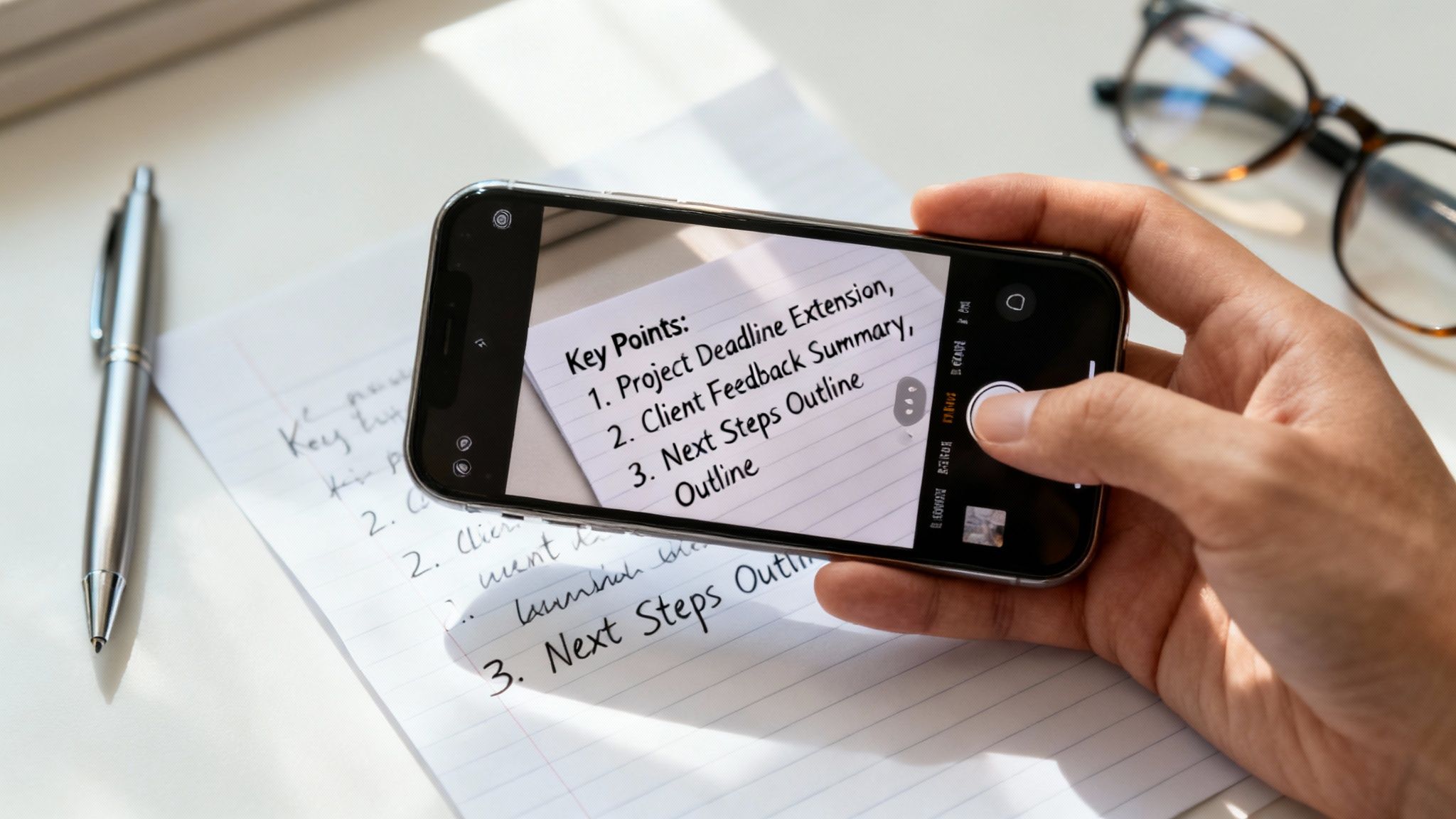
    A productive desk setup with a laptop, smartphone, sticky notes, and a pen, with the phone displaying a note-taking app that highlights a practical note taking system.

    From Mental Clutter to Mental Clarity

    That feeling of frustration is a clear signal. Your current method isn’t working with your brain; it’s working against it. Instead of letting your ideas scatter, the first step is to commit to a single, trusted hub for your thoughts. This doesn’t mean you need a complicated, feature-packed system. Consistency is what matters. A simple, reliable process you stick with will always beat a powerful tool you never open. Getting to this point is about building simple, sustainable habits. If you feel swamped, a structured approach like the one in Focus Recharged is the only way out.

    The Four Pillars of a Powerful Note Taking System

    A truly powerful note taking system isn’t about finding the perfect tool. It’s about building a reliable process that turns fleeting ideas into something you can actually use. A good system should support your thinking, not add to the mental clutter. I’ve found it helps to break this process down into four distinct stages: Capture, Organize, Distill, and Express. Think of it as the CODE framework for knowledge work.

    Flat lay of a desk showing a CODE Framework note taking system with the steps Capture, Organize, Distill, and Express.

    Each stage tackles a crucial part of the journey, from a raw thought to a finished idea.

    Capture: Frictionless Idea Collection in Your System

    First, you need a way to get ideas out of your head and into your system with almost zero effort. Your brain is brilliant at having ideas but terrible at holding them. Every thought you try to “remember for later” creates an open loop that quietly drains your focus. This is the Zeigarnik effect in action—our minds fixate on incomplete tasks. A great capture habit is your secret weapon for closing those loops on demand.

    Real-World Scenario: A freelance writer is walking her dog when a brilliant article idea strikes. Instead of mentally rehearsing it, she pulls out her phone, opens a notes app, and dictates the core concept. The thought is now safely in her inbox, and her mind is free again. That’s a note taking system doing its job.

    The key is to have a capture tool that’s always with you. It could be a simple phone app, a pocket notebook, or a voice recorder. The specific tool matters less than its instant availability.

    Organize: Your Personal Library within the Note Taking System

    Once you’ve captured a note, it needs a home. This is where most people get bogged down, creating complex webs of tags and folders that quickly become overwhelming. Instead of building a filing cabinet, think of your note taking system as a personal library. The goal isn’t just archival; it’s about connection and action.

    Start with a few broad categories that make sense for your life. A simple, effective structure might include:

    • Projects: These are tasks with a clear deadline and outcome (e.g., “Launch New Website,” “Plan Q3 Marketing Campaign”).
    • Areas: These are your ongoing responsibilities that don’t have an end date (e.g., “Health & Fitness,” “Personal Finances,” “Professional Development”).
    • Resources: This is your reference library of articles, book notes, and materials on topics that interest you.
    • Archive: This is where you move completed projects and old notes. They’re out of sight but still searchable.

    This approach keeps your active workspace clean. It makes it easy to find what you need. It’s a key step in learning how to build a better system.

    Distill: Find the Core Insight of Your Notes

    This is where the real learning begins. Distilling is the act of reviewing your notes, pulling out the most important ideas, and rewriting them in your own words. It’s far more powerful than just highlighting or rereading. This process forces you to use active recall. Neuroscience shows that struggling to retrieve information from your memory is what makes that memory stronger. The harder you have to work to pull an idea out, the more deeply it gets wired into your brain.

    Real-World Scenario: A college student gets back from a lecture with pages of messy notes. Instead of just rereading them, she opens a fresh page. She writes a single paragraph summarizing the lecture’s main argument. That simple act of distillation solidifies her understanding. It also creates a potent study guide for later. Using a good monitor light bar for late-night study sessions can also reduce eye strain.

    When you pair this with spaced repetition—reviewing your distilled notes at increasing intervals—you’re using a scientifically proven method to lock in knowledge for the long term.

    Express: Turn Your Knowledge into Action

    Finally, your notes aren’t just for collecting; they’re for creating. The Express stage is about turning what you’ve learned into something tangible. This is the ultimate purpose of any note taking system.

    Putting your knowledge to work could mean anything from:

    • Writing an article based on your collected insights.
    • Building a presentation for a team meeting.
    • Starting a new personal project.
    • Simply sharing what you’ve learned with a friend or colleague.

    When you regularly use your notes to produce something, you create a powerful feedback loop. It gives your system a clear purpose. It transforms you from a passive consumer of information into an active creator of value. Your notes become an indispensable partner in everything you do.

    How to Choose the Right Tools for Your Note Taking System

    Choosing the right tools for your note taking system can feel surprisingly high-stakes. With a seemingly endless parade of sleek apps and beautiful notebooks, it’s easy to get stuck in analysis paralysis. But the secret isn’t finding the one “best” app. It’s about finding tools that disappear into your workflow. They should match how your brain actually works.

    The real question isn’t, “Which app is the most popular?” Instead, ask, “Which tool supports how I naturally think and organize?” A tool that feels liberating for a visual artist might be a cage for a software developer. Your goal is to match the tool to your personal need for structure, flexibility, or pure simplicity.

    Best Option for Beginners: Method First, Then Tools

    Before you download another piece of software, think about the method you want your tools to support. Different systems are built for different goals. When your tool aligns with your method, the whole system just clicks into place. Without that alignment, you’re just creating friction.

    • Zettelkasten: This is fantastic for academics, writers, and anyone whose goal is to connect ideas over the long haul. It’s a “bottom-up” approach where you link small, individual notes to build a sprawling web of knowledge over time.
    • P.A.R.A. (Projects, Areas, Resources, Archives): This is perfect if you’re action-oriented and need to organize information around concrete goals and responsibilities. It’s a “top-down” system that gives you immediate, practical structure.
    • Bullet Journaling (BuJo): This is for anyone who craves a flexible, screen-free analog system to track tasks, events, and notes all in one place. It’s a highly personalizable way to combine planning, doing, and reflecting.

    Your primary goal will point you to the right method.

    How to Choose Your Note Taking Method: A Comparison

    This quick comparison helps you see which approach fits your personal and professional life. Compare options to see what feels most natural.

    MethodBest ForCore PrinciplePotential Downside
    ZettelkastenAcademics, researchers, and writers building a long-term “second brain.”Linking atomic, single-idea notes to discover novel connections.Can feel abstract and slow to show value initially; requires discipline.
    P.A.R.A.Project managers, freelancers, and professionals managing multiple active commitments.Organizing information by its actionability and relevance to your current goals.Can become rigid if not maintained; requires regular reviews.
    Bullet JournalVisual thinkers, creatives, and anyone seeking a mindful, screen-free planning method.Rapid logging of tasks, events, and notes using a simple, flexible syntax.Limited searchability and can be time-consuming to set up and maintain.

    Once you have a sense of which philosophy fits, then you can go looking for tools.

    Best Note Taking System for Busy Professionals: Digital vs. Analog

    With a method in mind, the tool choice becomes much easier. Digital apps like Obsidian or Roam Research are brilliant for the Zettelkasten method. For P.A.R.A., structured apps like Notion, Evernote, or Microsoft OneNote are a natural fit. And for Bullet Journaling, a good notebook and a pen you love are all you need. A dedicated time blocking planner can be a fantastic analog partner to a digital system.

    Many people land on a hybrid approach that works beautifully. They might use a digital app as a long-term resource library. Simultaneously, they use a physical notebook for daily planning. The key is to be intentional about what goes where so you’re not creating more chaos.

    The Rise of AI and Collaborative Tools

    The world of note-taking is evolving fast. AI integration is a huge driver of this growth. Features like smart summarization and semantic search are becoming standard. They help us make sense of information overload. AI can digest long articles into key takeaways, saving you massive time. Our book, Marketing Magic: ChatGPT & AI Marketing, dives deep into these tools.

    For teams, collaborative tools make group note-taking smoother. Many platforms also weave in task management features, blurring the lines between notes and to-do lists.

    Building your own note taking system is like laying the foundation for a house you’ll improve for years. The first step is to create a single entry point. Think of it as a digital foyer. Every new thought, meeting note, or random idea goes into this “inbox” first. This simple rule eliminates friction. Your only job is to get it out of your head and into the system.

    Defining Your Core Structure for Your Note Taking System

    With a central inbox, the next step is a simple organizational spine. The biggest mistake is over-engineering with dozens of nested folders. A complicated system is one you won’t use when you’re tired or busy.

    Start with just a few top-level categories:

    • Projects: For anything with a defined goal and a finish line.
    • Areas: For your ongoing roles and responsibilities.
    • Resources: Your personal library for articles and book summaries.
    • Archive: A place for completed or irrelevant items.

    This framework keeps your active workspace clean and focused. It’s a modern spin on principles used for centuries. Our digital tools just make it much easier.

    The Power of Templates and Automation

    To make your system truly work for you, automate the small stuff. Templates are a game-changer here. They dramatically reduce decision fatigue. Behavioral science shows that good templates automate setup, freeing your cognitive bandwidth for the actual content.

    Start with templates for common notes:

    • Meeting Notes: Date, attendees, agenda, key takeaways, action items.
    • Project Plans: Goals, timelines, stakeholders, success metrics.
    • Book Summaries: Main argument, key quotes, your reflections.

    As your system grows, understanding concepts like workflow automation will help you cut out more manual work.

    A Freelancer’s Migration: A Real-World Example

    Let’s make this tangible. A freelance designer, Alex, had notes scattered across Google Docs, a paper notebook, and a notes app. Here’s the simple plan we used:

    1. Chose a Hub: Alex picked a single digital app to become the new central note taking system.
    2. Created the Structure: We set up four primary folders: Projects, Clients (Area), Inspiration (Resource), and Archive.
    3. Migrated Actively: Alex only moved notes for active projects and key client info. Old notes were left behind. This “just-in-time” migration prevents overwhelm.
    4. Established a Habit: Alex blocked out 15 minutes every Friday afternoon to process the inbox and file new notes.

    This step-by-step approach made the new system immediately useful.

    Creating Your Review Habit

    A note taking system is only as good as your habit of reviewing it. Without regular maintenance, it will become a digital junk drawer. Schedule short, consistent review sessions. A pomodoro timer can help you stay focused during these sessions, making the habit easier to stick with. This whole process is about refining your own process, not finding a magic app.

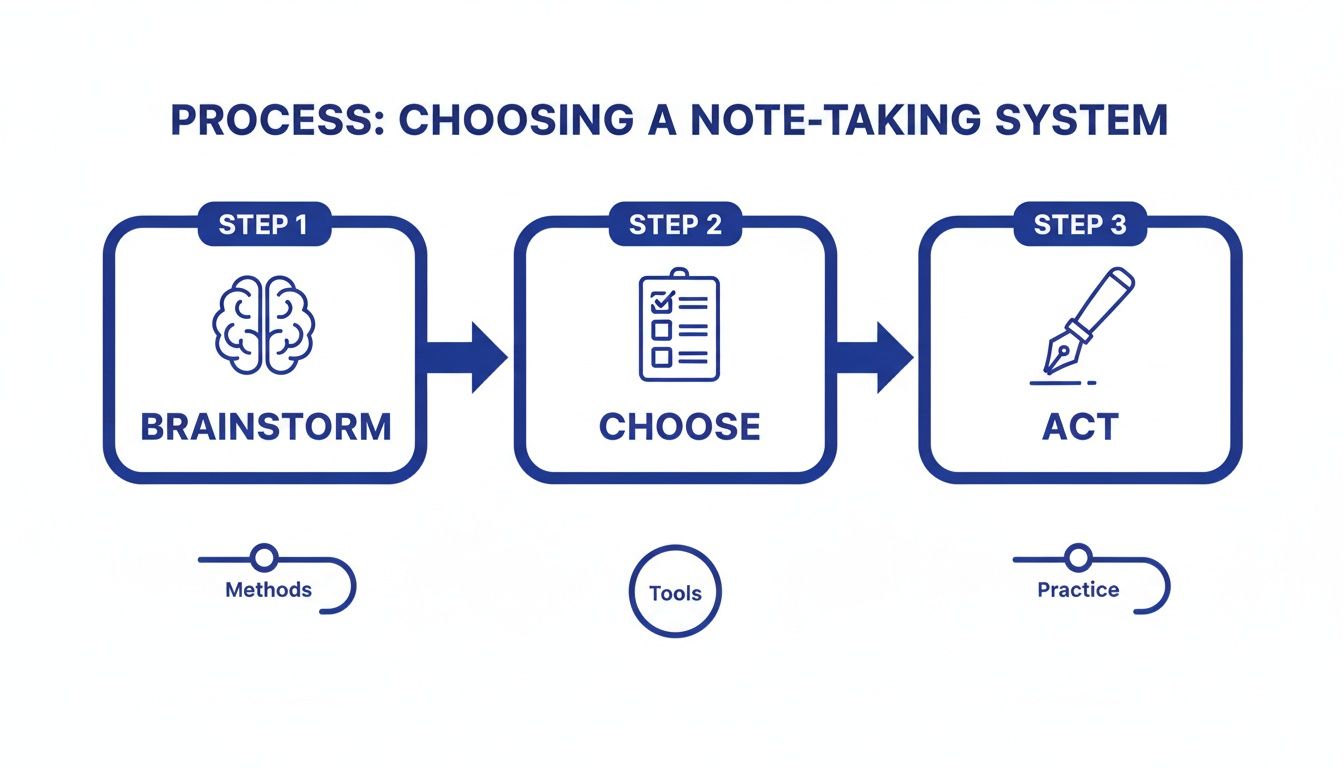
    A visual three-step process flow for choosing note tools, covering comparison, selection, and implementation.

    The flow from comparing options to implementing them shows that building your system is a journey, not a single event. It’s about making conscious choices that fit how you think and work.

    Editor’s Take: What Really Works for a Note Taking System

    After years of chasing the perfect productivity setup, here’s the most honest thing I can tell you. The best note taking system is the one that actually sticks. All the complex tagging, backlinking, and beautiful templates are worthless if the friction is too high to use them every day. My advice? Forget building a flawless digital brain overnight. Just start with one reliable digital app and one simple notebook.

    Who Is This Stripped-Down Approach For?

    This hybrid method is a lifesaver for knowledge workers, students, and creatives drowning in information. If your goal is to turn ideas into action—not just hoard them—this is for you. The biggest trap is “productivity procrastination.” This is when you spend more time tweaking your system than actually thinking. A good system should get out of your way, not become a new full-time job.

    The real magic happens when you focus on the Distill and Express pillars. This is where you transform raw notes into valuable insights. It’s the entire point of having a note taking system. Our guide on note taking from books is a great place to start mastering that skill. See the book that fits your goal to start applying these principles today.

    This simple hybrid approach lets you build momentum from day one. You can always add complexity later when a specific need arises. A simple system you use daily will always beat a perfect one you abandon after a week.

    Key Takeaways: Building Your Note Taking System

    Here’s a look back at the core ideas for building a note taking system that moves you from scattered information to structured clarity.

    One Hub to Rule Them All

    The most critical first step is deciding on a single, central place for everything. Whether it’s a specific app or a simple notebook, one inbox stops the mental energy drain from scattered notes. This is about making capture as frictionless as possible.

    Your System Needs a Job to Do

    A powerful note taking system is a dynamic process for thinking. The CODE framework gives your notes a purpose beyond storage.

    • Capture: Get thoughts out of your head quickly to close mental loops.
    • Organize: Use a simple, action-focused structure like P.A.R.A.
    • Distill: Rewrite notes in your own words to force understanding.
    • Express: Turn what you’ve learned into something new.

    Method First, Tool Second

    It’s incredibly easy to get lost searching for the “perfect” app. First, figure out how you want to work. Do you need to connect ideas like with Zettelkasten, or manage active projects with a system like PARA? Once you know your method, you can find a tool that supports it.

    A Garden Needs Weeding

    Your system is a living thing. If you don’t tend to it, it will become overgrown and useless. Set aside a short, recurring block of time each week to review, organize, and process your notes. This simple habit is what keeps the system trustworthy and powerful.

    FAQ: Your Note Taking System Questions Answered

    1. How do I move my old notes without it turning into a monster project?

    Don’t try to migrate everything at once. That’s a path to burnout. Instead, use a “just-in-time” approach. Only move a note from your old system to your new one when you actively need it for a current project. For everything else, create a single “Archive” folder in your old setup. This keeps your new workspace clean and relevant.

    2. Is it better to use a notebook or an app for creativity?

    Neither is inherently “better.” A hybrid approach works best for most people. Use an analog notebook for messy, initial brainstorming. The physical act can foster new connections. Then, transfer the refined, important ideas into your digital note taking system for long-term organization, search, and connection.

    3. How often should I actually look at my notes again?

    A system without a review process is just a digital graveyard. The single most important habit is the weekly review. Block out 30 minutes at the end of your week to process your inbox, file loose notes, and check in on active projects. This simple ritual keeps your system trustworthy and prevents digital clutter.

    4. What’s the biggest mistake people make when starting a new note taking system?

    The biggest mistake is “productivity procrastination.” This is when you spend more time tweaking your system—customizing themes, finding plugins, building elaborate folders—than actually using it. Start with the absolute simplest version. Your focus should be on building the habits of capturing and reviewing. An imperfect system you use daily is infinitely better than a perfect one you abandon.

    5. Can a good note taking system help with burnout or ADHD?

    Yes, it can be a powerful tool. A well-designed note taking system acts as an external brain. It reduces the cognitive load that contributes to burnout and feelings of being overwhelmed, which can be particularly helpful for managing ADHD symptoms. By getting tasks, ideas, and reminders out of your head and into a trusted place, you quiet mental chatter. However, this article is for educational purposes only. It is not a substitute for professional medical or psychological advice. If you are struggling with burnout, ADHD, or other mental health concerns, please consult a qualified healthcare provider. For more strategies on this topic, our book Burnout Breakthrough offers a practical roadmap.


    Disclaimer: This article contains affiliate links that may generate a commission for us at no extra cost to you. The content provided is for informational and educational purposes only and should not be considered medical or psychological advice. Always consult with a qualified professional for personal health concerns.

    Looking for a clear path to manage stress and prevent burnout? At Mind Clarity Hub, we create practical, science-backed books to help you find focus and balance.

    Explore Our Books on Burnout and Productivity
    Free download: 7-Day Mind Clarity Reset preview

    Free download: 7-Day Mind Clarity Reset

    A short daily reset you can actually stick with (no fluff).
  • Your Guide to Personal Knowledge Management

    Your Guide to Personal Knowledge Management

    If you feel like you’re drowning in a sea of browser tabs, half-read articles, and scattered notes, you are not alone. There’s a name for the skill that helps you turn that digital chaos into actionable clarity: personal knowledge management (PKM). It’s not about buying fancy software; it’s about building a simple, personal system to capture what you learn, connect ideas, and think better.

    This blog is supported by our readers. If you buy a product through a link on this page, we may earn a small commission at no extra cost to you.

    In a world saturated with information, the ability to manage it has become a quiet superpower. Personal knowledge management is the essential practice for anyone who feels like their best ideas are lost in a digital junk drawer.

    Think of it as creating a “second brain”—an external, organized place that holds everything you want to remember, connect, and build upon.

    This isn’t just about being tidy. It’s about fighting back against cognitive load. Neuroscience shows that our prefrontal cortex, the part of the brain that handles decision-making and complex thought, has a finite capacity. When we force it to juggle too many stray bits of information, we trigger what is cognitive overload, which kills our focus and pushes us toward burnout. A good PKM system is a direct antidote, offloading all that mental clutter into a trusted space.

    This article is for educational purposes only. It is not intended as a substitute for professional medical or psychological advice, diagnosis, or treatment. If you are experiencing symptoms of anxiety, burnout, or other mental health concerns, please consult a qualified healthcare provider.

    The Real-World Impact of Personal Knowledge Management

    Imagine a freelance designer trying to pull up client feedback. They have notes in their email, links in a bookmark folder, and random thoughts in a text file. Finding what they need becomes a frustrating scavenger hunt that drains creative energy.

    Now, picture that same designer with a simple PKM. All project-related notes, links, and ideas are captured in one place, tagged and linked for instant retrieval. That’s the difference between a day of friction and a day of flow.

    The need for this skill is exploding. The global knowledge management market, currently valued at $773.6 billion, is projected to hit a staggering $2.1 trillion by 2030. This isn’t just a corporate trend; it reflects an urgent need for individual solutions.

    Effective systems can slash the time spent searching for information by up to 35% and boost overall productivity by 20-25%. For anyone feeling the strain of information overload, a PKM strategy is no longer a nice-to-have. It’s a crucial tool for professional survival and mental well-being.

    Core Benefits of a Personal Knowledge Management System

    This quick summary shows how implementing a PKM system directly impacts your daily productivity and mental clarity, translating large-scale organizational benefits into personal gains.

    Benefit AreaImpact on Your Work
    Reduced Search TimeReclaim up to 35% of your time previously lost to hunting for notes, links, and files across different apps.
    Enhanced ProductivityAchieve a 20-25% boost in overall output by having the right information ready when you need it.
    Improved Learning & RetentionActively processing information reinforces neural pathways, making it easier to recall and apply knowledge.
    Reduced Cognitive LoadOffload mental clutter into a trusted system, freeing up your brain’s capacity for creative thinking and problem-solving.

    When you build your own PKM, you’re not just organizing files. You’re creating a personalized engine for learning and creativity. It allows you to stumble upon connections between ideas you might have captured months apart, sparking insights that otherwise would have been lost.

    This active engagement with your own knowledge base is what transforms you from a passive consumer of information into an active user of wisdom. It’s how you move beyond just managing information to truly mastering it.

    The Five Pillars of an Effective Personal Knowledge Management System

    A truly effective personal knowledge management system isn’t some complex software you have to master or a rigid set of rules. It’s actually a living, breathing process that rests on five core actions. Think of them as the gears that turn the daily flood of information into a clear, usable library of your own personal insights.

    This isn’t about just consuming information passively. It’s about becoming an active creator of knowledge.

    The whole point is to move from overwhelming chaos to structured clarity. This visual shows that journey in action—it’s the end goal of any good PKM system.

    A woman smiles as she organizes digital notes, showing the process of personal knowledge management.

    As you can see, your PKM system acts as the engine that grinds up tangled, raw information and spits out clear, actionable ideas. Let’s break down exactly how that engine works, pillar by pillar.

    Pillar 1: Capture What Resonates

    The first part of the process is all about collecting. Your goal here is to create a frictionless way to save any idea, quote, link, or thought that sparks your curiosity. This isn’t about hoarding information; it’s about being selective, capturing only what resonates with you from articles, podcasts, meetings, or even a fleeting shower thought.

    The key is to make it fast and effortless. If saving something takes more than a few seconds, you probably won’t do it. Stick to simple tools like a notes app, a read-it-later service, or even voice memos.

    Real-World Scenario: A startup founder is listening to a podcast about market trends. She hears a compelling statistic about a competitor. She quickly uses a mobile app to capture the quote and a link to the episode, tagging it #CompetitorInsights before getting back to her walk.

    Pillar 2: Clarify for Understanding

    Capturing is just the start. The next step, Clarify, is where the real learning kicks in. This is the act of processing your raw notes. You revisit what you’ve saved, summarize it in your own words, pull out key highlights, and add your own thoughts and connections.

    This step is backed by solid science around active recall and elaboration. Research in psychology shows that when we rephrase information and connect it to what we already know, we build stronger neural pathways. This makes the knowledge stick, making it much easier to pull up later.

    By taking a few moments to summarize and add your own context, you transform a passive piece of data into an active piece of knowledge that belongs to you.

    We dive deeper into this idea in our guide to the second brain method, which is built on this very principle of active processing.

    Pillar 3: Organize for Action

    Once you have a collection of clarified notes, it’s time to organize. This is where so many people get stuck, building complex folder structures that quickly become digital graveyards. A far more effective approach is to organize by actionability, not just by topic.

    A popular and highly practical method is P.A.R.A. (Projects, Areas, Resources, Archives).

    • Projects: Information for tasks with a clear deadline (e.g., “Q3 Marketing Report”).
    • Areas: Notes related to your ongoing responsibilities (e.g., “Team Management,” “Personal Finance”).
    • Resources: Topics of general interest that you’re curious about (e.g., “AI in Marketing,” “Stoic Philosophy”).
    • Archives: Completed projects or inactive items you want to keep but don’t need right now.

    This system keeps the information most relevant to your current goals right at your fingertips. To make sure this actually happens, it’s crucial to set aside time for it. Using a time blocking planner can help you carve out these essential organizing sessions so they don’t get lost in a busy week.

    Pillar 4: Retrieve with Speed

    A personal knowledge base is worthless if you can’t find what you need, when you need it. The fourth pillar, Retrieve, is all about making your knowledge instantly discoverable. This is where a smart tagging system and powerful search functions become your best friends.

    Instead of just relying on folder names, use tags to add layers of context. For example, a note about a productivity technique could be tagged with #Productivity, #Habits, and #DeepWork. This lets you pull up all related ideas from different corners of your system with a single search.

    Real-World Scenario: Months after capturing those competitor insights, our startup founder is now drafting her business plan. She searches for the tag #CompetitorInsights and instantly finds every single note she’s ever saved on the topic, including that podcast statistic from her walk.

    Pillar 5: Review for Insight

    The final pillar is Review. This is the simple habit of regularly revisiting your knowledge base. It’s not about re-reading everything from top to bottom. It’s about browsing your notes to spark new connections and refresh your memory, fighting the natural “forgetting curve” through a practice similar to spaced repetition.

    A weekly review can reveal surprising links between ideas you captured months apart. It’s what turns your knowledge system from a static archive into a dynamic engine for creativity and serendipity. Honestly, it’s during these review sessions that your most valuable and original insights will often emerge.

    How to Choose Your Personal Knowledge Management Tools

    Picking the right software for your personal knowledge management system can feel paralyzing. With what feels like an endless stream of new apps launching every month, it’s easy to get lost in feature comparisons and forget what you’re trying to accomplish.

    The most powerful tool isn’t the one with the longest feature list. It’s the one you actually open and use every day.

    Simplicity should always be your starting point. A complicated system you have to wrestle with just adds to your cognitive load—and that defeats the entire point of building a second brain in the first place. The goal is to find something that fits your natural workflow, making it almost effortless to get ideas out of your head. This philosophy of simplifying your digital life is a core theme in my book, Digital Clarity.

    A tidy wooden desk with an iPad, smartphone, and laptop, showcasing personal knowledge management in a digital workspace.

    Best for Beginners: Where to Start with Personal Knowledge Management

    If you’re new to this whole idea of personal knowledge management, start with the simplest tool you can find. This could be the notes app that came with your phone, like Google Keep or Apple Notes. The barrier to entry is practically zero.

    This lets you build the core habits—capturing ideas, reviewing them, and linking them together—without getting tangled up in a steep learning curve. The practice matters far more than the platform.

    Once you’ve consistently saved and organized ideas in a basic app for a few weeks, you’ll have a much clearer picture of what you actually need from a more advanced tool. Many people find a minimalist app is all they ever really require.

    How to Choose Your Tool Type: A Quick Comparison

    When you feel ready to move beyond a basic notes app, you’ll find that most tools fall into a few main categories. The right choice for you depends entirely on your goals and how you tend to think. To help you choose, here’s a quick comparison of the main options.

    • Best for Simplicity (Minimalist Apps): Ideal for beginners who need quick capture and simple organization without a steep learning curve. They prioritize speed over features.
    • Best for Integration (All-in-One Workspaces): Perfect for users who want to integrate project management, databases, and documents in one place.
    • Best for Connecting Ideas (Networked Thought Tools): Great for writers and researchers who thrive on seeing how disparate ideas link together.
    • Best for Automation (AI-Powered Systems): For early adopters wanting automated summaries, proactive suggestions, and intelligent organization.

    Choosing any new tool requires giving yourself the focused time to learn it. Creating a quiet environment can make a huge difference. For many, a good pair of noise canceling headphones is the secret ingredient for blocking out distractions, making the learning process feel smoother and less stressful. This small change signals to your brain that it’s time to concentrate.

    The most important factor is psychological buy-in. If a tool feels intuitive and enjoyable to you, you are far more likely to stick with it long-term.

    Ultimately, your PKM system should feel like a natural extension of your own mind. As you explore these different options, remember that the perfect tool is the one that fades into the background, letting your ideas take center stage. For those who capture a lot of insights from books, our guide on effective note-taking from books offers strategies that will complement any tool you land on. Ready to make a choice? Compare options using lists of the best knowledge management tools to find what fits your style.

    How to Use AI in Your Personal Knowledge Management

    Artificial intelligence is no longer just a buzzword; it’s a practical tool that can fundamentally change how you manage knowledge. The trick is to stop thinking of AI as a replacement for your brain and start seeing it as a tireless knowledge assistant. It’s a partner that handles the grunt work, freeing you up for the deep, creative thinking that actually matters.

    This isn’t about offloading your thinking. It’s about reducing the friction that drains your mental energy. Instead of spending hours manually summarizing articles or untangling messy meeting notes, you can delegate those jobs to AI. This gives you back the time and cognitive bandwidth to connect ideas, spot patterns, and generate real insights.

    Using AI as Your Knowledge Assistant

    Imagine you just wrapped up a one-hour project call. Instead of spending another hour re-listening to the recording and typing everything out, you can feed the audio transcript to an AI. Within minutes, you can have a clean summary of key decisions, a list of action items, and even a handful of suggested tags for your notes.

    Here are a few other ways this can look in your day-to-day workflow:

    • Summarize Long-Form Content: Paste the text from a dense research paper or a long article and ask the AI for a bulleted list of the main takeaways.
    • Generate Tags and Categories: After you’ve captured a new idea, ask your AI to suggest a few relevant tags. This is a game-changer for keeping your organizational system consistent and powerful over time.
    • Reformat Messy Notes: Quickly clean up jumbled thoughts from a voice memo or a chaotic brainstorming session into a structured, readable format.
    • Create First Drafts: If you have a folder full of research on a single topic, you can ask an AI to synthesize those notes into a first-draft outline. This can save you hours of staring at a blank page.

    The impact here isn’t theoretical. As AI becomes more common in knowledge work, the productivity gains are becoming clear. Reports show that 67% of companies using automation are seeing productivity jump by at least 10%. For you, this means an AI integrated into your PKM can surface old notes you’d forgotten, automate tedious summaries, and even point out gaps in your knowledge you didn’t know you had.

    Simple Prompts to Start Using AI Today

    The real magic of AI is unlocked by learning how to ask good questions. You don’t have to be a tech wizard. You just need to be clear about what you want. The strategies I cover in my book, Marketing Magic: ChatGPT & AI Marketing, are all about how simple, direct prompts can deliver surprisingly powerful results.

    Here are a few prompts you can copy and paste to get started right now:

    Prompt for Summarization: “Summarize the following text into five key bullet points. Focus on the main arguments and conclusions.”

    Prompt for Tag Generation: “I’ve written a note about [describe topic briefly]. Based on its content, suggest 3-5 relevant tags for my personal knowledge management system. Here is the note: [paste your note here].”

    Prompt for Outlining: “I have a collection of notes about [topic]. Create a logical outline for a blog post based on these notes. Here are the notes: [paste your notes here].”

    As you start working with AI-generated content, you’ll find yourself spending more time editing and refining—shaping the raw output into your own unique voice. An ergonomic keyboard can make a huge difference during these longer sessions, helping prevent strain as you do the important work of adding your own human insight. You can also learn more about using AI for productivity in our in-depth guide.

    Choosing the Right AI Tools for Your PKM

    When it comes to picking the right tools, it helps to understand the landscape of available AI providers. Some PKM apps now have impressive AI features built right in. Others can be connected to external powerhouses like ChatGPT or Claude through simple integrations or APIs.

    My advice? Start with what’s most accessible. You might be surprised to find that some of the tools you already use have AI features you just haven’t tried yet. This is how your PKM starts to feel less like a static digital filing cabinet and more like a dynamic thinking partner—a system that helps you think better, not just remember more. Ready to dig deeper? Start with this chapter in my book The 6-Figure Creator to find the right tools for your specific needs.

    Building Sustainable Habits for Your Personal Knowledge Management

    A powerful personal knowledge management system is useless if you never touch it. The real value doesn’t come from fancy tools or a perfect folder structure; it comes from the quiet, consistent habits you build around them. This is where we shift from the what of PKM to the how—turning a great idea into a real-world practice that actually sticks.

    A beautiful system that sits empty is just another form of digital clutter. Building the right habits is what makes your PKM a dynamic partner in your thinking, not a dusty archive you feel guilty about ignoring.

    A clean desk with items for personal knowledge management, including a notebook and clock.

    Anchor Your PKM Habit to an Existing Routine

    The secret to making a new habit stick is to piggyback it onto an old one. This simple technique, known as habit stacking, is a cornerstone of behavioral science. Instead of relying on raw willpower, you link the new behavior you want to a routine your brain already does on autopilot.

    Real-World Scenario: Try anchoring a 15-minute “daily clarify” session to your morning coffee. Your brain already has a strong connection between coffee and starting the day. By adding your PKM review right after you pour your cup, you dramatically lower the mental friction of getting started. This consistency creates a predictable reward loop in your brain, making the habit feel less like a chore over time.

    Engineer a Distraction-Proof Environment

    Your environment quietly shapes your behavior more than you think. To give your personal knowledge management habits a fighting chance, you have to create a space that makes focus the path of least resistance. This means deliberately removing the triggers that are designed to pull your attention away.

    This idea is a central theme in my book, Reclaiming Silence, where I explore how to build intentional walls against the constant noise of the modern world. For your PKM practice, this could mean closing all unrelated browser tabs, silencing your notifications, or even moving to a different chair.

    A great way to enforce this is with a phone lock box timer. Placing your phone inside for a dedicated 25-minute PKM session physically removes the single biggest source of distraction for most of us. This small act is a powerful signal to your brain that it’s time for deep, uninterrupted work.

    Make the Process Rewarding and Reflective

    For any habit to last, it needs to feel rewarding. A personal knowledge management system should create a sense of forward momentum and clarity, not just add another task to your to-do list. One of the best ways to do this is through a simple act of reflection.

    Using a productivity journal can completely transform your relationship with your PKM. At the end of each week, take just a few minutes to jot down your answers to these prompts:

    • One new connection I made between ideas in my system.
    • One piece of knowledge I successfully found and used this week.
    • What felt easy and what felt clunky or difficult?

    This simple reflective practice provides a tangible sense of accomplishment. It turns the vague goal of “getting organized” into a series of concrete, satisfying wins. If you want to dive deeper into building these kinds of positive routines, you can explore our detailed guide on developing good daily habits.

    Editor’s Take

    Let’s be honest about personal knowledge management: it only works if you keep it breathtakingly simple. The single biggest mistake I see people make is designing a beautiful, complex system with dozens of tags and intricate workflows they never actually use.

    This approach is for the busy professional who feels like they’re drowning in information and just needs a straightforward way to turn that chaos into clarity. It’s less for someone looking to build a perfectly automated, technical archive from day one.

    The most important thing to remember is that consistency trumps complexity. A simple system you use every single day is infinitely more powerful than a “perfect” one you only touch once a month.

    Your goal isn’t a flawless digital museum; it’s a living tool that helps you think, connect ideas, and create better work. A small habit, like tracking your progress in a habit tracker journal, can build the momentum you need to stick with it. Real clarity comes from using the system, not from perfecting it.

    Key Takeaways: Building a Personal Knowledge Management System That Actually Works

    Before you dive into apps and complex methods, let’s get one thing straight: personal knowledge management isn’t about building a perfect digital library. It’s about creating a simple, reliable practice that quiets the noise in your head so you can think more clearly.

    Here’s what really matters:

    • PKM is a personal practice, not a technical project. The goal is clarity and reduced cognitive load, not collecting digital trophies. A simple system you use daily is far better than a perfect one you touch once a month.

    • The process matters more than the tools. Focus on the five core actions: effortlessly Capturing ideas, Clarifying them in your own words, Organizing them for action, making them easy to Retrieve, and Reviewing them to spark new connections.

    • Start with tools you already know. You don’t need a top-of-the-line app to begin. A basic notes app or even a simple text file is enough to build the habit. Complexity can come later, if you even need it.

    • Consistency is what creates value. The magic happens when you link your PKM habits to your existing daily routines. This turns a static archive into a dynamic engine for creativity and insight.

    • Use AI as a smart assistant, not a replacement for thinking. AI can be brilliant for summarizing long articles, generating tags, or creating first drafts, but the deep work of clarifying and connecting ideas is still yours.


    Remember: A simple system you trust and use every day is infinitely more valuable than a perfect one you only touch once a month.

    Ultimately, a good PKM system should feel less like a chore and more like a conversation with your future self. It’s the scaffolding that supports your best thinking.

    If you want to go deeper on building the sustainable routines that make this all stick, you might find my book The Power of Clarity a helpful next step.

    Personal Knowledge Management FAQs: Your Questions, Answered

    Here are some honest answers to the questions that come up most often when you’re just getting started with building your own personal knowledge management system.

    How Much Time Do I Really Need to Spend on This Each Day?

    You don’t need to carve out huge, intimidating blocks of time. In fact, that’s often a recipe for quitting. The goal is consistency, not a marathon.

    Just 15-20 minutes a day is more than enough to get started. Use that time to review any new notes you captured and do a bit of organizing. A small, daily habit will always beat a massive, once-a-month cleanup session that leaves you feeling drained.

    Do I Have to Buy an Expensive App to Do This Right?

    Absolutely not. The best tool for personal knowledge management is the one you will actually open and use every day.

    For beginners, simple and free is almost always better. Tools like Google Keep or even the basic notes app that came with your phone are perfect. Focus on building the core habits first—capturing ideas and reviewing them regularly. Once those habits are solid, you can start looking at more powerful tools if you feel you’ve outgrown your simple setup.

    What’s the Biggest Mistake I Can Make When Starting a PKM?

    The most common trap is trying to build the perfect, all-encompassing system from day one. People get excited and try to capture absolutely everything, creating dozens of tags and complicated folder structures before they even know what they need.

    This almost always leads to overwhelm and burnout. You end up with a digital mess that feels more like a chore than a support system. The key is to start ridiculously simple. Focus only on what feels genuinely valuable and let your system grow and change with you.

    How Is This Any Different from Just Taking Notes?

    This is a great question. Standard note-taking is often a passive act—it’s about storage. You write something down to get it out of your head, like putting a book on a shelf and hoping you’ll remember it’s there.

    Personal knowledge management is an active, dynamic process. It’s not just about collecting information; it’s about intentionally connecting it. You process, organize, link, and revisit your ideas to spark new insights. It’s the difference between having a library and actually understanding the books inside it.

    Can a PKM System Genuinely Help with Burnout?

    Yes, it can be a surprisingly powerful tool against burnout. One of the biggest drivers of mental exhaustion is cognitive load—that feeling of having a million open tabs in your brain.

    By creating a trusted system outside of your head to hold stray thoughts, project details, and future ideas, you dramatically reduce that load. This externalization creates a sense of control and frees up mental energy, directly combating the feeling of being overwhelmed that so often leads to burnout.


    This article includes affiliate links and is for educational purposes only; it is not a substitute for professional medical or psychological advice. For those seeking structured ways to achieve mental clarity and beat burnout, Mind Clarity Hub offers books like Burnout Interrupted to guide you.

    Free download: 7-Day Mind Clarity Reset preview

    Free download: 7-Day Mind Clarity Reset

    A short daily reset you can actually stick with (no fluff).

    Helpful resources for your next step

    Affiliate disclosure: As an Amazon Associate, Mind Clarity Hub may earn from qualifying purchases at no extra cost to you. Use this link only if it genuinely helps your planning.

    If Your Guide to Personal Knowledge Management is a routine you want to keep using, a simple workbook, planner, or desk tool can make the steps easier to repeat.

    Compare related planners, workbooks, and organization tools on Amazon.

  • A Smarter System for Note Taking From Books

    A Smarter System for Note Taking From Books

    Taking effective notes from books isn’t about passively highlighting text—it’s about building a system to actively engage with ideas. It transforms reading from a quiet monologue into a lively conversation with the author. This creates real knowledge you can actually recall and use long after you’ve closed the cover.

    This post may contain affiliate links. If you make a purchase, we may receive a small commission at no extra cost to you.

    Editor’s Note: The biggest takeaway here is that a repeatable system beats fancy software every time. This guide is for readers who want to stop passively consuming books and start building a genuine, interconnected web of knowledge they can use in their life and work. It’s about building a habit, not just finding a tool. The methods are straightforward and effective, but the real power comes from consistent application.

    Why Your Current Note-Taking From Books Fails

    How many times have you finished a fantastic book, full of brilliant insights, only to forget its key ideas a month later? Your Kindle is a rainbow of highlights, but the wisdom feels just out of reach. If topics like this bring up feelings of anxiety or burnout, please remember this article is for educational purposes only and is not a substitute for professional medical or psychological care.

    If this sounds familiar, the problem isn’t your memory; it’s your method.

    An open book with highlighted text, a yellow highlighter, and a notebook on a wooden table, representing ineffective note taking from books.

    Most note-taking systems fail because they’re passive. Mindlessly dragging a highlighter across a page or copying quotes verbatim creates the illusion of learning. However, it doesn’t build any real, durable knowledge. These actions simply don’t require much cognitive effort.

    From a neuroscience perspective, deep learning happens when your brain actively works to process information. This process, known as active recall, involves retrieving information without looking at the source. When you pause to summarize a concept in your own words or question an author’s argument, you’re forcing your brain to forge stronger neural pathways. This makes the information more stable and easier to access later. Passive highlighting, by contrast, is just a recognition task—it’s easy, but it doesn’t stick.

    Shifting From Consumer to Conversationalist for Better Note Taking

    The core of this entire approach is a mindset shift. You have to move from being a passive consumer of information to an active participant in a conversation with the author. This means engaging with the text critically and thoughtfully, not just absorbing it.

    Here’s a real-world example: A marketing manager reading a book on consumer behavior.

    • Passive approach: Highlighting interesting statistics about buying habits.
    • Active approach: After reading a chapter, she closes the book and jots down, “How does the ‘social proof’ concept explain our last product launch’s failure?” She’s questioning, connecting, and applying the ideas to her own context.

    This intentional system is far more important than any specific app or tool. The global note-taking software market was valued at USD 7.36 billion in 2023 and is projected to grow substantially. This reflects a huge demand for better information management. Still, no app can do the thinking for you.

    Ultimately, the goal isn’t to create a perfect archive of quotes. It’s to build a personalized, interconnected web of knowledge that you can actually use to solve problems, generate ideas, and think more clearly.

    This approach also prevents the mental exhaustion that comes from trying to absorb a firehose of information. By being selective and active, you avoid the pitfalls of what is cognitive overload. The right system turns reading into a powerful engine for lifelong learning, not just another task on your to-do list.

    Set Your Intention Before Opening The Book for Note Taking

    A great note-taking session doesn’t start on page one. It starts before you even open the book, with a clear intention. Adopting a simple pre-reading ritual is one of the fastest ways to prime your brain for deeper focus. This turns passive consumption into an active hunt for knowledge.

    It all begins with defining your ‘why’ for picking up this specific book. Are you trying to solve a client’s problem? Learn a new skill for a side project? Or just find a jolt of creative inspiration? Answering this question activates a part of your brain called the reticular activating system (RAS). You can think of the RAS as your brain’s bouncer. By giving it a clear goal, you’re telling it exactly what kind of information to let past the velvet rope.

    From Passive Reading to a Focused Mission

    Imagine a freelance designer reading a book on brand strategy. Instead of just diving in, she first jots down three specific questions about an upcoming client project in her productivity journal. Suddenly, her reading is no longer a passive skim. It becomes a focused mission to find tangible, actionable answers. She’s now actively searching for solutions instead of just hoping to find them.

    This tiny act changes the entire experience. Every chapter, example, and case study is now seen through the lens of her specific needs. This focused approach is a core idea in my book, The Power of Clarity, which digs into how setting clear intentions is the foundation for any meaningful work.

    By knowing exactly what you’re looking for, you empower your brain to find it. You’ll notice relevant passages and connect ideas in ways you would have otherwise missed.

    Your environment matters, too. Before you start, clear your physical or digital workspace of anything that might pull your focus. A good laptop stand for desk can improve posture and focus during long reading sessions. Set a timer for a 25-minute block of pure, uninterrupted reading. This practice, often called timeboxing, builds a powerful habit loop for deep work. It’s a simple signal to your brain that it’s time to concentrate, making it much easier to slip into a state of flow. If you want to dive deeper into building these kinds of routines, you might find our guide on how to read more books helpful.

    By taking these small steps before you even start reading, you lay a powerful foundation. You shift from hoping to learn something to intentionally seeking the knowledge you need. This ensures every minute spent taking notes is as productive as possible.

    How to Actively Engage With The Text for Better Note Taking from Books

    True learning starts the moment you begin a conversation with the book. It’s time to move past passive highlighting. This habit often creates the illusion of understanding without any real retention. Instead, we need to adopt active annotation methods that force your brain to engage directly.

    This is where you start translating the author’s ideas into your own mental language. A powerful place to begin is by creating your own symbol legend right in the margins of the book. This doesn’t need to be some complex, color-coded system. A few simple symbols can completely transform how you interact with the text.

    The very act of creating these symbols is a form of encoding. Psychologically, encoding is the critical first step in creating a new memory. By assigning your own meaning—a star for a key idea, a question mark for something confusing—you’re processing the information on a much deeper level than just passively reading it. This makes recall worlds easier later on.

    Make Your Annotations Instantly Scannable

    Imagine a project manager reading a new book on leadership. They could use a simple, personalized shorthand to categorize ideas on the fly:

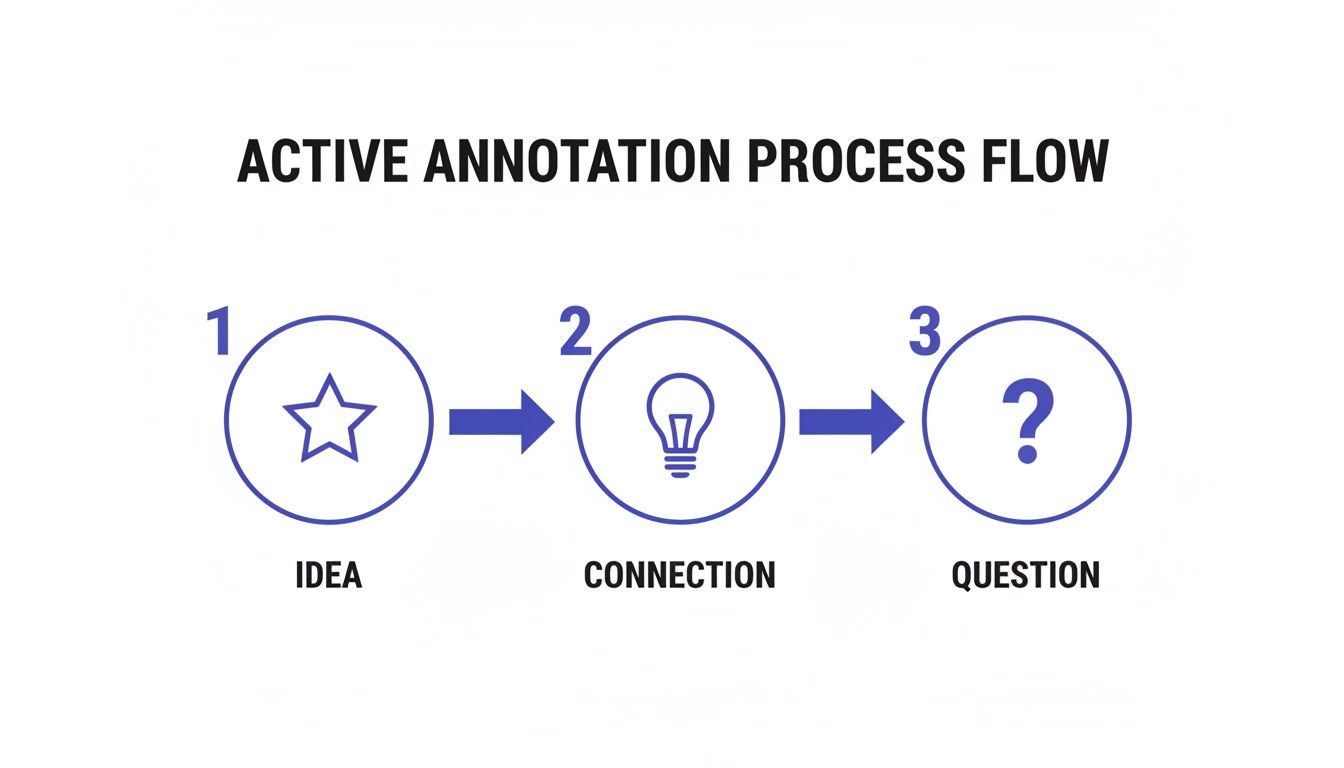
    • A star (★) for a game-changing insight they want to implement immediately with their team.
    • A lightbulb (💡) for a new connection they just made between this book and another concept.
    • A question mark (?) for a topic that feels fuzzy and needs further exploration.
    • An “A” (A) for an actionable team exercise or framework.

    This personal legend makes their notes instantly scannable and genuinely useful when they come back to the book weeks later. The goal isn’t to slow down your reading to a crawl. It’s about capturing your initial thoughts, questions, and reactions in the moment without killing your momentum.

    The most effective note-taking from books happens when you capture not just what the author said, but what you thought when you read it.

    While this guide focuses on reading, the principles of capturing information apply much more broadly. For instance, the same active mindset is crucial for effective note-taking from audio, helping you retain more from podcasts and lectures.

    To go even deeper on this, check out our full guide on active reading techniques. This foundation of active engagement is the bedrock for building a knowledge system that actually works for you.

    Turning Raw Notes Into Connected Knowledge

    Your in-book annotations are just the beginning—fleeting thoughts captured in the moment. The real magic happens when you process them. This is where you transform raw highlights and scribbled margin notes into a structured, interconnected, and genuinely useful knowledge base. Without this step, even the best annotations risk being forgotten on the shelf.

    The goal is to move from simply capturing information to truly understanding it. One of the best ways I’ve found to do this is with summarization frameworks like the Feynman Technique. It’s a simple but powerful test. Can you explain a concept in the simplest possible terms, as if teaching it to a total beginner? If you can’t, it’s a clear signal you haven’t fully grasped the idea, prompting you to dig back into the material.

    A three-step active annotation process flow: Idea (star), Connection (lightbulb), and Question (question mark), a key strategy for note taking from books.

    This simple flow—from noticing an idea to forming your own connections and questions—ensures your final notes are rich with your own thinking. Your notes will not just be a parrot of the author’s words.

    From Linear Lists to a Web of Ideas

    After you’ve summarized the core ideas in your own words, the next move is to get them into a central digital hub. This is where the concept of “atomic notes” becomes a game-changer. Instead of creating one long, linear document for each book, you break down the big ideas into their smallest possible components—their “atoms.”

    Here’s a scenario: You’re reading a book on habit formation.

    • Traditional method: A long note titled “Habit Book Summary.”
    • Atomic method: You create separate notes for “The Habit Loop,” “Implementation Intentions,” and “Habit Stacking.”
      Each note contains just one core idea, explained entirely in your own words. You then explicitly link these notes together. Your ‘Habit Stacking’ note links to ‘The Habit Loop.’ This networked approach mimics how your brain actually learns, building a web of ideas rather than a siloed list of facts. It’s much easier to spot new patterns and retrieve exactly what you need. This philosophy is often called building a second brain method, where you use tools to augment your thinking.

    The explosive growth in the note-taking app market shows just how powerful this shift is. The global market was valued at around USD 7.91 billion in 2024 and is projected to skyrocket past USD 49.47 billion by 2035. This trend is fueled by a massive demand for smarter ways to manage information. You can see the full breakdown in this market research report. By embracing an atomic system, you’re aligning your process with the best practices these tools support.

    Choosing Your Digital Note Taking System

    Deciding on the right app can feel overwhelming. The key isn’t to find the “perfect” app. Instead, find one whose philosophy aligns with how you want to think and work. Each app encourages a slightly different style of organizing knowledge.

    Note-Taking StyleCore ConceptBest For…Example Apps
    Networked ThoughtFocuses on linking individual “atomic” notes to create a web of interconnected ideas, much like a personal wiki.Synthesizing knowledge, discovering new connections, and long-term research projects.Obsidian, Roam Research, Logseq
    Hierarchical StructureOrganizes notes in a top-down, folder-and-file structure, similar to a digital filing cabinet.Storing and organizing large volumes of reference material in a clear, linear way.Evernote, Microsoft OneNote
    Minimalist & FlexibleProvides a clean, block-based canvas that allows for a mix of writing, databases, and project management.Creating customized dashboards, managing projects alongside notes, and visual thinkers.Notion, Craft
    Simple & Quick CapturePrioritizes speed and ease of capture with a clean interface and straightforward tagging.Getting ideas down quickly without friction, daily journaling, and simple to-do lists.Bear, Apple Notes

    Think about your primary goal. Are you trying to build a lifelong web of knowledge (Networked Thought)? Or do you just need a reliable place to store information (Hierarchical)? Your answer will point you toward the right tool. For deep work, pairing your app with noise canceling headphones can create an ideal focus environment.

    Using Spaced Repetition to Improve Your Note Taking from Books

    Capturing knowledge from books is a great first step. However, retaining it is a completely different game. Our brains are actually wired to forget. This isn’t a personal failure. It’s a well-documented principle from psychology called the “forgetting curve.” It shows how our memory of new information fades exponentially unless we actively do something to keep it.

    The most effective way to fight this natural decay is a technique called spaced repetition. It’s a simple but incredibly powerful method for hitting the pause button on the forgetting process. You review information at specific, ever-increasing intervals.

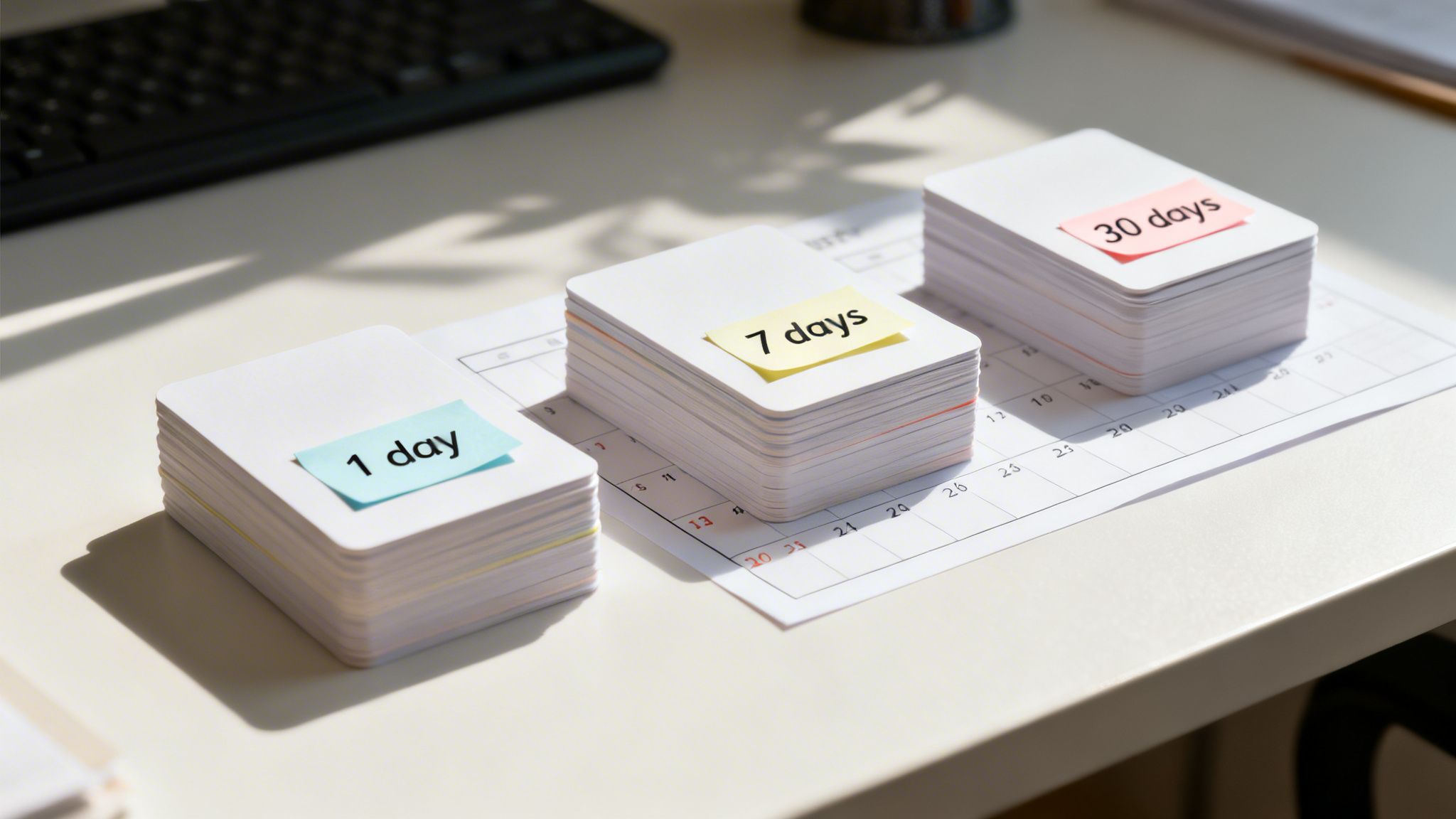
    Three stacks of white flashcards on a calendar, labeled '1 day', '7 days', and '30 days', symbolizing spaced repetition for effective note taking from books.

    While plenty of apps can automate this, there’s real power in the manual act of reviewing your own processed notes. To truly embed what you learn and make it part of your thinking, integrating a robust spaced repetition system into your workflow is non-negotiable.

    A Practical Review Schedule for Your Book Notes

    You don’t need complicated software to get started. A simple schedule in your time blocking planner can be remarkably effective. Once you’ve processed your raw annotations into structured, atomic notes, just schedule a few review sessions on your calendar.

    Here is a simple, battle-tested schedule to lock your book notes into long-term memory:

    • 1 Day Later: Your first review should happen within 24 hours. This is the most important one. It interrupts the steepest part of the forgetting curve right away.
    • 7 Days Later: A week after that initial review, revisit the notes again. This second pass further strengthens the neural pathways you’re building.
    • 30 Days Later: The final review, one month out, helps cement the information. This is what moves it from short-term recall into your durable, long-term knowledge base.

    Let’s imagine an entrepreneur who just finished a book on negotiation. They spend 20 minutes processing their notes into a clear summary. Then, they block out a 15-minute review for the next day. They schedule another for the following week right before a big sales meeting, and a final one a month later. This simple act embeds those strategies into their working memory, making them instantly accessible when it actually counts. This principle of intentional focus is a major theme in my book, Attention Unleashed.

    A Quick Recap of the Note Taking System

    If you want to turn what you read into knowledge that actually sticks, it comes down to a few core habits. Think of this as the high-level map for the entire system. These are the principles that make the difference between passive highlighting and active learning.

    • Read with Purpose: Before you even open the book, get clear on what you’re trying to learn. This simple step shifts your brain from passively scanning words to actively hunting for answers.

    • Engage Actively: Ditch the highlighter. Instead, use a personal set of symbols in the margins to argue with, question, and connect ideas. This turns reading into a conversation.

    • Process Your Notes: The real work happens after you close the book. Your goal is to move your thoughts—not just the author’s words—from the page into a central digital hub. This means summarizing, not just transcribing.

    • Build a Knowledge Web: Think small. Create single-idea notes, often called ‘atomic’ notes, and then link them together. You’re not just filing information; you’re building a network of insights that mirrors how your brain connects ideas.

    • Review Intelligently: To beat the forgetting curve, you need a system. A simple spaced repetition schedule—reviewing notes 1, 7, and 30 days later—is all it takes to move information into your long-term memory.


    Key Takeaways for Effective Note Taking from Books

    • Active Over Passive: The core principle is to engage with the text actively. Ask questions and summarize in your own words rather than passively highlighting. This creates stronger neural pathways for memory.
    • Intention is Everything: Start by defining why you are reading the book. This primes your brain to find the specific information you need, making your reading and note-taking far more efficient.
    • Separate Capture from Processing: While reading, use a simple symbol system to capture ideas quickly without breaking your flow. Process these raw notes into structured summaries later.
    • Build a Network, Not a List: Use an “atomic notes” system. Break down big ideas into single-concept notes and link them together. This mimics how your brain works and makes knowledge more accessible.
    • Use Spaced Repetition: Consistently review your notes at increasing intervals (e.g., 1 day, 7 days, 30 days). This is the most effective, research-backed way to combat the natural forgetting curve and retain information long-term.

    Disclaimer: This article contains affiliate links. The content provided is for educational and informational purposes only and does not constitute medical or psychological advice. Always consult a qualified professional for any health concerns or before making any decisions related to your health or well-being.

    Frequently Asked Questions About Taking Notes From Books

    As you start building a system for reading and remembering, a few common questions always pop up. Here are some honest answers based on what actually works in the real world.

    How Much Should I Write Down?

    It’s tempting to transcribe every clever line the author writes, but that’s not where the real value is. The goal isn’t to create a perfect mirror of the book; it’s to build a library of your own thinking. Focus on capturing your thoughts, questions, and connections. A great note is a concise summary of a core idea, explained entirely in your own words. That mental wrestling—the act of translating their ideas into your language—is what makes knowledge stick. Quality over quantity, always.

    Is a Digital or Physical Notebook Better for Note Taking?

    Neither is inherently better. The right choice is the one that fits your life and lowers the friction of actually taking and reviewing notes. Digital systems are incredible for searching, linking ideas together, and handling huge volumes of information. If you want to connect a thought from a book you read three years ago to something you learned today, digital is your best friend. On the other hand, there’s a beautiful simplicity to a physical notebook. It’s tactile, personal, and completely free of digital distractions. For some, the physical act of writing by hand is a powerful memory aid. The best system for you is simply the one you’ll use consistently.

    How Do I Take Notes Without Ruining My Reading Flow?

    This is a huge trap. If note-taking feels like a chore that constantly breaks your momentum, you’ll stop doing it. The key is to separate the capture from the processing. While you’re reading, develop a simple, personal symbol system. You don’t need a complex legend that requires a decoder ring. A quick star for a key idea, an underline for a powerful quote, or a question mark in the margin is usually enough. This allows you to flag a passage in seconds without breaking your reading stride. Save the deeper work—the summarizing and connecting—for after your reading session is over.

    How Often Should I Review My Notes from Books?

    Notes you never review are just a well-organized form of forgetting. To combat this, lean on the principles of spaced repetition. This just means reviewing information at increasing intervals to move it from short-term recall into your long-term memory. A great starting rhythm is to review your processed notes 1 day, 7 days, 30 days, and then 90 days after you first create them. Put these quick review sessions on your calendar. It’s a small investment that pays huge dividends in retention.

    Can AI Help Me Take Better Notes From Books?

    Absolutely. AI tools can be fantastic assistants, especially for speeding up the initial processing phase. You can use them to summarize dense chapters, generate thought-provoking questions about the text, or even suggest connections to other ideas. But here’s the crucial part: AI should always supplement, not replace, your own thinking. The most durable and valuable part of note-taking is the mental effort you invest in wrestling with the ideas yourself. Use AI as a smart assistant, but never outsource the critical thinking.


    At Mind Clarity Hub, we’re dedicated to helping you build systems for focus and deep learning. If you’re ready to master your attention and build a powerful knowledge base, explore our full library of books designed for modern challenges, including The Power of Clarity.

    Free download: 7-Day Mind Clarity Reset preview

    Free download: 7-Day Mind Clarity Reset

    A short daily reset you can actually stick with (no fluff).

    Affiliate notice: This section may reference tools or supplies mentioned elsewhere on this page. Some links on Mind Clarity Hub are affiliate links. If you choose to buy, we may earn a small commission at no extra cost to you.

    The fastest way to get value from book notes is to compress ideas into your own words, connect them to a current project, and schedule a tiny action within 24 hours.

    If your notes don’t guide what you do next, they’ll fade. The system below keeps things light but effective: capture key ideas, compress them into brief summaries and questions, connect them to what you’re working on, apply one actionable step, then review on a simple schedule.

    Quick-start checklist (15 minutes)

    • Before reading: Write one focus question (e.g., “How can I run better 30-min meetings?”).
    • During reading: Mark only high-signal lines (✱ for key idea, ? for question, ! for contradiction).
    • After a section: Create one Summary Card: 1-sentence gist, 3 bullets, 1 action.
    • Connect: Link the card to a current project or decision you own this week.
    • Apply: Schedule a 10-minute experiment based on one note within 24 hours.
    • Review: Day 2, Day 7, Day 30 — skim your cards and update one action.

    Method comparison: choose what fits your context

    • Margins + flags (pen + sticky tabs)
      Best for: deep understanding, fewer moving parts.
      Avoid if: you never revisit physical books.
    • Index/Action cards (3×5 or digital cards)
      Best for: turning ideas into actions; quick shuffling and linking.
      Avoid if: you dislike handling separate cards.
    • Digital notes (plain text, note apps)
      Best for: search, backlinks, and building a knowledge web.
      Avoid if: screens tempt you to over-format instead of think.
    • Audio reflections (voice memos → short text)
      Best for: capturing insights on walks or commutes.
      Avoid if: you rarely transcribe and compress afterward.

    Workflow that actually sticks: 5 steps

    1. Capture (while reading, 0 friction)
      • Mark with ✱ ! ? and write a 3–5 word margin cue.
      • End of a section: snap 1–3 photos or jot page numbers to revisit quickly.
    2. Compress (immediately after, 5–10 minutes)
      • One-sentence gist: “This chapter argues…”
      • Three bullets: Claim, Evidence (page), Counterpoint (your view).
      • One action: “Test with X by Friday; measure Y.”
    3. Connect (2–3 minutes)
      • Add 1–2 tags (e.g., #meetings #focus #feedback).
      • Link to one ongoing project or decision you already track.
    4. Apply (schedule it)
      • Turn the action into a calendar block or checklist item for this week.
    5. Review (Day 2, 7, 30 — 3 minutes each)
      • Day 2: Answer one question from memory before peeking.
      • Day 7: Update action or archive if no longer needed.
      • Day 30: Connect to a new project or file under a theme.

    Practical examples

    Manager improving meetings: After a chapter on facilitation, create one Summary Card with a 1-sentence gist, three tactics, and a 10-minute experiment (e.g., “silent start: everyone writes agenda outcomes for 2 minutes”). Link it to next Tuesday’s team meeting; review after.

    Student preparing for an exam: For each chapter, write two questions you expect on the test and answer them without looking. Keep one concise formula or framework on a card and rehearse on Day 2, 7, and 30.

    Independent creator learning marketing: Extract one small experiment per idea (e.g., “Rewrite homepage headline using the reader’s desired outcome”). Ship it the same week; note results in the card.

    Minimal templates you can copy

    Summary Card
    Gist (1 sentence): _______________
    3 bullets: 1) Claim — 2) Evidence (p.__) — 3) Counter/Limit
    Action (10 minutes): _______________
    Tags: #theme #project

    Q&A Prompt
    Question: If I forget everything else, what does this idea help me decide or do?
    Answer (from memory first): ____________

    Action Log
    Experiment: ____________ | Date: ____ | Result: ____ | Keep? Y/N

    Common mistakes and the fix

    • Too many highlights → Fix: Set a cap (e.g., 3 highlights per chapter).
    • Copying quotes verbatim → Fix: Paraphrase first, then add the quote if essential.
    • No link to real work → Fix: Attach each note to a project or scheduled action.
    • Single massive summary → Fix: Use small, linkable cards per idea.
    • Never reviewing → Fix: Put Day 2/7/30 reviews on your calendar now.

    Lightweight review cadence

    Try this: add a recurring “Book Notes Sweep” event for Fridays. Spend 10 minutes to skim this week’s Summary Cards, update one action, and archive anything you no longer need. This gentle cadence keeps your knowledge base tidy and useful.

    Want more focus and reading strategy guidance? Explore related guides on Mind Clarity Hub.

    Frequently asked questions

    What’s the fastest way to take notes from a non-fiction book?

    Preview the chapter, mark only high-signal lines, then create one Summary Card with a 1-sentence gist, 3 bullets, and 1 action. Review the card the next day.

    Should I take notes while reading or after?

    Mark lightly while reading, then write structured notes right after each section or reading session. Five to ten minutes is enough.

    How do I turn highlights into usable knowledge?

    Compress highlights into your own words, turn key ideas into Q&A prompts, link each note to a live project, and schedule a small experiment within 24 hours.

    How many notes per chapter should I make?

    Aim for three insights, one question, and one action. Fewer, clearer notes beat long transcripts. Go denser only for technical chapters.

    Is handwriting better than typing for book notes?

    Use the method you’ll actually review. Handwriting can slow you down to think; digital makes linking and search easier. Pick the one you’ll maintain.

    Helpful resources for your next step

    Affiliate disclosure: As an Amazon Associate, Mind Clarity Hub may earn from qualifying purchases at no extra cost to you. Use this link only if it genuinely helps your planning.

    If A Smarter System for Note Taking From Books is a routine you want to keep using, a simple workbook, planner, or desk tool can make the steps easier to repeat.

    Compare related planners, workbooks, and organization tools on Amazon.

  • Second Brain Method: How to Build Your Digital Mind for Clarity & Productivity

    Second Brain Method: How to Build Your Digital Mind for Clarity & Productivity

    Feel like you’re drowning in a sea of notes, bookmarked articles, and ideas that vanish as quickly as they appear? If your digital life feels scattered across a dozen apps and notebooks, you’re not just disorganized—you’re experiencing a completely normal side effect of modern life.

    Our brains simply weren’t built to handle the constant flood of information we face every day. From a neuroscience perspective, this creates cognitive overload, jamming our limited working memory. This is where building a second brain comes in. It’s a method for externalizing your thoughts to regain focus and clarity.

    Disclosure: This article contains affiliate links. If you make a purchase through these links, we may earn a small commission at no extra cost to you. This helps support our work in creating valuable content.

    Taming Information Overload with the Second Brain Method

    The second brain method is a system for creating a trusted, external place for your ideas, notes, and resources. Think of it as an extension of your own mind. It’s designed to cut through the mental clutter. This frees up your biological brain to do what it does best: think, solve problems, and connect ideas.

    It’s not about hoarding information. Instead, it’s about building an organized, searchable knowledge base that actually serves you. This structured approach can be a powerful tool for anyone looking to achieve greater focus, as detailed in my book, The Power of Clarity.

    Second brain method shown by a man in a suit using a tablet with digital notes and a “Second Brain” label floating above.

    alt=”An American man in a suit uses a tablet to interact with his digital second brain method system.”

    From a brain science perspective, this process directly counters cognitive overload. Our working memory—the mental scratchpad we use for moment-to-moment thinking—is incredibly limited. When we try to hold onto every stray thought and project detail, that workspace gets jammed. Consequently, our ability to think deeply and creatively plummets.

    If that feeling is all too familiar, you can explore our guide on what cognitive overload is and how to manage it.

    Why Our Brains Need Help: The Second Brain Method Solution

    The sheer volume of information has exploded. Until the year 1900, the sum of human knowledge was estimated to double roughly every century. Today, it doubles about every 13 months. No one can keep all of that in their head. Therefore, a system becomes a necessity, not a luxury.

    Real-World Example: Imagine a marketing manager juggling three big projects. They have client feedback buried in emails and creative sparks from a podcast. They also have market research saved as random PDFs. Without a central system, these valuable insights stay disconnected and are easily lost. This can lead to feelings of overwhelm and even contribute to burnout, a topic I cover in Burnout Interrupted. A second brain acts as a hub to connect those dots. It frees the manager from the stress of trying to remember it all. This allows them to focus on high-level strategy and execution. This is the core benefit: moving from remembering to creating.

    The Four Pillars of the Second Brain Method

    This whole system is built on four simple, repeatable steps, easily remembered by the acronym CODE:

    • Capture: Get in the habit of saving what resonates. This could be anything—quotes, meeting notes, articles, or shower thoughts. The key is to have a quick, reliable way to get it out of your head.
    • Organize: Structure that information for action, not just for storage. This is where a simple framework like PARA (Projects, Areas, Resources, Archives) shines. It helps you sort notes based on how you’ll use them.
    • Distill: Find the essence of what you’ve saved. You don’t want to re-read entire articles later. Highlight key points and summarize core insights in your own words. Your future self can then grasp the value in seconds.
    • Express: Put your knowledge to work. Use your curated insights to create something new. This could be a report, a blog post, a presentation, or a smarter solution to a problem.

    By practicing these four steps, you turn passive information consumption into an active creative process. You build a personal knowledge asset that grows more valuable over time. This helps you move toward your goals with far more clarity and a lot less stress.

    Mastering Effortless Capture with the Second Brain Method

    The whole Second Brain system hinges on one simple habit: effortless capture. If saving an idea, a link, or a thought feels like work, you just won’t do it. The goal is to make capturing feel like a reflex, not a chore.

    This starts with picking the right tools. Not the most complex ones, but the ones that are always in arm’s reach. Digital apps like Notion, Evernote, or Obsidian are popular for a reason: they sync everywhere. That means your system is ready whether you’re at your desk or waiting for a coffee.

    Real-World Example: You’re listening to a podcast while walking your dog. A brilliant idea for a work project strikes you. Instead of trying to remember it, you use a voice memo app on your phone to dictate the thought immediately. The memo saves to your digital inbox. The idea is captured safely without interrupting your walk or causing anxiety about forgetting it.

    Calming Capture Anxiety with Your Second Brain

    Have you ever had a brilliant idea pop into your head, told yourself you’d remember it later, and then felt that sinking feeling as it slipped away? Behavioral research calls the mental tax of trying to remember everything “cognitive load.” This constant effort can subtly increase stress and anxiety.

    Our brains are for having ideas, not for holding them. As soon as you build a capture system you actually trust, you offload that burden. You’re essentially telling your brain the idea is safe and won’t be lost. This one act can quiet a surprising amount of background mental noise, freeing you up to focus.

    A dependable system doesn’t just organize your thoughts; it calms the part of your brain that’s worried about losing them. This frees up cognitive resources for deeper, more creative thinking.

    Setting Up Your Capture Toolkit

    To make this real, you need a “capture anywhere” setup. You should never have to stop and think about how to save something, only that you should.

    Here’s what a simple but powerful toolkit could look like:

    • On Your Computer: A dedicated app like Notion works great. Pair it with a web clipper extension for your browser. This lets you instantly save articles, links, and screenshots without derailing your workflow.
    • On Your Phone: Make sure your chosen app has a fast, reliable mobile version. Widgets are perfect for one-tap access to a new note. And don’t sleep on voice-to-text; it’s a game-changer for capturing ideas hands-free.
    • For Analog Ideas: Sometimes the best ideas start with pen and paper. A simple habit tracker journal on your desk is perfect for jotting down daily thoughts. You can always snap a photo of the page later and send it into your digital inbox.

    alt=”An American person at a desk quickly captures an idea for their second brain method.”

    What Should You Capture in Your Second Brain?

    The short answer is simple: anything that resonates. Don’t filter yourself. Don’t overthink it. The point of capture isn’t to build a pristine, perfectly curated library from day one. It’s about gathering the raw materials that spark your curiosity and intellect.

    Toss these kinds of things into your inbox:

    • Quotes that make you pause and think.
    • Screenshots of compelling designs or charts.
    • Links to articles or videos you want to explore later.
    • Those random shower thoughts or “aha!” moments.
    • Quick, actionable notes from meetings or calls.
    • Highlights and annotations from the books you’re reading. If you’re looking for a solid framework for this, check out our guide on how to take notes from a book effectively.

    Ultimately, mastering capture is about building trust. Once you truly believe that every valuable piece of information has a safe home, you give your brain permission to let go. This allows you to focus on what’s right in front of you. It’s a foundational habit that paves the way for the clarity and creative output I detail in my book, Focus Recharged.

    Organizing Your Second Brain with the PARA Method

    Just capturing ideas isn’t enough. Without a simple, intuitive way to organize everything, your second brain can quickly turn into a digital junk drawer. It becomes a place where good ideas go to be forgotten. This is where the PARA method comes in.

    Developed by Tiago Forte, PARA is a refreshingly simple system for organizing your digital information. It stands for Projects, Areas, Resources, and Archives. The genius here is that it sorts information based on how actionable it is, not by some rigid category. This tweak alone makes your notes immediately more useful.

    The goal is to get thoughts out of your head and into a trusted system with as little friction as possible.

    An infographic illustrating the effortless capture process: Idea (brain), Tools (smartphone), and Action (refresh icon).

    This visual captures the core habit: moving a thought from your mind (Idea) through a device you trust (Tool) and into your system (Action). Then, it’s ready to be sorted using PARA.

    Breaking Down the PARA Categories for Your Second Brain

    Really understanding the difference between these four categories is the key to making the whole system click. It’s not about creating dozens of folders. Instead, it’s about having four main buckets that tell you where something belongs based on how you plan to use it.

    Here’s a quick breakdown to make the distinctions clear.

    Understanding The PARA Method At A Glance

    Category

    Definition

    Real-World Example

    ProjectsShort-term efforts with a specific goal and deadline.Complete website redesign, Plan family vacation, Finish online course.
    AreasLong-term responsibilities or standards you want to maintain.Finances, Health & Wellness, Professional Development, Home Management.
    ResourcesTopics of ongoing interest or themes you are researching.AI productivity, Stoic philosophy, Coffee brewing techniques, Digital marketing trends.
    ArchivesInactive items from the other three categories.Completed projects, outdated areas, resources you no longer need.

    This structure is dynamic, meaning information flows naturally between the categories. When a project is done, its folder moves to Archives. If a resource becomes critical for an ongoing responsibility, its notes might shift into an Area. This flexibility keeps your second brain from becoming stale.

    PARA in Action: A Freelance Writer’s Scenario

    Let’s make this concrete. Imagine you’re a freelance writer named Alex who wants to better manage their workflow.

    • Projects: Alex has a folder for “Client X Blog Post Series,” due next month. Inside are research articles, interview notes, and draft outlines. Another project is “Update Professional Portfolio,” which has a clear end date.
    • Areas: Alex maintains an “Area” called “Business Finances” to track invoices and expenses—an ongoing responsibility. Another Area is “Client Relationships,” which holds notes from recurring calls and client preferences.
    • Resources: Alex is curious about productivity, so they have a “Resource” folder named “AI Writing Tools.” Here, they save articles and tutorials. It’s just a topic of interest, not tied to a specific project.
    • Archives: Last year’s “Client Y Website Copy” project folder now lives in Archives. The project is finished, but the information is still searchable if Alex ever needs it. This system is key for creative professionals, a focus of my book The Focused Freelancer.

    By organizing this way, Alex knows exactly where to find what they need, when they need it. Active work is in Projects. Ongoing standards are in Areas. And general knowledge is in Resources. If you’re looking for more ways to structure your thoughts, you might find our guide on how to organize your thoughts for greater clarity helpful.

    Keeping Your PARA System Lean and Effective

    The most common mistake people make is over-categorizing. You really don’t need a folder for every single topic under the sun. Keep your top-level folders limited to just Projects, Areas, Resources, and Archives.

    The goal of PARA isn’t to create a perfect, museum-quality filing cabinet. It’s to reduce the friction between having a thought and knowing where to put it. Fewer choices mean faster organization and less decision fatigue, a key psychological principle for building sustainable habits.

    The widespread adoption of this system speaks volumes. Tiago Forte’s Building a Second Brain has sold over 400,000 copies worldwide. This isn’t just a fleeting trend; it shows that people are finding real, lasting value in frameworks like PARA. Exploring various efficient note taking systems can significantly boost your personal knowledge management. Ultimately, PARA helps you build a second brain that actively serves you.

    Turning Your Notes Into Actionable Insights

    So you’ve started capturing and organizing. That’s a huge first step. But a second brain filled with unread articles and raw notes is just a prettier junk drawer. It feels productive, but it doesn’t create anything on its own.

    The real magic happens when you move from passive collection to active creation. This is where the last two steps of the CODE framework, Distill and Express, come in. This is how you make your knowledge work for you.

    Second brain method shown in an open notebook with handwritten notes, a pen, and a yellow “Idea” sticky note.

    The goal is to turn your notes into springboards for action. Don’t let them become a mausoleum of forgotten ideas.

    Finding the Essence with Progressive Summarization

    The key technique for distilling your notes is Progressive Summarization. It’s a simple, multi-layered way to make a dense wall of text instantly scannable for your future self. Instead of re-reading an entire article every time, you can grab its essence in seconds.

    The best part? It unfolds naturally over time, whenever you happen to revisit a note.

    • Layer 1: The Bold Pass. The first time you review a captured note, just bold the most interesting sentences. This first pass immediately draws your eye to what mattered most in the moment. Simple.
    • Layer 2: The Highlight Pass. Sometime later, you might open that note again. This time, read only the bolded sentences and highlight the absolute best parts among them. You’re finding the gems within the gems.
    • Layer 3: The Executive Summary. Finally, after reviewing your highlights, write a one or two-sentence summary at the top of the note in your own words. This is the ultimate distillation, the core idea you can grab and use.

    This layered approach is a gift to your future, frazzled brain. You can engage with a note at any level—glance at the summary for the gist, scan the highlights for key points, or read the bolded text for more context. It’s designed for speed.

    When you build this habit, every piece of information in your second brain becomes more valuable. If you want to go deeper on making ideas stick, our guide on how to retain what you read is a great next step.

    From Distilled Notes to Creative Expression

    With a library of distilled, summarized notes, the final step—Express—stops feeling so intimidating. You’re no longer staring at a blank page. You’re assembling pre-built intellectual legos that you’ve already polished.

    Real-World Example: Let’s say a content creator named Sarah wants to write an article on “AI productivity.”

    Her workflow is now completely different:

    1. Search: Sarah opens her notes app and searches for the tag “#AI.”
    2. Review: In minutes, she skims the executive summaries of a dozen relevant notes she’s progressively summarized. No re-reading entire articles.
    3. Assemble: She drags the most potent highlighted quotes, bolded statistics, and her own summary insights into a new outline.
    4. Connect: Seeing all the key ideas in one place, she spots a new connection between two notes. That becomes the unique angle for her article.
    5. Create: With a rich outline full of distilled insights, writing the actual blog post becomes a much simpler task of connecting the dots.

    This process turns creation from a daunting chore into a manageable assembly project. She isn’t just regurgitating information; she’s using her curated knowledge to form new, original insights. The key to making this a real practice is scheduling it. Using a time blocking planner can help you carve out dedicated “creation sessions” each week.

    Enhancing Your Second Brain Method with AI

    The classic Second Brain method gives you a rock-solid foundation for managing knowledge. However, modern technology offers a powerful way to accelerate the process. Think of artificial intelligence as an intellectual partner—a tool that helps you process, connect, and retrieve information faster than ever before.

    This isn’t about replacing your thinking. It’s about augmenting it.

    AI tools can supercharge every single step of the CODE framework. Before you even capture an article, you could ask an AI tool to generate a quick summary. This simple step helps you decide if the full text is even worth saving. This makes your capture process smarter from the very beginning.

    Real-World Example: Imagine asking your digital system, “What are the common themes between my notes on stoicism and my notes on project management?” AI-integrated note-taking apps are already making this a reality. They can scan your entire knowledge base, spot hidden connections, and suggest relationships you might have missed. This turns your Second Brain from a passive archive into an active collaborator.

    Mindful Integration of AI into Your Workflow

    As these tools become more common, it’s critical to use them mindfully. The goal is to assist your thinking, not outsource it. This means creating an environment that supports deep focus, even when you’re using AI. Something as simple as putting on a pair of noise canceling headphones can help you block out distractions. This practice of managing your environment is a key concept in my book, Digital Clarity.

    This focused approach is more important than ever. AI adoption is exploding; nearly one in five Americans now use AI daily. A staggering 75% of employed adults have used AI tools in the last six months. Knowledge workers are weaving these tools into their Second Brain workflows to speed up pattern recognition. You can learn about the state of consumer AI to see just how fast this is moving.

    Practical AI Workflows for Your Second Brain

    Getting started with AI doesn’t have to be a massive project. You can begin with a few simple, high-impact workflows that save you time and deepen your insights right away.

    Here are a few practical ways to begin:

    • Automated Tagging: Many modern apps can look at your notes and automatically suggest relevant tags. This one feature can save a surprising amount of organizational time.
    • Intelligent Search: Move beyond basic keyword searches. Start using natural language to ask your Second Brain real questions. For example, “Show me all notes from last year related to marketing that mention budget constraints.”
    • Content Repurposing: Feed your distilled notes on a topic to an AI. Then, ask it to generate a first draft of a blog post, a social media thread, or a presentation outline. You provide the core insights; the AI handles the initial grunt work.
    • Idea Generation: Feeling stuck? Use an AI as a brainstorming partner. Give it a few of your core ideas and prompt it to suggest alternative angles, counterarguments, or related topics you haven’t considered.

    Having a well-organized Second Brain is a massive advantage here. It provides the structured, high-quality data that AI models need to produce genuinely relevant and useful outputs. Your curated knowledge becomes the fuel for the AI engine.

    To get even more out of this, you might explore some of the best AI content creation tools that can help you process information more efficiently. If you want to go deeper on this topic, check out our guide on how to use AI for productivity.

    Editor’s Take

    The Second Brain method is genuinely transformative for knowledge workers, creators, or anyone feeling buried under information. Its real power lies in building an external system you trust. Once you stop trying to hold every idea in your head, the background hum of anxiety starts to fade. This frees up an incredible amount of mental space for the deep thinking that actually matters.

    Who is it best for? This system is ideal for people who work with ideas—writers, marketers, researchers, students, and entrepreneurs. If your job involves synthesizing information to create something new, this is for you.

    What actually works? The PARA organization system is the most immediately useful part. It just makes sense. However, the true, long-term benefit comes from the consistent habit of “Progressive Summarization.” Distilling your notes over time is what turns your archive into a powerhouse of usable insights.

    Important Caveats: This is not a magic bullet. It requires upfront effort and the discipline to capture information consistently. If you already find complex digital tools draining, you might be better off with a simple productivity journal. Also, I recommend mastering the core habits of CODE and PARA before adding the complexity of AI tools. Get the foundation right first.

    Key Takeaways

    • Externalize Your Mind: The core idea is to offload information from your biological brain into a trusted digital system. This reduces cognitive load and frees up mental resources for creativity and problem-solving.
    • Follow the CODE Framework: Use this four-step process as your workflow: Capture what resonates, Organize for action, Distill the essence, and Express your ideas.
    • Organize for Action with PARA: Structure your digital life into four simple categories: Projects (active goals), Areas (ongoing responsibilities), Resources (topics of interest), and Archives (inactive items).
    • Distillation is Key: Use Progressive Summarization (bolding, highlighting, summarizing) to make your notes more valuable and easily scannable for your future self.
    • AI is a Supercharger, Not a Replacement: Leverage AI tools to speed up tasks like summarizing, tagging, and finding connections, but always keep your human curation and critical thinking at the center of the process.

    Disclaimer: This article contains affiliate links, which means we may earn a small commission if you make a purchase at no extra cost to you. The content provided here is for educational and informational purposes only. It is not intended as a substitute for professional medical or psychological advice, diagnosis, or treatment. Always seek the advice of your physician or other qualified health provider with any questions you may have regarding a medical or mental health condition.

    Frequently Asked Questions (FAQ)

    1. What is the best app to start a second brain?

    There’s no single “best” app. The right tool is the one that feels most intuitive to you. Popular choices include Notion (for flexibility and customization), Evernote (for simple, powerful capture and search), and Obsidian (for connecting ideas through backlinks). The most important factor is choosing an app you will use consistently.

    2. How is the second brain method different from just taking notes?

    Traditional note-taking is often passive collection. The Second Brain method is an active system designed for action and creation. It emphasizes organizing notes based on their actionability (using the PARA method) and distilling them over time to make them more useful. The goal is not just to store information, but to connect ideas and produce new work.

    3. Can I use a physical notebook for my second brain?

    Absolutely. An analog system, like using a dedicated notebook or journal, is excellent for focused, distraction-free thinking. Many people use a hybrid approach: a physical notebook for brainstorming and daily notes, and a digital app for long-term storage, searchability, and storing web content. Using a great ergonomic keyboard can also make the digital part of this process much more comfortable.

    4. How long does it take to build a second brain?

    You can set up the basic structure (choosing an app and creating your four PARA folders) in less than an hour. However, building a truly valuable second brain is a continuous practice, not a one-time project. The system grows and becomes more powerful as you consistently build the habit of capturing and distilling information over weeks and months.

    5. What if I feel overwhelmed by my existing notes? Should I organize them all at once?

    No, do not try to organize everything at once. This is a common mistake that leads to burnout. Start fresh with the PARA system. Create your new folders and begin putting new information into them. Only migrate and organize old notes on an as-needed basis—when you need to refer to something specific from your old system. This makes the transition manageable and much less intimidating. For a deeper look at managing digital overwhelm, check out my book on Reclaiming Silence.

    Free download: 7-Day Mind Clarity Reset preview

    Free download: 7-Day Mind Clarity Reset

    A short daily reset you can actually stick with (no fluff).

    Helpful resources for your next step

    Affiliate disclosure: As an Amazon Associate, Mind Clarity Hub may earn from qualifying purchases at no extra cost to you. Use this link only if it genuinely helps your planning.

    If Second Brain Method: How to Build Your Digital Mind for Clarity & Productivity is a routine you want to keep using, a simple workbook, planner, or desk tool can make the steps easier to repeat.

    Compare related planners, workbooks, and organization tools on Amazon.

  • How to Take Notes for a Book You Actually Remember

    How to Take Notes for a Book You Actually Remember

    Effective note-taking is more than just highlighting. It’s an active process—a conversation where you question, summarize, and connect the author’s ideas to your own life. This guide is all about turning passive reading into lasting knowledge by creating a system you can actually use.

    Affiliate Disclosure: At Mind Clarity Hub, we believe in transparency. Some of the links in this article may be affiliate links, which means we may earn a small commission if you make a purchase, at no extra cost to you. We only recommend products we trust.

    Why Your Book Notes Aren’t Sticking

    Have you ever finished a brilliant book, your copy filled with highlights and sticky notes, only to realize a month later you can barely recall the key concepts?

    It’s a deeply frustrating experience, but the problem isn’t your memory. It’s your method. Most of us were taught to transcribe information. This is a passive act that does little to actually encode it into long-term memory.

    How to take notes for a book — an open notebook with handwritten notes and colorful highlights on a white desk beside a book and sticky notes.

    This guide shows you how to take notes for a book in a way that truly sticks. We’re going to shift from passive highlighting to active engagement—a skill for deeper thinking, not just copying.

    The Science of Forgetting

    Our brains are wired to forget information that isn’t important. Passively dragging a highlighter across a page doesn’t create the strong neural connections needed for real recall. From a neuroscience perspective, true learning only happens when you actively process information—summarizing, questioning, or connecting ideas to what you already know. This forces your brain to work, signaling that the material is actually worth remembering.

    When you just highlight, you’re tricking your brain into thinking you’ve learned something. Psychologists call this the fluency illusion. The text feels familiar, but familiarity doesn’t equal comprehension. You end up with a library of highlights, not a repository of wisdom. This approach also leads to information overload, making it impossible to find what truly matters later. You can dive deeper into this topic in our guide on what is cognitive overload.

    Building a System for Real Learning

    To fix this, you need a system built for active engagement. This guide is designed for busy professionals, students, and lifelong learners who want to turn what they read into knowledge they can use.

    We’ll explore:

    • Actionable systems that work with physical notebooks or digital apps.
    • Simple frameworks for annotating, summarizing, and pulling out key insights.
    • AI-assisted shortcuts to make your process more efficient without sacrificing depth.

    This approach isn’t about creating more notes. It’s about creating better, more meaningful notes that become a permanent part of your personal knowledge base.

    By focusing on active recall and synthesis, you’ll stop being a passive consumer of information and start becoming an active participant in your own learning.


    This content is for educational purposes only and is not a substitute for professional medical or psychological advice, diagnosis, or treatment. It is not intended to diagnose or treat conditions like anxiety, depression, ADHD, or burnout. Always seek the advice of your physician or other qualified health provider with any questions you may have regarding a medical condition.

    Adopt the Mindset of an Active Reader

    Before you ever pick up a pen, the most critical part of taking notes isn’t about the system you use. It’s about shifting how you think about reading itself. Most of us were taught to read passively, absorbing words like we’re watching a movie. But if you want to learn and remember, that just won’t cut it.

    How to take notes for a book — golden light bathes rugged mountains reflected in a serene alpine lake at sunrise or sunset.

    Instead, you need to become an active reader. Think of it less like listening to a lecture and more like having a conversation with the author. You question their claims, hunt for specific insights, and connect their ideas back to your own life.

    Define Your Purpose Before You Begin

    The foundation of reading actively is knowing why you’re reading in the first place. Without a clear goal, your brain doesn’t know what to latch onto. Everything feels equally important, which usually means everything is equally forgettable.

    Setting a purpose primes your brain’s reticular activating system (RAS). This is a bundle of neurons that acts like a filter for information. By deciding what you’re looking for, you tell your brain which details matter. This makes them pop off the page as you read.

    Mini-Scenario: A manager is about to read a book on leadership. Instead of just starting, they write down a clear goal: “I want to find one new technique for giving constructive feedback to my team.” This simple mission turns a casual read into a focused hunt for practical solutions.

    Ask Questions as You Read

    Passive readers accept what an author says. Active readers poke and prod at it. The best way to do this is to constantly ask questions as you go. This transforms the book from a monologue into a dialogue.

    • “How does this connect to what I already know?” This question forces you to build bridges between new information and existing knowledge—a cornerstone of memory.
    • “Do I agree with this argument?” Challenging the author helps you form your own opinions. It also helps you understand the topic on a much deeper level.
    • “How could I apply this in my own life or work?” This is the most important question for turning abstract ideas into practical wisdom.

    Mini-Scenario: A freelance designer reading about pricing strategies shouldn’t just highlight a section on value-based pricing. An active reader would pause and ask, “How can I build this model into my client proposal next week? What are the exact steps I’d need to take?”

    This questioning process is a cornerstone of learning. If you want to go deeper, we have more resources on the principles of active reading.

    Connect Ideas to Your Personal Experience

    Your brain isn’t a filing cabinet; it’s a web of connections. New information sticks best when it’s hooked onto something personal. This could be an experience, an emotion, or an existing memory.

    When you come across a new concept, don’t just write it down. Take a moment to think about how it relates to something you’ve actually lived through. This act of personalization makes abstract ideas concrete and far more memorable.

    Mini-Scenario: A book discusses the “fight or flight” stress response. You might jot down a note about that high-pressure work deadline you had last month. By linking the scientific concept to a vivid personal memory, you give your brain a powerful hook to hang the new information on. This is how you stop just collecting facts and start building genuine understanding.

    Choosing Your Note-Taking System

    The whole analog versus digital debate can feel like a trap. Pen and paper? Or a sleek app? The truth is, the best system is the one you actually stick with. There’s no single right answer here. There is only the method that fits your goals, your environment, and the way you think.

    How to take notes for a book — a vast green mountain valley bathed in warm golden sunlight beneath a clear blue sky.

    This isn’t just about personal preference, either. The choice has real cognitive consequences. The trick is to understand the trade-offs. Compare the focused, tactile experience of a notebook versus the efficient, searchable power of a digital tool. Once you see the pros and cons, you can decide how to take notes for a book in a way that truly serves you.

    The Case For Analog Handwriting

    There’s a reason physical books and notebooks have such an enduring appeal. It isn’t just nostalgia. It’s wired into our brains. Research in neuroscience shows that handwriting lights up regions linked to memory and learning in a way that typing just doesn’t. This physical act forces a slower, more deliberate engagement with the text, which can give your comprehension a serious boost.

    This tactile connection is a big reason why print is still king. Globally, the books market hit USD 150.99 billion in 2024, and print books are on track to serve 1.9 billion readers by 2029. This preference for physical media underscores the power of analog methods for deep learning. You can discover more insights about the global book market on grandviewresearch.com.

    Some classic analog methods include:

    • Marginalia: Scribbling your thoughts, questions, and connections directly in the margins of the book itself.
    • Commonplace Book: A dedicated journal where you transcribe meaningful passages and add your own reflections. We have a great guide to some excellent journals for productivity that are perfect for this.

    Mini-Scenario: Imagine a university student wrestling with a dense philosophy textbook. By using a notebook to physically write summaries after each chapter, they’re forced to process the complex arguments. This leads to much better retention for their final exam.

    The Power Of Digital Systems for Note-Taking

    While analog is fantastic for deep focus, digital systems offer efficiency and organization that are hard to beat. Apps like Notion, Obsidian, or Evernote can turn your notes from static pages into a dynamic, searchable knowledge base. This is a game-changer when you’re managing insights from dozens of different sources.

    The main advantages here are speed and connectivity. You can capture quotes from an ebook with a simple copy-paste. You can also tag notes with keywords for easy retrieval, and link related ideas across countless books. Synthesizing information and spotting patterns becomes remarkably simple.

    Mini-Scenario: A busy professional listening to a business audiobook on their commute can quickly capture voice notes on their phone. Later, they can use an app to transcribe those thoughts, tag them with “leadership” and “Q3 goals,” and link them to relevant articles they’ve already saved.

    If you want to explore more options, these 10 effective note-taking methods offer a great overview of systems that can help you master information.

    Analog vs Digital Note-Taking Systems for Books

    This table compares key features of analog and digital systems to help you decide how to take notes for a book in a way that fits your goals.

    FeatureAnalog System (Pen and Paper)Digital System (Apps and Software)
    Cognitive EngagementHigher due to kinesthetic feedback, which can boost memory and recall.Lower, as typing can become automatic and less mindful for some users.
    Speed and EfficiencyA slower, more deliberate process that encourages thoughtful summary.Faster for capturing large amounts of text, highlights, and external links.
    Search and OrganizationDifficult to search; relies on manual systems like indexes or sticky tabs.Instant search, powerful tagging, and cross-linking capabilities.
    AccessibilityLimited to the physical location of your notebook or book.Accessible across multiple devices, such as your phone, laptop, and tablet.
    Distraction LevelMinimal distractions, which promotes a state of deep focus and concentration.High potential for distraction from notifications and the temptation to multitask.
    Best ForDeep conceptual understanding, creative brainstorming, and reducing screen fatigue.Efficiency, managing large volumes of information, and integrating with other digital tools.

    Ultimately, the choice really boils down to your specific needs. Are you optimizing for deep comprehension of a single, complex text? Or are you trying to efficiently manage a wide range of information from many sources? Neither is better than the other—they just serve different purposes.

    A Practical Workflow for Taking Better Book Notes

    Knowing the theory is one thing, but actually putting it into practice is where the real learning happens. A solid workflow takes the guesswork out of the process. This helps you pull real value from every single book you read.

    I’ve found a simple three-phase process—before, during, and after reading—works wonders. It’s flexible enough for a paper notebook or a digital app like Notion or Obsidian.

    This approach turns reading from a passive activity into an active, intentional one. It ensures you don’t just capture ideas, but truly understand and integrate them into your thinking. Following these steps will help you learn how to take notes from a book in a way that builds lasting wisdom, not just a library of highlights.

    This infographic breaks down the simple three-step process for choosing the right note-taking system for your own needs.

    Infographic detailing a three-step process to choose a note-taking system: brainstorm, choose, act.

    As the visual shows, it all starts with brainstorming your goals, picking the right tool for the job, and then consistently taking action.

    The Pre-Reading Phase: What to Do Before You Even Open the Book

    The best note-taking starts before you even read the first page. This whole phase is about setting a clear intention and getting your space ready for focused work. Think of it like a chef prepping their ingredients before cooking. You need to prepare your mind and your tools for learning.

    First, define your purpose. Just ask yourself: “What do I want to get out of this book?” Maybe you’re looking for actionable business strategies. Or a deeper understanding of a historical event. Or insights for personal growth. Writing down your goal actually primes your brain to spot the information that matters most.

    Next, create a dedicated space for your notes. This could be a new section in a physical journal or a fresh page in a digital app. Giving your thoughts a designated home keeps you organized. It also signals to your brain that it’s time for a serious learning session.

    Mini-Scenario: Before starting a book on personal finance, you open your note-taking app. You create a new page titled “Notes: [Book Title]” and write your goal at the top: “Find three actionable tips to improve my monthly budget.” Now you’re ready to learn with intention.

    During Reading: Annotation and Active Recall

    This is where the real work happens. As you read, your goal is to engage directly with the text, not just passively soak it in. It’s time to ditch the mindless highlighting. This often just creates a false sense of accomplishment. Instead, adopt a simple, active annotation system.

    A great system doesn’t need to be complicated. Try this:

    • Underline sentences that feel like a core idea or a powerful argument.
    • Use an asterisk (*) in the margin next to anything that feels immediately actionable or relevant to your goals.
    • Write questions or brief comments in the margins to challenge or connect with what the author is saying.

    The most crucial habit during this phase is to pause after each chapter and write a short, two-to-three-sentence summary in your own words. This forces active recall, a process that strengthens neural pathways and dramatically improves long-term memory.

    The Post-Reading Phase: Synthesis and Solidification

    Finishing the last page isn’t the end of the line. The final phase is all about synthesis. This means reviewing your scattered annotations and turning them into a cohesive, useful resource. This is the step that separates casual readers from serious learners.

    Once you’ve finished the book, set aside about 30 minutes to review all your underlines, asterisks, and summaries. Look for patterns, recurring themes, and the most important takeaways. Your goal is to consolidate all this raw information into a more permanent, useful format.

    Here are a few popular synthesis methods I’ve seen work well:

    • Create a one-page summary: Distill the book’s most critical concepts onto a single page.
    • Draw a mind map: Visually connect the main ideas, sub-topics, and key examples.
    • Make digital flashcards: Use an app like Anki for key definitions or facts you want to lock into memory.

    Busy professionals are increasingly leaning on digital tools for this phase. The global note-taking management software market was valued at USD 7.36 billion in 2023. It is projected to hit USD 11.82 billion by 2032. Apps allow you to search, tag, and organize notes with incredible speed, turning reading into a measurable productivity gain. You can find more details about the growth of the note-taking software market at zionmarketresearch.com.

    How to Use AI to Enhance Your Book Notes

    Artificial intelligence can feel like a complicated beast. But you don’t need a degree in computer science to make it work for you. The trick is to stop thinking of AI as a replacement for your brain. Start treating it like a very capable assistant. The goal isn’t to outsource your thinking. It’s to offload the tedious parts so you can focus on what matters: understanding and connecting ideas.

    For instance, if you’re staring down a particularly dense chapter, why not ask an AI tool to summarize it before you even start reading? This gives you a mental scaffold. It primes your brain to latch onto the most important concepts as you read through it yourself.

    How to take notes for a book — a hand holds a smartphone, photographing handwritten notes on a desk beside a pen.

    This is a core principle in learning how to use AI for productivity without getting overwhelmed. It’s all about smart, targeted assistance.

    Practical AI Workflows for Better Note-Taking

    Beyond summaries, AI can act as your personal tutor. Stuck on a complex scientific theory or a winding philosophical argument? Just copy and paste the passage into a chatbot. Then ask it to explain the idea in simpler terms or create an analogy. This simple step can save you hours of banging your head against the wall.

    Audiobook listeners, this is for you. When a great idea hits you on a walk or during your commute, just capture it as a quick voice note on your phone. Later, you can feed those recordings into an AI transcription service to get clean, editable text. It’s a brilliant way to bridge the gap between passive listening and active note-taking.

    Here’s what this looks like in the real world:

    • You finish a chapter and have a page of messy, handwritten notes.
    • You snap a quick photo of the page.
    • You upload it to an AI tool and ask it to digitize and organize your notes into a clean, bulleted list.
    • For an extra step, you could even prompt it to suggest related topics or questions for you to explore next.

    This isn’t about letting the AI do the work. It’s about letting it handle the administrative grunt work so you can spend your precious mental energy engaging with the ideas themselves.

    Making Your AI-Assisted Notes More Effective

    To get the most out of these tools, it helps to guide them. One of the best ways to do this is by mastering keyword extraction from text. This skill helps you quickly pinpoint the central themes of a chapter or an entire book. You can then use this to direct your AI summaries or queries.

    It’s no surprise that the note-taking app market is projected to hit $11.11 billion by 2025. Much of that growth is being fueled by tools that help users retrieve ideas up to 30% faster. Think about it: an AI can automatically tag your book notes with themes like “leadership,” “mental models,” or “cognitive biases.” A month later, you can find every insight you’ve ever had on a topic with a single click.

    Editor’s Take: What Actually Works

    When it comes down to it, the best way to take notes from a book is deeply personal. There’s no one-size-fits-all system. But after years of experimenting, I’ve found that every truly effective approach shares three core traits: it’s active, it involves synthesis, and it’s consistent.

    How to take notes for a book — a serene mountain meadow at sunrise with dew-kissed wildflowers bordering a gently flowing stream.

    Who This Advice Is For: This guide is best for students, professionals, and lifelong learners who want to retain more from non-fiction books. The methods are designed to turn reading into an active process of learning and application.

    What Actually Works: The single most effective habit is summarizing each chapter in your own words immediately after reading it. This forces active recall, which is scientifically proven to build stronger memories. A hybrid approach often works best: use analog notes for deep thinking and then digitize them for long-term organization.

    Caveats: Don’t get obsessed with finding the “perfect” system. Consistency is far more important than the specific tool you use. If your system is too complex, you won’t stick with it. Start simple and build from there. Also, remember this advice is geared toward non-fiction; taking notes for fiction is a different experience focused on appreciation, not just information retention.

    Key Takeaways: How to Take Notes for a Book

    • Read with a Purpose: Always know what you want to get out of a book before you start. This primes your brain to find the most relevant information.
    • Engage Actively: Don’t just highlight. Ask questions, challenge arguments, and connect the author’s ideas to your own experiences.
    • Summarize in Your Own Words: At the end of each chapter, pause and write a brief summary from memory. This active recall is crucial for long-term retention.
    • Choose the Right Tool for You: Analog (pen and paper) is great for deep focus and memory, while digital tools (apps) excel at organization and searchability. The best system is one you will consistently use.
    • Synthesize, Don’t Just Collect: After finishing a book, take time to review your notes. Create a one-page summary or mind map to connect the key ideas and solidify your understanding.
    • Use AI as an Assistant: Leverage AI tools to handle tedious tasks like summarizing dense text or transcribing notes, but always keep the critical thinking for yourself.

    A Few Final Thoughts on Better Note-Taking

    If you take away just one thing from this guide, let it be this: effective note-taking is about active engagement. It’s not just passively copying words from a page. This isn’t about creating a perfect, flawless transcript of a book. It’s about having a conversation with the author and, more importantly, with yourself.

    Here’s a quick rundown of the core ideas that will genuinely transform how you read and learn.

    How to take notes for a book — a vibrant green valley with a flowing river, lush trees, and a bright blue sky.

    These are the principles I come back to again and again:

    • Read With a Purpose: Before you even open the book, ask yourself: “What am I trying to get out of this?” Having a clear goal primes your brain to hunt for the most relevant insights.
    • Summarize in Your Own Words: At the end of a chapter, put the book down. Jot down a quick summary from memory. This simple act forces your brain to process the information, which is the secret to making it stick.
    • Connect Ideas to Your Life: Don’t let new concepts just hang in the air. Actively link them to your own experiences, projects, or problems. This makes abstract ideas concrete and far easier to recall later.
    • Synthesize Your Notes: Once you’ve finished the book, the real work begins. Take an hour to review all your highlights and scribbles. Then create a single-page summary or a mind map. This is where you connect the dots and solidify your understanding.

    Think of these techniques as the foundation of a solid system. If you want to go deeper, we explore more strategies in our guide on how to retain what you read.


    Disclaimer: This article contains affiliate links, which may generate a small commission at no extra cost to you. The content provided here is for educational and informational purposes only and is not a substitute for professional medical or psychological advice, diagnosis, or treatment.

    Frequently Asked Questions

    Let’s dig into some of the most common questions that come up. These answers should help clarify the key ideas from this guide and give you a bit more confidence as you start taking better notes.

    How to take notes for a book — close-up of pink wildflowers and dewy grass sparkling in warm golden morning sunlight.

    1. How do you take notes on a book you own?

    When the book is yours, the margins are your playground. This classic method, known as marginalia, is one of the most immediate ways to have a conversation with the text. Underline sentences that land, scribble questions next to confusing parts, and use symbols like asterisks for ideas you want to act on. You’re turning the book into a living document of your thinking.

    2. What is the best way to take notes from a book for studying?

    For studying, the goal is active recall, not just passive highlighting. After you finish a chapter, close the book. Try to write a short summary from memory, in your own words. This forces your brain to retrieve the information, which builds much stronger memory pathways than rereading ever could. For key terms and concepts, creating flashcards is a tried-and-true method.

    3. How can I take notes on an audiobook?

    This requires a two-step process. While listening, capture quick voice notes on your phone whenever an insight hits. Later, use a transcription tool to turn those audio snippets into text. From there, you can clean them up and organize them into your primary note-taking app like Notion or Obsidian. This captures the idea in the moment without breaking your stride.

    4. Should I take notes for fiction books?

    Absolutely, if it deepens your enjoyment! With fiction, your notes will look different. You’re not hunting for “actionable takeaways.” Instead, you might track themes, jot down notes on character arcs, or save a beautifully written sentence that moved you. It’s less about extraction and more about appreciation and understanding the craft of storytelling.

    5. How do I organize my book notes so I can find them later?

    This is where digital tools really shine. The key is a consistent tagging system. In an app like Notion or Obsidian, you can tag each note with the book’s title, the author, and relevant themes (e.g., “productivity,” “leadership,” “cognitive science”). Over time, this builds a searchable, personal wiki of everything you’ve learned.

    6. How many notes should I take per chapter?

    Think quality over quantity. Your goal isn’t to transcribe the book. Aim to capture the one to three biggest ideas from each chapter. A great rule of thumb is to force yourself to write a two- or three-sentence summary after you finish a chapter. This small constraint forces you to distill the core message.

    7. What’s the difference between highlighting and taking notes?

    Highlighting is a passive act of recognition—your brain is just saying, “Oh, that looks important.” It doesn’t require much effort. Taking notes is an active act of processing. You have to summarize, question, or connect an idea in your own words. Real learning happens during that active processing, not passive recognition.

    8. How long after reading a book should I review my notes?

    Review them within a day or two of finishing the book. This is the sweet spot. Your chapter-by-chapter notes are still fresh in your mind. This makes it the perfect time to synthesize them into a single, cohesive summary or a mind map. This final review cements the book’s big ideas into your long-term memory.

    9. Can I use AI to take notes for me?

    Think of AI as a smart assistant, not a replacement for your own brain. AI is fantastic for summarizing a dense chapter, transcribing your voice notes, or cleaning up handwritten thoughts into a neat list. But the critical thinking—the questioning, connecting, and internalizing—that’s where the real learning happens. You have to do that part yourself.

    10. What if I don’t have time to take detailed notes?

    If you’re pressed for time, adopt this one tiny habit. At the end of each chapter, write down one single sentence that captures its main point. This takes less than 60 seconds. It feels almost too simple to work, but it forces that crucial step of active recall. This makes it one of the highest-leverage, time-efficient learning strategies there is.


    Ready to build a clearer, more focused mind? Explore the full library of science-backed books and guides at Mind Clarity Hub. Find practical roadmaps to conquer digital burnout, master productivity, and reclaim your attention.

    Explore the Mind Clarity Hub Library

    Practical books on focus, digital habits, resilience, and building a calmer mind.

    The Power of Clarity — book cover

    The Power of Clarity

    Unlock mental focus, build momentum, and create the life you were meant to live.

    View book →
    AI & ChatGPT for Beginners — book cover

    AI & ChatGPT for Beginners

    No PhD needed — a 2025 guide to AI, prompts, and productivity without coding.

    View book →
    Zen in the Digital Jungle — book cover

    Zen in the Digital Jungle

    Mindfulness for a chaotic world.

    View book →
    The Slow Reset — book cover

    The Slow Reset

    Mindful living in a fast-paced world.

    View book →
    Perfectly Imperfect — book cover

    Perfectly Imperfect

    Stop self-criticism, set boundaries, and embrace the real you.

    View book →
    Reclaiming Silence — book cover

    Reclaiming Silence

    A dopamine detox guide to finding peace in a noisy world.

    View book →
    The Focused Freelancer — book cover

    The Focused Freelancer

    Productivity, pricing & positioning for independents in 2025.

    View book →
    ChatGPT Side Hustle System — book cover

    ChatGPT Side Hustle System

    Launch your AI-driven online business in 30 days.

    View book →
    Burnout, Interrupted — book cover

    Burnout, Interrupted

    A proven path to restore energy and reclaim your life.

    View book →
    Attention Unleashed — book cover

    Attention Unleashed

    Focus strategies for the distracted mind.

    View book →
    Side Hustle Launchpad — book cover

    Side Hustle Launchpad

    Your quick-start guide to extra income.

    View book →
    Digital Clarity — book cover

    Digital Clarity

    Rewire your brain, escape dopamine traps & regain focus.

    View book →
    Break the Scroll — book cover

    Break the Scroll

    Reduce screen time and take back control of your life.

    View book →
    Climate Compassion — book cover

    Climate Compassion

    Transform eco-anxiety into empowered action.

    View book →
    Village Mentality — book cover

    Village Mentality

    The power of community for mental wellness.

    View book →
    Restful Nights — book cover

    Restful Nights

    Overcoming sleep anxiety in a 24/7 world.

    View book →
    Connected Again — book cover

    Connected Again

    Combat loneliness and build meaningful relationships.

    View book →
    Focus Recharged — book cover

    Focus Recharged

    Mastering attention and productivity in the digital era.

    View book →
    Marketing Magic with ChatGPT — book cover

    Marketing Magic with ChatGPT

    AI-powered content, campaigns, and copywriting to grow faster.

    View book →
    The 6-Figure Creator — book cover

    The 6-Figure Creator

    Turn knowledge into passive income with books, courses & AI.

    View book →
    Burnout Breakthrough — book cover

    Burnout Breakthrough

    Reset your work-life balance and thrive in 2025.

    View book →
    The Emotionally Intelligent Man — book cover

    The Emotionally Intelligent Man

    A modern guide to self-awareness and communication.

    View book →
    AI Personalized Wellness — book cover

    AI Personalized Wellness

    Create your custom health plan with data-driven habits.

    View book →
    Everyday AI Made Easy — book cover

    Everyday AI Made Easy

    Use ChatGPT and smart tools to simplify life.

    View book →
    Money Mindfulness — book cover

    Money Mindfulness

    A financial wellness guide for Gen Z & Millennials.

    View book →
    Startup Smarter with AI — book cover

    Startup Smarter with AI

    ChatGPT strategies and tools to grow your business.

    View book →
    ChatGPT for Writers & Creators — book cover

    ChatGPT for Writers & Creators

    Unlock AI-powered brainstorming, drafting & editing.

    View book →
    Free download: 7-Day Mind Clarity Reset preview

    Free download: 7-Day Mind Clarity Reset

    A short daily reset you can actually stick with (no fluff).

    Affiliate disclosure: This section may reference tools or books. If you purchase through an existing affiliate link on this page, Mind Clarity Hub may earn a small commission at no extra cost to you.

    The shortest path to book notes you remember: Capture → Connect → Compress

    If you want notes that stick without overwhelm, use this three-pass workflow: (1) Capture only what truly matters while reading, (2) Connect ideas to your goals within 24 hours, and (3) Compress your takeaways into a brief you can review in 60–90 seconds. Aim for one actionable next step per book.

    1) Capture (during reading, low friction)

    Keep capture light so you don’t derail reading flow. Mark only signal, not everything that looks interesting.

    • Use three marks: big idea, ? question to test or explore, potential action.
    • Limit highlights to ~10% of pages. If you’re highlighting every paragraph, you’re collecting, not learning.
    • Write micro-marginalia: 3–5 words that state why it matters (e.g., “links to habit cue,” “use in meeting”).
    • Digital tip: Add a short tag to highlights (e.g., #focus, #writing, #leadership). Paper tip: add a simple index on the inside back cover with page numbers and tags.

    Why this works: You’re signaling importance to your brain by deciding, not just copying. This reduces cognitive overload later.

    2) Connect (within 24 hours, make it yours)

    Open your captures and answer three prompts. This is where comprehension turns into usable knowledge.

    1. Goal link: Which problem or goal does this idea support? Name one current project.
    2. Bridge question: What would have to be true for this idea to work in your context?
    3. Contrast: How does this idea differ from what you currently do? Note one practical trade-off.

    Optional but powerful: Cross-reference a related idea from a previous book or your own notes. Even a single link (Book A → Book B) boosts recall by creating a memory anchor.

    3) Compress (15 minutes, create the asset)

    Summarize only what you’ll actually use. Keep it brief enough to review in under two minutes.

    • 5-sentence brief: Problem → Core idea → Key mechanism → Example → Next step.
    • 3 recall cards: Turn big ideas into questions (e.g., “What are the 3 cues for starting a habit?”).
    • 1 next action: A concrete behavior you’ll try in the next 7 days. Put it on your calendar.

    Two quick examples

    Nonfiction (habits): You mark ★ on a section about “habit cue design,” write “use for morning writing,” and add → “set notebook open at desk.” During Connect, you tie it to your goal of shipping one article weekly and note the trade-off: earlier prep the night before. Compress into: five-sentence brief, 3 recall questions about cue–routine–reward, and next step “prep desk nightly at 9 pm.”

    Fiction (novel): You mark ★ for a theme about loyalty, ? beside a puzzling decision, and add a brief margin note “mirrors Ch. 2 promise.” In Connect, you link the theme to your interest in character arcs. In Compress, you distill a 5-sentence brief on theme, turning point, and how the setting pressures choices, plus one quote you’ll revisit.

    Quick-start checklist

    • Pick your marks: ★ ? → (write them on a sticky in the front cover).
    • Cap highlights to 1–2 per chapter unless an idea is essential.
    • Book a 20-minute “Connect + Compress” slot on the day you read.
    • Export or photograph your captures if you read on paper.
    • Create 3 recall cards and schedule reviews at 2, 7, and 30 days.

    Paper vs digital vs hybrid: which keeps you calmer and consistent?

    • Paper – Best for deep focus; easy margin notes; harder to search; photograph or index key pages.
    • Digital – Fast capture and search; easy tagging; risk of distraction; turn off notifications.
    • Hybrid – Read on paper, compress digitally; often the best of both for recall and retrieval.

    Make reviews effortless

    Put your 5-sentence brief and 3 recall cards where you already look daily (calendar reminder, task app, or a weekly planning note). Reviews at spaced intervals (for example: 2, 7, and 30 days) help reconsolidate what matters without re-reading the whole book.

    AI-assisted notes (optional, keep it honest)

    • Use AI to format exports, generate draft recall questions, or condense long highlights.
    • Don’t outsource understanding: always add your own 1–2 lines explaining why an idea matters to you.
    • Privacy check: avoid pasting full proprietary texts; summarize passages first.

    Why this method improves recall

    Active decisions (Capture), meaningful linking (Connect), and concise synthesis (Compress) reduce mental clutter and increase the odds you’ll reuse the ideas. This pairing of selective attention with brief, spaced reviews is a practical way to move insights from “felt familiar” to “ready to use.”

    FAQs: book note-taking, answered

    What’s the best way to take notes for a nonfiction book?
    Use the Capture → Connect → Compress flow: mark ★ ? → while reading, link 3 ideas to your goals within 24 hours, then write a 5-sentence brief, 3 recall cards, and 1 next action.
    How do I take notes for a novel without ruining the story?
    Keep it light: mark a few themes, key choices, and quotes. After each reading session, write two lines on what changed and why it matters.
    Should I use paper or a note-taking app?
    Choose what you’ll stick with. Paper aids focus; digital aids search. A hybrid—paper for reading, digital for compression—works well for many.
    How can I remember more after I finish the book?
    Schedule quick reviews of your 5-sentence brief and test yourself with the 3 recall cards at 2, 7, and 30 days.
    How many highlights are too many?
    If you’re saving more than ~10% of the text, you’re likely diluting signal. Aim for a few decisive marks per chapter.
    How do I organize quotes and ideas across books?
    Tag by problem or goal (e.g., #focus, #writing). During Connect, add one link from each new book to a prior note so patterns emerge.

    Helpful resources for your next step

    Affiliate disclosure: As an Amazon Associate, Mind Clarity Hub may earn from qualifying purchases at no extra cost to you. Use this link only if it genuinely helps your planning.

    If How to Take Notes for a Book You Actually Remember is a routine you want to keep using, a simple workbook, planner, or desk tool can make the steps easier to repeat.

    Compare related planners, workbooks, and organization tools on Amazon.