


We all know we should use our screens less, but generic advice like “just turn it off” or “go outside” rarely sticks for long. The constant pull of notifications, infinite scrolls, and vibrant app icons isn’t a simple matter of weak willpower; it’s a daily battle against sophisticated behavioral design engineered to capture and hold our attention. This is why many common approaches to reducing screen time often fail. They overlook the deep-seated habits and environmental triggers that keep us tethered to our devices.
Ways to Reduce Screen Time in 2026: 10 Evidence-Backed Strategies (and Why They Work)
This article moves beyond those simplistic tips. Here, we present 10 evidence-backed ways to reduce screen time, grounded in the principles of neuroscience and psychology. You’ll learn not just what to do, but why it works. We will explore practical strategies like rewiring your brain’s reward system by converting your screen to grayscale, creating environmental friction that makes mindless scrolling more difficult, and implementing structured technology fasts to reset your dopamine levels. This guide is built for busy professionals, students, and anyone feeling the cognitive strain of digital burnout who needs a more systematic approach.
Each strategy is a practical tool designed to help you reclaim your focus, protect your mental energy, and build a healthier, more intentional relationship with your technology. We will provide real-world scenarios, concrete action steps, and the science behind each method, all explained in plain language. If you’re ready to move past frustrating, ineffective rules and start implementing sustainable systems, these strategies offer a clear path forward to regain control.
Disclaimer: This article may contain affiliate links. If you purchase through one of our links, we may earn a small commission at no extra cost to you. This content is for educational purposes only and is not a substitute for professional medical or psychological advice, diagnosis, or treatment. Always seek the advice of a qualified health provider with any questions you may have regarding a medical or mental health condition.
1. The 2-Hour Deep Work Block: A Way to Reduce Screen Time by Removing Devices
One of the most effective ways to reduce screen time isn’t about willpower; it’s about systematically engineering your environment for focus. The 2-Hour Deep Work Block is a structured time-blocking technique where you dedicate an uninterrupted 120-minute sprint to a single, high-value task. The non-negotiable rule is that all non-essential devices are physically removed from your workspace, creating a powerful friction barrier against distraction.

This method, popularized by author Cal Newport, directly counters the high cost of context switching. From a neuroscience perspective, every time you glance at a notification, your brain must disengage from the primary task and re-engage with the new stimulus. Research shows this switch fragments attention, and it can take over 23 minutes for your brain to regain its previous level of deep concentration. By physically placing your smartphone in another room, you eliminate the low-effort impulse to “just check,” which is a key step in retraining your brain’s attention span. For a more comprehensive understanding of achieving this focused attention, explore this complete guide to Deep Work.
How to Implement This Strategy
To successfully integrate this technique, start by identifying your most cognitively demanding work. This could be writing a report, coding a feature, or studying complex material. Schedule these blocks into your calendar as you would a meeting.
- Real-World Example: A marketing manager needs to draft a quarterly strategy document. Instead of trying to write it between meetings with her phone buzzing on the desk, she blocks 9 AM to 11 AM on her calendar, puts her phone and smartwatch in a kitchen drawer, and closes all unrelated browser tabs. For those two hours, her focus is singular, resulting in a completed draft.
- Start Small: If two hours feels overwhelming, begin with a 90-minute block and gradually increase the duration as your focus endurance improves.
- Identify Peak Hours: Schedule your deep work for the time of day when you naturally have the most energy and mental clarity, whether that’s early morning or late afternoon.
- Create a Pre-Block Ritual: Signal to your brain that it’s time to focus. A simple ritual like making a specific type of coffee, putting on a particular playlist, and clearing your desk can be incredibly effective.
- Track Your Progress: Use a simple notebook or a whiteboard to mark each completed deep work session. Visualizing your progress builds momentum and reinforces the new habit. This disciplined focus is also a core component for entering a productive flow state.
2. Grayscale Conversion: A Simple Way to Reduce Screen Time
One of the most powerful ways to reduce screen time involves a simple, science-backed visual trick: removing all the color from your device. Grayscale Conversion is a built-in accessibility feature that turns your vibrant screen into a monochrome display. This method works by disrupting the dopamine-reward loop that app designers intentionally create using bright, attention-grabbing colors for icons and notifications.
This technique, advocated by former Google design ethicist Tristan Harris, leverages behavioral psychology to create “visual friction.” Our brains are hardwired to respond to bright, saturated colors—like the red of a notification badge—which evolutionarily signaled importance and reward (e.g., ripe fruit). When you remove that color, the endless scroll on Instagram or the red badge on Facebook becomes far less appealing from a neurological standpoint. Research from institutions like Stanford’s Persuasive Technology Lab has explored how reducing these visual triggers significantly decreases user engagement, making it easier to put your phone down without relying on pure willpower.
How to Implement This Strategy
Activating grayscale is typically found in your phone’s accessibility settings. You can often create a shortcut (like a triple-click of the side button) to easily toggle it on and off.
- Real-World Example: Alex finds himself scrolling through social media late at night. He sets his phone to automatically switch to grayscale at 9 PM. The vibrant, endlessly rewarding feed becomes a dull, uninteresting gray wall of text and images. The neurological “pull” is weakened, and he finds it much easier to put his phone down and pick up a book instead.
- Start with Evenings: If going full grayscale feels too drastic, begin by scheduling it to automatically activate after a certain time, like 8 PM, to help your brain wind down for sleep.
- Combine with Other Barriers: For maximum effect, pair grayscale with the removal of notification badges. Without the tempting red circles and vibrant icons, your home screen becomes a far less stimulating environment.
- Identify Color-Reliant Apps: Notice which apps lose all their appeal without color. This can be a great signal to delete or hide apps that provide little value beyond their visual stimulation.
3. Notification Audit: Control Alerts as a Way to Reduce Screen Time
One of the most powerful ways to reduce screen time involves reclaiming control from the constant stream of digital interruptions. This strategy combines a systematic audit of all your app notifications with a scheduled “batch checking” routine. The goal is to eliminate the Pavlovian response to every buzz and banner, a learned behavior where a notification sound (the stimulus) triggers an automatic phone check (the response).
This method, championed by digital minimalists like Cal Newport, directly attacks the cognitive load caused by constant alerts. From a psychology standpoint, each notification acts as an “attention trigger,” hijacking your focus and depleting finite mental energy. By curating only essential alerts and scheduling specific times to check everything else, you drastically lower the number of these triggers. This asynchronous approach preserves your focus for deep work and allows your brain to operate without the background stress of being perpetually on-call.
How to Implement This Strategy
To successfully adopt this technique, think of yourself as the strict gatekeeper of your own attention. The default for any notification should be “off” unless it proves its value.
- Real-World Example: Maria, a project manager, is constantly distracted by Slack notifications. She conducts an audit, muting all channels except for direct mentions and a dedicated “urgent” channel. She then schedules three 15-minute “Slack checks” at 10 AM, 1 PM, and 4 PM. Outside of those times, she keeps the app closed. Her focus improves, and her team knows to mention her directly for anything truly time-sensitive.
- Conduct a Ruthless Audit: Go through every single app on your phone and disable notifications for at least 80% of them. Be aggressive; you can always re-enable an alert if you genuinely miss critical information.
- Schedule Batch-Checking Times: Designate 3-4 specific times per day to check emails, messages, and social media. This discipline is essential if you need to effectively manage email overload.
- Create a VIP Allowlist: Use your phone’s “Do Not Disturb” or “Focus Mode” features to create an Allowlist of 5-10 essential contacts (like immediate family or your boss) whose calls and messages can bypass your silent settings, ensuring you remain accessible for true emergencies.
4. Dopamine Detox: A Way to Reduce Screen Time and Reset Your Brain
One of the more intensive ways to reduce screen time involves temporarily abstaining from high-dopamine digital activities to reset your brain’s reward pathways. A Dopamine Detox is a structured fast where you eliminate sources of what psychologists call “cheap dopamine”—like social media, video streaming, and endless news scrolling. The goal is to lower your baseline dopamine levels, which can make less stimulating, real-world activities feel rewarding again.

This approach is grounded in neuroscience. Constant digital stimulation can desensitize your dopamine receptors, a process known as hedonic adaptation. This means you require ever-greater stimuli to feel pleasure and motivation. By intentionally removing these triggers, you allow your neural circuits to recalibrate, which can reduce compulsive screen-seeking behavior and improve your ability to focus on meaningful tasks. For those interested in the science, this 2025 guide on how to reset your dopamine offers a deeper dive.
How to Implement This Strategy
A successful technology fast requires planning. Instead of an all-or-nothing approach, which can lead to failure, start by identifying your most problematic digital habits and replacing them with pre-planned analog activities.
- Real-World Example: John realizes he spends his weekends mindlessly watching YouTube shorts. He decides to do a “weekend dopamine fast.” He deletes the YouTube app on Friday night and plans a Saturday morning hike, a Sunday afternoon visit to a museum, and cooks a new recipe for dinner. By Monday, he feels more rested and finds that the desire to scroll has significantly decreased.
- Start Small: Begin with a 24-hour fast from a single app, like Instagram or TikTok, before attempting a week-long, multi-app detox.
- Plan Your Replacements: Don’t just remove the tech; fill the void. Schedule time for reading, hiking, cooking, or meeting a friend for coffee. Having a plan prevents boredom-induced relapse.
- Reintroduce Tech Mindfully: After the fast, don’t just reinstall everything. Add back one app at a time with clear rules for its use, such as “only check social media for 15 minutes after 6 PM.”
5. App Deletion: A Friction-Based Way to Reduce Screen Time
A powerful method for reducing screen time involves not just resisting temptation, but removing it entirely. The App Deletion & Intentional Reinstallation Protocol is a strategy where you completely delete high-engagement apps like social media and games from your phone. This approach introduces a crucial friction barrier: to use the app, you must actively go through the process of searching the app store, downloading it, and logging in again.
This tactic disrupts the brain’s autopilot behavior. Behavioral psychology research shows that many of our actions are driven by habit loops (cue -> routine -> reward). The mere sight of an app icon (the cue) can trigger the mindless scroll (the routine). By removing the icon, you eliminate the cue and force a moment of conscious choice. The extra effort required to reinstall an app is often enough to make you question if you truly need it in that moment, effectively short-circuiting the habit loop before it begins.
How to Implement This Strategy
Successfully using this protocol requires a deliberate and phased approach. The goal is to make mindless scrolling inconvenient while keeping intentional usage possible.
- Real-World Example: Sarah notices she opens Twitter whenever she has a spare 30 seconds—in line at the store, waiting for the microwave, etc. She deletes the app from her phone. The next day, she pulls out her phone in line, but the icon is gone. The impulse is broken. If she really wants to check Twitter, she can use the web browser, but the extra steps make her do it less often and more intentionally.
- Start with the Top 3: Identify the three most time-consuming or distracting apps on your phone and remove only those to begin.
- Use the Web Version: For services you need occasional access to, commit to using only the web browser version on your phone or, even better, exclusively on a desktop computer.
- Document Your ‘Why’: Create a simple note on your phone listing the apps you’ve deleted and the reason for each (e.g., “Deleted Instagram to be more present with family”). When you feel the urge to reinstall, review this note to reinforce your original goal.
6. Environmental Design: Shape Your Space as a Way to Reduce Screen Time
A powerful strategy for reducing screen time involves proactively shaping your environment to support focus. Environmental design is the practice of intentionally arranging your physical space to make desired behaviors easier and distractions harder. A key application is creating single-device workspaces, where the only technology present is the one absolutely essential for the task at hand.
This approach, championed by behavioral scientists like BJ Fogg and James Clear, acknowledges that environmental cues are a primary driver of our habits. From a psychological perspective, a smartphone on your desk acts as a powerful trigger for distraction, even if it’s turned off, a phenomenon known as “brain drain.” By physically removing all other screens, you eliminate the low-friction path to multitasking, making deep, single-task focus the default behavior.
How to Implement This Strategy
To successfully apply environmental design, you need to create clear, purpose-driven zones. This physical separation sends a strong signal to your brain about the intended activity for that space.
- Real-World Example: A writer finds that when his personal phone is on his desk, he constantly checks messages, derailing his creative flow. He implements a new rule: when he sits down to write, his phone goes on a charging stand in the living room. His desk becomes a “writing-only zone.” The physical distance creates enough friction to prevent mindless checks, and his writing sessions become more productive.
- Create Distinct Zones: Designate separate areas for different types of work. A “deep work zone” might have just your computer. A “leisure zone” (like your couch) should ideally be screen-free or limited to a single entertainment device.
- Remove All Non-Essential Tech: Don’t just put your phone out of sight; place it in another room entirely. The same goes for smartwatches, tablets, and any other internet-connected device not required for your current task.
- Use a Physical Timer: Place a simple kitchen timer or dedicated focus timer in your workspace. This visible cue reinforces your time commitment without creating a new digital distraction. For more ideas on structuring your workspace, consider these home office organizing ideas.
7. Accountability Systems: A Social Way to Reduce Screen Time
Willpower alone is often insufficient for long-term habit change. External accountability is one of the most powerful ways to reduce screen time because it leverages social pressure and public commitment to create a strong incentive for follow-through. By sharing your goals with an accountability partner or community, you make the commitment real and external.
This method is grounded in behavioral psychology. The act of stating a goal publicly makes you more likely to achieve it because your reputation feels like it’s on the line, a concept known as commitment and consistency principle. Accountability systems add structure and support, transforming a private struggle into a shared effort. Platforms like Stickk, co-founded by behavioral economists, even allow users to put financial stakes on their goals, providing a powerful loss-aversion motivator.
How to Implement This Strategy
Integrating accountability requires finding the right person or platform and setting clear, measurable targets.
- Real-World Example: Two friends, both struggling with late-night TikTok use, agree to be accountability partners. Their goal is “no social media after 10 PM.” They send each other a simple “Done” text at 10:05 PM each night. Knowing they have to report to someone else makes them far more likely to stick to the rule than when they were trying alone.
- Find a Partner or Group: Team up with a friend who shares similar goals for mutual accountability. Alternatively, join an established online community dedicated to digital well-being.
- Set Specific, Measurable Goals: Vague goals like “use my phone less” are hard to track. Instead, set a concrete target, such as “keep daily screen time under 2 hours” or “no social media after 9 PM.”
- Schedule Regular Check-ins: Arrange a brief weekly check-in with your partner via text, email, or a quick call to report your progress, discuss challenges, and celebrate wins.
8. Time-Blocking: A Strategic Way to Reduce Unplanned Screen Time
A powerful way to reduce screen time is to move from reactive scrolling to proactive scheduling. Time-blocking involves creating a detailed, hour-by-hour plan for your day, designating specific windows for different types of screen activities like work, communication, and leisure. This deliberate structure eliminates the “what should I do next?” decision fatigue that often leads to mindless screen use.
This method treats your time as a finite resource to be allocated intentionally. From a behavioral psychology perspective, it works by pre-committing your future self to specific actions. By creating protected “screen-free” hours for analog activities like reading or exercise, you’re not just avoiding your devices; you’re actively scheduling a replacement. This proactive planning reduces the cognitive load of constantly resisting temptation and helps rewire your brain to expect technology use only at predefined times.
How to Implement This Strategy
Use a digital calendar or physical planner to map out your ideal day, treating every hour as an appointment with yourself.
- Real-World Example: A freelance designer feels her days are chaotic, constantly switching between design work, emails, and social media. She starts time-blocking: 9-11 AM is “Client Project A (No Email),” 11-11:30 AM is “Email & Comms,” 11:30-1 PM is “Client Project B.” By assigning every minute a job, she eliminates the unstructured time where she would typically drift to distracting websites.
- Establish Hard Boundaries: Define strict “no screen” periods, such as from 7 PM to 8 AM. This creates a clear digital sunset and protects your sleep and morning routines.
- Create “Communication Blocks”: Instead of checking email and messages all day, designate specific times (e.g., 9-10 AM and 3-4 PM) to handle all communications.
- Schedule a Device-Free Day (or Half-Day): Dedicate a specific time each week, like Saturday morning, to be completely offline. This practice acts as a regular “digital reset.”
9. Single-Purpose Devices: A Way to Reduce Screen Time by Segregating Tech
A powerful strategy to reduce screen time involves dismantling the “everything machine” in your pocket. Instead of one device that does everything, you intentionally segregate tasks across single-purpose devices. This approach reintroduces friction, making it harder to drift from a planned activity (like reading) into an unplanned one (like scrolling social media).
This method works by breaking the “gateway effect,” where one task serves as an entry point to a cascade of digital distractions. When your phone is your book, camera, and social hub, the temptation to switch contexts is constant. By dedicating an e-reader solely for books or a basic phone for just calls, you design an environment where technology serves your intentions. Psychologically, this helps weaken the conditioned association between a specific device and an endless stream of novelty, making it one of the more effective ways to limit unwanted digital habits.
How to Implement This Strategy
Start by identifying one high-value activity that is often derailed by digital distractions, such as reading or focused work.
- Real-World Example: An avid reader wants to finish more books but keeps getting distracted by notifications when using the Kindle app on her phone. She buys a basic, dedicated e-reader. Now, when she sits down to read, there are no other apps, browsers, or notifications to pull her away. She finishes three books the next month.
- Start with Reading: The easiest first step is to get a dedicated e-reader like a Kindle. Move all your digital books there and delete reading apps from your phone.
- Use a Dedicated Work Machine: Keep your laptop or primary computer strictly for work. All entertainment, like streaming or gaming, should be moved to a separate device, like a tablet or TV.
- Establish Device-Specific Locations: Reinforce the habit by keeping devices in their designated zones. For example, the work laptop stays in the office, while the e-reader lives on your nightstand.
10. Digital Sunset: An Evening Curfew as a Way to Reduce Screen Time
One of the most impactful ways to reduce screen time is to create a firm boundary between your digital life and your restorative sleep. The Digital Sunset is a non-negotiable curfew for all screen use, typically set 1-2 hours before bed. By powering down phones and laptops, you replace stimulating blue light with calming, analog activities, directly impacting sleep quality and mood.
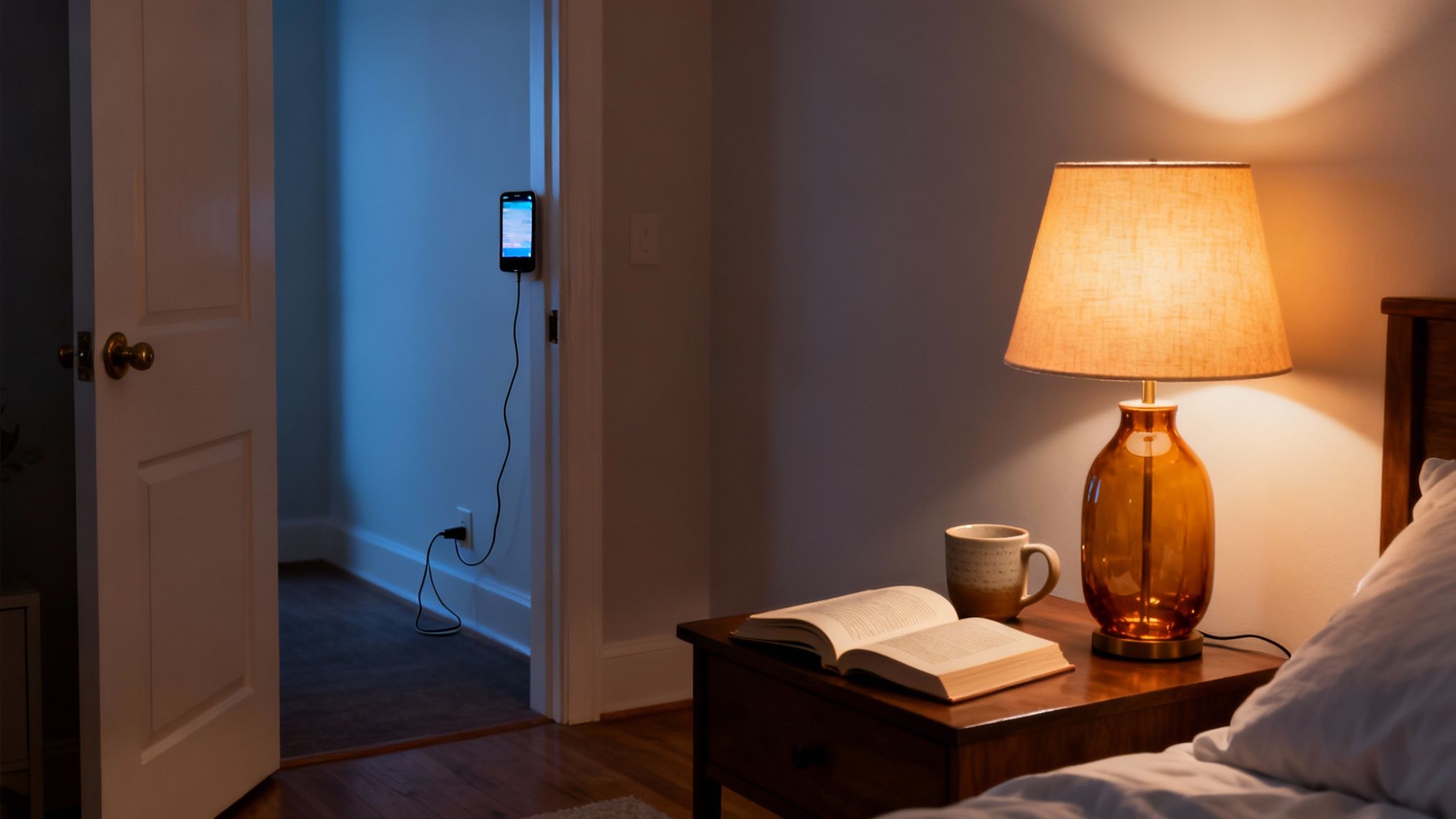
This strategy is deeply rooted in neuroscience. Research highlights how blue light from screens suppresses melatonin, the hormone that signals your brain it’s time to sleep. This disruption to your natural circadian rhythm can lead to difficulty falling asleep and lower-quality rest, which can negatively affect mood and focus the next day. By physically removing devices from the bedroom, you eliminate the temptation for late-night scrolling, a key cause of the mental exhaustion associated with what is known as digital fatigue.
How to Implement This Strategy
To make your Digital Sunset effective, focus on building an environment that makes the right choice the easiest one. As you establish evening screen curfews, you might find broader strategies for successfully limiting phone use beneficial.
- Real-World Example: David struggles to fall asleep, often scrolling news sites until midnight. He implements a 9:30 PM Digital Sunset. He sets an alarm, and when it goes off, he plugs his phone into a charger in the kitchen. He then spends 30 minutes reading a physical book in bed with a warm lamp. Within a week, he finds he is falling asleep faster and waking up feeling more refreshed.
- Set a “Time to Unplug” Alarm: Use a physical alarm clock or a smart home device to announce your screen curfew 15-30 minutes before it begins.
- Create a Charging Station Outside the Bedroom: Designate a specific spot in your kitchen or living room where all devices must be charged overnight. This removes the primary source of temptation.
- Invest in an Analog Alarm Clock: Replace your phone’s alarm function with a simple, dedicated alarm clock. This breaks the powerful habit of reaching for your phone first thing in the morning.
- Curate Your Analog Alternatives: Have your replacement activities ready. Lay out a physical book on your nightstand, place a journal and pen nearby, or prepare a cup of herbal tea.
Editor’s Note: What Actually Works to Reduce Screen Time
After reviewing these science-backed strategies, the most effective approach isn’t a single hack but a combination of environmental design and intentional friction. The methods that work best are those that make mindless scrolling harder and focused, analog activities easier.
What Actually Works: The Digital Sunset (Strategy #10) combined with App Deletion (Strategy #5) for your top 1-2 time-wasting apps offers the biggest return on investment. Removing devices from the bedroom is non-negotiable for better sleep and reduced evening screen time. Deleting the most addictive apps forces you to question your usage every single time, which is a powerful habit-breaker.
Who This Is Best For: These strategies are ideal for busy professionals and students who feel their focus is fragmented and their leisure time is being consumed by low-quality digital activities. If you feel like you’re constantly reacting to notifications rather than driving your own day, this is for you.
Important Caveats: A “dopamine detox” can be an intense reset but is not a sustainable long-term solution on its own. It’s best used as a catalyst to kickstart other habits. Likewise, accountability systems work wonders for some but can feel like a chore for others. The key is to experiment and build a system that aligns with your personality and lifestyle, rather than trying to force a method that doesn’t fit.
Disclaimer: This article may contain affiliate links. The content provided is for educational and informational purposes only and does not constitute medical or psychological advice. It is not intended to be a substitute for professional consultation, diagnosis, or treatment. Always seek the advice of a qualified health provider.
Frequently Asked Questions (FAQ) About Ways to Reduce Screen Time
These answers focus on practical systems, not guilt. In other words, you’ll reduce screen time by changing cues, access, and routines.
Quick wins you can do today
1. What is the fastest way to reduce screen time?
The fastest way is to add friction. First, delete (or hide) your top time-waster. Next, charge your phone outside your bedroom. As a result, urges fade sooner because access is not instant.
- Remove the app icon from your home screen (or uninstall it).
- Log out, then turn off saved passwords for that app.
- Set a “plug-in time” at night, then keep the charger in another room.
2. What are the best ways to reduce screen time without relying on willpower?
Use environment design. For example, silence non-essential notifications, move distracting apps off the first screen, and keep your phone out of reach during focus blocks. That way, “checking” stops being automatic.
- Turn off badges and banners for social, news, and shopping apps.
- Use Focus Mode or Do Not Disturb during work and sleep hours.
- Keep the phone in a drawer, bag, or another room during deep work.
3. Does grayscale mode actually help reduce screen time?
Yes. Grayscale makes apps less stimulating because bright colors lose their pull. Consequently, scrolling feels less rewarding, so stopping is easier.
If full-time grayscale feels too strict, start with evenings. Then expand the window as it gets easier.
Brain, habits, and motivation
4. How does reducing screen time benefit focus and executive function?
It reduces constant task switching. Over time, your brain regains stamina for sustained attention. As a bonus, it can lower mental fatigue because you stop reacting to nonstop prompts.
5. Why do I keep picking up my phone even when I don’t want to?
Because habits run on cues and rewards. Notifications, boredom, and stress can all become cues. Then the “reward” is novelty. However, you can break the loop by removing cues and adding a replacement action.
- Replace “check phone” with “stand up + 5 deep breaths.”
- Keep a book or notebook visible, and put the phone away.
- Use a short timer, so breaks stay short and intentional.
6. How much screen time is “too much” for adults?
There is no single number that fits everyone. Instead, track discretionary screen time (scrolling and entertainment). If it replaces sleep, movement, deep work, or real connection, it is too much for your baseline.
Work, school, and day-to-day systems
7. What’s the best first step if I feel overwhelmed by my phone?
Start with a Notification Audit. In 15 minutes, turn off everything except calls and messages from key people. Then wait 24 hours. After that, re-enable only what you truly missed.
8. How do I reduce screen time at work when I need my computer all day?
Reduce switching, not productivity. First, set 1–3 communication windows for email and chat. Next, close those tabs outside the windows. Finally, keep your phone off your desk.
- Use 30–90 minute focus blocks, then take short off-screen breaks.
- Batch messages at set times, so interruptions drop sharply.
- When possible, keep one screen for work only.
9. Are screen time reduction apps worth using?
Yes, if you treat them as guardrails. They can block apps, limit websites, and enforce downtime. Still, results improve when you pair the tool with a clear routine and a replacement activity.
10. What if my job or school requires heavy screen time—how do I still improve?
Separate required use from recovery. During the day, take brief off-screen breaks each hour. In the evening, protect a Digital Sunset. That boundary supports sleep and attention recovery.
- Every hour: 2–5 minutes away from the screen.
- Night: a fixed cutoff time for scrolling and entertainment.
- Bedroom: phone charges outside the room when possible.
Tip: This FAQ is written to support readability and SEO. The grouped subheadings also prevent long, unbroken sections.
Explore the Mind Clarity Hub Library
Practical books on focus, digital habits, resilience, and building a calmer mind.

The Power of Clarity
Unlock mental focus, build momentum, and create the life you were meant to live.
View book →
AI & ChatGPT for Beginners
No PhD needed — a 2025 guide to AI, prompts, and productivity without coding.
View book →
Zen in the Digital Jungle
Mindfulness for a chaotic world.
View book →
The Slow Reset
Mindful living in a fast-paced world.
View book →
Perfectly Imperfect
Stop self-criticism, set boundaries, and embrace the real you.
View book →
Reclaiming Silence
A dopamine detox guide to finding peace in a noisy world.
View book →
The Focused Freelancer
Productivity, pricing & positioning for independents in 2025.
View book →
ChatGPT Side Hustle System
Launch your AI-driven online business in 30 days.
View book →
Burnout, Interrupted
A proven path to restore energy and reclaim your life.
View book →
Attention Unleashed
Focus strategies for the distracted mind.
View book →
Side Hustle Launchpad
Your quick-start guide to extra income.
View book →
Digital Clarity
Rewire your brain, escape dopamine traps & regain focus.
View book →
Break the Scroll
Reduce screen time and take back control of your life.
View book →
Climate Compassion
Transform eco-anxiety into empowered action.
View book →
Village Mentality
The power of community for mental wellness.
View book →
Restful Nights
Overcoming sleep anxiety in a 24/7 world.
View book →
Connected Again
Combat loneliness and build meaningful relationships.
View book →
Focus Recharged
Mastering attention and productivity in the digital era.
View book →
Marketing Magic with ChatGPT
AI-powered content, campaigns, and copywriting to grow faster.
View book →
The 6-Figure Creator
Turn knowledge into passive income with books, courses & AI.
View book →
Burnout Breakthrough
Reset your work-life balance and thrive in 2025.
View book →
The Emotionally Intelligent Man
A modern guide to self-awareness and communication.
View book →
AI Personalized Wellness
Create your custom health plan with data-driven habits.
View book →
Everyday AI Made Easy
Use ChatGPT and smart tools to simplify life.
View book →
Money Mindfulness
A financial wellness guide for Gen Z & Millennials.
View book →
Startup Smarter with AI
ChatGPT strategies and tools to grow your business.
View book →
ChatGPT for Writers & Creators
Unlock AI-powered brainstorming, drafting & editing.
View book →