


Published:
Quick answer: an evening smartphone boundaries checklist for better sleep is a small set of phone rules you run before bedtime: silence nonessential alerts, park high-stimulation apps, dim the screen, move the charger away from the bed, and decide when the phone is allowed back in the morning. The goal is not to become anti-technology. The goal is to keep your phone from making the last hour of the day louder than it needs to be.
This guide is written for adults who use a phone for work, family, alarms, or reading, yet want a calmer night without a dramatic digital detox. It also supports readers building a bigger digital clarity plan through Break the Scroll, Restful Nights, and the full Jeremy Jarvis books hub.
What is an evening smartphone boundaries checklist for better sleep?
An evening smartphone boundaries checklist for better sleep is a repeatable shutdown routine for your phone. It decides what your phone can interrupt, where it sleeps, which apps are available, and what you do when you are tempted to reopen it. A checklist works better than a vague promise because bedtime decisions happen when willpower is already low.
The checklist is not medical treatment, and it does not replace care for insomnia, anxiety, shift-work sleep problems, or other sleep conditions. It is a practical environment design tool. You are reducing light, alerts, novelty, and late-night decision friction so your evening has a clearer finish line.
Why phone boundaries work better than willpower at night
Phone use near bedtime is hard to manage because the phone mixes practical tools with high-reward distractions. The same device can hold your alarm, family messages, meditation app, shopping tabs, work chat, breaking news, and short videos. A tired brain treats that mix as one open door.
Free download: 7-Day Mind Clarity Reset
A short daily reset you can actually stick with (no fluff).
Sleep education sources commonly recommend reducing electronic stimulation before bed because light, alerts, and emotionally engaging content can delay wind-down. The Sleep Foundation explains how electronics can affect sleep, while CDC sleep guidance emphasizes regular sleep habits and a supportive routine. A recent open-access study in PMC on adult screen use and sleep timing also reinforces why evening screen habits deserve specific boundaries.
That does not mean every person needs a two-hour phone ban. It means your phone should stop behaving like an always-open room. The strongest evening smartphone boundaries checklist for better sleep is usually simple enough to repeat on a normal Tuesday.
How do you use this checklist tonight?
Use the checklist in three passes. First, set the phone rules while you are still alert. Second, move the phone out of your easiest reach. Third, create a morning re-entry point so the boundary feels complete rather than punitive.
| Pass | What to decide | Fast option | Better option |
|---|---|---|---|
| Notifications | Who can interrupt? | Do Not Disturb | Sleep Focus or Bedtime mode with allowed contacts |
| Apps | What is off limits? | Move social apps off the home screen | Set app limits or block lists after a fixed time |
| Placement | Where does the phone sleep? | Across the room | Outside the bedroom with a backup alarm |
| Re-entry | When can you check it? | After getting out of bed | After light, water, and first planned action |
If you only do one thing tonight, move the charger. A phone on the pillow side of the bed asks for attention even when it is silent. A phone across the room becomes a tool again.
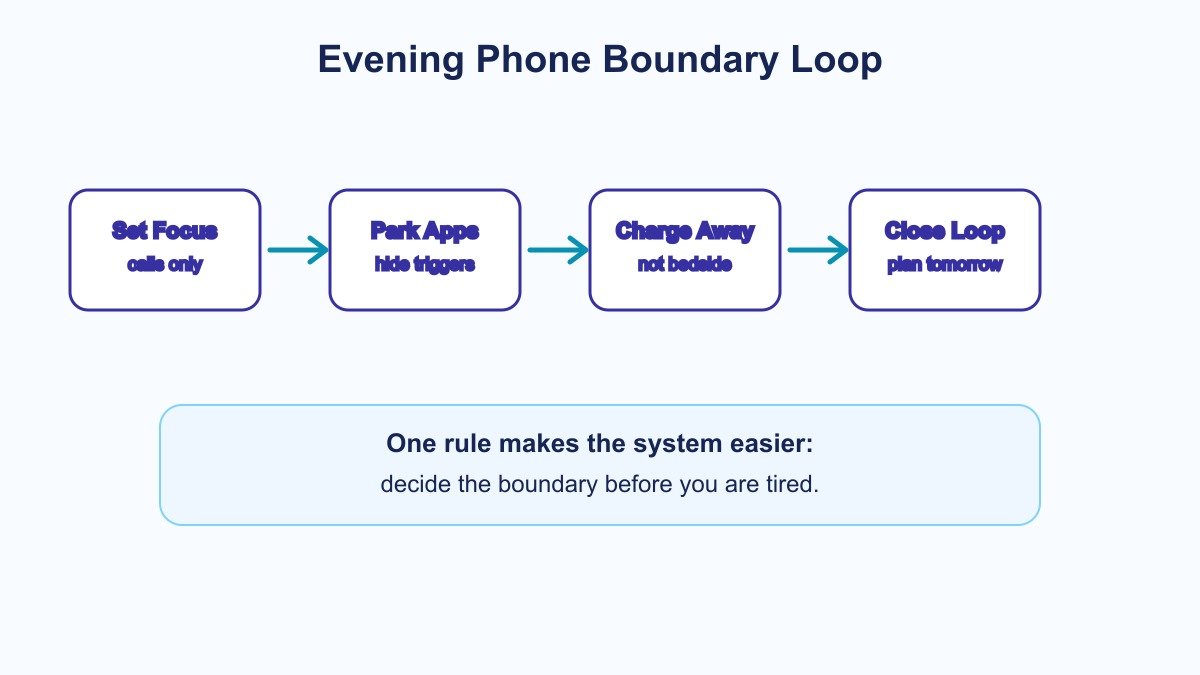
The 10-minute evening phone boundary routine
This routine is designed to fit inside the last practical part of the evening, before teeth brushing, reading, journaling, or lights out. Start about 30 to 60 minutes before bed if you can. If that is unrealistic, start with the last 10 minutes.
Minute 1: choose the phone’s bedtime
Pick a clear time, not a mood. For example: “At 9:45, the phone goes to the charger.” A clock time is easier to honor than “when I feel done scrolling.” If your evening schedule changes, tie the boundary to an anchor such as after dishes, after the kids are down, or after the final work check.
Minute 2: turn on the right mode
On iPhone, Apple provides Focus and Sleep tools that can allow chosen people, customize screens, and quiet apps. Apple documents those settings in its Focus setup guide. On Android, Google Digital Wellbeing includes Bedtime mode, app timers, Focus mode, grayscale, and Do Not Disturb options through the Digital Wellbeing feature set.
Minute 3: allow the real exceptions
A good boundary has humane exceptions. Allow partner, caregiver, school, emergency, or work-on-call contacts if needed. Do not make the boundary so strict that you feel anxious about missing something important. The point is to remove noise, not support a brittle rule.
Minute 4: hide the apps that pull you back
Put the most tempting apps behind friction. Move them off the home screen. Log out if needed. Use app limits for social, shopping, short video, news, and work chat. If you need one calming app, place only that app on a low-stimulation evening screen.
Minute 5: dim and simplify the screen
Lower brightness, use night shift or night light tools, and try grayscale if color pulls you into browsing. This is not magic. It is a cue. A duller phone is less inviting, and that makes the next boundary easier.
Minute 6: write tomorrow’s first action
Many people reopen the phone because the next day feels unresolved. Before you park the device, write one small first action for tomorrow. It can be “send invoice,” “pack lunch,” or “open draft.” This gives your brain a handoff.
Minute 7: move the charger
Place the charger across the room, in the hallway, in the kitchen, or at a small charging station. If you need your phone as an alarm, put it far enough away that you must stand up to turn it off. If that creates stress, use a separate alarm clock.
Minute 8: choose a replacement cue
Do not leave a blank space and expect it to feel relaxing. Replace phone time with one small cue: a book, a paper checklist, a stretch, a glass of water, a two-minute tidy, or the pre-sleep journaling template. The replacement should be boring in a good way.
Minute 9: close open loops
If a task feels urgent, write it down instead of solving it from bed. A parking list keeps the thought from becoming a search session. Use one line per task. Stop when you have captured enough to continue tomorrow.
Minute 10: decide the morning rule
The evening boundary is easier when the morning is clear. Decide whether the phone returns after you stand up, after water, after breakfast, or after the first focus block. A morning rule prevents revenge checking from becoming the first habit of the day.
What should be on the checklist?
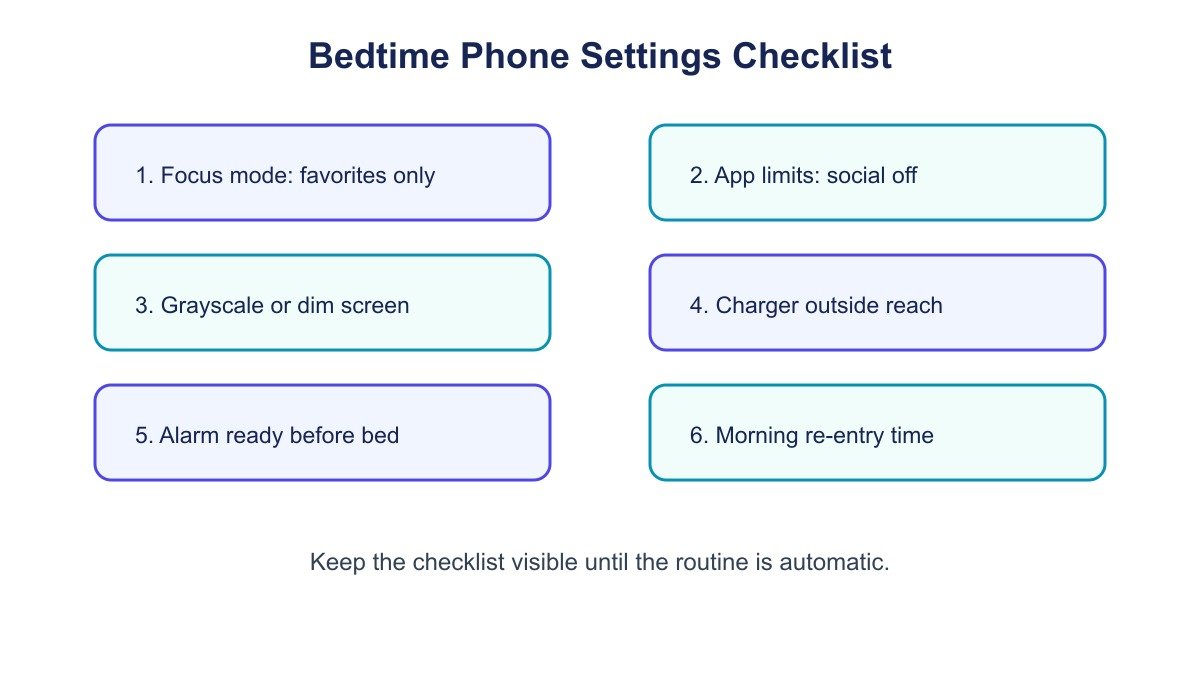
Use this as the default evening smartphone boundaries checklist for better sleep. Keep it visible for one week, then simplify it to the three steps you actually need.
- Sleep Focus, Do Not Disturb, or Bedtime mode is scheduled.
- Emergency contacts are allowed, and everything else is quiet.
- Social, shopping, news, short video, and work chat are hidden or limited.
- Brightness is low, and grayscale or night mode is on if helpful.
- The next morning’s first action is written outside the phone.
- The phone is charging away from the bed.
- A replacement cue is ready: book, paper note, stretch, water, or journal.
- The morning re-entry rule is clear.
If that list feels like too much, use the short version: quiet it, park it, replace it. A simple evening smartphone boundaries checklist for better sleep repeated nightly beats a perfect checklist used twice.
iPhone settings that support evening phone boundaries
For iPhone users, the most useful starting point is Focus. You can create a Sleep Focus, choose allowed people, choose allowed apps, and simplify the Lock Screen. The official Apple guidance is the best place to check exact menus because iOS labels change over time.
| Need | iPhone setting | Boundary it supports |
|---|---|---|
| Allow family but silence noise | Sleep Focus allowed people | Important contact access without every app alert |
| Reduce visual prompts | Custom Lock Screen and Home Screen | Fewer tempting apps at bedtime |
| Protect the sleep window | Sleep schedule and Focus schedule | Automatic evening start |
| Reduce repeated checking | Notification summaries and app limits | Less novelty in the final hour |
The key is to make the setting match your life. If a parent, partner, or client must reach you, allow that route. If one reading or sound app helps you wind down, keep it available. Remove the rest from the bedtime path so the evening smartphone boundaries checklist for better sleep stays focused.
Android settings that support evening phone boundaries
Android phones vary by manufacturer, but the Digital Wellbeing and Bedtime mode pattern is similar: reduce notifications, fade the screen, and set a schedule. Google describes Digital Wellbeing tools such as app timers, Focus mode, and Bedtime mode on the Digital Wellbeing app page and related Android support materials.
| Need | Android setting | Boundary it supports |
|---|---|---|
| Quiet the phone | Do Not Disturb or Bedtime mode | Fewer sleep interruptions |
| Make scrolling less rewarding | Grayscale during Bedtime mode | Lower pull from colorful feeds |
| Limit problem apps | App timers or Focus mode | Clear stop point for distracting apps |
| Start automatically | Bedtime schedule | Boundary runs without a nightly debate |
If your phone brand uses different labels, search Settings for “Digital Wellbeing,” “Bedtime,” “Focus,” “Do Not Disturb,” or “Modes.” The exact path matters less than the outcome: fewer alerts, fewer triggers, and a phone that is not waiting beside your pillow. This keeps the evening smartphone boundaries checklist for better sleep practical across devices.
Where should your phone charge at night?
The best charging spot is the nearest place that makes checking inconvenient without making life harder. For some readers, that is a dresser. For others, it is the kitchen, hallway, office, or a shelf outside the bedroom. Start with distance before you buy anything.
| Charging spot | Best for | Watch out for |
|---|---|---|
| Across the bedroom | People who use a phone alarm | You may still check it after lights out |
| Hallway shelf | Light sleepers and couples | Emergency contact settings need to be right |
| Kitchen station | Strongest separation | Needs a separate alarm or smart speaker alarm |
| Home office | Remote workers | Can reopen work if the room is not closed |
Do not turn the charger into a productivity shrine. A cable, a small tray, and a paper note are enough. If the charging station becomes complicated, the phone will migrate back to the bed.
What if you need the phone for sleep sounds, alarms, or family?
Keep the useful function and remove the open-ended browsing. A phone can still provide a white-noise app, audiobook timer, medication reminder, or family emergency route. The boundary is not “never use your phone.” It is “only the intended tool remains easy.”
For sleep sounds, start the audio before the phone goes to its spot. For alarms, place the phone across the room or use a separate clock. For family, allow selected contacts through Sleep Focus or Do Not Disturb. For on-call work, keep the on-call route but block every nonessential app.
This is where many plans fail: they confuse access with invitation. You may need access. You do not need the phone inviting you into every feed at midnight.
What should you do instead of scrolling?
The replacement should be short, repeatable, and not more stimulating than the phone. If you replace scrolling with an ambitious routine, you may avoid both. Choose a small action that gives your nervous system a familiar closing cue.
- Read two pages of a paper book.
- Write tomorrow’s first action on a sticky note.
- Do a three-minute stretch with the lights low.
- Set clothes, water, or breakfast supplies for the morning.
- Use the pre-sleep journaling template if looping thoughts are the real pull.
- Use the gentle evening wind-down routine if you want a fuller shutdown.
The best replacement is not necessarily relaxing on the first night. It is simply less stimulating and easier to repeat.
Common mistakes with evening phone boundaries
Most people do not fail because they lack discipline. They fail because the boundary has too many loopholes, starts too late, or depends on a future tired version of themselves to make a good decision.
| Mistake | Why it breaks | Better rule |
|---|---|---|
| Keeping the phone beside the pillow | Reach turns into checking | Charge across the room or outside the bedroom |
| Blocking every contact | Creates anxiety about emergencies | Allow a short emergency contact list |
| Starting after you are exhausted | Too much decision friction | Start after a stable evening anchor |
| Using the phone for every replacement habit | The tool reopens the feeds | Use paper, a book, or a simple offline cue |
| Making a huge detox rule | Feels like punishment | Use a narrow bedtime rule first |
If you already have a broader digital declutter plan, this article should not replace it. Use the digital declutter checklist for screens across the week, then use this page for the evening sleep boundary.
A seven-night phone boundary experiment
Run the experiment for seven nights before judging it. One night can be distorted by stress, weather, family needs, caffeine, work, travel, or a bad mattress. Seven nights give you enough repetition to see what actually helps.
- First night: choose the phone bedtime and charger spot.
- Second evening: add Sleep Focus, Do Not Disturb, or Bedtime mode.
- Third pass: remove the top two tempting apps from the evening screen.
- Fourth reset: write tomorrow’s first action before parking the phone.
- Fifth trial: test a replacement cue for 10 minutes.
- Sixth check: adjust emergency contacts and app exceptions.
- Final review: keep the three rules that made the largest difference.
Track only three things: when the phone was parked, whether it stayed parked, and how the morning felt. Do not over-measure. The point is a cleaner routine, not another dashboard.
Examples for different households
For parents: allow school, family, and emergency contacts, then block everything else. Keep the phone on a dresser if a child may need you. Put a paper card beside the charger that says what is allowed: family calls, medication reminders, and alarms. Everything else can wait.
For remote workers: create a separate work shutdown before the phone boundary. Close team chat, write the next work action, and set a morning re-entry rule. If the phone is your work device, move work apps into a folder named Tomorrow so the label itself becomes a cue.
For students: park the phone after the last study block and keep only alarm, calendar, and a calm audio app available. If group chats run late, use a status message that says you check again in the morning.
For couples: agree on light, sound, and charging zones. One person can keep an emergency phone nearby while the other charges outside the room. The shared goal is less interruption, not identical behavior.
Make the boundary easier to keep
The environment should do most of the work. Put a book where the phone used to sit. Place the charger where you naturally walk after brushing your teeth. Keep a pen and paper at the charging station. If you use smart lights or a routine app, set the evening cue to start before your usual scrolling window.
Expect friction for the first few nights. The habit may feel strangely quiet. That is useful feedback. You are noticing how much stimulation the phone had been adding. Keep the rule small, repeat it, and let the evening become more predictable. Over time, the evening smartphone boundaries checklist for better sleep should feel like a normal closeout rather than a restriction.
How this connects to digital clarity
An evening smartphone boundaries checklist for better sleep is one piece of digital clarity. It gives your day a boundary. That boundary protects rest, and rest protects attention the next day. If your larger issue is constant screen pull, read Digital Clarity vs Digital Detox next. If the issue is a phone habit that feels automatic, Break the Scroll is the more direct book path.
If sleep anxiety, racing thoughts, or bedtime worry are the main problem, Restful Nights is the more relevant reader path. If you want the full shelf by topic, start at the Mind Clarity books hub.
When should you get more help?
Phone boundaries can support better sleep habits, but they are not a cure-all. If you regularly cannot sleep, wake often, feel unsafe, experience severe anxiety, or feel exhausted despite enough time in bed, consider talking with a qualified health professional. Practical routines are useful, but persistent sleep problems deserve real support.
Also look beyond the phone. Caffeine timing, alcohol, shift work, pain, room temperature, caregiving, workload, and stress can all affect sleep. A phone boundary is one lever. It works best when it is part of a realistic evening system.
The simplest version to save
Save this version if the full article feels like too much: at the same time each evening, turn on Sleep Focus or Bedtime mode, write tomorrow’s first action, charge the phone outside easy reach, and do one low-stimulation replacement for 10 minutes. That is the core evening smartphone boundaries checklist for better sleep.
Frequently asked questions
Is it bad to sleep with your phone next to your bed?
For many people, the issue is not the phone’s existence. It is easy access to alerts, light, and stimulating content. If the bedside phone leads to checking, move it farther away and keep only essential interruptions enabled.
How long before bed should I stop using my phone?
Start with 30 minutes if a longer window feels unrealistic. Some sleep guidance recommends a longer electronics buffer, but a consistent 30-minute boundary is better than an ideal rule you never use.
What phone settings are best for sleep?
Use Sleep Focus, Do Not Disturb, Bedtime mode, grayscale, app limits, and a schedule. The best settings are the ones that silence nonessential alerts while preserving true emergency access.
Can I still use my phone as an alarm?
Yes, but place it across the room so turning it off requires standing up. If that still leads to checking, use a separate alarm clock and charge the phone outside the bedroom.
What if my partner does not want the same phone rules?
Make the boundary personal and practical. Use your own charger spot, your own Focus settings, and a low-light agreement. You do not need identical rules to reduce your own friction.
Should I buy a lockbox or phone safe?
Only if simpler steps fail. Try charger placement, app limits, Focus settings, and a paper replacement first. A lockbox can help some people, but it is not required for a strong evening boundary.
Sources and update note
Last reviewed: June 20, 2026. This guide uses practical sleep-habit framing and current public documentation from CDC sleep and health guidance, Sleep Foundation electronics and sleep guidance, Sleep Foundation blue light guidance, Apple Focus support, Google Digital Wellbeing information, and the open-access PMC study linked above.
Helpful resources for your next step
Affiliate disclosure: As an Amazon Associate, Mind Clarity Hub may earn from qualifying purchases at no extra cost to you. Use this link only if it genuinely helps your planning.
If Evening Smartphone Boundaries Checklist for Better Sleep is a routine you want to keep using, a simple workbook, planner, or desk tool can make the steps easier to repeat.
Compare related planners, workbooks, and organization tools on Amazon.
