...

Tag: focus habits

  • Attention Residue at Work: A 7-Step Reset for Focus

    Attention Residue at Work: A 7-Step Reset for Focus

    Attention residue at work is the mental drag that follows you after a meeting, message thread, tab switch, or unfinished task. You are technically doing the next thing, but part of your mind is still holding the previous thing open.

    That drag matters because knowledge work depends on clean attention. Writing, planning, analysis, editing, learning, and creative problem solving all ask your brain to hold a few important ideas at once. When yesterday’s Slack thread, the unfinished email, and the next meeting are all still humming in the background, focus gets expensive.

    This guide gives you a practical reset for attention residue at work. It is not a promise to make every day perfectly calm. It is a simple focus recovery system you can use between meetings, after interruptions, before deep work, and at the end of a noisy workday.

    Reader note: This is educational self-improvement content, not medical advice. If distraction, anxiety, low mood, sleep loss, or work stress feels severe or persistent, consider talking with a qualified professional.

    What Is Attention Residue At Work?

    Attention residue at work happens when your mind keeps processing the previous task after you have moved to the next one. You might leave a meeting and open a writing project, but your thoughts are still replaying a comment from the call. You might answer a client message, then try to analyze numbers, but part of your attention is still waiting for the reply.

    The problem is not weakness. It is a predictable cost of switching contexts. Your brain does not always close one mental file just because your calendar says the next block has started. This is why a task can look simple on paper and still feel hard in real life.

    A good reset does three things. It closes the last task, clears the immediate friction, and gives the next task a clean starting line. That is the heart of a useful attention residue at work routine.

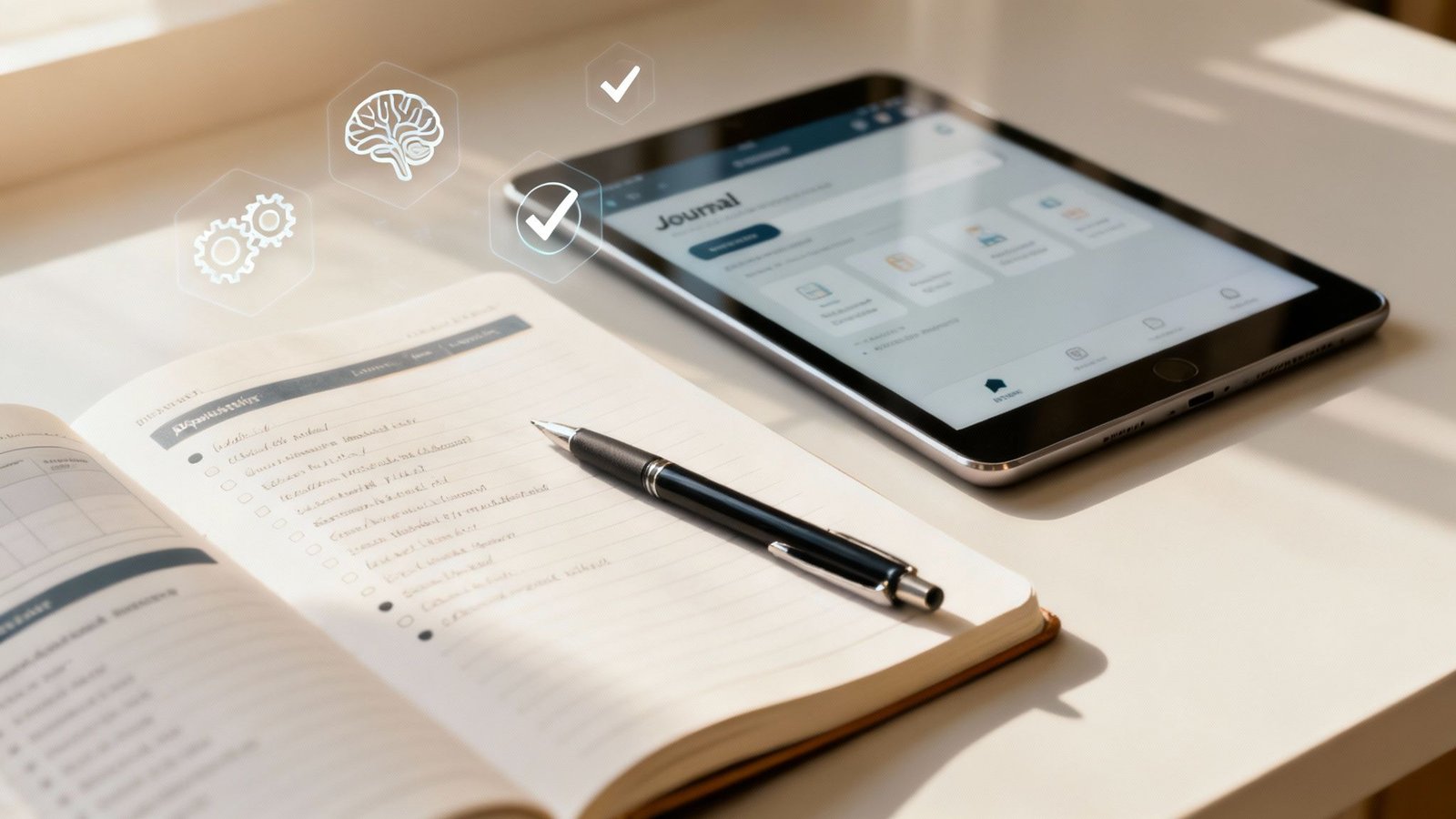
    attention residue at work reset with a notebook and laptop for focused knowledge work
    A short written reset can reduce attention residue after meetings, messages, and task switching.

    Why Does Attention Residue At Work Feel Worse Now?

    Modern work creates more unfinished loops than most people can close cleanly. A normal day may include video meetings, email, chat tools, shared documents, dashboards, notifications, personal texts, and browser tabs. Each tool can be useful. Together, they create a workday that is constantly asking you to re-orient.

    Microsoft’s Work Trend Index has reported that many workers do not feel they have enough uninterrupted focus time, and its research on the β€œinfinite workday” describes how meetings, messages, and notifications fragment attention. That does not mean every tool is bad. It means your day needs a recovery rhythm, not only a productivity app.

    Sleep and stress make the pattern stronger. The CDC explains that adults generally need seven or more hours of sleep, and sleep supports attention, memory, mood, and daily performance. The CDC/NIOSH guide to stress at work also frames job stress as a real workplace issue, not simply a personal flaw.

    When sleep is short, stress is high, and the workday keeps switching channels, attention residue at work becomes easier to feel. The answer is not to shame yourself into harder focus. The answer is to build small transition rituals that make focus possible again.

    How Do You Reset Attention Residue At Work Quickly?

    The fastest reset is a three-minute close-and-open ritual. You close the last loop, name the next target, and remove one obvious distraction before you begin. It sounds small because it is small. That is the point. A reset you can use on a busy Tuesday is better than a perfect system you never touch.

    1. Close: Write one sentence that captures where the last task stands.
    2. Park: Write the next action for that old task so your brain does not keep rehearsing it.
    3. Clear: Close unrelated tabs, silence one notification source, or move your phone away.
    4. Choose: Name the next task in one plain sentence.
    5. Start: Work for ten minutes before judging whether you feel focused.

    This quick version works well after meetings, before writing, after checking email, and before any task that requires judgment. If your work is scattered, use the short reset many times. If your day is overloaded, use the longer routine below once or twice.

    The 7-Step Attention Residue At Work Routine

    This routine is designed for knowledge workers who need to recover focus without disappearing from their responsibilities. Use it before a deep work block, after a run of meetings, or when your brain feels full but you still have one meaningful task left.

    1. Capture The Open Loops

    Start by writing down the unfinished thoughts that are pulling at you. Do not organize them yet. List the email you need to send, the decision you are waiting on, the message you keep checking, the idea from the meeting, and the personal errand that keeps interrupting your mind.

    This step lowers the pressure to remember everything. Your brain can stop acting like a sticky-note wall. The goal is not a beautiful list. The goal is a trusted capture point. If attention residue at work feels like mental clutter, this step gives the clutter a place to land.

    2. Mark What Is Actually Next

    After capture, pick the next real action for each open loop. β€œProject” is not an action. β€œSend Maya the revised outline” is an action. β€œBudget” is not an action. β€œReview the two changed expense lines” is an action.

    Many people stay foggy because their lists are full of nouns. A noun reminds you that something exists, but it does not tell your brain what done looks like. A next action reduces the mental debate. You are no longer carrying a vague worry. You are carrying a clear step.

    3. Choose One Focus Target

    A focus target is the one result that would make the next block worthwhile. It should be small enough to finish or clearly move forward in one sitting. β€œWork on strategy” is too wide. β€œDraft the first three bullets for the strategy memo” is better.

    Write the target before you open the work. This protects you from starting with a search, a dashboard, or a feed. It also makes the next ten minutes easier. When you know the target, you can return to it when your attention wanders.

    4. Remove The Most Obvious Friction

    You do not need a perfect environment. Remove the one distraction most likely to pull you away. Close the inbox. Put the phone face down. Move chat to do-not-disturb for twenty minutes. Hide the extra browser window. Clear the papers that belong to a different project.

    Research on reward-linked distractions shows that attention can be captured by cues even when you are trying to focus. One useful example is a study indexed by PubMed on reward-associated distractors and attention. In normal language, tempting cues matter. Reduce the strongest cue first.

    5. Use A Ten-Minute Re-Entry Block

    Do not demand instant deep work. Start with ten minutes. Open the document, outline the section, sort the notes, or solve one small piece. The first ten minutes are a re-entry ramp. They tell your mind, β€œThis is where we are now.”

    If the task still feels hard after ten minutes, you can reassess. Often, the fog lifts once motion begins. Attention residue at work feels strongest at the doorway between tasks. A short re-entry block gets you through that doorway.

    6. Add A Recovery Marker

    A recovery marker is a tiny signal that a work block has ended. It can be a check mark, a closing note, a two-line summary, a saved file name, or a sentence that says what to do next. The marker keeps the task from following you into the next block.

    Use this sentence: β€œWhen I return, the next step is…” Then finish it. This helps future-you restart faster. It also reduces the chance that the task keeps running in the back of your mind for the next hour.

    7. Protect The Next Transition

    The final step is to make the next switch gentler. Leave two minutes between meetings. Put a buffer after high-emotion calls. Avoid checking messages in the minute before deep work. Decide when you will return to email instead of letting email decide for you.

    This is where a routine becomes a system. A single reset helps today. A protected transition changes the shape of the week. If you want a broader book-based approach, the Focus Recharged productivity book and the Mind Clarity Hub book library are natural next steps.

    When Should You Use This Routine?

    You do not need the full routine every hour. Match the reset to the moment. A tiny transition is enough after a simple task. A stronger reset helps after a messy meeting, a conflict, a difficult decision, or a long period of reactive work.

    Workday Moment Best Reset Time Needed Why It Works
    After a normal meeting Write the next action and close the notes 2 minutes Prevents the meeting from leaking into the next task
    Before deep work Capture loops, choose one target, clear one distraction 5 minutes Creates a clean starting line
    After email or chat Park replies and set the next check-in time 3 minutes Stops constant monitoring
    After conflict or stress Take a longer reset with breathing, notes, and a short walk 10-15 minutes Gives your body time to settle before judgment-heavy work

    For deep work support, pair this page with how to train your brain to focus and how to do deep work. Those guides help build the larger skill. This attention residue at work routine helps you recover between real-world interruptions.

    How Can Teams Reduce Attention Residue At Work?

    Individuals can build better rituals, but teams create many of the switches. When every meeting ends at the exact moment the next one begins, people carry unfinished thoughts all day. A channel that treats everything as urgent eventually makes nothing feel clear. Work scattered across too many tools turns attention into a navigation problem before the real work even starts.

    Teams can help by making transitions visible. End meetings five minutes early. Close each meeting with decisions, owners, and next actions. Use fewer β€œquick pings” when an async note would work. Batch status updates. Protect focus blocks on shared calendars.

    • Give every meeting a decision, discussion, or update label.
    • End with β€œwho does what by when” so people do not keep replaying the call.
    • Keep one source of truth for project status.
    • Use urgent channels only for truly urgent work.
    • Normalize short recovery buffers after heavy meetings.

    This is not about becoming less responsive. It is about becoming more reliable. People do better work when they are not constantly trying to remember where they left their attention.

    What If Your Workplace Is Noisy Or Reactive?

    A noisy workplace does not make the routine useless. It means you need a smaller version. If you cannot control your calendar, control the first thirty seconds after a switch. Write the next action. Close one loop. Name the next task. Even a tiny ritual can keep the day from becoming one long blur.

    Use β€œmicro-boundaries” when larger boundaries are not possible. Put headphones on for a ten-minute block. Move one task to paper. Turn off badges but leave direct calls available. Ask your team to mark messages as urgent only when they truly need immediate action.

    If the noise is chronic, look at workload and expectations too. A focus routine can help you recover, but it cannot fix an impossible job design by itself. That is why workplace-level resources from NIOSH and organizational mental health groups matter. Personal habits and healthier systems should work together.

    Can This Routine Help Burnout?

    A focus reset can help with daily overload, but burnout is bigger than a messy inbox. Burnout often involves exhaustion, cynicism, and a reduced sense of effectiveness. If that sounds familiar, use this routine as one small support, not as the whole solution.

    The practical value is that recovery markers make work feel less endless. You can finish a block, name what remains, and step away with less mental residue. That helps evenings feel more separate from work. It also makes tomorrow easier to restart.

    For a wider reset, read Burnout Breakthrough or the Work-Life Reset Workbook. Those pages fit better when the issue is not just focus, but the whole pattern of work, rest, boundaries, and recovery.

    A Simple Daily Template

    Use this template for one week. Keep it plain. The more complicated the template becomes, the less likely you are to use it when the day gets loud.

    1. Morning: Name the one focus target that matters most before opening messages.
    2. Before meetings: Write the outcome you need from the conversation.
    3. After meetings: Capture decisions, next actions, and anything you are waiting on.
    4. Before deep work: Close unrelated tabs and start a ten-minute re-entry block.
    5. End of day: Write β€œWhen I return, the next step is…” for unfinished work.

    This template turns attention residue at work into something you can notice and handle. You are not trying to become a machine. You are giving your attention a fair chance to land.

    How To Measure Whether It Is Working

    Do not measure the routine by whether you feel focused every minute. That standard will fail on normal human days. Measure whether you recover faster, restart easier, and carry fewer unfinished loops into the evening.

    • Important work starts with less wandering.
    • Message checks happen less often during focus blocks.
    • The next action is clear when returning to unfinished tasks.
    • Evenings carry fewer open mental loops.
    • Less pressure builds around keeping every task in your head.

    If none of those improves after a week, simplify the routine. Use only capture, next action, and ten-minute start. A small routine used daily beats a large routine abandoned by Wednesday.

    What Should You Avoid When Resetting Focus?

    The biggest mistake is turning the reset into another performance test. A focus routine should make the next step easier. It should not become a new reason to criticize yourself. If the reset takes twenty minutes of planning before every task, it is too heavy for the real workday.

    Avoid using the routine as a way to delay the task. Planning can feel productive while quietly protecting you from the uncomfortable first draft, first calculation, or first decision. Keep the reset short. Then start before you feel perfectly ready.

    Avoid adding more tools than the problem requires. A notebook, task manager, calendar, or plain text note can all work. The tool is only useful if it helps you close loops and return to the next task. If the tool creates more sorting, tagging, and maintenance than focus, simplify it.

    Avoid treating attention residue at work as only a personal discipline issue. Sometimes the real problem is too many meetings, unclear ownership, reactive communication, or chronic under-recovery. Personal habits help, but work design matters too.

    How Does This Fit With Digital Clarity?

    Digital clarity is the larger system. The attention residue at work routine is one tool inside that system. Digital clarity asks what each app, device, meeting, and message is allowed to do in your life. This routine handles the moment after those inputs have already pulled your mind in different directions.

    Use digital clarity to set boundaries before the day begins. Use this reset to recover when the day does not go as planned. That pairing is realistic because modern work is not perfectly controllable. Even with good boundaries, meetings run long, people need answers, and urgent work appears.

    The goal is not to remove every interruption. The goal is to stop every interruption from owning the next hour. When you can close one loop and start one next action, your attention becomes less fragile. That is why a small reset can have an outsized effect across a week.

    Can AI Tools Help Or Hurt This Routine?

    AI tools can help when they reduce friction. They can summarize notes, turn messy meeting points into next actions, draft a simple outline, or help you find the first sentence when you are stuck. Used that way, AI can support the re-entry block.

    AI tools can also hurt focus when they become another open loop. If you ask for ten options, compare all of them, rewrite the prompt, and then open three more tabs, the tool has become part of the residue. Use AI with a narrow job: summarize, outline, simplify, or turn notes into next steps.

    A useful rule is to write your focus target before opening the AI tool. Then ask for help with that target only. For example: β€œTurn these meeting notes into three next actions” or β€œCreate a five-bullet outline for this section.” The clearer the job, the less likely the tool is to scatter your attention.

    FAQ: Attention Residue At Work

    Is attention residue at work the same as procrastination?

    No. Procrastination is delaying a task. Attention residue at work is the leftover mental pull from a previous task. They can overlap, but they are not the same problem.

    How long does attention residue last?

    It depends on the task, the emotion attached to it, and whether you closed the loop. A simple switch may clear quickly. A tense meeting or unfinished decision can follow you much longer.

    What is the fastest reset before deep work?

    Write the last task’s next action, close unrelated tabs, name the next focus target, and work for ten minutes before checking anything else.

    Can attention residue at work affect sleep?

    It can. Unfinished work loops may make it harder to mentally leave work. A short end-of-day shutdown note can help separate tomorrow’s next step from tonight’s recovery.

    Should I use an app for this routine?

    Use an app only if it makes the routine easier. A notebook, notes app, or task manager can all work. The tool matters less than the habit of closing loops before switching.

    The Bottom Line

    Attention residue at work is not a character flaw. It is a signal that your brain is still carrying unfinished context. The solution is not more pressure. The solution is a repeatable transition that closes the last task and opens the next one with care.

    Start with the three-minute version today. Capture the loop, choose the next action, clear one distraction, and begin for ten minutes. If that helps, use the seven-step routine for heavier workdays. For a deeper system, continue with Digital Clarity, Focus Recharged, or the full Mind Clarity Hub book library.
  • Digital Clarity vs Digital Detox: Which Reset Fits You?

    Digital Clarity vs Digital Detox: Which Reset Fits You?

    Digital clarity is not about throwing your phone into a drawer and pretending modern life does not exist. It is about deciding what your screens are allowed to do for you, what they are no longer allowed to take from you, and how you can use technology without letting it set the pace of your day.

    A digital detox can help when your habits feel messy. But a detox is usually temporary. Digital clarity is the system you keep after the reset ends. That matters if you use screens for work, books, banking, family, learning, travel, shopping, and almost everything else.

    This guide will help you compare digital clarity and digital detox plans, choose the right reset for your season, and build a practical screen routine that supports focus without making life harder.

    Reader note: This is educational self-improvement content, not medical advice. If screen use feels compulsive, is tied to anxiety or depression, or is disrupting sleep, work, school, or relationships in a serious way, consider talking with a qualified health professional.

    What Is Digital Clarity?

    Digital clarity is the practice of using your devices on purpose. It asks a simple question before every app, tool, notification, and habit: does this help the life I am trying to build?

    That question is different from β€œIs technology bad?” Technology is not the enemy. Unchecked defaults are the problem. A phone can help you read, write, learn, relax, manage money, and connect with people you love. The same phone can also pull you into loops that leave you tired, scattered, and strangely unsatisfied.

    Digital clarity gives each tool a job. A calendar helps protect time. Notes capture ideas. A reading app supports learning. Social apps get boundaries. The phone stops being one giant slot machine of possible interruptions and becomes a tool cabinet.

    If you want the deeper book-based framework behind this idea, start with Digital Clarity or browse the full Mind Clarity Hub book library. The goal is not perfection. The goal is a calmer relationship with attention.

    What Is A Digital Detox?

    A digital detox is a planned break from certain screens, apps, platforms, or online behaviors. Some people do a full weekend away from social media. Others block short-video apps for seven days, keep the phone out of the bedroom, or remove shopping apps during a spending reset.

    A detox can be useful because it interrupts momentum. When a habit is automatic, you may not notice how often you reach for the device until the normal path is blocked. That friction creates a pause. In that pause, you can see what you were actually looking for: rest, escape, stimulation, reassurance, novelty, or connection.

    The weak point is that a detox can become a dramatic event instead of a repeatable system. You may feel better for three days, reinstall everything, and return to the same pattern. That does not mean the digital detox failed. It means the detox needs to hand off to digital clarity.

    For a deeper look at the popular dopamine-reset idea, read What Is a Dopamine Detox?. For a behavior-focused version, see how to overcome social media addiction.

    Digital Clarity vs Digital Detox: Which One Fits?

    Most people do not need to choose one forever. Use a digital detox when you need a clean break. Use digital clarity when you need a daily operating system.

    Goal Best Fit Why It Helps Example
    Stop a specific habit quickly Digital detox Creates immediate friction and distance Remove short-video apps for 7 days
    Build a calmer daily routine Digital clarity Creates rules you can keep long term Check messages at set times instead of all day
    Improve sleep boundaries Both A detox clears the bedroom; clarity keeps the rule Charge your phone outside the room
    Use technology for work Digital clarity Protects focus without blocking useful tools Keep research tabs open, block social tabs
    Reset after burnout Both Reduce noise first, then rebuild intentionally Take a quiet weekend, then create app limits
    person journaling beside a phone during a digital clarity reset
    A simple notebook check-in can turn a digital detox into a clearer screen routine.

    If you are exhausted, reactive, or checking your phone before you even know why, start with a short detox. If your life requires screens and you need a realistic system, start with digital clarity.

    Why Does Your Phone Feel So Hard To Put Down?

    Your phone is not hard to put down because you are weak. It is hard because it combines novelty, social feedback, entertainment, convenience, and unfinished loops in one object. Every check might contain something useful, urgent, funny, flattering, scary, or distracting.

    Research on media multitasking is still debated, but a 2023 paper in Technology, Mind, and Behavior found a negative link between media multitasking and sustained attention across three samples. The practical lesson is modest but helpful: frequent switching can make focus feel less stable, especially when the switches are driven by apps instead of by your own plan.

    Sleep is another reason to treat screens carefully. The National Heart, Lung, and Blood Institute recommends using the hour before bed for quiet time and avoiding bright artificial light from screens because it can signal the brain to stay awake. You do not have to become extreme. You do need an evening boundary that your future self can trust.

    Mindfulness can also help because it trains the pause between urge and action. NIH News in Health describes mindfulness as learning to return attention to the present moment when the mind wanders. That is the same small skill you use when you notice the urge to scroll and choose a better next step.

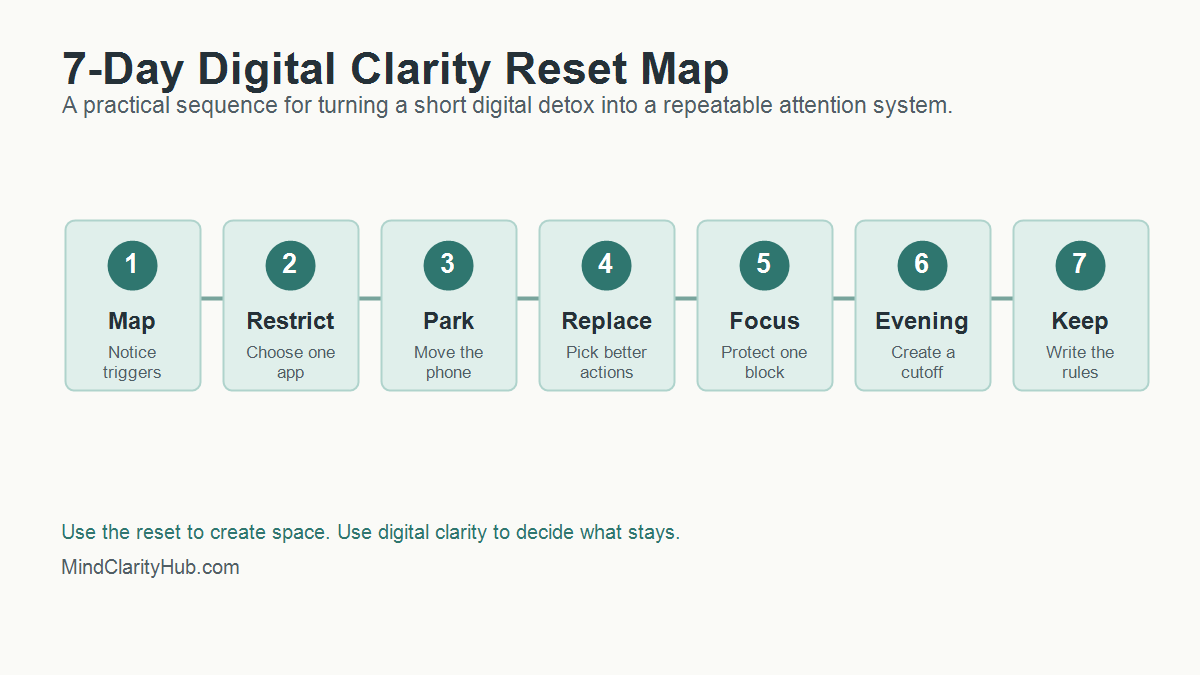
    How Do You Start A 7-Day Digital Clarity Reset?

    A 7-day reset works best when it is small enough to finish. Do not try to rebuild your entire digital life in one weekend. Pick the few habits causing the most friction and use this sequence.

    seven day digital clarity reset map showing trigger mapping app restriction phone parking replacement habits focus evening cutoff and kept rules
    A 7-day reset map helps readers move from a short digital detox to lasting digital clarity.

    Day 1: Map The Triggers

    Write down the moments when you reach for your phone without a clear reason. Common triggers include waking up, waiting in line, feeling stuck on a task, eating alone, avoiding a hard conversation, or trying to wind down at night.

    • Which app do you open first?
    • What feeling comes right before the reach?
    • Name the need you actually had in that moment.
    • Did the app meet that need or delay it?

    This is digital clarity in its most basic form. You are not judging yourself. You are collecting evidence.

    Day 2: Choose One App To Restrict

    Pick one app or category that gives you the lowest return on attention. For many people, it is short-form video, social feeds, news loops, shopping, or work email after dinner.

    Remove it from your home screen. Turn off notifications. If needed, delete it for the week. A digital detox works better when the target is specific. β€œUse my phone less” is vague. β€œNo short-video apps before noon or after 8 p.m.” is a rule you can follow.

    Day 3: Create A Phone Parking Spot

    Choose a physical place where your phone rests when you are eating, reading, working, or sleeping. The parking spot should not be your pocket. It should be across the room, in a drawer, on a charger, or beside a notebook.

    Distance matters because attention often fails in the first second. When the phone is already in your hand, you need willpower. When it is across the room, you get a moment to decide.

    Day 4: Build A Replacement Menu

    A digital detox that only removes stimulation can feel flat. Digital clarity replaces the loop with something that actually meets the need.

    • Rest: try a short walk, music, stretching, or breathing.
    • Connection: text one person directly instead of scrolling a feed.
    • Stimulation: read five pages, make tea, or clean one small area.
    • Progress: open a notebook and write the next tiny action.

    The replacement does not need to be noble. It needs to be better than the loop you are trying to leave.

    Day 5: Protect One Deep Work Block

    Pick a 45 to 90 minute block where your phone is out of reach and only the tools needed for the task are open. If you work at a computer, close messaging tabs and use full-screen mode when possible.

    This is where digital clarity supports real productivity. You are not trying to become unavailable all day. You are proving that a protected block can still exist inside a connected life. For more focus tools, read how to train your brain to focus.

    Day 6: Reset The Evening

    Choose a screen cutoff that feels realistic. If one hour before bed feels impossible, start with 20 minutes. Put the phone on its charger, dim the lights, and switch to a quiet routine.

    Good options include reading, a paper planner, gentle stretching, a shower, prayer, journaling, or a simple body scan. NIH News in Health lists deep breathing, mindful walking, mindful eating, and body scans as practical mindfulness options. Pick one that you would actually repeat.

    Day 7: Write The Rules You Are Keeping

    The last day is not about celebrating a perfect week. It is about choosing the rules that worked. Keep the rules that gave you more calm, more sleep, more focus, or more presence. Drop rules that were too strict, too vague, or too annoying to maintain.

    1. Keep one morning rule.
    2. Choose one work rule.
    3. Protect one evening rule.
    4. Repeat one replacement habit.
    5. Schedule one weekly check-in.

    That is the bridge from digital detox to digital clarity.

    How Do You Keep Digital Clarity After The Reset?

    The week after a digital detox matters more than the detox itself. That is when old defaults try to return. Digital clarity turns the reset into a living system by deciding what happens on ordinary Tuesdays, not just during a special challenge.

    Start with three default rules. First, choose when attention-heavy apps are allowed. Second, choose where your phone sleeps. Third, choose which alerts can interrupt you. These rules are simple enough to remember and strong enough to change the shape of the day.

    A good rule should pass the real-life test. Can you follow it when work is busy? Will it still work when you are tired? Is it simple enough to explain in one sentence? If the answer is no, simplify the rule until it works.

    Use A Weekly Screen Review

    Set a 10-minute review once a week. Look at screen time, app categories, sleep, focus blocks, and mood after use. The numbers are useful, but the pattern matters more. A week with more screen time may still be healthy if the time supported work, learning, family, or reading.

    Ask three questions during the review:

    • Which digital habit gave me a real benefit this week?
    • Which digital habit made me feel scattered, rushed, or behind?
    • What is one rule I can adjust for the next seven days?

    This keeps digital clarity flexible. You are not locking yourself into one perfect system forever. You are training yourself to notice, adjust, and protect attention before small leaks become a flood.

    Keep Friction Low And Meaning High

    The best screen boundaries are easy to repeat. Put distracting apps in a folder. Move the phone charger away from the bed. Use a website blocker during writing or work blocks. Keep one book, journal, or offline task where you usually scroll.

    Meaning matters too. If your phone is the only easy source of fun, comfort, or connection, removing it will feel like deprivation. Add good alternatives before you remove the loop. Call one person. Read something physical. Take a walk without audio. Build a small evening ritual that feels like recovery instead of punishment.

    That is the heart of digital clarity. You are not only reducing screen time. You are making offline life easier to reach.

    What Should You Track During A Digital Clarity Reset?

    Tracking should help you notice patterns, not make you obsessive. Use a simple scorecard for seven days. Give each item a yes or no.

    Metric Question Why It Matters
    Morning control Did I avoid feeds for the first 30 minutes? Protects the tone of the day
    Focus block Did I complete one protected work block? Builds confidence and momentum
    Evening boundary Did I stop high-stimulation apps before bed? Supports better wind-down habits
    Replacement habit Did I choose a better action when I wanted to scroll? Turns restriction into a real alternative
    Mood after use Did my screen time leave me better, neutral, or worse? Reveals which tools are worth keeping

    At the end of the week, look for the easiest win. Maybe your sleep improved when the phone charged outside the bedroom. Work may have improved when notifications stayed off until lunch. Stress may have dropped when you stopped checking news first thing in the morning.

    How Can You Make A Digital Detox Less Extreme?

    Many people fail with detoxes because the rules are too dramatic. A complete screen break may be useful for a retreat, but it is not realistic for a parent, creator, freelancer, student, or business owner.

    Use a partial detox instead. Remove one type of input while keeping useful tools. You can block social media while keeping maps. News can pause while email stays available. Shopping apps can disappear while banking remains. This keeps the reset from becoming a punishment.

    Here are simple detox formats that pair well with digital clarity:

    • Bedroom detox: no phone in the bedroom for seven nights.
    • Morning detox: no feeds before breakfast or before your first work block.
    • Platform detox: remove one app category for a week.
    • Notification detox: turn off all non-human alerts, then add back only what matters.
    • Social comparison detox: pause accounts that make you feel behind, resentful, or scattered.

    A detox should create space. Digital clarity tells you what belongs in that space next.

    Where Do Books And Tools Fit Into Digital Clarity?

    Books help because they slow the mind down. A book is not just content. It is a different relationship with attention. You follow one argument, one chapter, one idea, and one page at a time.

    That is why Mind Clarity Hub should use new articles to guide readers toward the right book, not just send them to random product links. If your main struggle is scattered focus, start with The Power of Clarity. For phone noise and online overwhelm, start with Digital Clarity. When burnout is part of the pattern, the books page can help you choose a better match.

    Useful tools can support the same system. A paper notebook, a basic alarm clock, website blocker, app timer, reading app, or focus playlist can all help. The key is to choose tools that reduce decisions, not tools that add one more dashboard to manage.

    Can A YouTube Video Help With A Digital Reset?

    Yes, if it is used on purpose. A video can explain a concept quickly, create motivation, or give you a starting point. The trap is letting one helpful video turn into an hour of autoplay.

    If you watch a video during a reset, decide the job before you press play. Are you learning one idea? Choosing one action? Getting a reminder? Once the job is done, close the tab.

    A short video on reducing screen time can be useful when it leads to one clear action.

    When Should You Get Extra Support?

    Most screen habits can improve with better boundaries. Some patterns need more support. Pay attention if your screen use regularly causes missed sleep, missed work, relationship conflict, panic when separated from your phone, secretive behavior, compulsive spending, or a sense that you cannot stop even when you want to.

    In those cases, digital clarity can still help, but it should not be the only tool. A therapist, physician, counselor, support group, or trusted mentor can help you understand what the screen habit is protecting you from or helping you avoid.

    Be especially careful if you are using screens to numb intense anxiety, depression, loneliness, grief, or shame. The goal is not to remove coping before you have better support. The goal is to build a healthier plan with the right help.

    FAQ About Digital Clarity And Digital Detox

    Is digital clarity better than a digital detox?

    Digital clarity is better for daily life because it creates a long-term system. A digital detox is better when you need a short reset from a specific app, platform, or behavior. The strongest plan often uses both.

    How long should a digital detox last?

    Start with 24 hours, three days, or seven days. Longer is not always better. The best digital detox is long enough to reveal the habit and short enough that you can finish it without turning the reset into a source of stress.

    Can digital clarity help if I have ADHD?

    Digital clarity can help reduce friction, distractions, and decision fatigue, but it is not a treatment for ADHD. If ADHD symptoms are affecting work, school, finances, or relationships, use screen boundaries alongside professional support and evidence-based strategies.

    What if my job requires screens all day?

    Then avoid extreme rules. Focus on work screens versus distraction screens. Keep the tools required for your job, but remove unnecessary alerts, batch messages, block distracting sites during focus blocks, and protect your evening recovery time.

    What is the first rule I should try?

    Try a no-feeds morning rule. Do not open social feeds, news, or short-video apps for the first 30 minutes after waking. It is simple, measurable, and powerful because it lets your own priorities touch the day before everyone else’s noise arrives.

    The Bottom Line

    Digital clarity is the long game. A digital detox can give you a clean break, but digital clarity gives you rules, replacements, and a better relationship with attention.

    Start small. Pick one app, one morning boundary, one focus block, and one evening rule. Keep what works. Adjust what does not. Technology should support your life, not silently organize it around distraction.

    Next step: read Digital Clarity for the full system, or explore all Mind Clarity Hub books to choose the guide that best fits your season.

    Sources used: NHLBI sleep habit guidance, NIH News in Health on mindfulness, NCCIH meditation and mindfulness overview, and Technology, Mind, and Behavior research on media multitasking and attention.

  • Your Guide to the Amazon Store Books Kindle Section

    Your Guide to the Amazon Store Books Kindle Section

    So, you’re ready to find some of Jeremy Jarvis’s books, but maybe you’re not sure where to start. Think of this as your personal roadmap to navigating the massive digital bookshelf that is the amazon storeβ€”specifically for books and Kindleβ€”so you can find the right resources to sharpen your focus. We’ll walk through everything from locating specific titles to picking the format that actually fits your life.

    Affiliate Disclosure: This article contains affiliate links. If you make a purchase through one of them, we might earn a small commission at no extra cost to you. It’s a simple way to support our work here.

    Navigating Your Digital Library for Better Focus

    Let’s be honest, scrolling through Amazon can feel like wading through an ocean of information. It’s overwhelming. But finding a book that can genuinely help you reclaim your attention doesn’t have to be a chore. The goal here is to turn that digital chaos into a powerful, brain-friendly habit for your own growth.

    Building focused habits is rooted in behavioral psychology. Specifically, it’s about reducing friction between you and the desired action. For busy professionals and students, knowing your way around the Kindle store isn’t just a tech skill. It’s the first step toward building a library that works for you.

    Amazon store books Kindle β€” A Kindle e-reader sits on a sunlit wooden table beside a cup of tea, reading glasses, and an open notebook for notes.

    We’re going to focus on practical, no-fluff skills you can use right away. Together, we’ll cover:

    • How to find specific authors and titles without getting lost in endless search results.
    • Deciding between Kindle and paperback based on your own learning style and daily routine.
    • Using Kindle’s built-in tools to actually absorb and remember what you’re reading.

    Ultimately, the aim is to help you build a hand-picked digital library that actively supports your focus goals. Let’s get started.

    How to Find Jeremy Jarvis’s Books on Amazon

    Trying to find a specific author’s work in a digital sea like Amazon can feel a bit overwhelming. But it doesn’t have to be. With a few simple steps, you can cut right through the noise. You can get straight to Jeremy Jarvis’s books, whether you’re looking for a Kindle version or a classic paperback.

    The easiest way to start is with a direct search. Typing β€œJeremy Jarvis author” or a full title like β€œThe Power of Clarity” into the main search bar usually gets you the best results right away. This little bit of precision helps Amazon understand you’re not just looking for books about clarity, but a specific one.

    Once the results load, look to the left-hand side of the page for the filters. This is where you can narrow things down. If you’re a digital reader, just click β€œKindle Store” to see only the versions ready for your device.

    Pro-Tip: Honestly, the most reliable way to find everything an author has published is to go straight to their official author page on Amazon. It’s a central hub that lists all their books. This ensures you’re getting authentic copies and can see their full library in one place. For a complete, curated list of Jeremy Jarvis’s work, check out our guide on finding the best Amazon books.

    Kindle vs. Paperback: Which Format Builds Better Habits?

    Choosing between a digital Kindle book and a good old-fashioned paperback is about more than personal preference. It can actually shape your reading habits. The format you pick from the amazon store for books, including Kindle editions, can either help or hinder your consistency. If you understand the subtle psychology behind each choice, you can pick the right tool to match your focus goals.

    Take the physical act of holding a paperback. Turning the pages creates haptic feedback, a tactile experience that helps many people absorb complex ideas more easily. Behavioral research suggests this sensory input can strengthen memory pathways. The tangible sense of progress as you move through the book is also incredibly motivating.

    The Power of a Dedicated E-Reader for Your Amazon Store Books

    On the flip side, the sheer convenience of a Kindle is tough to beat. This is especially true if you’re trying to build a consistent reading routine. The market for e-readers is booming for a reason. Models like the Paperwhite get rave reviews. In fact, 28.9% of positive mentions praise how β€˜easy to use’ they are. Another 25.4% love the β€˜battery life,’ and 23.1% highlight how β€˜lightweight’ they are.

    That portability means your entire library can slide into your bag. It turns a morning commute or a few minutes waiting in line into a genuine reading opportunity.

    A dedicated e-reader like a Kindle creates a distraction-free zone. Unlike a phone or tablet buzzing with notifications, a Kindle has one purpose: reading. This single-tasking environment helps your brain enter a state of deeper focus. This makes it easier to build a sustainable reading practice.

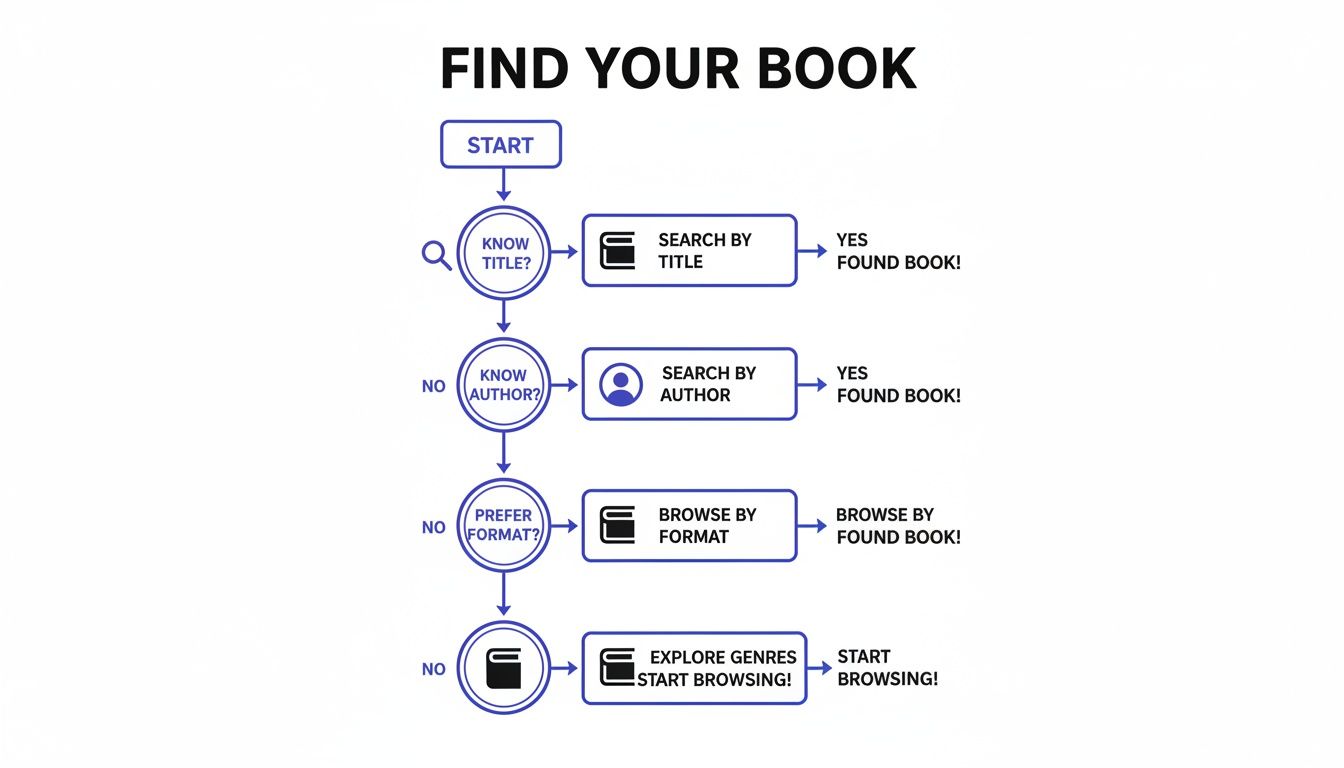
    This decision tree can help you visualize the best way to find books on Amazon that fit whatever format you choose.

    A flowchart outlining steps to find books by title, author, format, or by browsing genres.

    As the flowchart shows, whether you start with a specific title, an author, or a format in mind, Amazon’s filters make it pretty simple to zero in on what you need.

    Who Benefits From Each Format?

    To help you decide, this table breaks down the key differences between Kindle e-books and paperbacks. This way, you can choose the format that best fits your reading style and focus goals.

    Comparing Kindle E-Book vs Paperback

    FeatureKindle E-BookPaperback Book
    PortabilityCarry an entire library on one lightweight device.Can be bulky; carrying multiple books is impractical.
    DistractionsA dedicated e-reader is a single-purpose device, free of notifications.Offers a completely offline, distraction-free experience.
    AccessibilityInstantly download new books anytime, anywhere.Requires a trip to a store or waiting for delivery.
    Reading ExperienceAdjustable font sizes, backlights for night reading, and built-in dictionary.Provides a tactile, sensory experience that can aid memory.
    Note-TakingDigital highlighting and note-taking sync across devices.Physical highlighting and writing in the margins feel more permanent.
    CostE-books are often cheaper than their physical counterparts.Can be more expensive; used copies offer savings.

    Ultimately, the best format is the one that slides most easily into your life.

    If you’re a student who lives by physical highlighters and sticky notes, a paperback is probably your best bet. But if you’re a busy professional who needs to switch between your phone and an e-reader on the go, a Kindle with its Whispersync feature is a game-changer. For more strategies on building a solid reading habit, check out our guide on how to read more books.

    Using Kindle Features for Active Learning and Focus

    A Kindle from the amazon store isn’t just a digital bookshelfβ€”it’s a powerful tool for focused learning. Its features are built to help you wrestle with the concepts in Jeremy Jarvis’s books. They turn what could be passive reading into an active, immersive experience. When used right, these tools can make a huge difference in how well you grasp and hold onto key ideas.

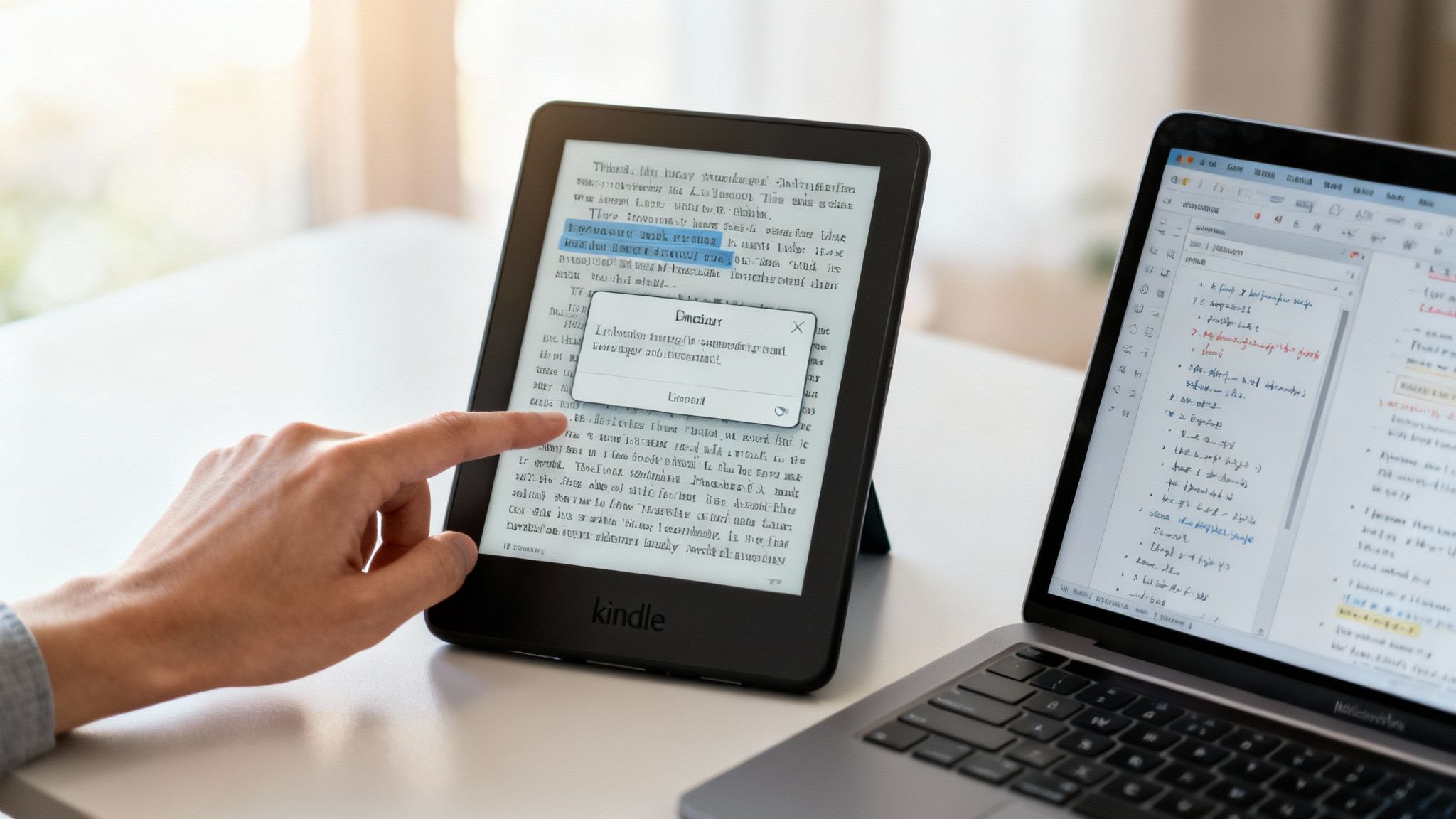
    For instance, the highlighting and note-taking functions are perfect for capturing insights. This is great for complex topics like dopamine regulation or managing cognitive load from AI workflows. The real magic happens later, when you can export all your notes into a single document for review. This simple step transforms your reading into a structured study session. We have a whole guide on this, if you’re curious about how to take notes from a book more effectively.

    Amazon store books Kindle β€” A person’s hand taps a Kindle e-reader showing an open book page with a definition pop-up, beside a laptop on a desk.

    Go Deeper Without Losing Your Place

    When you’re reading about dense topics, you’re bound to hit unfamiliar terms. The Kindle’s built-in dictionary and X-Ray feature are designed to help you out without shattering your concentration. Neuroscience tells us that task-switching is costly for our brains. These features help you stay in a state of flow.

    • Built-in Dictionary: Just tap and hold a word to see its definition pop up instantly. This is a game-changer for clarifying concepts without having to switch apps or grab your phone.
    • X-Ray Feature: Think of this as a high-level map of a book’s β€œbones.” It shows you key characters, places, and recurring terms. This makes it easy to see how ideas connect across the entire text.

    Of course, the features on your Kindle are just one part of the puzzle. General techniques to develop reading comprehension skills will amplify your learning even further.

    Syncing Your Progress for Consistent Learning

    For busy readers, one of the most brilliant features is Whispersync. This technology seamlessly syncs your reading progress, notes, and bookmarks across all your devices. This works from your Kindle e-reader to the Kindle app on your phone.

    Real-World Scenario: Picture this: you’re at home, deep into a chapter on burnout recovery on your Kindle. The next day, you’re stuck waiting for a meeting to start. You can just pull out your phone, open the Kindle app, and pick up right where you left off.

    This seamless handoff turns those little pockets of downtime into productive learning moments. As Amazon’s Kindle Direct Publishing platform has grown, this ecosystem has become even more powerful. Audiobook integration has surged 24% year-over-year, as more and more people switch between reading books and listening on Audible. For busy professionals, this makes challenging, science-based titles accessible anywhere, anytime.

    Editor’s Take: What Actually Works with the Amazon Store Books Kindle Selection

    So, when it comes to the amazon store books kindle selection for Jeremy’s work, what’s the final verdict? Here’s my honest take.

    For most busy professionals, the Kindle version is the most practical choice. Having your entire library on one slim device just makes it easier to build a consistent reading habit. You can sneak in a chapter on your commute or during a lunch break. Whispersync is also a game-changer for modern life, letting you switch seamlessly between your phone and Kindle. This reduces the mental effort needed to keep reading.

    However, a physical book offers a unique tactile experience that a screen can’t replicate. If you’re someone who needs that physical feeling to really absorb informationβ€”the weight of the pages, the ability to flip back and forthβ€”then the paperback is unbeatable. This is especially true for deep, focused study sessions. It helps when you want to eliminate every possible digital distraction.

    The best format isn’t about what’s trendy; it’s about what you’ll actually use consistently. My advice? Grab the Kindle version for convenience. But consider buying a well-loved copy in paperback for your reference shelf and deeper study.

    Ultimately, the goal is to remove any friction that keeps your brain from engaging with the material. That’s a huge part of learning how to retain what you read in the first place.

    Key Takeaways

    • Be Specific: To find books efficiently on Amazon, use specific search terms like the full title or β€œauthor’s name + author”.
    • Use the Author Page: An author’s official Amazon page is the most reliable way to find all their available books in one place.
    • Kindle for Convenience: The Kindle format is ideal for building consistent reading habits due to its portability and features like Whispersync.
    • Paperback for Deep Focus: Physical books provide a tactile, distraction-free experience that can improve memory and comprehension for many readers.
    • Leverage Kindle Tools: Use built-in features like highlighting, notes, and the dictionary to turn passive reading into active learning.
    • No Kindle, No Problem: You can read Kindle books on any device by downloading the free Kindle app.

    Disclaimer: This article contains affiliate links, which means we may earn a small commission if you make a purchase at no extra cost to you. The content provided is for educational and informational purposes only and is not a substitute for professional medical or psychological advice. If you are struggling with issues like anxiety, burnout, or ADHD, please consult a qualified healthcare provider.

    Frequently Asked Questions About the Amazon Store Books Kindle Options

    1. How can I find all of an author’s books in one place on Amazon?

    The best way is to navigate to their official Amazon Author Page. Simply search for the author’s name, like β€œJeremy Jarvis author,” and click on their name in the search results. This page consolidates all their available titles, including different formats like Kindle and paperback.

    2. Is it better to buy a Kindle book or a paperback?

    It depends on your goals. Choose Kindle for convenience and building a consistent reading habit, as you can carry a full library anywhere. Choose paperback for a tactile, distraction-free experience that may help with memory retention and deep focus.

    3. Can I read a Kindle book if I don’t own a Kindle device?

    Yes, absolutely. You can download the free Kindle app on your smartphone, tablet, or computer. Your Amazon account will sync your books across all devices where the app is installed.

    4. What is the best way to search for a specific book on the Amazon store?

    Use the full title and author’s name for the most accurate results. For example, searching for β€œThe Power of Clarity by Jeremy Jarvis” is more effective than a general search for β€œfocus books.” Also, use the filters on the left side to narrow results to the β€œKindle Store.”

    5. Are Kindle books usually cheaper than paperbacks?

    Generally, yes. E-books often have a lower price point because there are no printing or shipping costs involved. However, always check for special promotions or sales on paperback editions.

    6. Can I gift a Kindle book from the Amazon store to someone else?

    Yes. On the book’s product page, look for the β€œBuy for others” option. You can then enter the recipient’s email address, and Amazon will send them a link to redeem their new e-book.

    7. What is the X-Ray feature on Kindle and how does it help?

    X-Ray is a Kindle feature that acts like an index of a book’s key elements. It helps you track characters, terms, and important concepts throughout the text. This is especially useful for complex non-fiction to see how ideas connect without losing your place.

    8. Does highlighting on Kindle help with remembering what I read?

    Yes. Psychological studies on active recall show that interacting with textβ€”like highlighting and making notesβ€”strengthens memory formation. The Kindle’s ability to export all your highlights into one document makes it a powerful tool for reviewing and reinforcing what you’ve learned.

    9. What is Whispersync and why is it useful?

    Whispersync is Amazon’s technology that automatically saves and syncs your last page read, bookmarks, and notes across all your Kindle devices and apps. This allows you to switch seamlessly from reading on your Kindle e-reader at home to your phone during a commute.

    10. Is the content in this article medical advice?

    No. This article is for educational and informational purposes only. It is not intended as a substitute for professional medical or psychological advice, diagnosis, or treatment. If you are dealing with concerns like anxiety, burnout, or sleep problems, please consult a qualified healthcare professional.


    At Mind Clarity Hub, our goal is to provide you with the tools and knowledge to reclaim your focus. Explore Jeremy Jarvis’s collection of science-based guides on mindful productivity, burnout recovery, and digital clarity.
    Find your next read on Mind Clarity Hub

    Explore the Mind Clarity Hub Library

    Practical books on focus, digital habits, resilience, and building a calmer mind.

    The Power of Clarity β€” book cover

    The Power of Clarity

    Unlock mental focus, build momentum, and create the life you were meant to live.

    View book β†’
    AI & ChatGPT for Beginners β€” book cover

    AI & ChatGPT for Beginners

    No PhD needed β€” a 2025 guide to AI, prompts, and productivity without coding.

    View book β†’
    Zen in the Digital Jungle β€” book cover

    Zen in the Digital Jungle

    Mindfulness for a chaotic world.

    View book β†’
    The Slow Reset β€” book cover

    The Slow Reset

    Mindful living in a fast-paced world.

    View book β†’
    Perfectly Imperfect β€” book cover

    Perfectly Imperfect

    Stop self-criticism, set boundaries, and embrace the real you.

    View book β†’
    Reclaiming Silence β€” book cover

    Reclaiming Silence

    A dopamine detox guide to finding peace in a noisy world.

    View book β†’
    The Focused Freelancer β€” book cover

    The Focused Freelancer

    Productivity, pricing & positioning for independents in 2025.

    View book β†’
    ChatGPT Side Hustle System β€” book cover

    ChatGPT Side Hustle System

    Launch your AI-driven online business in 30 days.

    View book β†’
    Burnout, Interrupted β€” book cover

    Burnout, Interrupted

    A proven path to restore energy and reclaim your life.

    View book β†’
    Attention Unleashed β€” book cover

    Attention Unleashed

    Focus strategies for the distracted mind.

    View book β†’
    Side Hustle Launchpad β€” book cover

    Side Hustle Launchpad

    Your quick-start guide to extra income.

    View book β†’
    Digital Clarity β€” book cover

    Digital Clarity

    Rewire your brain, escape dopamine traps & regain focus.

    View book β†’
    Break the Scroll β€” book cover

    Break the Scroll

    Reduce screen time and take back control of your life.

    View book β†’
    Climate Compassion β€” book cover

    Climate Compassion

    Transform eco-anxiety into empowered action.

    View book β†’
    Village Mentality β€” book cover

    Village Mentality

    The power of community for mental wellness.

    View book β†’
    Restful Nights β€” book cover

    Restful Nights

    Overcoming sleep anxiety in a 24/7 world.

    View book β†’
    Connected Again β€” book cover

    Connected Again

    Combat loneliness and build meaningful relationships.

    View book β†’
    Focus Recharged β€” book cover

    Focus Recharged

    Mastering attention and productivity in the digital era.

    View book β†’
    Marketing Magic with ChatGPT β€” book cover

    Marketing Magic with ChatGPT

    AI-powered content, campaigns, and copywriting to grow faster.

    View book β†’
    The 6-Figure Creator β€” book cover

    The 6-Figure Creator

    Turn knowledge into passive income with books, courses & AI.

    View book β†’
    Burnout Breakthrough β€” book cover

    Burnout Breakthrough

    Reset your work-life balance and thrive in 2025.

    View book β†’
    The Emotionally Intelligent Man β€” book cover

    The Emotionally Intelligent Man

    A modern guide to self-awareness and communication.

    View book β†’
    AI Personalized Wellness β€” book cover

    AI Personalized Wellness

    Create your custom health plan with data-driven habits.

    View book β†’
    Everyday AI Made Easy β€” book cover

    Everyday AI Made Easy

    Use ChatGPT and smart tools to simplify life.

    View book β†’
    Money Mindfulness β€” book cover

    Money Mindfulness

    A financial wellness guide for Gen Z & Millennials.

    View book β†’
    Startup Smarter with AI β€” book cover

    Startup Smarter with AI

    ChatGPT strategies and tools to grow your business.

    View book β†’
    ChatGPT for Writers & Creators β€” book cover

    ChatGPT for Writers & Creators

    Unlock AI-powered brainstorming, drafting & editing.

    View book β†’
  • Journals for Productivity: An Essential Guide to Focus

    Journals for Productivity: An Essential Guide to Focus

    Journals for Productivity: An Essential Guide to Focus

    Jeremy Jarvis β€” Mind Clarity Hub founder
    Mind Clarity Hub β€’ Research-aware focus & digital wellness

    Productivity journals are specialized notebooks or apps built to help you wrestle your goals, tasks, and habits into a coherent system. Think of it as more than just a glorified to-do list; a well-designed journal is a command center for turning vague intentions into clear, daily actions. It’s a remarkably simple but powerful tool for directing your focus where it matters most.

    This article is for educational purposes only and is not a substitute for professional medical or psychological advice, diagnosis, or treatment. If you are struggling with mental health concerns such as anxiety, depression, ADHD, burnout, or sleep problems, please consult a qualified healthcare provider.

    Affiliate Disclosure: Please note that this article may contain affiliate links. If you make a purchase through these links, we may earn a small commission at no extra cost to you. This helps support our work in creating valuable content.

    Why Using Journals for Productivity Is So Effective

    In a world buzzing with notifications and a never-ending stream of priorities, finding genuine focus can feel like an uphill battle. This is precisely where a productivity journal steps in, acting less like a planner and more like a powerful cognitive tool. It provides a structured, quiet space to declutter your mindβ€”a process psychologists call cognitive offloading.

    When you write down your tasks, ideas, and worries, you’re literally moving them from your brain’s very limited working memory onto paper or a screen. Behavioral research shows this simple act frees up a surprising amount of mental bandwidth. Instead of constantly trying to remember everything, your brain can engage in deeper, more creative thinking. It’s like closing a dozen unnecessary tabs on your computer to help it run faster.

    Real-World Scenario: Imagine a project manager, Maria, juggling three projects. Her mind is a storm of deadlines, team questions, and new ideas. Instead of just trying to keep it all in her head, she spends five minutes writing everything down in her journal. The simple act of externalizing the chaos onto a page allows her to see the tasks clearly, prioritize them logically, and approach her day with a sense of calm control rather than reactive panic.

    This single practice unlocks some pretty significant benefits:

    • Improved Focus: By deciding on your priorities at the start of the day, you’re telling your brain exactly what’s important. This helps it filter out the noise and directs your attention to activities that actually move the needle.
    • Reduced Overwhelm: A chaotic storm of tasks swirling around in your head is a recipe for stress. Organizing them in a journal transforms that chaos into a clear, actionable plan, which can dramatically lower feelings of anxiety.
    • Enhanced Mental Clarity: The act of writing forces you to articulate your thoughts. This process of externalizing your thinking is crucial for focus, and you can learn more about how to improve mental clarity in our dedicated guide.
    • Stronger Habit Formation: Tracking your progress on new habitsβ€”like a daily workout or reading goalβ€”creates a visual record of your wins. Seeing that chain of success reinforces the behavior and builds momentum, making it easier to stick with it over time.
    A person in a suit writes in a planner on a desk next to a steaming cup of coffee, demonstrating the use of journals for productivity.

    Image Caption: A productivity planning session is a core component of using journals for productivity to organize daily tasks and goals.
    Image Description: A professional sits at a wooden desk with a planner, a pen, and a cup of coffee. They are using their journal for productivity to plan their day, with a focus on organization and efficiency.

    Think of it this way: an architect wouldn’t dream of building a skyscraper without a blueprint. A productivity journal provides the blueprint for your day, ensuring you build what you actually intend to, one focused task at a time.

    The Neuroscience Behind Productive Journaling Methods

    Ever wonder why the simple act of writing in a journal actually works? It’s not just a nice organizational habit. It’s a way of talking directly to your brain to shape your focus, motivation, and even your mood. When you use a journal for productivity, you’re applying practical neuroscienceβ€”turning fuzzy goals into concrete actions your brain can lock onto.

    At the center of it all is a part of your brainstem called the Reticular Activating System (RAS). Think of the RAS as your brain’s attention filter. It decides which of the millions of sensory inputs get your attention and which ones fade into the background.

    When you take a moment to write down a specific goalβ€”like β€œDraft the project proposal by noon”—you’re giving your RAS clear instructions. The physical act of writing signals, β€œHey, this is important.” Your brain then gets primed to notice everything related to that task: resources, ideas, and opportunities. You become far more likely to act on it.

    Freeing Up Your Mental RAM with Journals for Productivity

    Your brain’s working memoryβ€”the mental sticky note you use for immediate tasksβ€”is incredibly limited. Trying to juggle deadlines, creative ideas, and your to-do list all in your head is like running a high-end laptop with a dozen heavy programs open at once. Sooner or later, everything grinds to a halt.

    This is where your journal becomes a tool for cognitive offloading.

    By getting your plans, worries, and reminders out of your head and onto paper or a screen, you are literally clearing your mental RAM. This frees up precious cognitive bandwidth, letting you dive deeper into the task at hand and access higher-level creative thinking.

    This mental decluttering is one of the most immediate benefits of a productivity journal. It doesn’t just organize your tasks; it organizes your mind. You can explore how this sharpens your focus in our guide on the neuroscience of single-tasking.

    Creating a Dopamine-Fueled Momentum Loop

    Another powerful force at play is your brain’s reward system, which runs on the neurotransmitter dopamine. Dopamine isn’t just about pleasure; its primary role is motivation. It’s the chemical that tells your brain, β€œThat was good. Let’s do it again.”

    When you write down a small, achievable goal in your journal and then check it off, your brain releases a satisfying little hit of dopamine. This feeling of accomplishment reinforces the behavior, making you eager to tackle the next thing on your list.

    This creates a powerful positive feedback loop:

    • Plan: You write down a clear, manageable task.
    • Act: You get it done.
    • Reward: You check it off, triggering that dopamine release.
    • Repeat: The good feeling motivates you to keep the cycle going.

    This is how tiny wins build into serious momentum. It’s no surprise that tools enabling this cycle are booming. The global market for digital journal apps was valued at $5.1 billion in 2024 and is projected to hit an incredible $13.58 billion by 2033. This surge shows a massive shift toward using journaling as a serious tool for modern life and work. You can read the full research on the digital journaling market to see the trend breakdown.

    Here’s How It Looks in Real Life: Imagine Sarah, a freelance designer, feeling completely swamped by a huge project. Her mind is a chaotic mess of client feedback, design ideas, and a looming deadline. Instead of panicking, she opens her journal and does some cognitive offloading. She writes down every single thing causing her stress. Then, she breaks it down into just three small, actionable steps she can take in the next two hours:

    1. Review and sort client feedback into categories.
    2. Sketch three new concepts for the logo variation.
    3. Email the client a quick progress update.
      Instantly, the mountain of anxiety transforms into a clear, manageable path. As she finishes and checks off the first item, she feels a surge of control and accomplishment. That’s the dopamine loop kicking in. She just used her journal not just to plan, but to actively regulate her focus and state of mind.

    Choosing Your Tool: Physical vs. Digital Journals for Productivity

    Deciding between a classic paper notebook and a sleek digital app is often the first real choice you’ll make on your journaling journey. There’s no single β€œright” answer here. The best tool isn’t the one with the most features, but the one that feels the most natural for youβ€”the one you’ll actually look forward to opening each day.

    Both physical and digital journals have unique strengths, rooted in how our brains process information and engage with the world. The goal is to pick the medium that removes friction and makes daily planning and reflection feel less like a chore and more like a welcome ritual.

    The Case for Physical Journals

    There’s something uniquely grounding about a paper journal that digital tools just can’t mimic. The simple act of putting pen to paper engages different neural pathways than typing on a keyboard. This physical connection, known as haptic feedback, can slow down your thinking, which may lead to deeper processing and stronger memory of your goals and ideas.

    For many, a paper notebook is a much-needed sanctuary from the endless glare of screens. It offers a quiet, dedicated space free from notifications, pop-ups, and the temptation of just one more browser tab. If you find yourself battling screen fatigue, a physical journal can be a powerful antidote.

    A physical journal is a single-tasking device in a multitasking world. Its only job is to hold your thoughts, plans, and reflections, making it a powerful tool for deep, focused work.

    And it’s not just a niche preference. The demand for analog tools is surprisingly strong. The global market for physical planners and diaries is set to climb from $1.98 billion in 2024 to an estimated $3.07 billion by 2033. This growth shows that even as technology advances, people still crave the clarity that pen and paper provide. If you’re interested in the data, you can read the full market research on planners here.

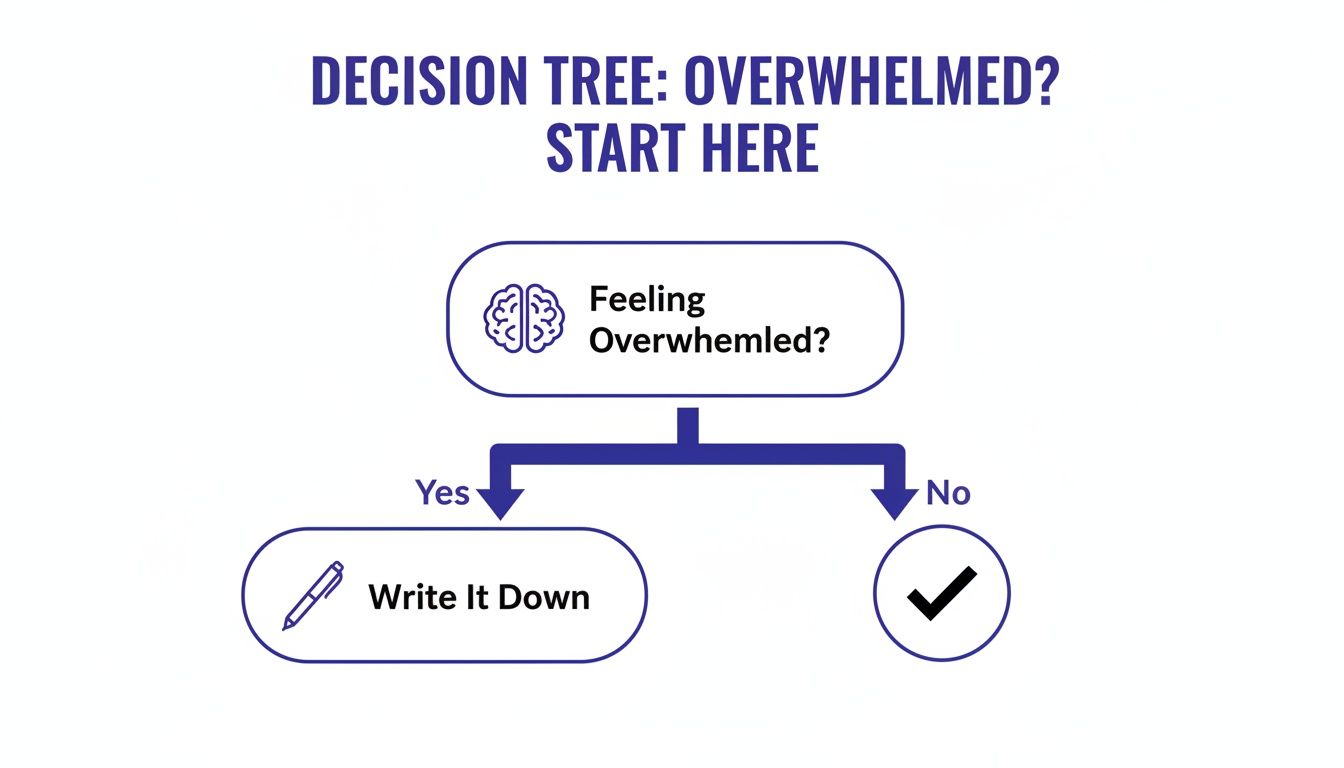
    Feeling overwhelmed is often a sign that your thoughts are swirling without a clear outlet. As the simple flowchart below shows, the act of writing things down is one of the most direct ways to regain a sense of calm.

    A decision tree flowchart for addressing feelings of overwhelm, suggesting to write it down in journals for productivity.

    Image Caption: A simple decision tree shows how writing in journals for productivity can be an effective strategy for managing overwhelm.
    Image Description: This flowchart starts with the question β€œFeeling Overwhelmed?” and branches to β€œWrite it down.” It illustrates the concept of cognitive offloading using journals for productivity to reduce mental clutter and stress.

    This process of externalizing your thoughts is the core magic of journalingβ€”it gets ideas out of your head and onto the page, instantly reducing mental clutter.

    The Power of Digital Journals

    Where physical journals offer focus, digital journals deliver convenience, power, and portability. With an app on your phone, tablet, or computer, your entire productivity system is always in your pocket, ready for a quick note, an updated to-do list, or on-the-go planning.

    The standout advantages of digital tools are hard to ignore:

    • Searchability: Need to find that brilliant idea you had three months ago? A quick search pulls it up in seconds, no frantic page-flipping required.
    • Integration: Your journal can talk to your other tools. Link entries to your calendar, connect tasks to your project management app, and create a truly unified workflow.
    • AI Features: Many modern apps now include AI assistants that can summarize your progress, suggest goals based on your entries, or even help you rephrase your thoughts for clarity.
    • Backups & Security: Your thoughts are safely backed up to the cloud, protecting them from spills, loss, or damage.

    If you find yourself constantly battling digital overload, it’s worth exploring strategies for managing it. Our guide on what is digital fatigue and how to recover faster offers practical tips.

    Physical Journals vs Digital Journals for Productivity

    So, how do you decide? This table breaks down the key differences to help you find the best fit for your workflow.

    FeaturePhysical Journals (Paper)Digital Journals (Apps)
    Focus & MindfulnessExcellent. Creates a distraction-free, single-tasking environment.Fair. Prone to notifications and multitasking temptations from the device.
    Tactile ExperienceHigh. The act of writing can improve memory and deepen thinking.Low. Lacks the sensory feedback of pen on paper.
    Portability & AccessGood. Easy to carry one notebook, but becomes cumbersome with multiple journals.Excellent. Access your entire journal history from any device, anywhere.
    Search & OrganizationLimited. Relies on manual indexing, tabs, or flipping through pages.Excellent. Instant search, tagging, and linking make finding information effortless.
    Integration & AutomationNone. Fully analog and disconnected from other digital tools.High. Can connect with calendars, task managers, and other apps to automate workflows.
    Durability & BackupVulnerable. Susceptible to loss, damage, or wear and tear. No easy backup.Excellent. Data is securely stored and backed up in the cloud.
    CostLow to High. Can be as cheap as a basic notebook or as expensive as a premium planner.Variable. Many apps offer free versions, with premium features available via subscription.

    Ultimately, the choice comes down to what you value most. If you’re seeking a quiet space for deep thinking, a physical journal is a fantastic tool. If you need a dynamic, interconnected system that’s always with you, a digital app is likely the better choice.

    Finding Your Fit: The Hybrid Approach

    Here’s a secret: you don’t actually have to choose. Some of the most productive people use a hybrid system, blending the strengths of both analog and digital to create a workflow that truly serves them. This isn’t about duplicating work; it’s about using the right tool for the right kind of thinking.

    A Real-World Example: Think of a project manager named Alex. His day starts not with a screen, but with a cup of coffee and his physical journal. This is his protected, quiet time for big-picture thinking. He sketches out creative solutions to a project bottleneck and sets his three most important priorities for the day. The physical act of writing helps him untangle complex thoughts. Once the workday kicks into high gear, Alex switches to his digital app. He uses it to log project updates, check off shared tasks with his team, and set reminders for upcoming deadlines. The app’s searchability and integration with his calendar are perfect for managing the fast-moving, collaborative details of his job. By using a hybrid approach, Alex gets the best of both worlds: the deep, reflective benefits of analog and the efficient, connected power of digital.

    Actionable Templates for Your Productivity Journal

    Knowing why a productivity journal works is one thing. Actually putting pen to paper is where the real magic happens. That leap from theory to action can feel like the hardest part, which is why having a solid structure is so critical. These templates are designed to kill β€œblank page” paralysis. Instead of wondering what to write, you can use these simple, proven frameworks to guide your focus, reflection, and planning. They’re minimalist by designβ€”you should be spending your time doing the work, not just planning it.

    Let’s turn that empty notebook into your personal command center.

    An open journal for productivity with 'Top 3 Priorities' written, a checked item, and a pen.

    Image Caption: The β€œTop 3 Priorities” method is a simple yet powerful technique for using journals for productivity.
    Image Description: An open notebook shows a prioritized to-do list with the heading β€œTop 3 Priorities.” One item is checked off, illustrating the satisfaction of completing a key task planned in a journal for productivity.

    The Daily Planner Template for Maximum Focus

    Your daily entry is the bedrock of any productivity journal. Its job is simple: create clarity and intention before the day’s chaos pulls you into reactive, low-impact work. The key is to keep it sharp and focused on what actually moves the needle. This template is built around the β€œTop 3 Priorities” idea, a killer method for forcing you to identify the tasks that will generate real momentum.

    The Daily Template:

    • Date:
    • Today’s Focus Prompt: What one thing, if I get it done, will make today a success?
    • Top 3 Priorities:
      1. Β 
      2. Β 
      3. Β 
    • Secondary Tasks: (A spot for smaller, less urgent to-dos)
    • End-of-Day Review:
      • One Win:
      • One Lesson Learned:

    Here’s how it looks in the real world for a busy professional:
    Date: October 26
    Today’s Focus Prompt: What one thing, if I get it done, will make today a success? Getting the Q4 budget presentation completely finalized.
    Top 3 Priorities:

    1. Finalize and proofread the Q4 budget presentation slides.
    2. Draft the follow-up email to the marketing team about the new campaign launch.
    3. Complete the performance review notes for my direct report.
      Secondary Tasks: Book dentist appointment, clear out non-urgent emails.
      End-of-Day Review:
    • One Win: Nailed the presentation ahead of schedule and felt totally prepared.
    • One Lesson Learned: I really underestimated how long that email draft would take. Next time, I need to block out dedicated writing time for important comms.

    This daily rhythm trains your brain to tackle high-impact work first, making sure that even on the craziest days, you’re still making meaningful progress.

    The Weekly Review for Strategic Progress

    A week can just vanish in a blur of meetings, emails, and small tasks. The weekly review is your chance to hit pause, zoom out, and make sure your daily grind is actually aligned with your bigger goals. This is a non-negotiable practice for course-correcting, learning, and celebrating winsβ€”all of which reinforces the habits you want to build. This template helps you quickly analyze what worked, what didn’t, and what you need to tweak for the week ahead.

    The Weekly Review Template:

    1. Big Wins This Week: What went well? What are you proud of? (List 2-3 things)
    2. Challenges & Obstacles: What got in the way? Where did you get stuck?
    3. Key Lessons Learned: What insights did you gain from both the wins and the struggles?
    4. Priorities for Next Week: Based on this review, what are the 1-3 most important things to focus on next week?

    This simple framework turns your journal from a simple task list into a powerful tool for strategic self-improvement.

    The Goal-Setting Framework for Big Ambitions

    Big, ambitious goals can feel totally paralyzing without a concrete plan. This template is all about breaking down those huge goals into manageable quarterly, monthly, and weekly chunks. It transforms a vague dream like β€œlaunch a new service” into a clear, actionable roadmap. Breaking down your objectives this way is a fundamental first step. You can dig into more strategies for this in our guide on setting powerful goals for self-improvement.

    The Goal Breakdown Template:

    • Ambitious Goal: (e.g., Launch a new coaching service by the end of Q4)
    • This Quarter’s Objective: What’s the major milestone you have to hit in the next 90 days?
      • Example: Finalize the service offering and pricing, and build a waitlist of 20 people.
    • This Month’s Target: What piece of that quarterly objective will you tackle this month?
      • Example: Outline the full service curriculum and create the sales page copy.
    • This Week’s Actionable Steps: What specific tasks will move you toward this month’s target?

        1. Draft the service curriculum outline.


        1. Research competitor pricing.

        1. Write the first draft of the sales page headline.

    By leaning on these templates, you’re not just journalingβ€”you’re building a structured, repeatable system. This consistency is what creates unstoppable momentum.

    Common Journaling Pitfalls and How to Avoid Them

    Getting a productivity journal started is the easy part. The real challengeβ€”and where most people get stuckβ€”is turning it into a habit that actually sticks. The good news? Most roadblocks are incredibly common, and you can get past them with a few simple mindset shifts. The goal is never perfection. It’s about building a sustainable practice that serves you.

    Even seasoned journalers run into walls. Instead of seeing these moments as failures, think of them as signalsβ€”opportunities to tweak your system until it fits your life, not the other way around.

    The Perfectionism Paralysis Trap

    One of the biggest hurdles is perfectionism paralysisβ€”that nagging fear of messing up your beautiful, clean notebook. It shows up as anxiety over messy handwriting or feeling pressure to create Instagram-worthy layouts. This completely defeats the purpose. A journal is a tool, not a performance. This fear often leads to a mental block where you just can’t bring yourself to write anything. If you find yourself staring at a blank page, our guide on overcoming blank mind syndrome has some great strategies for getting your thoughts moving again.

    How to Overcome It: Give yourself permission to be imperfect. Scribble, cross things out, use it as a rough draft for your day. A great little trick is to christen the first page of any new journal as your β€œmessy page.” Intentionally write sloppy notes or test your pens. It breaks the seal of perfection right from the start.

    Overcomplicating Your System

    It’s so easy to get inspired by complex, color-coded journaling systems online. While they look amazing, starting out with a dozen different trackers for habits, moods, and metrics is a fast track to burnout. When a system feels like a chore, we abandon it.

    Your productivity journal should reduce complexity, not add to it. The best system is the simplest one you can stick with consistently. Start small and earn your complexity.

    How to Overcome It: Begin with just one simple template, like the daily planner we covered earlier. Stick with that for a couple of weeks until it feels automatic. Once that core habit is locked in, you can start thoughtfully adding one new element at a time, like a weekly review or a single habit tracker.

    Breaking the Cycle of Inconsistency

    Falling off the journaling wagon is normal. Life gets chaotic, you miss a day, and suddenly it’s been a week. The secret is to ditch the all-or-nothing mindset. Missing a few entries doesn’t erase all your progress.

    A powerful technique from behavioral psychology for this is habit stacking. This just means linking your new journaling habit to a routine you already have locked in. For example: β€œAfter I pour my morning coffee, I will open my journal for five minutes.” By tethering the new habit to an old one, you take willpower out of the equation.

    Mini-Scenario: A student named Maya journaled consistently for two weeks, then stopped cold during a stressful exam period. A week later, she feels guilty for breaking her streak. Instead of giving up, she just opens her journal to a fresh page, writes today’s date, and jots down one priority for the day. She proves that progress is always more important than perfection. You don’t need to go back and fill in the blanks; just start again right where you are.

    Editor’s Take: What Really Works for Productivity Journaling

    Let’s cut through the noise. The best of all the journals for productivity isn’t a specific brand or appβ€”it’s the one you actually use. The magic isn’t hidden in a leather-bound notebook or a slick piece of software; it’s forged in the simple, daily habit of looking at your day with intention.

    For most of us navigating a chaotic professional life, a hybrid system tends to be the most practical. Use a digital tool to catch those fleeting ideas or manage tasks you share with a team. But for the deep, strategic thinkingβ€”the kind that moves the needleβ€”a physical journal is your best bet. It provides a necessary break from screen glare and endless pings. This blend gives you digital efficiency paired with analog mindfulness.

    The point isn’t to curate a perfect, Instagram-worthy journal. It’s to build a functional, no-nonsense system that cuts through the overwhelm, sharpens your focus, and helps you make real progress on the things that actually matter.

    Who This Advice Is Best For

    This approach is for anyone who feels like they’re drowning in a sea of to-do listsβ€”freelancers, entrepreneurs, students, and remote workers. If you’re hunting for a real-world method to bring order to your day and connect your daily actions to your bigger goals, starting a journaling habit is a powerful move. It’s designed for people who value consistency over complexity. However, if you are looking for a diagnostic or treatment tool for conditions like ADHD or anxiety, this advice is not a substitute for professional care.


    _**Disclaimer:** This article contains affiliate links; purchases may generate a commission at no extra cost to you. The content provided is for educational and informational purposes only and is not a substitute for professional medical or psychological advice, diagnosis, or treatment. Always seek the advice of a qualified health provider with any questions you may have regarding a medical condition._

    FAQ: Your Questions About Journals for Productivity

    When you’re just starting with a productivity journal, a few questions almost always come up. Let’s clear the air on the most common ones so you can dive in with confidence.

    How Much Time Should I Spend Journaling Every Day?

    Consistency trumps duration. You absolutely do not need to block out an hour to see real benefits. In fact, starting with just 5-10 minutes a day is the sweet spot. Use that brief window to map out your priorities or reflect on what got done. A short, daily check-in is far more powerful than a marathon session once a week.

    What’s the Difference Between a Productivity Journal and a Diary?

    While both involve writing, their core purpose is different. A classic diary is retrospectiveβ€”it’s a space for recording memories and processing feelings about past events. A productivity journal is forward-looking and action-oriented. Its main job is to help you plan, prioritize, and execute your goals. It’s a tool for intentionally designing your future, one day at a time.

    Can I Just Use a Plain, Blank Notebook as a Journal for Productivity?

    Absolutely. You don’t need a fancy, pre-printed planner to build a powerful productivity system. A simple blank notebook is an incredibly flexible tool. Systems like the Bullet Journal were born from this exact idea, giving you a framework to create a completely custom setup that flexes with your needs. The freedom of a blank page means you can experiment and find what genuinely clicks.

    What if I Miss a Few Days of Journaling?

    It’s not a question of if you’ll miss a day, but when. Life happens. Inconsistency is a normal part of building any new routine. The answer is simple: just start again. Don’t fall into the trap of guilt or feel you have to go back and fill in the blank pages. Just open your journal to a fresh page, write today’s date, and pick up right where you are. Progress over perfection is what makes a journaling practice stick for the long haul.


    Ready to build a system that clears the mental clutter and sharpens your focus? Explore the full library of science-backed guides at Mind Clarity Hub to create practical routines for calm, effective work.

    Explore the Mind Clarity Hub Library

    Practical books on focus, digital habits, resilience, and building a calmer mind.

    The Power of Clarity β€” book cover

    The Power of Clarity

    Unlock mental focus, build momentum, and create the life you were meant to live.

    View book β†’
    AI & ChatGPT for Beginners β€” book cover

    AI & ChatGPT for Beginners

    No PhD needed β€” a 2025 guide to AI, prompts, and productivity without coding.

    View book β†’
    Zen in the Digital Jungle β€” book cover

    Zen in the Digital Jungle

    Mindfulness for a chaotic world.

    View book β†’
    The Slow Reset β€” book cover

    The Slow Reset

    Mindful living in a fast-paced world.

    View book β†’
    Perfectly Imperfect β€” book cover

    Perfectly Imperfect

    Stop self-criticism, set boundaries, and embrace the real you.

    View book β†’
    Reclaiming Silence β€” book cover

    Reclaiming Silence

    A dopamine detox guide to finding peace in a noisy world.

    View book β†’
    The Focused Freelancer β€” book cover

    The Focused Freelancer

    Productivity, pricing & positioning for independents in 2025.

    View book β†’
    ChatGPT Side Hustle System β€” book cover

    ChatGPT Side Hustle System

    Launch your AI-driven online business in 30 days.

    View book β†’
    Burnout, Interrupted β€” book cover

    Burnout, Interrupted

    A proven path to restore energy and reclaim your life.

    View book β†’
    Attention Unleashed β€” book cover

    Attention Unleashed

    Focus strategies for the distracted mind.

    View book β†’
    Side Hustle Launchpad β€” book cover

    Side Hustle Launchpad

    Your quick-start guide to extra income.

    View book β†’
    Digital Clarity β€” book cover

    Digital Clarity

    Rewire your brain, escape dopamine traps & regain focus.

    View book β†’
    Break the Scroll β€” book cover

    Break the Scroll

    Reduce screen time and take back control of your life.

    View book β†’
    Climate Compassion β€” book cover

    Climate Compassion

    Transform eco-anxiety into empowered action.

    View book β†’
    Village Mentality β€” book cover

    Village Mentality

    The power of community for mental wellness.

    View book β†’
    Restful Nights β€” book cover

    Restful Nights

    Overcoming sleep anxiety in a 24/7 world.

    View book β†’
    Connected Again β€” book cover

    Connected Again

    Combat loneliness and build meaningful relationships.

    View book β†’
    Focus Recharged β€” book cover

    Focus Recharged

    Mastering attention and productivity in the digital era.

    View book β†’
    Marketing Magic with ChatGPT β€” book cover

    Marketing Magic with ChatGPT

    AI-powered content, campaigns, and copywriting to grow faster.

    View book β†’
    The 6-Figure Creator β€” book cover

    The 6-Figure Creator

    Turn knowledge into passive income with books, courses & AI.

    View book β†’
    Burnout Breakthrough β€” book cover

    Burnout Breakthrough

    Reset your work-life balance and thrive in 2025.

    View book β†’
    The Emotionally Intelligent Man β€” book cover

    The Emotionally Intelligent Man

    A modern guide to self-awareness and communication.

    View book β†’
    AI Personalized Wellness β€” book cover

    AI Personalized Wellness

    Create your custom health plan with data-driven habits.

    View book β†’
    Everyday AI Made Easy β€” book cover

    Everyday AI Made Easy

    Use ChatGPT and smart tools to simplify life.

    View book β†’
    Money Mindfulness β€” book cover

    Money Mindfulness

    A financial wellness guide for Gen Z & Millennials.

    View book β†’
    Startup Smarter with AI β€” book cover

    Startup Smarter with AI

    ChatGPT strategies and tools to grow your business.

    View book β†’
    ChatGPT for Writers & Creators β€” book cover

    ChatGPT for Writers & Creators

    Unlock AI-powered brainstorming, drafting & editing.

    View book β†’