...

Tag: to-do list

  • The Capsule To-Do List Method for Overwhelmed Professionals

    The Capsule To-Do List Method for Overwhelmed Professionals

    Quick answer: the capsule to-do list method for overwhelmed professionals is a simple way to turn one noisy task list into three small containers: Must Move, Should Support, and Could Wait. You still capture everything, but you only plan from the capsules that match today. That keeps urgent work visible, protects recovery tasks, and gives lower-value ideas a place to wait without hijacking your focus.

    If your list keeps growing while your attention keeps shrinking, the problem may not be discipline. It may be list design. A single running list treats a client deadline, a benefits form, a half-formed idea, a Slack favor, and a book you want to read as if they all belong in the same mental room. Overloaded professionals need a smaller decision surface. The capsule method gives each task a job before you decide whether it deserves your energy today.

    This guide is practical, not clinical advice. Use it as a workday clarity system, especially when your calendar is crowded, your inbox is loud, and you need a humane way to pick the next step. If work stress is affecting sleep, health, safety, or daily functioning, use workplace support, medical care, or a qualified professional alongside any productivity system.

    What is the capsule to-do list method for overwhelmed professionals?

    The capsule method is a three-part task triage system. Instead of sorting tasks by project, app, color, or mood, you sort them by what they do for your day. Must Move tasks protect promises and deadlines. Should Support tasks reduce future friction. Could Wait tasks are useful, interesting, or optional, but not needed today.

    The point is not to create a prettier list. The point is to reduce the number of choices you face each time you ask, β€œWhat should I do now?” That question gets expensive when every item looks equally available. With capsules, you can look at the right container first.

    • Must Move: deadline-driven, promise-driven, or risk-reducing work that genuinely needs action today.
    • Should Support: planning, admin, cleanup, health, recovery, and prevention tasks that make tomorrow easier.
    • Could Wait: nice-to-have ideas, research rabbit holes, optional improvements, and someday tasks.

    For most workdays, the final plan becomes a Daily Big 3: one Must Move, one Should Support, and one flexible win from either capsule. That is enough structure to create momentum without pretending you can finish everything.
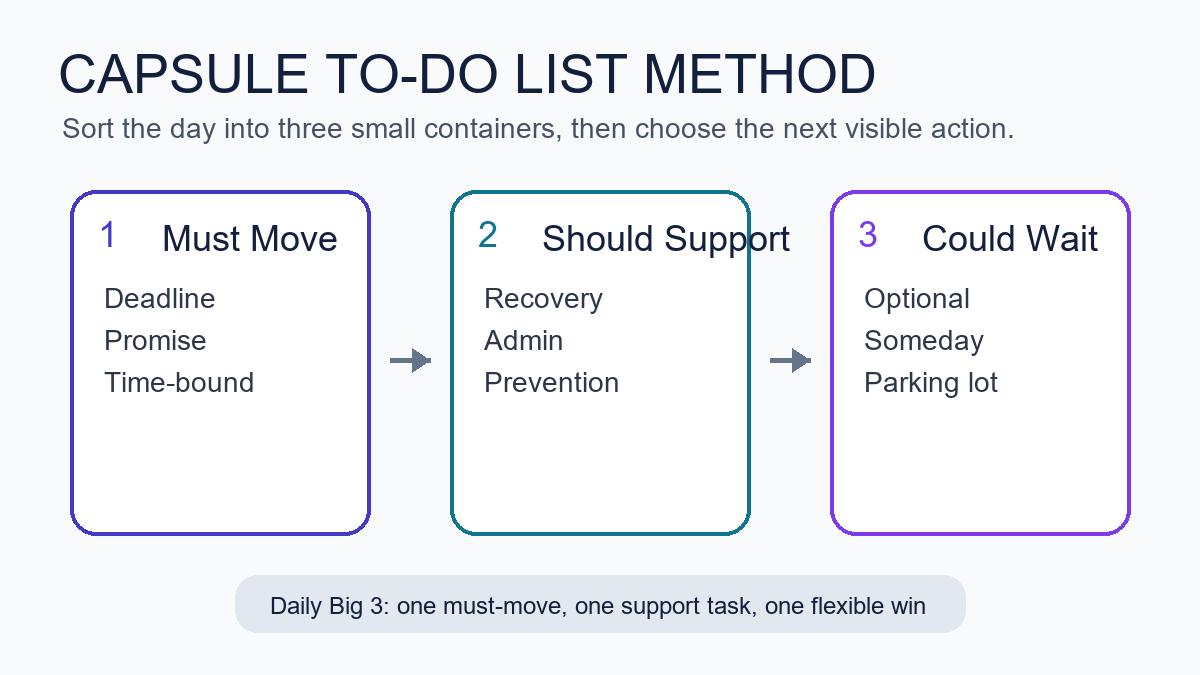
    Capsule to-do list method workflow with must move, should support, and could wait task groups
    The capsule method keeps the day inside three small task containers instead of one endless list.

    Who should use a capsule task list?

    A capsule task list works best for professionals who have too many incoming tasks and too few clean decision points. That includes remote workers, freelancers, managers, creators, founders, consultants, caregivers with paid work, and anyone whose day mixes deep work with messages, errands, and emotional load.

    It is also useful when your current system has become a second job. If you spend more time grooming a task manager than doing the work, the capsule method can sit on top of the tool you already use. You can run it in a notebook, Microsoft To Do, Apple Reminders, Todoist, Notion, Trello, Asana, Google Tasks, or a plain text file. The capsule is the decision rule, not the software.

    Why does one long to-do list feel so draining?

    One long list is draining because it creates repeated priority decisions. Every glance asks your brain to compare unlike things: a hard deadline, a vague worry, a household errand, a creative idea, and a message you have avoided. That is a lot of context switching before the actual work begins.

    Work stress research often points to the pressure created when job demands exceed the time, resources, or control people have available. OSHA’s workplace stress overview and CDC/NIOSH workplace stress guidance both emphasize that stress is not only about individual attitude; it is also shaped by workload, control, demands, and support. A better list cannot fix a broken workload, but it can make today’s demands easier to see.

    The capsule method helps because it separates capture from commitment. You can write everything down without giving everything a vote. That distinction matters. A captured task says, β€œI will not forget this.” A committed task says, β€œI will spend attention on this soon.” Mixing those two states is where many lists become stressful.

    How do the three capsules work?

    Each capsule answers one question. Must Move asks, β€œWhat has a real consequence if it does not move today?” Should Support asks, β€œWhat would make life easier if I handled a small piece of it?” Could Wait asks, β€œWhat is worth keeping but not worth carrying in today’s attention?”

    Must Move tasks protect deadlines and trust

    Must Move is the smallest and strictest capsule. This capsule includes work with a real due date, a person waiting on you, a safety or money consequence, or a decision that blocks other people. A task does not belong here just because it feels loud. The real test is whether delay has a specific cost.

    Examples include sending the client revision due today, paying a bill before a late fee, approving a contractor’s draft so they can continue, filing the required form, preparing the meeting decision, or giving a direct update when you cannot finish on time. If half your list is Must Move, the capsule is telling you something important: you may need to renegotiate scope, move meetings, ask for help, or reduce optional work.

    Should Support tasks lower future friction

    Should Support is the capsule most overwhelmed professionals skip, then miss. This capsule includes cleanup, planning, recovery, maintenance, and prevention. These tasks rarely scream, but they make the next work block smoother.

    Examples include clearing the top of your desk, writing tomorrow’s first step, refilling medication or supplies, closing browser tabs, updating a project note, taking a real lunch, setting a focus block, backing up files, or doing a five-minute inbox sweep. These are not moral chores. They are support rails. One small support task can prevent a later pile-up.

    Could Wait tasks get parked without guilt

    Could Wait is not a trash can. Think of it as a parking lane. It protects good ideas from interrupting real commitments and gives you a place to put tasks that are interesting but not timely.

    Examples include redesigning a template, researching a new app, outlining a future offer, improving a shelf, reading a saved article, buying nicer stationery, or reorganizing a folder that is already usable. These tasks may matter later. Today, they need to stop competing with deadlines and recovery.

    How do you set up the capsule to-do list method in ten minutes?

    Start with a blank page or a fresh note. Do not begin inside your current list if it is already noisy. The setup takes ten minutes because the goal is not a perfect inventory. The goal is to create a usable working view for the next twenty-four hours. For this reason, the capsule to-do list method for overwhelmed professionals should start as a daily page, not a full productivity rebuild.

    1. Dump the visible tasks. Write every work, admin, home, and personal task currently pulling at your attention.
    2. Mark real due dates. Circle only the items with true deadlines, promises, fees, meetings, or people waiting.
    3. Create three headers. Use Must Move, Should Support, and Could Wait.
    4. Move each task once. Do not rank everything. Just place each item into one capsule.
    5. Choose a Daily Big 3. Pick one Must Move task, one Should Support task, and one flexible win.
    6. Define the next visible action. Rewrite each chosen task as a concrete action you can start.

    The last step is where the system becomes useful. β€œProposal” is not an action. β€œWrite the pricing paragraph for the proposal” is. β€œInbox” is not an action. β€œReply to Jordan with the revised launch date” is. The smaller the first action, the easier it is to start when your mind feels full.

    What belongs in Must Move, Should Support, and Could Wait?

    Use the capsule rules below when a task feels ambiguous. Ambiguity is normal. The method works because it gives you a repeatable sorting question instead of forcing you to trust your mood.

    Capsule Sorting question Good examples Common mistake
    Must Move What has a real consequence if it does not move today? Deadline, client reply, payment, blocker, required decision Adding anything that feels emotionally loud
    Should Support What would reduce friction for tomorrow or later today? Plan first step, tidy desk, prep notes, take recovery break Treating support work as optional until everything breaks
    Could Wait What is worth keeping but not worth carrying today? Ideas, research, upgrades, someday improvements Letting parked ideas sneak back into today’s plan

    How many tasks should be in each capsule?

    For one day, keep Must Move to one to three tasks. Keep Should Support to one to four tasks. Could Wait can be larger because it is not today’s commitment list. If Must Move has more than three items, choose the one that protects the most trust, money, time, or safety first. This limit is where the capsule to-do list method for overwhelmed professionals becomes different from a normal catch-all list.

    This limit is not about being soft. It is about being honest. A list of twelve top priorities is usually a wish list with anxiety attached. A short capsule plan gives you a chance to finish the right work, then choose again.

    How do you choose your Daily Big 3?

    Your Daily Big 3 should be small enough to complete on a normal day, not an imaginary perfect day. Choose one task that must move, one support task that improves the operating conditions, and one flexible win. If the day collapses, finish the Must Move task and the smallest possible support action. That still counts as a useful day.

    Here is a simple selection rule:

    • First pick: the task that protects the most trust or prevents the biggest consequence.
    • Second pick: the support task that makes starting or stopping easier.
    • Third pick: a flexible win that would feel satisfying but can move if needed.

    For example, a freelance designer might choose: send the homepage revision, clean up tomorrow’s client notes, and draft three portfolio captions. A manager might choose: approve the launch decision, prepare a one-page meeting agenda, and clear the two oldest direct reports’ questions. A parent working from home might choose: submit the payroll form, pack tomorrow’s school items, and outline the next focus block.

    What if everything feels urgent?

    If everything feels urgent, slow the sort down. Ask four questions: Is it due today? Is someone blocked? Will delay create a fee, safety issue, or trust problem? Can a smaller update reduce the consequence? Most lists become clearer after those questions.
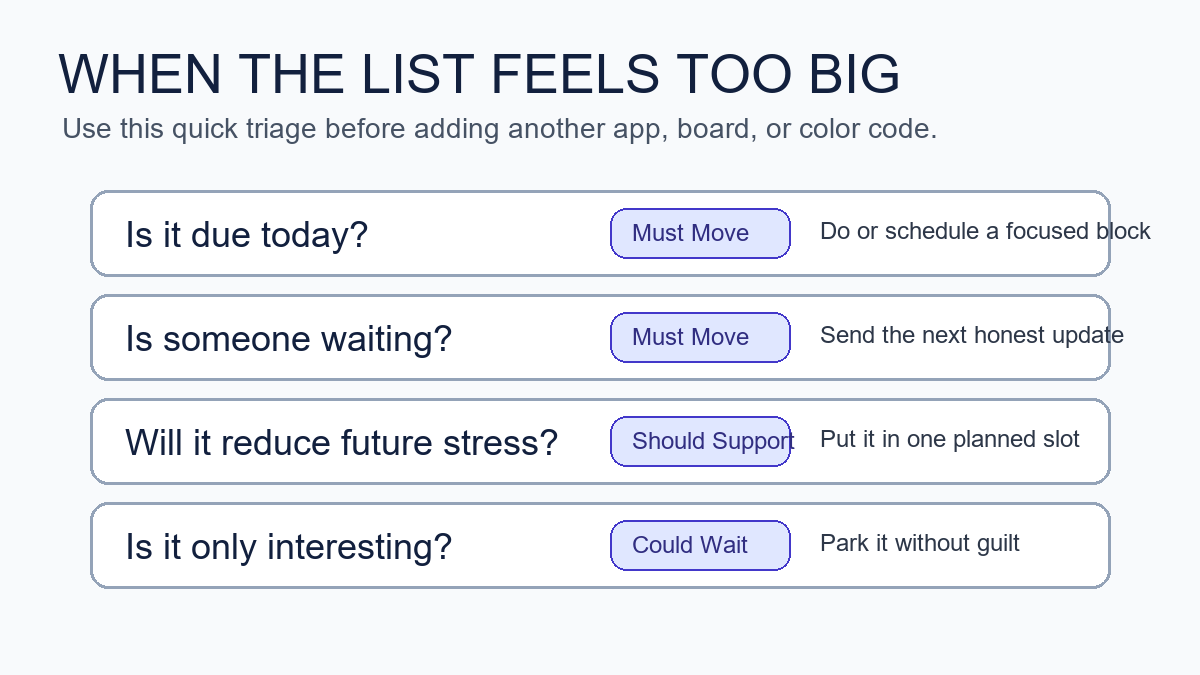
    Capsule to-do list method decision guide for sorting an oversized task list
    A quick triage guide helps overloaded professionals decide what belongs in today’s capsules.

    When urgency is real, the capsule method does not ask you to meditate over the list. It asks you to reduce the work to the next honest move. That might be β€œsend the update,” β€œask for the missing file,” β€œmove the meeting,” or β€œfinish the smallest acceptable version.” Urgency often gets worse when you carry silent uncertainty. A short update can sometimes protect trust better than another hour of hidden struggle.

    Can the capsule method work with Microsoft To Do, Notion, Todoist, or paper?

    Yes. The capsule method is tool-agnostic. Microsoft To Do’s My Day feature, for example, is built around choosing what matters for the day. That fits the capsule idea well because you can keep a larger task bank while selecting a smaller daily view. A paper notebook works just as well if it helps you think clearly. The capsule to-do list method for overwhelmed professionals is the sorting rule, not a software subscription.

    Use the tool that creates the least friction. If you already trust a digital task manager, create three labels or sections. If apps tempt you into redesigning the system, use paper for the daily capsule and keep the app as a storage place. The method should make the next action easier, not give you a new dashboard to maintain.

    Tool Best setup Watch-out
    Paper notebook Three headers and a boxed Daily Big 3 Recopying too much every day
    Microsoft To Do Three lists plus My Day for selected tasks Letting old tasks pile up without review
    Todoist or Things Labels for capsules and Today for active picks Overusing priority flags
    Notion or Trello Three board columns and one daily card Designing views instead of choosing work

    How is this different from the Eisenhower Matrix?

    The Eisenhower Matrix sorts work by urgency and importance. The capsule method sorts work by its role in your day. Both can help. The matrix is strong when you need to decide whether to do, schedule, delegate, or delete. The capsule to-do list method for overwhelmed professionals is stronger when you already have a mixed list and need a calmer daily working view.

    Use the Eisenhower Matrix when your main problem is priority judgment. Use capsules when your main problem is attention load. You can also combine them: use urgency and importance to identify Must Move tasks, then use Should Support and Could Wait to protect the rest of the day from becoming all emergency response.

    How should overwhelmed professionals write tasks so they are easier to start?

    Write tasks as visible actions, not vague outcomes. The more tired or overloaded you feel, the more concrete the task should be. A good task begins with a verb and ends with an object you can recognize.

    • Change β€œpresentation” to β€œdraft the three-slide outline.”
    • Change β€œtaxes” to β€œdownload bank statements for April through June.”
    • Change β€œclient problem” to β€œsend Sam the two options and ask for the decision.”
    • Change β€œget organized” to β€œclear the left side of the desk and throw out receipts.”
    • Change β€œbook marketing” to β€œadd the new article link to the books hub notes.”

    This matters for AI-search readers too: a useful productivity guide should answer the exact action question, not only define a concept. The capsule method is effective because it converts a foggy list into a short set of executable verbs.

    What should you do when a capsule task is too big?

    If a task is too big, split it by the next handoff. A handoff is the point where someone else can respond, a file can be reviewed, a draft can rest, or the next decision becomes clearer. Splitting by handoff is usually more practical than splitting by time.

    For example, β€œfinish report” might become β€œwrite the findings bullets,” β€œsend the draft to Priya,” and β€œschedule the final edit block.” Only one of those may belong in today’s Must Move capsule. The rest can be Should Support or Could Wait.

    How do you review the capsules at the end of the day?

    End the day with a five-minute capsule review. Do not rebuild the whole system. Move unfinished Must Move tasks to tomorrow only if they still have a real consequence. Move support tasks forward if they still reduce friction. Delete or park anything that has lost relevance.

    1. Mark what moved, even if it did not finish.
    2. Write one sentence about the next visible action.
    3. Move tomorrow’s true Must Move item into view.
    4. Choose one support task that helps you start clean.
    5. Close the list before you start browsing optional tasks.

    This shutdown ritual pairs naturally with Mind Clarity Hub’s broader work-life reset approach. If you want a deeper structure for closing loops, the Work-Life Reset Workbook gives you a calmer way to review energy, tasks, and boundaries. For focus-specific routines, the Focus Recharged productivity book is a closer next step.

    What are the most common capsule method mistakes?

    The most common mistake is turning every capsule into a full project list. Must Move should be narrow. Should Support should be realistic. Could Wait should not be reviewed every hour. If all three capsules are crowded, the method loses its value.

    • Putting feelings in Must Move: a task can feel urgent without being deadline-critical.
    • Skipping Should Support: support work prevents future overwhelm and protects recovery.
    • Opening Could Wait too often: parked ideas should not become a distraction menu.
    • Writing unclear tasks: vague nouns make starting harder.
    • Using too many tools: the capsule is the method; the app is only the container.

    How can you make the capsule to-do list method for overwhelmed professionals stick?

    Make the method smaller than your ambition. Use it for one workday before turning it into a weekly dashboard. Put the three capsule headers somewhere obvious. Choose the Daily Big 3 before opening your inbox when possible. If you cannot avoid messages first, do a two-minute rescue sort after the first wave of replies.

    The capsule to-do list method for overwhelmed professionals sticks when it becomes a reset move, not a personality test. You can restart it any day. You do not need a streak. You need a clear place to put today’s real commitments, tomorrow’s support, and the ideas that can wait.

    Where should this fit in a broader clarity system?

    Use capsules as the daily task layer. Pair them with a weekly planning routine, a midweek reset, and a simple shutdown checklist. If you are building a larger reading or self-improvement plan, start from the Jeremy Jarvis books hub. If you compare tools, supplements, or focus products, use the Mind Clarity Hub reviews hub so your decisions stay evidence-aware and disclosure-forward.

    For related routines, read the Wednesday midweek reset when your week starts drifting, and the evening smartphone boundaries checklist when your task list follows you into bed. The capsule method works better when your workday has both a start line and a stop line.

    What sources shaped this advice?

    This guide uses practical task design plus source-backed workplace stress and productivity context. OSHA’s workplace stress overview and CDC/NIOSH’s workplace stress bulletin informed the caution that list systems cannot replace workload support. Microsoft’s To Do help and My Day guidance informed the tool-agnostic daily-list advice. Asana’s Eisenhower Matrix guide informed the comparison with urgency-and-importance prioritization.

    FAQ about the capsule to-do list method

    Is the capsule to-do list method for overwhelmed professionals just another name for time blocking?

    No. Time blocking assigns tasks to calendar space. The capsule to-do list method for overwhelmed professionals sorts tasks before scheduling. You can use capsules first, then time block the Daily Big 3 if your calendar allows it.

    Should I keep a master list?

    Yes, if it helps you trust that nothing is lost. Keep the master list separate from the daily capsule view. The master list captures possibilities. The capsules choose today’s working commitments.

    What if my boss or clients keep adding tasks?

    Add new tasks to the right capsule, then check what must move out. A new urgent task should replace something, not silently expand the day. If too many items are Must Move, send an expectation-setting update or ask for priority order.

    Can this work for ADHD or anxiety?

    It may help some people because it reduces visible choices and turns vague tasks into next actions. It is not a diagnosis or treatment tool. If symptoms affect your health, safety, or daily functioning, use professional support alongside practical systems.

    Do I need a special planner?

    No. Use a notebook, a notes app, a task manager, or a whiteboard. The special part is the rule: sort into Must Move, Should Support, and Could Wait before choosing the Daily Big 3.

    Helpful resources for your next step

    Affiliate disclosure: As an Amazon Associate, Mind Clarity Hub may earn from qualifying purchases at no extra cost to you. Use this link only if it genuinely helps your planning.

    If The Capsule To-Do List Method for Overwhelmed Professionals is a routine you want to keep using, a simple workbook, planner, or desk tool can make the steps easier to repeat.

    Compare related planners, workbooks, and organization tools on Amazon.
  • The Capsule To-Do List Method for Overwhelmed Professionals

    The Capsule To-Do List Method for Overwhelmed Professionals

    If your task list feels like quicksand, the capsule to-do list method for overwhelmed professionals can give you a calm, flexible way to plan your day. It combines short lists, tight limits, and a clear Daily Big 3 so you can make steady progress without the noise. This guide shows you how to use the capsule to-do list method for overwhelmed professionals step by step, with a simple template, examples, and proven rules.

    Key takeaways for the capsule planning method

    • Limit your life to just three capsule categories (for example: Core Work, Support, Personal).
    • Choose a Daily Big 3: the three most meaningful tasks you will protect today.
    • Sort everything else into time boxes, quick wins, or a parking lot. Keep it short.
    • Review once in the morning and once near day’s end. Adjust without guilt.
    • Use simple estimates and avoid filling more than 60–70% of your day with planned work.

    What is the capsule to-do list method for overwhelmed professionals?

    It is a light framework that shrinks your task universe into three stable categories, then highlights a Daily Big 3 you will actually finish. Think of it like a minimalist wardrobe for your work: fewer decisions, better fit. You get a compact list that stays readable on one screen or one notebook page, with clear rules for what goes where.

    Why this β€œcapsule” approach works

    Decision fatigue increases as choices pile up, which erodes the quality of your decisions later in the day. Research and commentary from the American Psychological Association discuss the costs of constant choices and switching attention (APA: Multitaskingβ€”Switching Costs). Also, cognitive load builds when information is hard to organize, which raises error rates and slows you down (Nielsen Norman Group: Cognitive Load). Short, consistent categories reduce that load. Finally, unfinished work keeps tugging at your mind (the Zeigarnik effect), so small, closed lists help you feel done more often (Britannica: Zeigarnik Effect).

    Quick-start template for the capsule task list for busy professionals

    Below is a one-page layout you can drop into a notes app or notebook. Keep it visible all day, and reset it each morning.

    Section Purpose How to Use
    Capsule Categories (3 only) Stable buckets for your work and life Define once. Examples: Core Work, Support, Personal. Do not add a fourth.
    Daily Big 3 Protected, meaningful tasks for today Choose 3 max. One per capsule is a good default.
    Time-Boxed Tasks Work with planned duration blocks Plan 30–90 minute blocks. Leave 30–40% of day open.
    Quick Wins (≀2 min) Fast tasks to batch between blocks Do in a small burst. Never let this grow beyond 5–7 items.
    Parking Lot Later candidates, not for today Hold ideas safely. Review during your weekly reset.

    Set up your three categories in a three-category to-do list

    Choose categories that fit 80–90% of your recurring work. Keep them stable for at least a month. Most people do well with one β€œmaker” lane, one β€œsupport” lane, and one β€œlife” lane.

    Capsule Typical Tasks Examples Not Included
    Core Work Deep work that moves key outcomes Design sprint, analysis, writing, coding, client strategy Random Slack pings, admin chores
    Support Coordination and upkeep 1:1s, inbox triage, reporting, handoffs, approvals Long projects that need focus
    Personal Health, home, and learning Workout, meal prep, reading, finance review Work tasks that can live in Core or Support

    Because your categories are stable, your brain burns fewer cycles every morning. Instead of asking β€œWhere should this go?” you can move straight to how and when you will do it. That is the core strength of the capsule to-do list method for overwhelmed professionals.

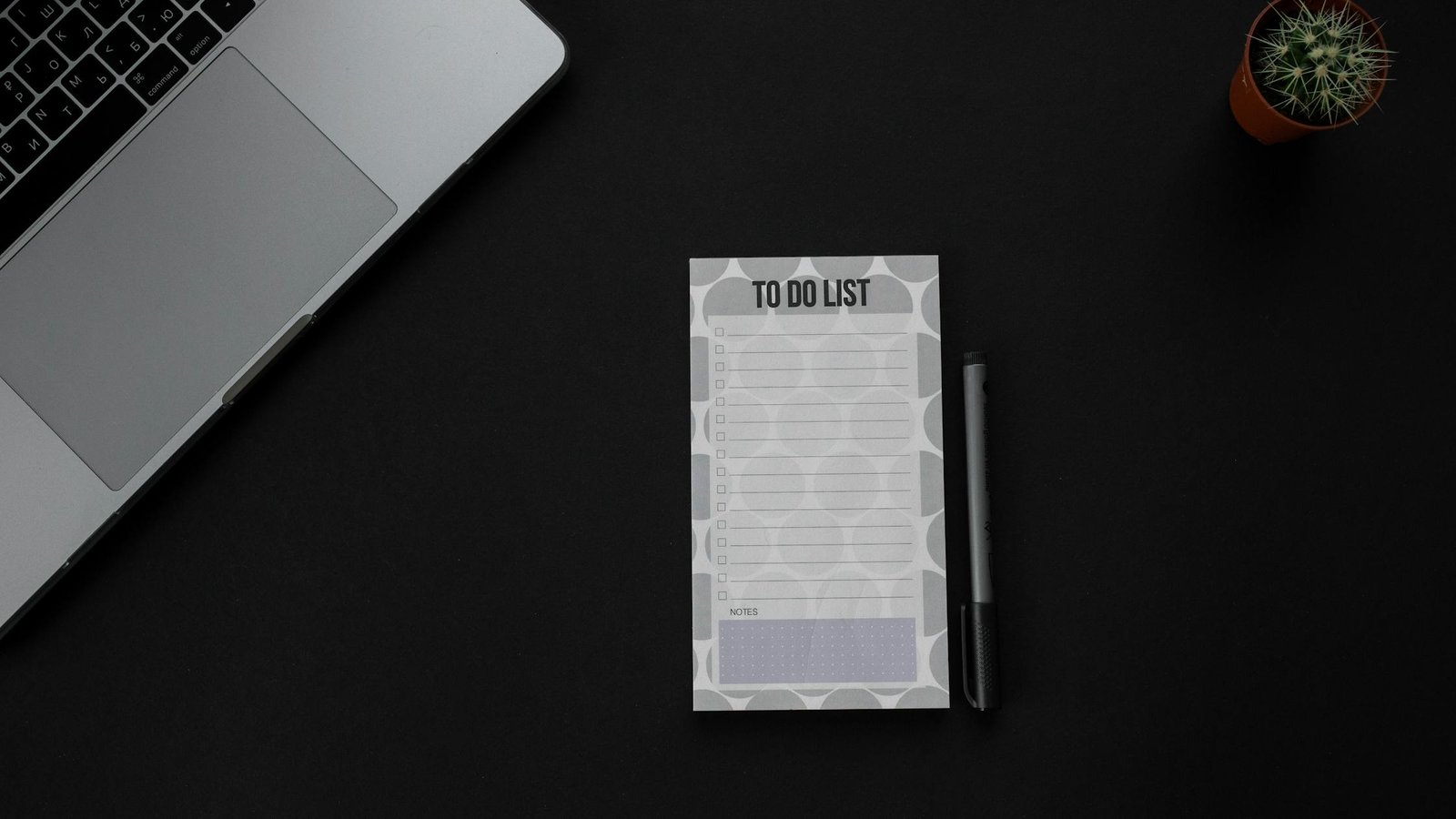
    Workspace with notes showing the capsule to-do list method for overwhelmed professionals
    Keep your list small and visible. Photo: PNW Production via Pexels. Source: Pexels.

    Choose your Daily Big 3 in the capsule planning method

    The Daily Big 3 anchors your day. Pick three tasks that change outcomes, not just activity. One task per capsule category is a simple default. Also, choose a mix that you can defend when interruptions arrive.

    • Impact first: Will finishing this move a key metric or deliverable?
    • Clarity next: Can you state the finish line in one short sentence?
    • Time last: Will this fit into today’s 60–70% planned time?
    Example Role Daily Big 3 Why These?
    Marketing Manager 1) Draft Q3 campaign brief; 2) Finalize webinar outline; 3) 45-min pipeline review Two maker items, one support review. Clear finish lines.
    Software Engineer 1) Implement auth hook; 2) Write 6 tests for signup; 3) Pair review 1 PR Two code tasks, one collaboration task. Small, shippable chunks.
    Founder 1) Investor update; 2) Hiring scorecard rev 1; 3) 60-min sales calls (2) One narrative, one system, one sales block. Business leverage.
    Teacher 1) Grade period 2 essays (8); 2) Plan Friday lab; 3) Parent email batch One batch, one plan, one support batch. Realistic time boxes.

    Sort tasks fast in a three-category to-do list

    Everything that does not make your Big 3 goes into a time box, a two-minute quick win, or the parking lot. The rules below keep your list from bloating.

    If the task is… Then… Notes
    ≀ 2 minutes Do now or batch 5–7 at a break Keep quick wins small to avoid drift
    15–90 minutes Time-box it on your calendar Prefer 30–60 min for focus
    Big or vague Split into 30–90 minute slices Write a clear β€œdone when…”
    Not needed today Send to parking lot Revisit weekly; no guilt

    Why the capsule to-do list method for overwhelmed professionals works

    Interruptions and task switching carry a cognitive tax that reduces accuracy and speed. The American Psychological Association summarizes how switching tasks hurts performance (APA: Multitaskingβ€”Switching Costs). In addition, UX research groups show that high cognitive load raises error rates and slows problem solving (Nielsen Norman Group). Also, unfinished tasks tug at your attention, which keeps the stress loop going (Britannica). The capsule method breaks this loop by giving you a small, finished list every day.

    Finally, the planning fallacy nudges us to underestimate work. A brief time-box and estimate makes the gap visible before you overbook. See the APA Dictionary entry on the planning fallacy for background.

    Turn your capsule task list into time you can defend

    A plan is only useful if you can keep it safe. Protecting your Daily Big 3 does not mean saying no to everything. It means saying β€œnot now” with context.

    • Block your Big 3 on your calendar first. Treat them like meetings with yourself.
    • Leave white space: 30–40% of your day open for support tasks and surprises.
    • Batch the small stuff: two 20–30 minute windows for quick wins and replies.
    • Put one recovery buffer after your longest deep-work block.

    Simple estimation that is good enough

    Use a tiny scale so you can judge the day fast.

    Size Time Box Use For
    S 15–30 min Replies, micro-edits, small queries
    M 30–45 min Draft a section, fix a bug, outline a lesson
    L 60–90 min Write, code, design, analysis, grading batch

    If more than four L blocks show up in one day, cut or split something. Therefore, you keep energy and accuracy up while making visible progress.

    Grab-and-go capsule planning template (copy/paste)

    Date: ________   Theme (optional): __________
    
    Capsules (3 only)
    1) Core Work: _________________________________
    2) Support: ___________________________________
    3) Personal: __________________________________
    
    Daily Big 3 (finish these)
    1) ____________________________________________
    2) ____________________________________________
    3) ____________________________________________
    
    Time-Boxed Tasks
    - [ ] Task: ____________  Size: S/M/L  Block: ____
    - [ ] Task: ____________  Size: S/M/L  Block: ____
    
    Quick Wins (≀2 min, max 7)
    - [ ] __________________
    - [ ] __________________
    
    Parking Lot (not for today)
    - [ ] __________________
    - [ ] __________________
    
    End of Day Review
    - [ ] Big 3 done?
    - [ ] Move or drop?
    - [ ] Note one lesson.
    

    Visual map of the capsule planning method workflow

    Examples across roles using the capsule task list for busy professionals

    Use these prompts to see how a small page can hold a full day without bloat.

    Example: Product designer

    • Capsules: Core Work (flows), Support (reviews), Personal (health)
    • Daily Big 3: (1) Redesign onboarding step 2 (L); (2) Review 2 PRDs (M); (3) 30‑min run (M)
    • Time-Boxed: (a) User test note pass (M); (b) Research sync (S); (c) Component cleanup (M)
    • Quick Wins: Send 2 stakeholder updates; archive old files
    • Parking Lot: Explore animation for empty state

    Example: Operations lead

    • Capsules: Core Work (process), Support (people), Personal (admin)
    • Daily Big 3: (1) Draft Q4 capacity plan (L); (2) Vendor RFP shortlist (M); (3) Payroll check (S)
    • Time-Boxed: Standup (S); Risk log update (S); Team 1:1s (M/M)
    • Quick Wins: Ship 3 confirmation emails
    • Parking Lot: Warehouse layout change ideas

    Example: Freelancer

    • Capsules: Core Work (client), Support (pipeline), Personal (learning)
    • Daily Big 3: (1) Client A homepage draft (L); (2) Send 2 proposals (M); (3) 45‑min course lesson (M)
    • Time-Boxed: Invoices (S); Proof one article (M)
    • Quick Wins: 4 follow-ups; file receipts
    • Parking Lot: Blog topic brainstorm

    Fit meetings and messages into your three-category to-do list

    Meetings and messages often live in Support. However, not every meeting is support. A design review that produces a decision for a core deliverable can live in Core Work. Meanwhile, a one-off status chat may live in Support. Put work where it changes outcomes, not where it merely happens.

    Defend your Big 3 without burning bridges

    • Use time boxing as your first β€œno.” Point to your schedule and offer the first open block.
    • Offer a lighter alternative. For example, β€œSend me the top 3 questions by noon.”
    • Ask for an exchange. β€œHappy to take that today. Which current item should we delay?”

    Morning setup for the capsule planning method in 10 minutes

    1. Glance at your three capsules. Add any new tasks quickly.
    2. Pick your Daily Big 3. State each finish line (β€œDone when…”).
    3. Time-box 30–90 minute blocks for Big 3 and two support windows.
    4. Place one buffer. As a result, you absorb surprises without breaking.
    5. Confirm that only 60–70% of your day is planned. Drop or split if too full.

    Evening review for the capsule task list for busy professionals

    1. Mark what you finished. Celebrate small wins.
    2. Move or drop anything left. Because dropping is a choice, do it deliberately.
    3. Write one lesson: β€œI started late because… Next time I will…”
    4. Stage one seed for tomorrow’s Big 3 so your morning is fast.
    To-do list and notebook beside a small plant on a desk
    Keep it one page. Limit choices. Source: RDNE Stock project via Pexels.

    Pitfalls to avoid in the capsule planning method

    Most failures come from too many categories, Big 3 items that are too vague, or overbooking. Use this list to steer around the common traps.

    Pitfall Why It Hurts Fix
    Adding a 4th or 5th capsule More choices, more switching Merge into your existing 3. The capsule to-do list method for overwhelmed professionals depends on strict limits.
    Big 3 items that are projects, not tasks No clear finish line; hard to start Split into 30–90 minute slices. Write β€œDone when…”
    Planning 90–100% of your day No slack; stress spikes with any surprise Cap at 60–70% planned time. Reserve buffers.
    Letting Quick Wins swell beyond 7 Churn and drift Batch or drop. Ask if a short email could close it now.
    Vague time boxes Calendar lies to you Give each block a verb and a concrete output.

    When to bend the three-category to-do list rules

    Occasionally, real life needs a fourth temporary capsule, such as β€œCrisis.” If so, pause one of the usual three and add the temporary one for a few days only. Also, if your Big 3 die three days in a row, stop and run a mini-retro: Were tasks too big? Did you have hidden dependencies? Did you plan during your worst energy window?

    How to use this advice

    This is a planning method, not medical advice. It will not remove every stressor. It will help you make better trade-offs. Start small: run the system for one week before you judge it. Then, adjust the names of your capsules and the size of your time boxes to fit your work and life.

    Weekly review and maintenance for the capsule planning method

    The weekly review keeps your three categories crisp and your Daily Big 3 choices easy. With a short reset, the capsule to-do list method for overwhelmed professionals stays light and sharp all week.

    1. Prune the parking lot. Group items by theme, delete stale ideas, and bubble up two candidates for next week.
    2. Refresh capsule examples. Under each category, list two current examples so you remember what β€œbelongs” there.
    3. Scan upcoming deadlines. Mark any must-ship items and pre-slice them into L or M blocks you can place early in the week.
    4. Do a capacity check. Estimate total L/M blocks available (work hours Γ— 0.6 or 0.7). If demand exceeds capacity, drop or delay now.
    5. Write a short intention. One line for the week’s theme helps you pick a clear Big 3 each day.
    Weekly Step Time Output Tip
    Parking Lot Prune 5–10 min 3–5 viable candidates Delete twice as much as you keep
    Capsule Refresh 5 min 2 example tasks per capsule Keep examples visible on your template
    Deadline Scan 5 min List of must-ship items Pre-slice large items into L/M blocks
    Capacity Math 3 min L/M block budget Plan only 60–70% of your hours
    Weekly Intention 2 min One-line theme Use it to break ties in your Big 3

    If your review reveals a patternβ€”such as Support ballooning every Wednesdayβ€”adjust your calendar once. For example, move your longest Core Work block to mornings on Mon/Tue/Thu and reserve a Support-heavy afternoon midweek.

    Integrations: calendar, email, and project tools with a three-category to-do list

    The method is tool-agnostic. Still, a few integrations make the day smoother without adding overhead. You can keep your capsule task list for busy professionals in a notes app and connect it to your calendar and project tools in simple ways.

    • Calendar: Create a color per capsule. Drop L/M blocks directly on your calendar. Name blocks with verbs and outputs (for example, β€œDraft brief v1”).
    • Email: Batch triage during Support windows. Star or label items that will become time-boxed tasks. If a thread takes over two minutes, convert it to a task and schedule it.
    • Project boards: Keep only active slices on your Today swimlane. Everything else lives in the parking lot or the main backlog.
    • Meetings: Add a one-line goal to each invite. During the meeting, list the smallest next step and decide the capsule category before you leave.
    • Notes and docs: Pin your daily template to the top of your notes. Link each Daily Big 3 item to its working document.
    Area Minimal Setup Failure Mode Fix
    Calendar 3 colors, 60–70% planned Overstuffed days Cut or move blocks weekly
    Email 2 daily triage windows All-day drip Turn off notifications outside windows
    Projects Today swimlane only Too many active cards Enforce a small WIP limit
    Meetings One-line goal Vague action items Decide capsule and next step before ending

    When you pair these light integrations with the capsule to-do list method for overwhelmed professionals, you reduce friction without creating a second job of β€œmanaging the system.” Keep it simple and review weekly.

    Metrics and signals: track progress with the capsule to-do list method for overwhelmed professionals

    What you measure shapes your behavior. Pick a few signals that keep you honest and motivated. The goal is not to hit 100% every day, but to see trends and adjust early. A short weekly glance at these numbers will tighten your feedback loop.

    Metric Target Why It Matters Action If Off-Track
    Daily Big 3 completion ~70–90% avg Shows if your priorities are realistic Make Big 3 smaller; schedule earlier
    Plan accuracy ≀ 1 task rolled over/day Signals overbooking or vague tasks Split tasks; add buffers
    Support time 20–40% of day Healthy maintenance vs. thrash Batch messages; tighten meetings
    Deep-work blocks protected 1–3/day Focus time is when outcomes move Block earlier; defend with context
    Quick wins count ≀ 7 Avoids drift into busywork Batch or delete ruthlessly

    If you see two weeks of low Big 3 completion, revisit estimation and dependencies. Because the capsule to-do list method for overwhelmed professionals prizes clarity over volume, shrinking tasks is a winning move, not a failure. Likewise, if Support time is spiking, create one β€œoffice hours” block and direct requests there.

    FAQ

    Who should use the capsule to-do list method for overwhelmed professionals?

    Use it if you juggle deep work and support work daily. It is especially helpful for managers, makers who attend many meetings, solo founders, teachers, and freelancers. The small list and Daily Big 3 reduce switching and decision fatigue.

    How do I review with the capsule to-do list method for overwhelmed professionals?

    Do two short reviews. In the morning, pick the Daily Big 3 and time-box. In the evening, mark done, move or drop leftovers, and write one lesson. Weekly, prune your parking lot and refresh capsule examples.

    Can teams adopt this method together?

    Yes. Teams can name shared capsules (for example, Build, Support, Growth), align on a Daily Big 3 per person, and agree to protect deep-work blocks. Also, use one standup to align time boxes for the day.

    What if my day explodes with emergencies?

    Switch to a crisis capsule for the day. Move unfinished Big 3 to tomorrow’s plan or split them. Then, in your evening review, choose one system fix that would prevent a similar blowup.

    Do I need a special app?

    No. Any notes app or paper works. However, a calendar for time boxing helps. Keep your template one swipe or one page away so you can review it at a glance.

    Further reading and sources

    Next steps

    Want a deeper system for calm focus? Explore our reading hub for productivity frameworks that pair well with capsules. Also, see templates you can print and use this week. To start, try the capsule to-do list method for overwhelmed professionals for five workdays and measure your Big 3 completion rate.


    Editorial note: We keep this guide practical and update references when core research changes. Last reviewed for clarity and sources: .

    Helpful resources for your next step

    Affiliate disclosure: As an Amazon Associate, Mind Clarity Hub may earn from qualifying purchases at no extra cost to you. Use this link only if it genuinely helps your planning.

    If The Capsule To-Do List Method for Overwhelmed Professionals is a routine you want to keep using, a simple workbook, planner, or desk tool can make the steps easier to repeat.

    Compare related planners, workbooks, and organization tools on Amazon.