...

Tag: daily planning

  • Morning Reset Routine for Focus: A Gentle Start That Works

    Morning Reset Routine for Focus: A Gentle Start That Works

    Quick answer: A morning reset routine for focus is a short sequence that helps you land in the day, clear mental clutter, choose one priority, and begin with a small focus sprint. It is not a perfect 5 a.m. lifestyle plan. It is a practical reset you can run in 10 to 20 minutes before email, messages, and other people start shaping your attention.

    If your mornings start with a phone, a rushed drink, and an instant list of everyone else’s needs, focus has to fight uphill. The goal of this routine is simple: remove avoidable friction before the first real task. You give your body a few cues, move loose thoughts out of your head, pick the next useful action, and start before the day becomes noisy.

    This guide is written for busy adults, remote workers, students, creators, and anyone who wants a calmer first hour without pretending life is perfectly controllable. Use the whole flow when you can. Use the three-minute version when the morning is already messy.

    What Is a Morning Reset Routine for Focus?

    A morning reset routine for focus is a repeatable set of small actions that lowers decision load before your first meaningful work block. It usually includes a body cue, a quick capture step, one priority decision, and a protected start.

    The reset works because it separates preparation from performance. Instead of asking your brain to wake up, triage, plan, and produce at the same time, you give each job a small place. You do not need a special planner, a long meditation, or a productivity app. You need a sequence you can trust even when you are tired.

    For Mind Clarity Hub readers, this routine also supports the same idea behind the Jeremy Jarvis books hub: clear systems beat vague motivation. If you want a deeper companion for daily attention and follow-through, the Focus Recharged productivity book is the most natural next step.

    Why Does Morning Focus Break So Easily?

    Morning focus breaks when your attention gets claimed before you choose where it should go. A phone notification, an open inbox, a messy desk, or a half-remembered obligation can become the first steering wheel of the day.

    Sleep quality matters too. The National Heart, Lung, and Blood Institute notes that poor or insufficient sleep can make it harder to focus on tasks and think clearly. That does not mean a morning routine can replace rest. It means the routine should be gentle enough for a real human morning, not built around heroic willpower.

    Movement also helps. The CDC explains that physical activity can support thinking, learning, and problem-solving. A focus reset does not need to become a workout. Even a short walk, light mobility, or a few minutes of standing movement can tell your body that the day has started.

    The third pressure is work design. Microsoft WorkLab has reported that meetings, messages, and app switching can crowd the hours when many people are trying to do focused work. That is why this routine protects the start. It gives your best attention somewhere to go before scattered inputs multiply.

    Morning Reset Routine for Focus: The 5-Step Flow

    The easiest version of a morning reset routine for focus has five steps: land, clear, choose, prime, and begin. Each step is small. Each step answers one question your brain would otherwise keep reopening.
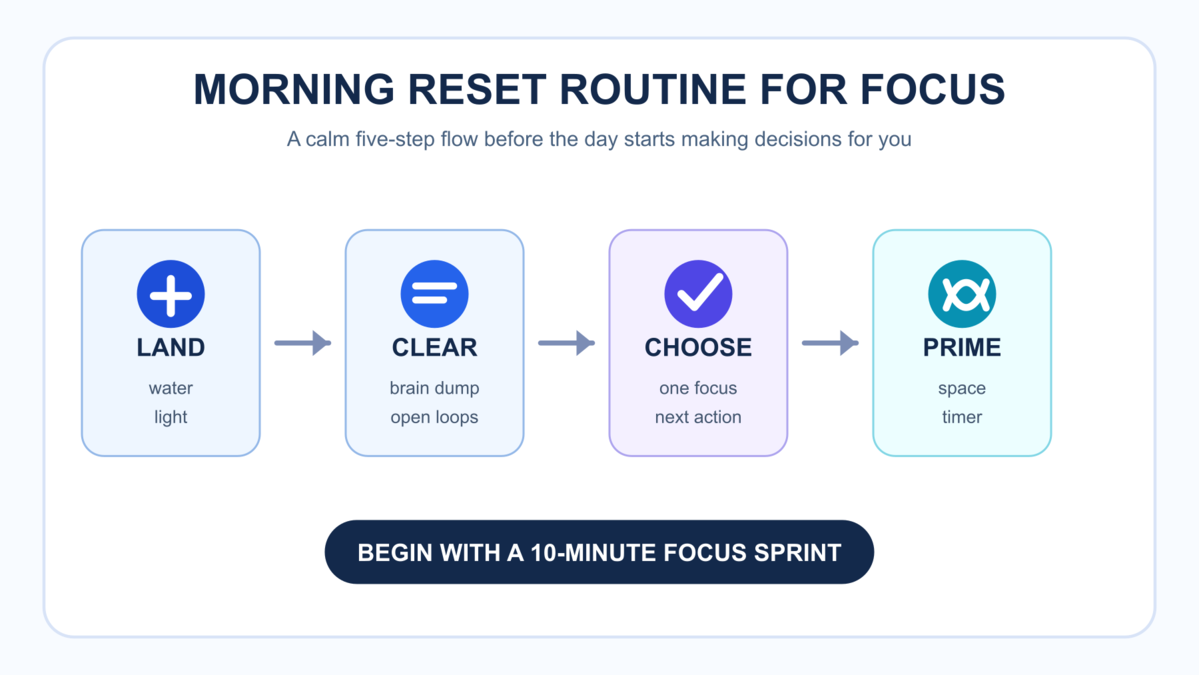
    Morning reset routine for focus five-step workflow: land, clear, choose, prime, and begin
    A five-step visual workflow for turning a rushed morning into one clear focus sprint.

    Step 1: Land Before You Plan

    Start with a physical cue before you ask your mind to make decisions. Drink water. Open a curtain. Step outside for a minute if that is realistic. Stretch your neck and shoulders. Put both feet on the floor and take a few slower breaths.

    This step is intentionally basic. It prevents the routine from becoming another thinking task. You are not trying to optimize your nervous system with a complicated protocol. You are helping your body receive the message that it is morning and that you are safe enough to choose the next action.

    Step 2: Clear the Open Loops

    Write down the loose thoughts that are already trying to pull attention: errands, replies, worries, ideas, reminders, and small tasks. Keep this to three minutes. The goal is capture, not organization.

    A good brain dump might include β€œsend invoice,” β€œcheck school form,” β€œfinish outline,” β€œreply to Jordan,” and β€œbuy coffee filters.” Once those thoughts are outside your head, they stop competing as loudly with your first focus block. If your list is long, circle only the items that matter today.

    Step 3: Choose One Focus Target

    Ask: What would make this morning feel meaningfully started? Pick one answer. Not five. Not a full life plan. One focus target.

    Good targets are concrete: draft the introduction, review the budget, outline the client email, process ten receipts, read one chapter, or plan the top three tasks. Weak targets are vague: be productive, catch up, get organized, or fix everything. A morning reset routine for focus works best when the target can survive contact with a normal day.

    Step 4: Prime the Space

    Prepare only what the first task needs. Close unrelated tabs. Put the phone away or turn on a focus mode. Place the notebook, document, or tool in front of you. Set a timer for 10, 15, or 25 minutes.

    Priming is not procrastination if it is short and specific. It becomes avoidance when you spend 45 minutes choosing music, cleaning the whole room, or rebuilding your task system. Keep the rule simple: prepare the launchpad, then launch.

    Step 5: Begin With a Small Sprint

    Start the first focus sprint before checking the inbox. Ten minutes is enough. The goal is not to finish the project. The goal is to prove that attention has a direction.

    Once the sprint starts, do not renegotiate the whole day. If a thought appears, write it on a capture line and return to the task. If the task is too large, shrink it. Write the first paragraph. Name the file. Open the spreadsheet. Sort the first five items. Progress that can be seen is easier to continue.

    How Long Should a Morning Reset Routine for Focus Take?

    A morning reset routine for focus should take 10 to 20 minutes on a normal day. On a rushed day, use the three-minute version: water, one-line brain dump, one next action.

    Longer is not always better. A routine that takes 60 minutes may feel good on a quiet weekend and fail on a Tuesday. The best routine is short enough to repeat when the house is loud, the calendar is crowded, or you did not sleep perfectly.

    Available Time What to Do Best Use Case
    3 minutes Water, capture three thoughts, choose one next action Late start or family-heavy morning
    10 minutes Land, brain dump, pick focus, clear space, start timer Most workdays
    20 minutes Add light movement, quick review, and a longer first sprint Deep work, studying, writing, planning

    What Should You Avoid During a Morning Reset Routine for Focus?

    Avoid anything that turns the reset into a second job. The morning reset should reduce choices, not create a new performance standard.

    • Avoid the inbox first. Email turns your morning into a reaction list before you choose a direction.
    • Avoid social feeds. They add other people’s urgency, mood, and comparison before your own priorities are named.
    • Avoid full-system rebuilding. Do not redesign your planner during the reset. Use the system you have today.
    • Avoid vague goals. β€œFocus more” is not a task. β€œOutline the first section” is a task.
    • Avoid self-criticism. A reset is a return point, not proof that you failed yesterday.

    How Do You Pick the First Priority in a Morning Reset Routine for Focus?

    Pick the first priority by looking for the task that reduces the most useful friction. It may be important, urgent, emotionally heavy, or simply the task that unlocks the rest of the day.

    Use this quick filter when everything feels equally loud:

    1. What has a real deadline or consequence?
    2. Which task would make other tasks easier once it is started?
    3. Name the thing that has been mentally open for too long.
    4. What can I move forward in 10 minutes?

    If two tasks compete, choose the one with the clearest next action. Clarity beats size in the first sprint. You can handle larger planning later, after attention has warmed up.

    Morning Reset Routine for Focus Examples

    Examples make the routine easier to adapt. The structure stays the same, but the first priority changes by life context.

    Reader Reset Focus First Sprint
    Remote worker Close yesterday’s open loops before meetings start Write the status update and send one key reply
    Student Begin the hardest study block before checking messages Review notes and create five recall questions
    Parent Protect one small adult priority after the household launch Process the appointment form or plan dinner
    Creator Make one draft move before research expands Write the opening scene, outline, or script hook

    How Can You Personalize the Morning Reset Without Overbuilding It?

    Personalize the reset by changing the cue, the capture tool, and the first sprint length while keeping the same order. The order matters because it protects attention from jumping straight into planning before your body and environment are ready.

    If you like paper, keep one index card near your desk. Write the date, one focus target, and the first visible action. When the sprint ends, move the card into a small stack. This gives you proof that the routine is working without building a complicated tracking system.

    If you prefer digital tools, use one pinned note called β€œmorning reset.” Keep the note boring. Add five lines only: land, clear, choose, prime, begin. A notes app can support attention, but it can also become a doorway into messages, files, and tabs. Open only the reset note before the first sprint.

    If you are a verbal processor, record a 60-second voice note. Say what is on your mind, name the priority, and state the next action. Then stop. Do not turn the reset into a morning podcast to yourself. The value comes from choosing a direction, not from explaining every detail.

    If you share space with other people, make the routine visible and quiet. A small card on the table can say, β€œfirst focus sprint.” Headphones, a closed door, or a specific chair can become the signal. The reset should not require everyone else to change their morning before you can begin.

    Morning Reset Routine for Focus Mistakes to Avoid

    The most common mistake is making the routine too impressive. A reset that looks beautiful but needs perfect conditions will disappear when life gets normal. Build the version you can do on an average weekday.

    Another mistake is adding too many wellness goals. Morning sunlight, movement, journaling, breakfast, reading, and planning can all be useful. Still, the reset has one job: help you begin the first meaningful focus block. Add other habits only when they support that job.

    A third mistake is treating the reset as a mood test. You do not have to feel inspired before you begin. You only have to make the next action visible enough that starting is easier than avoiding. In practice, the first five minutes often create the focus you were waiting to feel.

    Finally, do not use the reset to hide from hard prioritizing. If every day begins with easy admin while the important work keeps moving forward untouched, the routine has become a comfort loop. Put one meaningful task near the front at least a few days each week.

    What If You Wake Up Tired?

    If you wake up tired, make the routine smaller and more physical. Do not punish yourself with a complex planning session. Start with water, light, a gentle movement cue, and one low-friction task.

    The NHLBI’s sleep guidance is a useful reminder: lack of quality sleep can affect clear thinking and attention. A morning routine can help you begin, but it cannot erase a pattern of poor sleep. If sleep problems are persistent or disruptive, treat sleep as a core system to improve and talk with a qualified clinician when needed.

    On low-energy days, choose a β€œminimum viable focus” target. That might mean answering the one message blocking a project, creating a rough outline, or setting up tomorrow’s first task. This keeps trust with yourself without pretending your energy is unlimited.

    How Can Remote Workers Use a Morning Reset Routine for Focus?

    Remote workers can use a morning reset routine for focus to create a boundary between home mode and work mode. Without a commute, the brain often lacks a clear transition. A short reset can become that transition.

    Try this version:

    • Leave the phone outside the workspace for the first sprint.
    • Write the first work block on paper before opening chat.
    • Check the calendar only after the focus target is named.
    • Set one visible stop point for the first task.
    • Keep a capture note for messages that can wait.

    The American Psychological Association has also highlighted the value of breaks for energy and well-being. For remote work, that matters because the morning reset is only the first anchor. You still need pauses during the day so your focus does not depend on one perfect start.

    How Is a Morning Reset Routine for Focus Different From a Morning Routine?

    A morning routine may include exercise, breakfast, reading, journaling, family care, chores, or commuting. A morning reset routine for focus is narrower. It exists to help attention choose a direction.

    That difference is helpful. You can keep your normal morning life and still add the reset. It does not require replacing breakfast, parenting, prayer, exercise, or quiet time. It simply creates a short bridge between waking up and beginning meaningful work.

    What Tools Do You Need for a Morning Reset Routine for Focus?

    You need fewer tools than you think. A notebook and timer are enough. Notes apps can work. Task apps can work too. Even a sticky note is fine.

    Useful tools include:

    • A capture page for open loops
    • A daily card with one focus target
    • A timer for the first sprint
    • A focus mode or app blocker if your phone is the main leak
    • A short checklist you can reuse without thinking

    If tools become the main project, simplify. The reset should be portable. It should work in a notebook, on a hotel desk, at a kitchen table, or before a work shift.

    How Should You Review the Routine Each Week?

    Review the routine once a week for five minutes. Ask what helped, what dragged, and what made starting harder than it needed to be. This review is not a grade. It is a design check.

    Look for patterns. Maybe the routine works when your phone stays in another room. The brain dump may get too large when you skip a weekly planning session. Your first sprint might be easier after movement but harder after opening news. These observations tell you where the system needs less friction.

    Keep one small adjustment for the next week. Move the checklist. Shorten the capture step. Choose the first task the night before. Put the book, notebook, or laptop file in place before bed. Small changes compound because they make the reset easier to start.

    How Do You Make the Routine Stick?

    Make the routine stick by attaching it to a cue you already have. Try it after coffee. Use it after brushing teeth. Start after school drop-off. Run it after opening the laptop. The cue matters more than the perfect time.

    Keep the checklist visible for two weeks. Use the same words every day: land, clear, choose, prime, begin. Repetition lowers the decision cost. Once the pattern feels familiar, you will not need to negotiate every step.

    Also track friction, not perfection. If you skip three days, ask what made the reset too hard. Was it too long? Did it require a quiet room? Did it start after the inbox was already open? Fix the design instead of blaming your character.

    What If Your Morning Is Chaotic?

    If your morning is chaotic, run the reset after the chaos settles. A reset does not have to happen at sunrise. It can happen at 8:47 a.m., in a parked car, at a desk, or after the kids leave.

    Use this short script:

    I am here. The day has already started, but I can still choose the next useful action.

    Then write one sentence: β€œThe next useful action is…” Finish the sentence. Start there. This is the entire emergency version of the morning reset routine for focus.

    How We Use This Advice at Mind Clarity Hub

    Mind Clarity Hub publishes practical systems for attention, reading, planning, and calmer follow-through. This article is based on a tool-agnostic method: reduce morning decision load, protect one first focus block, and support the body without making medical promises.

    Source-backed claims in this guide are limited to broad, practical points about sleep, physical activity, breaks, and attention pressure. For deeper reading, see the CDC on physical activity and brain health, the NHLBI on sleep and clear thinking, the APA on breaks, and Microsoft WorkLab on modern focus pressure.

    For a book-based next step, visit the Mind Clarity books hub. A focused productivity path starts with Focus Recharged. Comparison-style guides and evidence notes live in the reviews and science deep dives hub.

    Morning Reset Routine for Focus Checklist

    Use this checklist tomorrow. Keep it short enough that you can finish before the day gets crowded.

    1. Drink water or use another simple body cue.
    2. Open light or step outside briefly when possible.
    3. Capture loose thoughts for three minutes.
    4. Choose one focus target for the morning.
    5. Write the next visible action.
    6. Close unrelated tabs and move the phone away.
    7. Set a timer for 10 to 25 minutes.
    8. Begin before checking the inbox.

    FAQ

    What is the best morning reset routine for focus?

    The best morning reset routine for focus is one you can repeat: land with a body cue, clear open loops, choose one priority, prime your space, and begin a short focus sprint.

    Can a morning reset routine replace sleep?

    No. A morning reset can help you start with less friction, but it does not replace enough quality sleep. If poor sleep is frequent, treat sleep as a separate health and schedule priority.

    Should I meditate during the reset?

    Meditation can help some people, but it is optional. If it supports your attention, use two to five minutes. If it becomes another obstacle, use breathing, light movement, or a short written check-in.

    How do I use this if I have ADHD?

    Keep the reset external and visible: a printed checklist, a timer, a short capture list, and one next action. This guide is educational and not a treatment plan, so adapt it with professional support if needed.

    Should I check my calendar before choosing a priority?

    Yes, but keep it brief. Look for fixed commitments, then choose your first focus target. Avoid opening messages or inboxes until the target is written down.

    What is the three-minute version?

    The three-minute version is water, capture, choose. Drink water, write down the loudest loose thoughts, and name the next useful action. Then begin for five to ten minutes.

    Helpful Sources

    Helpful resources for your next step

    Affiliate disclosure: As an Amazon Associate, Mind Clarity Hub may earn from qualifying purchases at no extra cost to you. Use this link only if it genuinely helps your planning.

    If Morning Reset Routine for Focus: A Gentle Start That Works is a routine you want to keep using, a simple workbook, planner, or desk tool can make the steps easier to repeat.

    Compare related planners, workbooks, and organization tools on Amazon.

  • End-of-Day Shutdown Checklist for Remote Workers

    End-of-Day Shutdown Checklist for Remote Workers

    Quick answer: an end-of-day shutdown checklist for remote workers is a short closing routine that captures loose tasks, chooses tomorrow’s first step, closes communication loops, resets your desk, and gives your brain a clear signal that work is done.

    If you work from home, the end of the workday can feel strangely invisible. There is no commute, no office door, and no shared moment when everyone leaves. Your laptop may sit three feet from the sofa. Messages may keep arriving on your phone. Meanwhile, your mind may keep replaying unfinished work while dinner, family, errands, or rest are already asking for attention.

    This guide gives you a practical end-of-day shutdown checklist for remote workers that takes about 15 minutes. It is built for busy adults who want less mental carryover, not a perfect productivity system. Use it at the same time most days, keep it visible, and treat it as a bridge between work mode and personal time.

    End-of-day shutdown checklist for remote workers on a cozy desk with a laptop and notebook
    A simple desk, notebook, and laptop are enough for a remote work shutdown routine when the checklist is clear.

    What Is an End-of-Day Shutdown Checklist for Remote Workers?

    An end-of-day shutdown checklist for remote workers is a repeatable set of closing actions you complete before you leave work. It is not just a to-do list. It answers four questions: what is done, what is still open, what needs attention tomorrow, and what signal tells your brain to stop scanning for work.

    The checklist matters because remote work blurs physical and mental boundaries. Microsoft described the modern knowledge-work pattern as an β€œinfinite workday”, with frequent interruptions and work activity stretching into evening hours. You do not need a dramatic life overhaul to push back. You need a small closing system that is easy to repeat when you are tired.

    Why Do Remote Workers Need an End-of-Day Shutdown Checklist?

    Remote workers need a shutdown routine because the brain often keeps unfinished tasks active. When work has no clean stopping point, you may keep checking messages, mentally rehearsing tomorrow’s problems, or feeling guilty about tasks that were never realistic for one day.

    The American Psychological Association’s Work in America survey shows that psychological well-being remains a major workplace concern. Remote work can help with flexibility, but flexibility without boundaries can turn into always-on availability. A shutdown checklist creates friction around that drift.

    It also protects tomorrow. A messy ending makes the next morning heavier because you have to rediscover your work state before you can make progress. A clean ending gives future-you a starting line.

    Remote work problem Shutdown checklist response Why it helps
    Loose tasks keep looping Capture every open loop in one trusted place The task is stored, so your mind does not have to rehearse it
    Messages arrive after hours Send final replies or schedule them for tomorrow You reduce ambiguity without training people to expect instant evening responses
    Tomorrow feels vague Choose one first meaningful action The morning begins with motion instead of decision load
    The desk still looks active Close tabs, clear the surface, and put tools away Your environment stops inviting another work session

    The 15-Minute End-of-Day Shutdown Checklist for Remote Workers

    This end-of-day shutdown checklist for remote workers has seven steps. You can complete the full version in 15 minutes or the short version in five. The key is order: capture first, decide second, communicate third, close fourth.

    1. Capture Every Open Loop

    Start by writing down every loose task, promise, question, and worry that is still taking up mental space. Use one notebook, task app, or daily planning file. Do not organize yet. The goal is to get the work out of your head before you judge it.

    • Unfinished tasks from today
    • Messages you still owe
    • Decisions waiting on someone else
    • Ideas you do not want to lose
    • Personal reminders that appeared during work

    Keep this step plain. If you start rebuilding your whole project system, the checklist becomes a second work session. A shutdown routine should lower mental noise, not create a productivity project.

    2. Mark What Is Actually Done

    Next, mark the day’s completed work. This sounds small, but it helps your brain see progress. Remote workers often end the day staring at what remains. That habit can make a productive day feel like a failure.

    Write three finished items, even if they are modest. A finished client reply counts. Drafting an outline counts. So does a hard conversation that moved a decision forward. This is not hype. It is a factual record that the day had output.

    3. Pick Tomorrow’s First Meaningful Action

    Choose one action that will make tomorrow easier. It should be specific enough that you can start without rethinking the whole project. β€œWork on proposal” is vague. β€œOpen proposal, revise pricing paragraph, and send to Sam by 10:30” is useful.

    This is where the end-of-day shutdown checklist for remote workers becomes a morning support tool. Your goal is not to plan every hour. Your goal is to remove the first decision from tomorrow.

    4. Close Communication Loops

    Check email, Slack, Teams, or your main communication tool once. Send only what truly needs to be sent today. For everything else, schedule a reply, create a task, or leave it for the next work block.

    This step protects boundaries. The Microsoft Work Trend data shows how easily digital communication fragments the day. A closing check lets you be responsible without keeping the door open all night.

    5. Reset Tabs, Files, and Notes

    Close browser tabs that do not support tomorrow’s first action. Save files. Rename downloads. Put meeting notes where they belong. If you need a tab tomorrow, add the link to tomorrow’s task instead of leaving twenty tabs open as reminders.

    Remote work makes digital clutter feel invisible until it slows you down. A two-minute digital reset prevents the next morning from starting inside yesterday’s mess.

    6. Prepare the Physical Work Boundary

    Clear the desk enough that it no longer looks like active work. Put the notebook in one place. Plug in your laptop if needed. Move coffee cups and dishes. If your workspace is also your living space, close the laptop, cover the keyboard, or place work tools in a tray.

    This physical cue is especially useful when you do not have a separate office. The goal is to change the scene so your brain receives a visible signal: this part of the day is complete.

    7. Use a Closing Phrase or Action

    End with a short phrase or action. Cal Newport has long recommended a work shutdown ritual with a clear ending phrase; his version is direct and memorable. You can read his original explanation at CalNewport.com.

    Use language that feels natural, such as β€œWork is closed,” β€œShutdown complete,” or β€œBack tomorrow at 9.” Then stand up, turn off the desk lamp, walk outside, stretch, or move to a non-work room. The phrase is not magic. It is a repeatable signal.

    How Long Should an End-of-Day Shutdown Checklist for Remote Workers Take?

    A remote work shutdown should usually take 10 to 15 minutes. If it takes longer than 20 minutes, the checklist may be too complex or you may be doing real work during the shutdown window.

    Use this timing guide:

    Available time Best version What to include
    5 minutes Emergency close Capture open loops, pick tomorrow’s first action, close laptop
    10 minutes Standard close Capture, mark done, set tomorrow, check messages, reset desk
    15 minutes Full close All seven checklist steps plus a short transition walk or stretch
    30 minutes Weekly review only Use for Friday review, not daily shutdown

    What Should You Put on an End-of-Day Shutdown Checklist for Remote Workers?

    Put only actions that make the next transition easier. A good end-of-day shutdown checklist for remote workers is short enough to use on a hard day. If it needs perfect energy, it will fail when you need it most.

    Use this printable-style version:

    1. Capture loose tasks and promises.
    2. Mark three things that are done.
    3. Move unfinished work to the right list.
    4. Choose tomorrow’s first meaningful action.
    5. Send or schedule essential replies.
    6. Close extra tabs and save open files.
    7. Clear the desk enough to change the scene.
    8. Set device boundaries for the evening.
    9. Say the closing phrase.
    10. Leave the work area for at least five minutes.

    How Do You Handle Messages After Shutdown?

    Handle after-hours messages with a simple rule before they arrive. For example: urgent client issues go to phone, standard messages wait until tomorrow, and team questions are answered during the next communication block.

    If your role requires evening coverage, define the coverage window. A boundary does not have to mean silence. It means people know what to expect. A scheduled reply can be useful because it lets you write the response while the context is fresh without sending the signal that you are available all evening.

    Use a short line like this when needed: β€œI saw this and will handle it in my first block tomorrow.” That sentence closes the loop without opening a new work session.

    What If You Work Flexible or Split Hours?

    If you work split hours, run a smaller shutdown after each major work block. The checklist is not tied to 5 p.m. It is tied to transition. Parents may use it before school pickup. Freelancers may use it before a client call break. Night workers may use it after a late focus block.

    The flexible version has three anchors: capture the open loop, choose the next return point, and make the workspace visibly inactive. That gives you the benefit even when your schedule is irregular.

    How Does This Support Burnout Prevention?

    A shutdown routine supports burnout prevention by reducing unfinished-work rumination and protecting recovery time. It is not a cure for unmanageable workload, poor leadership, or chronic overwork. However, it can help you notice when your work is consistently exceeding the container you have available.

    Research on remote work, occupational stress, mental health, and burnout points to complex relationships among workload, stress, and well-being. That is why this article avoids promising that a checklist can fix every problem. A checklist gives you a daily boundary. Bigger workload problems may still need workload negotiation, staffing changes, clinical support, or a different role.

    Still, the daily signal matters. Recovery starts more easily when work has a closing shape.

    Which Version Fits Your Work Style?

    Use the checklist version that matches your real friction. A manager, freelancer, parent, and deep-work creator may all need different emphasis.

    Work style Main risk Checklist emphasis
    Remote team lead Messages and decisions spill into the evening Close communication loops and set response expectations
    Freelancer Client work and admin blend together Choose tomorrow’s first paid action and track unpaid admin
    Parent working from home Work stops abruptly when family time begins Use the five-minute emergency close before transition points
    Creative or writer Ideas keep looping after the laptop closes Capture ideas in a parking lot and leave one restart note

    End-of-Day Shutdown Checklist for Remote Workers: A One-Week Setup Plan

    The easiest way to install the habit is to test it for one week instead of redesigning your entire routine. A one-week trial gives you enough repetition to notice friction, but it is short enough that you do not need a big commitment. Use the same checklist every day, then adjust only after you have real evidence.

    Day 1: Put the End-of-Day Shutdown Checklist for Remote Workers Where You Work

    Place the checklist beside your keyboard, inside your planner, or at the top of your task app. The location matters because the end of the workday is when memory is least reliable. If the checklist is hidden, you will default to whatever you already do: one more email, one more tab, one more half-finished thought.

    Set a calendar reminder 20 minutes before your usual stopping point. Name it plainly, such as β€œclose work.” When the reminder appears, stop starting new tasks. Your only job is to land the plane.

    Days 2 and 3: Protect the First Five Minutes

    For the next two days, focus only on the first five minutes. Capture open loops, choose tomorrow’s first action, and close the laptop. Do not worry if the rest of the checklist is imperfect. A partial shutdown that happens is better than a complete shutdown you avoid.

    This is also where you learn whether your chosen tool works. If a paper notebook feels calming, keep it. If paper gets lost, move the checklist into your task manager. The right tool is the one that lowers friction at the exact moment you want to stop working.

    Days 4 and 5: Add Communication Boundaries

    Once the capture habit is working, add the message rule. Decide which channel gets one final check and which channels stay closed. Most remote workers do not need to review every inbox at shutdown. They need to know whether anything truly urgent requires a response before tomorrow.

    Use status language if your team relies on async work. A simple note like β€œoffline for the evening; next replies tomorrow morning” can lower ambiguity. If that feels too formal, use a status emoji, calendar block, or scheduled send. The method is flexible; the boundary should be clear.

    Day 6: Review What Still Leaks Into the Evening

    On the sixth day, notice what still follows you after shutdown. It may be a specific client, a vague project, a messy calendar, or a personal errand that keeps appearing during work. Add one small fix for that leak. For example, create a waiting-for list, add a family reminder to your personal calendar, or move recurring client follow-ups into a Friday admin block.

    Day 7: Repeat the End-of-Day Shutdown Checklist for Remote Workers

    At the end of the week, keep the steps that made evenings quieter. Cut anything that felt decorative. Then repeat the lean version for another week. The best end-of-day shutdown checklist for remote workers is not the longest checklist. It is the one you can use when you are busy, tired, and tempted to leave work half-open.

    How Can You Make the Habit Stick?

    Make the habit stick by attaching it to an existing cue. Use your final meeting, school pickup alarm, dinner prep, or calendar block as the trigger. Put the checklist where you can see it. Do not trust memory at the end of a long day.

    Keep a two-line log for one week:

    • Did I complete the shutdown checklist today?
    • Did tomorrow start with less friction?

    After seven days, remove any step you avoided repeatedly. That avoidance is useful data. The step may be too vague. It may belong in a weekly review. Or it may actually be a work task, not a shutdown task.

    End-of-Day Shutdown Checklist for Remote Workers: Common Mistakes

    The most common mistake is turning the shutdown into more work. If you start rewriting your project plan, cleaning the whole office, or answering every low-priority message, you have left shutdown mode.

    • Mistake: checking every app. Better: check only the channels where something truly urgent could appear.
    • Mistake: planning tomorrow hour by hour. Better: choose the first meaningful action and leave detailed planning for the morning.
    • Mistake: leaving tabs open as reminders. Better: save the link inside the task.
    • Mistake: using the checklist only on easy days. Better: use a five-minute version on chaotic days.
    • Mistake: expecting instant calm. Better: track whether the routine lowers friction over one to two weeks.

    How We Built This Checklist

    This guide blends the approved Mind Clarity Hub cluster plan with current cached site signals. Fresh Bing Webmaster data showed remote work productivity and focus-related queries. Cached GA4 data showed traffic to remote work productivity, focus reset, books, and related planning pages. Cached GSC data showed existing impressions around burnout, focus, ADHD routine, and productivity topics.

    The Semrush MCP keyword report was unavailable because the current Semrush plan does not include MCP access. GSC and GA4 refresh attempts returned OAuth HTTP 400 errors during this run, so the post uses the latest cached exports and the approved cluster plan. That is acceptable under the pipeline when blockers are logged.

    The content direction is practical and non-clinical: define the method, give the checklist, show variations, support claims with credible sources, and link readers to deeper Mind Clarity Hub book resources when they want a broader reset plan.

    More Guides for Closing Work Cleanly

    If this checklist helps, pair it with the Mind Clarity Hub books page for a broader reading path on focus, burnout, and calmer routines. For remote workers trying to rebuild energy after long seasons of stress, The Work-Life Reset Workbook is the most relevant next step. If the deeper issue is sustained work exhaustion, see Burnout Breakthrough.

    You may also like Focus Routine for Remote Work and Inbox Zero, Without the Stress. They support the same reader goal from different angles: fewer loose loops, fewer reactive starts, and more intentional work blocks.

    FAQ About the End-of-Day Shutdown Checklist for Remote Workers

    Is an end-of-day shutdown checklist for remote workers the same as time blocking?

    No. Time blocking plans work into calendar space. An end-of-day shutdown checklist for remote workers closes the current workday, stores open loops, and prepares the next start point.

    What if I never finish everything by the end of the day?

    The checklist assumes you will not finish everything. Its job is to decide where unfinished work belongs so it does not keep looping in your head all evening.

    Should I use a paper checklist or a digital checklist?

    Use whichever you will actually repeat. Paper adds a physical boundary. Digital works well if your work already lives in a task manager. The system matters less than the daily cue.

    Can this help if my workplace expects after-hours replies?

    It can help you define the real expectation. If after-hours replies are required, set a coverage window and keep the full shutdown after that window. If they are not required, use scheduled replies and clear status notes.

    How soon will the checklist feel automatic?

    Many people need one to two weeks before the checklist feels natural. Start with the five-minute version so the habit survives busy days.

    The Bottom Line

    An end-of-day shutdown checklist for remote workers gives the workday a clean edge. It captures what is unfinished, honors what is complete, points tomorrow in the right direction, and gives your body a clear transition out of work mode.

    Start tonight with the short version: capture open loops, choose tomorrow’s first action, close the laptop, and say one closing phrase. Repeat it for a week. The win is not a perfect evening. The win is a workday that stops asking for your attention after it is done.

    Helpful resources for your next step

    Affiliate disclosure: As an Amazon Associate, Mind Clarity Hub may earn from qualifying purchases at no extra cost to you. Use this link only if it genuinely helps your planning.

    If End-of-Day Shutdown Checklist for Remote Workers is a routine you want to keep using, a simple workbook, planner, or desk tool can make the steps easier to repeat.

    Compare related planners, workbooks, and organization tools on Amazon.

  • The Capsule To-Do List Method for Overwhelmed Professionals

    The Capsule To-Do List Method for Overwhelmed Professionals

    Quick answer: the capsule to-do list method for overwhelmed professionals is a simple way to turn one noisy task list into three small containers: Must Move, Should Support, and Could Wait. You still capture everything, but you only plan from the capsules that match today. That keeps urgent work visible, protects recovery tasks, and gives lower-value ideas a place to wait without hijacking your focus.

    If your list keeps growing while your attention keeps shrinking, the problem may not be discipline. It may be list design. A single running list treats a client deadline, a benefits form, a half-formed idea, a Slack favor, and a book you want to read as if they all belong in the same mental room. Overloaded professionals need a smaller decision surface. The capsule method gives each task a job before you decide whether it deserves your energy today.

    This guide is practical, not clinical advice. Use it as a workday clarity system, especially when your calendar is crowded, your inbox is loud, and you need a humane way to pick the next step. If work stress is affecting sleep, health, safety, or daily functioning, use workplace support, medical care, or a qualified professional alongside any productivity system.

    What is the capsule to-do list method for overwhelmed professionals?

    The capsule method is a three-part task triage system. Instead of sorting tasks by project, app, color, or mood, you sort them by what they do for your day. Must Move tasks protect promises and deadlines. Should Support tasks reduce future friction. Could Wait tasks are useful, interesting, or optional, but not needed today.

    The point is not to create a prettier list. The point is to reduce the number of choices you face each time you ask, β€œWhat should I do now?” That question gets expensive when every item looks equally available. With capsules, you can look at the right container first.

    • Must Move: deadline-driven, promise-driven, or risk-reducing work that genuinely needs action today.
    • Should Support: planning, admin, cleanup, health, recovery, and prevention tasks that make tomorrow easier.
    • Could Wait: nice-to-have ideas, research rabbit holes, optional improvements, and someday tasks.

    For most workdays, the final plan becomes a Daily Big 3: one Must Move, one Should Support, and one flexible win from either capsule. That is enough structure to create momentum without pretending you can finish everything.

    Capsule to-do list method workflow with must move, should support, and could wait task groups
    The capsule method keeps the day inside three small task containers instead of one endless list.

    Who should use a capsule task list?

    A capsule task list works best for professionals who have too many incoming tasks and too few clean decision points. That includes remote workers, freelancers, managers, creators, founders, consultants, caregivers with paid work, and anyone whose day mixes deep work with messages, errands, and emotional load.

    It is also useful when your current system has become a second job. If you spend more time grooming a task manager than doing the work, the capsule method can sit on top of the tool you already use. You can run it in a notebook, Microsoft To Do, Apple Reminders, Todoist, Notion, Trello, Asana, Google Tasks, or a plain text file. The capsule is the decision rule, not the software.

    Why does one long to-do list feel so draining?

    One long list is draining because it creates repeated priority decisions. Every glance asks your brain to compare unlike things: a hard deadline, a vague worry, a household errand, a creative idea, and a message you have avoided. That is a lot of context switching before the actual work begins.

    Work stress research often points to the pressure created when job demands exceed the time, resources, or control people have available. OSHA’s workplace stress overview and CDC/NIOSH workplace stress guidance both emphasize that stress is not only about individual attitude; it is also shaped by workload, control, demands, and support. A better list cannot fix a broken workload, but it can make today’s demands easier to see.

    The capsule method helps because it separates capture from commitment. You can write everything down without giving everything a vote. That distinction matters. A captured task says, β€œI will not forget this.” A committed task says, β€œI will spend attention on this soon.” Mixing those two states is where many lists become stressful.

    How do the three capsules work?

    Each capsule answers one question. Must Move asks, β€œWhat has a real consequence if it does not move today?” Should Support asks, β€œWhat would make life easier if I handled a small piece of it?” Could Wait asks, β€œWhat is worth keeping but not worth carrying in today’s attention?”

    Must Move tasks protect deadlines and trust

    Must Move is the smallest and strictest capsule. This capsule includes work with a real due date, a person waiting on you, a safety or money consequence, or a decision that blocks other people. A task does not belong here just because it feels loud. The real test is whether delay has a specific cost.

    Examples include sending the client revision due today, paying a bill before a late fee, approving a contractor’s draft so they can continue, filing the required form, preparing the meeting decision, or giving a direct update when you cannot finish on time. If half your list is Must Move, the capsule is telling you something important: you may need to renegotiate scope, move meetings, ask for help, or reduce optional work.

    Should Support tasks lower future friction

    Should Support is the capsule most overwhelmed professionals skip, then miss. This capsule includes cleanup, planning, recovery, maintenance, and prevention. These tasks rarely scream, but they make the next work block smoother.

    Examples include clearing the top of your desk, writing tomorrow’s first step, refilling medication or supplies, closing browser tabs, updating a project note, taking a real lunch, setting a focus block, backing up files, or doing a five-minute inbox sweep. These are not moral chores. They are support rails. One small support task can prevent a later pile-up.

    Could Wait tasks get parked without guilt

    Could Wait is not a trash can. Think of it as a parking lane. It protects good ideas from interrupting real commitments and gives you a place to put tasks that are interesting but not timely.

    Examples include redesigning a template, researching a new app, outlining a future offer, improving a shelf, reading a saved article, buying nicer stationery, or reorganizing a folder that is already usable. These tasks may matter later. Today, they need to stop competing with deadlines and recovery.

    How do you set up the capsule to-do list method in ten minutes?

    Start with a blank page or a fresh note. Do not begin inside your current list if it is already noisy. The setup takes ten minutes because the goal is not a perfect inventory. The goal is to create a usable working view for the next twenty-four hours. For this reason, the capsule to-do list method for overwhelmed professionals should start as a daily page, not a full productivity rebuild.

    1. Dump the visible tasks. Write every work, admin, home, and personal task currently pulling at your attention.
    2. Mark real due dates. Circle only the items with true deadlines, promises, fees, meetings, or people waiting.
    3. Create three headers. Use Must Move, Should Support, and Could Wait.
    4. Move each task once. Do not rank everything. Just place each item into one capsule.
    5. Choose a Daily Big 3. Pick one Must Move task, one Should Support task, and one flexible win.
    6. Define the next visible action. Rewrite each chosen task as a concrete action you can start.

    The last step is where the system becomes useful. β€œProposal” is not an action. β€œWrite the pricing paragraph for the proposal” is. β€œInbox” is not an action. β€œReply to Jordan with the revised launch date” is. The smaller the first action, the easier it is to start when your mind feels full.

    What belongs in Must Move, Should Support, and Could Wait?

    Use the capsule rules below when a task feels ambiguous. Ambiguity is normal. The method works because it gives you a repeatable sorting question instead of forcing you to trust your mood.

    Capsule Sorting question Good examples Common mistake
    Must Move What has a real consequence if it does not move today? Deadline, client reply, payment, blocker, required decision Adding anything that feels emotionally loud
    Should Support What would reduce friction for tomorrow or later today? Plan first step, tidy desk, prep notes, take recovery break Treating support work as optional until everything breaks
    Could Wait What is worth keeping but not worth carrying today? Ideas, research, upgrades, someday improvements Letting parked ideas sneak back into today’s plan

    How many tasks should be in each capsule?

    For one day, keep Must Move to one to three tasks. Keep Should Support to one to four tasks. Could Wait can be larger because it is not today’s commitment list. If Must Move has more than three items, choose the one that protects the most trust, money, time, or safety first. This limit is where the capsule to-do list method for overwhelmed professionals becomes different from a normal catch-all list.

    This limit is not about being soft. It is about being honest. A list of twelve top priorities is usually a wish list with anxiety attached. A short capsule plan gives you a chance to finish the right work, then choose again.

    How do you choose your Daily Big 3?

    Your Daily Big 3 should be small enough to complete on a normal day, not an imaginary perfect day. Choose one task that must move, one support task that improves the operating conditions, and one flexible win. If the day collapses, finish the Must Move task and the smallest possible support action. That still counts as a useful day.

    Here is a simple selection rule:

    • First pick: the task that protects the most trust or prevents the biggest consequence.
    • Second pick: the support task that makes starting or stopping easier.
    • Third pick: a flexible win that would feel satisfying but can move if needed.

    For example, a freelance designer might choose: send the homepage revision, clean up tomorrow’s client notes, and draft three portfolio captions. A manager might choose: approve the launch decision, prepare a one-page meeting agenda, and clear the two oldest direct reports’ questions. A parent working from home might choose: submit the payroll form, pack tomorrow’s school items, and outline the next focus block.

    What if everything feels urgent?

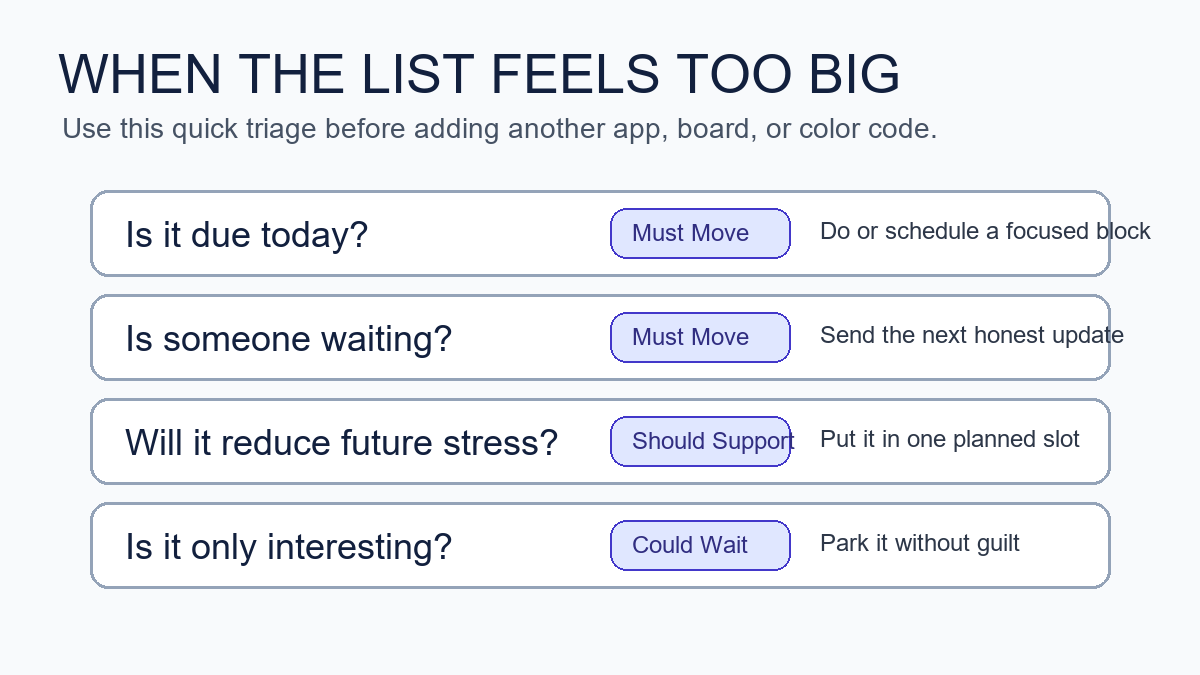
    If everything feels urgent, slow the sort down. Ask four questions: Is it due today? Is someone blocked? Will delay create a fee, safety issue, or trust problem? Can a smaller update reduce the consequence? Most lists become clearer after those questions.

    Capsule to-do list method decision guide for sorting an oversized task list
    A quick triage guide helps overloaded professionals decide what belongs in today’s capsules.

    When urgency is real, the capsule method does not ask you to meditate over the list. It asks you to reduce the work to the next honest move. That might be β€œsend the update,” β€œask for the missing file,” β€œmove the meeting,” or β€œfinish the smallest acceptable version.” Urgency often gets worse when you carry silent uncertainty. A short update can sometimes protect trust better than another hour of hidden struggle.

    Can the capsule method work with Microsoft To Do, Notion, Todoist, or paper?

    Yes. The capsule method is tool-agnostic. Microsoft To Do’s My Day feature, for example, is built around choosing what matters for the day. That fits the capsule idea well because you can keep a larger task bank while selecting a smaller daily view. A paper notebook works just as well if it helps you think clearly. The capsule to-do list method for overwhelmed professionals is the sorting rule, not a software subscription.

    Use the tool that creates the least friction. If you already trust a digital task manager, create three labels or sections. If apps tempt you into redesigning the system, use paper for the daily capsule and keep the app as a storage place. The method should make the next action easier, not give you a new dashboard to maintain.

    Tool Best setup Watch-out
    Paper notebook Three headers and a boxed Daily Big 3 Recopying too much every day
    Microsoft To Do Three lists plus My Day for selected tasks Letting old tasks pile up without review
    Todoist or Things Labels for capsules and Today for active picks Overusing priority flags
    Notion or Trello Three board columns and one daily card Designing views instead of choosing work

    How is this different from the Eisenhower Matrix?

    The Eisenhower Matrix sorts work by urgency and importance. The capsule method sorts work by its role in your day. Both can help. The matrix is strong when you need to decide whether to do, schedule, delegate, or delete. The capsule to-do list method for overwhelmed professionals is stronger when you already have a mixed list and need a calmer daily working view.

    Use the Eisenhower Matrix when your main problem is priority judgment. Use capsules when your main problem is attention load. You can also combine them: use urgency and importance to identify Must Move tasks, then use Should Support and Could Wait to protect the rest of the day from becoming all emergency response.

    How should overwhelmed professionals write tasks so they are easier to start?

    Write tasks as visible actions, not vague outcomes. The more tired or overloaded you feel, the more concrete the task should be. A good task begins with a verb and ends with an object you can recognize.

    • Change β€œpresentation” to β€œdraft the three-slide outline.”
    • Change β€œtaxes” to β€œdownload bank statements for April through June.”
    • Change β€œclient problem” to β€œsend Sam the two options and ask for the decision.”
    • Change β€œget organized” to β€œclear the left side of the desk and throw out receipts.”
    • Change β€œbook marketing” to β€œadd the new article link to the books hub notes.”

    This matters for AI-search readers too: a useful productivity guide should answer the exact action question, not only define a concept. The capsule method is effective because it converts a foggy list into a short set of executable verbs.

    What should you do when a capsule task is too big?

    If a task is too big, split it by the next handoff. A handoff is the point where someone else can respond, a file can be reviewed, a draft can rest, or the next decision becomes clearer. Splitting by handoff is usually more practical than splitting by time.

    For example, β€œfinish report” might become β€œwrite the findings bullets,” β€œsend the draft to Priya,” and β€œschedule the final edit block.” Only one of those may belong in today’s Must Move capsule. The rest can be Should Support or Could Wait.

    How do you review the capsules at the end of the day?

    End the day with a five-minute capsule review. Do not rebuild the whole system. Move unfinished Must Move tasks to tomorrow only if they still have a real consequence. Move support tasks forward if they still reduce friction. Delete or park anything that has lost relevance.

    1. Mark what moved, even if it did not finish.
    2. Write one sentence about the next visible action.
    3. Move tomorrow’s true Must Move item into view.
    4. Choose one support task that helps you start clean.
    5. Close the list before you start browsing optional tasks.

    This shutdown ritual pairs naturally with Mind Clarity Hub’s broader work-life reset approach. If you want a deeper structure for closing loops, the Work-Life Reset Workbook gives you a calmer way to review energy, tasks, and boundaries. For focus-specific routines, the Focus Recharged productivity book is a closer next step.

    What are the most common capsule method mistakes?

    The most common mistake is turning every capsule into a full project list. Must Move should be narrow. Should Support should be realistic. Could Wait should not be reviewed every hour. If all three capsules are crowded, the method loses its value.

    • Putting feelings in Must Move: a task can feel urgent without being deadline-critical.
    • Skipping Should Support: support work prevents future overwhelm and protects recovery.
    • Opening Could Wait too often: parked ideas should not become a distraction menu.
    • Writing unclear tasks: vague nouns make starting harder.
    • Using too many tools: the capsule is the method; the app is only the container.

    How can you make the capsule to-do list method for overwhelmed professionals stick?

    Make the method smaller than your ambition. Use it for one workday before turning it into a weekly dashboard. Put the three capsule headers somewhere obvious. Choose the Daily Big 3 before opening your inbox when possible. If you cannot avoid messages first, do a two-minute rescue sort after the first wave of replies.

    The capsule to-do list method for overwhelmed professionals sticks when it becomes a reset move, not a personality test. You can restart it any day. You do not need a streak. You need a clear place to put today’s real commitments, tomorrow’s support, and the ideas that can wait.

    Where should this fit in a broader clarity system?

    Use capsules as the daily task layer. Pair them with a weekly planning routine, a midweek reset, and a simple shutdown checklist. If you are building a larger reading or self-improvement plan, start from the Jeremy Jarvis books hub. If you compare tools, supplements, or focus products, use the Mind Clarity Hub reviews hub so your decisions stay evidence-aware and disclosure-forward.

    For related routines, read the Wednesday midweek reset when your week starts drifting, and the evening smartphone boundaries checklist when your task list follows you into bed. The capsule method works better when your workday has both a start line and a stop line.

    What sources shaped this advice?

    This guide uses practical task design plus source-backed workplace stress and productivity context. OSHA’s workplace stress overview and CDC/NIOSH’s workplace stress bulletin informed the caution that list systems cannot replace workload support. Microsoft’s To Do help and My Day guidance informed the tool-agnostic daily-list advice. Asana’s Eisenhower Matrix guide informed the comparison with urgency-and-importance prioritization.

    FAQ about the capsule to-do list method

    Is the capsule to-do list method for overwhelmed professionals just another name for time blocking?

    No. Time blocking assigns tasks to calendar space. The capsule to-do list method for overwhelmed professionals sorts tasks before scheduling. You can use capsules first, then time block the Daily Big 3 if your calendar allows it.

    Should I keep a master list?

    Yes, if it helps you trust that nothing is lost. Keep the master list separate from the daily capsule view. The master list captures possibilities. The capsules choose today’s working commitments.

    What if my boss or clients keep adding tasks?

    Add new tasks to the right capsule, then check what must move out. A new urgent task should replace something, not silently expand the day. If too many items are Must Move, send an expectation-setting update or ask for priority order.

    Can this work for ADHD or anxiety?

    It may help some people because it reduces visible choices and turns vague tasks into next actions. It is not a diagnosis or treatment tool. If symptoms affect your health, safety, or daily functioning, use professional support alongside practical systems.

    Do I need a special planner?

    No. Use a notebook, a notes app, a task manager, or a whiteboard. The special part is the rule: sort into Must Move, Should Support, and Could Wait before choosing the Daily Big 3.

    Helpful resources for your next step

    Affiliate disclosure: As an Amazon Associate, Mind Clarity Hub may earn from qualifying purchases at no extra cost to you. Use this link only if it genuinely helps your planning.

    If The Capsule To-Do List Method for Overwhelmed Professionals is a routine you want to keep using, a simple workbook, planner, or desk tool can make the steps easier to repeat.

    Compare related planners, workbooks, and organization tools on Amazon.

  • Chatgpt Workflow For Daily Planning

    Chatgpt Workflow For Daily Planning

    Last updated: April 29, 2026

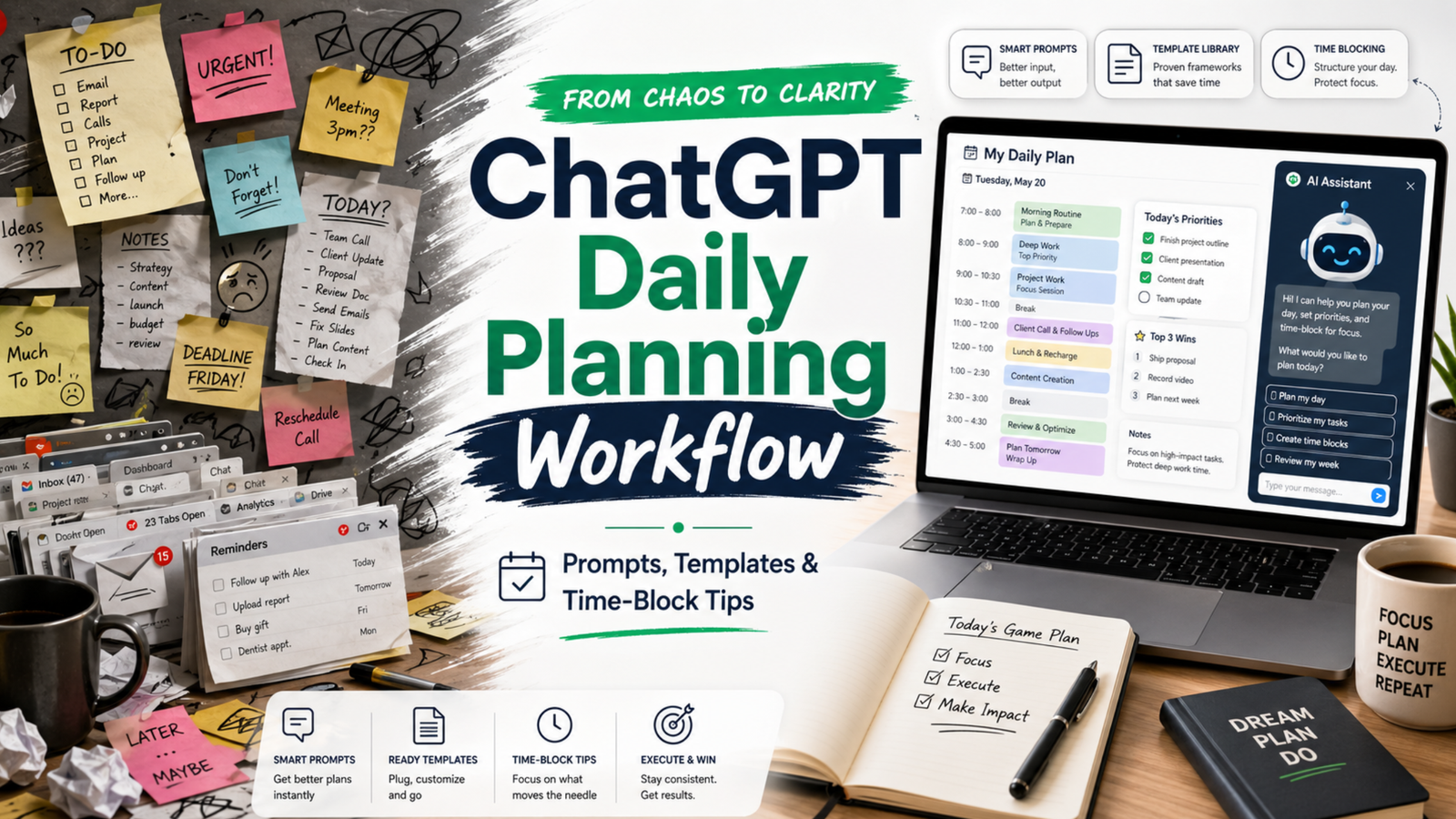
    If your day feels like a ping-pong match of pings, meetings, and shifting plans, this practical ChatGPT workflow for daily planning will help you turn noise into clear next steps. You will map what matters, time-block it, and review without spending all morning on the plan.

    Key takeaways

    • Plan in a short loop: capture, prioritize, estimate, block, and review.
    • Keep roles clear: you choose goals; ChatGPT drafts and checks; your calendar commits.
    • Use tight prompts, constraints, and tokens. Then edit for reality and energy.
    • Close the loop daily. Learn from slippage and adjust tomorrow’s plan.

    What is a ChatGPT workflow for daily planning?

    A ChatGPT workflow for daily planning is a repeatable, 15–25 minute loop that turns goals, tasks, and constraints into a time-blocked daily plan. You capture inputs, prioritize work, estimate effort, and draft a schedule. Then you sense-check the plan, commit the blocks to your calendar, and review at day’s end to improve tomorrow.

    Because it is a workflow, not a one-off prompt, it reduces friction and decision fatigue. Also, it frees your attention for deep work while still reacting to change.

    How does this fit with time blocking and GTD?

    Time blocking protects focus by giving each block a job. The approach matches the classic idea of planning your day before executing it, a practice advocated by productivity researchers and writers. For deeper context on the value of time blocking for focused work, see Cal Newport’s overview of the method and why it helps reduce context switching (Cal Newport).

    GTD (Getting Things Done) gives you trusted capture and clarity of next actions. You can use your GTD lists as the raw input for the plan (GTD basics). Meanwhile, prompt engineering guidance from vendors can improve the quality of your ChatGPT drafts (Microsoft Learn; OpenAI Custom Instructions).

    What do you need before you start?

    • A quick list of today’s candidates: meetings, deadlines, open loops, and 2–3 outcomes that matter.
    • Your calendar open, with room to block. If it is jammed, expect tradeoffs.
    • Access to ChatGPT (or any capable LLM) and your preferred note space.
    • Constraints ready: energy windows, hard stops, context limits, and must-do admin.
    Tablet showing a ChatGPT workflow for daily planning with a simple time-block layout.
    A light, clear layout makes your plan easier to trust. Photo: Jakub Zerdzicki via Pexels. Source: Pexels page.

    How to use this advice (and what to avoid)

    • Start small. Plan one key outcome plus 2–3 supporting blocks, not a perfect day.
    • Keep prompts short and specific. Limit scope and ask for estimates with a buffer.
    • Edit the draft. You own the plan; ChatGPT only offers a first pass.
    • Avoid dumping sensitive data. Use redacted text or summaries. Review your tool’s privacy policy first (OpenAI Privacy).
    • Close the loop. Do an honest review each evening in 5 minutes.

    Step-by-step daily loop

    Use this ChatGPT workflow for daily planning in five compact phases. The whole loop takes 15–25 minutes once you practice it.

    Phase 1 β€” Capture and clarify

    1. List hard commitments: meetings, deadlines, immovable errands.
    2. Write 1–3 outcomes that define a β€œgood day.” Keep them specific and measurable.
    3. List possible tasks that support those outcomes. Note time guesses if you have them.

    Prompt template:

    Context: I have a standard 8-hour workday with two meetings (10:00–10:30, 14:00–15:00), and a hard stop at 17:30.
    Outcomes (ranked):
    1) Ship the draft of the product update email
    2) Make progress on Q2 roadmap (finish 2 tickets)
    3) Clear finance admin backlog (30 minutes)
    Tasks on deck (rough guess):
    - Draft email (60m), edit (30m)
    - Two roadmap tickets (60m each)
    - Finance admin (30m)
    - Inbox sweep (15m)
    - Lunch (30m)
    - Walk break (15m)
    Ask: Turn this into a prioritized plan with time estimates and 20% buffer. Ask me clarifying questions if needed.

    Phase 2 β€” Prioritize and right-size

    ChatGPT will return a first pass. Now guide it to sharpen the focus. Ask for tradeoffs and cuts. For example:

    Revise the plan so the top outcome is guaranteed. If needed, cut or shrink lower-value items.
    Constraints: protect one 90-minute deep work block before noon; add 20% buffer across the day.

    Reference note: Prompts that include role, task, constraints, and output format tend to perform better than vague asks. See vendor guidance for practical patterns (Microsoft Learn).

    Phase 3 β€” Estimate and buffer

    Ask ChatGPT for estimates only if the work is well-scoped. Otherwise, give your own base estimates and ask for a buffer suggestion. A rule of thumb is a 15–30% buffer for creative or cross-team work. Keep it simple.

    Given these tasks and my past velocity, propose conservative time estimates and a single 30-minute β€œoverflow” block at 16:30.

    Phase 4 β€” Time-block the calendar

    Now move from plan to calendar. Use blocks that match the energy of the task. Put hard things earlier. Group similar work. Keep 5–10 minutes between blocks to reset. For a clear overview of time blocking’s benefits for deep work and reduced context switching, review Cal Newport’s write-up (Time blocking explained).

    Prompt template to draft blocks you will then paste into your calendar:

    Turn this prioritized plan into time blocks for 09:00–17:30 in 24-hour time.
    Rules:
    - 90m deep work on the top outcome before lunch
    - 10m buffers between blocks
    - 30m lunch at 12:30
    - 15m walk at 15:30
    Output as a table with start, end, block name, and goal.
    Core roles in a ChatGPT workflow for daily planning
    WhoOwnsExamples
    YouGoals, priorities, commitmentsPick top outcomes. Approve tradeoffs. Move blocks on the calendar.
    ChatGPTDrafts, estimates, structureSuggests order. Proposes buffers. Flags overload or conflicts.
    CalendarExecution contractHolds the blocks you commit to. Signals when to switch.

    Phase 5 β€” Review and learn

    Close the loop near day’s end. Compare the plan with what actually happened. Note where you under- or over-estimated. Then feed those notes into tomorrow’s planning prompt. This short review sharpens your future plans.

    Review prompt for 17:15:
    Compare the planned blocks with what I did (below). List 3 lessons about estimates or sequencing. Suggest one change for tomorrow’s plan.
    Data:
    - Planned vs. actual for each block
    - Interruptions and how long they took
    - Biggest win and biggest miss

    Prompts that work in the real world

    Use these short, constraint-first patterns. Edit names and times to fit your day.

    Prompt library for common planning moments
    SituationPromptOutput format
    Morning plan in 10 minutes Given these outcomes and meetings, propose a 09:00–17:30 plan with one 90m deep work block. Add 20% buffer and a 15m overflow at 16:30. Bullet plan + time table
    Midday course-correct It is 13:00. Rebuild the plan around these facts (below). Keep only what drives the top outcome. Put admin at the end or cut it. Revised table + cuts list
    Estimate reality check Here are my estimates. Apply a confidence score to each (high/med/low). Suggest one split or merge to improve flow. Table with confidence + notes
    Context protection Group tasks by context (design, writing, review). Order for minimal switching. Keep only 2 context types before lunch. Ordered groups + rationale
    End-of-day review Compare plan vs actual. Give 3 insights and one new rule for tomorrow (e.g., longer buffers, earlier deep work). Bullets + tomorrow rule

    What makes the plan realistic?

    • Protect one deep block early. Your energy is higher and interruptions are fewer.
    • Add a daily overflow block. Use it for spillover; if empty, pull a quick win.
    • Plan admin late. Keep your morning clean for work that moves the needle.
    • Use the Eisenhower lens. Ask: urgent or important? Cut what is neither (Matrix overview).
    • Match blocks to energy. Put creative or analytical work in your best hours.

    Reality checks that keep you honest

    1. Compare plan vs. actual weekly. Look for recurring 30–60 minute slips.
    2. Cut one thing daily. Replace it with margin, not another task.
    3. Use a simple rule: no more than 4 major blocks on a normal day.
    Focused person reviewing a time-blocked plan on dual screens after running a ChatGPT workflow for daily planning.
    Review builds judgment. Compare plan vs. actual while it is fresh. Photo: RDNE Stock project via Pexels. Source: Pexels page.

    Common mistakes and how to fix them

    • Over-planning: You draft 20 steps. Fix: plan at the outcome level, not micro-tasks.
    • No buffers: Your plan breaks on first contact. Fix: add 15–30% and one overflow block.
    • Vague prompts: ChatGPT guesses. Fix: state constraints, hour ranges, and a result format.
    • Too many contexts: You switch every 15 minutes. Fix: group by context and cap before lunch.
    • Calendar not updated: The plan lives in notes. Fix: commit blocks to your actual calendar.

    What about privacy and sensitive work?

    Do not paste confidential details. Summarize or mask names and numbers. Review your tool’s data use policy and team settings, especially if you work in a regulated role (OpenAI Privacy). If in doubt, keep sensitive planning in-house while still using the structure of this loop.

    How do I review a ChatGPT workflow for daily planning at day’s end?

    Keep it to five minutes:

    1. Mark blocks you finished, moved, or dropped. Note why.
    2. Log total time on the top outcome. Aim to protect it better tomorrow.
    3. Write one rule for tomorrow. For example, β€œlonger buffer before 14:00 meeting.”

    Then feed those notes into your next morning prompt so your ChatGPT workflow for daily planning improves with each pass.

    Example day: turning inputs into a clear plan

    Inputs: two meetings, one key email to ship, two roadmap tickets, and finance admin. Constraints: early deep work, 20% buffer, 17:30 stop. A solid plan might look like this:

    Sample time-blocked day
    StartEndBlockGoal
    09:0010:30Deep work β€” draft product emailShip v1 draft
    10:3010:40BufferReset
    10:4011:10MeetingTeam sync
    11:1011:20BufferNotes
    11:2012:30Ticket 1Finish scope
    12:3013:00LunchRest
    13:0013:30Edit emailPolish and schedule
    13:3014:00Inbox sweepUnblock others
    14:0015:00MeetingStakeholder review
    15:0015:30Ticket 2Push to PR
    15:3015:45WalkReset brain
    15:4516:15Finance adminReconcile
    16:1516:30BufferPrep overflow
    16:3017:00OverflowCatch spillover
    17:0017:15ReviewPlan tomorrow

    Will this still work when the day explodes?

    Yes, if you replan fast. Use a 5-minute midday course-correct. Keep the top outcome alive and protect one block to move it forward. Push admin late. If needed, cut it.

    Can I automate parts of the loop?

    You can centralize inputs and reduce copy-paste:

    • Keep a pinned morning prompt in your notes app. Paste today’s inputs under it.
    • Save your ChatGPT workflow for daily planning as text snippets so you can load it fast.
    • Export meeting times from your calendar to paste as the day’s constraints.

    Automation helps, but do not automate judgment. You still pick the top outcomes and tradeoffs.

    Accessibility: make your plan easy to scan

    • Use short block names. Lead with the verb and the object: β€œDraft email v1.”
    • Keep a single cue per block. Do not cram three goals into one hour.
    • Color-code deep work, meetings, and admin.

    Daily planning checklist

    • List hard commitments and 1–3 outcomes that define success.
    • Draft a first pass with constraints and buffers.
    • Time-block the calendar and commit.
    • Do the work. Protect the top outcome.
    • Review in 5 minutes. Log one rule for tomorrow.

    Detailed examples for different days

    Not all days look the same. Therefore, build a plan that fits the shape of your hours. Here are two clear examples you can copy and adapt.

    Manager day with many meetings

    Goal: move one strategic item while keeping the team unblocked. Constraint: meetings at 09:30–10:00, 11:30–12:00, 14:00–15:30, and 16:30–17:00. Hard stop at 17:30.

    Manager prompt:

    Given these four meetings and a hard stop at 17:30, protect one 60–75m deep block before lunch to draft the QBR outline. Add 10m buffers around meetings. Push admin late. Output a table in 24-hour time.
    Manager-style sample plan
    StartEndBlockGoal
    08:4509:15Inbox triage (strict)Unblock team
    09:1509:25BufferPrep meeting
    09:3010:001:1Coaching
    10:0010:10BufferNotes
    10:1011:25Deep work β€” QBR outlineDraft v1
    11:2511:30BufferPrep
    11:3012:00Status meetingDecide blockers
    12:0012:30LunchRest
    12:3013:00QBR editPolish v1
    13:0013:20Slack sweepRespond
    13:2013:30BufferPrep
    14:0015:30Stakeholder reviewAlign
    15:3015:45WalkReset
    15:4516:15Admin & approvalsClose loops
    16:1516:25BufferPrep
    16:3017:00Team standupPriorities
    17:0017:20OverflowCatch spillover
    17:2017:30ReviewLessons

    Notice the early deep block and frequent buffers. As a result, the plan stays stable even with many handoffs.

    Maker day with deep focus

    Goal: ship a feature draft. Constraint: long focus windows, one demo at 15:00–15:30. Hard stop at 18:00.

    Maker prompt:

    Plan two long focus blocks for feature work (90–120m each) with a short break between them. Keep meetings wrapped in buffers. Put quick admin after the demo. Output a table in 24-hour time.
    Maker-style sample plan
    StartEndBlockGoal
    09:0011:00Deep work β€” implement module AWorking code
    11:0011:15BufferStretch
    11:1512:30Deep work β€” tests & refactorGreen tests
    12:3013:00LunchRest
    13:0013:20Inbox sweep (strict)Unblock
    13:2014:40Write docsDraft page
    14:4014:55BufferPrep demo
    15:0015:30DemoFeedback
    15:3015:45WalkReset
    15:4516:15Admin & PRsReviews
    16:1517:15Deep work β€” module BFinish core
    17:1517:45OverflowCatch slips
    17:4518:00ReviewPlan tomorrow

    Here the plan clusters similar work and protects long spans. Consequently, context switches drop and throughput rises.

    Troubleshooting playbook

    When the plan drifts, fix the root cause fast. Use these quick moves and prompts.

    • Estimates were off: Split the task and re-slot the next chunk. Prompt: Split β€œDraft whitepaper” into 2 smaller blocks with clear ends. Keep the first today, move the second to tomorrow morning.
    • Urgent interrupt: Insert a short triage block, then rebuild the next two hours. Prompt: I have a P1 issue (30–45m). Rebuild 13:00–15:00 with buffers and keep one deep block alive.
    • Low energy window: Swap in shallow work. Prompt: Replace the next 45 minutes of deep work with 2 admin tasks that still support the top outcome.
    • Meeting ran long: Cut nice-to-haves and keep the top outcome. Prompt: We lost 25 minutes. Remove the lowest-value item and add a 15m overflow at 16:45.
    • Task unclear: Add a 15-minute clarify block before you start. Prompt: Write a 5-bullet mini-brief for β€œDraft outreach email” so I can start fast.

    Metrics that make the habit stick

    Track a few simple numbers. Then adjust based on facts, not feelings.

    Simple weekly metrics
    MetricHow to measureTarget
    Protected deep workTotal minutes spent in planned deep blocks180–300 min/day
    Plan vs actual deltaTotal minutes off plan (over/under)< 60 min/day
    Overflow useTimes overflow saved a slip3–5/week
    Context switchesDistinct contexts before lunch≀ 2

    Review these on Friday. Therefore, next week’s plan will start stronger.

    Team workflow and handoffs

    This loop also helps teams. Share a short daily plan so others can align. Also, use the same review questions in standup.

    Standup share template:

    Top outcome today: ____
    Deep block protected: ____ (start–end)
    Risks: ____
    Asks: ____
    Overflow plan: ____

    When plans change, post a one-line update. For example: β€œDeep block moved to 11:00–12:15 due to incident; overflow extended.” Sharing your ChatGPT workflow for daily planning summary keeps the whole group in sync without long threads.

    Advanced tips: encode constraints for cleaner prompts

    It is easier to plan when inputs are tidy. So, hand ChatGPT a small, structured block of data. Then ask for a schedule from it.

    {
      "day": "Tue",
      "work_hours": ["09:00", "17:30"],
      "meetings": [
        {"start": "10:00", "end": "10:30", "name": "Team sync"},
        {"start": "14:00", "end": "15:00", "name": "Review"}
      ],
      "outcomes_ranked": [
        "Ship v1 of product email",
        "Finish ticket #482",
        "Finance admin (30m)"
      ],
      "rules": {
        "deep_block_before_lunch": 90,
        "buffers_minutes": 10,
        "overflow_at": "16:30",
        "lunch_at": "12:30"
      }
    }

    Follow-up prompt:

    Using this JSON, propose a time-block plan in 24-hour time. Include start, end, block name, and goal. Respect the rules and add a 20% buffer overall.

    Edge cases and how to adapt

    • Travel days: Treat transit as a long block. Then schedule low-cog tasks (inbox, notes, reading). Keep one small outcome to protect momentum.
    • Meeting-only days: Add 5–10 minute buffers after each call. Use a single 30-minute slot for one tangible outcome (even a draft).
    • Half day: Cut scope in half. However, still protect one deep block, even if it is just 45 minutes.
    • On-call or support: Plan in 60–90 minute horizons. Rebuild often. Keep a rolling overflow block for spikes.

    These tweaks keep the loop alive even when conditions are rough. In short, the habit is the power, not a perfect day.

    Source notes and further reading

    FAQs

    What is the best ChatGPT workflow for daily planning?

    The best one is the one you can run in under 25 minutes. Use five phases: capture, prioritize, estimate, time-block, and review. Protect one early deep block. Add a daily overflow block. Keep admin late.

    How many blocks should I plan in a normal day?

    Plan 3–4 major blocks and a few short ones. If you need more, your blocks are too small or your scope is too wide.

    How do I handle meetings that split my day?

    Wrap meetings with buffers and use the largest open span for deep work. If the day is chopped up, focus on smaller, high-value chunks and leave big creative work for a better window.

    Can I use this with a team?

    Yes. Share the plan summary in morning standup. Align on the top outcome. Ask teammates to flag blockers and timing risks first thing.

    Should I write prompts the night before or in the morning?

    Do a light setup the evening before, but draft the final plan in the morning when energy and context are fresh.


    Next steps

    If you want a deeper, book-length walkthrough with templates and examples, explore our AI productivity books. Start with the hub to see the full range, or jump straight to our focused guide on daily planning:

    Finally, write your rules while the day is fresh. This ChatGPT workflow for daily planning is simple, flexible, and fastβ€”so you can plan with clarity and finish with focus.

    Free download: 7-Day Mind Clarity Reset preview

    Free download: 7-Day Mind Clarity Reset

    A short daily reset you can actually stick with (no fluff).

    Helpful resources for your next step

    Affiliate disclosure: As an Amazon Associate, Mind Clarity Hub may earn from qualifying purchases at no extra cost to you. Use this link only if it genuinely helps your planning.

    If Chatgpt Workflow For Daily Planning is a routine you want to keep using, a simple workbook, planner, or desk tool can make the steps easier to repeat.

    Compare related planners, workbooks, and organization tools on Amazon.
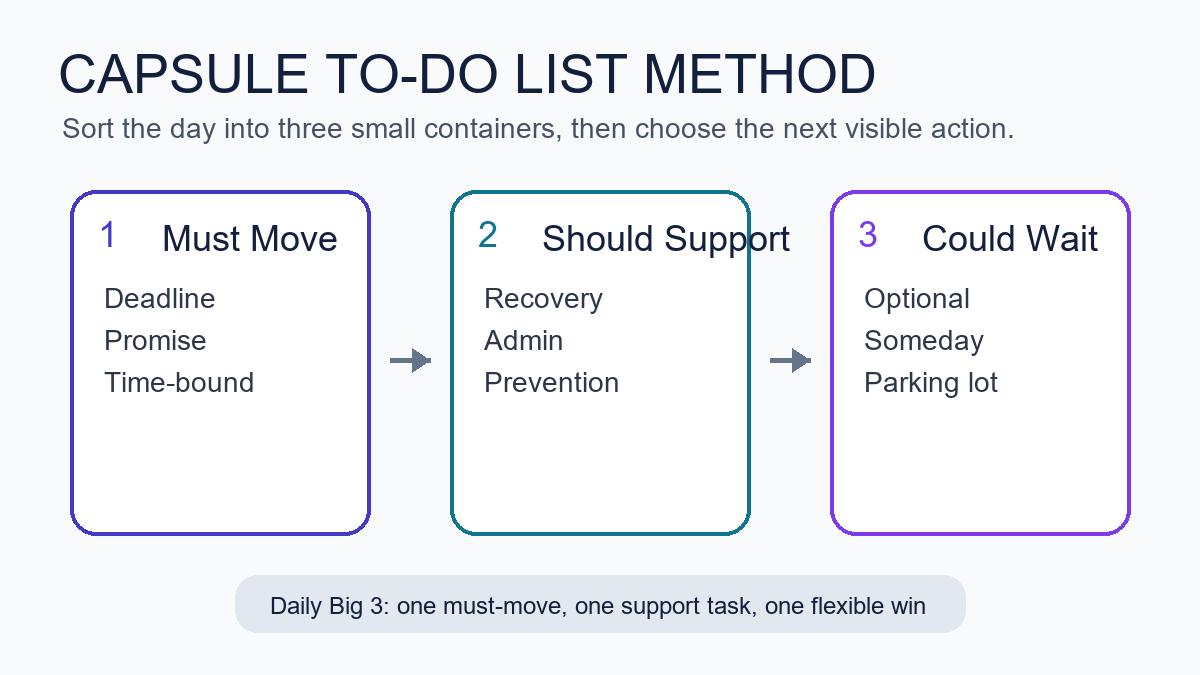
    Related guides