...

Tag: decision making

  • Weekly Reflection Questions for Clarity, Energy, and Better Decisions

    Weekly Reflection Questions for Clarity, Energy, and Better Decisions

    Weekly reflection questions are a short set of prompts you answer once a week so you can notice what worked, what drained you, what still matters, and what deserves a clearer next step. The point is not to grade your life. The point is to slow the week down long enough to make better choices.

    If your days blur together, a weekly review can give you a calmer place to think. You look back at real evidence from the week, name the lesson, and choose a small adjustment before the next week starts. That rhythm supports focus, energy, reading plans, work routines, home habits, and better decisions without turning reflection into another heavy productivity system.

    This guide gives you practical weekly reflection questions you can use in 10 to 25 minutes. It also shows how to choose the right prompts for your season, how to avoid overthinking, and how to turn answers into one useful action.

    Quick Answer: What Are Weekly Reflection Questions?

    Weekly reflection questions are prompts that help you review the last seven days and decide what to repeat, change, pause, or plan next. A good weekly reflection asks about wins, friction, energy, attention, relationships, unfinished work, and the next small choice. It should leave you with clarity, not a longer guilt list.

    • Best time: Friday afternoon, Sunday evening, or Monday morning.
    • Best length: 10 to 25 minutes for most busy adults.
    • Best output: one lesson, one priority, one repair, and one next step.
    • Best tools: a notebook, notes app, voice memo, or a simple weekly template.

    For readers building a deeper self-improvement habit, pair this practice with the Jeremy Jarvis books hub. The books and digital clarity guides can help you turn weekly insights into repeatable systems instead of one-off motivation.

    Why Weekly Reflection Questions Improve Clarity

    Reflection works because it separates experience from interpretation. During the week, you react. At the end of the week, you can review. That simple distance helps you see patterns you miss while you are inside the rush.

    Writing is one useful way to create that distance. The American Psychological Association has covered research on expressive writing and how writing can help people work through difficult experiences and make meaning from them. Harvard Health has also discussed expressive writing as a way some people process worry, stress, and emotions. These sources do not mean a weekly review is medical treatment. They do support a practical point: putting thoughts into words can make them easier to examine.

    Weekly reflection is different from daily journaling. Daily writing captures the weather of the day. Weekly writing looks for the climate. You are asking: What kept showing up? What did I keep postponing? What gave me energy more than once? What problem deserves a system rather than another promise?

    How Weekly Reflection Questions Support Better Decisions

    Better decisions usually need better inputs. A weekly review gives you a small evidence base. Instead of deciding from memory, mood, or pressure, you review what actually happened.

    For example, you may think you need more discipline. Your reflection may show that the real issue was a calendar with no margin. You may think you are tired because you are lazy. Your answers may show three late nights, skipped meals, and too many context switches. You may think a book, course, or app failed you. Your review may show that you never gave it a consistent place in your week.

    Good weekly reflection questions turn vague feelings into usable information. They do not make every choice easy. They do help you choose from a cleaner view of reality.

    SEO Booster Notes for This Topic

    The search intent behind this post is practical and informational. Readers want prompts they can use tonight, not a theory lecture. Related searches tend to cluster around weekly review questions, journal prompts for clarity, self-reflection questions, productivity review templates, and end-of-week reflection. Question-style searches often ask what to write in a weekly review, how to reflect on the week, and how to make better decisions with journaling.

    Common SERP gaps are clear. Many articles list dozens of prompts without showing how to pick the right ones. Others turn reflection into a large life audit that feels hard to repeat. Some productivity posts focus only on goals and tasks while ignoring energy, attention, relationships, and recovery. This article keeps the structure simple: choose a small prompt set, answer honestly, and convert the answer into one next action.

    Start With These 12 Weekly Reflection Questions

    If you want a simple template, start here. Answer each prompt in one to three sentences. Skip any question that feels irrelevant this week.

    1. What gave me the most energy this week?
    2. What drained more energy than it deserved?
    3. What did I finish, even if it was small?
    4. What stayed unfinished, and why?
    5. Where did I make a decision from pressure instead of clarity?
    6. What helped me focus?
    7. What kept pulling my attention away?
    8. What conversation, task, or commitment needs a cleaner next step?
    9. What did I learn about my current season of life?
    10. What should I repeat next week?
    11. What should I simplify, pause, or stop?
    12. What is the one next action that would make next week calmer?

    Do not try to produce perfect answers. Useful reflection often sounds plain. A sentence like, β€œI need to stop checking email before breakfast,” can be more valuable than a full page of polished writing.

    Notebook and pen for weekly reflection questions on a calm desk
    Use a simple notebook or notes app so weekly reflection questions stay easy to repeat. Photo: Pexels.

    Which Weekly Reflection Questions Should You Pick?

    You do not need every question every week. Choose prompts based on what feels noisy right now. If your calendar is packed, use time and energy questions. If you feel stuck, use decision questions. If you are trying to build a reading or self-improvement habit, use learning questions.

    Current problem Best question type Useful prompt Next action
    You feel scattered Attention What pulled my focus most often? Remove or schedule one distraction trigger.
    You feel tired Energy What gave energy and what drained it? Protect one energy-giving block next week.
    You feel behind Priority What truly needed my attention? Choose one priority before adding new tasks.
    You keep avoiding something Friction What made this task feel hard to start? Define the smallest visible first step.
    You want to grow Learning What lesson should I carry forward? Turn the lesson into a rule or reminder.

    What Is the Best Weekly Reflection Routine?

    The best weekly reflection routine is short enough to repeat when life is busy. A useful structure is review, name, choose, and schedule.

    1. Review the week without judging it

    Open your calendar, task list, notes, and photos if they help. Look at what happened. You are not building a case against yourself. You are gathering facts. Notice finished work, skipped plans, stressful moments, helpful routines, and moments that felt clear.

    2. Name the pattern

    Write one sentence that starts with, β€œThis week showed me…” Keep it honest and specific. Examples: β€œThis week showed me that late meetings make my mornings harder,” or β€œThis week showed me that I read more when the book is visible on my desk.”

    3. Choose one adjustment

    Pick one change. One is enough. If your review creates seven new rules, you may ignore all of them. A strong adjustment is small, visible, and tied to a real pattern.

    4. Schedule the next step

    Put the next action somewhere it can survive the week. Add it to your calendar, place it on a sticky note, write it on your weekly page, or attach it to an existing routine. Reflection is useful when it changes the environment, not just your mood.

    Weekly Reflection Questions for Clarity

    Use these prompts when you feel mentally crowded or unsure what matters next.

    • What felt mentally loud this week?
    • What decision became easier once I slowed down?
    • What am I carrying that does not belong to this week?
    • Which commitment still feels aligned?
    • Which commitment needs a cleaner boundary?
    • What information do I need before I decide?
    • What would make next week 10 percent simpler?

    These questions are especially helpful when you are reading, studying, or working through a personal reset. If you want a reading path that supports this kind of clarity, start with mental clarity books for a practical reading plan.

    Weekly Reflection Questions for Energy

    Energy questions help you stop treating every task as equal. A task can be quick and still draining. A task can be challenging and still meaningful. Your weekly review should notice the difference.

    • When did I feel most like myself this week?
    • What task took more energy than expected?
    • What helped me recover after a hard day?
    • Where did I ignore a body signal, such as hunger, fatigue, or tension?
    • What environment made focus easier?
    • What should I do earlier in the day next week?
    • What can I lower, delegate, batch, or remove?

    Keep this practical and non-clinical. If you are dealing with serious fatigue, anxiety, depression, or burnout symptoms, use reflection as a support tool and consider professional care. A journal is not a substitute for diagnosis or treatment.

    Weekly Reflection Questions for Better Decisions

    Decision questions are useful when you keep changing plans, buying new tools, or saying yes before checking capacity.

    • What decision did I avoid this week?
    • What decision did I make too quickly?
    • Where did I confuse urgency with importance?
    • What did I say yes to that deserves a better boundary?
    • What did I say no to that protected something important?
    • What tradeoff am I pretending not to see?
    • What would I choose if I trusted the evidence from this week?

    These prompts work well before a weekly planning session. They keep the plan tied to your real life instead of a fantasy version of your week.

    Weekly Reflection Questions for Reading and Self-Improvement

    Reflection can make reading more useful. A book can inspire you, but a weekly review helps you apply one idea at a time. That matters for self-help, productivity, focus, burnout recovery, and digital clarity books.

    • What did I read, watch, or learn this week?
    • Which idea felt immediately useful?
    • Which idea sounded good but does not fit my current season?
    • What quote, exercise, or framework should I revisit?
    • What action did this book or guide make easier?
    • What question do I want my next book to help answer?

    For a focused next step, browse Jeremy Jarvis books and digital self-help guides. If you want more science and product context before choosing tools, use the Mind Clarity Hub reviews and science deep dives.

    How Do You Turn Reflection Into Action?

    The fastest way is to end with a three-line closeout:

    1. Keep: One thing that worked and deserves a repeat.
    2. Change: One friction point that deserves a small adjustment.
    3. Next: One action that belongs on the calendar, task list, or daily page.

    Here is an example. Keep: I read for 12 minutes after lunch three times. Change: I checked messages before writing and lost focus. Next: Put the phone across the room during the first writing block on Monday, Wednesday, and Friday.

    That is enough. You do not need a life manifesto. You need a small bridge between what you noticed and what you will do.

    How Long Should a Weekly Reflection Take?

    A weekly reflection should take 10 to 25 minutes for most people. If you are new, set a timer for 12 minutes. Spend four minutes reviewing the week, five minutes answering questions, and three minutes choosing the next action.

    Longer reviews can help during transitions, launches, burnout recovery, or major planning seasons. Still, the habit should have a small version. A weekly reflection that only works during a quiet weekend will disappear when life gets full.

    What Should You Avoid During Weekly Reflection?

    The main mistake is turning reflection into self-criticism. You can be honest without being harsh. Ask what happened, what helped, what hurt, and what deserves a better system.

    • Avoid rewriting the whole week: You cannot fix last Tuesday. You can learn from it.
    • Avoid tracking too many metrics: Three useful signals beat 20 numbers you will ignore.
    • Avoid vague promises: Replace β€œbe better” with a scheduled action.
    • Avoid copying someone else’s template exactly: Your questions should match your real friction.
    • Avoid all-or-nothing reviews: A five-minute reflection still counts.

    A Simple Weekly Reflection Template

    Copy this structure into a notebook or notes app. Use it as written for two weeks, then remove prompts you do not need.

    Date:
    One sentence about this week:
    What worked:
    What drained energy:
    What I learned:
    What needs a next step:
    One thing to repeat:
    One thing to simplify:
    One scheduled action:

    If you prefer a verbal review, record a short voice memo using the same headings. Then write only the final action. The best system is the one you can repeat without making reflection feel like homework.

    Can Weekly Reflection Questions Help With Focus?

    Yes, weekly reflection questions can help focus because they reveal what repeatedly steals attention and what conditions support deeper work. They do not force focus by themselves. They help you design a better week.

    For example, your review may show that focus improves when your first work block starts before meetings. It may show that reading at night fails because your phone is nearby. It may show that your best thinking happens after a walk. Each answer points to a design choice: protect the first block, move the phone, or schedule the walk before planning.

    For more help with attention, read the neuroscience guide to improving focus and concentration after this post.

    Should You Use Paper or Digital Notes?

    Use the tool that reduces friction. Paper can slow your thoughts down and make the review feel more grounded. Digital notes are easier to search, duplicate, and connect to reminders. A hybrid works well for many people: answer the reflection on paper, then move one next action into your digital calendar or task app.

    The tool matters less than the loop. Review the week. Name the lesson. Choose the action. Put the action where you will see it.

    Example Weekly Reflection for a Busy Adult

    Here is a realistic example:

    One sentence about this week: I completed the urgent work but let small messages split my attention every morning.

    What worked: Reading after lunch helped me reset and gave me a clear break between morning work and afternoon calls.

    What drained energy: Checking messages before choosing the day’s first priority made everything feel urgent.

    What I learned: I need a short focus setup before I open communication tools.

    One scheduled action: On Monday, Wednesday, and Friday, write the first priority on paper before opening email.

    This is not dramatic. That is why it works. The answer is clear enough to act on next week.

    Two Short Examples You Can Reuse

    If you are reviewing a work-heavy week, use this version: What moved the most important project forward? What meeting or message created avoidable friction? What boundary would make the next work block easier? What should I prepare before Monday so I do not start from urgency?

    If you are reviewing a personal reset week, use this version: What helped my home, body, or attention feel calmer? What small habit was easier than expected? What did I keep postponing because the first step was unclear? What support, tool, or reading guide would make the next step more realistic?

    These examples keep weekly reflection questions close to real life. They also prevent the review from becoming abstract. You are not trying to discover a perfect life philosophy every Sunday. You are trying to notice one useful pattern and make the next week easier to enter.

    Frequently Asked Questions About Weekly Reflection Questions

    What are the best weekly reflection questions?

    The best weekly reflection questions ask what worked, what drained energy, what stayed unfinished, what you learned, and what one action would make next week clearer. Start with fewer than 12 prompts so the habit stays repeatable.

    How often should I answer weekly reflection questions?

    Answer them once a week. Friday, Sunday, and Monday are the easiest anchors. If you miss a week, restart with three prompts: what worked, what was hard, and what is next.

    Are weekly reflection questions the same as journaling?

    They overlap, but they are not identical. Journaling can be open-ended. Weekly reflection is a structured review of the last seven days with a clear next action.

    Can weekly reflection replace therapy or coaching?

    No. Weekly reflection is a self-management and learning habit. It can support clarity, but it does not replace professional mental health care, coaching, financial advice, or medical guidance when those are needed.

    What if my weekly reflection becomes negative?

    Add balance prompts. Ask what worked, what you handled, what helped, and what you want to repeat. Honest reflection should include friction, but it should not become a weekly self-attack.

    Final Takeaway

    Weekly reflection questions help you turn a busy week into a clearer next step. Keep the habit small. Review real evidence. Choose one lesson. Schedule one action. Over time, that steady loop can support better focus, calmer decisions, and a more useful reading and self-improvement plan.

    Source notes: This guide uses practical reflection advice alongside source-backed context from the American Psychological Association on expressive writing, APA Monitor coverage of writing to heal, Harvard Health on writing worries down, and Harvard Health on gratitude and well-being.

    Watch on YouTube if the weekly reflection checklist video does not load.

    Helpful resources for your next step

    Affiliate disclosure: As an Amazon Associate, Mind Clarity Hub may earn from qualifying purchases at no extra cost to you. Use this link only if it genuinely helps your planning.

    If Weekly Reflection Questions for Clarity, Energy, and Better Decisions is a routine you want to keep using, a simple workbook, planner, or desk tool can make the steps easier to repeat.

    Compare related planners, workbooks, and organization tools on Amazon.

  • Calendar Triage for Overcommitted Volunteers

    Calendar Triage for Overcommitted Volunteers

    If your week feels like a relay race from PTA sign-ups to fundraiser shifts, you are not alone. This guide shows you how to use the calendar triage method for overcommitted volunteers to reduce stress, protect family time, and keep your best impact. It works even if you already said yes to too many things.

    Quick start: volunteer calendar triage in 15 minutes

    • List every volunteer role you hold. Note hours, dates, and who benefits.
    • Mark non-negotiables (family, health, work). These block time first.
    • Add sunset clauses to any open-ended role (e.g., β€œthrough June 30, then review”).
    • Run a 90-minute triage: Keep, Defer, Delegate, or Decline each item.
    • Send two emails today: one graceful decline and one exit-plan note.
    • Schedule a 30-minute monthly audit to stay clear.

    What is the calendar triage method for overcommitted volunteers?

    The calendar triage method for overcommitted volunteers is a short, structured review you run on your calendar and role list. In one sprint, you sort every task and commitment into four lanes: Keep, Defer, Delegate, or Decline. You decide with your values first, then fit your time and energy. You also attach sunset dates so even good roles do not become forever roles by accident.

    Unlike generic time tips, this method speaks to the real life of community and parent volunteers. Meetings spill into evenings. Coaches need a back-up. School events pile up. By applying a shared languageβ€”Keep, Defer, Delegate, Declineβ€”you cut decision fatigue and move fast with care.

    Why the calendar triage method for overcommitted volunteers works

    Three forces make volunteers feel stretched: too many asks, unclear role scope, and weak exit ramps. Evidence-backed time practices can help. For example, prioritization frameworks like urgent-important matrices reduce overload by focusing on what matters now and later. See the Eisenhower Matrix overview by Asana for a simple view of urgency vs. importance. Also, research-backed guidance from the American Psychological Association links time management and boundaries with lower stress. Finally, in the nonprofit world, clear role design and support lower burnout and increase retention; see resources from the National Council of Nonprofits and Points of Light.

    Because you decide in batches, you avoid case-by-case guilt. Because you set end dates and capacity limits up front, you avoid silent scope creep. And because you prepare scripts, you say no with grace instead of delay.

    Parent marking dates to apply the calendar triage method for overcommitted volunteers on a shared calendar
    Planning sprints work best when you can see the week at a glance. Photo credit: Towfiqu barbhuiya via Pexels.

    Prepare for the calendar triage method for overcommitted volunteers

    Preparation keeps the sprint fast and fair. Do these three things first.

    1) Make a complete role inventory

    List every role, event, and promise tied to your volunteering life, even small ones. Include who benefits and what would happen if you step back. Add expected hours and calendar dates. Then add the true hidden time: drive time, follow-up messages, shopping, and recovery time.

    Role or task Who benefits Hours/month Dates/Deadlines Impact if I step back
    PTA Treasurer School PTO 8 Monthly meeting; year-end report Someone must manage handoff; risk if delayed
    Snack Parent, U10 Soccer Team 2 Saturdays Easy to reassign among parents
    Annual Auction Committee Booster Club 10 (Feb–Apr) April 20 event; weekly calls Work can shift to committee or vendor

    2) Block your non-negotiables

    Before you assign a single volunteer hour, block your non-negotiables. Common blocks:

    • Family time (e.g., dinner, bedtime, one weekend morning)
    • Sleep and health (bedtime, workouts, therapy, medical)
    • Work and commute
    • Personal sanity time (reading, faith practice, quiet hour)

    Now you are planning with what is left, not what you wish existed.

    3) Add sunset clauses to every open-ended role

    Open-ended roles become forever roles unless you add end dates. A sunset clause is a small line that saves you later: β€œI can serve through June 30; let’s review then.” Or, β€œHappy to try this for 90 days and reassess.” You will use these lines in your exit-plan emails too.

    Run the calendar triage method for overcommitted volunteers in 90 minutes

    Set a 90-minute timer. Print your role inventory. Open your calendar. Then follow these steps.

    Step 1: Choose your values filter (10 minutes)

    Write 3–5 values that lead your choices this season. Examples: family stability, kids’ growth, neighbor care, simple weekends, health. These values are your green lights and red lights. If a role fights your values, it likely does not belong on your plate now.

    Step 2: Estimate your true capacity (10 minutes)

    Count your free hours after non-negotiables. Keep at least one unscheduled block per week. Many volunteers do best with a 70–80% capacity rule to leave room for life’s surprises. As Harvard Business Review notes, we often underestimate future load; a simple buffer protects you from good-intention overreach.

    Step 3: Sort everything into four lanes (45 minutes)

    Go line by line. Use your values and capacity to decide. Mark each item:

    Lane Definition When to use Typical action
    Keep Aligned, high-impact, fits capacity It serves your top value and schedule Confirm scope and put on calendar
    Defer Good, but not for this season Impact is real but timing is wrong Offer to revisit after a date
    Delegate Still matters, but not to you Others can do it well or better Nominate a successor and hand off
    Decline Not aligned or over capacity Costs exceed benefits right now Send a short, kind no

    Step 4: Add sunset dates and scope notes (10 minutes)

    For every Keep item, add a scope statement and end date. For every Delegate item, write the handoff plan and date. For every Defer item, set a review date and note.

    Step 5: Send your first two emails (15 minutes)

    Open your templates below. Choose one Decline email for a new ask and one Exit-plan email for a current role. Send both before your timer ends. Momentum matters.

    Scripts that support the calendar triage method for overcommitted volunteers

    Use these short, respectful messages. Adjust tone to match your group culture.

    Fast decline scripts (new requests)

    • β€œThanks for asking. I’m at capacity this season and need to decline. I hope it goes well.”
    • β€œI appreciate the invite. Because I’m protecting family nights, I can’t join this time.”
    • β€œThis aligns with our school’s goals. I can’t contribute hours, but I can share the sign-up link.”
    • β€œI’m focusing my volunteer time on coaching through May. Please check again after June 1.”

    Counter-offer scripts (delegate or defer)

    • β€œI can’t lead, but I can help for one hour at set-up on Saturday.”
    • β€œI can’t take this in March. If it’s still needed after April 15, please ping me.”
    • β€œI can’t own the project. Would [Name] be a good fit? I’m happy to intro and share notes.”

    Boundary scripts (scope and sunset)

    • β€œHappy to try this for 90 days and reassess on June 30.”
    • β€œI can help with copyediting, not vendor calls.”
    • β€œYes to Friday afternoon; no to evenings.”

    Text replies for volunteer schedule triage

    • β€œThanks! I’m maxed this monthβ€”can we revisit after 6/30?”
    • β€œI can help one hour, not lead.”
    • β€œSounds great. Not this season. Sharing the sign-up now.”
    • β€œAt capacity this week. Can we find a co-lead?”

    Exit-plan emails for the calendar triage method for overcommitted volunteers

    Use these when you already hold the role. They are respectful and clear.

    Exit now β€” volunteer calendar triage handoff

    Subject: Treasurer role – handoff plan
    
    Hi [Chair Name],
    
    Thank you for the chance to serve this year. I reviewed my schedule and need to step back from Treasurer.
    
    To support a smooth transition, I can:
    β€’ Close out this month’s report by [date]
    β€’ Share a 1-page β€œhow it works” doc
    β€’ Meet a successor for a 30-minute handoff
    
    Please let me know who to connect with and the best timing. I respect the team and want to set them up well.
    
    Gratefully,
    [Your Name]
    

    Exit at a set date (sunset clause)

    Subject: Field Day – wrapping up after May 31
    
    Hi [Coordinator Name],
    
    I’ve loved helping with Field Day. To keep my weekends clear this summer, I’ll finish out through May 31 and then step back.
    
    Between now and then I will:
    β€’ Document vendor contacts
    β€’ Organize the supply closet
    β€’ Help identify a new lead
    
    Thanks for supporting this plan,
    [Your Name]
    

    Reduce scope (stay on, smaller slice)

    Subject: Auction committee – scope for this season
    
    Hi [Chair Name],
    
    I’m staying with the committee, but I need to narrow my lane. I can handle copyediting and two donor calls per week. I won’t be able to lead logistics or manage vendor bids this year.
    
    If that works, great. If not, I can help someone else ramp up.
    
    Thanks for understanding,
    [Your Name]
    

    Monthly audit checklist for volunteer calendar triage

    Run a short check each month to stay clear. You can use the calendar triage method for overcommitted volunteers every month in 30 minutes.

    Check Question Action
    Capacity Do I still have buffer hours? Decline new asks until buffer returns
    Values Does this serve my top 3 values now? Defer or delegate if misaligned
    Scope Did the role grow beyond plan? Reset scope by email with chair
    Sunset Is the end date set and visible? Add or confirm the sunset clause
    Handoff Who can learn this next? Invite a co-lead; document steps
    • Block your audit on the first weekday of the month.
    • Skim your role inventory for 5 minutes.
    • Mark two decisions you can send today. Use the scripts above.
    Cozy desk with planner showing the calendar triage method for overcommitted volunteers in action
    Write decisions while your plan is clear. Photo credit: Vlada Karpovich via Pexels.

    Delegation playbook for volunteer calendar triage

    Delegation is not dropping the ball; it is widening the circle. A small plan lets you hand off with care. Use this playbook to move a task without drama and with trust.

    Map the micro-tasks

    • Break the role into tiny actions (30–60 minute chunks).
    • Tag each chunk: prep, people, logistics, follow-up.
    • Note skills needed and any passwords or links.
    • Star the two easiest chunks to give away first.
    • Add a one-sentence outcome for each chunk.

    2-minute ask script

    "Hi [Name], I’m shifting my time this season and want to share a small, clear task. It’s [task, 45 minutes, by date]. I’ll send a 1-page guide and be on call for questions. Would you be open to trying it once? If it’s not a fit, no worriesβ€”we’ll adjust."
    

    Onboarding checklist

    • Share the 1-page β€œhow it works” with links and logins.
    • Walk through the first task live for 10 minutes.
    • Confirm the sunset date and who signs off.
    • Schedule a short debrief after the first run.
    • Thank them publicly and note next steps.

    Seasonal reset plan with volunteer schedule triage

    Volunteer load rises and falls with the calendar. Plan resets by season so you act early, not late. This simple view helps you pick your focus each quarter.

    Season Typical asks Triage focus
    Aug–Sep (Back-to-school) Class parents, team sign-ups, fundraisers Set non-negotiables, pick 1–2 roles, decline the rest
    Oct–Dec (Holidays) Drives, concerts, travel conflicts Scope caps, batch errands, share sign-up links
    Jan–Feb (Winter) Budget work, planning meetings Delegate micro-tasks, add sunset dates
    Mar–May (Spring sports) Tournaments, auctions, field events Keep only high-impact roles, set handoff dates
    Jun–Jul (Summer) Camps, travel, lighter meetings Run mini-triage; defer new asks

    Put a 90-minute reset on the first weekend of each new season. Then book 30 minutes for a light audit each month to stay steady.

    Mini-triage on your phone β€” volunteer time triage

    Stuck in a car line? Do a 7-minute check on your phone to avoid knee-jerk yeses.

    1. Open your calendar and note free blocks this week.
    2. List three asks spinning in your head.
    3. Match each ask to a lane: Keep, Defer, Delegate, Decline.
    4. Type one-sentence replies for the Defer/Decline items.
    5. Schedule one 20-minute slot to prep any Keep item.
    6. Send the replies before you close the app.

    Troubleshooting templates for scope creep β€” volunteer schedule triage

    When a role grows past plan, reset early. These short notes reduce friction and protect trust.

    Subject: Quick scope reset before [event]
    
    Hi [Chair Name],
    
    Our plan added two new tasks this week. My volunteer hours are capped, so I can do A and B, not C. If C is needed, can we ask [Name] or simplify it?
    
    Thanks for helping me keep this reliable,
    [Your Name]
    
    Subject: Pausing new asks until review
    
    Hi [Team],
    
    I’m at capacity this month. I’ll pause new requests until our [date] check-in. If something is time-critical, please mark it as such and I’ll help route it.
    
    Appreciate the clarity,
    [Your Name]
    

    How do I decide what to keep or cut with volunteer schedule triage?

    Use this simple comparison to turn fuzzy feelings into decisions you trust.

    Question If YES If NO
    Does it serve one of my top values now? Keep (with scope + sunset) Delegate or Decline
    Would I say yes if it were two months from now? Defer to that date Decline
    Am I the only person who can do this well? Consider co-leading; document Delegate
    Does it fit inside my buffer hours? Keep Defer or Decline

    Role design for volunteer calendar triage: Make your yes smaller and stronger

    Many roles feel heavy because they have fuzzy scope. Here is how to keep your yes crisp:

    • Write the job in one line. β€œUniforms: order by Aug 15, hand out Sept 1.”
    • Set a simple rhythm. β€œ30 minutes each Tuesday; 1 hour first Sunday.”
    • Make handoff notes from day one. Think future-you or the next parent.
    • Ask for co-ownership. Two people at 60% each beats one person at 120%.

    What if saying no feels hard during volunteer time triage?

    It is normal to feel tugged by guilt or habit. Short scripts let you respond kindly and fast. Evidence on boundary-setting shows that clear, respectful no’s protect well-being and make yeses more reliable. The APA’s time and stress guidance highlights planning and boundaries as skills you can practice, not traits you either have or do not.

    Can the calendar triage method for overcommitted volunteers work with couples or co-parents?

    Yes. Put a 30-minute β€œteam triage” on the first Sunday night of each month. Share values up top. Then sort both calendars together. Decide who is point for each kid or cause this month. Add sunset dates in both calendars. If you co-parent, you can use a neutral script: β€œI’m at capacity this week; can you take the Thursday shift? I can swap next week.”

    Handling high-stakes roles with volunteer calendar triage

    Some roles feel impossible to exit. Try this three-step plan:

    1. Document the job in 5 bullets and 5 links. Keep it simple.
    2. Invite a co-lead for two weeks of shadowing.
    3. Schedule the handoff date. Announce it with thanks and confidence.

    Most groups welcome lighter lifts and clear lanes. When you show the bridge, people will cross it.

    Mistakes to avoid in volunteer schedule triage

    • Saying β€œmaybe” when you mean β€œno.” Delay grows stress.
    • Leaving roles open-ended. Always add a sunset clause.
    • Under-counting hidden time like errands and messages.
    • Keeping everything because it is β€œfor the kids.” Protecting rest also serves kids.
    • Doing it alone. Ask for a co-lead or set up a micro-team.

    How this fits with other tools for volunteer time triage

    The triage pairs well with simple tools. A one-page weekly plan for your family, a shared calendar per kid, and a visible list of non-negotiables can prevent overload from returning. If you prefer a visual system, the urgent-important grid (see Asana’s guide) is an easy add-on. For the nonprofit context, browse the National Council of Nonprofits volunteer management toolkit for role design ideas you can reuse.

    When to re-run volunteer calendar triage

    Run a full 90-minute session at the start of each season (back-to-school, post-holidays, spring sports). Then run the monthly audit to stay on track. If a crisis month hits, do a 20-minute β€œmini-triage” and cut two things for two weeks.

    Real-life volunteer calendar triage examples

    • Snack parent becomes a rotating slot you hold once a month rather than every week.
    • Booster Club website updates shift to a student intern who wants experience.
    • Fundraiser role ends on a known date with a simple handoff checklist.

    What to say to leaders and coordinators during volunteer schedule triage

    Leaders often appreciate clarity. Try: β€œI want to keep my help reliable. Here is what I can own through May, with a review on June 1. If more is needed, let’s find a second person for the extra.” This protects trust and reduces last-minute scrambles.

    Build your volunteer reading list

    Want a deeper system for calm weeks? Explore our Books hub for practical picks on focus, planning, and boundaries. Start here: evidence-informed productivity and clarity books. Also, see reader notes and summaries in our reviews hub to choose a next read fast.

    FAQ

    How often should I use the calendar triage method for overcommitted volunteers?

    Run it at the start of each season and then monthly. A short monthly audit keeps scope, sunset dates, and buffer hours healthy.

    Isn’t saying no selfish when it’s for the school or team?

    No. Saying a clear no protects the yeses you keep. Healthy boundaries prevent burnout and make volunteer help reliable over time.

    What if my group resists end dates or handoffs?

    Propose a pilot. β€œLet’s try a 90-day window with a review.” Most teams accept clarity when they see it lowers last-minute stress.

    Can teens help with handoffs?

    Yes. Teens can shadow roles and take on parts like web updates or check-in tables. It builds skills and spreads the load.

    How do I track sunset dates?

    Add the end date to the calendar entry title (e.g., β€œPTO Treasurer – through 6/30”). Set a reminder two weeks before to plan a handoff.


    You now have a clear, repeatable way to protect your time and still serve well. Use the calendar triage method for overcommitted volunteers each month, and your schedule will reflect your values without guilt.

    Helpful resources for your next step

    Affiliate disclosure: As an Amazon Associate, Mind Clarity Hub may earn from qualifying purchases at no extra cost to you. Use this link only if it genuinely helps your planning.

    If Calendar Triage for Overcommitted Volunteers is a routine you want to keep using, a simple workbook, planner, or desk tool can make the steps easier to repeat.

    Compare related planners, workbooks, and organization tools on Amazon.

    Related guides

  • Your Decision Making Framework Template for 2026

    Your Decision Making Framework Template for 2026

    A decision making framework template is a simple, structured guide that helps you move from the uncertainty of a tough choice to a clear, confident path forward. It works by organizing the jumble of information and priorities in your head. This stops you from getting stuck in analysis paralysis. It also helps you make a choice you can stand behind. It’s an especially powerful tool for busy people who need to make solid decisions without getting drained.

    As an Amazon Associate, I earn from qualifying purchases. This means that if you click a link and make a purchase, I may receive a small commission at no extra cost to you. This helps support the site and allows me to continue creating valuable content.

    Why a Decision Making Framework Template Is Your Brain’s Best Friend

    Have you ever stared at a choice, feeling completely stuck? That feeling of being mentally drained isn’t just in your head. It’s a very real phenomenon known as decision fatigue. This article is for educational purposes only. It is not a substitute for professional medical or psychological advice, diagnosis, or treatment for conditions like anxiety, burnout, or ADHD.

    From a neuroscience perspective, making choices is surprisingly hard work. The job falls to your prefrontal cortex, the part of your brain that handles executive functions. These include planning, reasoning, and self-control. However, this part of your brain has a limited energy budget for the day.

    Every single decision you make draws from this finite resource. When you constantly weigh options without a clear process, you burn through that energy too fast. The result is mental exhaustion. This makes you far more likely to make impulsive choices or avoid deciding altogether. You can learn more about what decision fatigue is in our detailed guide.

    A Template Offloads the Cognitive Burden

    Think of a decision making framework template as an external hard drive for your brain. It offloads the cognitive burden of trying to hold all the variables in your head at once. Instead of mentally juggling pros, cons, risks, and gut feelings, you get it all down on paper in a structured way.

    This simple act provides a few immediate psychological wins:

    • It reduces your cognitive load. By writing everything down, you free up precious mental bandwidth. Your brain no longer has to actively keep track of every single detail.
    • It creates psychological distance. Seeing the problem laid out separates you from the emotional weight of the choice. This allows for a more objective, clear-headed evaluation.
    • It gives you a sense of control. A structured process turns a chaotic problem into a series of small, manageable steps. This instantly lowers feelings of anxiety and stress.

    From Chaos to Clarity with a Framework

    It’s a lot like trying to organize a messy room. The initial chaos feels overwhelming. But once you start sorting items into simple categoriesβ€”keep, donate, discardβ€”the path forward suddenly becomes clear. A framework does the exact same thing for the clutter in your head.

    This is the same reason a good time blocking planner brings so much structure to a workday. Both tools provide a scaffold for your brain’s executive functions. They let you operate more efficiently and with far less stress. They validate that feeling of being overwhelmed and offer a practical way to find clarity.

    By using a template, you’re building a repeatable habit for clear thinking. This structured approach helps conserve your mental energy for the deep work that truly matters. You’ll find yourself making confident choices without the burnout described in our book, Burnout Interrupted.

    How to Use Your Decision Making Framework Template

    When you’re facing a big decision, your thoughts can feel like a tangled mess. The goal of this framework isn’t to force you into a rigid spreadsheet. Instead, it acts as a guided journal. It walks your brain from scattered uncertainty to a clear, documented choice.

    Let’s make this real. Imagine a small business founder, β€œAlex,” is stuck. She needs to invest in new software but has the budget for only one. The choice is between a customer relationship management (CRM) system or a new project management tool. Here’s how Alex can use the template to find a way forward.

    First, Define the Real Problem with Your Template

    The first step is simply to get clear on what you’re actually deciding. A fuzzy goal will always lead to a fuzzy outcome. β€œChoose new software” is too vague to be useful.

    Alex needs something sharper. A better decision statement would be: β€œSelect the single software platform that will have the greatest positive impact on revenue and team efficiency in the next six months.” That clarity becomes the north star for the entire process.

    List Your Options and Evaluation Criteria

    Next, Alex jots down her two paths: β€œOption A: New CRM” and β€œOption B: New Project Management Tool.” But now comes the most important part of the exercise: defining the evaluation criteria.

    These are the yardsticks you’ll use to measure each option. It’s about moving beyond a simple pros-and-cons list. You need to get specific about what β€œgood” actually looks like for you.

    For her business, Alex’s criteria might be:

    • Impact on Sales: How directly will this tool help us close more deals?
    • Team Efficiency: How many hours will this save the team each week?
    • Implementation Time: How fast can we get this up and running?
    • Monthly Cost: What’s the recurring financial hit?
    • Scalability: Will this tool still work for us in two years?

    Writing these down is a powerful defense against β€œshiny object syndrome.” This is our tendency to get distracted by what’s new rather than what’s truly effective. If you want to get better at collecting mental models like this, learning about the Second Brain method is a great way to organize your thinking.

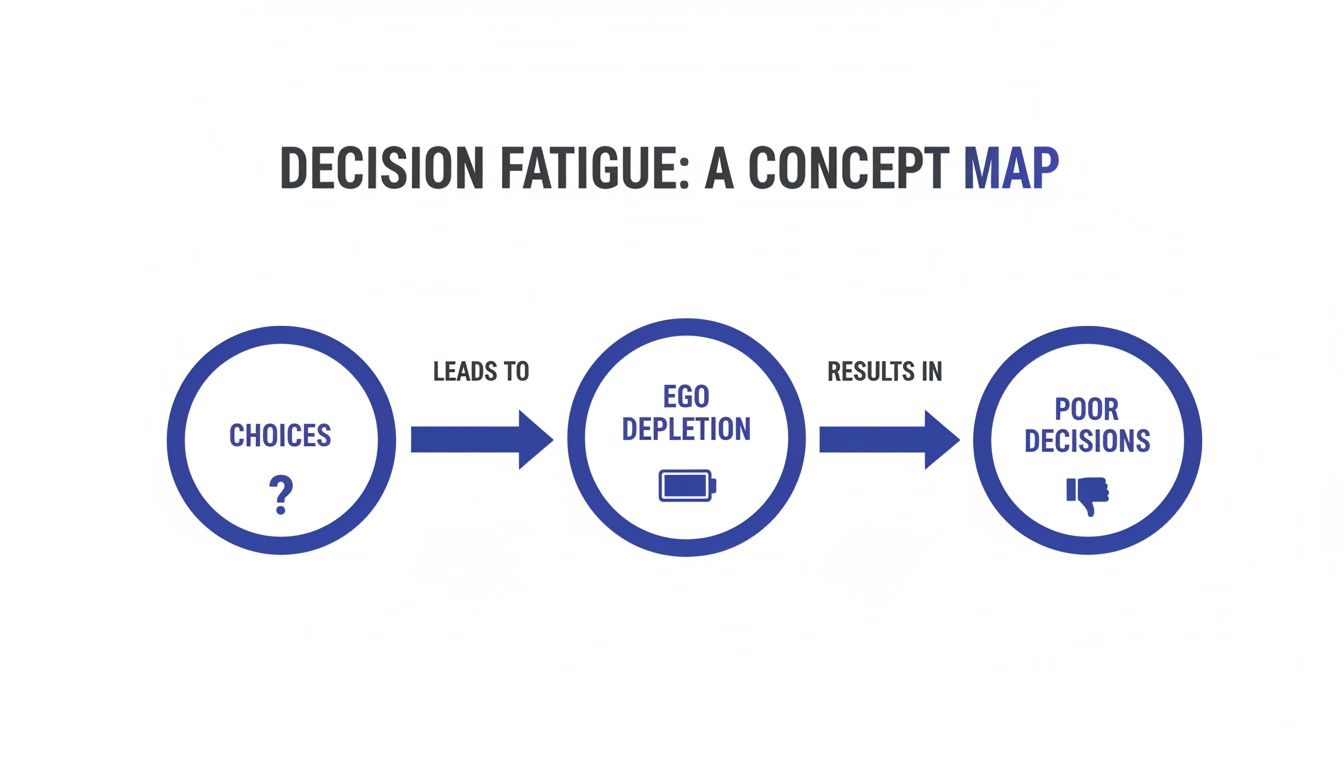
    A framework like this is the perfect antidote to decision fatigue. It helps when endless choices leave your brain feeling drained and overwhelmed.

    A diagram explaining decision fatigue: overwhelmed choice leads to mental drain, resolved by a framework.

    As the visual shows, a structured process moves you from feeling swamped to being back in control.

    Give Your Criteria Weight in Your Decision Framework

    Let’s be honest: not all criteria are created equal. This is where a weighted decision matrix really shines. Alex needs to decide which of her criteria are non-negotiable. She also needs to identify which are just nice-to-haves. She can do this by assigning a β€œweight” to each one, usually on a simple scale of 1 to 5.

    If driving immediate revenue is her absolute top priority, her weights might look like this:

    • Impact on Sales: 5 (Most Important)
    • Team Efficiency: 4
    • Monthly Cost: 3
    • Implementation Time: 2
    • Scalability: 2

    This step forces an honest conversation with yourself about your real priorities. It’s an effective way to cut through emotional attachments and focus on pure strategic value.

    Score Your Options and Let the Math Talk

    Now for the final step: scoring each option against each criterion. Using a scale of 1-10 works well here. Alex would go down her list and rate both the CRM and the Project Management tool on every point. How well does the CRM impact sales? (Maybe a 9/10). How quickly can it be implemented? (Perhaps only a 4/10).

    Once the scores are in, she just multiplies each score by its assigned weight. This gives her a β€œweighted score.” The option with the highest total is her logical winner. The beauty of these matrices is that they force you to quantify your thinking. This dramatically reduces the odds of second-guessing yourself later.

    By following this process, Alex doesn’t just have a decision. She has a clear, defensible reason for it. That’s the real power of the framework. It gives you a path through the noise and the confidence to finally take action.

    How to Choose the Right Decision Framework

    Not every choice needs a multi-day workshop or a color-coded spreadsheet. The real key to making better decisions isn’t having one perfect system. It’s knowing how to match the tool to the task at hand.

    Using a heavy-duty framework for a simple choice is overkill. But a simple pros-and-cons list won’t cut it when the stakes are high.

    The goal is to become more flexible and efficient. You want to apply just the right amount of rigor. This is true whether you’re a solopreneur picking out the best laptop stand for desk or a manager facing a major project pivot. Knowing your options is the first step toward getting it right.

    Match the Framework to the Stakes

    A useful way to gauge a decision’s importance is to think of it as a hat, a haircut, or a tattoo. This popular analogy gives you a quick mental shortcut. It helps you figure out how permanent and impactful a choice really is.

    • Hats (Low Stakes, Easily Reversible): These are your small, everyday choices. Deciding which task to start first falls into this camp. The cost of getting it wrong is low, so you can decide quickly. A simple pros-and-cons list is usually all you need.

    • Haircuts (Medium Stakes, Reversible with Effort): These decisions carry more weight. A bad one can be fixed, but it will cost you time or money. Think about hiring a new team member. A weighted decision matrix is perfect for these situations.

    • Tattoos (High Stakes, Difficult to Reverse): These are the game-changers. We’re talking about major financial investments or company-wide strategic shifts. Reversing these is painful and expensive. They demand a more robust decision making framework template, like the DACI model.

    Once you categorize your decision, you instantly get a feel for how much energy it deserves. Learning to tell these apart is a core skill for managing competing priorities without burning out.

    Best Option for Individual vs. Team Decisions

    The right framework also hinges on who is making the call. A choice you make alone has different needs than a group decision. In a group, getting everyone on the same page is half the battle. A solid guide to these kinds of essential decision-making frameworks can give you the structured thinking needed. To help you choose, here is a simple comparison. Compare options below to find the best fit for your situation.

    Choosing Your Decision Making Framework Template

    Framework Type Best For Complexity Level Example Use Case
    Pros & Cons List Quick, low-impact personal choices. Low Deciding whether to buy a pair of noise canceling headphones.
    Weighted Matrix Comparing multiple options with clear criteria. Medium A founder choosing between two software tools based on cost, features, and reviews.
    DACI Framework Complex, high-stakes team decisions requiring clear accountability. High A product team finalizing a new feature launch campaign involving multiple departments.
    Eisenhower Matrix Prioritizing a list of tasks or decisions based on urgency and importance. Low A manager deciding what their team should focus on for the upcoming week.

    The real goal is to get better at recognizing what kind of structure a problem needs. When you start with the right decision making framework template, you empower yourself to stop second-guessing and move forward with clarity.

    Best for Busy Professionals: The DACI Framework

    We’ve all been there: the group decision that goes nowhere. Endless meetings and conflicting opinions can stall even the most important projects. You either end up in a stalemate or with a watered-down choice that nobody owns.

    This is exactly why a framework like DACI is so useful for teams. It’s a simple system for assigning roles to make sure collaborative decisions move forward. DACI stands for Driver, Approver, Contributors, and Informed. By sorting out who does what before the debate begins, you cut through the confusion.

    People collaborate on a whiteboard with colorful sticky notes during a DACI roles workshop using a decision making framework template.

    Breaking Down the DACI Roles

    How does this work in the real world? Let’s say a marketing team needs to lock in a core message for a new product launch. With DACI, it looks like this:

    • D – Driver: This is the project point person. They are responsible for getting the decision made on schedule. They set up meetings and gather info. The Driver is not the one who makes the final call.

    • A – Approver: This is the single person who has the final say. Just one. They have the authority to greenlight the plan. This single point of accountability is what kills endless debate.

    • C – Contributors: These are your subject-matter experts. They have a voice but not a vote. Their job is to provide vital input and analysis.

    • I – Informed: This group includes anyone who needs to know what was decided. They aren’t part of the decision-making process itself. They are, however, affected by the outcome.

    Once these roles are mapped out, the guessing games stop. Everyone knows their job.

    Why Documenting Roles Is a Game-Changer

    Writing these roles down isn’t just a box-ticking exercise. It gives the team a shared source of truth. It stops roles from bleeding into one another. This drastically cuts down on friction and boosts efficiency. Atlassian offers a great playbook for structured decision-making that builds on these ideas.

    Defining these roles is one of the most powerful moves a leader can make. It establishes clear lines of responsibility. It lets people pour their energy into great work instead of navigating politics. If you want to build this muscle on your team, start with this chapter in The Power of Clarity to build team alignment.

    Common Pitfalls When Using a Decision Making Framework Template

    Even the best template can’t save you from the mental traps that sabotage good choices. Knowing what these pitfalls look like is the first step to sidestepping them.

    A person writes in a notebook at a desk with a laptop beside a sign saying β€œAvoid Pitfalls,” illustrating a decision making framework template.

    One of the most common culprits is analysis paralysis. This is the state of overthinking a choice so much that you never actually make one. Our brains are wired to crave certainty. When faced with too many options, the prefrontal cortex simply freezes. To break free, give your research a hard stop. A useful pomodoro timer can help you commit to a research window.

    Failing to Define Clear Criteria

    Another classic mistake is jumping straight into comparing options before you know what a β€œwin” looks like. Without clear, written criteria, your choice becomes a magnet for emotions and shifting priorities. A decision framework is your best defense.

    Before you look at a single option, stop and answer one question: β€œWhat are the most important outcomes I need from this decision?” Write them down. This simple act creates an objective filter. Learning about the common mistakes that can hinder early-stage companies offers a stark reminder of why clear criteria are non-negotiable.

    Neglecting Post-Decision Commitment

    Making the choice is only half the battle. A decision without a clear plan to act on it is really just an opinion. It’s an open invitation for second-guessing. This is where people get trapped in an endless loop, draining their mental energy.

    This is precisely why documenting your decision-making process is so powerful. Having a record of your rationale acts as a psychological backstop. When doubt creeps in, you don’t have to re-litigate the entire choice in your head.

    Instead, you can pull out your notes and review why you made the decision. This helps you confidently get back to work. A simple productivity journal can be a fantastic tool for this. It creates a single source of truth that allows you to commit and move on.

    Editor’s Take: What Actually Works When You’re Overwhelmed

    Look, I’ve seen complex frameworks like DACI. They have their place for big corporate moves. But for a busy professional trying to make a high-stakes choice without getting stuck for weeks? The single most effective tool I come back to again and again is a simple weighted decision matrix.

    It’s fast, it’s reusable, and it forces you to get honest about what truly matters. It cuts through emotional noise and makes you stack up choices against criteria you defined.

    The only catch? Any decision making framework template is useless if you aren’t brutally honest when you assign those weights. It’s easy to say cost is a low priority. But if you know the budget is tight, you have to reflect that. The tool is only as good as the truth you feed it.

    The real magic isn’t in the spreadsheet itself. The power is in the act of getting all those swirling, competing thoughts out of your head and onto a page.

    This is the key to breaking free from analysis paralysis. Externalizing the thought process creates the mental space you need to see the situation clearly. This practice is a core part of developing mental focus, a topic we explore deeply in Attention Unleashed. The more you practice improving your critical thinking skills, the more natural it will feel. The best framework is always the one you’ll actually use.

    Key Takeaways for Using a Decision Making Framework Template

    Here is a quick summary of the core principles for making smarter choices without the usual stress and second-guessing.

    • A template is your best defense against decision fatigue. Your brain’s capacity for high-quality thinking is finite. A decision making framework template acts as external scaffolding, taking the load off your working memory so you can focus.

    • For big solo choices, a weighted matrix is non-negotiable. It pushes you past vague gut feelings. By scoring your options against clear criteria, you get a logical, defensible answer instead of just hoping for the best.

    • When a team is involved, the DACI framework creates clarity. Knowing who is the Driver, Approver, Contributor, and who just needs to be Informed prevents the endless meetings that kill momentum.

    • A decision isn’t finished until it’s documented. Writing down why you made a choice creates a record that prevents future debates. A simple entry in a productivity journal is all it takes to make this a habit.


    Disclaimer: Some of the links in this article may be affiliate links, which means we may earn a small commission at no extra cost to you. The content on Mind Clarity Hub is for educational purposes only and is not a substitute for professional medical or psychological advice, diagnosis, or treatment. Always seek the guidance of a qualified health professional with any questions you may have regarding a medical condition.

    Decision Frameworks FAQ: Your Questions Answered

    Here are some honest answers to the questions that come up most often when you start using a structured process for clearer choices.

    What’s the simplest framework I can use for a personal decision?

    For smaller, low-stakes choices, you can’t beat a simple pros-and-cons list. It’s fast and perfect when you’re deciding on something like a new ergonomic mouse. No need to overcomplicate it.

    But when the stakes get higher, you need more structure. This is where a weighted decision matrix shines. It forces you to get honest about what you truly value (like salary or work-life balance). It helps you score each option against those priorities. This simple upgrade moves your decision from a vague gut feeling to a well-reasoned choice.

    How can a template help when I feel overwhelmed?

    That feeling of being overwhelmed is often your brain trying to juggle too many variables at once. Psychologists call this cognitive load. It’s a direct path to decision fatigue, where your brain just gives up.

    A decision making framework template acts as an external brain. It gives you a place to offload all those competing thoughts. The moment you start writing everything down, you free up mental energy. It turns a chaotic storm of anxiety into a structured list you can work with. The process itself builds a sense of control that immediately cuts through the stress.

    Can I really use these for a huge life decision, like a career change?

    Absolutely. In fact, that’s where these frameworks are most powerful. A choice as big as a career change is too important to leave to a gut feeling alone. You need a rock-solid rationale.

    A good template forces you to dig deep into what truly matters to you. You’ll define and weigh all the critical factors. These might include long-term fulfillment, salary potential, and the impact on your family. Documenting this thinking gives you a powerful record. When doubt creeps in later, you have a logical foundation to stand on. This helps you commit to your new path with far less second-guessing.

    What’s the difference between a decision matrix and a decision tree?

    They solve different kinds of problems. A decision matrix is your best bet when you need to pick one option from a list of similar choices. Think of comparing software vendors. You score each alternative against the same weighted criteria to see which one comes out on top.

    A decision tree, on the other hand, is for mapping out decisions with uncertain outcomes. It looks like a flowchart. It helps you visualize how different choices could lead to a range of results. A tree helps you plan a sequence of choices over time.

    How do I keep my personal bias from skewing the results of a framework?

    No system is completely bias-proof, but a template is one of your best defenses. Here’s the single most important rule: define and weigh your criteria before you start scoring the options.

    This one step prevents you from accidentally fudging the numbers to make your preferred option win. This is a classic trap known as confirmation bias. For an extra layer of objectivity, ask a trusted colleague to review your criteria. A simple question like, β€œWhat important factors might I be missing here?” can instantly reveal your blind spots. Getting that outside perspective is one of the smartest moves you can make.

    Free download: 7-Day Mind Clarity Reset preview

    Free download: 7-Day Mind Clarity Reset

    A short daily reset you can actually stick with (no fluff).

    Helpful resources for your next step

    Affiliate disclosure: As an Amazon Associate, Mind Clarity Hub may earn from qualifying purchases at no extra cost to you. Use this link only if it genuinely helps your planning.

    If Your Decision Making Framework Template for 2026 is a routine you want to keep using, a simple workbook, planner, or desk tool can make the steps easier to repeat.

    Compare related planners, workbooks, and organization tools on Amazon.

  • Improving critical thinking skills: A practical guide to smarter decisions

    Improving critical thinking skills: A practical guide to smarter decisions

    Improving your critical thinking skills isn’t about some massive overnight personality change. It’s really about the small, conscious shift from a reactive, emotional gut-check to a more analytical, evidence-based mindset. It’s learning to hit pause, question your own assumptions, evaluate what you’re seeing objectively, and genuinely consider other viewpoints before you land on a conclusion.

    (Affiliate Disclosure: This article may contain affiliate links. If you make a purchase, we may earn a small commission at no extra cost to you.)

    What Critical Thinking Is and Why Improving Your Skills Matters Now

    In a world completely saturated with information, notifications, and now AI-generated content, the ability to think clearly has become a genuine superpower. Critical thinking isn’t some dusty, academic concept; it’s a practical, everyday skill for navigating decisions with intention and clarity.

    It’s the active, methodical process of analyzing, synthesizing, and evaluating information to form a solid judgment.

    Think about the last time a perfectly targeted ad popped up in your social media feed.

    • Reactive Thinking: You see the ad and immediately click β€œbuy.” It hits an emotional nerve or makes a persuasive claim, and you just go with it.
    • Critical Thinking: You pause. Who is behind this ad? What are they really selling me? Is there any actual evidence for their claims? You might check a few independent reviews, compare prices, or just ask yourself, β€œDo I honestly need this right now?”

    That deliberate pause is more than a good habit; it’s a neurological process. When you engage in critical thinking, you’re firing up your brain’s prefrontal cortexβ€”its executive control center. This part of the brain helps regulate impulses and allows for higher-order reasoning. It effectively puts the brakes on the more primitive, reactive parts of your brain that love to jump to quick conclusions. Mastering this skill is a cornerstone of books like The Power of Clarity, which is all about building systems for intentional thought.

    To make this a bit more concrete, you can break the big idea of β€œcritical thinking” into four core pillars. It’s a useful way to see the different muscles you’re trying to build.

    The Four Pillars of Critical Thinking

    Pillar What It Means Everyday Example
    Analysis Breaking down information into its fundamental parts to understand how they relate to each other. Reading a news article and separating the reported facts from the journalist’s opinion or interpretation.
    Inference Drawing logical conclusions based on the evidence and reasoning you have available. Noticing that your project team has missed three straight deadlines and concluding that the current workflow is flawed.
    Evaluation Assessing the credibility, relevance, and strength of arguments and evidence. Listening to a political debate and judging the candidates’ statements based on their evidence, not just their charisma.
    Interpretation Understanding and explaining the meaning of information, data, or a particular situation. Looking at a sales report and explaining not just what the numbers are, but why they might be trending up or down.

    Seeing it laid out like this makes it feel less like an abstract ideal and more like a set of practical skills you can actually practice, one pillar at a time.

    The Urgency for Better Thinking Skills

    There’s a surprising gap between how much we value critical thinking and how much we actually practice it. A 2020 survey revealed that while 94% of people believe critical thinking is β€˜extremely’ or β€˜very important,’ only 55% felt their own skills had improved since high school.

    Respondents pointed to modern technology and changing societal norms as major roadblocks, which highlights a clear need for deliberate, focused practice. This skill isn’t just about avoiding a bad purchase online; it’s fundamental to your professional success and personal well-being.

    One of the biggest payoffs here is that as you develop your critical thinking, you’ll naturally improve problem solving skills and learn to approach challenges more strategically.

    Instead of feeling overwhelmed by a complex issue, you’ll have the tools to break it down, analyze its parts, and map out logical solutions. This methodical approach is a game-changer for reducing stress and getting better outcomes, whether you’re trying to manage a project, resolve a conflict on your team, or make a major life decision.

    Building a Daily Routine for Sharper Thinking Skills

    Great thinking isn’t an accident. It’s a habit. Like building muscle in the gym, sharpening your critical thinking skills happens through consistent, deliberate practice. You can train your brain to move from knee-jerk reactions to more thoughtful, analytical responses by weaving small, intentional routines into your day.

    This is all about creating protected time to actually think. I’ve found that using a time blocking planner to schedule these moments is a game-changer. It signals to your brain that this is deep work time, especially when you pair it with something like noise canceling headphones to wall off distractions.

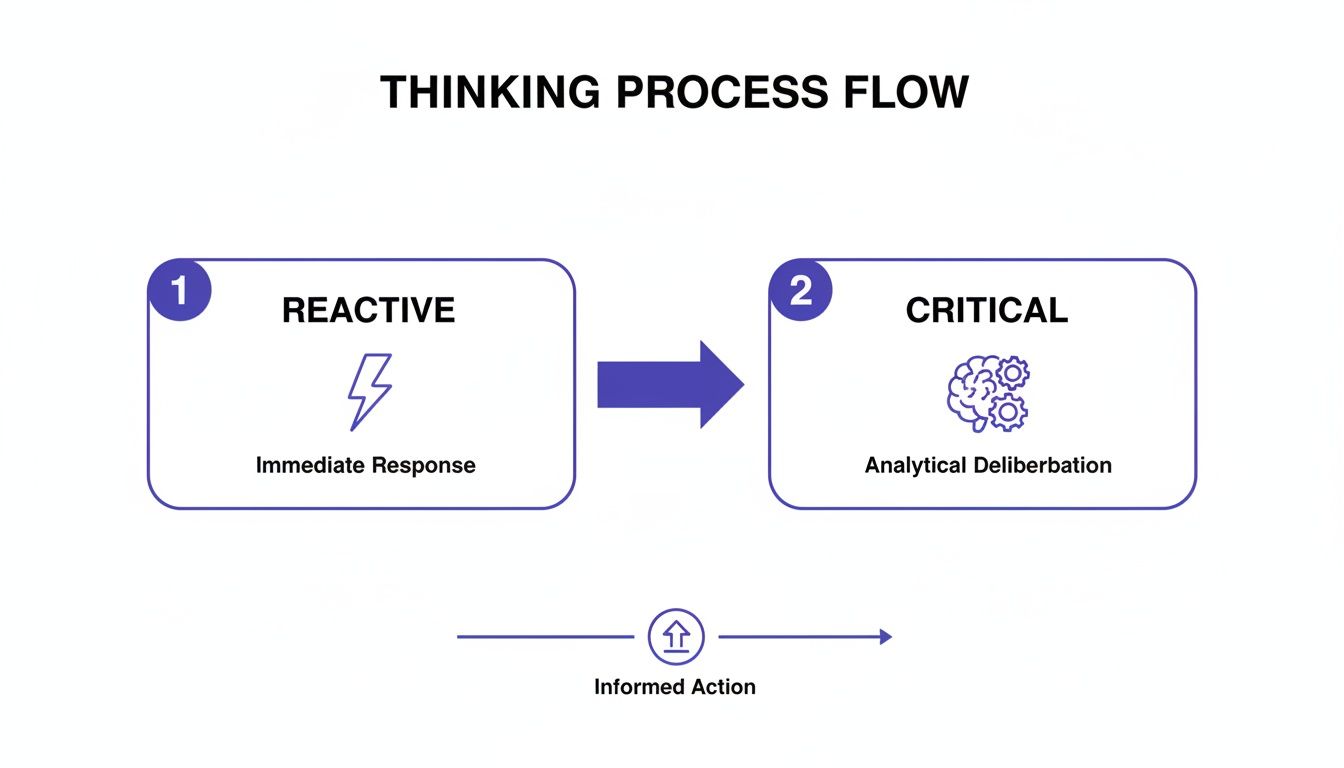
    The goal is to shift from reactive to reflective thinking.

    A thinking process flow diagram showing reactive to critical thinking leading to informed action.

    This diagram gets it rightβ€”critical thinking is about inserting a deliberate pause between a trigger and your response. That pause is where analysis happens.

    Start Your Day with a Questioning Mindset

    Before you even think about opening your inbox, carve out the first 15 minutes of your workday to tackle one specific challenge. A fantastic tool for this is the β€œ5 Whys” method. It’s a simple but surprisingly powerful way to dig past surface-level symptoms and uncover the real root of a problem.

    Let’s walk through a real-world example. Say you notice website traffic dipped by 10% last week.

    • Why #1? Why did traffic drop? Because our organic search traffic was lower.
    • Why #2? Why was it lower? Because our ranking for a key blog post slipped.
    • Why #3? Why did the ranking slip? A competitor published a more comprehensive article on the same topic.
    • Why #4? Why is their article better? It includes recent data and expert interviews that ours is missing.
    • Why #5? Why don’t we have those things? We haven’t set up a process for periodically updating our best content.

    And there it is. You went from a vague problem (β€œtraffic is down”) to a concrete, actionable solution: create a content refresh schedule. This kind of structured thinking is all about creating systems to manage your mental energy and get to the core of an issue.

    Curate Your Information Diet

    You’re consuming information all day long, but are you doing it on purpose? A critical thinker is intentional about their inputs. Cognitive psychology is clear on this: our brains have a finite amount of high-quality attention. When you flood it with low-quality, biased, or irrelevant junk, you create β€œcognitive load,” leaving less bandwidth for the decisions that actually matter.

    Take 10 minutes in the middle of your day to do a quick cleanup.

    • Unfollow social media accounts that thrive on outrage or unverified claims.
    • Unsubscribe from those newsletters you signed up for but never actually read.
    • Set up targeted news alerts for specific topics you need to track, instead of just passively scrolling headlines.

    This isn’t about becoming uninformed; it’s about being deliberate. You’re curating your inputs to create the mental space you need to think deeply. Maybe you can use a laptop stand for desk to create a more organized and intentional workspace.

    End Your Day with Structured Reflection

    The final piece of the daily puzzle is a brief, structured reflection. This habit is what makes the day’s lessons stick and trains your brain to review its own decisions without bias. Before you log off, grab a productivity journal and analyze one key decision you made.

    Ask yourself these four questions:

    1. What was the decision I made?
    2. What assumptions was it based on?
    3. What was the actual outcome?
    4. What would I do differently next time?

    This simple exercise closes the learning loop for the day. It’s the kind of deliberate practice that research confirms is essential for building any skill. For instance, a major study of 120,000 students found that a full one-fifth performed at the lowest level of critical thinking. The researchers’ conclusion? Targeted daily practice and measurementβ€”the very heart of this routineβ€”are what drive real improvement. You can see the full study by the Council for Aid to Education to dig into the data yourself.

    By putting this simple, three-part routine into practice, you build a powerful daily habit for sharper thinking. And if you’re looking for more strategies to get your thoughts in order, our guide on how to organize your thoughts for greater clarity is a great next step.

    Go Deeper: Challenging Your Assumptions with Weekly Exercises for Improving Critical Thinking Skills

    Daily routines are fantastic for building habits, but to really sharpen your critical thinking, you need to stretch your mind with a few focused weekly workouts. Think of these as the mental equivalent of hitting the gym for a longer, more intense session.

    These exercises are designed to pull you out of your intellectual comfort zone. They force you to dismantle arguments, confront your own biases, and spot problems before they snowball. To stay on track, I recommend blocking out a specific time each week and logging your progress in a simple habit tracker journal. Consistency is what turns effort into skill.

    A man actively drawing a mind map about an argument on paper, with a laptop and planner on a desk, creating a hands‑on workspace aimed at improving critical thinking skills.

    Exercise 1: Play Devil’s Advocate

    One of the quickest ways to expose your own blind spots is to actively argue against your strongest opinions. We all naturally gravitate toward information that confirms what we already believeβ€”psychologists call this confirmation bias. This exercise is a direct counter-attack.

    Once a week, pick a belief you hold firmly, especially one related to your work. Maybe you’re convinced that β€œremote work is always more productive.”

    Your mission is to build the strongest possible case against that belief.

    • Real-World Scenario: A marketing manager believes Instagram is the best platform for their new campaign. To play devil’s advocate, she spends an hour researching why TikTok or LinkedIn might be superior, even though she doubts it. She finds data showing her target audience is highly active on TikTok, forcing her to reconsider her initial, biased assumption.

    The goal isn’t to change your mind. It’s a powerful workout in cognitive flexibility that forces you to engage with opposing views, strengthening your overall grasp of the issue.

    Exercise 2: Deconstruct an Argument

    You’re surrounded by persuasion every single day, from targeted ads to LinkedIn thought leaders. This exercise trains you to see the architecture behind the arguments, making you a much more discerning consumer of information.

    Each week, choose one persuasive piece of contentβ€”a news editorial, a viral social media post, or even a marketing email. Your job is to map out its logical structure.

    • First, find the core conclusion. What is the single main point the author wants you to believe?
    • Next, list the supporting premises. What evidence or reasons do they offer?
    • Then, hunt for logical fallacies. Is the author using flawed reasoning to make their point?

    We see flawed arguments everywhere, from political debates to social media threads. Being able to spot them separates a well-reasoned point from one that just feels emotionally convincing. Here are a few of the most common ones to get you started.

    Common Logical Fallacies to Spot in the Wild

    Fallacy Name What It Is Example You Might See
    Straw Man Misrepresenting an opponent’s argument to make it easier to attack. β€œYou support reducing the marketing budget? So you just want the company to fail.”
    Ad Hominem Attacking the person making the argument instead of the argument itself. β€œWe can’t trust his analysis of the data; he didn’t even go to a top university.”
    False Dichotomy Presenting two options as the only possibilities when more exist. β€œWe either have to work weekends to finish this project, or we accept total failure.”
    Appeal to Authority Claiming something is true simply because an authority figure said it. β€œOur CEO said this is the best strategy, so it must be.”

    Learning to spot these errors is a critical thinking superpower. Once you start looking for them, you’ll see them pop up in meetings, articles, and advertisements constantly.

    Exercise 3: Conduct a β€œPremortem”

    This technique, borrowed from the business world, is an incredible way to sharpen your foresight and planning skills. Instead of conducting a β€œpostmortem” after a project fails, you hold a β€œpremortem” before it even begins.

    Pick a project you’re about to startβ€”either at work or in your personal life. Now, fast forward in your mind. It’s six months from now, and the project has been a complete disaster.

    Get a small group together (or just do this solo) and brainstorm all the plausible reasons for this epic failure. Write everything down, no matter how unlikely it seems.

    • Real-World Scenario: A team planning a software launch holds a premortem. They imagine the launch failed spectacularly. Potential reasons emerge: β€œA key developer got sick,” β€œMarketing didn’t understand the product,” and β€œA competitor launched a similar feature first.” By identifying these risks upfront, they can now build contingency plans, like cross-training developers and preparing competitive response messaging.

    This exercise flips the script from hopeful planning to proactive risk management. By identifying potential points of failure, you can build safeguards into your strategy from day one. It’s a powerful way of improving problem-solving skills because it trains you to anticipate obstacles instead of just reacting when they hit.

    Using Technology and AI to Improve Your Critical Thinking Abilities

    Technology often feels like the enemy of deep thoughtβ€”a constant stream of pings and notifications pulling you away from anything that requires real concentration. But when you use it with intention, technology and AI can become powerful partners in sharpening your critical thinking.

    The secret is to stop using these tools for quick answers and start using them to ask better, deeper questions. Instead of treating an AI chatbot like a glorified search engine, think of it as an intellectual sparring partner. This requires a whole different way of promptingβ€”one that invites challenge instead of just asking for information.

    A laptop displaying a chat about the definition of knowledge sits beside a phone and a desk clock, creating a study-focused workspace that supports improving critical thinking skills.

    Prompting AI as a Socratic Partner

    Let’s say you have a new business idea. The reactive, low-effort approach is to ask an AI, β€œIs my business idea good?” You’ll get a generic, unhelpful summary every time.

    A critical thinking approach uses a much more strategic prompt.

    Your Prompt: β€œAct as a skeptical but fair Socratic partner. I will present my new business idea for a subscription box for indoor plant enthusiasts. Your role is to challenge my core assumptions, point out potential blind spots, and ask probing questions about my target market, pricing model, and competitive advantages. Do not provide answers, only ask questions that force me to justify my reasoning.”

    This simple shift transforms the AI from an information vending machine into a tool that actively sharpens your own thinking. It forces you to defend your ideas against scrutiny, revealing the weak spots you would have otherwise missed.

    Creating an Environment for Deep Thought

    Of course, using AI as a thinking partner only works if you can actually focus. It’s hard to think critically when your phone is buzzing every two minutes with notifications. This is where a few low-tech tools can support your high-level thinking.

    • A phone lock box timer can create a mandatory, distraction-free bubble for an hour of intense work.
    • Investing in a quality monitor light bar can reduce digital eye strain during long research sessions, helping you stay focused for longer without the headache.
    • Sometimes, even a simple tool like an ergonomic keyboard can reduce physical distractions that pull your focus away from complex problems.

    These simple tweaks to your environment support the sustained concentration that critical analysis demands.

    Evaluating AI Content Critically

    It’s crucial to remember that AI-generated content is not gospel. In fact, critically evaluating its output is, in itself, a powerful exercise.

    Always cross-reference significant claims, statistics, or data points with trusted, independent sources. This turns the process from passive consumption into active verification, reinforcing your analytical muscles with every check. You can learn more about using AI for productivity while maintaining that critical edge in our detailed guide.

    This human-AI dynamic is only becoming more important. A recent bibliometric analysis of critical thinking research revealed a massive spike in publications between 2017 and 2021, driven largely by tech-forward nations. This academic surge shows that as AI gets more capable, the global focus on honing human critical thinking has intensified, positioning it as the essential counterpart to machine intelligence.

    Editor’s Take on What Really Works

    Let’s be honest for a second: consistency beats complexity every single time. A simple 15-minute daily reflection habit is far more powerful than a rare, multi-hour deep dive into abstract theories.

    This advice isn’t for academic philosophers; it’s for busy professionals who feel like their brain has too many tabs open. The most important thing to know is that these skills build over months, not days. There are no shortcuts here, and real progress demands patience.

    Simple Tools, Internal Work

    Tools can definitely help grease the wheels. A basic pomodoro timer is fantastic for carving out a protected block of time for an exercise. A dedicated productivity journal can give your end-of-day reflections some much-needed structure.

    But the real work? That’s always internal. The single biggest obstacle you’ll face is your own set of cognitive biases. Genuine critical thinking demands a willingness to question your own assumptions andβ€”most importantlyβ€”to be wrong. It’s uncomfortable, but that discomfort is where all the growth happens.

    This practical, no-hype philosophy is the heart of Mind Clarity Hub. We focus on building sustainable habits that lead to clearer thought, a theme we explore in depth in books like The Power of Clarity and Attention Unleashed.

    These exercises are incredible for analyzing new information, which is a huge part of learning. But to make those new insights actually stick, you also need to know how to retain what you read and integrate it into your mental toolkit for good.

    Key Takeaways: Your Core Critical Thinking Toolkit

    Improving your critical thinking isn’t about some massive, overnight transformation. It’s about building small, intentional habits that compound over time. Think of this as your quick-start guideβ€”a scannable summary of the core actions you can take right now.

    Build a Daily Thinking Routine

    Consistency is everything. A brief daily practice builds the mental muscle for deeper, more analytical thought. This could be as simple as using the β€œ5 Whys” method to dig into a problem at work or spending just ten minutes with a productivity journal to reflect on the day’s decisions.

    Challenge Your Assumptions Weekly

    Go a step further with a focused weekly exercise. Deliberately play devil’s advocate against one of your own long-held beliefs. Deconstruct a persuasive argument you find online, or run a β€œpremortem” on an upcoming project to spot weaknesses before they happen. These drills are designed to fight cognitive bias head-on.

    Use Technology as a Socratic Partner

    Instead of asking AI for answers, start using it to ask better questions. Prompt a chatbot to challenge your ideas or poke holes in your logic. You can also use simple tech to protect your focus, like a phone lock box timer, to carve out the uninterrupted mental space required for deep thinking.

    Engineer a Focused Environment

    Your physical space shapes your mental state. Small, deliberate changes can signal to your brain that it’s time to concentrate. A good pair of noise canceling headphones, for example, does more than block out soundβ€”it creates a clear boundary between you and the world of distractions. Ultimately, the goal is to consistently apply what you’ve learned about how to build critical thinking skills and turn these practices into a reliable toolkit for making smarter, more reasoned decisions in everything you do.

    Frequently Asked Questions About Improving Critical Thinking Skills

    Let’s dig into some of the most common questions that come up when you start taking critical thinking seriously. The goal here is to give you straight, practical answers that build on the ideas we’ve already covered.

    1. How Long Does It Take to See Real Improvement?

    There’s no magic number, but you’ll probably notice small shifts within a few weeks of consistent practice. It might be as simple as catching yourself pausing to question a news headline instead of just scrolling past. That’s a win. But developing deep-seated critical thinking habitsβ€”the kind that fundamentally change how you solve problemsβ€”is a longer game. For significant, noticeable upgrades in your decision-making, you’re likely looking at several months of dedicated effort. The key is consistency, not cramming.

    2. What Is the Best First Step for a Total Beginner?

    Start a daily reflection habit. It’s low-effort but has a massive payoff over time. At the end of each day, take five or ten minutes with a productivity journal. Pick one decision you made and ask yourself:

    • What was my gut reaction or initial assumption?
    • What information did I actually use?
    • How did it turn out?
    • Knowing what I know now, what would I do differently?
      This simple act builds the foundational skill of metacognitionβ€”thinking about your thinking. It’s the absolute cornerstone of critical analysis.

    3. Can Critical Thinking Help with Procrastination?

    Absolutely. Procrastination is often just a symptom of feeling overwhelmed or unsure where to even begin. That feeling of being stuck is what’s known as β€œanalysis paralysis.” Critical thinking is the perfect antidote. It gives you the tools to break down huge, intimidating projects into small, logical, and manageable steps. By analyzing the real problem and identifying the very next action, you build clarity and momentum. We actually have a whole guide on how to overcome analysis paralysis with structured thinking if you want to go deeper.

    4. Are There Any Tools That Can Help?

    Yes, but think of them as support systems, not magic solutions. The best tools often just help you create the right environment for deep thought. For example, a visual timer for desk use can help you commit to short, focused bursts of analysis. In the same way, a good pair of noise canceling headphones can carve out a distraction-free zone, signaling to your brain that it’s time to concentrate. These tools help you manage your environment so you can do the real internal work.

    5. How Can I Apply These Skills in a Team Setting?

    This is where critical thinking really shines. You can start by practicing active listening in meetingsβ€”genuinely trying to understand a colleague’s viewpoint before you formulate your own response. Another powerful move is to introduce structured questioning. When a new idea is on the table, gently ask clarifying questions like, β€œWhat assumptions are we making with this plan?” or β€œWhat are the potential second-order effects we haven’t considered?” This steers the conversation away from gut feelings and toward a more evidence-based discussion.

    6. Improving critical thinking skills and reading comprehension

    How can I improve my critical thinking skills when reading? The trick is to read actively, not passively. Instead of just letting the words wash over you, turn it into a mental workout by constantly asking questions. As you read, keep these in your back pocket:

    • What is the author’s core argument here?
    • What evidence are they using to back it up?
    • Is that evidence actually credible? Where did it come from?
    • Are there any obvious logical fallacies in their reasoning?
      This approach transforms reading from consumption into an analytical exercise. It’s a habit that strengthens your ability to evaluate information in every part of your life.

    7. Can Critical Thinking Reduce Stress and Anxiety?

    Yes, it can be an incredibly powerful tool for managing stress, but this is not medical advice. Much anxiety is fueled by vague, looping worries or catastrophizing about what might happen. Critical thinking allows you to put those anxious thoughts on trial. You can ask yourself, β€œWhat is the actual, objective evidence that this worst-case scenario will happen?” or β€œWhat’s a more realistic, alternative outcome?” This process helps you challenge irrational fears and ground yourself in reality, which can dial down your stress levels significantly. This content is educational and not a substitute for professional psychological care.

    8. What Role Does Environment Play in Critical Thinking?

    Your environment plays a massive role. It is incredibly difficult to think deeply when you’re surrounded by a firehose of distractions and interruptions. Creating a focused space is non-negotiable. This might mean using a phone lock box timer to quarantine your biggest distraction for an hour. It could also be as simple as upgrading your workspace with an ergonomic mouse and other tools that eliminate physical discomfort that constantly pulls at your attention.

    9. Is It Possible to Overthink Instead of Thinking Critically?

    Yes, and this is a crucial distinction to make. Critical thinking is a focused, goal-oriented process. You’re analyzing and evaluating information with the clear aim of solving a problem or making a sound decision. It’s productive. Overthinking, on the other hand, is usually an anxious, repetitive thought loop without a clear purpose or endpoint. It’s dwelling on a problem without moving toward a solution. The key difference is that critical thinking leads to clarity, while overthinking leads to paralysis.

    10. How Do I Know if My Critical Thinking Is Improving?

    You’ll start to see it in the small things. You might find yourself questioning your own gut reactions more often, or you’ll spot the flawed logic in an advertisement that would have flown right past you a month ago. Another key indicator is how you communicate. You’ll likely get better at articulating why you believe something, backing up your opinions with solid reasoning, and genuinely understanding different viewpoints in a debate. Keeping a journal to track your decision-making process is also a great way to see tangible proof of your progress over time.


    (Disclaimer: This article may contain affiliate links. If you make a purchase, we may earn a small commission at no extra cost to you. This content is for educational purposes only and is not a substitute for professional medical or psychological advice, diagnosis, or treatment.)


    At Mind Clarity Hub, we are dedicated to providing practical, science-based guides to help you achieve mental clarity and focus. If you’re ready to build a system for intentional thought and make smarter decisions, explore our cornerstone book, The Power of Clarity, and start your journey today.

    Free download: 7-Day Mind Clarity Reset preview

    Free download: 7-Day Mind Clarity Reset

    A short daily reset you can actually stick with (no fluff).

    Helpful resources for your next step

    Affiliate disclosure: As an Amazon Associate, Mind Clarity Hub may earn from qualifying purchases at no extra cost to you. Use this link only if it genuinely helps your planning.

    If Improving critical thinking skills: A practical guide to smarter decisions is a routine you want to keep using, a simple workbook, planner, or desk tool can make the steps easier to repeat.

    Compare related planners, workbooks, and organization tools on Amazon.

  • What Is Decision Fatigue and How Can You Overcome It? A Practical Guide

    What Is Decision Fatigue and How Can You Overcome It? A Practical Guide

    Heads up: This article contains affiliate links. If you buy something through a link, we may earn a small commission at no extra cost to you. Your support helps us create helpful content like this!

    Medical Disclaimer

    The ideas and strategies in this article are for informational and educational purposes only. They are not a substitute for professional medical advice, diagnosis, or treatment from a qualified healthcare provider. This content is not intended to diagnose or treat conditions like anxiety, depression, ADHD, or burnout.

    Always talk with your physician or another trusted health professional if you have questions about a medical or psychological condition. Never ignore their guidance or delay seeking it because of something you have read here. For more details on our approach to health information, you can also review Mindful-UK’s Medical Disclaimer.

    What Is Decision Fatigue and Why Does It Matter?

    Ever get to the end of a long day and find that choosing what to watch on Netflix feels like a monumental task? You’re not just tired. You’re experiencing decision fatigue. It’s the quiet erosion of your ability to make good choices after a long stretch of making them. Think of your willpower as a muscle. The more you use it throughout the day, the more exhausted it gets. Each choice, from what to wear in the morning to how to handle a major project, is like one more rep at the gym.

    Eventually, that muscle is spent.

    The Science Behind a Tired Brain

    This mental wear-and-tear has a name in psychology: ego depletion. The core idea, grounded in behavioral research, is that our self-control is a finite resource. As we go through the day, our brain’s command centerβ€”the prefrontal cortexβ€”gets overworked from constantly weighing options, making trade-offs, and resisting impulses.

    When that happens, your brain starts looking for shortcuts. It’s too tired for careful analysis, so it defaults to the easiest path. This might mean acting impulsively to get a decision over with, or avoiding the choice entirely. It’s why you might renew a subscription you don’t really needβ€”it’s simply easier than deciding to cancel.

    Real-World Scenario: Imagine a project manager. She starts her day fresh, carefully allocating resources for a high-stakes project. By 4 PM, after countless emails, team questions, and budget adjustments, a vendor asks for a contract extension with less favorable terms. Her prefrontal cortex is depleted. Instead of carefully analyzing the new terms, she impulsively agrees just to get the task off her plate.

    This is closely related to another common challenge we explore in our guide on what is cognitive overload.

    To put it simply, here’s how the process usually unfolds.

    A visual explanation of decision fatigue, showing that too many choices lead to ego depletion and poor decisions.

    alt=”what is decision fatigue: A concept map showing how numerous choices lead to a tired brain and poor decisions.”

    As you can see, the path from being overwhelmed with choices to making poor decisions is a straight line, fueled by the slow drain of your mental energy.

    To get a clearer picture of how this works, we can break it down into its core components.

    Decision Fatigue At A Glance

    This table breaks down the core components of decision fatigue, showing its causes, the mental processes involved, and the common outcomes.

    Core Concept Underlying Science Common Outcome
    Too Many Choices The prefrontal cortex, responsible for executive functions, becomes overworked by constant evaluation. Mental exhaustion and a reduced capacity for thoughtful decision-making.
    Ego Depletion Willpower and self-control are treated as a limited resource that gets used up throughout the day. Increased impulsivity, procrastination, or defaulting to the easiest option.
    Degraded Quality The brain conserves energy by taking mental shortcuts instead of engaging in careful analysis. Poor choices, decision avoidance, and a higher likelihood of making mistakes.

    Understanding these interconnected parts is the first step toward managing your mental energy more effectively.

    How It Plays Out in the Real World

    Decision fatigue isn’t just an abstract concept; it has tangible consequences.

    Imagine a freelancer who starts their morning sharp and confident, setting fair rates for a new project. Fast-forward to late afternoon. After a dozen client emails, several small project tweaks, and juggling invoices, a client asks for β€œjust one more thing.” Mentally drained, the freelancer agrees to the scope creep without adjusting the priceβ€”a choice they’d never have made with a fresh mind.

    Their decision-making quality didn’t just dip; it degraded. Recognizing this pattern is the key to protecting your most important choices, a central theme I explore in my book, The Power of Clarity.

    Recognizing the Signs of Decision Fatigue in Daily Life

    Decision fatigue isn’t a dramatic breakdown. It’s more like a slow, quiet leak in your mental energy. The first step to plugging that leak is learning to spot the subtle signs that it’s happening. It often shows up looking like laziness or garden-variety stress, but the real root is cognitive exhaustion.

    So, how do you know when your decision-making battery is running low? It creeps into your behavior in ways that might seem completely unrelated to the choices you’ve been making all day. Learning to spot these patterns is the key to managing your mental resources before they run dry.

    Common Symptoms You Might Overlook

    Decision fatigue often wears the mask of procrastination. You know you have three important work emails to answer, but instead, you spend an hour meticulously organizing your desktop icons. This isn’t laziness; it’s decision avoidance. Your brain is too tired to grapple with complex choices, so it defaults to a simple, low-stakes task that feels productive but isn’t.

    Another classic sign is impulsive behavior. After a day packed with back-to-back meetings and constant problem-solving, you might find yourself mindlessly adding things to an online shopping cart you don’t need. Your prefrontal cortex, the part of your brain that governs self-control, is depleted. As a result, the easy, gratifying choiceβ€”buy the thingβ€”wins out over the more rational one. This can feel a lot like the mental drain that contributes to what causes brain fog, where clear thinking becomes a real struggle.

    Finally, there’s a heavy reliance on the default option. This is when you let a subscription renew even though you don’t use it, simply because the act of canceling feels like too much work. To conserve its last scraps of energy, your brain just sticks with the path of least resistance.

    β€œDecision fatigue doesn’t feel like a dramatic breakdown. It feels like taking the easiest pathβ€”saying β€˜yes’ to one more cookie, skipping the gym, or sticking with the default settingsβ€”because you simply lack the mental capacity to argue with yourself.”

    Are You Experiencing Decision Fatigue?

    Sometimes it’s hard to tell the difference between a tough day and a pattern of cognitive exhaustion. This simple checklist can help you connect your everyday behaviors to the underlying strain of decision fatigue. See if any of these feel familiar.

    Symptom What It Looks Like (Real-World Example) A Simple First Step
    Procrastination You have a big project to start, but you spend the morning answering unimportant emails and tidying your desk. Pick one tiny, 5-minute task related to the project and do only that.
    Impulsive Choices After a stressful workday, you order expensive takeout you can’t really afford instead of cooking. Decide what you’ll have for dinner before 4 PM, when your willpower is stronger.
    Decision Avoidance You put off making a simple choice, like which doctor to call, for days or even weeks. Ask a trusted friend for their opinion to break the inertia.
    Sticking to Defaults You keep paying for a streaming service you never watch because canceling seems like too much effort. Set a calendar reminder for 10 minutes tomorrow to find and click the β€œcancel” link.
    Irritability A simple question like β€œWhat do you want for dinner?” makes you feel instantly annoyed and overwhelmed. Have a go-to β€œno-decision” meal for tired nights (e.g., eggs on toast, leftovers).

    If you see yourself in a few of these examples, it doesn’t mean you’re failing. It’s just a signal that your brain is overloaded and needs more support.

    Practical Tools for Real-World Scenarios

    Once you start recognizing these signs, you can become proactive instead of reactive. If you notice a pattern of making poor food choices or impulse buys in the evening, you can build systems to protect your future self from your tired self.

    Using a time blocking planner to schedule your most important decisions for the morningβ€”when your willpower is at its peakβ€”is a simple but incredibly effective strategy. For those prone to late-night impulse buys, a phone lock box timer can create a physical barrier between you and mindless scrolling. By consciously designing your environment, you drastically reduce the number of in-the-moment choices you have to make when you’re already running on empty.

    How Decision Fatigue Chips Away at Your Productivity and Well-Being

    Decision fatigue isn’t some vague feeling of being mentally tired. It has real, measurable costs that can quietly sabotage your most important goals. The constant drain on your mental bandwidth doesn’t just make you feel overwhelmed; it directly degrades the quality of your decisions and your overall sense of well-being.

    When your brain is fried from making one choice after another, its ability to handle high-level thinking plummets. This isn’t just a hunch; the data backs it up. A working paper from the National Bureau of Economic Research found that the accuracy of financial analysts’ forecasts dropped significantly over the course of a day.

    By their fourth or fifth forecast, their prediction errors jumped by a staggering 12-15% compared to their first one. It’s a clear picture of a brain shifting from careful, deliberate analysis to tired, error-prone shortcuts. For anyone running their own business, this is a stark reminder that making critical financial or strategic calls when you’re fatigued can lead to expensive mistakes. You can see the full financial study here.

    The Ripple Effect on Your Professional Life

    This mental drain has a direct, and often invisible, impact on your productivity.

    Think about a manager trying to make a hiring decision late on a Friday. After a full week of back-to-back meetings and putting out fires, their ability to thoughtfully weigh each candidate is shot. They’re far more likely to rush the choice or just go with a gut feeling instead of objective criteria. The result? A bad hire that costs the company precious time and money.

    Or picture an entrepreneur who spends all morning making dozens of small operational decisions. By the evening, when it’s time to price a major project, their mental gas tank is empty. They might underprice their work just to get the decision over with, leaving a huge amount of revenue on the table. Even small physical annoyances, like a poorly designed workspace, can pile on. Simply using an ergonomic mouse can reduce the physical strain that quietly adds to this mental load.

    The Toll on Your Personal Well-Being

    The damage from decision fatigue doesn’t stop when you close your laptop. It’s a major contributor to the downward spiral of burnout, a topic I explore in-depth in my book, Burnout Breakthrough.

    When you arrive home completely drained, you have almost no willpower left to make healthy choices. This is the exact reason you might skip a planned workout or grab greasy takeout instead of cooking the healthy meal you intended. Your brain, desperate for the path of least resistance, defaults to whatever brings the quickest reward.

    These seemingly small daily choicesβ€”the workout you skipped, the easy meal you orderedβ€”add up. Over time, they lead to more stress, worse health habits, and a gnawing sense of being completely underwater. Understanding the science behind dopamine and motivation can really shine a light on why our brains fall into this trap.

    Actionable Strategies to Combat Decision Fatigue

    Knowing you have decision fatigue is one thing; fighting back is another. The key isn’t just reacting to exhaustion but building systems that actively conserve your mental energy. We can organize these practical, evidence-based tactics into three pillars: Simplify, Automate, and Recharge.

    Overhead view of a bright workspace with open planners, a Pomodoro timer, and silver headphones, illustrating what is decision fatigue and how structure supports focus.

    These pillars work together to lower the daily cognitive load that quietly drains your focus and willpower.

    Simplify Your Choices

    The most direct way to push back against decision fatigue is to eliminate trivial choices from your day altogether. By creating routines, you put low-impact decisions on autopilot, saving that precious brainpower for what truly matters.

    • Create a β€œUniform”: Decide on a few go-to work outfits for the week. This single choice saves you from staring into your closet every morning, burning mental fuel before you’ve even had coffee.
    • Plan Your Meals: Spend an hour on Sunday mapping out your meals. This prevents the daily β€œwhat’s for dinner?” debate that hits right when your energy is at its lowest.
    • Standardize Small Decisions: Always park in the same area of the lot. Buy the same brand of staple groceries. These micro-decisions add up, and standardizing them removes dozens of tiny mental speed bumps from your day.

    A simple habit tracker journal can be a fantastic tool here, helping you build and stick to these new simplifying routines. It’s the consistency that makes these strategies so powerful.

    Automate and Batch Your Tasks

    Automation isn’t just for complex software; it’s a mindset. It’s about grouping similar tasks together and using tools to handle repetitive work, which frees up your mental RAM.

    For instance, instead of letting email interrupt you every 15 minutes, batch it into two or three dedicated blocks per day. This stops the constant context-switching that kills deep focus. A core strategy here is learning how to prioritize tasks at work, which often involves delegating lower-priority items to get them off your plate entirely.

    A pomodoro timer is perfect for this batching approach. It helps you focus intensely for a set period and then take a short, deliberate break, structuring your work sessions to protect you from mental drain. For a deeper dive, check out our guide on how to automate repetitive tasks.

    Recharge Your Cognitive Battery

    You cannot out-work a depleted brain. Strategic rest is non-negotiable for restoring your decision-making capacity. This goes far beyond just getting enough sleepβ€”it’s about weaving recovery moments into your actual workday.

    The data on this is startling. One study of physicians found that after making just six consecutive patient decisions, their diagnostic error rates spiked by 15-25%. That’s a massive drop in performance from a relatively small number of choices, and it underscores just how quickly our cognitive batteries drain without proactive rest.

    Strategic breaks aren’t a sign of weakness; they are a sign of professional self-awareness. Taking just 5-10 minutes to step away from your screen can help reset your prefrontal cortex, improving the quality of your very next decision.

    Putting on noise-canceling headphones for a few minutes of pure silence can be a powerful way to guard your focus and recharge. Ultimately, though, quality sleep is the foundation of all cognitive recovery, a theme I explore in my book, Restful Nights.

    Editor’s Take

    Here’s the honest truth: the best way to beat decision fatigue is to get ahead of it. It’s less about finding a magic cure for a tired brain and more about building systems that ruthlessly eliminate non-essential choices from your day. This is especially true for busy professionals, creatives, and anyone feeling the slow drain of a β€˜death by a thousand cuts’ from dozens of tiny, daily decisions.

    A word of caution, though: trying to fix everything at once can ironically cause more fatigue. Start with just one area. Maybe it’s planning your entire work week on Sunday or creating a dead-simple morning routine you don’t have to think about. A productivity journal can be a great ally here, helping you track that slow, sustainable progress.

    By systematically chipping away at the number of choices you have to make, you reclaim your best mental energy for the decisions that actually move the needle. This is a core idea I explore in my book, The Power of Clarity.

    Key Takeaways

    Feeling mentally shot by the end of the day? It’s probably not just youβ€”it’s the sheer weight of choices. Here’s a quick rundown of decision fatigue and how to get a handle on it.

    • What Is Decision Fatigue, Really? It’s the slow decline in your ability to make good choices after a long stretch of making them. Think of your willpower like a muscle. Each decision, big or small, is another rep. Eventually, that muscle gets tired.
    • How to Spot It in the Wild: The classic signs are putting off important tasks, making impulsive choices you second-guess later, or just defaulting to the easiest option because you’re too drained to think through anything else.
    • How to Push Back: You can fight this mental drain. The best tools are simplifying your routines (like planning meals for the week), automating small decisions (like handling all your email in one batch), and taking real breaks to let your brain actually recharge.
    • Guard Your Best Hours: Your brain is sharpest in the morning. That’s your prime time. Schedule your most important and complex decisions for this window to give them the best mental energy you’ve got.

    A Final Note on This Guide

    Just so you know, some of the links in this article are affiliate links. This means if you decide to purchase something through them, we might earn a small commissionβ€”at absolutely no extra cost to you.

    It’s also important to remember that everything here is for informational purposes. This guide isn’t a substitute for professional medical or psychological advice. If you have a health concern, please talk to a qualified professional. Your well-being is the top priority, and a real person can offer guidance that’s tailored to your specific situation.

    Your Questions on Decision Fatigue, Answered

    To help you put these ideas into practice, I’ve gathered some of the most common questions that come up. Think of this as a quick reference to solidify your understanding and get you started on the right foot.

    1. What is the best way to start combating decision fatigue?
    Start small. Honestly, the single most effective thing you can do is simplify one recurring daily choice. Don’t try to overhaul your entire life overnight. Just pick one thingβ€”like laying out your work clothes for the whole week on Sunday, or eating the same healthy breakfast every weekday. This gives you an immediate, easy win and starts saving you mental energy from day one.

    2. Is decision fatigue the same as just being tired?
    Not quite, though they definitely feel related. General tiredness is that familiar feeling of physical or mental exhaustion after a long day. Decision fatigue, sometimes called ego depletion, is differentβ€”it’s a specific decline in the quality of your choices that happens after you’ve made too many of them. You can be physically rested on the couch and still be suffering from a bad case of it.

    3. Can decision fatigue affect my physical health?
    Absolutely, though it’s usually indirect. When your willpower is shot, you’re far more likely to make the easy, less healthy choice. You order the greasy takeout instead of cooking, skip the workout you planned, or stay up an hour too late scrolling. Over time, these small, fatigue-driven decisions can have a huge impact on your well-being. A good night’s sleep is a powerful antidote; tools like a sleep mask blackout can really help improve sleep quality, which is crucial for restoring willpower.

    4. How long does it take to recover from a bout of decision fatigue?
    Recovery time varies, but the good news is that even short, strategic breaks work wonders. A 10–15 minute walk outside, listening to a favorite album with noise canceling headphones, or just stepping away from your screen can start to refill your mental tank. Of course, a solid night of sleep is the ultimate reset button for your brain’s executive functions.

    5. Does technology make decision fatigue worse?
    Without a doubt. Every single notification, email, and app alert forces a micro-decision: β€œDo I deal with this now?” This constant, low-grade stream of choices is one of the biggest drivers of cognitive overload in modern life. We actually have a whole guide with practical strategies for this, which you can find right here: digital detox tips.

    Understanding More About What is Decision Fatigue

    6. Are some people more prone to decision fatigue than others?
    Yes, definitely. People in high-stakes roles who make one critical choice after anotherβ€”think doctors, air traffic controllers, or senior managersβ€”are highly susceptible. Personality plays a role, too. If you tend to overthink or ruminate on every option, you might find your mental battery drains a lot faster than someone who is naturally more decisive.

    7. What is the β€œdefault choice” and how does it relate to this?
    The default choice is simply the option that gets selected if you do nothing. When your brain is fried from making decisions, it desperately wants to conserve energy, so it will almost always stick with the default. This is why you keep paying for a subscription you don’t use or stick with a utility provider that overcharges. It’s a classic sign that your cognitive resources are running on empty.

    8. Can I improve my β€˜decision-making stamina’ over time?
    Yes, you absolutely can. Think of it like strength training for your willpower. By building strong habits and routines, you automate the low-impact decisions (what to wear, what to eat for lunch). This builds a much stronger reserve of mental energy for the high-impact choices that actually move your life forward. A habit tracker journal is a fantastic tool for making this process visual and consistent.

    9. What’s the difference between decision fatigue and burnout?
    This is a great question. Decision fatigue is a short-term cognitive state that you can often fix with rest, a good meal, or simplifying your day. Burnout, which I cover in-depth in my book Burnout Interrupted, is a much more severe, long-term state of emotional, physical, and mental exhaustion caused by prolonged stress. Think of it this way: chronic, unmanaged decision fatigue can be a major highway leading directly to burnout.

    10. Does my physical workspace affect decision fatigue?
    It has a much bigger impact than most people realize. A cluttered, messy desk forces your brain to make constant, tiny decisions about where to look and what to ignore. That visual noise is draining. A clean, organized setup with helpful tools like a laptop stand for desk and a monitor light bar reduces that friction, helping you preserve your precious cognitive energy for the work that matters.

    Free download: 7-Day Mind Clarity Reset preview

    Free download: 7-Day Mind Clarity Reset

    A short daily reset you can actually stick with (no fluff).

    Short answer: Decision fatigue is the drop in decision quality after many choices. Reduce it with smaller menus, clear defaults, and timed recovery.

    Quick note on links: This section may include affiliate links already present on this page. If you choose to buy through them, we may earn a small commission at no extra cost to you. Thank you for supporting Mind Clarity Hub.

    Think of your decision-making energy like a phone battery. Every choice spends a little power. Instead of trying to power through, design your day so common decisions are easier, faster, or automaticβ€”saving your best attention for what truly matters.

    Decision Energy Day Map
    [Morning]  β–ˆβ–ˆβ–ˆβ–ˆβ–ˆβ–ˆβ–ˆβ–ˆβ–ˆβ–ˆ  Plan + make important choices
    [Midday]   β–ˆβ–ˆβ–ˆβ–ˆβ–ˆβ–ˆβ–ˆβ–ˆ    Batch routine choices
    [Late Day] β–ˆβ–ˆβ–ˆβ–ˆ        Use defaults or defer non-urgent
        
    Visual guide: Spend peak energy on high-impact decisions; let defaults and checklists handle the rest.

    Quick wins you can set up in 10 minutes

    • Create a β€œToday Menu” of 3 lunch options and stick to it this week.
    • Set one daily decision window (e.g., 9:30–10:00) for approvals and small yes/no choices.
    • Turn off non-essential app badges; keep only calendar and messages.
    • Pick a default: β€œIf it’s under 2 minutes, do now; if over 2 minutes and not important, schedule or decline.”
    • Bookmark this page and copy the checklist below into your notes app.

    Decision diet: shrink choice sets

    You don’t need perfect willpowerβ€”just fewer forks in the road. A small, stable menu for recurring decisions removes constant micro-choices.

    • Meals: Rotate 3–5 go-to breakfasts/lunches. Keep ingredients visible at eye level.
    • Wardrobe: Choose a color palette and 2–3 silhouettes for workdays.
    • Apps: Move high-friction apps off your home screen. Keep a single β€œFocus” folder for work essentials.
    • Emails: Create rules: newsletters to a β€œRead Later” label; invoices to β€œFinance.”
    • Errands: Batch once weekly with a prewritten route list.

    Use defaults and if–then rules

    Defaults are decisions you only make once. If–then rules turn recurring dilemmas into quick, confident actions.

    • Meetings: Default no meetings before 10 a.m. If a request comes in earlier, then offer your next available block.
    • Purchases: If a non-essential item costs over your preset limit, then wait 24 hours and revisit.
    • Health breaks: If you’ve been seated for 60 minutes, then take a 3-minute stretch or short walk.
    • Bedtime: Set a β€œlights-out” window (e.g., 10:30–11:00). If it’s within the window, then start your wind-down cue (dim lights, quiet reading).

    Comparison: decide now or later?

    Decide now when…

    • The choice is small and reversible.
    • It aligns with a clear priority or deadline.
    • You’re in your high-energy window (usually morning).

    Decide later when…

    • The stakes are high and not time-sensitive.
    • You lack a key piece of information.
    • You feel rushed, depleted, or irritable.

    Energy-aware scheduling

    Match decision difficulty to your current energy. Guard your best block for strategic choices and deep work; place routine tasks where energy is lower.

    1. Identify your peak (90-minute window you feel most clear). Put one important decision there.
    2. Batch similar choices to reduce context switches (e.g., approvals, scheduling, quick replies).
    3. Pre-load complex decisions: gather facts and options the day before so you can decide faster during your peak.

    Sustainable routines (not rigid rules)

    Use a β€œminimum viable routine” that still works on a busy day:

    • Plan the top 1–3 outcomes for tomorrow before you stop work.
    • Lay out clothes and prep breakfast at night.
    • Place a small notepad by your keyboard for a running brain-dump.

    A 7‑day micro-experiment

    Try this for one week and track how you feel:

    1. Choose one area to simplify (meals, wardrobe, or email).
    2. Set a single default and one if–then rule.
    3. Protect one daily 45–90 minute focus block for important decisions.
    4. End each day by listing tomorrow’s 1–3 outcomes.

    Measure: a 1–10 rating for mental energy at noon and 5 p.m., plus one sentence on what helped.

    What research says (brief and careful)

    Many people notice decision quality drops after making lots of choices. Research exploring β€œego depletion” has mixed findings across studies. Regardless, practical stepsβ€”like shrinking menus, setting defaults, and aligning choices with your high-energy windowβ€”are low-risk ways to protect your focus and make steadier decisions. If decision challenges are persistent or distressing, consider speaking with a qualified health professional.

    Decision fatigue FAQs

    What is decision fatigue in simple terms?

    It’s the wear-and-tear from many choices that makes later decisions slower, more impulsive, or avoided. Fewer options and clear defaults help.

    Is decision fatigue the same as burnout, anxiety, or ADHD?

    No. It can overlap in how it feels, but it isn’t a diagnosis. If decision struggles are ongoing or disruptive, consider consulting a qualified professional.

    How do I recover when I’m already mentally spent?

    Pause, hydrate, take a brief walk, and use defaults for non-urgent items. Defer complex decisions to your next high-energy window.

    Should I make fewer choices or make them faster?

    Start by reducing choices for routine matters. Then use time-boxing for small, reversible decisions so they don’t expand and drain energy.

    Does caffeine help with decision fatigue?

    It may feel alerting for some people, but it doesn’t replace rest or clarity. Use it thoughtfully and avoid relying on it to push through complex choices.

    Helpful resources for your next step

    Affiliate disclosure: As an Amazon Associate, Mind Clarity Hub may earn from qualifying purchases at no extra cost to you. Use this link only if it genuinely helps your planning.

    If What Is Decision Fatigue and How Can You Overcome It A Practical Guide is a routine you want to keep using, a simple workbook, planner, or desk tool can make the steps easier to repeat.

    Compare related planners, workbooks, and organization tools on Amazon.

  • A Science-Backed Guide to Improving Problem Solving Skills

    A Science-Backed Guide to Improving Problem Solving Skills

    A Science-Backed Guide to Improving Problem Solving Skills

    Getting better at solving problems isn’t about grinding harderβ€”it’s about thinking smarter. It’s a deliberate process of breaking down challenges, seeing around corners, and actually learning from what happens. This guide gives you a practical, no-fluff program for improving problem solving skills for good.

    (Note: This article contains affiliate links. If you purchase a product through one of these links, we may earn a small commission at no extra cost to you. This content is for educational purposes only and is not a substitute for professional medical or psychological advice.)

    Why Improving Your Problem-Solving Skills Matters More Than Ever

    Ever feel like you’re just staring at a project that’s gone completely sideways? A dozen priorities are screaming for your attention, some unexpected tech glitch just blew up your workflow, and the deadline is breathing down your neck. Your brain gets stuck in a loop, replaying the same bad ideas until you’re completely overwhelmed.

    That feeling is often a sign of cognitive overload, and it’s precisely where strong problem-solving skills make all the difference. In today’s messy, fast-moving world of work, the ability to dissect a problem and map out a real solution isn’t a β€œsoft skill” anymore. It’s a core survival tool. It’s what separates reactive stress from proactive progress.

    A thoughtful man in a gray sweater looks intently at a diagram on his laptop, a key part of improving problem solving skills.

    The Real-World Cost of Underdeveloped Skills

    Let’s be clear: weak problem-solving isn’t just some abstract career limiter. It has tangible, measurable costs. Stronger problem-solving proficiency tends to travel with higher earnings and better odds of staying in the workforce, though how large that gap is varies by country and by study.

    But it’s not just about landing a better job or navigating huge crises. It’s about handling the daily grind with less friction:

    • Decoding a client’s vague feedback without sinking into an endless cycle of revisions.
    • Fixing a recurring bug at its root instead of just slapping on another temporary patch.
    • Navigating a team conflict so people can actually get back to working together.

    Without a solid process, we default to our worst cognitive habits. Neuroscience explains that when we’re stressed, the brain’s emotional center (the amygdala) can override the logical, reasoning part (the prefrontal cortex). This triggers what’s known as β€œsolution-jumping”—we grab the first, easiest answer we can think of, not the best one.

    (This article is for educational purposes and is not a substitute for professional medical or psychological advice, diagnosis, or treatment. If you are experiencing symptoms of burnout, anxiety, or other mental health concerns, please consult a qualified healthcare provider.)

    You Can Systematically Build This Skill

    Here’s the good news: problem-solving isn’t some innate talent reserved for a lucky few. It’s a skill, like learning an instrument or a new language. You can train it. By practicing specific mental frameworks and building the right habits, you can literally rewire how your brain approaches a challenge.

    This guide isn’t about fuzzy advice like β€œthink outside the box.” We’re giving you a step-by-step programβ€”from honest self-assessment and targeted micro-drills to advanced cognitive strategies. It’s built for busy professionals who need methods that work, not just theories that sound good.

    Assess Your Current Approach to Solving Problems

    Before you can build stronger problem-solving skills, you need a clear, honest picture of where you’re starting. Think of it like a fitness assessment before a new training planβ€”without a baseline, you can’t track your progress or focus your energy where it actually counts. This isn’t about some formal quiz; it’s about candid self-reflection.

    When a surprise problem lands on your desk and throws your day off course, what’s your first instinct? Do you dive in headfirst, trying solutions on the fly? Or do you take a beat to figure out what’s really going on? Your gut reaction reveals a lot about your default problem-solving style.

    A person's hand writes in a notebook with 'ASSESSMENT' and checkboxes, a core step for improving problem solving skills.

    Solution-Jumping vs. Problem-Framing

    Many of us are conditioned to be β€œsolution-jumpers.” It’s a cognitive shortcut where the brain, desperate to resolve uncertainty, grabs the first plausible fix it finds. It feels productive in the moment, but it’s a trap. This habit often leads to patching up symptoms instead of addressing the root cause, all but guaranteeing the problem will pop up again later.

    In sharp contrast, problem-framing is the deliberate practice of defining the issue before you even think about solutions. It means asking clarifying questions, gathering context, and resisting that powerful urge for a quick fix. This more methodical approach is a cornerstone of strong executive functionβ€”the mental command center that governs how we plan, focus, and execute complex tasks.

    If you feel like this is a constant battle, our guide on how to repair executive function offers deeper, more targeted strategies.

    A well-defined problem is a half-solved problem. Rushing this step is like trying to build a house on a shaky foundationβ€”the effort you save upfront will cost you much more down the road.

    A Real-World Scenario Uncovering Blind Spots

    Consider a project manager, Sarah, who noticed her team kept missing deadlines for a specific type of task. Her immediate, solution-jumping reaction was to blame the project management software and start researching expensive alternatives. It was a classic case of aiming for a fast, visible fix.

    But then she paused to assess her own approach. Instead of assuming the tool was the problem, she started framing the issue by asking herself a few sharp questions:

    • Is this happening with the whole team, or just a few people?
    • Does the delay occur at a specific point in our workflow?
    • Have I been crystal clear about the dependencies for this task?

    Through this self-assessment, Sarah found the bottleneck. It wasn’t the software at all; it was an ambiguous handoff step between the design and development phases. Team members were making different assumptions, which led to rework and delays. Her blind spot was assuming the process was clear to everyone just because it was clear to her. By framing the problem correctly, she implemented a simple handoff checklist. The issue was solved without spending a dime on new software.

    Identify Your Problem-Solving Style

    So, how do you typically react when things go sideways? Your habits, your mood, and even your stress levels can dictate your approach. This table isn’t a test, but a mirror. Use it to reflect on your common patterns and see where your default style might be holding you back.

    Common Situation Reactive Approach (Impulsive) Structured Approach (Mindful)
    Facing a vague request Immediately starts working on what you think is needed. Asks clarifying questions to define the scope and goal first.
    An initial solution fails Feels frustrated and tries a slightly different version of the same idea. Pauses to analyze why it failed before formulating a new hypothesis.
    Under pressure Jumps at the first, easiest fix to relieve the immediate stress. Takes a moment to breathe and map out the core components of the problem.
    A complex problem emerges Feels overwhelmed and avoids the issue, focusing on smaller, easier tasks. Breaks the large problem down into smaller, more manageable sub-problems.

    Looking at these patterns, do you see yourself leaning one way or the other? Recognizing whether your default is reactive or structured is the essential first step. It shines a light on the specific habits you need to build for more effective, reliable problem-solving.

    Mastering Core Cognitive Strategies for Improving Problem Solving Skills

    Once you get a feel for your default problem-solving habits, you can start upgrading your mental toolkit. This isn’t about finding a single β€œmagic bullet” technique. It’s about mastering a few powerful cognitive strategiesβ€”mental models that shift how you see a problem in the first place.

    Think of them as different lenses you can look through. Each one reveals a unique angle of a challenge, helping you move past the obvious, surface-level fixes to find more robust, fundamental solutions. These aren’t just abstract theories; they are practical frameworks you can actively use.

    And these skills are surprisingly rare. Data from the OECD’s PISA 2012 assessment revealed that, on average, just 11% of 15-year-old students across 44 countries were top performers in problem-solving. This points to a huge gap between basic troubleshooting and the kind of adaptive thinking needed for complex modern challenges. You can check out more insights from this global skills assessment on the OECD website.

    Use First Principles Thinking to Deconstruct Problems

    One of the most powerful ways to cut through complexity is First Principles Thinking. The idea is to break a problem down into its most basic, undeniable truthsβ€”the β€œfirst principles”—and then build your solution up from there. Instead of relying on assumptions or what’s always been done, you reason from the ground up.

    This approach forces you to question everything. Your prefrontal cortex, the brain’s hub for logical reasoning, is brilliant at this kind of deconstruction when you give it the time and space to work. For a deeper look at specific methods, it’s worth exploring these essential structured problem-solving techniques.

    Scenario: The Freelance Web Designer
    A freelance designer gets a vague but common request from a client: β€œWe need a new, modern website.”

    • Conventional Approach: The designer immediately starts looking at trendy website templates and creating mockups based on current design fads.
    • First Principles Approach: The designer hits pause and asks fundamental questions:
      • What is the absolute core purpose of this website? Is it for lead generation? E-commerce sales? An information hub?
      • Who is the end-user, and what is the single most important action we want them to take?
      • Stripped of all jargon, what are the essential elements required to get them to take that action?
        By reasoning from these first principles, the designer’s focus shifts from just a β€œmodern look” to building a site that serves the client’s foundational business goals. The result is a far more effective final product.

    Anticipate Consequences with Second-Order Thinking

    While First Principles breaks a problem down, Second-Order Thinking builds it back up by exploring what happens next. It’s the simple practice of thinking beyond the immediate result of a decision. First-order thinking is quick and easy (β€œThis will solve our immediate problem”). Second-order thinking is deeper: β€œAnd then what will happen? And what will be the consequence of that?”


    This mental model helps you spot unintended consequences and avoid creating new problems down the line. It’s a critical skill for any kind of strategic decision. Sustaining this level of forward-thinking takes real mental energy, which is why our guide on improving focus and concentration can be a valuable resource for building that cognitive stamina.

    Second-order thinking is the voice in your head that asks, β€œAnd then what?” It separates good decision-makers from great ones by forcing a disciplined look at the chain reaction of effects over time.

    Scenario: The Software Team Lead
    A team lead is tempted to use a β€œquick and dirty” code patch to meet a tight deadline for a new feature.

    • First-Order Thinking: β€œThis patch will fix the bug and let us ship on time. The client will be happy.”
    • Second-Order Thinking: The lead forces themself to ask, β€œAnd then what?”
      • The patch introduces β€œtechnical debt,” making future updates slower and more difficult.
      • The team might get used to taking shortcuts, lowering overall code quality.
      • If the patch causes another bug after the launch, it will damage the client’s trust far more than a slight delay ever would.
        Recognizing these long-term consequences, the lead decides to negotiate a one-day deadline extension to implement a proper, stable fix.

    Work Backward with Inversion

    Sometimes the clearest path forward is found by looking backward. Inversion is a powerful mental model where you start by identifying the outcome you want to avoid, and then work backward to figure out what you need to do to prevent it from happening. Instead of asking, β€œHow can I achieve success?” you ask, β€œWhat could cause this to fail completely?”

    This little psychological trick helps you sidestep cognitive biases like over-optimism. By focusing on potential failures, you proactively spot risks, weaknesses, and blind spots you might otherwise miss.

    Scenario: The Marketing Manager
    A manager is planning a major product launch campaign.

    • Conventional Approach: The manager focuses on all the things that need to go right: β€œWe need great ad copy, a smooth website experience, and positive press coverage.”
    • Inversion Approach: The manager convenes the team for a β€œpre-mortem” and poses the question: β€œImagine it’s six months from now and this launch was a total disaster. What went wrong?”
      • Team members might suggest failures like: β€œOur key messaging was confusing,” β€œThe website crashed from all the traffic,” or β€œA competitor launched a similar product a week before us and stole our thunder.”
        By identifying these potential failure points upfront, the team can create specific contingency plansβ€”like stress-testing the website or refining the messagingβ€”to prevent those exact disasters from happening.

    Building Your Practice Routine for Improving Problem Solving Skills

    Knowing the cognitive strategies is one thing, but building real skill happens in the trenches. It comes from consistent, deliberate practice. Just like strengthening a muscle, you can’t improve your problem-solving abilities without a dedicated routine. The goal is to move these mental models from a state of conscious, clunky effort to an automatic, intuitive habit.

    This isn’t just a metaphor; you’re literally creating new neural pathways. When you consistently practice a specific way of thinking, your brain strengthens the synaptic connections involved. This process, known as neuroplasticity, makes that thought pattern faster and more efficient over time. This is the heart of habit formationβ€”turning intentional action into second nature.

    This diagram shows a simplified flow for how you might apply these powerful cognitive strategies in a practice session.

    A diagram illustrates three cognitive strategies for improving problem solving skills: First Principles, Second-Order Thinking, and Inversion.

    It’s a great visual reminder of the process: start by breaking a problem down to its core truths (First Principles), then explore the long-term ripple effects of potential solutions (Second-Order Thinking), and finally, spot risks by imagining what could go wrong (Inversion).

    Design Your Practice Sessions

    An effective routine isn’t about grinding for hours. It’s about a smart balance of short, focused exercises and longer, more immersive sessions. This variety keeps your practice engaging and targets different aspects of your cognitive function.

    • Micro-Practice Drills (5-10 minutes): These are quick, targeted exercises designed to fit into a busy day. Think of them as mental push-ups. The goal here is pure repetition and reinforcement of a single skill. For example, grab a common workplace problemβ€”like an unclear email requestβ€”and spend just five minutes deconstructing it using First Principles. That’s it.
    • Deep Work Sessions (45-minute blocks): This is your dedicated, uninterrupted time for a complex problem. The time constraint is actually a feature, not a bugβ€”it forces you to focus intensely and push your cognitive limits. Aiming for one deep work session a week is a fantastic way to build mental endurance.

    The key is consistency, not intensity. A daily 10-minute drill is far more effective for long-term skill development than one heroic, three-hour session once a month.

    Manage Your Brain’s Chemistry for Better Focus

    Your ability to sink into deep problem-solving is heavily influenced by your brain’s neurochemical state, especially dopamine. Our modern digital lives often flood our brains with cheap dopamine hits from notifications, social media feeds, and constant context-switching.

    Behavioral research shows this endless stimulation trains your brain to crave novelty and distraction. That makes it incredibly difficult to sustain the prolonged focus needed for deep work. It’s not just about productivity; managing your screen time is about protecting your very capacity for clear, methodical thought.

    Actionable Tip: Schedule your deep work sessions before you check emails or social media. This saves your prefrontal cortex’s finite daily resources for high-value thinking instead of draining them on reactive, low-value tasks first thing in the morning.

    Use AI as a Sparring Partner, Not a Shortcut

    AI tools like ChatGPT can be incredible for practice, but only if you use them correctly. The goal is to scaffold your thinking, not to outsource it. It’s tempting to ask for the answer, but that builds zero skill.

    Instead, treat AI like a collaborator to push your own thinking further:

    • Generate Scenarios: β€œAct as a project manager. Give me a complex scenario where a software launch is behind schedule due to an unexpected technical issue.”
    • Critique Your Solutions: β€œHere is my proposed solution to that scenario. What are three potential flaws or unintended consequences of this approach?”
    • Deepen Your Analysis: β€œHelp me apply Second-Order Thinking to this decision. What are the likely ripple effects in one month? Six months? One year?”

    This approach forces you to articulate your thought process and defend your logic, which is where the real learning happens.

    Sample Weekly Practice Schedule

    A structured plan helps turn good intentions into real action. Here’s a simple template you can adapt to your own schedule and goals. Keeping a dedicated notebook for these exercises can also be a game-changer; you can find great options in our guide to the best journals for productivity.

    Day Focus Activity Duration Goal
    Monday First Principles Drill 10 min Deconstruct a recent work email or request into its fundamental truths.
    Tuesday Inversion Practice 15 min Take an upcoming project and brainstorm all the ways it could fail.
    Wednesday Deep Work Session 45 min Tackle a significant, non-urgent problem using your chosen strategies.
    Thursday Second-Order Drill 10 min Analyze a recent decision you made and map out its potential future consequences.
    Friday AI Sparring Session 20 min Use an AI tool to generate a new scenario and critique your response.

    This blend of micro-drills and deep work creates a balanced routine that builds skill without causing burnout. It makes improving your problem-solving skills a sustainable, lifelong habit.

    From Analysis to Action With Decision Frameworks

    All the analysis in the world is useless until it leads to a decision. This is where problem-solving stops being a thought exercise and starts creating real-world change. To make that leap without getting stuck, you need a few battle-tested decision frameworks to guide you from insight to action.

    Without a good model, it’s incredibly easy to fall into analysis paralysis. This isn’t a character flaw; it’s a known cognitive state where too many options overwhelm your brain’s executive functions. Your prefrontal cortex gets stuck in a loop, endlessly weighing variables without ever landing on a conclusion. Decision frameworks act as a filter, helping you cut through the noise.

    This skill is rarer than you might think. OECD data reveals that only 5% of adults reach the highest level of adaptive problem-solvingβ€”the very skill needed for smart decisions under pressure. Meanwhile, nearly a third struggle with multi-step tasks, showing a clear need for frameworks to guide action. You can see more on these adult problem-solving skills on OECD.org.

    First, Separate the Urgent from the Important

    Not all problems are created equal. The Eisenhower Matrix is a brilliantly simple tool for figuring out what truly deserves your immediate attention. It forces you to sort tasks into four quadrants based on just two criteria: urgency and importance.

    • Urgent & Important: Do these first, and do them now.
    • Important, Not Urgent: Schedule these. This is where strategic progress happens.
    • Urgent, Not Important: Delegate these if you can. They’re often other people’s priorities.
    • Neither Urgent Nor Important: Eliminate these. They’re just distractions.

    Scenario: An office manager is swamped. The printer is jammed (urgent, not important), a major quarterly budget report is due next week (important, not urgent), and a coworker just asked for help with a minor spreadsheet formula (urgent, not important). Using the matrix, the manager asks the coworker to wait, calls IT for the printer, and carves out dedicated time to work on the crucial budget report. This prevents the immediate but low-value tasks from derailing strategic work.

    Making Smart Calls in Fast-Moving Situations

    For problems that are constantly changing, the OODA Loop is an invaluable mental model. Developed by military strategist John Boyd, it’s a four-stage cycle for making decisions in fluid environments: Observe, Orient, Decide, and Act.

    The OODA Loop isn’t a linear checklist but a rapid, iterative cycle. The person or team who can cycle through it fastestβ€”observing new information, reorienting their understanding, and acting decisivelyβ€”gains a significant strategic advantage.

    Imagine a small coffee shop owner who notices a new competitor opening across the street with a big marketing splash. Instead of panicking, she pauses and studies what they’re doingβ€”what’s on their menu, how they’re pricing things, and who they seem to be targeting.

    Pretty quickly, she sees the pattern: they’re pushing sugary, high-margin drinks and trying to win people with hype and discounts. Her shop, on the other hand, has a reputation for high-quality, single-origin coffee and customers who actually care about taste.

    So she makes a clear decision: she’s not going to fight a price war she doesn’t need. She’s going to lean harder into what makes her different. Then she takes action by launching a β€œCoffee Connoisseur’s Club,” with tasting nights and simple educational workshops that turn casual customers into loyal regulars.

    The result is that she doesn’t just survive the new competitionβ€”she sidesteps it. By moving through her OODA loop faster and with better judgment, she responds in a way the competitor didn’t anticipate, and she strengthens her position instead of weakening it.

    Clarifying Who Does What in Team Decisions

    When a decision involves multiple people, ambiguity is the enemy. The RAPID framework is designed to eliminate confusion by clarifying exactly who has which role, preventing stalemates and ensuring someone is accountable.

    • Recommend: The person who proposes a course of action.
    • Agree: Stakeholders who must sign off on the recommendation.
    • Perform: The team that will actually implement the decision.
    • Input: People who are consulted for information and expertise.
    • Decide: The single person with the final authority to say β€œyes” or β€œno.”

    For a visual way to map out more complex choices, using a good decision tree template can provide a clear strategic guide.

    Turn Every Outcome into a Lesson

    Finally, getting better at problem-solving means learning from your choicesβ€”both the good and the bad. After a decision is made and the outcome is clear, take a few minutes to conduct a brief error analysis.

    This isn’t about beating yourself up. It’s about taking an honest look at what worked and what didn’t. Ask yourself what you overlooked, which assumptions didn’t hold up, and what you’d change if you had to do it again. The point is to learn from the outcome and use those lessons to make the next attempt smarter.

    This simple habit, rooted in behavioral psychology principles of feedback loops, transforms every decision into a lesson for the next challenge. As you get more comfortable with this, you might explore our guide on how to use AI for productivity to help analyze data and outcomes more efficiently.

    Editor’s Take: The Truth About Improving Problem-Solving Skills

    Let’s cut right to it: you can’t read your way to becoming a great problem-solver. No amount of passively consuming articles on mental models will sharpen your thinking. Real, lasting improvement comes from one place and one place only: consistent, deliberate practice. The frameworks in this guide are powerful, but only if you get your hands dirty.

    Who is this advice best for? This approach is for professionals, students, and entrepreneurs who are ready to lean into the cognitive friction that real growth requires. It’s for people who understand that quick fixes are usually just temporary patches.

    What are the limitations? The biggest barrier isn’t a lack of information; it’s the mental static and stress that kicks in the moment you face a problem without an obvious solution. These techniques are less effective when you’re burned out or overwhelmed. Managing your well-being isn’t optional; it’s a prerequisite for clear thinking. The path to mastery is measured in months of consistent effort, not days of cramming.

    Frequently Asked Questions About Improving Problem-Solving Skills

    Here are answers to common questions about sharpening your problem-solving abilities.

    1. How long does it take to see real improvement in problem-solving skills?

    You can notice small shifts, like pausing before reacting, within a few weeks of consistent practice. However, making these structured approaches your default way of thinking under pressure typically takes several months of dedicated effort.

    2. Can I use these techniques for personal problems, too?

    Absolutely. Mental models like First Principles Thinking, Second-Order Thinking, and Inversion are universal. They are just as effective for untangling a personal finance issue or navigating a family conflict as they are for a complex work project.

    3. What is the single biggest mistake people make?

    Solution-jumping. It’s the powerful, instinctual urge to grab the first plausible fix without truly understanding the root cause of the problem. This habit leads to treating symptoms instead of the underlying issue, ensuring the problem will return.

    4. How can I practice if my job is repetitive?

    Even in a structured role, you can create practice scenarios. Run β€œwhat-if” drills: β€œWhat if our primary software failed for a full day? What’s our backup plan?” You can also apply these analytical skills to non-work challenges, like planning a vacation or optimizing a fitness routine.

    5. Are there any specific apps or tools that help with problem-solving skills?

    While no app can do the work for you, some can support your practice. Mind-mapping tools like Miro or XMind help visualize complex problems. Brain-training apps like Luminosity can sharpen analytical thinking, and AI assistants like ChatGPT are excellent for generating practice scenarios.

    6. What’s the difference between critical thinking and problem-solving?

    Think of critical thinking as the analysis phase. It’s the skill of questioning assumptions, identifying biases, and evaluating evidence. Problem-solving is the entire process that includes critical thinking, but also involves defining the problem, generating solutions, deciding on a course of action, and implementing it.

    7. What should I do when a problem feels completely overwhelming?

    When you feel overwhelmed, your brain’s emotional centers are overriding its logical ones. The best first step is to disengage to calm your nervous system. Take a short walk, do a few minutes of deep breathing, or write down your worries. Return to the problem only when you feel more grounded.

    8. Is it better to solve problems alone or in a group?

    It depends on the problem. For highly technical issues where one person has deep expertise, solving it alone can be faster. For complex, ambiguous problems that require diverse perspectives, a collaborative group approach is almost always superior.

    9. How can I start teaching these problem-solving skills to my team?

    Lead by example. Use the language of these frameworks in meetings. When breaking down a problem, verbalize your thought process. Introduce a β€œpre-mortem” exercise (a form of Inversion) before your next big project. Insist on a clear, agreed-upon problem definition before anyone suggests solutions.

    10. What role does creativity play in logical problem-solving?

    Creativity is essential. Logic and structured thinking help you dissect a problem into its core components. Creativity is what allows you to see novel connections between those components and generate innovative solutions that aren’t immediately obvious. The best problem-solvers masterfully blend both.


    (Disclaimer: This article contains affiliate links. If you purchase a product, we may earn a small commission at no extra cost to you. The content provided is for educational purposes only and is not a substitute for professional medical or psychological advice. Always consult a qualified professional for personal health concerns.)


    Ready to stop feeling overwhelmed and start solving problems with confidence? The books from Mind Clarity Hub offer science-backed, step-by-step guides to help you build focus, manage your attention, and think more clearly. Explore the full library and find the right guide for you at mindclarityhub.com.

    Explore the Mind Clarity Hub Library

    Practical books on focus, digital habits, resilience, and building a calmer mind.


    The Power of Clarity β€” book cover

    The Power of Clarity

    Unlock mental focus, build momentum, and create the life you were meant to live.

    View book β†’


    AI & ChatGPT for Beginners β€” book cover

    AI & ChatGPT for Beginners

    No PhD needed β€” a 2025 guide to AI, prompts, and productivity without coding.

    View book β†’


    Zen in the Digital Jungle β€” book cover

    Zen in the Digital Jungle

    Mindfulness for a chaotic world.

    View book β†’


    The Slow Reset β€” book cover

    The Slow Reset

    Mindful living in a fast-paced world.

    View book β†’


    Perfectly Imperfect β€” book cover

    Perfectly Imperfect

    Stop self-criticism, set boundaries, and embrace the real you.

    View book β†’


    Reclaiming Silence β€” book cover

    Reclaiming Silence

    A dopamine detox guide to finding peace in a noisy world.

    View book β†’


    The Focused Freelancer β€” book cover

    The Focused Freelancer

    Productivity, pricing & positioning for independents in 2025.

    View book β†’


    ChatGPT Side Hustle System β€” book cover

    ChatGPT Side Hustle System

    Launch your AI-driven online business in 30 days.

    View book β†’


    Burnout, Interrupted β€” book cover

    Burnout, Interrupted

    A proven path to restore energy and reclaim your life.

    View book β†’


    Attention Unleashed β€” book cover

    Attention Unleashed

    Focus strategies for the distracted mind.

    View book β†’


    Side Hustle Launchpad β€” book cover

    Side Hustle Launchpad

    Your quick-start guide to extra income.

    View book β†’


    Digital Clarity β€” book cover

    Digital Clarity

    Rewire your brain, escape dopamine traps & regain focus.

    View book β†’


    Break the Scroll β€” book cover

    Break the Scroll

    Reduce screen time and take back control of your life.

    View book β†’


    Climate Compassion β€” book cover

    Climate Compassion

    Transform eco-anxiety into empowered action.

    View book β†’


    Village Mentality β€” book cover

    Village Mentality

    The power of community for mental wellness.

    View book β†’


    Restful Nights β€” book cover

    Restful Nights

    Overcoming sleep anxiety in a 24/7 world.

    View book β†’


    Connected Again β€” book cover

    Connected Again

    Combat loneliness and build meaningful relationships.

    View book β†’


    Focus Recharged β€” book cover

    Focus Recharged

    Mastering attention and productivity in the digital era.

    View book β†’


    Marketing Magic with ChatGPT β€” book cover

    Marketing Magic with ChatGPT

    AI-powered content, campaigns, and copywriting to grow faster.

    View book β†’


    The 6-Figure Creator β€” book cover

    The 6-Figure Creator

    Turn knowledge into passive income with books, courses & AI.

    View book β†’


    Burnout Breakthrough β€” book cover

    Burnout Breakthrough

    Reset your work-life balance and thrive in 2025.

    View book β†’


    The Emotionally Intelligent Man β€” book cover

    The Emotionally Intelligent Man

    A modern guide to self-awareness and communication.

    View book β†’


    AI Personalized Wellness β€” book cover

    AI Personalized Wellness

    Create your custom health plan with data-driven habits.

    View book β†’


    Everyday AI Made Easy β€” book cover

    Everyday AI Made Easy

    Use ChatGPT and smart tools to simplify life.

    View book β†’


    Money Mindfulness β€” book cover

    Money Mindfulness

    A financial wellness guide for Gen Z & Millennials.

    View book β†’


    Startup Smarter with AI β€” book cover

    Startup Smarter with AI

    ChatGPT strategies and tools to grow your business.

    View book β†’


    ChatGPT for Writers & Creators β€” book cover

    ChatGPT for Writers & Creators

    Unlock AI-powered brainstorming, drafting & editing.

    View book β†’


    Free download: 7-Day Mind Clarity Reset preview

    Free download: 7-Day Mind Clarity Reset

    A short daily reset you can actually stick with (no fluff).

    Helpful resources for your next step

    Affiliate disclosure: As an Amazon Associate, Mind Clarity Hub may earn from qualifying purchases at no extra cost to you. Use this link only if it genuinely helps your planning.

    If A Science-Backed Guide to Improving Problem Solving Skills is a routine you want to keep using, a simple workbook, planner, or desk tool can make the steps easier to repeat.

    Compare related planners, workbooks, and organization tools on Amazon.