...

Tag: Remote Work

  • Brain Dump Checklist: Turn Mental Noise Into a Clear Next Step List

    Brain Dump Checklist: Turn Mental Noise Into a Clear Next Step List

    If your thoughts feel loud and scattered, this brain dump checklist will help you capture everything and turn it into a clear next-step list you can act on today. Because your head is not a storage unit, you need a simple flow: capture, clarify, organize, and review. As a result, youÒ€ℒll free up attention, reduce decision fatigue, and make steady progress without carrying it all in working memory.

    Brain Dump Checklist: Key Takeaways

    • A brain dump works because it offloads short-term memory and reduces mental friction so you can think and act with more clarity.
    • Use a repeatable checklist: Capture everything, Clarify meaning, Organize outcomes, Review next steps.
    • Start with a 10-minute timer, a trigger list, and a simple way to tag items as Next Action, Project, Calendar, Waiting, or Reference.

    What is a thought download checklist?

    A brain dump checklist is a short, structured set of prompts and steps you run every time you want to unload mental clutter. Instead of keeping tasks, worries, and ideas in your head, you put them in a trusted place. Then you clarify each one and sort them into the right bucket. Therefore, you finish with a tidy list of concrete next steps you can start now, not a chaotic wall of sticky notes.

    Many people meet this idea through the GTD mind sweep, Bullet Journal rapid logging, or a simple notepad. The method is flexible. However, the repeatable checklist is what ensures you capture everything, not just the easiest items.

    Why Does a Brain Dump Checklist Work?

    There are three helpful ideas behind this practice:

    • Cognitive offloading: When you record information outside your head, you free up limited working memory for problem-solving. Research on cognitive offloading explains why tools like lists and reminders reduce mental load and errors. See a review in Trends in Cognitive Sciences for a plain-language overview of how and why this works (Trends in Cognitive Sciences).
    • Working memory is limited: Your mind can only hold a handful of items at once. Writing things down removes that bottleneck so you can focus. The APAÒ€ℒs entry on working memory is a useful primer (American Psychological Association).
    • Zeigarnik effect: Unfinished tasks tend to stay mentally active. A clear capture-and-clarify loop reduces that nagging open loop. Britannica has a concise explanation (Encyclopaedia Britannica).

    Because of these factors, a consistent checklist becomes a light, reliable way to reduce cognitive load and get into focused work faster.

    The 4-step brain dump checklist

    Use this simple flow every time:

    1. Capture: Get everything out without judging. Words, fragments, tasks, worries, ideas.
    2. Clarify: Ask Ò€œWhat does this mean?Ò€ and Ò€œIs there a next step?Ò€ Keep it short.
    3. Organize: Sort into Next Action, Project, Calendar, Waiting For, or Reference.
    4. Review: Pick 1Γ’β‚¬β€œ3 next steps you will do today, and schedule the rest.

    Principles that keep the checklist light

    • Keep capture and clarify separate. Also, do not organize while you dump.
    • Use short, plain words. Because speed beats perfection in this step.
    • Set a timer to limit the session and avoid overthinking.
    A minimalist notebook ready for quick capture.
    Use a simple page to run your checklist. Photo by Nataliya Vaitkevich via Pexels.

    How Do You Run a Brain Dump Checklist in 10 Minutes?

    HereÒ€ℒs a quick-start you can run during a break or before you log off for the day. This 10-minute brain dump checklist acts like a reset button when you feel overloaded.

    1. Set a 3-minute timer for pure capture. Write everything, one line per thought. Do not sort yet.
    2. Set another 3-minute timer for clarify. Add a few words to each line so the meaning is obvious tomorrow.
    3. Set 2 minutes to star the 1Γ’β‚¬β€œ3 items you will do next. Keep it small.
    4. Use the last 2 minutes to move starred items to your Next list or todayÒ€ℒs calendar.

    Therefore, in 10 minutes you reset your head, pick a path, and prevent tomorrowÒ€ℒs you from starting in a fog.

    Brain Dump Checklist Trigger Prompts

    Trigger prompts help you remember what you would otherwise miss. The official GTD Mind Sweep Trigger List is a thorough starting point (GTD Trigger List PDF). Adapt it to your life using the prompts below.

    Trigger prompts by life area
    Area Prompt Examples
    Work Deadlines, meetings, stakeholders Prep Q3 brief; schedule 1:1s; send handoff email
    Home Repairs, supplies, routines Fix loose handle; order filters; laundry rhythm
    Admin Bills, renewals, paperwork Update license; expense receipts; renew domain
    Health & energy Sleep, meals, movement Plan grocery list; book a walk with a friend
    Learning Courses, books, skills Outline next module; capture reading notes
    Errands Stores, pickups, deliveries Pick up package; return item; buy stamps
    Waiting For Follow-ups and replies Reply from Alex; new laptop ETA; invoice status

    Because your life changes, your triggers should change. Add or remove prompts until your printable checklist makes you think Ò€œOh right, that!Ò€ two or three times each run.

    Turn a thought download checklist into next steps

    After the capture, move line by line and decide what each one is. Use the five simple outcomes below. This is adapted from GTDÒ€ℒs organize stage, which keeps your system tidy without overbuilding it.

    From raw thought to concrete outcome
    Raw thought Outcome bucket Example next step
    Ò€œTeam offsite?Ò€ Project Create doc: Offsite agenda draft
    Ò€œLeaky faucetÒ€ Next Action Text landlord photo of leak
    Ò€œDentist checkupÒ€ Calendar Book appointment for any weekday morning
    Ò€œWaiting on logo filesÒ€ Waiting For Ping Eliza: logo files status
    Ò€œInteresting AI bookÒ€ Reference / Someday Add to reading queue with a one-line note

    Therefore, you end with an actionable list, a short projects list, and fewer open loops. A small, steady routine ensures you always know what to do with what you captured.

    Avoid these mind sweep checklist mistakes

    • Sorting while you capture. Instead, finish capture, then clarify.
    • Writing vague lines. Also, add 3Γ’β‚¬β€œ6 words to make the meaning obvious.
    • Skipping the review. Finally, choose 1Γ’β‚¬β€œ3 next steps before you stop.

    Paper vs app: tools to run your mind sweep checklist

    Use whatever you will open daily. Because tools shape behavior, match them to your context.

    Paper and app options for your checklist
    Tool Best for Pros Consider
    Notebook + pen Quick capture anywhere Zero friction; no battery; natural Manual transfer to lists later
    Notes app (Apple/Google) Ubiquitous, simple Syncs across devices; fast Easy to clutter without tags
    Todoist/Things Action-focused people Quick next-step sorting; dates Projects view can tempt over-structure
    Notion Builders and documenters Flexible databases; tags; templates Setup time; keep the checklist short
    Obsidian Linked notes and ideas Backlinks; plain text; plugins Requires a light process to avoid sprawl

    If you prefer a one-page weekly database, create a Notion page that pairs your brain dump with a simple Next Actions gallery. For a ready pattern, see how we map a week in our planning articles, then adapt that simple shape to your own board. Also, if youÒ€ℒre rebuilding your deep work routine, you may like our guide on staying focused during intense reading; it shows how to protect attention once your list is clear (maintain deep focus while reading dense technical specs).

    Hand writing a checklist in a notebook to plan next steps.
    Keep the flow fast: capture now, clarify later. Photo by Jakub Zerdzicki via Pexels.

    Brain Dump Checklist Deep Dive: Capture to Review

    The four steps look simple. Yet each step hides small choices that make or break the session. Use the guidance below to keep momentum and avoid rework.

    Brain Dump Checklist Step 1: Capture

    • Write one short line per thought. Fragments are fine. Do not edit.
    • Prefer verbs. For example, write Ò€œEmail supplierÒ€ instead of Ò€œsupplier.Ò€
    • Use a timer. It creates a clear boundary and stops perfectionism.
    • Scan your inbox and calendar for 60 seconds. Add anything that tugs.
    • Close apps and tabs for this step. Fewer cues, cleaner dump.

    Tip: If your mind goes blank, use three quick lensesÒ€”work, personal, and adminÒ€”and list one thing for each. It will unstick the flow.

    Brain Dump Checklist Step 2: Clarify

    • Ask two questions: Ò€œWhat is this?Ò€ and Ò€œWhatÒ€ℒs the next visible step?Ò€
    • Keep next steps physically small (under 15Γ’β‚¬β€œ20 minutes when possible).
    • For a multi-step outcome, mark it as a Project and define the very first step.
    • For an item tied to a specific date or time, move it to your calendar.
    • When an item needs someone else first, move it to Waiting For and add a follow-up date.

    Good clarification converts fog into motion. It should take seconds per line, not minutes.

    Brain Dump Checklist Step 3: Organize

    1. Use five buckets: Next Action, Project, Calendar, Waiting For, Reference.

    2. Tag Next Actions with a context (e.g., @Laptop, @Errands, @Calls).

    3. Give Projects a clear outcome, a why, and the next visible step.

    4. Move Reference to its home (notes app, wiki, or a folder) the same day.

    5. Batch Waiting For items and review them at set times.

    Fewer buckets reduce thinking overhead. The buckets above cover nearly all cases without needing a complex system.

    Brain Dump Checklist Step 4: Review

    • Pick 1Γ’β‚¬β€œ3 Next Actions for today. Choose low-resistance items first.
    • Schedule or defer the rest. If it matters, give it a slot.
    • Close the loop. Put tools away and start the first chosen task.

    By ending with a short action list, you reduce choice overload and build trust in your system.

    Decision rules that remove friction

    When decisions are pre-made, you think less and move faster. Use the rules below whenever you sort items. A short set of rules keeps your brain dump checklist smooth under pressure.

    Simple decision rules for clarify and organize
    Rule Use it when… What to do
    Two-minute rule Task is tiny and clear Do it now instead of tracking it
    Single vs multi-step test You are unsure if it is a Project If more than one step, create a Project and define the first step
    Calendar test It must happen on a date/time Put it on the calendar or set a dated reminder
    Ownership check Someone else must act first Move to Waiting For and add a follow-up date
    Reference vs action test Information has no action File it in Reference and add a one-line note if needed
    Energy match Your energy is low Pick the easiest Next Action to create momentum

    Use contexts and energy tags

    Contexts tell you where a task fits best. Energy tags tell you when to do it. Together they stop you from staring at a long list.

    1. Contexts: @Laptop, @Phone, @Errands, @Home, @Office, @DeepWork.

    2. Energy: High, Medium, Low. Add a simple label after the task.

    3. Use cases: During a short break, filter to @Phone + Low and make two quick calls.

    As a result, you pick actions that fit the moment instead of forcing hard work at the wrong time.

    Make the thought download checklist a habit

    Habits form when the cue and the action are tight. Keep the ritual small and linked to an existing step.

    1. Cue: End of workday chime, first coffee, or opening your planner.

    2. Action: Start a 3-minute capture. Set a timer before writing.

    3. Reward: Tick a small Ò€œDoneÒ€ box, close your laptop, or play a short song.

    4. Environment: Keep your capture tool open by default.

    Because the ritual is short, you will use it even on busy days. Consistency is more valuable than a perfect session.

    What routine keeps your system working?

    A light weekly review maintains trust. Meanwhile, a short daily check keeps momentum without micromanaging life. A simple cadence keeps your brain dump checklist working week after week.

    Daily and weekly review rhythm
    Cadence Time Checklist
    Daily shutdown 10 minutes Run a mini brain dump; star 1Γ’β‚¬β€œ3; calendar check
    Weekly review 30Γ’β‚¬β€œ45 minutes Full brain dump; clarify; organize; plan next week
    Monthly reset 45Γ’β‚¬β€œ60 minutes Archive done; prune someday; refresh triggers

    Because remote work blurs edges, many readers stack a 5-minute capture before lunch and a 10-minute capture at shutdown. It pairs well with a short attention reset routine (try an attention reset) and a weekly planning pass (Notion weekly planner template ideas).

    Adapt the mind sweep checklist to your role

    Students

    1. Use course codes as tags (BIO201, HIST110). Add @Study, @Lab, @Group.

    2. During capture, scan your syllabus for due dates and add them to Calendar.

    3. Break large assignments into 20Γ’β‚¬β€œ30 minute chunks to avoid last-minute rush.

    Managers

    1. Split capture into People, Projects, Metrics. Add 1Γ’β‚¬β€œ2 items per person weekly.

    2. Batch Ò€œWaiting ForÒ€ follow-ups to two windows each day to cut context switching.

    3. Turn recurring 1:1 notes into a mini checklist so prep is quick and repeatable.

    Parents and caregivers

    1. Keep a shared family list for errands and appointments.

    2. Use @Phone + Low to make quick bookings while waiting in lines.

    3. Review the calendar with others once a week to reduce surprises.

    See a week-long experiment

    HereÒ€ℒs a short video diary where a creator tries a daily brain dump for a week. Watch how a simple list lowers friction and creates motion.

    Open the video in a new tab

    Copy-and-run brain dump checklist templates

    Use the templates below as a starting point. Then edit them to fit your day.

    Paper template (index card or A5)

    1. Header: Date and Ò€œBrain DumpÒ€

    2. Timer: 10 minutes total (3 capture + 3 clarify + 2 star + 2 move)

    3. Sections: Work / Home / Admin / Waiting / Ideas

    4. Footer: Ò€œChoose 1Γ’β‚¬β€œ3 nowÒ€ checkbox row

    App template (Notion/Todoist)

    1. Fields: Text, Tag, Outcome (Next, Project, Calendar, Waiting, Ref), Due

    2. Views: Inbox (unclear), Next (due soon), Waiting (follow-ups), Projects

    3. Automation: Today view filters Outcome = Next and Due Ò‰€ today+2

    Build it in your favorite app

    Notion setup in 5 minutes

    1. Create a database named Ò€œCapture.Ò€ Add properties: Tag (multi-select), Outcome (select), Due (date), Energy (select), Context (select).

    2. Add a Gallery view for Projects and a Table view for Next Actions.

    3. Create a filter for the Today view: Outcome is Next AND (Due is empty OR Due is within 2 days).

    4. Add a template button that pre-fills Outcome = Next and Energy = Medium.

    5. Save a Weekly Review template page with a short checklist and link your Capture database inside it.

    Once this is set, running the brain dump checklist takes less time than thinking about it. You press a template, type, sort, and start.

    Todoist or Things

    1. Create a Project called Ò€œInboxÒ€ for raw capture. Keep it at the top.

    2. Use Sections for Next, Waiting For, and Projects (or use labels like @waiting).

    3. Create filters: Ò€œToday+2Ò€ and Ò€œWaiting:overdueÒ€ for quick scans.

    4. Use the mobile widget so a new task is one tap away.

    5. During clarify, add one verb to each task so it is obvious later.

    Notes app

    1. Pin a single note called Ò€œCapture.Ò€

    2. Start lines with a hyphen and one verb. Keep it plain text.

    3. At review time, move actions to your calendar or task app. Archive the note weekly.

    How Do You Troubleshoot a Brain Dump Checklist?

    1. Ò€œI donÒ€ℒt know where to start.Ò€ Set a 2-minute timer and write three fragments. Momentum beats clarity at the start.

    2. Ò€œMy list is too long.Ò€ Limit daily picks to 1Γ’β‚¬β€œ3. Move the rest to Projects or Next without guilt.

    3. Ò€œI keep rewriting the same items.Ò€ Add a small why beneath the task or turn it into a calendar block.

    4. Ò€œI forget to review.Ò€ Tie review to a fixed cue (shutdown alarm, last meeting).

    5. Ò€œI overbuild the system.Ò€ Keep five buckets. If you add more, prune them during the monthly reset.

    Measure progress

    You do not need complex analytics. A few light metrics show whether the checklist helps.

    1. Daily picks: Did you choose 1Γ’β‚¬β€œ3 and do at least one? Yes/No.

    2. Review streak: How many days in a row did you run capture?

    3. Open loops: Count of Waiting For items. Is it shrinking weekly?

    4. Stress note: One line at shutdown: lower, same, or higher than yesterday.

    As the numbers stabilize, you will feel more in control. If they drift, simplify the flow.

    How remote workers can tune the mind sweep checklist

    1. Use work and personal sections so you can close the laptop cleanly.

    2. Batch Ò€œWaiting ForÒ€ items and follow-ups to two windows per day.

    3. Protect focus blocks. Also, reduce screen time during deep work (digital detox strategies).

    How we built this simple brain dump checklist

    We blended field-tested systems (GTDÒ€ℒs mind sweep and Bullet JournalÒ€ℒs rapid logging) with cognitive offloading research and kept only what helps in a busy digital day. For source materials, see the GTD Trigger List (official PDF), Bullet Journal basics (Bullet Journal Learn), a review of cognitive offloading (Trends in Cognitive Sciences), the APA on working memory (APA dictionary), and Britannica on the Zeigarnik effect (Britannica).

    Frequently asked questions

    What is the difference between this process and a to-do list?

    A brain dump checklist is a process for unloading and sorting everything in your head. It includes prompts and steps. A to-do list is the result of that process: clear, actionable items. Therefore, run the dump first, then shape a small list for today.

    How often should I run my brain dump checklist?

    Use a 5Γ’β‚¬β€œ10 minute version daily (often at shutdown) and a longer 30Γ’β‚¬β€œ45 minute version weekly. Also, run a quick capture any time you feel scattered. Because the checklist is short, it takes less time than wrestling with mental clutter.

    Can I do a mind sweep without GTD?

    Yes. You can use the same capture Ò†’ clarify Ò†’ organize Ò†’ review loop without adopting GTD wholesale. The checklist exists to give you a reliable routine, not to lock you into a complex system.

    What if my list gets too long?

    Limit outcomes. Move only 1Γ’β‚¬β€œ3 items to Ò€œToday,Ò€ park the rest on Next or Projects, and schedule when needed. In addition, prune your Ò€œSomeday/MaybeÒ€ list during the monthly reset so your system stays light.

    Is there a best time of day to run it?

    Two good slots are first thing in the morning and the daily shutdown. Morning sets direction. Shutdown clears leftovers and protects off-hours. Choose one and stick with it so the habit runs on autopilot.


    Next steps

    1. Print or save your own one-page brain dump checklist.

    2. Pick a 10-minute slot today and run it once. Then star 1Γ’β‚¬β€œ3 items.

    3. Protect two focus blocks this week. If you need help, try our deep focus guide.

    4. Reduce ambient noise in your day with a light digital detox strategy.

    5. Set up a simple weekly board: start with our Notion weekly planner template ideas.

    Finally, keep this thought: your brain is for thinking, not for storage. A small, steady brain dump checklist turns noise into motion.

    Helpful resources for your next step

    Affiliate disclosure: As an Amazon Associate, Mind Clarity Hub may earn from qualifying purchases at no extra cost to you. Use this link only if it genuinely helps your planning.

    If Brain Dump Checklist: Turn Mental Noise Into a Clear Next Step List is a routine you want to keep using, a simple workbook, planner, or desk tool can make the steps easier to repeat.

    Compare related planners, workbooks, and organization tools on Amazon.

  • Minimalist Productivity System: Fewer Tools, Better Follow-Through

    Minimalist Productivity System: Fewer Tools, Better Follow-Through

    Quick answer: A minimalist productivity system is a small set of trusted places for tasks, calendar commitments, notes, and review. It works because it reduces capture points, lowers switching, and makes the next action obvious without asking you to manage a complicated tool stack.

    A minimalist productivity system is not about doing less work that matters. It is about removing the extra decisions around the work. When every task lives in a different app, every reminder has a different rule, and every note has a different home, the system itself becomes another job. A lighter setup gives you one place to look, one way to choose, and one habit for closing the loop.

    This guide is for busy adults, remote workers, creators, students, and small teams who want better follow-through without rebuilding life around a new app. You will build a simple four-part system, test it for two weeks, and connect it to the broader Mind Clarity Hub reading path only where it helps. The goal is calm control, not a perfect dashboard.

    What is a minimalist productivity system?

    A minimalist productivity system is a repeatable workflow with the fewest tools needed to capture, decide, do, and review work. In practice, that usually means one calendar, one task list, one note home, and one short review ritual. Anything else has to earn its place by making decisions easier.

    The system should answer four questions quickly: What must happen on a specific day? What is the next action? Where are the supporting notes? When will I review open loops? If those answers are scattered, the setup is not minimalist yet, even if the interface looks clean.

    Research on attention supports the practical reason for this approach. The American Psychological Association explains task-switching costs and notes that moving between complex tasks can take a toll on productivity. A system with fewer places to check reduces avoidable switching before the work even begins.

    Who needs a minimalist productivity system most?

    You may need a minimalist productivity system if you keep improving your tools but still miss tasks, avoid planning, or feel tense when you open your dashboard. The problem may not be discipline. It may be tool sprawl. Each extra inbox, board, label, and automation asks for attention.

    This is especially common for people who read productivity advice often. A method sounds useful, so you add it. A template looks impressive, so you copy it. Another app promises focus, so you test it. After a while, your planning system has more moving parts than the week it was meant to support.

    • You capture tasks in messages, sticky notes, apps, notebooks, and memory.
    • You spend more time reorganizing tasks than completing them.
    • Your calendar and task list disagree about what matters today.
    • Project notes become hard to find.
    • Reviews feel too large to face.
    • A new app becomes tempting every few weeks.

    Why does a minimalist productivity system improve follow-through?

    A minimalist productivity system improves follow-through by making the next step easier to see. Follow-through often fails before the work starts. You open the laptop, look at five possible places, remember several half-finished plans, and lose energy deciding where to begin. A small system removes that first layer of friction.

    The workplace context matters too. CDC worker mental health guidance points to demands, resources, stress, and job conditions as real factors in burnout and strain. A personal system cannot fix every workload problem. Still, it can create clearer boundaries around what is yours, what is waiting, and what needs a conversation.

    The practical win is not aesthetic minimalism. It is trust. If your task list is short enough to review, your calendar is honest enough to protect time, and your notes are easy enough to find, you stop carrying every open loop in your head.

    Minimalist productivity system notebook with a small daily task list
    A small task list is easier to trust than a crowded dashboard. Photo by Lukas via Pexels.

    The four parts of a minimalist productivity system

    Keep the system to four homes: calendar, tasks, notes, and review. Each home has one job. The calendar holds time-specific commitments. The task list holds next actions. Notes hold reference material. The review catches loose ends before they become stress.

    Do not let one tool do every job unless it truly stays simple. Many people can keep tasks and notes in the same app, but the jobs should remain separate. A note about a project is not the same thing as the next action. A someday idea is not the same thing as a dated commitment.

    System part What belongs there What does not belong there
    Calendar Appointments, deadlines, focus blocks, review time Every possible task
    Task list Clear next actions you can finish or move Long reference notes
    Notes Project context, links, drafts, decisions Unprocessed obligations
    Review Loose ends, stalled work, cleanup choices A full life audit every day

    How do you build a minimalist productivity system in one hour?

    Build the first version quickly. A minimalist productivity system should start plain, because the first week is a test. You can make it prettier later if it keeps working. Set a timer for one hour and make decisions that are good enough to use tomorrow.

    Step 1: Pick one capture inbox

    Choose one place where new tasks go before they are sorted. It can be a notebook page, an app inbox, or a single document. The rule matters more than the tool: new obligations go there first. If something arrives by email or chat, convert it into the capture inbox when it becomes a real task.

    Step 2: Create three task lanes

    Use three lanes: today, this week, and later. Today should stay short. This week holds real commitments that are not due today. Later catches useful tasks that should not compete for current attention. More lanes may feel precise, but precision can become maintenance.

    Step 3: Make the calendar honest

    Put meetings, appointments, deadlines, and real focus blocks on the calendar. Add buffers if work often runs long. Microsoft Work Trend Index research on the infinite workday describes how meetings, messages, and after-hours work can fragment focus, so your calendar should protect work time instead of only recording meetings.

    Step 4: Choose one note home

    Pick one place for project notes and reference material. Use plain titles, such as β€œClient launch notes” or β€œHome office reset ideas.” Avoid building a complex taxonomy at the start. Search and a few simple names are usually enough for the first month.

    Step 5: Schedule one weekly review

    Add a 20-minute weekly review. The review clears the capture inbox, moves tasks between lanes, checks the calendar, and closes finished work. Without a review, even the cleanest system slowly becomes a storage closet.

    What should stay out of a minimalist productivity system?

    Keep out anything that creates more sorting than action. A system can become cluttered even when every piece is useful in theory. If a field, label, or automation does not help you choose the next action, remove it for now.

    • Status labels you rarely use.
    • Priority systems with more than three levels.
    • Separate apps for similar tasks.
    • Daily templates that take longer to fill out than to act on.
    • Automations you do not understand well enough to repair.
    • Habit trackers for habits you are not currently practicing.

    This is where minimalism becomes practical. The best system is not the one with the fewest features. It is the one with the fewest features that still handles your real life.

    Minimalist productivity system examples for different lives

    Your setup should match the kind of work you actually do. A freelancer, parent, manager, student, and creator may all use the same four-part structure, but their rules will differ. Start with the smallest version that protects the decisions you make most often.

    Situation Minimal setup Most important rule
    Remote worker Calendar, task app, weekly review note Protect two focus blocks before checking low-priority messages.
    Freelancer Client board, invoice reminder, project notes Every client task gets a next action and due date.
    Student Class calendar, assignment list, study notes Assignments enter the system the day they are assigned.
    Parent or caregiver Shared calendar, family admin list, simple notes Home tasks need owners, not just reminders.
    Creator Idea inbox, production list, publishing calendar Ideas do not become projects until they have a next action.

    Notice that each example avoids a giant command center. A minimalist productivity system works best when it fits into a normal week. The system should be visible enough to guide you and small enough to survive a busy day.

    How do you choose tools without overbuilding?

    Choose tools by friction, not reputation. A beautiful app is a poor fit if you avoid opening it. Paper is not outdated if it helps you think. Shared spreadsheets are not boring if they keep team work clear. The right tool is the one you trust under pressure.

    Use a three-question test before adding anything new. Does this tool remove a repeated decision? Does it replace an existing tool instead of adding another place to check? Will I still understand the system when I am tired? If the answer is no, wait.

    Paper, app, or hybrid?

    Paper works well for daily focus because it limits overediting. Apps work well for recurring reminders, search, and shared work. A hybrid setup can work if the boundary is clear. For example, use paper for today’s plan and an app for weekly tasks. Do not keep full duplicate lists in both places.

    What about AI tools?

    AI can help summarize notes, draft checklists, or turn a messy brain dump into categories. It should not become a second brain that you never review. If you use AI, feed the result back into your normal task, calendar, or note home. Otherwise, AI output becomes another loose end.

    How can a minimalist productivity system reduce mental load?

    A minimalist productivity system reduces mental load by replacing memory with trusted defaults. Instead of deciding where to put every task, you already know. Rather than rereading every note, you know which review will surface it. For options that are not active today, you park them outside the current field.

    The NIOSH Science Bulletin on workplace mental health summarizes research showing that chronic exposure to occupational stress can affect mental health. A simple personal system is not a treatment plan, and it cannot repair harmful work design by itself. It can, however, make workload visible enough to discuss, renegotiate, or reduce.

    That visibility is a form of relief. When commitments are written down, sorted, and reviewed, you can stop using worry as a reminder system.

    Simple team planning board for a minimalist productivity system
    Minimal systems still need clear ownership, especially when work is shared. Photo by fauxels via Pexels.

    What daily routine keeps the system working?

    Use a daily open and close. The open takes five minutes. Check the calendar, choose one must-do task, and pick two smaller actions if capacity allows. The close takes five minutes. Mark what finished, move what did not, and write the first task for tomorrow.

    Keep the routine short enough that it still works on tired days. A minimalist productivity system fails when the review ritual becomes too precious. If only two minutes are available, check the calendar and choose the next action. That still counts.

    1. Open: Check fixed commitments first.
    2. Choose: Pick one task that makes the day meaningful or lighter.
    3. Limit: Keep today’s list short enough to finish.
    4. Close: Move unfinished items without self-criticism.
    5. Prepare: Write tomorrow’s first action in plain words.

    What weekly review keeps a minimalist productivity system clean?

    The weekly review is the maintenance habit. It prevents the system from becoming a pile of good intentions. Set a 20-minute timer and move through the same checklist each week. Stop when the timer ends. A partial review done weekly is better than a perfect review you avoid.

    A 20-minute weekly review checklist

    • Clear the capture inbox into today, this week, later, or delete.
    • Scan the calendar for deadlines, meetings, travel, errands, and recovery time.
    • Choose three outcomes that would make the week feel stable.
    • Check stalled projects for a missing next action.
    • Archive notes that are no longer active.
    • Pick one system rule to simplify if the week felt heavy.

    The last item matters. A minimalist productivity system should get lighter as you learn. If a rule creates resistance, adjust it. Remove categories that never help. Add structure only to projects that truly need it.

    For shared work, add one extra review question: who owns the next visible action? Microsoft has also reported that inefficient meetings and unclear goals are common productivity disruptors in Work Trend Index research. A short ownership check can prevent a simple personal system from hiding team ambiguity.

    How do you avoid keyword and task cannibalization in your own system?

    Writers use the word cannibalization when pages compete for the same search intent. Personal systems can have a similar problem. Two lists compete for the same task. Two calendars compete for the same time. Three note apps compete for the same idea. The result is uncertainty.

    Fix overlap by assigning one job to one place. The calendar owns time. The task list owns next actions. Notes own support material. The review owns cleanup. When a new tool appears, ask which job it replaces. If it does not replace a job, it probably adds one.

    How should this connect to books and deeper learning?

    Use deeper reading when it supports a specific change. The Jeremy Jarvis books hub is the broadest starting point for Mind Clarity Hub readers. If your main problem is attention and follow-through, Focus Recharged is the cleaner next step. If the issue is digital noise, compare it with Digital Clarity or Break the Scroll.

    For tools, supplements, or product-style decisions, use the reviews and science deep dives hub instead of forcing product research into this setup guide. A minimalist productivity system should keep the next step clear, so each internal link should answer a real reader need.

    Common mistakes with a minimalist productivity system

    The first mistake is making the system too pretty before it proves useful. Good design can help, but decoration often hides uncertainty. Build the rule first, then improve the surface.

    The second mistake is confusing simple with vague. A short task such as β€œwebsite” is not a next action. Write β€œdraft intro for website page” or β€œsend homepage notes to designer.” Minimalism needs clarity, not shorthand that only makes sense when you are already calm.

    The third mistake is adding categories to avoid decisions. Tags can be useful, but they should not replace choosing. If everything is marked important, nothing is important. If every task has five labels, the labels are probably serving the system more than the user.

    How do you know the system is working?

    A minimalist productivity system is working when you can find the next action quickly, trust the calendar, review open loops without dread, and finish more of what matters without constantly changing tools. The signal is not that life becomes empty. The signal is that work feels easier to enter and easier to leave.

    Track a few light metrics for two weeks. Count how many days you used the open and close routine. Notice whether missed tasks declined. Ask whether your task list feels smaller at the end of the week. The best metric is honest follow-through, not the number of features used.

    Signal Good direction Adjustment if it stalls
    Daily list size Shorter and more realistic Move optional items to later.
    Task starts Less delay before beginning Rewrite tasks as smaller actions.
    Calendar trust Fewer surprise conflicts Add buffers and review deadlines weekly.
    Review habit More consistent Cut review time to 10 minutes for two weeks.
    Tool switching Less checking and copying Remove one duplicate capture point.

    FAQ about a minimalist productivity system

    How many tools should a minimalist productivity system use?

    Most people can start with two or three tools: a calendar, a task list, and a note home. Paper can replace the daily task list if you still keep one trusted place for weekly tasks.

    Is a minimalist productivity system enough for complex projects?

    Yes, if you add structure only where complexity exists. Keep the main system simple, then give large projects their own notes, milestones, or shared boards when needed.

    What is the best app for a minimalist productivity system?

    The best app is the one you already trust and can open quickly. Todoist, Apple Reminders, Google Tasks, Notion, Trello, a spreadsheet, or a notebook can all work if the rules stay clear.

    Should I track habits in the same system?

    Track only the habits you are actively practicing. Too many habit rows turn the system into a scoreboard. Start with one habit that supports follow-through, such as a daily close routine.

    How long should I test the system before changing it?

    Test it for two weeks before making major changes. Small fixes are fine, but constant redesign prevents trust. The system needs enough normal days to show what works.

    Minimalist productivity system bottom line

    A minimalist productivity system gives every commitment a clear home and every day a short starting point. Use one calendar, one task list, one note home, and one review ritual. Remove tools that duplicate decisions. Keep the system plain until it earns more structure. Better follow-through usually comes from less friction, not more control panels.

    If the first version feels too small, that may be a feature. Small systems reveal whether the rule works before you invest in a bigger structure. Once the habit is stable, you can add a project board, recurring checklist, or automation for one repeated pain point at a time.

    Helpful resources for your next step

    Affiliate disclosure: As an Amazon Associate, Mind Clarity Hub may earn from qualifying purchases at no extra cost to you. Use this link only if it genuinely helps your planning.

    If Minimalist Productivity System: Fewer Tools, Better Follow-Through is a routine you want to keep using, a simple workbook, planner, or desk tool can make the steps easier to repeat.

    Compare related planners, workbooks, and organization tools on Amazon.

  • Morning Reset Routine for Focus: A Gentle Start That Works

    Morning Reset Routine for Focus: A Gentle Start That Works

    Quick answer: A morning reset routine for focus is a short sequence that helps you land in the day, clear mental clutter, choose one priority, and begin with a small focus sprint. It is not a perfect 5 a.m. lifestyle plan. It is a practical reset you can run in 10 to 20 minutes before email, messages, and other people start shaping your attention.

    If your mornings start with a phone, a rushed drink, and an instant list of everyone else’s needs, focus has to fight uphill. The goal of this routine is simple: remove avoidable friction before the first real task. You give your body a few cues, move loose thoughts out of your head, pick the next useful action, and start before the day becomes noisy.

    This guide is written for busy adults, remote workers, students, creators, and anyone who wants a calmer first hour without pretending life is perfectly controllable. Use the whole flow when you can. Use the three-minute version when the morning is already messy.

    What Is a Morning Reset Routine for Focus?

    A morning reset routine for focus is a repeatable set of small actions that lowers decision load before your first meaningful work block. It usually includes a body cue, a quick capture step, one priority decision, and a protected start.

    The reset works because it separates preparation from performance. Instead of asking your brain to wake up, triage, plan, and produce at the same time, you give each job a small place. You do not need a special planner, a long meditation, or a productivity app. You need a sequence you can trust even when you are tired.

    For Mind Clarity Hub readers, this routine also supports the same idea behind the Jeremy Jarvis books hub: clear systems beat vague motivation. If you want a deeper companion for daily attention and follow-through, the Focus Recharged productivity book is the most natural next step.

    Why Does Morning Focus Break So Easily?

    Morning focus breaks when your attention gets claimed before you choose where it should go. A phone notification, an open inbox, a messy desk, or a half-remembered obligation can become the first steering wheel of the day.

    Sleep quality matters too. The National Heart, Lung, and Blood Institute notes that poor or insufficient sleep can make it harder to focus on tasks and think clearly. That does not mean a morning routine can replace rest. It means the routine should be gentle enough for a real human morning, not built around heroic willpower.

    Movement also helps. The CDC explains that physical activity can support thinking, learning, and problem-solving. A focus reset does not need to become a workout. Even a short walk, light mobility, or a few minutes of standing movement can tell your body that the day has started.

    The third pressure is work design. Microsoft WorkLab has reported that meetings, messages, and app switching can crowd the hours when many people are trying to do focused work. That is why this routine protects the start. It gives your best attention somewhere to go before scattered inputs multiply.

    Morning Reset Routine for Focus: The 5-Step Flow

    The easiest version of a morning reset routine for focus has five steps: land, clear, choose, prime, and begin. Each step is small. Each step answers one question your brain would otherwise keep reopening.

    Morning reset routine for focus five-step workflow: land, clear, choose, prime, and begin
    A five-step visual workflow for turning a rushed morning into one clear focus sprint.

    Step 1: Land Before You Plan

    Start with a physical cue before you ask your mind to make decisions. Drink water. Open a curtain. Step outside for a minute if that is realistic. Stretch your neck and shoulders. Put both feet on the floor and take a few slower breaths.

    This step is intentionally basic. It prevents the routine from becoming another thinking task. You are not trying to optimize your nervous system with a complicated protocol. You are helping your body receive the message that it is morning and that you are safe enough to choose the next action.

    Step 2: Clear the Open Loops

    Write down the loose thoughts that are already trying to pull attention: errands, replies, worries, ideas, reminders, and small tasks. Keep this to three minutes. The goal is capture, not organization.

    A good brain dump might include β€œsend invoice,” β€œcheck school form,” β€œfinish outline,” β€œreply to Jordan,” and β€œbuy coffee filters.” Once those thoughts are outside your head, they stop competing as loudly with your first focus block. If your list is long, circle only the items that matter today.

    Step 3: Choose One Focus Target

    Ask: What would make this morning feel meaningfully started? Pick one answer. Not five. Not a full life plan. One focus target.

    Good targets are concrete: draft the introduction, review the budget, outline the client email, process ten receipts, read one chapter, or plan the top three tasks. Weak targets are vague: be productive, catch up, get organized, or fix everything. A morning reset routine for focus works best when the target can survive contact with a normal day.

    Step 4: Prime the Space

    Prepare only what the first task needs. Close unrelated tabs. Put the phone away or turn on a focus mode. Place the notebook, document, or tool in front of you. Set a timer for 10, 15, or 25 minutes.

    Priming is not procrastination if it is short and specific. It becomes avoidance when you spend 45 minutes choosing music, cleaning the whole room, or rebuilding your task system. Keep the rule simple: prepare the launchpad, then launch.

    Step 5: Begin With a Small Sprint

    Start the first focus sprint before checking the inbox. Ten minutes is enough. The goal is not to finish the project. The goal is to prove that attention has a direction.

    Once the sprint starts, do not renegotiate the whole day. If a thought appears, write it on a capture line and return to the task. If the task is too large, shrink it. Write the first paragraph. Name the file. Open the spreadsheet. Sort the first five items. Progress that can be seen is easier to continue.

    How Long Should a Morning Reset Routine for Focus Take?

    A morning reset routine for focus should take 10 to 20 minutes on a normal day. On a rushed day, use the three-minute version: water, one-line brain dump, one next action.

    Longer is not always better. A routine that takes 60 minutes may feel good on a quiet weekend and fail on a Tuesday. The best routine is short enough to repeat when the house is loud, the calendar is crowded, or you did not sleep perfectly.

    Available Time What to Do Best Use Case
    3 minutes Water, capture three thoughts, choose one next action Late start or family-heavy morning
    10 minutes Land, brain dump, pick focus, clear space, start timer Most workdays
    20 minutes Add light movement, quick review, and a longer first sprint Deep work, studying, writing, planning

    What Should You Avoid During a Morning Reset Routine for Focus?

    Avoid anything that turns the reset into a second job. The morning reset should reduce choices, not create a new performance standard.

    • Avoid the inbox first. Email turns your morning into a reaction list before you choose a direction.
    • Avoid social feeds. They add other people’s urgency, mood, and comparison before your own priorities are named.
    • Avoid full-system rebuilding. Do not redesign your planner during the reset. Use the system you have today.
    • Avoid vague goals. β€œFocus more” is not a task. β€œOutline the first section” is a task.
    • Avoid self-criticism. A reset is a return point, not proof that you failed yesterday.

    How Do You Pick the First Priority in a Morning Reset Routine for Focus?

    Pick the first priority by looking for the task that reduces the most useful friction. It may be important, urgent, emotionally heavy, or simply the task that unlocks the rest of the day.

    Use this quick filter when everything feels equally loud:

    1. What has a real deadline or consequence?
    2. Which task would make other tasks easier once it is started?
    3. Name the thing that has been mentally open for too long.
    4. What can I move forward in 10 minutes?

    If two tasks compete, choose the one with the clearest next action. Clarity beats size in the first sprint. You can handle larger planning later, after attention has warmed up.

    Morning Reset Routine for Focus Examples

    Examples make the routine easier to adapt. The structure stays the same, but the first priority changes by life context.

    Reader Reset Focus First Sprint
    Remote worker Close yesterday’s open loops before meetings start Write the status update and send one key reply
    Student Begin the hardest study block before checking messages Review notes and create five recall questions
    Parent Protect one small adult priority after the household launch Process the appointment form or plan dinner
    Creator Make one draft move before research expands Write the opening scene, outline, or script hook

    How Can You Personalize the Morning Reset Without Overbuilding It?

    Personalize the reset by changing the cue, the capture tool, and the first sprint length while keeping the same order. The order matters because it protects attention from jumping straight into planning before your body and environment are ready.

    If you like paper, keep one index card near your desk. Write the date, one focus target, and the first visible action. When the sprint ends, move the card into a small stack. This gives you proof that the routine is working without building a complicated tracking system.

    If you prefer digital tools, use one pinned note called β€œmorning reset.” Keep the note boring. Add five lines only: land, clear, choose, prime, begin. A notes app can support attention, but it can also become a doorway into messages, files, and tabs. Open only the reset note before the first sprint.

    If you are a verbal processor, record a 60-second voice note. Say what is on your mind, name the priority, and state the next action. Then stop. Do not turn the reset into a morning podcast to yourself. The value comes from choosing a direction, not from explaining every detail.

    If you share space with other people, make the routine visible and quiet. A small card on the table can say, β€œfirst focus sprint.” Headphones, a closed door, or a specific chair can become the signal. The reset should not require everyone else to change their morning before you can begin.

    Morning Reset Routine for Focus Mistakes to Avoid

    The most common mistake is making the routine too impressive. A reset that looks beautiful but needs perfect conditions will disappear when life gets normal. Build the version you can do on an average weekday.

    Another mistake is adding too many wellness goals. Morning sunlight, movement, journaling, breakfast, reading, and planning can all be useful. Still, the reset has one job: help you begin the first meaningful focus block. Add other habits only when they support that job.

    A third mistake is treating the reset as a mood test. You do not have to feel inspired before you begin. You only have to make the next action visible enough that starting is easier than avoiding. In practice, the first five minutes often create the focus you were waiting to feel.

    Finally, do not use the reset to hide from hard prioritizing. If every day begins with easy admin while the important work keeps moving forward untouched, the routine has become a comfort loop. Put one meaningful task near the front at least a few days each week.

    What If You Wake Up Tired?

    If you wake up tired, make the routine smaller and more physical. Do not punish yourself with a complex planning session. Start with water, light, a gentle movement cue, and one low-friction task.

    The NHLBI’s sleep guidance is a useful reminder: lack of quality sleep can affect clear thinking and attention. A morning routine can help you begin, but it cannot erase a pattern of poor sleep. If sleep problems are persistent or disruptive, treat sleep as a core system to improve and talk with a qualified clinician when needed.

    On low-energy days, choose a β€œminimum viable focus” target. That might mean answering the one message blocking a project, creating a rough outline, or setting up tomorrow’s first task. This keeps trust with yourself without pretending your energy is unlimited.

    How Can Remote Workers Use a Morning Reset Routine for Focus?

    Remote workers can use a morning reset routine for focus to create a boundary between home mode and work mode. Without a commute, the brain often lacks a clear transition. A short reset can become that transition.

    Try this version:

    • Leave the phone outside the workspace for the first sprint.
    • Write the first work block on paper before opening chat.
    • Check the calendar only after the focus target is named.
    • Set one visible stop point for the first task.
    • Keep a capture note for messages that can wait.

    The American Psychological Association has also highlighted the value of breaks for energy and well-being. For remote work, that matters because the morning reset is only the first anchor. You still need pauses during the day so your focus does not depend on one perfect start.

    How Is a Morning Reset Routine for Focus Different From a Morning Routine?

    A morning routine may include exercise, breakfast, reading, journaling, family care, chores, or commuting. A morning reset routine for focus is narrower. It exists to help attention choose a direction.

    That difference is helpful. You can keep your normal morning life and still add the reset. It does not require replacing breakfast, parenting, prayer, exercise, or quiet time. It simply creates a short bridge between waking up and beginning meaningful work.

    What Tools Do You Need for a Morning Reset Routine for Focus?

    You need fewer tools than you think. A notebook and timer are enough. Notes apps can work. Task apps can work too. Even a sticky note is fine.

    Useful tools include:

    • A capture page for open loops
    • A daily card with one focus target
    • A timer for the first sprint
    • A focus mode or app blocker if your phone is the main leak
    • A short checklist you can reuse without thinking

    If tools become the main project, simplify. The reset should be portable. It should work in a notebook, on a hotel desk, at a kitchen table, or before a work shift.

    How Should You Review the Routine Each Week?

    Review the routine once a week for five minutes. Ask what helped, what dragged, and what made starting harder than it needed to be. This review is not a grade. It is a design check.

    Look for patterns. Maybe the routine works when your phone stays in another room. The brain dump may get too large when you skip a weekly planning session. Your first sprint might be easier after movement but harder after opening news. These observations tell you where the system needs less friction.

    Keep one small adjustment for the next week. Move the checklist. Shorten the capture step. Choose the first task the night before. Put the book, notebook, or laptop file in place before bed. Small changes compound because they make the reset easier to start.

    How Do You Make the Routine Stick?

    Make the routine stick by attaching it to a cue you already have. Try it after coffee. Use it after brushing teeth. Start after school drop-off. Run it after opening the laptop. The cue matters more than the perfect time.

    Keep the checklist visible for two weeks. Use the same words every day: land, clear, choose, prime, begin. Repetition lowers the decision cost. Once the pattern feels familiar, you will not need to negotiate every step.

    Also track friction, not perfection. If you skip three days, ask what made the reset too hard. Was it too long? Did it require a quiet room? Did it start after the inbox was already open? Fix the design instead of blaming your character.

    What If Your Morning Is Chaotic?

    If your morning is chaotic, run the reset after the chaos settles. A reset does not have to happen at sunrise. It can happen at 8:47 a.m., in a parked car, at a desk, or after the kids leave.

    Use this short script:

    I am here. The day has already started, but I can still choose the next useful action.

    Then write one sentence: β€œThe next useful action is…” Finish the sentence. Start there. This is the entire emergency version of the morning reset routine for focus.

    How We Use This Advice at Mind Clarity Hub

    Mind Clarity Hub publishes practical systems for attention, reading, planning, and calmer follow-through. This article is based on a tool-agnostic method: reduce morning decision load, protect one first focus block, and support the body without making medical promises.

    Source-backed claims in this guide are limited to broad, practical points about sleep, physical activity, breaks, and attention pressure. For deeper reading, see the CDC on physical activity and brain health, the NHLBI on sleep and clear thinking, the APA on breaks, and Microsoft WorkLab on modern focus pressure.

    For a book-based next step, visit the Mind Clarity books hub. A focused productivity path starts with Focus Recharged. Comparison-style guides and evidence notes live in the reviews and science deep dives hub.

    Morning Reset Routine for Focus Checklist

    Use this checklist tomorrow. Keep it short enough that you can finish before the day gets crowded.

    1. Drink water or use another simple body cue.
    2. Open light or step outside briefly when possible.
    3. Capture loose thoughts for three minutes.
    4. Choose one focus target for the morning.
    5. Write the next visible action.
    6. Close unrelated tabs and move the phone away.
    7. Set a timer for 10 to 25 minutes.
    8. Begin before checking the inbox.

    FAQ

    What is the best morning reset routine for focus?

    The best morning reset routine for focus is one you can repeat: land with a body cue, clear open loops, choose one priority, prime your space, and begin a short focus sprint.

    Can a morning reset routine replace sleep?

    No. A morning reset can help you start with less friction, but it does not replace enough quality sleep. If poor sleep is frequent, treat sleep as a separate health and schedule priority.

    Should I meditate during the reset?

    Meditation can help some people, but it is optional. If it supports your attention, use two to five minutes. If it becomes another obstacle, use breathing, light movement, or a short written check-in.

    How do I use this if I have ADHD?

    Keep the reset external and visible: a printed checklist, a timer, a short capture list, and one next action. This guide is educational and not a treatment plan, so adapt it with professional support if needed.

    Should I check my calendar before choosing a priority?

    Yes, but keep it brief. Look for fixed commitments, then choose your first focus target. Avoid opening messages or inboxes until the target is written down.

    What is the three-minute version?

    The three-minute version is water, capture, choose. Drink water, write down the loudest loose thoughts, and name the next useful action. Then begin for five to ten minutes.

    Helpful Sources

    Helpful resources for your next step

    Affiliate disclosure: As an Amazon Associate, Mind Clarity Hub may earn from qualifying purchases at no extra cost to you. Use this link only if it genuinely helps your planning.

    If Morning Reset Routine for Focus: A Gentle Start That Works is a routine you want to keep using, a simple workbook, planner, or desk tool can make the steps easier to repeat.

    Compare related planners, workbooks, and organization tools on Amazon.

  • Evening Shutdown Routine for Remote Workers: Close the Day With Less Stress

    Evening Shutdown Routine for Remote Workers: Close the Day With Less Stress

    An evening shutdown routine for remote workers helps you close loops, switch off, and start tomorrow calm. In this guide, you will get a clear plan you can run in 10Γ’β‚¬β€œ45 minutes, along with scripts, templates, a checklist, and simple tools that make it stick.

    Key takeaways

    • End your day on purpose. A brief shutdown removes loose ends and protects your off-time.
    • Use a short checklist. It keeps the routine fast and repeatable, even on busy days.
    • Write a one-line plan for tomorrow. Your brain stops spinning when it knows the next move.
    • Reduce friction. Fewer tabs, tighter notifications, and a clean desk help you switch off.
    • Start small. Ten minutes is enough to change how your evening feels.

    What is an evening shutdown routine for remote workers?

    It is a short, repeatable process that closes your workday so you can detach from work and rest. You make a quick pass through your open loops, set a realistic plan for tomorrow, and build a small Ò€œoff switchÒ€ ritual. Because the steps are simple and written down, you can run them even when you are tired. This is why an evening shutdown routine for remote workers works so well: it takes decision-making out of the moment and replaces it with a friendly script.

    Why a remote work evening routine helps your brain and sleep

    Our brains need clear boundaries to recover after work. Research shows that psychological detachment from work supports well-being and reduces burnout risk. The American Psychological Association reports that detachment and recovery experiences are linked to improved energy and less stress after hours.

    • Psychological detachment improves next-day focus and mood (see APA overview).
    • Good sleep begins before bed. Healthy sleep hygiene and a calm wind-down improve both sleep quality and timing (CDC guidance).
    • Evening screen exposure can delay sleep by affecting melatonin. A calmer, low-light close helps signal shutdown to your brain (Harvard Health on blue light).

    Also, remote workers often see Ò€œafter-hours creep.Ò€ MicrosoftÒ€ℒs Work Trend Index found a rise in later-evening work peaks, which can blur the line between life and work. A clear, fast shutdown pushes back against this trend and protects your evenings.

    Sources: APA: Detaching from work to recover; CDC: Sleep hygiene basics; Harvard Health: Blue light and sleep; Microsoft WorkLab: The triple-peak workday.

    Build your evening shutdown routine for remote workers in 10 steps

    You can customize these steps, but keep the order steady. A consistent script makes your evening shutdown routine for remote workers fast and automatic.

    1. Close with a phrase. Say a simple line out loud: Ò€œShutdown complete. IÒ€ℒm off until tomorrow.Ò€ It sounds small, but it marks the boundary.
    2. Zero your inboxes. Triage email, DMs, and missed calls with the 4 Ds: Do (2 minutes or less), Defer (into a task), Delegate, or Delete. Avoid deep replies now.
    3. Capture loose ends. Dump any open tasks, ideas, or worries into your single task list. DonÒ€ℒt keep it in your head.
    4. Scan your calendar. Look at tomorrowÒ€ℒs meetings and hard commitments. Spot prep needs now.
    5. Pick the next three. Choose up to three important tasks for tomorrow. Fewer is better. Write them where you will see them first thing.
    6. Write your one-line plan. Ò€œAt 8:30 a.m., open Project X doc and draft the intro.Ò€ Make it tiny and concrete. This is the bridge back to work.
    7. Park your work. Save files, close project tabs, and put your to-do tool at the top of tomorrowÒ€ℒs view. Leave the path clean.
    8. Set guardrails. Silence work apps outside your chosen hours. Turn off badges and lock away your laptop if you can.
    9. Reset your space. Tidy your desk. Fill your water. Put your notebook and pen where your hands land in the morning.
    10. Do a 60-second mind exhale. Breathe, stretch, or take a short walk. This is the body signal that work is done.

    How long should a workday shutdown routine take?

    Most days, 10Γ’β‚¬β€œ15 minutes is enough. Complex project days may need 25Γ’β‚¬β€œ30 minutes. High-stakes deadlines can take 45 minutes if you must create a detailed handoff or plan. What matters is that you pick a realistic window and run it. If time is tight, a three-step close still works: triage, pick the next three, write a one-line plan. That keeps your evening shutdown routine for remote workers alive on the busiest days.

    Evening shutdown routine for remote workers: time ranges

    Time Window When to Use Focus Outcome
    10Γ’β‚¬β€œ12 min Normal days Triage, plan three, park tabs Fast, clean exit
    20Γ’β‚¬β€œ25 min Heavy email or shifting priorities Deeper triage, clearer plan No loose ends
    35Γ’β‚¬β€œ45 min Complex handoffs or deadlines Notes, files, calendar buffers Strong morning ramp

    Two styles for your remote work evening routine

    Not every day needs the same level of shutdown. You can keep two versions and choose the one that fits your energy and workload.

    The minimal close is the safety net. It is three parts: triage light, pick the next three, write a one-line plan. That is it. You still say your closing phrase. You still park tabs. Yet you stop before you start fixing things. Use it on days with back-to-back calls or when family needs you now.

    The full close follows the 10 steps. It cleans up the day, leaves notes for your future self, and locks down devices. Use it when stakes are higher, or when tomorrow has meetings you cannot miss. The point is choice with a rule: you always do one of the two. This reduces decision fatigue and builds trust in your shutdown ritual for remote work.

    Here is a simple way to decide. When you have less than 12 minutes, run the minimal version. With 20 minutes or more, run the full version. If you are unsure, start small. You can always add five minutes to finish parking tabs or writing a handoff note.

    Role-specific examples that make it real

    Engineers can end with a tiny commit and a note. Save work-in-progress with a short comment: what you changed and what comes next. Park tabs to the code review page. Your one-line plan can be Ò€œ9:00, run failing test, fix null check in auth.Ò€ It is short and specific. You will be back in flow fast.

    Designers can capture open questions. Drop a line in the file: what problem the next frame solves and which constraints matter most. Close the big artboards and leave the exact next frame zoomed in. Write a one-liner like Ò€œ10:00, sketch mobile nav variant B, compare tap targets.Ò€

    Remote roles that need clearer handoffs

    Product managers can leave a decision log bullet. If a choice is pending, write the options and who owns the call. Put a 15-minute buffer before the standup to prep the talking points. Your one-line plan could be Ò€œ8:45, pull dashboard, confirm NPS trend for slide 3.Ò€

    Sales or support roles can separate the urgent from the open. Reply fast to anything you can close in two minutes. Everything else becomes a task with a due date. Leave your CRM on tomorrowÒ€ℒs filter. Use a one-liner like Ò€œ9:15, call ACME, confirm renewal terms first.Ò€ That sequence prevents late-night checking.

    People managers can collect wins and blockers. Jot two lines for your team note: who shipped what, and which blocker needs help tomorrow. Park your performance doc at the top. Your one-line plan could be Ò€œ9:30, send kudos to Maya; book 20 min to unblock FE deploy.Ò€ Clarity fuels calm leadership.

    Founders and solo operators can protect the edge between tasks and vision. End by moving one tiny strategic action into tomorrowÒ€ℒs first 30 minutes. Your one-liner might be Ò€œ7:45, outline 3 bullets for pricing page test.Ò€ This stops the blend of admin and strategy from leaking into the evening.

    Habit science: make your shutdown ritual for remote work automatic

    Habits form when a clear cue leads to a small routine and a quick reward. Use that loop here. Start with a fixed cue. It can be a calendar alert, a desk lamp, or the end of your last recurring meeting. Keep the action tiny at first: open your checklist and say your phrase. Then give yourself a low-effort reward, like starting a playlist you love while you tidy your desk.

    Design the path. Put your checklist where your eyes land. Pin it in your task tool. Keep a Ò€œShutdownÒ€ bookmark folder with the tabs you need only for closing time: inbox, calendar, task list. Remove everything that tempts deep work. The easier the path, the more days you will run the routine.

    Stack it on top of something you already do. For example, finish your last call, open the checklist at once, and then make tea. That stack keeps the order the same. Over time, you will feel the urge to close things as soon as the cue fires. That is the sign the habit is taking root.

    Finally, remove friction at night. Turn on a Do Not Disturb schedule that starts at your stop time. Put your laptop on a shelf or in a bag. If you must check something, use a single allowed channel. Everything else can wait for your next workday.

    ADHD, anxiety, and caregiver realities

    Some days are loud or chaotic. If you live with ADHD, anxiety, or care for others, a rigid routine can feel brittle. So build a softer version that still protects you. Anchor it to a strong cue, like the start of meal prep, school pickup, or a daily medication time. Then cap the routine at 10 minutes. A short, repeatable close beats a long, skipped one.

    Externalize wins. At the end of your three steps, write one line about what went well. This calms worry and reduces the drive to reopen your laptop. If you feel stuck, use a Ò€œbody doubleÒ€ by sitting in a quiet coworking room or on a video call while you run the steps. The shared presence helps you finish.

    Keep capture simple. Use voice notes to dump tasks when energy is low. Drop them into your task app in the morning. Use a single sticky phrase for anxiety spirals: Ò€œCaptured for tomorrow.Ò€ Then read your one-line plan out loud and leave the room. Small physical cues matter.

    Time zones, on-call, and weekend resets

    Global teams need tighter handoffs. When you work across time zones, pick a clear overlap window and a standard handoff format. In your shutdown, add one sentence that states owner, next step, and deadline. That single line can save hours of back-and-forth while others sleep.

    On-call weeks are different. Define one urgent channel and silence the rest. Keep a tiny Ò€œre-shutdownÒ€ if a page arrives. After the fix, write a next-step note and say your closing phrase again. This helps your brain switch off twice in one night.

    Weekends benefit from a Ò€œdouble-close.Ò€ Do the normal shutdown on Friday. Then, on Sunday evening, run a 10-minute reset: check your calendar, pick the next three, and write the one-liner. Monday morning will feel lighter, and you will sleep better on Sunday night.

    How to measure your workday shutdown routine

    You can track progress without heavy tools. Use two kinds of measures. Lead measures are actions you control. Lag measures are results you notice. A simple lead measure is Ò€œDid I run the shutdown today?Ò€ Log yes or no. Another is Ò€œDid I write a one-line plan?Ò€ Keep a streak on a small calendar.

    Lag measures can be simple, too. How many nights did you avoid reopening your laptop? How many weekdays did you stop within 15 minutes of your target time? How many mornings did you start with your one-liner instead of email? Check these each week. If numbers drift, return to the minimal version and rebuild the habit.

    Qualitative signs matter. Are evenings calmer? Do you fall asleep faster? Do you feel less dread on Sunday night? These are valid signals. Write one line each Friday about how the routine felt. Over a month, trends will show up.

    What goes in the last 30 minutes of your remote work evening routine?

    Use this map to decide what to do now versus tomorrow morning. Keep it light late in the day. Protect deep work for daylight hours.

    Task Type Examples Time Needed Place It
    Housekeeping File save, repo commit, desk reset 1Γ’β‚¬β€œ5 min Now
    Triage Inbox zero, DM replies under 2 min 5Γ’β‚¬β€œ15 min Now
    Light planning Pick the next three, write a one-liner 3Γ’β‚¬β€œ6 min Now
    Deep thinking Architecture, long proposals 30Γ’β‚¬β€œ90+ min Tomorrow
    Quick reviews Skim doc, drop 2Γ’β‚¬β€œ3 bullets 5Γ’β‚¬β€œ10 min Now (if helpful)
    Admin Timesheet, expense snapshot 5Γ’β‚¬β€œ10 min Now or Friday
    Casual man buttoning shirt in home kitchen while running an evening shutdown routine for remote workers
    Transition cues matter. A simple change of clothes can signal Ò€œwork is over.Ò€ Photo by RDNE Stock project via Pexels.

    Boundaries that support your remote work evening routine

    Boundaries work best when they are simple and visible. Also, you need both digital and physical guardrails.

    • Pick hard stop times for your workdays. Put them on your calendar as daily events.
    • Silence work apps outside work hours. Turn off badges and banners.
    • Use separate profiles or users for work and personal. Different wallpapers help your brain switch modes.
    • Park your laptop in a cabinet or bag after the shutdown. Out of sight helps.
    • Leave a handoff note if others depend on you. Ò€œNext step is X; blocked on Y; ETA Z.Ò€

    Short video: boundaries and small routines reduce after-hours creep and support your evening shutdown routine for remote workers.

    If the video does not load, open it here: Remote Work Habits: Use Boundaries and Routines to Stay Productive.

    Emergency protocol for your workday shutdown routine

    Real emergencies happen. However, you can still protect most of your evening with a clear playbook.

    • Define Ò€œemergency.Ò€ Agree as a team what truly needs same-day attention.
    • Set one path in. Use a single channel for urgent pings. Mute everything else.
    • Time-box it. Offer a short window for a triage response, not a full work session.
    • Make a next-step note. Add a handoff in your task tool and return to your evening.
    • Run a tiny re-shutdown. One line in your notes and your closing phrase bring the boundary back.

    Sync your household to protect your shutdown ritual for remote work

    Remote work lives inside a home with other people. Therefore, align cues and expectations so your evening starts smoothly.

    • Use a visible signal. A lamp, door hanger, or status tile that flips to Ò€œoff.Ò€
    • Share your stop time. Tell your household when you plan to finish, and what help you need to protect it.
    • Create a handoff activity. A 10-minute walk, music, or making tea with someone at home marks the shift.
    • Set device rules. Put phones and laptops away during meals or first-hour-after-work time.
    A person preparing coffee while working remotely on a laptop in a cozy kitchen setup
    Pair your shutdown with a simple habit, like making tea. It becomes a reliable Ò€œwork is overÒ€ anchor. Photo by Vlada Karpovich via Pexels.

    Optional tools that support your shutdown ritual for remote work

    Tools are optional. Use them to remove friction, not to create more steps. Keep your stack light.

    • Task capture: Any notes app or a task manager you already trust.
    • Calendar buffers: Add 10Γ’β‚¬β€œ15 minute daily events for shutdown and Ò€œfirst focus.Ò€
    • Notification profiles: Set a Work profile that turns off at your stop time.
    • Space reset: A tray or shelf where the laptop lives after hours.

    Affiliate disclosure: Some links in this guide may be affiliate links. If you buy through them, Mind Clarity Hub may earn a commission at no extra cost to you.

    Helpful, low-fuss resources (optional): Simple evening routine planners on Amazon Ò€” paper prompts that support an evening shutdown routine for remote workers. Also see Deep Work by Cal Newport (search) for ideas on focus and boundaries.

    Mistakes that break a shutdown ritual for remote work

    • Making it too long. Keep it tight. Ten minutes most days.
    • Doing real work in shutdown time. Triage and park, not build.
    • Changing the order every day. A fixed script makes habits easy.
    • Skipping the one-line plan. This small step relieves worry at night.
    • Leaving notifications on. One badge can pull you back in.

    Sample scripts for your remote work evening routine: 15, 30, and 45 minutes

    Use these as-is or tweak them to fit your role.

    Evening shutdown routine for remote workers: 15Γ’β‚¬β€˜min script

    • 00:00Γ’β‚¬β€œ02:00 Ò€” Say your closing phrase and open your checklist.
    • 02:00Γ’β‚¬β€œ07:00 Ò€” Inbox triage with the 4 Ds. No deep replies.
    • 07:00Γ’β‚¬β€œ09:00 Ò€” Calendar scan for tomorrow; spot prep and blockers.
    • 09:00Γ’β‚¬β€œ12:00 Ò€” Pick the next three; write a one-line plan.
    • 12:00Γ’β‚¬β€œ15:00 Ò€” Save files, close tabs, reset desk, silence work apps.

    Evening shutdown routine for remote workers: 30Γ’β‚¬β€˜min script

    • 00:00Γ’β‚¬β€œ05:00 Ò€” Close with phrase; quick review of todayÒ€ℒs wins and lessons.
    • 05:00Γ’β‚¬β€œ15:00 Ò€” Inbox/DM triage, task capture, delegate or defer.
    • 15:00Γ’β‚¬β€œ20:00 Ò€” Calendar and prep notes for key meetings.
    • 20:00Γ’β‚¬β€œ25:00 Ò€” Pick three priorities; add buffers; leave a handoff note.
    • 25:00Γ’β‚¬β€œ30:00 Ò€” Park tabs and tools; space reset; 60-second breathing.

    45Γ’β‚¬β€˜min deep handoff for your remote work evening routine

    • 00:00Γ’β‚¬β€œ10:00 Ò€” Full triage, backlog sweep for any dangling threads.
    • 10:00Γ’β‚¬β€œ20:00 Ò€” Draft a brief status note for your team or future self.
    • 20:00Γ’β‚¬β€œ30:00 Ò€” Prep files, links, and calendar blocks for tomorrow.
    • 30:00Γ’β‚¬β€œ40:00 Ò€” Choose three, write your one-line plan, and schedule buffers.
    • 40:00Γ’β‚¬β€œ45:00 Ò€” Final check; shutdown phrase; step away.

    FAQs

    Is an evening shutdown routine for remote workers different from an office routine?

    The core steps are the same. However, remote work needs stronger physical cues (close the laptop, change clothes, leave the room) because the environment is shared with your personal life.

    What if my team expects instant replies at night?

    Agree on a true-emergency channel and response window. Then, document normal response times for non-urgent messages. Boundaries are clearer when they are visible and shared.

    Can I do my shutdown at a different time?

    Yes. If evenings are hectic, run it 30 minutes before your last meeting, then do a 60-second close when you actually stop. Consistency matters more than the exact time.

    Will this help my sleep?

    It can. A short, calm close reduces mental load and late-night rumination. Pair it with healthy sleep habits, like dim light and fewer screens before bed (see CDC and Harvard Health resources above).

    How do I keep it from growing too big?

    Lock the steps and the time box. If the box overflows, move work to tomorrow, not into the shutdown. Keep the routine small and sacred.

    Next steps to strengthen your remote work evening routine

    Wrap-up

    Start an evening shutdown routine for remote workers tonight. Keep it short. Write your one-line plan. Say your closing phrase. Then step into your evening with less stress and more clarity.

  • Build a Five-Senses Grounding Kit for Remote Work Days

    Build a Five-Senses Grounding Kit for Remote Work Days

    When your attention wobbles or anxiety jumps, a small, well-made toolkit can bring you back to the present fast. This five-senses grounding kit checklist for remote workers helps you plan the right items, a 60-second use protocol, and a simple refill rhythm so you stay steady on high-pressure days.

    Grounding is a brief sensory reset. You orient to what you can touch, see, hear, smell, and taste. Because it is concrete, it works even when your inner dialogue feels loud. In addition, it pairs well with short breathing sets and micro-breaks between tasks. With a compact kit, you can use it between calls without leaving your chair.

    Key takeaways for your sensory grounding checklist

    • A compact kit removes decision fatigue during stress spikes and makes grounding fast.
    • Use the 5-4-3-2-1 method, plus a simple breath pattern, to settle in about one minute.
    • Keep items by sense. Include at least two options per sense to fit different moments.
    • Store the kit within arm’s reach of your workstation and set a monthly refill check.
    • Use the printable checklist to build, personalize, and maintain your kit.

    Why a sensory grounding checklist works during remote work

    Grounding anchors your attention to immediate, physical input. Therefore, your brain has an easy job: notice what is here now. That shift can reduce spirals and ease stress while you stay at your desk.

    The widely used 5-4-3-2-1 technique asks you to notice five things you can see, four you can feel, three you can hear, two you can smell, and one you can taste. It is brief, portable, and private. You can run it between calls without leaving your chair.

    For a clear primer on grounding, see the U.S. Department of Veterans Affairs overview of grounding skills. For a step-style walkthrough of 5-4-3-2-1, review this short guide from the Anxiety and Depression Association of America: Try the 5-4-3-2-1 coping technique. Also, research summaries from Harvard Health note that mindful attention practices can reduce stress and improve emotional regulation over time (Harvard Health).

    Remote work brings unique stressors as well. Boundaries blur, notifications stack, and context switches multiply. The American Psychological Association’s most recent Work in America report shows many workers reporting high stress and fatigue. A pocketable, planned kit means you do not have to think when pressure is high. You just reach, run the protocol, and return.

    What is a five-senses grounding kit checklist for remote workers?

    A kit is a small pouch or box that holds rapid, sensory anchors for sight, touch, sound, smell, and taste. The checklist is your build-and-maintain plan so the right items are always there. This five-senses grounding kit checklist for remote workers turns an idea into a reliable routine. It removes the guesswork when your mind is racing, and it keeps your tools in one place.

    Build your sensory grounding checklist by sense: compact, calming, and desk-ready

    Start simple. Pick two items per sense. Then test them for a week. Because you work from home, choose items that are quiet, discreet, and safe to use around electronics. This is where the five-senses grounding kit checklist for remote workers keeps you on track as you add or swap items.

    Touch anchors for your 5-4-3-2-1 grounding kit

    • Textured object: a smooth stone, a ridged coin, or a fidget with soft resistance.
    • Temperature cue: a small gel pack that can be warmed or cooled.
    • Fabric square: felt, microfiber, or a braided cord for repetitive touch.
    • Elastic therapy band: light strength for a few slow pulls.

    Pick textures that engage your attention without pain. Also, avoid messy or sharp objects, and keep size under palm width so you can use it on video calls.

    Sight anchors for your 5-4-3-2-1 grounding kit

    • Color card or gradient swatch: scan from dark to light and back.
    • Nature photo: trees, ocean, or sky with a simple focal point.
    • Minimalist grid: count lines or squares slowly.
    • Postcard from a place you like: trace the edges and notice details.

    Because your eyes already stare at screens, choose analog visuals. A physical card or photo gives your eyes a fresh target and reduces glare.

    Sound anchors for your 5-4-3-2-1 grounding kit

    • Small chime, clicker, or metronome app (mute-ready): count ten steady beats.
    • Noise playlist: light rain, fan hum, or brown noise (save offline).
    • Earplugs: use when you need quiet to run a quick 5-4-3-2-1 set.

    Keep audio cues respectful for shared spaces. If sound is not an option, you can silently β€œhear” three things by noticing ambient hums or your breath on exhale.

    Smell anchors for your sensory grounding checklist

    • Aromatherapy inhaler or scent blotter: peppermint, citrus, or lavender.
    • Ground coffee packet or tea bag: a single, familiar note.
    • Unscented option: fresh airβ€”open a window for a few slow breaths.

    Choose scents you enjoy and that do not linger long. Also, store them sealed so the aroma stays fresh and does not distract you later.

    Taste anchors for your 5-4-3-2-1 grounding kit

    • Strong mint or sour candy: a brief, clear sensation.
    • Herbal tea sachet: smell first, then sip after your 60-second reset.
    • Water: a cool sip can mark the end of your set and your return to work.

    Check ingredients if you have sensitivities. Finally, keep portions small. The point is a crisp, momentary signal, not a snack break.

    Desk setup organizing a five-senses grounding kit checklist for remote workers with a visible to-do list and tools
    Organize your kit where you work. Photo: Jakub Zerdzicki via Pexels.

    Credit and source: Pexels/Jakub Zerdzicki.

    What should your kit live in?

    Use a small zipper pouch, pencil case, or desk tray with a lid. Label it. Because it is visible, you will reach for it when stress spikes. Also, add a simple index card that lists your 60-second protocol. That card, part of your five-senses grounding kit checklist for remote workers, removes guesswork under pressure.

    Container Pros Cons Best for
    Fabric zipper pouch Quiet, soft, portable Can collect lint Hot-desking and travel
    Hard pencil case Protects fragile items Bulkier on small desks Home office shelves
    Desk tray with lid One-hand access, visible Not travel-friendly Permanent workstation

    Use your 5-4-3-2-1 grounding kit in 60 seconds: the quick protocol

    Here is a fast, plain-language sequence you can run at your desk. It pairs a short breath with the 5-4-3-2-1 method. Because it is simple, you can do it without looking at your notes after a few runs.

    1. Exhale slowly through your mouth. Then inhale through your nose for a count of four. Hold one. Exhale six. Repeat this breath once.
    2. See: Name five things you can see. Move your eyes gently. Trace an edge.
    3. Touch: Feel four sensations. Use your textured object or the desk grain.
    4. Hear: Notice three sounds. If needed, tap a soft beat or play a brief chime.
    5. Smell: Identify two scents. Use your inhaler or tea bag.
    6. Taste: Take one sip of water or mint. Pay full attention to the first second of taste.
    7. Exhale once more. Name your next tiny task out loud. Begin.

    Keep a small card inside your kit that summarizes this protocol. That way, your five-senses grounding kit checklist for remote workers is ready even when your mind feels scrambled.

    A simple one-minute flow that fits between calls.

    20-second reset with your 5-4-3-2-1 grounding kit

    Use a micro-set. Exhale, then touch your stone for four slow rubs while you count 1-2-3-4. Next, name one thing you can see in detail and one sound you can hear. Finally, sip water. You can run this in 15–20 seconds between screens.

    Starter items for a sensory grounding checklist (with quick buying or DIY notes)

    Sense Low-cost item DIY idea Note
    Touch Worry stone Folded fabric square Choose a texture you enjoy repeating
    Sight Nature postcard Print a favorite photo Avoid busy patterns that over-stimulate
    Sound Soft clicker Metronome app Keep volume low for shared spaces
    Smell Inhaler stick Tea bag in a zip pouch Store sealed to retain scent
    Taste Strong mint Lemon slice in water Confirm dietary needs and sensitivities

    Test each item at your desk. Also, note what you naturally reach for when stress surges. Then swap underused items with better fits.

    Modern desk with a notebook and a printed five-senses grounding kit checklist for remote workers
    Keep a written checklist near your keyboard. Photo: Jakub Zerdzicki via Pexels.

    Credit and source: Pexels/Jakub Zerdzicki.

    Where should you place the kit for fastest reach?

    Place it within one arm’s reach of your primary input device. For example, tuck a pouch under your monitor, in a top drawer, or beside your trackpad. As a result, the movement becomes automatic when you feel a spike.

    • At your main desk: front-right or front-left, not behind your screen.
    • On the go: inside the laptop sleeve pocket so it opens with your laptop.
    • In shared spaces: a silent pouch with no loose items that could rattle.

    Finally, add a tiny label so you do not confuse it with cables or pens. That label is part of your five-senses grounding kit checklist for remote workers and reduces search time.

    Desk placement and camera-friendly moves

    Make the kit’s first move effortless. Keep the pouch close to your dominant hand, slightly forward of your keyboard, so you can open it without shifting your chair. If you use a standing desk, clip a thin pouch to the desk edge with a magnetic hook. This keeps reach distance short and predictable.

    During video calls, use small, quiet motions below the camera frame. For touch, rest your hand in your lap and rub a stone with your thumb. For sight, glance at a photo taped beside your monitor rather than holding it up. For sound, count breaths or beats in your head. These moves are subtle, respectful, and still effective.

    When you finish the set, close the pouch and return your hands to the keyboard. That visible reset can cue your brain that the pause is complete. Over time this sequence becomes automatic: reach, run, return.

    Refill plan for your sensory grounding checklist

    Simple maintenance keeps your kit reliable. Schedule a 10-minute monthly review. Replace mints and tea, reseal scent items, and wipe tools clean. Your five-senses grounding kit checklist for remote workers should include this short ritual so you never reach for an empty pouch.

    Frequency Tasks Why it matters
    Weekly (2 minutes) Count items, reseal scents, restock water near desk Prevents midweek gaps
    Monthly (10 minutes) Replace mints/tea, clean tools, swap one item to try Keeps the kit fresh and interesting
    Quarterly (15 minutes) Audit each sense, retire unused items, update the index card Aligns the kit with changing seasons and workloads

    Digital backups and note cards

    Create a one-line version of the protocol in your phone’s notes and pin it to your lock screen. For example: β€œExhale β€’ See 5 β€’ Touch 4 β€’ Hear 3 β€’ Smell 2 β€’ Taste 1 β€’ Name next task.” In a crunch, this digital cue can replace the index card.

    Also, save a short voice memo that guides you through the steps. Keep it offline so it works in low-signal spots. If your smartwatch supports haptics, use a one-minute timer with soft taps to pace your breath and sense counts.

    Finally, keep a spare printed card in your laptop sleeve. Redundancy means one busy day will not break your habit.

    Printable five-senses grounding kit checklist for remote workers

    Use this printable section to build or audit your kit. You can print this page from your browser and clip it to your pouch. The five-senses grounding kit checklist for remote workers below is short, clear, and easy to mark up.

    Sense Item 1 Item 2 Item 3 (optional) Notes In pouch?
    Touch __________________ __________________ __________________ __________________ [ ]
    Sight __________________ __________________ __________________ __________________ [ ]
    Sound __________________ __________________ __________________ __________________ [ ]
    Smell __________________ __________________ __________________ __________________ [ ]
    Taste __________________ __________________ __________________ __________________ [ ]
    Card Protocol index card present and updated [ ]
    Container Pouch labeled and within arm’s reach [ ]

    Print tip: Use your browser’s Print function for a clean copy. You can also copy this table into a note app to track changes.

    Choose items for your sensory grounding checklist you will use

    Run a three-day test. Day one focuses on touch and sight. The next day, try sound and smell. Finish with taste plus one favorite. Meanwhile, jot one sentence after each set: β€œWhat felt most steady?” Keep the winners; swap the rest.

    • If a scent distracts you for more than 10 seconds, choose a lighter option.
    • If a texture pulls you into repetitive fidgeting you cannot stop, pick a slower, smoother feel.
    • If a sound is audible to others, go with a silent beat or metronome in headphones.

    When to use your 5-4-3-2-1 grounding kit during the day

    Use it at the first sign of a stress rise. For example, before you open a difficult email or after a jarring notification. Also, pair one grounding set with transitions: after lunch, before a presentation, and after the final call.

    • Before deep work: a 30-second micro-set clears residue from the last task.
    • After interruptions: one minute helps your brain reorient.
    • End-of-day: a short set marks a boundary between work and home time.

    Troubleshooting sticky moments

    If you start a set and feel no change, shorten the step counts. Try a 3-3-3 pass (see three, feel three, hear three). Then add smell and taste. A shorter loop can build momentum when attention is tight.

    If you feel awkward during a meeting, keep your eyes on the screen and switch to touch only. Quiet textures can break a rising spiral without drawing focus from others.

    If you tend to skip the kit under pressure, add a cue. For instance, place a green dot sticker on your trackpad. Each time you notice it, run a 20-second micro-set. With repetition, the cue becomes automatic.

    Mistakes to avoid with a sensory grounding checklist

    Avoid building a big kit you never reach forβ€”keep it small and visible. Do not skip the label or the protocol card; your hand should find the kit fast and your eyes should see the steps at a glance. Steer clear of loud or messy items; keep choices office-friendly. Finally, do not rely on a single item per sense; have a backup for tougher days.

    How we selected and tested the sensory grounding checklist

    This guide uses practical workplace constraints: low cost, quiet use, and no spills near electronics. We also aligned choices with common sensory anchors used in clinical grounding skills education (see the VA’s grounding overview) and popular 5-4-3-2-1 instructions (see ADAA). Finally, we kept the protocol short so you can use it mid-shift without breaking flow. That is why a five-senses grounding kit checklist for remote workers focuses on setup, reach distance, and one-minute steps.

    Important: This article is educational and not medical advice. If stress or anxiety interferes with daily life, consider reaching out to a licensed clinician. The APA offers a starting point for therapist search and workplace well-being resources in its Work in America report series.

    Optional add-ons for your 5-4-3-2-1 grounding kit

    • Pouch dividers: keep scents sealed from taste items.
    • Index-card wallet: store your protocol and refill notes.
    • Small microfiber cloth: doubles as a tactile item and screen cleaner.

    Amazon resources (optional):

    Affiliate disclosure: Some links in this guide may be affiliate links. If you buy through them, Mind Clarity Hub may earn a commission at no extra cost to you.

    Browse a compact zip pouch for your kit: Amazon search for small zip pouches. Choose a quiet fabric and a size that fits in your desk drawer.

    Team norms and self-advocacy

    Grounding is a private skill, yet team culture matters. If you lead a meeting, add 30 seconds of quiet before tough decisions. If you are an attendee, you can say, β€œI’ll take a breath and check notes,” then run a micro-set camera-off. This language signals focus, not avoidance.

    With managers, frame the kit as a performance tool. For instance: β€œThis one-minute reset helps me return to the agenda faster after interruptions.” Linking the practice to outcomes builds support.

    Budget and sustainability

    You do not need to buy much. A smooth stone from a walk, a scrap of soft fabric, a postcard, and a tea bag can form a complete starter kit. Reuse a pencil case you already own. If you prefer new items, choose durable, washable pieces so they last.

    To reduce waste, store taste items in small containers and replace them in bulk once a quarter. For scent, reseal inhalers right away so they stay potent longer.

    Track your results in two minutes

    After a week, open a note and write three short lines: β€œWhen I used the kit,” β€œWhat changed in one minute,” and β€œWhat to swap.” Keep the log simple. Over time, you will see which items help most before calls, after alerts, or during deep work transitions.

    You can also add a tiny checkbox to your daily to-do. Each check marks one set completed. This small feedback loop keeps the habit alive.

    FAQs: quick answers you can use today

    What is the 5-4-3-2-1 technique and how does it fit a workday?

    It is a sensory scan: notice 5 things you see, 4 you feel, 3 you hear, 2 you smell, and 1 you taste. Because it is concrete and brief, it fits between tasks. It is also silent, so you can run it during a meeting camera-off moment.

    How big should a five-senses grounding kit checklist for remote workers be?

    Keep it small enough to grab with one hand. A pencil case or thin pouch is ideal. If it is too large, you will not use it. Aim for two items per sense and a small protocol card.

    Can I use the kit during video calls without being obvious?

    Yes. Choose silent, discreet items: a stone under the desk, a fabric square on your knee, or a small chime you only play in headphones. You can run the full set in about one minute with your camera off.

    How often should I refresh scents and taste items?

    Do a quick weekly check and a monthly refresh. Replace mints and tea and ensure scent items are sealed. Add this cadence to your refill notes so the kit is always ready.

    What if one sense does not work for me?

    Double up on others. For example, add a second touch texture and a second sight card. The goal is a steady anchor, not perfect balance. Adjust until your kit feels reliable.

    More ways to protect focus at home

    Pair your kit with clear task rituals. For deep reading days, see our guide to maintain deep focus while reading dense technical specifications. Also, if you like digital structure, explore our picks for the best free ADHD planning apps for adults. For more evidence-informed tools, browse the Mind Clarity Hub books section.

    Sources and further reading

    • U.S. Department of Veterans Affairs. Grounding. ptsd.va.gov
    • Anxiety and Depression Association of America. Try the 5-4-3-2-1 coping technique when anxiety hits. adaa.org
    • Harvard Health Publishing. Mindfulness meditation may ease anxiety, mental stress. health.harvard.edu
    • American Psychological Association. Work in America Survey. apa.org

    Wrap-up: your next five minutes with your sensory grounding checklist

    1. Pick two items per sense from the lists above.
    2. Place them in a small pouch and label it.
    3. Copy the 60-second protocol onto a card.
    4. Put the pouch within arm’s reach of your main device.
    5. Schedule a 10-minute monthly refill review.

    With that, your five-senses grounding kit checklist for remote workers is live. Use it today. Adjust next week. Keep what works. Let go of what does not.

  • Focus Timer Alternatives to Pomodoro for Anxious Brains

    Focus Timer Alternatives to Pomodoro for Anxious Brains

    Quick answer: the best focus timer alternatives to Pomodoro for anxious brains are Flowtime, 52/17, ultradian blocks, music-based timers, body-doubling sessions, and tiny launch sprints. Start with Flowtime if alarms make you tense. Start with a 10-minute launch sprint if getting started is the hard part.

    The classic Pomodoro technique is useful: choose one task, work for 25 minutes, take a 5-minute break, and repeat. Many people like that clear container. Still, a fixed alarm can feel too sharp when your nervous system is already braced, your task is ambiguous, or you finally reached a calm flow state and the timer cuts it off.

    This guide compares focus timer alternatives to Pomodoro for anxious brains without turning productivity into a personality test. You will choose a timer by the problem it solves: starting, staying with a task, stopping before fatigue, or returning after a break.

    What are focus timer alternatives to Pomodoro for anxious brains?

    Focus timer alternatives to Pomodoro for anxious brains are work-rest rhythms that make attention feel safer, quieter, and easier to repeat than a strict 25/5 cycle. They still protect focus. They simply change the timing rule, sound cue, break length, or social support around the work block.

    Use these alternatives when Pomodoro creates one of four problems:

    • The countdown makes the task feel like a test.
    • The alarm interrupts the moment you finally settle.
    • The break feels too short to actually reset.
    • You spend more energy managing the timer than doing the work.

    This is not medical advice, and a timer is not treatment for anxiety. If worry, panic, sleep disruption, or avoidance is interfering with daily life, the National Institute of Mental Health anxiety overview is a better starting point for understanding symptoms and support options. Here, the goal is practical: choose a work rhythm that reduces friction instead of adding pressure.

    Why can focus timer alternatives to Pomodoro for anxious brains work better?

    Pomodoro can feel stressful because it treats every task as if it can fit inside the same container. That is tidy, but real work is uneven. Writing a hard email, editing a client proposal, reviewing code, cleaning a backlog, and answering messages all create different levels of uncertainty.

    For an anxious brain, uncertainty is often the expensive part. A loud timer can accidentally say, β€œperform now.” A visible countdown can make your attention split between the task and the clock. A 5-minute break can feel rushed if your body needs a slower transition.

    Modern work also adds interruption load. Microsoft WorkLab has reported that many knowledge workers experience frequent pings from meetings, email, and chat during core work hours, which makes protected focus time harder to defend. The answer is not always a stricter timer. Sometimes the answer is a calmer container with fewer signals.

    If Pomodoro helps you, keep it. Mind Clarity Hub already has a simple explainer on what the Pomodoro technique is. This guide is for the days when the 25-minute rule does not fit your attention, energy, or stress level.

    How do focus timer alternatives to Pomodoro for anxious brains help you choose?

    Choose the timer by the job your brain needs help with right now. Do not choose by what sounds most productive. A timer that you resist will not become consistent just because the method is popular.

    If the hard part is… Try this timer Why it helps Break rule
    Starting a task 10-minute launch sprint Small enough to begin without promising a whole session Stop or extend after 10 minutes
    Staying in flow Flowtime No alarm cuts off a good working state Break based on actual work length
    Medium project work 52/17 rhythm Longer runway than Pomodoro, with a real recovery pause 17 minutes away from work
    Mental fatigue Ultradian block Uses a longer 75-90 minute cycle for deep work 10-20 minute reset
    Lonely avoidance Body-doubling timer Social presence reduces the start-up burden Check in, then step away

    If you are unsure, pick the gentlest option: a 10-minute launch sprint followed by Flowtime. That combination helps you start small, then lets the block continue if your attention warms up.

    1. Flowtime: flexible focus timer alternatives to Pomodoro for anxious brains

    Flowtime is often the best focus timer alternative to Pomodoro for anxious brains because it removes the fixed stop point. You write down your start time, work until your attention naturally dips, then log the end time and take a break based on the length of the block.

    How does Flowtime work?

    Use this simple version:

    1. Write one task in a notebook or document.
    2. Record the start time.
    3. Work without a countdown timer.
    4. Stop when focus fades, body tension rises, or you complete a natural milestone.
    5. Record the end time and take a break.

    A practical break guide is 5 minutes after a 25-minute block, 10 minutes after a 45-minute block, and 15-20 minutes after a block over an hour. You do not need exact math. The point is to match recovery to real effort.

    Who should use Flowtime as focus timer alternatives to Pomodoro for anxious brains?

    Use Flowtime for writing, design, strategy, studying, coding, and any task where the first 10 minutes are rough but the middle can become calm. It also works when you dislike alarm sounds. You can set a silent backup alarm for a hard stop, but keep it far enough away that it protects your schedule instead of policing each minute.

    2. The 52/17 rhythm as focus timer alternatives to Pomodoro for anxious brains

    The 52/17 rhythm gives you 52 minutes of focus followed by 17 minutes of break. It is not magic. Its value is that it creates a longer runway than Pomodoro and a break long enough to move, drink water, reset your eyes, and return without feeling hurried.

    This method works well when the task needs setup time. For example, if you need 8 minutes to open files, find notes, and understand where you left off, a 25-minute sprint can feel too short. A 52-minute block gives the setup cost more room to pay off.

    How do focus timer alternatives to Pomodoro for anxious brains keep 52/17 flexible?

    Use a soft landing rule. If you are two minutes from finishing a paragraph, calculation, email, or design pass when the timer ends, finish the thought and then stop. Do not use that rule to work through the entire break. Use it only to avoid cutting a clean mental thread.

    During the 17-minute break, leave the task environment if possible. Look away from the screen. Stretch. Step outside. Start the dishwasher. A 2022 systematic review and meta-analysis on micro-breaks at work found that short breaks can support well-being and some forms of performance, although effects vary by task type. The practical lesson is simple: breaks should restore attention, not become another input stream.

    3. Ultradian blocks as focus timer alternatives to Pomodoro for anxious brains

    Ultradian blocks use a longer rhythm: usually 75 to 90 minutes of work followed by 10 to 20 minutes of recovery. This is not the right first choice for a tense day. It is useful when you are already settled, your environment is quiet, and the task rewards depth.

    Think of an ultradian block as a reserved studio session. You prepare before it starts: water nearby, phone away, browser tabs reduced, next action visible, and one clear definition of done. The timer is a boundary around the session, not a challenge to push harder.

    What tasks fit an ultradian block?

    • Drafting a chapter, article, proposal, or long memo.
    • Editing a complex document from start to finish.
    • Building a campaign, lesson, workflow, or client plan.
    • Doing focused analysis where context switching would be costly.

    If you are using Mind Clarity Hub books as part of your system, pair this method with a single guide or workbook section rather than a pile of tabs. The Mind Clarity Hub books page is the better hub when you want one next resource instead of another search spiral.

    4. Music-based focus timer alternatives to Pomodoro for anxious brains

    A music-based timer uses a playlist, album, ambient track, or soundscape as the work container. The session ends when the audio ends. This can feel less clinical than a countdown because the cue is environmental rather than confrontational.

    Use this method when silence makes you scan your own stress signals. Choose audio without lyrics if words compete with the task. Keep the playlist length predictable: 20 minutes for admin, 35 minutes for writing warm-up, 50 minutes for project work, or 75 minutes for deep work.

    How do you avoid using music as another distraction?

    Pick the playlist before you begin. Do not browse for the perfect sound after the work block starts. The timer is the playlist length, not the search for the playlist. If you change tracks more than twice, switch to a simpler method: a silent visual timer or Flowtime note.

    Focus timer alternatives to Pomodoro for anxious brains shown with a notebook and calm desk setup
    Use a visible notebook, playlist, or silent timer cue to make a focus block concrete without turning it into a pressure test. Photo by Anastasia Shuraeva on Pexels.

    5. Body-doubling focus timer alternatives to Pomodoro for anxious brains

    A body-doubling timer is a focus block done with another person present, either in the room or on a quiet video call. You both name the task, work silently, and check in at the end. The social cue reduces the cost of starting.

    This is especially useful when the task is not hard but avoidance has built up around it. Examples include opening mail, cleaning a desktop, sending invoices, filing expenses, or starting a draft you have delayed for days.

    What is a simple body-doubling script?

    Use this structure:

    • β€œI am working on one thing: the client outline.”
    • β€œMy first visible step is opening the document and writing the headings.”
    • β€œWe will work for 25 or 40 minutes.”
    • β€œAt the end, I will report what moved, not whether it is perfect.”

    That last line matters. An anxious brain can turn accountability into performance. Keep the check-in factual: started, continued, blocked, or finished.

    6. Tiny launch sprints as focus timer alternatives to Pomodoro for anxious brains

    A tiny launch sprint is a 5, 10, or 12-minute timer used only to begin. It is not a full productivity system. It is a door opener.

    Use it like this:

    1. Set a 10-minute timer.
    2. Choose a task that can show visible movement.
    3. Work until the timer ends.
    4. Ask: stop, repeat, or switch to Flowtime?

    The key is permission to stop. If the rule is β€œ10 minutes, then I must keep going,” your brain will learn that the timer is a trap. If the rule is β€œ10 minutes gives me information,” the block becomes safer to start.

    Which focus timer alternatives to Pomodoro for anxious brains fit each task?

    Use this table as a quick chooser. It is intentionally practical. The best method is the one that makes the next session easier to begin.

    Task type Best first timer Backup timer Stop signal
    Admin backlog 10-minute launch sprint Pomodoro One folder, form, reply, or receipt batch done
    Creative writing Flowtime Music-based timer Scene, section, outline, or idea pass complete
    Client communication 25-minute soft Pomodoro 52/17 Priority replies sent and next batch scheduled
    Deep project work Ultradian block 52/17 Meaningful milestone, not total completion
    Avoided personal task Body doubling 10-minute launch sprint Task opened, clarified, or moved one step forward

    What should breaks look like with focus timer alternatives to Pomodoro for anxious brains?

    Good breaks lower activation. They do not need to be impressive. In fact, the best break may look boring: water, light movement, bathroom, window, breathing, or a short reset of the desk.

    The APA Work in America survey highlights how important psychological well-being is to workers. For timer design, that means breaks should support recovery instead of acting as a reward you have to earn through strain.

    What should you avoid during breaks?

    Avoid break activities that create new unfinished loops. Social media, news, inbox checks, and shopping tabs can all make it harder to return. If you want a digital break, choose something with a clean ending: one saved article paragraph, one song, one photo upload, or one message to a friend.

    Try this simple menu:

    • Two minutes: stand, breathe slowly, look across the room.
    • Five minutes: refill water, stretch calves and shoulders, reset the chair.
    • Ten minutes: walk outside, unload the dishwasher, or sit without input.
    • Seventeen minutes: eat a snack, take a short walk, or do a full sensory reset.

    How do you make focus timer alternatives to Pomodoro for anxious brains feel safer?

    You can make almost any timer more anxiety-friendly by changing the cue, the promise, and the exit rule. A method fails less often when the rules are humane.

    Use a soft alarm or no alarm

    Choose vibration, a quiet bell, a visual cue, or a playlist ending. A loud alarm may work for chores, but it can be too sharp for writing, planning, or emotionally loaded tasks.

    Name the first visible action

    β€œWork on taxes” is too large. β€œOpen the receipt folder and sort five files” is visible. The timer should protect a next action, not hold the weight of the whole project.

    Set a kind stop rule

    Before you start, decide what counts as enough. Enough might be 10 minutes, one paragraph, three emails, one outline, or a clean list of blockers. This reduces the fear that starting means getting trapped.

    Keep a return note

    At the end of each block, write one sentence: β€œNext, I will…” This is especially helpful when a break might stretch longer than planned. The note gives your future self a low-friction re-entry point.

    How do focus timer alternatives to Pomodoro for anxious brains compare?

    Method Best for Risk Anxiety-friendly adjustment
    Pomodoro Clear admin tasks and short sprints Can feel rigid or interrupt flow Use a soft alarm and a flexible finish-the-thought rule
    Flowtime Creative and knowledge work Can drift without a backstop Add a silent calendar boundary for hard stops
    52/17 Medium-depth tasks Can feel too long on hard days Use 35/12 as a lighter version
    Ultradian block Deep work and project milestones Too demanding when energy is low Reserve for prepared sessions, not emergency catch-up
    Body doubling Avoided tasks and lonely starts Can become chatty Use a start script and silent middle

    What is a one-week test plan for focus timer alternatives to Pomodoro for anxious brains?

    Do not overhaul your entire schedule. Test one timer at a time for one week, then keep the method that makes starting easier and recovery cleaner.

    Day 1: baseline Pomodoro

    Use one normal Pomodoro block on a clear task. Write down how it felt: too short, too long, too loud, just right, or helpful only for admin.

    Day 2: Flowtime

    Use Flowtime for a creative or thinking task. Record start time, end time, task type, and break length. Notice whether removing the countdown lowers pressure.

    Day 3: 10-minute launch sprint

    Use the sprint on the task you are avoiding most. The goal is not to finish. The goal is to make contact with the task and decide the next visible step.

    Day 4: music-based timer

    Pick one playlist before the block begins. Use it for writing, cleaning, admin, or planning. If choosing music becomes the distraction, stop and switch to a silent timer.

    Day 5: 52/17 or 35/12

    Choose 52/17 if your energy is steady. Choose 35/12 if the week is heavy. Use the longer break for true recovery, not inbox grazing.

    Day 6: body doubling

    Ask a friend, coworker, or virtual focus room to work silently beside you. Name one task, run the block, and report only what moved.

    Day 7: choose your default

    Choose one default for admin, one for deep work, and one for low-energy days. That is enough. A good system needs fewer decisions, not more timer theories.

    Where does this fit with a larger focus routine?

    A timer is only one part of a focus routine. It works better when paired with a clear start cue, a reduced-input environment, and a simple shutdown note. If your current problem is remote-work distraction, read the Focus Routine for Remote Work guide next. If you want a broader book-based system, start with The Focused Freelancer or The Power of Clarity.

    For product or tool decisions, use the Mind Clarity Hub reviews hub as a separate step. Do not shop for apps while you are trying to prove a timer method. First find the rhythm your brain will actually repeat.

    What mistakes make focus timers fail?

    The most common mistake is using a timer to force a vague task. If the next action is unclear, the timer only measures confusion. Clarify the task before the clock starts.

    The second mistake is treating every timer as a discipline test. A focus block is a design choice. It should answer: What am I doing? How long will I protect it? How will I recover? What is the next re-entry note?

    The third mistake is changing methods too quickly. Give each timer at least two fair tries on the right task type. Pomodoro may still be excellent for email. Flowtime may be better for writing. Body doubling may be the missing piece for avoided chores. You do not need one method for every part of your life.

    What is the simplest recommendation?

    If Pomodoro works, keep it for short, clear tasks. If it makes you tense, use Flowtime for creative work, 52/17 for medium projects, and a 10-minute launch sprint for avoided tasks. For anxious brains, the best timer is the one that lowers the cost of beginning and makes returning after a break feel possible.

    Start today with one small test: write the task, choose the gentlest timer, and define what counts as enough before you begin. A calm focus system is not the one with the strictest rules. It is the one you can repeat tomorrow.

    Frequently asked questions about focus timer alternatives to Pomodoro for anxious brains

    What is the best focus timer alternative to Pomodoro for anxious brains?

    The best first choice is usually Flowtime because it lets you work until attention naturally dips, then take a break based on the real block length instead of a fixed 25-minute rule.

    Is Pomodoro bad for anxiety?

    No. Pomodoro can help many people. It becomes a poor fit when the alarm creates pressure, interrupts a calm flow state, or makes unfinished work feel like failure.

    How long should a focus block be if I feel anxious?

    Start with 10 to 25 minutes, or use a no-alarm Flowtime block. The right length is the shortest block you can repeat without bracing against the timer.

    Should I use an app, a kitchen timer, or music?

    Use the cue that creates the least friction. A silent visual timer, playlist, or paper start time can work better than a loud alarm for sensitive or anxious work sessions.

    Can I combine Pomodoro with other focus timer methods?

    Yes. Use Pomodoro for small admin tasks, Flowtime for creative work, 52/17 for medium projects, and body doubling when starting alone is the hard part.

    Helpful resources for your next step

    Affiliate disclosure: As an Amazon Associate, Mind Clarity Hub may earn from qualifying purchases at no extra cost to you. Use this link only if it genuinely helps your planning.

    If Focus Timer Alternatives to Pomodoro for Anxious Brains is a routine you want to keep using, a simple workbook, planner, or desk tool can make the steps easier to repeat.

    Compare related planners, workbooks, and organization tools on Amazon.

  • End-of-Day Shutdown Checklist for Remote Workers

    End-of-Day Shutdown Checklist for Remote Workers

    Quick answer: an end-of-day shutdown checklist for remote workers is a short closing routine that captures loose tasks, chooses tomorrow’s first step, closes communication loops, resets your desk, and gives your brain a clear signal that work is done.

    If you work from home, the end of the workday can feel strangely invisible. There is no commute, no office door, and no shared moment when everyone leaves. Your laptop may sit three feet from the sofa. Messages may keep arriving on your phone. Meanwhile, your mind may keep replaying unfinished work while dinner, family, errands, or rest are already asking for attention.

    This guide gives you a practical end-of-day shutdown checklist for remote workers that takes about 15 minutes. It is built for busy adults who want less mental carryover, not a perfect productivity system. Use it at the same time most days, keep it visible, and treat it as a bridge between work mode and personal time.

    End-of-day shutdown checklist for remote workers on a cozy desk with a laptop and notebook
    A simple desk, notebook, and laptop are enough for a remote work shutdown routine when the checklist is clear.

    What Is an End-of-Day Shutdown Checklist for Remote Workers?

    An end-of-day shutdown checklist for remote workers is a repeatable set of closing actions you complete before you leave work. It is not just a to-do list. It answers four questions: what is done, what is still open, what needs attention tomorrow, and what signal tells your brain to stop scanning for work.

    The checklist matters because remote work blurs physical and mental boundaries. Microsoft described the modern knowledge-work pattern as an β€œinfinite workday”, with frequent interruptions and work activity stretching into evening hours. You do not need a dramatic life overhaul to push back. You need a small closing system that is easy to repeat when you are tired.

    Why Do Remote Workers Need an End-of-Day Shutdown Checklist?

    Remote workers need a shutdown routine because the brain often keeps unfinished tasks active. When work has no clean stopping point, you may keep checking messages, mentally rehearsing tomorrow’s problems, or feeling guilty about tasks that were never realistic for one day.

    The American Psychological Association’s Work in America survey shows that psychological well-being remains a major workplace concern. Remote work can help with flexibility, but flexibility without boundaries can turn into always-on availability. A shutdown checklist creates friction around that drift.

    It also protects tomorrow. A messy ending makes the next morning heavier because you have to rediscover your work state before you can make progress. A clean ending gives future-you a starting line.

    Remote work problem Shutdown checklist response Why it helps
    Loose tasks keep looping Capture every open loop in one trusted place The task is stored, so your mind does not have to rehearse it
    Messages arrive after hours Send final replies or schedule them for tomorrow You reduce ambiguity without training people to expect instant evening responses
    Tomorrow feels vague Choose one first meaningful action The morning begins with motion instead of decision load
    The desk still looks active Close tabs, clear the surface, and put tools away Your environment stops inviting another work session

    The 15-Minute End-of-Day Shutdown Checklist for Remote Workers

    This end-of-day shutdown checklist for remote workers has seven steps. You can complete the full version in 15 minutes or the short version in five. The key is order: capture first, decide second, communicate third, close fourth.

    1. Capture Every Open Loop

    Start by writing down every loose task, promise, question, and worry that is still taking up mental space. Use one notebook, task app, or daily planning file. Do not organize yet. The goal is to get the work out of your head before you judge it.

    • Unfinished tasks from today
    • Messages you still owe
    • Decisions waiting on someone else
    • Ideas you do not want to lose
    • Personal reminders that appeared during work

    Keep this step plain. If you start rebuilding your whole project system, the checklist becomes a second work session. A shutdown routine should lower mental noise, not create a productivity project.

    2. Mark What Is Actually Done

    Next, mark the day’s completed work. This sounds small, but it helps your brain see progress. Remote workers often end the day staring at what remains. That habit can make a productive day feel like a failure.

    Write three finished items, even if they are modest. A finished client reply counts. Drafting an outline counts. So does a hard conversation that moved a decision forward. This is not hype. It is a factual record that the day had output.

    3. Pick Tomorrow’s First Meaningful Action

    Choose one action that will make tomorrow easier. It should be specific enough that you can start without rethinking the whole project. β€œWork on proposal” is vague. β€œOpen proposal, revise pricing paragraph, and send to Sam by 10:30” is useful.

    This is where the end-of-day shutdown checklist for remote workers becomes a morning support tool. Your goal is not to plan every hour. Your goal is to remove the first decision from tomorrow.

    4. Close Communication Loops

    Check email, Slack, Teams, or your main communication tool once. Send only what truly needs to be sent today. For everything else, schedule a reply, create a task, or leave it for the next work block.

    This step protects boundaries. The Microsoft Work Trend data shows how easily digital communication fragments the day. A closing check lets you be responsible without keeping the door open all night.

    5. Reset Tabs, Files, and Notes

    Close browser tabs that do not support tomorrow’s first action. Save files. Rename downloads. Put meeting notes where they belong. If you need a tab tomorrow, add the link to tomorrow’s task instead of leaving twenty tabs open as reminders.

    Remote work makes digital clutter feel invisible until it slows you down. A two-minute digital reset prevents the next morning from starting inside yesterday’s mess.

    6. Prepare the Physical Work Boundary

    Clear the desk enough that it no longer looks like active work. Put the notebook in one place. Plug in your laptop if needed. Move coffee cups and dishes. If your workspace is also your living space, close the laptop, cover the keyboard, or place work tools in a tray.

    This physical cue is especially useful when you do not have a separate office. The goal is to change the scene so your brain receives a visible signal: this part of the day is complete.

    7. Use a Closing Phrase or Action

    End with a short phrase or action. Cal Newport has long recommended a work shutdown ritual with a clear ending phrase; his version is direct and memorable. You can read his original explanation at CalNewport.com.

    Use language that feels natural, such as β€œWork is closed,” β€œShutdown complete,” or β€œBack tomorrow at 9.” Then stand up, turn off the desk lamp, walk outside, stretch, or move to a non-work room. The phrase is not magic. It is a repeatable signal.

    How Long Should an End-of-Day Shutdown Checklist for Remote Workers Take?

    A remote work shutdown should usually take 10 to 15 minutes. If it takes longer than 20 minutes, the checklist may be too complex or you may be doing real work during the shutdown window.

    Use this timing guide:

    Available time Best version What to include
    5 minutes Emergency close Capture open loops, pick tomorrow’s first action, close laptop
    10 minutes Standard close Capture, mark done, set tomorrow, check messages, reset desk
    15 minutes Full close All seven checklist steps plus a short transition walk or stretch
    30 minutes Weekly review only Use for Friday review, not daily shutdown

    What Should You Put on an End-of-Day Shutdown Checklist for Remote Workers?

    Put only actions that make the next transition easier. A good end-of-day shutdown checklist for remote workers is short enough to use on a hard day. If it needs perfect energy, it will fail when you need it most.

    Use this printable-style version:

    1. Capture loose tasks and promises.
    2. Mark three things that are done.
    3. Move unfinished work to the right list.
    4. Choose tomorrow’s first meaningful action.
    5. Send or schedule essential replies.
    6. Close extra tabs and save open files.
    7. Clear the desk enough to change the scene.
    8. Set device boundaries for the evening.
    9. Say the closing phrase.
    10. Leave the work area for at least five minutes.

    How Do You Handle Messages After Shutdown?

    Handle after-hours messages with a simple rule before they arrive. For example: urgent client issues go to phone, standard messages wait until tomorrow, and team questions are answered during the next communication block.

    If your role requires evening coverage, define the coverage window. A boundary does not have to mean silence. It means people know what to expect. A scheduled reply can be useful because it lets you write the response while the context is fresh without sending the signal that you are available all evening.

    Use a short line like this when needed: β€œI saw this and will handle it in my first block tomorrow.” That sentence closes the loop without opening a new work session.

    What If You Work Flexible or Split Hours?

    If you work split hours, run a smaller shutdown after each major work block. The checklist is not tied to 5 p.m. It is tied to transition. Parents may use it before school pickup. Freelancers may use it before a client call break. Night workers may use it after a late focus block.

    The flexible version has three anchors: capture the open loop, choose the next return point, and make the workspace visibly inactive. That gives you the benefit even when your schedule is irregular.

    How Does This Support Burnout Prevention?

    A shutdown routine supports burnout prevention by reducing unfinished-work rumination and protecting recovery time. It is not a cure for unmanageable workload, poor leadership, or chronic overwork. However, it can help you notice when your work is consistently exceeding the container you have available.

    Research on remote work, occupational stress, mental health, and burnout points to complex relationships among workload, stress, and well-being. That is why this article avoids promising that a checklist can fix every problem. A checklist gives you a daily boundary. Bigger workload problems may still need workload negotiation, staffing changes, clinical support, or a different role.

    Still, the daily signal matters. Recovery starts more easily when work has a closing shape.

    Which Version Fits Your Work Style?

    Use the checklist version that matches your real friction. A manager, freelancer, parent, and deep-work creator may all need different emphasis.

    Work style Main risk Checklist emphasis
    Remote team lead Messages and decisions spill into the evening Close communication loops and set response expectations
    Freelancer Client work and admin blend together Choose tomorrow’s first paid action and track unpaid admin
    Parent working from home Work stops abruptly when family time begins Use the five-minute emergency close before transition points
    Creative or writer Ideas keep looping after the laptop closes Capture ideas in a parking lot and leave one restart note

    End-of-Day Shutdown Checklist for Remote Workers: A One-Week Setup Plan

    The easiest way to install the habit is to test it for one week instead of redesigning your entire routine. A one-week trial gives you enough repetition to notice friction, but it is short enough that you do not need a big commitment. Use the same checklist every day, then adjust only after you have real evidence.

    Day 1: Put the End-of-Day Shutdown Checklist for Remote Workers Where You Work

    Place the checklist beside your keyboard, inside your planner, or at the top of your task app. The location matters because the end of the workday is when memory is least reliable. If the checklist is hidden, you will default to whatever you already do: one more email, one more tab, one more half-finished thought.

    Set a calendar reminder 20 minutes before your usual stopping point. Name it plainly, such as β€œclose work.” When the reminder appears, stop starting new tasks. Your only job is to land the plane.

    Days 2 and 3: Protect the First Five Minutes

    For the next two days, focus only on the first five minutes. Capture open loops, choose tomorrow’s first action, and close the laptop. Do not worry if the rest of the checklist is imperfect. A partial shutdown that happens is better than a complete shutdown you avoid.

    This is also where you learn whether your chosen tool works. If a paper notebook feels calming, keep it. If paper gets lost, move the checklist into your task manager. The right tool is the one that lowers friction at the exact moment you want to stop working.

    Days 4 and 5: Add Communication Boundaries

    Once the capture habit is working, add the message rule. Decide which channel gets one final check and which channels stay closed. Most remote workers do not need to review every inbox at shutdown. They need to know whether anything truly urgent requires a response before tomorrow.

    Use status language if your team relies on async work. A simple note like β€œoffline for the evening; next replies tomorrow morning” can lower ambiguity. If that feels too formal, use a status emoji, calendar block, or scheduled send. The method is flexible; the boundary should be clear.

    Day 6: Review What Still Leaks Into the Evening

    On the sixth day, notice what still follows you after shutdown. It may be a specific client, a vague project, a messy calendar, or a personal errand that keeps appearing during work. Add one small fix for that leak. For example, create a waiting-for list, add a family reminder to your personal calendar, or move recurring client follow-ups into a Friday admin block.

    Day 7: Repeat the End-of-Day Shutdown Checklist for Remote Workers

    At the end of the week, keep the steps that made evenings quieter. Cut anything that felt decorative. Then repeat the lean version for another week. The best end-of-day shutdown checklist for remote workers is not the longest checklist. It is the one you can use when you are busy, tired, and tempted to leave work half-open.

    How Can You Make the Habit Stick?

    Make the habit stick by attaching it to an existing cue. Use your final meeting, school pickup alarm, dinner prep, or calendar block as the trigger. Put the checklist where you can see it. Do not trust memory at the end of a long day.

    Keep a two-line log for one week:

    • Did I complete the shutdown checklist today?
    • Did tomorrow start with less friction?

    After seven days, remove any step you avoided repeatedly. That avoidance is useful data. The step may be too vague. It may belong in a weekly review. Or it may actually be a work task, not a shutdown task.

    End-of-Day Shutdown Checklist for Remote Workers: Common Mistakes

    The most common mistake is turning the shutdown into more work. If you start rewriting your project plan, cleaning the whole office, or answering every low-priority message, you have left shutdown mode.

    • Mistake: checking every app. Better: check only the channels where something truly urgent could appear.
    • Mistake: planning tomorrow hour by hour. Better: choose the first meaningful action and leave detailed planning for the morning.
    • Mistake: leaving tabs open as reminders. Better: save the link inside the task.
    • Mistake: using the checklist only on easy days. Better: use a five-minute version on chaotic days.
    • Mistake: expecting instant calm. Better: track whether the routine lowers friction over one to two weeks.

    How We Built This Checklist

    This guide blends the approved Mind Clarity Hub cluster plan with current cached site signals. Fresh Bing Webmaster data showed remote work productivity and focus-related queries. Cached GA4 data showed traffic to remote work productivity, focus reset, books, and related planning pages. Cached GSC data showed existing impressions around burnout, focus, ADHD routine, and productivity topics.

    The Semrush MCP keyword report was unavailable because the current Semrush plan does not include MCP access. GSC and GA4 refresh attempts returned OAuth HTTP 400 errors during this run, so the post uses the latest cached exports and the approved cluster plan. That is acceptable under the pipeline when blockers are logged.

    The content direction is practical and non-clinical: define the method, give the checklist, show variations, support claims with credible sources, and link readers to deeper Mind Clarity Hub book resources when they want a broader reset plan.

    More Guides for Closing Work Cleanly

    If this checklist helps, pair it with the Mind Clarity Hub books page for a broader reading path on focus, burnout, and calmer routines. For remote workers trying to rebuild energy after long seasons of stress, The Work-Life Reset Workbook is the most relevant next step. If the deeper issue is sustained work exhaustion, see Burnout Breakthrough.

    You may also like Focus Routine for Remote Work and Inbox Zero, Without the Stress. They support the same reader goal from different angles: fewer loose loops, fewer reactive starts, and more intentional work blocks.

    FAQ About the End-of-Day Shutdown Checklist for Remote Workers

    Is an end-of-day shutdown checklist for remote workers the same as time blocking?

    No. Time blocking plans work into calendar space. An end-of-day shutdown checklist for remote workers closes the current workday, stores open loops, and prepares the next start point.

    What if I never finish everything by the end of the day?

    The checklist assumes you will not finish everything. Its job is to decide where unfinished work belongs so it does not keep looping in your head all evening.

    Should I use a paper checklist or a digital checklist?

    Use whichever you will actually repeat. Paper adds a physical boundary. Digital works well if your work already lives in a task manager. The system matters less than the daily cue.

    Can this help if my workplace expects after-hours replies?

    It can help you define the real expectation. If after-hours replies are required, set a coverage window and keep the full shutdown after that window. If they are not required, use scheduled replies and clear status notes.

    How soon will the checklist feel automatic?

    Many people need one to two weeks before the checklist feels natural. Start with the five-minute version so the habit survives busy days.

    The Bottom Line

    An end-of-day shutdown checklist for remote workers gives the workday a clean edge. It captures what is unfinished, honors what is complete, points tomorrow in the right direction, and gives your body a clear transition out of work mode.

    Start tonight with the short version: capture open loops, choose tomorrow’s first action, close the laptop, and say one closing phrase. Repeat it for a week. The win is not a perfect evening. The win is a workday that stops asking for your attention after it is done.

    Helpful resources for your next step

    Affiliate disclosure: As an Amazon Associate, Mind Clarity Hub may earn from qualifying purchases at no extra cost to you. Use this link only if it genuinely helps your planning.

    If End-of-Day Shutdown Checklist for Remote Workers is a routine you want to keep using, a simple workbook, planner, or desk tool can make the steps easier to repeat.

    Compare related planners, workbooks, and organization tools on Amazon.
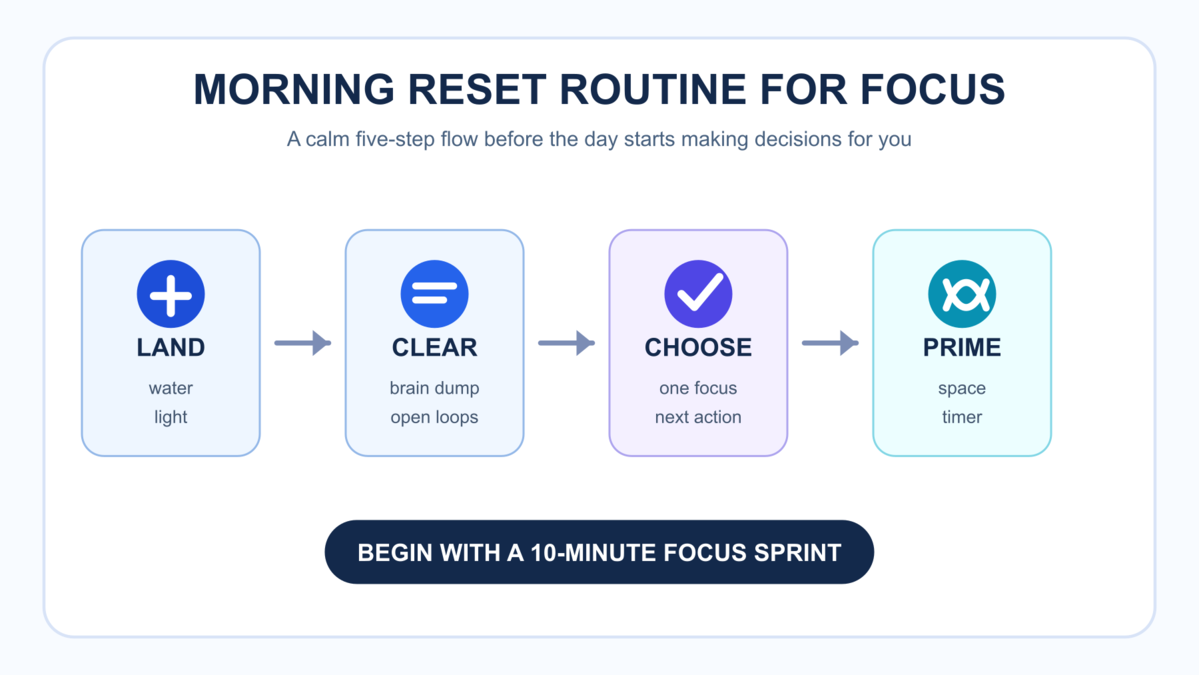
  • Tame Your Tabs: Session-Based Browser Groups for Anxious Brains

    Tame Your Tabs: Session-Based Browser Groups for Anxious Brains

    If your browser feels like a second to-do list, the fix is not more willpower. It is a better container. Session-based browser groups give each kind of work its own lane, so research, writing, admin, and personal tabs stop colliding in one noisy strip across the top of your screen.

    This guide shows you a calm browser tab wrangling method for anxious brains: how to group tabs by session instead of by vague intention, how to cap each group before it starts to sprawl, and how to reset your browser at the end of the day without losing what matters. The goal is not a perfect browser. The goal is less cognitive drag and faster re-entry into focused work.

    Editor note: This method is built for people who open tabs as reminders, postpone decisions by leaving pages visible, or feel uneasy closing tabs they might need later. It is also shaped by the practical constraints of knowledge work: switching contexts, saving sources, and coming back to projects after interruptions.

    Key takeaways

    • Session-based browser groups work best when each group matches one active mode of work, not a broad life category.
    • Most people need only four to five active groups: now, next, reference, admin, and personal.
    • A hard cap on tabs per group prevents visual clutter from quietly becoming mental clutter.
    • A short midday reset and a two-minute shutdown stop tab creep better than occasional giant cleanups.
    • This method pairs naturally with digital declutter habits, deeper reading, and calmer work blocks.

    What is a browser tab wrangling method?

    A browser tab wrangling method is a repeatable system for deciding where tabs belong, how long they stay open, and what happens when you are done with them. It replaces emotional tab keeping with rules. Instead of treating every open page as equally urgent, you sort pages by current session, near-term use, long-term reference, or safe closure.

    Many people try to organize tabs by topic alone: work, home, shopping, travel, reading. That looks tidy for a day, then collapses. Why? Because your brain does not work on one topic at a time. It works in sessions. You write for 40 minutes, answer admin messages for 15, review sources for 20, then switch again. Session-based browser groups mirror that real pattern, which is why they feel lighter in practice.

    The method in this article is designed to answer one simple question whenever a new tab appears: What session does this belong to right now? That single question reduces hesitation, duplicate tabs, and the habit of leaving everything open just in case.

    Why do too many tabs make anxious brains feel worse?

    Too many tabs create more than a messy browser. They create constant context cues. Every favicon, half-read headline, and unfinished document becomes a small reminder that something still wants attention. The American Psychological Association notes that switching between tasks carries real efficiency costs and can increase errors, especially when the work is complex and mentally demanding. See the APA overview on multitasking and switching costs.

    That matters because tabs are visual invitations to switch. Even if you stay on one page, the rest of the strip quietly advertises all the other things you could be doing. Gloria MarkÒ€ℒs attention research, summarized by the APA, also links frequent attention switching with more stress and poorer focus regulation. See APAÒ€ℒs interview on shrinking attention spans.

    For an anxious brain, this can feel like unfinished life admin sitting in plain view. You may keep tabs open because closing them feels risky, yet keeping them open keeps the task psychologically active. Session-based browser groups help because they lower decision noise. You are no longer staring at thirty unrelated prompts. You are looking at one active lane.

    How do session-based browser groups work?

    Session-based browser groups organize tabs by the type of attention you need for the next block of work. Instead of a permanent Ò€œresearchÒ€ bucket that grows forever, you create groups like:

    • Work now: the tabs for the task you are actively doing in this block.
    • Waiting or next: pages you will likely need later today, but not right now.
    • Reference: stable sources or tools you return to often.
    • Admin: email, calendars, forms, and account tasks.
    • Personal: optional tabs that should not leak into a focus block.

    The power comes from using time and attention as your sorting system. When your current session ends, you either close the group, archive it, or move the few remaining tabs into a more accurate lane. This keeps your browser aligned with reality instead of with accumulated intentions from three days ago.

    Group What belongs there Suggested cap Close rule
    Work now Draft, source, document, task tracker, and one communication tab if essential 5-7 tabs Close or move leftovers when the block ends
    Waiting / next Tabs for the next block, follow-ups, or items blocked on someone else 5 tabs Promote only when you start that session
    Reference Guidelines, dashboards, stable research pages, and recurring tools 8 tabs Review once a week; close stale items
    Admin Email, billing, calendar, support, and operational forms 4 tabs Shut down when admin time ends
    Personal Shopping, reading for later, travel, social, and non-work errands 4 tabs Keep closed during deep work unless intentional
    A laptop and papers laid out for a session-based browser groups reset routine
    A simple desk reset makes session-based browser groups easier to maintain day after day. Photo: Christina Morillo via Pexels.

    What should go into session-based browser groups?

    The easiest mistake is making groups too broad. Ò€œResearchÒ€ is too broad. Ò€œMarketingÒ€ is too broad. Ò€œThings to readÒ€ is too broad. The group label should tell you what you are doing in this session, not just the subject area.

    Better examples look like this:

    • Write article intro instead of content
    • Compare browser settings instead of research
    • Pay bills and answer invoices instead of admin
    • Plan next week reading list instead of books

    That level of specificity matters because anxious brains often keep tabs open to preserve context. A precise label gives the context back to you. You do not need twelve tabs sitting in sight to remember what they are for. Your group name already holds the intention.

    If you are supporting focus and reading habits, this also creates a cleaner bridge to longer-form attention. You can finish a browser session, close the group, and move into a deeper offline block with one clear next step. That is one reason this article links naturally to the Mind Clarity books hub and to book pages such as Digital Clarity and Break the Scroll.

    How do you set up session-based browser groups in 15 minutes?

    You do not need a giant digital overhaul. A short setup is enough. The purpose is to create an easy default, not an elaborate browser architecture.

    Step 1: Audit what your open tabs are trying to do

    Look at every open tab and sort it mentally into one of four buckets: active work, waiting, reference, or emotional clutter. Emotional clutter includes tabs you opened because you were curious, worried, or afraid to forget something. This step matters because it shows you that many tabs are not active tools. They are placeholders for unfinished decisions.

    Step 2: Create four starter groups

    Create your first four groups as Now, Next, Reference, and Admin. If you want a fifth, use Personal. Keep the names plain. Fancy systems are harder to maintain. The objective is friction reduction.

    All major browsers now support some version of grouping or workspace-based separation. Google explains how to group, move, and save related tabs in Chrome in its official help docs: Manage tabs in Chrome. Firefox now includes built-in tab groups on desktop: Mozilla Support: Tab groups in Firefox. Safari supports tab groups and even Focus-linked separation on Apple devices: Group tabs in Safari on Mac.

    Step 3: Move tabs by session, not by guilt

    Put only the tabs you need for your current block into Now. Move near-term tabs into Next. Put stable references into Reference. If a tab does not fit any real session, close it or bookmark it. This is the moment where the method works or fails. If you keep Ò€œjust in caseÒ€ tabs everywhere, your groups become decorated clutter.

    Step 4: Set a cap before the group starts growing

    Pick a number and commit to it. For most people, five to seven tabs in the active group is enough. When the group hits the cap, you cannot add a tab until you close, replace, or move one. That rule sounds small, but it breaks the habit of using tabs as a stress buffer.

    Step 5: Add a shutdown rule

    At the end of a work block or workday, close the Now group. Move only truly needed leftovers into Next or Reference. This keeps session-based browser groups from turning into permanent storage. Your browser is a work surface, not a museum of unfinished thinking.

    Browser Useful feature Why it helps this method
    Chrome Tab groups Quick color labels and easy drag-and-drop grouping for short work sessions
    Edge Workspaces and sleeping tabs Supports project separation and helps reduce background tab load
    Firefox Built-in tab groups Useful for simple native grouping without extra extensions
    Safari Tab groups and Focus integration Lets you tie a calmer browsing set to a specific work or personal mode

    Which browser features support session-based browser groups best?

    You do not need to switch browsers for this system, but you should use the native features your current browser already offers.

    Chrome: Chrome makes fast grouping easy, which is enough for most people. If your workday changes quickly, ChromeÒ€ℒs group-and-move flow is simple to maintain.

    Microsoft Edge: Edge adds another useful layer with Workspaces, which Microsoft describes as a way to group related tabs into a single workspace you can revisit later. That makes it especially good for project-level separation. See Microsoft Edge Workspaces. Edge also includes performance tools such as sleeping tabs, which can reduce background drag from too many open pages: Edge performance features.

    Firefox: FirefoxÒ€ℒs native tab groups are a strong option if you want fewer account-tied layers and a straightforward desktop grouping flow.

    Safari: Safari becomes especially useful if you already use Apple Focus modes, because you can pair a calmer browsing set with a specific work context. Apple documents both tab groups and Focus-linked filtering in its support pages: Choose a Tab Group for a Focus on Mac.

    The important point is not the feature race. It is consistency. Pick the browser features that make your session labels visible and your cleanup routine easy.

    What should you do when tab anxiety spikes in the middle of the day?

    Sometimes the system breaks because you are tired, rushed, or trying to hold too many decisions at once. When that happens, do not attempt a full reorganization. Run an emergency reset.

    • Pause for 60 seconds and ask, Ò€œWhat is the one session I am actually in?Ò€
    • Move every unrelated tab into Next or Reference.
    • Close duplicates immediately.
    • Bookmark anything that is truly useful but not needed today.
    • Return to one active group with no more than seven tabs.

    This works because you are reducing options, not solving everything. The point of session-based browser groups is to make recovery easier when your attention has already scattered.

    If you notice this It usually means Reset move
    Multiple versions of the same article or doc You are searching for certainty, not information Keep one source of truth and close the rest
    Social, shopping, and work tabs mixed together Your active session has lost boundaries Move non-work tabs into Personal and collapse the group
    So many tabs that titles disappear Your visual field is now carrying memory load Close duplicates and enforce the cap
    Avoiding closure because you might need it later You need a bookmark or notes habit, not more open tabs Save one note, then close the tab

    When should you review session-based browser groups?

    Review them at three levels:

    • Midday: a 90-second cleanup after lunch or after your second major work block.
    • Shutdown: a two-minute end-of-day closeout where the active group disappears.
    • Weekly: a deeper pass on the reference group, bookmarks, and saved reading list.

    A simple weekly rhythm helps. On Monday, create the few groups your week actually needs. From Tuesday through Thursday, keep your active work inside one main group and one backup group only. On Friday, clear the reference lane, save anything worth keeping, and close the rest. This rhythm makes session-based browser groups feel ordinary instead of like another system you have to maintain.

    The weekly review is where this system starts supporting reading, learning, and book traffic more directly. If you are collecting articles, source links, or ideas from Mind Clarity Hub, use the weekly review to decide what becomes a note, what becomes an action, and what becomes a deeper read from the books hub. This is how you stop tabs from impersonating a reading plan.

    If you want a companion routine for the larger digital environment, pair this guide with the newer digital declutter checklist. The declutter piece handles apps, notifications, files, and photos. This article handles the live browser surface where attention usually leaks first.

    Common mistakes that make the system fall apart

    Using groups as archives. If a group becomes permanent storage, it is not a session anymore. Use bookmarks, notes, or a read-later tool for long-term keeping.

    Creating too many groups. Five good groups beat twelve clever ones. The more groups you manage, the more micro-decisions you create.

    Naming groups too vaguely. Vague names force you to inspect tabs to understand what they are for. Good names reduce that extra scan.

    Skipping the shutdown. The method depends on closure. If you never close the active lane, tomorrow inherits yesterdayÒ€ℒs noise.

    Confusing references with active work. Reference tabs should support a task, not dominate your field of view. If you are not using a source in the next block, it should not be in Now.

    How does this method support focus, calmer work, and better reading?

    Tab discipline matters because it protects transition quality. When you finish one online task and shift to another, your brain does not reset instantly. Fewer open cues make it easier to complete the switch cleanly. That is why this system pairs well with calmer focus books and digital clarity titles rather than just with Ò€œproductivity hacks.Ò€

    If your main struggle is digital overstimulation, start with Break the Scroll. If your broader issue is noisy inputs and diffuse attention, Digital Clarity is the more direct match. If you want a wider overview of focus-supporting reads, browse the full Jeremy Jarvis books collection.

    In practical terms, a cleaner browser also improves your reading behavior. You are more likely to finish one article, capture one insight, or move into one chapter when your screen is not broadcasting twelve competing intentions. That is not dramatic. It is just the cumulative effect of fewer friction points.

    How can you make session-based browser groups stick?

    Make the method visible and automatic. Use the same group names every day. Put a sticky note near your desk that says: Now, Next, Reference, Admin. Build one shutdown shortcut into your routine, such as closing the active group right after you note tomorrowÒ€ℒs first task.

    You can also lower friction by pairing the method with one simple rule outside the browser:

    • Keep one capture note for links you want later.
    • Use bookmarks only for stable references, not everything interesting.
    • Run email in its own admin lane instead of keeping inbox tabs open all day.
    • Open social or shopping tabs only inside an intentional personal session.

    If you work remotely, this method can also reduce the visual chaos that often grows around Slack, docs, dashboards, and browser-based tools. It will not solve every remote-work stressor, but it can stop your browser from becoming a live feed of every possible obligation at once.

    Frequently asked questions about session-based browser groups

    Are session-based browser groups better than bookmarking everything?

    They solve a different problem. Bookmarks store information for later. Session-based browser groups keep the current work surface clean and usable. Most people need both: groups for active attention and bookmarks for durable storage.

    How many session-based browser groups should I have open at once?

    Usually four or five. If you often have more than that, the system is probably carrying too much future work in the present moment.

    Should I create separate groups for every project?

    Only if you are actively switching between them the same day. Otherwise, keep project links in notes or bookmarks and activate the project group only when that session starts.

    What if I need lots of tabs for research?

    Use a short research session, capture the useful links, and close the rest. If you need persistent research access, move only the best sources into the reference group. The aim is not zero tabs. It is intentional tabs.

    Can session-based browser groups help with anxiety?

    They can reduce one common trigger: visual overload from too many unfinished digital cues. They are not treatment, but they can make your work surface calmer and easier to trust.

    Try these next

    If this method helped you see your browser more clearly, keep going with a broader digital reset. Start with the Digital Declutter Checklist, then explore the full Mind Clarity books hub for deeper frameworks on focus, digital overload, burnout, and calmer productivity. If digital distraction is your biggest pain point, Break the Scroll is the most direct next read.

    Helpful resources for your next step

    Affiliate disclosure: As an Amazon Associate, Mind Clarity Hub may earn from qualifying purchases at no extra cost to you. Use this link only if it genuinely helps your planning.

    If Tame Your Tabs: Session-Based Browser Groups for Anxious Brains is a routine you want to keep using, a simple workbook, planner, or desk tool can make the steps easier to repeat.

    Compare related planners, workbooks, and organization tools on Amazon.

  • ADHD-Friendly Task Handoff Checklist for Small Remote Teams

    ADHD-Friendly Task Handoff Checklist for Small Remote Teams

    If your team ships work across time zones, an adhd-friendly task handoff checklist for small remote teams can save focus, cut anxiety, and prevent missed steps. This guide gives you a clear checklist, examples, and a copy‑ready Notion/Doc template so every handoff is fast, kind, and complete.

    Quick answer for your ADHD-friendly handoff template

    This adhd-friendly task handoff checklist for small remote teams works because it removes guesswork. At a glance, you need a single owner, a short Definition of Done, working links, a real deadline with a time zone, a light check‑in plan, clear failure triggers, and a one‑line status and next step. Keep words short. Use the same order every time.

    Essential Why it stops dropped balls
    Owner + role Removes diffusion of responsibility
    Definition of Done Makes finish line testable
    Links to files/docs Prevents hunting and context loss
    Deadline + time zone Eliminates β€œwhich Friday?” confusion
    Check‑in cadence Creates a light feedback loop
    Failure triggers Gives a first move when risk appears
    Status β†’ next step Protects momentum across shifts

    Why ADHD‑friendly handoffs matter in remote work

    Remote work adds lag, context shifts, and tool friction. ADHD can add working‑memory load and time blindness. A consistent handoff reduces cognitive load for everyone. It makes details easy to see, next actions unambiguous, and risks visible in time to adjust.

    Public health perspective: The CDC notes ADHD can involve inattention and executive function challenges that affect task follow‑through. A structured checklist supports consistency and reduces misses. Source: CDC – ADHD.

    Remote operations: Asynchronous norms help remote teams ship without live meetings. Documentation and clear ownership are central. Source: GitLab Handbook – Communication.

    Agile practice: Teams ship faster when β€œdone” is explicit and testable. Source: Atlassian – Definition of Done. That is exactly what an adhd-friendly task handoff checklist for small remote teams reinforces.

    Your adhd-friendly task handoff checklist for small remote teams

    Use this adhd-friendly task handoff checklist for small remote teams whenever work moves between people, shifts, or time zones. Keep it in your template. Trim fields you do not need, but do not rename them often. Stability helps the brain find what it needs fast.

    Handoff fields in a remote task transfer checklist (with examples)

    Field Why it helps 1–2 line example
    Owner Reduces diffusion of responsibility Owner: Jess (Design). Backup: Mo (PM).
    Context Cuts guesswork and rework Goal: ship banner for sale. Audience: repeat buyers. Brand tone: friendly.
    Links Prevents hunting for files Brief, assets, brand guide, task card links in one place.
    Definition of Done (DoD) Makes β€œdone” testable File exported PNG+SVG, 2 sizes, passes contrast check, QA sign‑off.
    Deadline + Timezone Removes ambiguity Due: 2026‑06‑12 16:00 UTC (Fri).
    Check‑ins Builds a light feedback loop Async update Tue + Thu in #design‑handoffs. Tag PM if blocked > 2h.
    Failure Triggers Creates safety valves When assets are missing by Tue 12:00 UTC, ping PM and switch to v1 draft copy.
    Status β†’ Next Step Sets momentum Status: assets approved. Next: export sizes, share for QA by Thu.

    Also add a short, friendly tone. For example, β€œYou’ve got this. Ping me if anything is fuzzy.” Warmth lowers stress and makes questions more likely, which improves quality.

    Copy‑ready template for your adhd-friendly task handoff checklist for small remote teams

    Paste this template into Notion, Google Docs, or your task tool. Keep field names identical so your brain learns the pattern. That speed is the hidden power of an adhd-friendly task handoff checklist for small remote teams.

    Task Handoff
    β€” Owner: [Name] (Role). Backup: [Name].
    β€” One‑line purpose: [What outcome by when, for whom]
    β€” Context (3 bullets max):
       β€’ [Audience or user]
       β€’ [Where this fits]
       β€’ [Constraints]
    β€” Links:
       β€’ Brief: [URL]
       β€’ Files/assets: [URL]
       β€’ Task card: [URL]
       β€’ Brand/tech guide: [URL]
    β€” Definition of Done (checkable):
       β–‘ [Deliverable + format]
       β–‘ [Quality or test requirement]
       β–‘ [Approval/sign‑off]
    β€” Deadline + Timezone: [YYYY‑MM‑DD HH:MM TZ]
    β€” Check‑in cadence + channel:
       β€’ [Day/time, channel, what to post]
    β€” Failure triggers and fallbacks:
       β€’ If [risk or block] by [time], then [who + action]
    β€” Status (today): [Green/Amber/Red] β€” [11 words or fewer]
    β€” Next step: [Owner] will [verb + object] by [time + TZ]
    β€” Notes for Future Me: [1–2 lines to reduce context reload]

    Helpful references if you build templates: Notion – Using templates; W3C – Date and Time Formats (ISO 8601); IANA – Time Zone Database.

    How do you write a strong Definition of Done in an async task handover guide?

    Make β€œdone” observable. Tie it to a file, a test, or a confirmation. Keep it short so it fits on a single screen. Include who confirms it. For example: deliverable + format (PDF + DOCX), a quality gate (Lighthouse 90+ on mobile), any needed policy or accessibility check, and the approver (β€œQA lead sign‑off in ticket”). For more depth, see Atlassian’s overview and then adapt.

    For deeper guidance, see Atlassian’s overview on DoD and acceptance criteria: Definition of Done. Then adjust it to your workflows.

    How do you set deadlines across time zones for a remote task transfer checklist?

    Use a date and a time with a time zone. When your tools support it, store dates in UTC and show the local time. And when tools do not convert time zones, add both the owner’s local time and UTC to reduce error. For example, β€œDue Thu 16:00 UTC (Thu 09:00 PDT).”

    Task type Good deadline phrasing Why it works
    Content draft 2026‑06‑14 13:00 UTC (Sun) Sunday ship reduces weekday collisions; UTC avoids confusion.
    Design asset 2026‑06‑10 17:00 UTC / owner local 10:00 PDT Two times help if the tool cannot convert time zones.
    Hotfix Within 2 hours of issue creation, during on‑call hours Relative window with a clear on‑call rotation avoids burnout.

    Standards help. ISO 8601 date and time formats are readable and unambiguous. See the W3C note on ISO 8601: W3C – Date and Time Formats. For time zones, the IANA database is the common reference: IANA TZ DB.

    How often should remote teams check in in an ADHD-friendly handoff template?

    Pick a cadence based on task risk and cycle time. Use async updates by default. Keep the update format the same every time so it becomes a habit.

    Risk level Cadence Channel Format
    Low (routine) 1 update mid‑cycle #team‑handoffs β€œStatus: Green. Next: [action]. Blocked: None.”
    Medium (new but known) Twice weekly Thread on task β€œG/A/R + link to WIP. Need eyes on [X].”
    High (ambiguous) Daily short async; optional quick call Thread + calendar hold β€œRisks + decisions today. 10‑min call if Red.”

    As GitLab’s remote handbook stresses, default to asynchronous communication and document as you go. Live calls are for rapid decisions, not for status that a checklist can capture: GitLab Handbook.

    What are β€œfailure triggers” and how do you write them for the async task handover guide?

    Failure triggers define early warning signs and the first response. They lower stress because the team knows what to do if a block hits while others are offline. Keep each one short and specific. Tie it to a time or a measurable event.

    Trigger First response
    Vendor link still 404 at Tue 12:00 UTC Switch to backup asset; inform PM in the task thread
    Setup debug exceeds 30 minutes Tag DevOps; pause at step 3 until reply
    Copy feedback not received by Wed 10:00 UTC Publish version A; schedule V2 next sprint

    Write 1–3 of these per handoff. Put the most likely failure first. As a result, you will avoid last‑minute scrambles.

    Examples using the adhd-friendly task handoff checklist for small remote teams

    Example A: Marketing asset handoff

    Field Example
    Owner Jess (Design). Backup: Mo (PM)
    One‑line purpose Launch banner for summer sale on homepage
    Context Returning buyers; mobile first; friendly tone
    Links Brief, asset folder, brand guide, task card
    Definition of Done 2 sizes (1200Γ—628, 1080Γ—1080), PNG+SVG, contrast AA, QA sign‑off
    Deadline Fri 16:00 UTC
    Check‑ins Tue + Thu async in #design‑handoffs; tag PM for copy sync
    Failure trigger Copy not final by Wed 10:00 UTC β†’ use V1 and plan V2
    Status β†’ Next step Assets approved β†’ export sizes; share for QA by Thu

    Example B: Engineering bug fix handoff

    Field Example
    Owner Priya (Backend). Backup: Lee (On‑call)
    One‑line purpose Fix 500 error on profile update
    Context Regression from last deploy; EU users; logs attached
    Links Sentry issue, PR #4321, staging env, Slack thread
    Definition of Done Failing test reproduced; patch merged; staging OK; deploy green; postmortem notes
    Deadline Within 24h during on‑call window
    Check‑ins Daily 14:00 UTC update; extra ping if Red
    Failure trigger Staging down > 30m β†’ call on‑call; roll back to prev build
    Status β†’ Next step Test reproduced β†’ bisect commits; open PR within 2h

    Which tools make handoffs easier for an ADHD-friendly handoff template?

    Use tools you already trust, but standardize how you fill fields. Consistency beats novelty. A short template in your issue tracker or doc tool works best. Notion, Asana, Trello, ClickUp, Linear, Jira, or a plain Google Doc all work if the fields are stable.

    Pin the template where work starts (for example, a Notion database template or a Jira issue template). Link files in the same order each time. Use ISO dates and add UTC. Keep a #handoffs channel for short, predictable updates. This makes the adhd-friendly task handoff checklist for small remote teams feel natural in daily flow.

    When you document by default, you unlock async speed. GitLab’s remote playbook is a useful model: GitLab Handbook – Asynchronous.

    Who owns what? A tiny RACI for small teams in your remote task transfer checklist

    In small teams, full RACI tables can be heavy. Use a β€œlean RACI” that sets one Owner, one Approver, optional Contributors, and who to Inform if the plan changes.

    Role Responsibility 1‑line example
    Owner (O) Delivers the work and posts updates Jess (Design) exports and posts by Thu 16:00 UTC
    Approver (A) Gives the final yes/no Mo (PM) signs off on contrast + sizes
    Contributors (C) Provide inputs on request Copywriter shares final headline
    Informed (I) Gets the outcome, not play‑by‑play Growth lead sees final link in #launches

    Note: β€œOwner” is singular. If two people own it, no one owns it. When you truly need two, split the work into two owned chunks.

    Reduce ADHD‑related friction with design, not willpower in the async task handover guide

    People do not forget on purpose. Instead of relying on memory, design your handoff to do the remembering for you. Keep one screen, no scroll where possible. Prefer short lines over long paragraphs to aid scanning. Use the same order every time so brains can glide on pattern recognition. Make the next step visible because momentum lives in the next verb. Share direct links, not navigation paths. Add realistic time boxes to help planning.

    Helpful primers on ADHD basics: CDC – ADHD and CHADD – ADHD in Adults. Use these to inform empathy and structure, not to diagnose teammates.

    Troubleshooting your ADHD-friendly handoff template

    Sometimes a clean handoff still slips. When that happens, review the last three handoffs and look for patterns. Was the owner unclear? Did links break? Did the Definition of Done include a test someone could run in under a minute? Small gaps compound across time zones.

    Start with the basics from the adhd-friendly task handoff checklist for small remote teams. Tighten owner and backup, move the most used links to the very top, and rephrase the DoD so a new teammate can verify it quickly. Then adjust your check‑ins to match task risk for the next sprint.

    Symptom Likely cause Fix for next handoff
    β€œDone” keeps drifting DoD not testable Add a file, a metric, or a named approver
    Reviewers ask for links Files scattered across tools Collect links under one β€œLinks” field in the card
    Late surprises near deadline No failure triggers Write two β€œwhen X, then Y” rules before starting

    Finally, preview the handoff on a phone. If you cannot scan it in 30 seconds, it is too long. Trim words, not meaning.

    Communication scripts for a remote task transfer checklist

    Scripts lower friction and keep tone warm. Copy and adapt as needed. They pair well with the adhd-friendly task handoff checklist for small remote teams and reduce the urge to jump to a live call.

    Kickoff (thread):
    Owner here. Purpose: <11 words>. DoD: <3 checks>. Due: 16:00 UTC. Links: <1,2,3>.
    Check‑in (green):
    Status Green β†’ Next: <verb + object> by Thu 10:00 UTC. Blocked: none.
    Check‑in (amber):
    Status Amber β†’ Need <X> by Wed 12:00 UTC. See link.
    Check‑in (red):
    Status Red β†’ Trigger fired (see card). Switched to fallback. Approver pinged.
    Review request:
    DoD met. Please verify: <1 line test>. If OK, approve by 15:00 UTC.
    Handoff complete:
    Done per DoD. Artifacts + links locked in card. Rolling learnings into template.

    Metrics to audit your async task handover guide

    What gets measured improves. Track a few small signals and tune the process monthly. The goal is less rework and fewer pings, not more paperwork.

    Metric How to measure What good looks like
    Dropped balls per sprint Count misses caught after due time Trending down and <= 1 per sprint
    Reopen rate % of tasks reopened after β€œdone” < 5% with stable DoD
    Slack pings about links Mentions asking β€œwhere is X?” Near zero after link field standardizes
    Average review cycle time Start of review β†’ approval Shorter after adding check‑ins

    If any metric worsens, revisit the adhd-friendly task handoff checklist for small remote teams and remove friction before adding steps.

    Optional planning aid (if you like paper)

    Mind Clarity Hub/Amazon Associate disclosure: Some links in this section may be affiliate links. If you buy through them, Mind Clarity Hub may earn a commission at no extra cost to you.

    Prefer a simple paper view for daily focus? Try an undated daily planner with time blocks. It pairs well with the handoff template for quick planning. Browse undated daily planners with time blocks.

    Rollout plan to adopt the adhd-friendly task handoff checklist for small remote teams

    Step 1 β€” Add the template where work starts (ADHD-friendly handoff template)

    Pick the tools you already use. Set the default issue or doc template to include the fields above. Do not create new tools. Keep friction low.

    Step 2 β€” Practice with two live examples (remote task transfer checklist)

    Run a 30‑minute session. Write one DoD and one failure trigger together. Keep each line under two sentences. Save the examples.

    Step 3 β€” Agree on channel and cadence (async task handover guide)

    Create a #handoffs channel or a project thread. Decide how often you will post based on risk. Pin the format in the channel topic.

    Step 4 β€” Run a two‑week pilot and measure

    Start with one team. Track dropped balls, rework, and response time. Collect two β€œbefore/after” examples.

    Step 5 β€” Trim, don’t bloat

    Remove any field no one uses. If people still search for key details, reorder fields rather than adding more.

    Step 6 β€” Share and scale

    Publish the template link and the metrics that improved. Invite questions. Fold good suggestions back into the template.

    Because small teams move fast, keep the rollout simple. You can adjust the template without huge meetings. Ship it, observe, and refine.

    Common mistakes to avoid when using the adhd-friendly task handoff checklist for small remote teams

    Mistake Better
    β€œOwner: Team” Use one name; note a backup
    Vague DoD Tie to a file, a check, and an approver
    Missing links Put all links in one β€œLinks” field
    Ambiguous times Add time and time zone; include UTC
    Invisible risks Write at least one failure trigger
    Wall of text Keep the handoff under 150–200 words

    Instead of more words, add clearer structure. That is the essence of an adhd-friendly task handoff checklist for small remote teams.

    Can you skim this? Yes. Extractable answers from the async task handover guide

    What belongs in a handoff? Owner, DoD, links, deadline + time zone, check‑ins, failure triggers, and a one‑line status with the next step.

    How often to check in? Low risk: once mid‑cycle. Medium: twice weekly. High: daily async with an optional short call.

    What is a failure trigger? A short rule for what to do when a predictable block appears so momentum continues while others are offline.

    How to phrase times? Use ISO date + time + time zone and add UTC if tools do not convert time zones.

    Where to store the template? In your default issue or doc template so it appears by default on new work.

    A simple, stable place for your template

    Notion board showing an adhd-friendly task handoff checklist for small remote teams used in a task template
    Pin your handoff template where work starts. Photo: Jakub Zerdzicki via Pexels. Source: Pexels link.

    Description: A person managing tasks on a tablet with a digital pen in a modern office setting. Photographer: Jakub Zerdzicki. Licensed via Pexels.

    Keep the checklist short enough to tick in one sitting

    Paper checklist with short boxes that mirror an adhd-friendly task handoff checklist for small remote teams
    Short boxes beat long paragraphs. Photo: Nataliya Vaitkevich via Pexels. Source: Pexels link.

    Description: A hand drawing checkboxes on a minimalist checklist. Photographer: Nataliya Vaitkevich. Licensed via Pexels.

    FAQ

    What is the fastest way to adopt this without new tools?

    Copy the template into your current issue type or doc. Pin it. Ask everyone to use it for two weeks. Remove any unused field. Keep the order the same.

    How can we keep handoffs inclusive for neurodiverse teammates?

    Use short sentences, consistent field names, and one screen of content. Offer both text and a quick optional walk‑through video when helpful. Invite clarifying questions without judgment.

    Should we ever skip a check‑in?

    Yes, if risk is low and the deadline is near. But write one failure trigger so the next person knows what to do if something slips.

    Can we use this in sprints with Jira or Linear?

    Yes. Create an issue template with the same fields. Pre‑fill the DoD where it repeats. Link the task doc right in the card.

    How detailed should the DoD be?

    Enough that a teammate can verify it in under a minute. If it takes longer, split the task or simplify the DoD.

    Wrap‑up and next steps

    Start small. Ship the template. Use it on three handoffs this week. You will see fewer Slack pings and faster reviews. Most gains come from making β€œdone” visible and reducing hunting for links. As you refine, keep the core stable so brains can glide on pattern recognition.

    If you want more structure for calm focus, explore our book round‑ups and practical guides. You will find next steps you can apply today. See books that support focused work and our hands‑on reviews and summaries.

    Use this adhd-friendly task handoff checklist for small remote teams, keep it short, and let your process carry the load. Your future self will thank you.

    Last reviewed: 2026‑06‑07. This guide shares process design advice for remote teamwork. It does not provide medical advice or diagnosis.