...

Tag: digital clarity

  • Minimalist Productivity System: Fewer Tools, Better Follow-Through

    Minimalist Productivity System: Fewer Tools, Better Follow-Through

    Quick answer: A minimalist productivity system is a small set of trusted places for tasks, calendar commitments, notes, and review. It works because it reduces capture points, lowers switching, and makes the next action obvious without asking you to manage a complicated tool stack.

    A minimalist productivity system is not about doing less work that matters. It is about removing the extra decisions around the work. When every task lives in a different app, every reminder has a different rule, and every note has a different home, the system itself becomes another job. A lighter setup gives you one place to look, one way to choose, and one habit for closing the loop.

    This guide is for busy adults, remote workers, creators, students, and small teams who want better follow-through without rebuilding life around a new app. You will build a simple four-part system, test it for two weeks, and connect it to the broader Mind Clarity Hub reading path only where it helps. The goal is calm control, not a perfect dashboard.

    What is a minimalist productivity system?

    A minimalist productivity system is a repeatable workflow with the fewest tools needed to capture, decide, do, and review work. In practice, that usually means one calendar, one task list, one note home, and one short review ritual. Anything else has to earn its place by making decisions easier.

    The system should answer four questions quickly: What must happen on a specific day? What is the next action? Where are the supporting notes? When will I review open loops? If those answers are scattered, the setup is not minimalist yet, even if the interface looks clean.

    Research on attention supports the practical reason for this approach. The American Psychological Association explains task-switching costs and notes that moving between complex tasks can take a toll on productivity. A system with fewer places to check reduces avoidable switching before the work even begins.

    Who needs a minimalist productivity system most?

    You may need a minimalist productivity system if you keep improving your tools but still miss tasks, avoid planning, or feel tense when you open your dashboard. The problem may not be discipline. It may be tool sprawl. Each extra inbox, board, label, and automation asks for attention.

    This is especially common for people who read productivity advice often. A method sounds useful, so you add it. A template looks impressive, so you copy it. Another app promises focus, so you test it. After a while, your planning system has more moving parts than the week it was meant to support.

    • You capture tasks in messages, sticky notes, apps, notebooks, and memory.
    • You spend more time reorganizing tasks than completing them.
    • Your calendar and task list disagree about what matters today.
    • Project notes become hard to find.
    • Reviews feel too large to face.
    • A new app becomes tempting every few weeks.

    Why does a minimalist productivity system improve follow-through?

    A minimalist productivity system improves follow-through by making the next step easier to see. Follow-through often fails before the work starts. You open the laptop, look at five possible places, remember several half-finished plans, and lose energy deciding where to begin. A small system removes that first layer of friction.

    The workplace context matters too. CDC worker mental health guidance points to demands, resources, stress, and job conditions as real factors in burnout and strain. A personal system cannot fix every workload problem. Still, it can create clearer boundaries around what is yours, what is waiting, and what needs a conversation.

    The practical win is not aesthetic minimalism. It is trust. If your task list is short enough to review, your calendar is honest enough to protect time, and your notes are easy enough to find, you stop carrying every open loop in your head.

    Minimalist productivity system notebook with a small daily task list
    A small task list is easier to trust than a crowded dashboard. Photo by Lukas via Pexels.

    The four parts of a minimalist productivity system

    Keep the system to four homes: calendar, tasks, notes, and review. Each home has one job. The calendar holds time-specific commitments. The task list holds next actions. Notes hold reference material. The review catches loose ends before they become stress.

    Do not let one tool do every job unless it truly stays simple. Many people can keep tasks and notes in the same app, but the jobs should remain separate. A note about a project is not the same thing as the next action. A someday idea is not the same thing as a dated commitment.

    System part What belongs there What does not belong there
    Calendar Appointments, deadlines, focus blocks, review time Every possible task
    Task list Clear next actions you can finish or move Long reference notes
    Notes Project context, links, drafts, decisions Unprocessed obligations
    Review Loose ends, stalled work, cleanup choices A full life audit every day

    How do you build a minimalist productivity system in one hour?

    Build the first version quickly. A minimalist productivity system should start plain, because the first week is a test. You can make it prettier later if it keeps working. Set a timer for one hour and make decisions that are good enough to use tomorrow.

    Step 1: Pick one capture inbox

    Choose one place where new tasks go before they are sorted. It can be a notebook page, an app inbox, or a single document. The rule matters more than the tool: new obligations go there first. If something arrives by email or chat, convert it into the capture inbox when it becomes a real task.

    Step 2: Create three task lanes

    Use three lanes: today, this week, and later. Today should stay short. This week holds real commitments that are not due today. Later catches useful tasks that should not compete for current attention. More lanes may feel precise, but precision can become maintenance.

    Step 3: Make the calendar honest

    Put meetings, appointments, deadlines, and real focus blocks on the calendar. Add buffers if work often runs long. Microsoft Work Trend Index research on the infinite workday describes how meetings, messages, and after-hours work can fragment focus, so your calendar should protect work time instead of only recording meetings.

    Step 4: Choose one note home

    Pick one place for project notes and reference material. Use plain titles, such as β€œClient launch notes” or β€œHome office reset ideas.” Avoid building a complex taxonomy at the start. Search and a few simple names are usually enough for the first month.

    Step 5: Schedule one weekly review

    Add a 20-minute weekly review. The review clears the capture inbox, moves tasks between lanes, checks the calendar, and closes finished work. Without a review, even the cleanest system slowly becomes a storage closet.

    What should stay out of a minimalist productivity system?

    Keep out anything that creates more sorting than action. A system can become cluttered even when every piece is useful in theory. If a field, label, or automation does not help you choose the next action, remove it for now.

    • Status labels you rarely use.
    • Priority systems with more than three levels.
    • Separate apps for similar tasks.
    • Daily templates that take longer to fill out than to act on.
    • Automations you do not understand well enough to repair.
    • Habit trackers for habits you are not currently practicing.

    This is where minimalism becomes practical. The best system is not the one with the fewest features. It is the one with the fewest features that still handles your real life.

    Minimalist productivity system examples for different lives

    Your setup should match the kind of work you actually do. A freelancer, parent, manager, student, and creator may all use the same four-part structure, but their rules will differ. Start with the smallest version that protects the decisions you make most often.

    Situation Minimal setup Most important rule
    Remote worker Calendar, task app, weekly review note Protect two focus blocks before checking low-priority messages.
    Freelancer Client board, invoice reminder, project notes Every client task gets a next action and due date.
    Student Class calendar, assignment list, study notes Assignments enter the system the day they are assigned.
    Parent or caregiver Shared calendar, family admin list, simple notes Home tasks need owners, not just reminders.
    Creator Idea inbox, production list, publishing calendar Ideas do not become projects until they have a next action.

    Notice that each example avoids a giant command center. A minimalist productivity system works best when it fits into a normal week. The system should be visible enough to guide you and small enough to survive a busy day.

    How do you choose tools without overbuilding?

    Choose tools by friction, not reputation. A beautiful app is a poor fit if you avoid opening it. Paper is not outdated if it helps you think. Shared spreadsheets are not boring if they keep team work clear. The right tool is the one you trust under pressure.

    Use a three-question test before adding anything new. Does this tool remove a repeated decision? Does it replace an existing tool instead of adding another place to check? Will I still understand the system when I am tired? If the answer is no, wait.

    Paper, app, or hybrid?

    Paper works well for daily focus because it limits overediting. Apps work well for recurring reminders, search, and shared work. A hybrid setup can work if the boundary is clear. For example, use paper for today’s plan and an app for weekly tasks. Do not keep full duplicate lists in both places.

    What about AI tools?

    AI can help summarize notes, draft checklists, or turn a messy brain dump into categories. It should not become a second brain that you never review. If you use AI, feed the result back into your normal task, calendar, or note home. Otherwise, AI output becomes another loose end.

    How can a minimalist productivity system reduce mental load?

    A minimalist productivity system reduces mental load by replacing memory with trusted defaults. Instead of deciding where to put every task, you already know. Rather than rereading every note, you know which review will surface it. For options that are not active today, you park them outside the current field.

    The NIOSH Science Bulletin on workplace mental health summarizes research showing that chronic exposure to occupational stress can affect mental health. A simple personal system is not a treatment plan, and it cannot repair harmful work design by itself. It can, however, make workload visible enough to discuss, renegotiate, or reduce.

    That visibility is a form of relief. When commitments are written down, sorted, and reviewed, you can stop using worry as a reminder system.

    Simple team planning board for a minimalist productivity system
    Minimal systems still need clear ownership, especially when work is shared. Photo by fauxels via Pexels.

    What daily routine keeps the system working?

    Use a daily open and close. The open takes five minutes. Check the calendar, choose one must-do task, and pick two smaller actions if capacity allows. The close takes five minutes. Mark what finished, move what did not, and write the first task for tomorrow.

    Keep the routine short enough that it still works on tired days. A minimalist productivity system fails when the review ritual becomes too precious. If only two minutes are available, check the calendar and choose the next action. That still counts.

    1. Open: Check fixed commitments first.
    2. Choose: Pick one task that makes the day meaningful or lighter.
    3. Limit: Keep today’s list short enough to finish.
    4. Close: Move unfinished items without self-criticism.
    5. Prepare: Write tomorrow’s first action in plain words.

    What weekly review keeps a minimalist productivity system clean?

    The weekly review is the maintenance habit. It prevents the system from becoming a pile of good intentions. Set a 20-minute timer and move through the same checklist each week. Stop when the timer ends. A partial review done weekly is better than a perfect review you avoid.

    A 20-minute weekly review checklist

    • Clear the capture inbox into today, this week, later, or delete.
    • Scan the calendar for deadlines, meetings, travel, errands, and recovery time.
    • Choose three outcomes that would make the week feel stable.
    • Check stalled projects for a missing next action.
    • Archive notes that are no longer active.
    • Pick one system rule to simplify if the week felt heavy.

    The last item matters. A minimalist productivity system should get lighter as you learn. If a rule creates resistance, adjust it. Remove categories that never help. Add structure only to projects that truly need it.

    For shared work, add one extra review question: who owns the next visible action? Microsoft has also reported that inefficient meetings and unclear goals are common productivity disruptors in Work Trend Index research. A short ownership check can prevent a simple personal system from hiding team ambiguity.

    How do you avoid keyword and task cannibalization in your own system?

    Writers use the word cannibalization when pages compete for the same search intent. Personal systems can have a similar problem. Two lists compete for the same task. Two calendars compete for the same time. Three note apps compete for the same idea. The result is uncertainty.

    Fix overlap by assigning one job to one place. The calendar owns time. The task list owns next actions. Notes own support material. The review owns cleanup. When a new tool appears, ask which job it replaces. If it does not replace a job, it probably adds one.

    How should this connect to books and deeper learning?

    Use deeper reading when it supports a specific change. The Jeremy Jarvis books hub is the broadest starting point for Mind Clarity Hub readers. If your main problem is attention and follow-through, Focus Recharged is the cleaner next step. If the issue is digital noise, compare it with Digital Clarity or Break the Scroll.

    For tools, supplements, or product-style decisions, use the reviews and science deep dives hub instead of forcing product research into this setup guide. A minimalist productivity system should keep the next step clear, so each internal link should answer a real reader need.

    Common mistakes with a minimalist productivity system

    The first mistake is making the system too pretty before it proves useful. Good design can help, but decoration often hides uncertainty. Build the rule first, then improve the surface.

    The second mistake is confusing simple with vague. A short task such as β€œwebsite” is not a next action. Write β€œdraft intro for website page” or β€œsend homepage notes to designer.” Minimalism needs clarity, not shorthand that only makes sense when you are already calm.

    The third mistake is adding categories to avoid decisions. Tags can be useful, but they should not replace choosing. If everything is marked important, nothing is important. If every task has five labels, the labels are probably serving the system more than the user.

    How do you know the system is working?

    A minimalist productivity system is working when you can find the next action quickly, trust the calendar, review open loops without dread, and finish more of what matters without constantly changing tools. The signal is not that life becomes empty. The signal is that work feels easier to enter and easier to leave.

    Track a few light metrics for two weeks. Count how many days you used the open and close routine. Notice whether missed tasks declined. Ask whether your task list feels smaller at the end of the week. The best metric is honest follow-through, not the number of features used.

    Signal Good direction Adjustment if it stalls
    Daily list size Shorter and more realistic Move optional items to later.
    Task starts Less delay before beginning Rewrite tasks as smaller actions.
    Calendar trust Fewer surprise conflicts Add buffers and review deadlines weekly.
    Review habit More consistent Cut review time to 10 minutes for two weeks.
    Tool switching Less checking and copying Remove one duplicate capture point.

    FAQ about a minimalist productivity system

    How many tools should a minimalist productivity system use?

    Most people can start with two or three tools: a calendar, a task list, and a note home. Paper can replace the daily task list if you still keep one trusted place for weekly tasks.

    Is a minimalist productivity system enough for complex projects?

    Yes, if you add structure only where complexity exists. Keep the main system simple, then give large projects their own notes, milestones, or shared boards when needed.

    What is the best app for a minimalist productivity system?

    The best app is the one you already trust and can open quickly. Todoist, Apple Reminders, Google Tasks, Notion, Trello, a spreadsheet, or a notebook can all work if the rules stay clear.

    Should I track habits in the same system?

    Track only the habits you are actively practicing. Too many habit rows turn the system into a scoreboard. Start with one habit that supports follow-through, such as a daily close routine.

    How long should I test the system before changing it?

    Test it for two weeks before making major changes. Small fixes are fine, but constant redesign prevents trust. The system needs enough normal days to show what works.

    Minimalist productivity system bottom line

    A minimalist productivity system gives every commitment a clear home and every day a short starting point. Use one calendar, one task list, one note home, and one review ritual. Remove tools that duplicate decisions. Keep the system plain until it earns more structure. Better follow-through usually comes from less friction, not more control panels.

    If the first version feels too small, that may be a feature. Small systems reveal whether the rule works before you invest in a bigger structure. Once the habit is stable, you can add a project board, recurring checklist, or automation for one repeated pain point at a time.

    Helpful resources for your next step

    Affiliate disclosure: As an Amazon Associate, Mind Clarity Hub may earn from qualifying purchases at no extra cost to you. Use this link only if it genuinely helps your planning.

    If Minimalist Productivity System: Fewer Tools, Better Follow-Through is a routine you want to keep using, a simple workbook, planner, or desk tool can make the steps easier to repeat.

    Compare related planners, workbooks, and organization tools on Amazon.

  • Evening Smartphone Boundaries Checklist for Better Sleep

    Evening Smartphone Boundaries Checklist for Better Sleep

    Quick answer: an evening smartphone boundaries checklist for better sleep is a small set of phone rules you run before bedtime: silence nonessential alerts, park high-stimulation apps, dim the screen, move the charger away from the bed, and decide when the phone is allowed back in the morning. The goal is not to become anti-technology. The goal is to keep your phone from making the last hour of the day louder than it needs to be.

    This guide is written for adults who use a phone for work, family, alarms, or reading, yet want a calmer night without a dramatic digital detox. It also supports readers building a bigger digital clarity plan through Break the Scroll, Restful Nights, and the full Jeremy Jarvis books hub.

    What is an evening smartphone boundaries checklist for better sleep?

    An evening smartphone boundaries checklist for better sleep is a repeatable shutdown routine for your phone. It decides what your phone can interrupt, where it sleeps, which apps are available, and what you do when you are tempted to reopen it. A checklist works better than a vague promise because bedtime decisions happen when willpower is already low.

    The checklist is not medical treatment, and it does not replace care for insomnia, anxiety, shift-work sleep problems, or other sleep conditions. It is a practical environment design tool. You are reducing light, alerts, novelty, and late-night decision friction so your evening has a clearer finish line.

    Why phone boundaries work better than willpower at night

    Phone use near bedtime is hard to manage because the phone mixes practical tools with high-reward distractions. The same device can hold your alarm, family messages, meditation app, shopping tabs, work chat, breaking news, and short videos. A tired brain treats that mix as one open door.

    Sleep education sources commonly recommend reducing electronic stimulation before bed because light, alerts, and emotionally engaging content can delay wind-down. The Sleep Foundation explains how electronics can affect sleep, while CDC sleep guidance emphasizes regular sleep habits and a supportive routine. A recent open-access study in PMC on adult screen use and sleep timing also reinforces why evening screen habits deserve specific boundaries.

    That does not mean every person needs a two-hour phone ban. It means your phone should stop behaving like an always-open room. The strongest evening smartphone boundaries checklist for better sleep is usually simple enough to repeat on a normal Tuesday.

    How do you use this checklist tonight?

    Use the checklist in three passes. First, set the phone rules while you are still alert. Second, move the phone out of your easiest reach. Third, create a morning re-entry point so the boundary feels complete rather than punitive.

    Pass What to decide Fast option Better option
    Notifications Who can interrupt? Do Not Disturb Sleep Focus or Bedtime mode with allowed contacts
    Apps What is off limits? Move social apps off the home screen Set app limits or block lists after a fixed time
    Placement Where does the phone sleep? Across the room Outside the bedroom with a backup alarm
    Re-entry When can you check it? After getting out of bed After light, water, and first planned action

    If you only do one thing tonight, move the charger. A phone on the pillow side of the bed asks for attention even when it is silent. A phone across the room becomes a tool again.

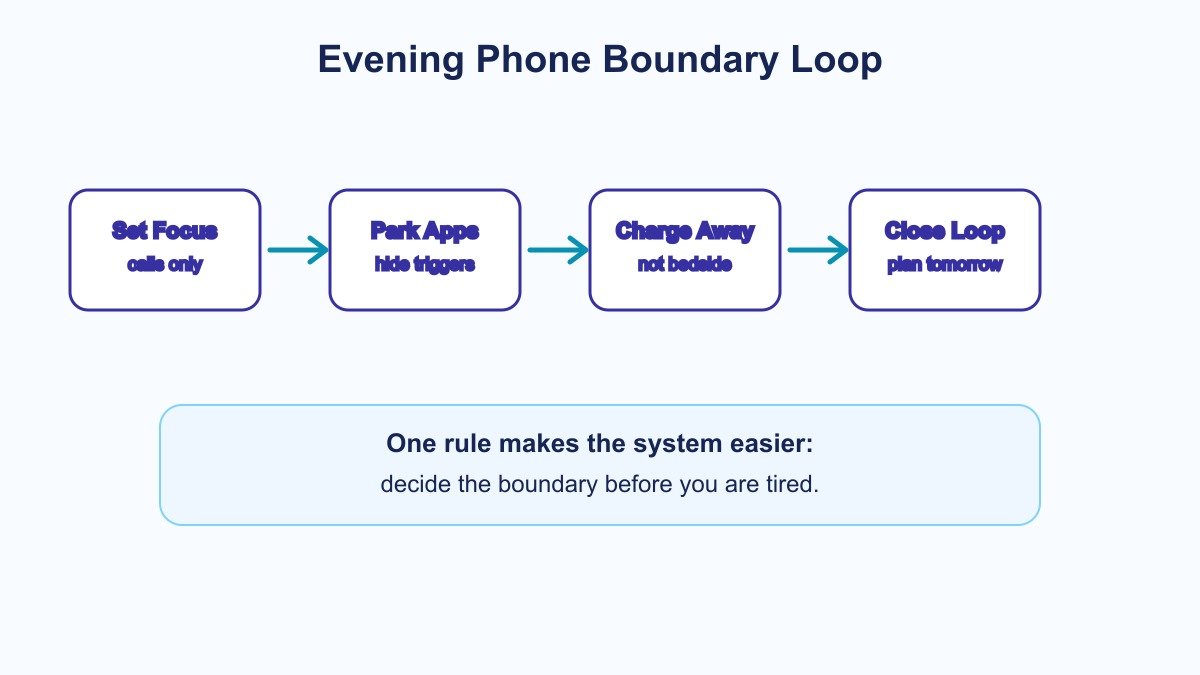
    Evening smartphone boundaries checklist for better sleep shown as a four step phone boundary loop
    Use this loop to set phone boundaries before you are tired.

    The 10-minute evening phone boundary routine

    This routine is designed to fit inside the last practical part of the evening, before teeth brushing, reading, journaling, or lights out. Start about 30 to 60 minutes before bed if you can. If that is unrealistic, start with the last 10 minutes.

    Minute 1: choose the phone’s bedtime

    Pick a clear time, not a mood. For example: β€œAt 9:45, the phone goes to the charger.” A clock time is easier to honor than β€œwhen I feel done scrolling.” If your evening schedule changes, tie the boundary to an anchor such as after dishes, after the kids are down, or after the final work check.

    Minute 2: turn on the right mode

    On iPhone, Apple provides Focus and Sleep tools that can allow chosen people, customize screens, and quiet apps. Apple documents those settings in its Focus setup guide. On Android, Google Digital Wellbeing includes Bedtime mode, app timers, Focus mode, grayscale, and Do Not Disturb options through the Digital Wellbeing feature set.

    Minute 3: allow the real exceptions

    A good boundary has humane exceptions. Allow partner, caregiver, school, emergency, or work-on-call contacts if needed. Do not make the boundary so strict that you feel anxious about missing something important. The point is to remove noise, not support a brittle rule.

    Minute 4: hide the apps that pull you back

    Put the most tempting apps behind friction. Move them off the home screen. Log out if needed. Use app limits for social, shopping, short video, news, and work chat. If you need one calming app, place only that app on a low-stimulation evening screen.

    Minute 5: dim and simplify the screen

    Lower brightness, use night shift or night light tools, and try grayscale if color pulls you into browsing. This is not magic. It is a cue. A duller phone is less inviting, and that makes the next boundary easier.

    Minute 6: write tomorrow’s first action

    Many people reopen the phone because the next day feels unresolved. Before you park the device, write one small first action for tomorrow. It can be β€œsend invoice,” β€œpack lunch,” or β€œopen draft.” This gives your brain a handoff.

    Minute 7: move the charger

    Place the charger across the room, in the hallway, in the kitchen, or at a small charging station. If you need your phone as an alarm, put it far enough away that you must stand up to turn it off. If that creates stress, use a separate alarm clock.

    Minute 8: choose a replacement cue

    Do not leave a blank space and expect it to feel relaxing. Replace phone time with one small cue: a book, a paper checklist, a stretch, a glass of water, a two-minute tidy, or the pre-sleep journaling template. The replacement should be boring in a good way.

    Minute 9: close open loops

    If a task feels urgent, write it down instead of solving it from bed. A parking list keeps the thought from becoming a search session. Use one line per task. Stop when you have captured enough to continue tomorrow.

    Minute 10: decide the morning rule

    The evening boundary is easier when the morning is clear. Decide whether the phone returns after you stand up, after water, after breakfast, or after the first focus block. A morning rule prevents revenge checking from becoming the first habit of the day.

    What should be on the checklist?

    Use this as the default evening smartphone boundaries checklist for better sleep. Keep it visible for one week, then simplify it to the three steps you actually need.

    • Sleep Focus, Do Not Disturb, or Bedtime mode is scheduled.
    • Emergency contacts are allowed, and everything else is quiet.
    • Social, shopping, news, short video, and work chat are hidden or limited.
    • Brightness is low, and grayscale or night mode is on if helpful.
    • The next morning’s first action is written outside the phone.
    • The phone is charging away from the bed.
    • A replacement cue is ready: book, paper note, stretch, water, or journal.
    • The morning re-entry rule is clear.

    If that list feels like too much, use the short version: quiet it, park it, replace it. A simple evening smartphone boundaries checklist for better sleep repeated nightly beats a perfect checklist used twice.

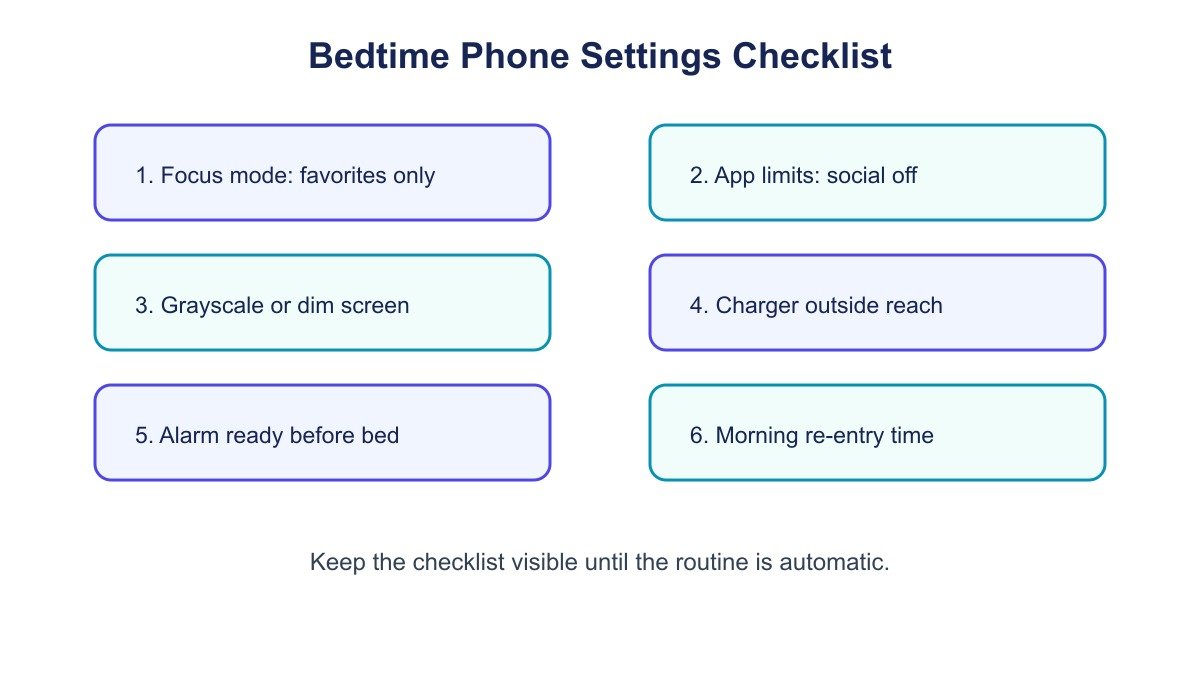
    Bedtime phone settings checklist for an evening smartphone boundaries routine
    A quick settings checklist for putting the phone to bed before you go to bed.

    iPhone settings that support evening phone boundaries

    For iPhone users, the most useful starting point is Focus. You can create a Sleep Focus, choose allowed people, choose allowed apps, and simplify the Lock Screen. The official Apple guidance is the best place to check exact menus because iOS labels change over time.

    Need iPhone setting Boundary it supports
    Allow family but silence noise Sleep Focus allowed people Important contact access without every app alert
    Reduce visual prompts Custom Lock Screen and Home Screen Fewer tempting apps at bedtime
    Protect the sleep window Sleep schedule and Focus schedule Automatic evening start
    Reduce repeated checking Notification summaries and app limits Less novelty in the final hour

    The key is to make the setting match your life. If a parent, partner, or client must reach you, allow that route. If one reading or sound app helps you wind down, keep it available. Remove the rest from the bedtime path so the evening smartphone boundaries checklist for better sleep stays focused.

    Android settings that support evening phone boundaries

    Android phones vary by manufacturer, but the Digital Wellbeing and Bedtime mode pattern is similar: reduce notifications, fade the screen, and set a schedule. Google describes Digital Wellbeing tools such as app timers, Focus mode, and Bedtime mode on the Digital Wellbeing app page and related Android support materials.

    Need Android setting Boundary it supports
    Quiet the phone Do Not Disturb or Bedtime mode Fewer sleep interruptions
    Make scrolling less rewarding Grayscale during Bedtime mode Lower pull from colorful feeds
    Limit problem apps App timers or Focus mode Clear stop point for distracting apps
    Start automatically Bedtime schedule Boundary runs without a nightly debate

    If your phone brand uses different labels, search Settings for β€œDigital Wellbeing,” β€œBedtime,” β€œFocus,” β€œDo Not Disturb,” or β€œModes.” The exact path matters less than the outcome: fewer alerts, fewer triggers, and a phone that is not waiting beside your pillow. This keeps the evening smartphone boundaries checklist for better sleep practical across devices.

    Where should your phone charge at night?

    The best charging spot is the nearest place that makes checking inconvenient without making life harder. For some readers, that is a dresser. For others, it is the kitchen, hallway, office, or a shelf outside the bedroom. Start with distance before you buy anything.

    Charging spot Best for Watch out for
    Across the bedroom People who use a phone alarm You may still check it after lights out
    Hallway shelf Light sleepers and couples Emergency contact settings need to be right
    Kitchen station Strongest separation Needs a separate alarm or smart speaker alarm
    Home office Remote workers Can reopen work if the room is not closed

    Do not turn the charger into a productivity shrine. A cable, a small tray, and a paper note are enough. If the charging station becomes complicated, the phone will migrate back to the bed.

    What if you need the phone for sleep sounds, alarms, or family?

    Keep the useful function and remove the open-ended browsing. A phone can still provide a white-noise app, audiobook timer, medication reminder, or family emergency route. The boundary is not β€œnever use your phone.” It is β€œonly the intended tool remains easy.”

    For sleep sounds, start the audio before the phone goes to its spot. For alarms, place the phone across the room or use a separate clock. For family, allow selected contacts through Sleep Focus or Do Not Disturb. For on-call work, keep the on-call route but block every nonessential app.

    This is where many plans fail: they confuse access with invitation. You may need access. You do not need the phone inviting you into every feed at midnight.

    What should you do instead of scrolling?

    The replacement should be short, repeatable, and not more stimulating than the phone. If you replace scrolling with an ambitious routine, you may avoid both. Choose a small action that gives your nervous system a familiar closing cue.

    • Read two pages of a paper book.
    • Write tomorrow’s first action on a sticky note.
    • Do a three-minute stretch with the lights low.
    • Set clothes, water, or breakfast supplies for the morning.
    • Use the pre-sleep journaling template if looping thoughts are the real pull.
    • Use the gentle evening wind-down routine if you want a fuller shutdown.

    The best replacement is not necessarily relaxing on the first night. It is simply less stimulating and easier to repeat.

    Common mistakes with evening phone boundaries

    Most people do not fail because they lack discipline. They fail because the boundary has too many loopholes, starts too late, or depends on a future tired version of themselves to make a good decision.

    Mistake Why it breaks Better rule
    Keeping the phone beside the pillow Reach turns into checking Charge across the room or outside the bedroom
    Blocking every contact Creates anxiety about emergencies Allow a short emergency contact list
    Starting after you are exhausted Too much decision friction Start after a stable evening anchor
    Using the phone for every replacement habit The tool reopens the feeds Use paper, a book, or a simple offline cue
    Making a huge detox rule Feels like punishment Use a narrow bedtime rule first

    If you already have a broader digital declutter plan, this article should not replace it. Use the digital declutter checklist for screens across the week, then use this page for the evening sleep boundary.

    A seven-night phone boundary experiment

    Run the experiment for seven nights before judging it. One night can be distorted by stress, weather, family needs, caffeine, work, travel, or a bad mattress. Seven nights give you enough repetition to see what actually helps.

    1. First night: choose the phone bedtime and charger spot.
    2. Second evening: add Sleep Focus, Do Not Disturb, or Bedtime mode.
    3. Third pass: remove the top two tempting apps from the evening screen.
    4. Fourth reset: write tomorrow’s first action before parking the phone.
    5. Fifth trial: test a replacement cue for 10 minutes.
    6. Sixth check: adjust emergency contacts and app exceptions.
    7. Final review: keep the three rules that made the largest difference.

    Track only three things: when the phone was parked, whether it stayed parked, and how the morning felt. Do not over-measure. The point is a cleaner routine, not another dashboard.

    Examples for different households

    For parents: allow school, family, and emergency contacts, then block everything else. Keep the phone on a dresser if a child may need you. Put a paper card beside the charger that says what is allowed: family calls, medication reminders, and alarms. Everything else can wait.

    For remote workers: create a separate work shutdown before the phone boundary. Close team chat, write the next work action, and set a morning re-entry rule. If the phone is your work device, move work apps into a folder named Tomorrow so the label itself becomes a cue.

    For students: park the phone after the last study block and keep only alarm, calendar, and a calm audio app available. If group chats run late, use a status message that says you check again in the morning.

    For couples: agree on light, sound, and charging zones. One person can keep an emergency phone nearby while the other charges outside the room. The shared goal is less interruption, not identical behavior.

    Make the boundary easier to keep

    The environment should do most of the work. Put a book where the phone used to sit. Place the charger where you naturally walk after brushing your teeth. Keep a pen and paper at the charging station. If you use smart lights or a routine app, set the evening cue to start before your usual scrolling window.

    Expect friction for the first few nights. The habit may feel strangely quiet. That is useful feedback. You are noticing how much stimulation the phone had been adding. Keep the rule small, repeat it, and let the evening become more predictable. Over time, the evening smartphone boundaries checklist for better sleep should feel like a normal closeout rather than a restriction.

    How this connects to digital clarity

    An evening smartphone boundaries checklist for better sleep is one piece of digital clarity. It gives your day a boundary. That boundary protects rest, and rest protects attention the next day. If your larger issue is constant screen pull, read Digital Clarity vs Digital Detox next. If the issue is a phone habit that feels automatic, Break the Scroll is the more direct book path.

    If sleep anxiety, racing thoughts, or bedtime worry are the main problem, Restful Nights is the more relevant reader path. If you want the full shelf by topic, start at the Mind Clarity books hub.

    When should you get more help?

    Phone boundaries can support better sleep habits, but they are not a cure-all. If you regularly cannot sleep, wake often, feel unsafe, experience severe anxiety, or feel exhausted despite enough time in bed, consider talking with a qualified health professional. Practical routines are useful, but persistent sleep problems deserve real support.

    Also look beyond the phone. Caffeine timing, alcohol, shift work, pain, room temperature, caregiving, workload, and stress can all affect sleep. A phone boundary is one lever. It works best when it is part of a realistic evening system.

    The simplest version to save

    Save this version if the full article feels like too much: at the same time each evening, turn on Sleep Focus or Bedtime mode, write tomorrow’s first action, charge the phone outside easy reach, and do one low-stimulation replacement for 10 minutes. That is the core evening smartphone boundaries checklist for better sleep.

    Frequently asked questions

    Is it bad to sleep with your phone next to your bed?

    For many people, the issue is not the phone’s existence. It is easy access to alerts, light, and stimulating content. If the bedside phone leads to checking, move it farther away and keep only essential interruptions enabled.

    How long before bed should I stop using my phone?

    Start with 30 minutes if a longer window feels unrealistic. Some sleep guidance recommends a longer electronics buffer, but a consistent 30-minute boundary is better than an ideal rule you never use.

    What phone settings are best for sleep?

    Use Sleep Focus, Do Not Disturb, Bedtime mode, grayscale, app limits, and a schedule. The best settings are the ones that silence nonessential alerts while preserving true emergency access.

    Can I still use my phone as an alarm?

    Yes, but place it across the room so turning it off requires standing up. If that still leads to checking, use a separate alarm clock and charge the phone outside the bedroom.

    What if my partner does not want the same phone rules?

    Make the boundary personal and practical. Use your own charger spot, your own Focus settings, and a low-light agreement. You do not need identical rules to reduce your own friction.

    Should I buy a lockbox or phone safe?

    Only if simpler steps fail. Try charger placement, app limits, Focus settings, and a paper replacement first. A lockbox can help some people, but it is not required for a strong evening boundary.

    Sources and update note

    Last reviewed: June 20, 2026. This guide uses practical sleep-habit framing and current public documentation from CDC sleep and health guidance, Sleep Foundation electronics and sleep guidance, Sleep Foundation blue light guidance, Apple Focus support, Google Digital Wellbeing information, and the open-access PMC study linked above.

    Helpful resources for your next step

    Affiliate disclosure: As an Amazon Associate, Mind Clarity Hub may earn from qualifying purchases at no extra cost to you. Use this link only if it genuinely helps your planning.

    If Evening Smartphone Boundaries Checklist for Better Sleep is a routine you want to keep using, a simple workbook, planner, or desk tool can make the steps easier to repeat.

    Compare related planners, workbooks, and organization tools on Amazon.

  • Digital Clarity vs Digital Detox: Which Reset Fits You?

    Digital Clarity vs Digital Detox: Which Reset Fits You?

    Digital clarity is not about throwing your phone into a drawer and pretending modern life does not exist. It is about deciding what your screens are allowed to do for you, what they are no longer allowed to take from you, and how you can use technology without letting it set the pace of your day.

    A digital detox can help when your habits feel messy. But a detox is usually temporary. Digital clarity is the system you keep after the reset ends. That matters if you use screens for work, books, banking, family, learning, travel, shopping, and almost everything else.

    This guide will help you compare digital clarity and digital detox plans, choose the right reset for your season, and build a practical screen routine that supports focus without making life harder.

    Reader note: This is educational self-improvement content, not medical advice. If screen use feels compulsive, is tied to anxiety or depression, or is disrupting sleep, work, school, or relationships in a serious way, consider talking with a qualified health professional.

    What Is Digital Clarity?

    Digital clarity is the practice of using your devices on purpose. It asks a simple question before every app, tool, notification, and habit: does this help the life I am trying to build?

    That question is different from β€œIs technology bad?” Technology is not the enemy. Unchecked defaults are the problem. A phone can help you read, write, learn, relax, manage money, and connect with people you love. The same phone can also pull you into loops that leave you tired, scattered, and strangely unsatisfied.

    Digital clarity gives each tool a job. A calendar helps protect time. Notes capture ideas. A reading app supports learning. Social apps get boundaries. The phone stops being one giant slot machine of possible interruptions and becomes a tool cabinet.

    If you want the deeper book-based framework behind this idea, start with Digital Clarity or browse the full Mind Clarity Hub book library. The goal is not perfection. The goal is a calmer relationship with attention.

    What Is A Digital Detox?

    A digital detox is a planned break from certain screens, apps, platforms, or online behaviors. Some people do a full weekend away from social media. Others block short-video apps for seven days, keep the phone out of the bedroom, or remove shopping apps during a spending reset.

    A detox can be useful because it interrupts momentum. When a habit is automatic, you may not notice how often you reach for the device until the normal path is blocked. That friction creates a pause. In that pause, you can see what you were actually looking for: rest, escape, stimulation, reassurance, novelty, or connection.

    The weak point is that a detox can become a dramatic event instead of a repeatable system. You may feel better for three days, reinstall everything, and return to the same pattern. That does not mean the digital detox failed. It means the detox needs to hand off to digital clarity.

    For a deeper look at the popular dopamine-reset idea, read What Is a Dopamine Detox?. For a behavior-focused version, see how to overcome social media addiction.

    Digital Clarity vs Digital Detox: Which One Fits?

    Most people do not need to choose one forever. Use a digital detox when you need a clean break. Use digital clarity when you need a daily operating system.

    Goal Best Fit Why It Helps Example
    Stop a specific habit quickly Digital detox Creates immediate friction and distance Remove short-video apps for 7 days
    Build a calmer daily routine Digital clarity Creates rules you can keep long term Check messages at set times instead of all day
    Improve sleep boundaries Both A detox clears the bedroom; clarity keeps the rule Charge your phone outside the room
    Use technology for work Digital clarity Protects focus without blocking useful tools Keep research tabs open, block social tabs
    Reset after burnout Both Reduce noise first, then rebuild intentionally Take a quiet weekend, then create app limits
    person journaling beside a phone during a digital clarity reset
    A simple notebook check-in can turn a digital detox into a clearer screen routine.

    If you are exhausted, reactive, or checking your phone before you even know why, start with a short detox. If your life requires screens and you need a realistic system, start with digital clarity.

    Why Does Your Phone Feel So Hard To Put Down?

    Your phone is not hard to put down because you are weak. It is hard because it combines novelty, social feedback, entertainment, convenience, and unfinished loops in one object. Every check might contain something useful, urgent, funny, flattering, scary, or distracting.

    Research on media multitasking is still debated, but a 2023 paper in Technology, Mind, and Behavior found a negative link between media multitasking and sustained attention across three samples. The practical lesson is modest but helpful: frequent switching can make focus feel less stable, especially when the switches are driven by apps instead of by your own plan.

    Sleep is another reason to treat screens carefully. The National Heart, Lung, and Blood Institute recommends using the hour before bed for quiet time and avoiding bright artificial light from screens because it can signal the brain to stay awake. You do not have to become extreme. You do need an evening boundary that your future self can trust.

    Mindfulness can also help because it trains the pause between urge and action. NIH News in Health describes mindfulness as learning to return attention to the present moment when the mind wanders. That is the same small skill you use when you notice the urge to scroll and choose a better next step.

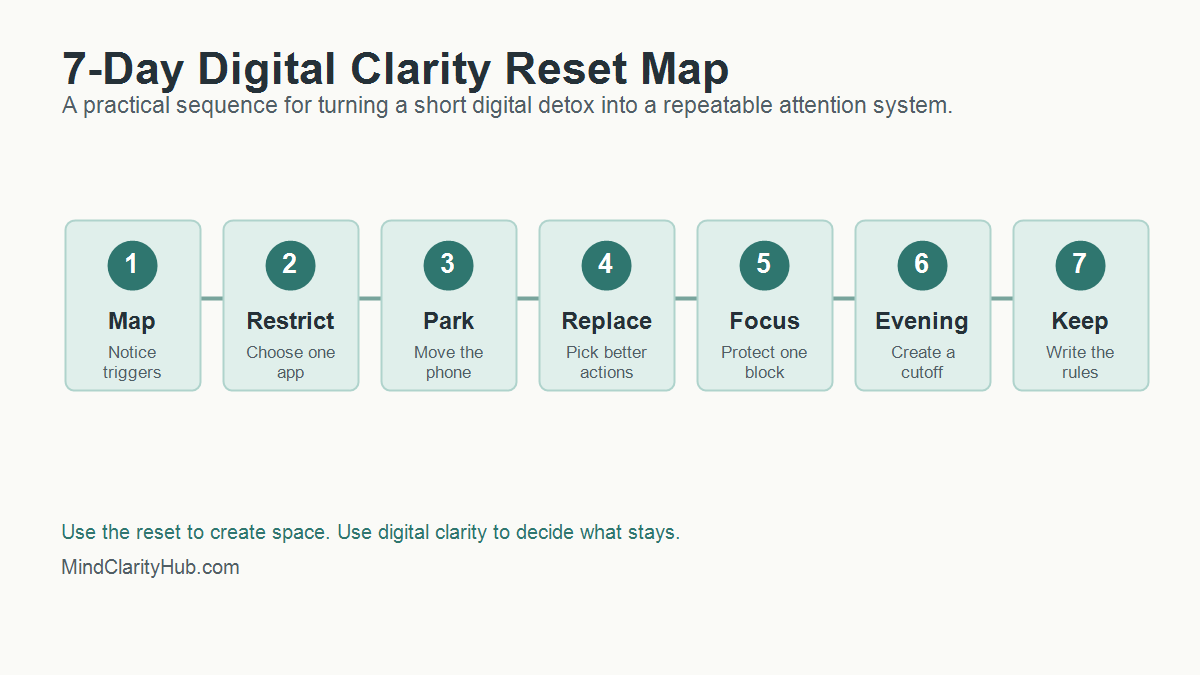
    How Do You Start A 7-Day Digital Clarity Reset?

    A 7-day reset works best when it is small enough to finish. Do not try to rebuild your entire digital life in one weekend. Pick the few habits causing the most friction and use this sequence.

    seven day digital clarity reset map showing trigger mapping app restriction phone parking replacement habits focus evening cutoff and kept rules
    A 7-day reset map helps readers move from a short digital detox to lasting digital clarity.

    Day 1: Map The Triggers

    Write down the moments when you reach for your phone without a clear reason. Common triggers include waking up, waiting in line, feeling stuck on a task, eating alone, avoiding a hard conversation, or trying to wind down at night.

    • Which app do you open first?
    • What feeling comes right before the reach?
    • Name the need you actually had in that moment.
    • Did the app meet that need or delay it?

    This is digital clarity in its most basic form. You are not judging yourself. You are collecting evidence.

    Day 2: Choose One App To Restrict

    Pick one app or category that gives you the lowest return on attention. For many people, it is short-form video, social feeds, news loops, shopping, or work email after dinner.

    Remove it from your home screen. Turn off notifications. If needed, delete it for the week. A digital detox works better when the target is specific. β€œUse my phone less” is vague. β€œNo short-video apps before noon or after 8 p.m.” is a rule you can follow.

    Day 3: Create A Phone Parking Spot

    Choose a physical place where your phone rests when you are eating, reading, working, or sleeping. The parking spot should not be your pocket. It should be across the room, in a drawer, on a charger, or beside a notebook.

    Distance matters because attention often fails in the first second. When the phone is already in your hand, you need willpower. When it is across the room, you get a moment to decide.

    Day 4: Build A Replacement Menu

    A digital detox that only removes stimulation can feel flat. Digital clarity replaces the loop with something that actually meets the need.

    • Rest: try a short walk, music, stretching, or breathing.
    • Connection: text one person directly instead of scrolling a feed.
    • Stimulation: read five pages, make tea, or clean one small area.
    • Progress: open a notebook and write the next tiny action.

    The replacement does not need to be noble. It needs to be better than the loop you are trying to leave.

    Day 5: Protect One Deep Work Block

    Pick a 45 to 90 minute block where your phone is out of reach and only the tools needed for the task are open. If you work at a computer, close messaging tabs and use full-screen mode when possible.

    This is where digital clarity supports real productivity. You are not trying to become unavailable all day. You are proving that a protected block can still exist inside a connected life. For more focus tools, read how to train your brain to focus.

    Day 6: Reset The Evening

    Choose a screen cutoff that feels realistic. If one hour before bed feels impossible, start with 20 minutes. Put the phone on its charger, dim the lights, and switch to a quiet routine.

    Good options include reading, a paper planner, gentle stretching, a shower, prayer, journaling, or a simple body scan. NIH News in Health lists deep breathing, mindful walking, mindful eating, and body scans as practical mindfulness options. Pick one that you would actually repeat.

    Day 7: Write The Rules You Are Keeping

    The last day is not about celebrating a perfect week. It is about choosing the rules that worked. Keep the rules that gave you more calm, more sleep, more focus, or more presence. Drop rules that were too strict, too vague, or too annoying to maintain.

    1. Keep one morning rule.
    2. Choose one work rule.
    3. Protect one evening rule.
    4. Repeat one replacement habit.
    5. Schedule one weekly check-in.

    That is the bridge from digital detox to digital clarity.

    How Do You Keep Digital Clarity After The Reset?

    The week after a digital detox matters more than the detox itself. That is when old defaults try to return. Digital clarity turns the reset into a living system by deciding what happens on ordinary Tuesdays, not just during a special challenge.

    Start with three default rules. First, choose when attention-heavy apps are allowed. Second, choose where your phone sleeps. Third, choose which alerts can interrupt you. These rules are simple enough to remember and strong enough to change the shape of the day.

    A good rule should pass the real-life test. Can you follow it when work is busy? Will it still work when you are tired? Is it simple enough to explain in one sentence? If the answer is no, simplify the rule until it works.

    Use A Weekly Screen Review

    Set a 10-minute review once a week. Look at screen time, app categories, sleep, focus blocks, and mood after use. The numbers are useful, but the pattern matters more. A week with more screen time may still be healthy if the time supported work, learning, family, or reading.

    Ask three questions during the review:

    • Which digital habit gave me a real benefit this week?
    • Which digital habit made me feel scattered, rushed, or behind?
    • What is one rule I can adjust for the next seven days?

    This keeps digital clarity flexible. You are not locking yourself into one perfect system forever. You are training yourself to notice, adjust, and protect attention before small leaks become a flood.

    Keep Friction Low And Meaning High

    The best screen boundaries are easy to repeat. Put distracting apps in a folder. Move the phone charger away from the bed. Use a website blocker during writing or work blocks. Keep one book, journal, or offline task where you usually scroll.

    Meaning matters too. If your phone is the only easy source of fun, comfort, or connection, removing it will feel like deprivation. Add good alternatives before you remove the loop. Call one person. Read something physical. Take a walk without audio. Build a small evening ritual that feels like recovery instead of punishment.

    That is the heart of digital clarity. You are not only reducing screen time. You are making offline life easier to reach.

    What Should You Track During A Digital Clarity Reset?

    Tracking should help you notice patterns, not make you obsessive. Use a simple scorecard for seven days. Give each item a yes or no.

    Metric Question Why It Matters
    Morning control Did I avoid feeds for the first 30 minutes? Protects the tone of the day
    Focus block Did I complete one protected work block? Builds confidence and momentum
    Evening boundary Did I stop high-stimulation apps before bed? Supports better wind-down habits
    Replacement habit Did I choose a better action when I wanted to scroll? Turns restriction into a real alternative
    Mood after use Did my screen time leave me better, neutral, or worse? Reveals which tools are worth keeping

    At the end of the week, look for the easiest win. Maybe your sleep improved when the phone charged outside the bedroom. Work may have improved when notifications stayed off until lunch. Stress may have dropped when you stopped checking news first thing in the morning.

    How Can You Make A Digital Detox Less Extreme?

    Many people fail with detoxes because the rules are too dramatic. A complete screen break may be useful for a retreat, but it is not realistic for a parent, creator, freelancer, student, or business owner.

    Use a partial detox instead. Remove one type of input while keeping useful tools. You can block social media while keeping maps. News can pause while email stays available. Shopping apps can disappear while banking remains. This keeps the reset from becoming a punishment.

    Here are simple detox formats that pair well with digital clarity:

    • Bedroom detox: no phone in the bedroom for seven nights.
    • Morning detox: no feeds before breakfast or before your first work block.
    • Platform detox: remove one app category for a week.
    • Notification detox: turn off all non-human alerts, then add back only what matters.
    • Social comparison detox: pause accounts that make you feel behind, resentful, or scattered.

    A detox should create space. Digital clarity tells you what belongs in that space next.

    Where Do Books And Tools Fit Into Digital Clarity?

    Books help because they slow the mind down. A book is not just content. It is a different relationship with attention. You follow one argument, one chapter, one idea, and one page at a time.

    That is why Mind Clarity Hub should use new articles to guide readers toward the right book, not just send them to random product links. If your main struggle is scattered focus, start with The Power of Clarity. For phone noise and online overwhelm, start with Digital Clarity. When burnout is part of the pattern, the books page can help you choose a better match.

    Useful tools can support the same system. A paper notebook, a basic alarm clock, website blocker, app timer, reading app, or focus playlist can all help. The key is to choose tools that reduce decisions, not tools that add one more dashboard to manage.

    Can A YouTube Video Help With A Digital Reset?

    Yes, if it is used on purpose. A video can explain a concept quickly, create motivation, or give you a starting point. The trap is letting one helpful video turn into an hour of autoplay.

    If you watch a video during a reset, decide the job before you press play. Are you learning one idea? Choosing one action? Getting a reminder? Once the job is done, close the tab.

    A short video on reducing screen time can be useful when it leads to one clear action.

    When Should You Get Extra Support?

    Most screen habits can improve with better boundaries. Some patterns need more support. Pay attention if your screen use regularly causes missed sleep, missed work, relationship conflict, panic when separated from your phone, secretive behavior, compulsive spending, or a sense that you cannot stop even when you want to.

    In those cases, digital clarity can still help, but it should not be the only tool. A therapist, physician, counselor, support group, or trusted mentor can help you understand what the screen habit is protecting you from or helping you avoid.

    Be especially careful if you are using screens to numb intense anxiety, depression, loneliness, grief, or shame. The goal is not to remove coping before you have better support. The goal is to build a healthier plan with the right help.

    FAQ About Digital Clarity And Digital Detox

    Is digital clarity better than a digital detox?

    Digital clarity is better for daily life because it creates a long-term system. A digital detox is better when you need a short reset from a specific app, platform, or behavior. The strongest plan often uses both.

    How long should a digital detox last?

    Start with 24 hours, three days, or seven days. Longer is not always better. The best digital detox is long enough to reveal the habit and short enough that you can finish it without turning the reset into a source of stress.

    Can digital clarity help if I have ADHD?

    Digital clarity can help reduce friction, distractions, and decision fatigue, but it is not a treatment for ADHD. If ADHD symptoms are affecting work, school, finances, or relationships, use screen boundaries alongside professional support and evidence-based strategies.

    What if my job requires screens all day?

    Then avoid extreme rules. Focus on work screens versus distraction screens. Keep the tools required for your job, but remove unnecessary alerts, batch messages, block distracting sites during focus blocks, and protect your evening recovery time.

    What is the first rule I should try?

    Try a no-feeds morning rule. Do not open social feeds, news, or short-video apps for the first 30 minutes after waking. It is simple, measurable, and powerful because it lets your own priorities touch the day before everyone else’s noise arrives.

    The Bottom Line

    Digital clarity is the long game. A digital detox can give you a clean break, but digital clarity gives you rules, replacements, and a better relationship with attention.

    Start small. Pick one app, one morning boundary, one focus block, and one evening rule. Keep what works. Adjust what does not. Technology should support your life, not silently organize it around distraction.

    Next step: read Digital Clarity for the full system, or explore all Mind Clarity Hub books to choose the guide that best fits your season.

    Sources used: NHLBI sleep habit guidance, NIH News in Health on mindfulness, NCCIH meditation and mindfulness overview, and Technology, Mind, and Behavior research on media multitasking and attention.

    Free download: 7-Day Mind Clarity Reset preview

    Free download: 7-Day Mind Clarity Reset

    A short daily reset you can actually stick with (no fluff).

    Helpful resources for your next step

    Affiliate disclosure: As an Amazon Associate, Mind Clarity Hub may earn from qualifying purchases at no extra cost to you. Use this link only if it genuinely helps your planning.

    If Digital Clarity vs Digital Detox: Which Reset Fits You is a routine you want to keep using, a simple workbook, planner, or desk tool can make the steps easier to repeat.

    Compare related planners, workbooks, and organization tools on Amazon.

  • 10 Remote Work Best Practices for Sustainable Productivity in 2026

    10 Remote Work Best Practices for Sustainable Productivity in 2026

    10 Remote Work Best Practices for Sustainable Productivity in 2026

    Jeremy Jarvis β€” Mind Clarity Hub founder
    Mind Clarity Hub β€’ Research-aware focus & digital wellness

    Remote work promised autonomy and flexibility, but for many, it has delivered digital exhaustion, blurred boundaries, and a persistent feeling of being β€˜always on.’ The solution isn’t to work longer or harder; it’s to work with more intention by aligning your daily routines with the principles of neuroscience and psychology. The promise of freedom is still achievable, but it requires a more deliberate and structured approach than simply opening a laptop at the kitchen table.

    This guide moves beyond generic advice like β€œhave a routine” and dives into specific, actionable systems designed for deep focus and sustainable productivity. We will explore 10 evidence-based remote work best practices to help you reclaim control over your time, attention, and energy. You’ll learn not just what to do, but why these strategies work, from creating distraction-free workspaces that reduce cognitive load to implementing AI-powered workflows that automate mundane tasks.

    Affiliate Disclosure: This article may contain affiliate links. If you purchase a product through one of these links, we may earn a small commission at no extra cost to you. We only recommend products we believe will add value to our readers.

    We will cover practical techniques such as time blocking, building pre-work rituals to signal focus to your brain, and establishing clear communication protocols that prevent burnout. These systems are not just about getting more done; they’re about creating a healthier, more integrated way of working and living. While these individual practices are powerful, they are most effective within a supportive structure. To truly unlock clarity in remote work, consider the broader strategies for effective remote team management that foster a productive environment for everyone. This listicle provides the personal toolkit you need to thrive, helping you build a remote work life that feels less chaotic and more focused, productive, and fulfilling.

    1. Establish a Dedicated Workspace as a Remote Work Best Practice

    One of the most effective remote work best practices is creating a clear physical and mental boundary between your personal life and professional duties. Establishing a dedicated workspace leverages principles of environmental psychology, specifically a concept known as β€œcontext-dependent memory.” Your brain creates powerful associations between your environment and your mental state, meaning a space consistently used for work signals it’s time to focus. This practice reduces the cognitive load of context-switching, helping you enter a state of deep work more efficiently.

    A bright and modern home office serves as one of the best remote work best practices.

    This space doesn’t need to be a separate room. A specific corner of a living room, a particular chair at the dining table, or even a portable standing desk that you set up each morning can serve this purpose. The key is consistency. When you enter this zone, it becomes a ritual that primes your brain for productivity, minimizing household distractions and digital temptations. For example, a marketing manager named Sarah uses a specific lamp on her desk. When the lamp is on, her family knows she’s in β€œwork mode” and shouldn’t be interrupted unless it’s an emergency. This simple cue reinforces the boundary for both her and her brain.

    How to Implement This Practice

    Successfully creating a focus-friendly zone involves more than just picking a spot. It requires a deliberate effort to engineer an environment for sustained attention.

    • Define Your Zone: If you lack a separate office, use visual cues like a small area rug, a specific desk lamp, or a portable screen to physically define your workspace.
    • Remove Digital Distractions: Physically move your smartphone and smartwatch to another room or place them out of sight. Use website blockers (like Freedom or Cold Turkey) during work blocks to prevent mindless scrolling.
    • Optimize for Comfort: An ergonomic setup is crucial for preventing physical strain that leads to fidgeting and distraction. Invest in a supportive chair and position your monitor at eye level. For more inspiration, explore these practical home office organizing ideas on mindclarityhub.com.

    • Control Your Sensory Input: Use noise-canceling headphones with white noise or nature sounds to mask unpredictable household sounds. Adjust lighting to be bright and energizing during the day.

    2. Implement Time Blocking and the Pomodoro Method to Improve Remote Work Habits

    Structuring your workday with intention is one of the most powerful remote work best practices for combating procrastination and maintaining high energy levels. Time blocking and the Pomodoro Technique are neuroscience-backed methods that leverage the brain’s natural β€œultradian rhythms,” which are 90-to-120-minute cycles of high-frequency brain activity followed by periods of lower-frequency activity. Instead of fighting this natural ebb and flow, these strategies work with it, creating a sustainable cadence of intense focus followed by deliberate rest. This prevents cognitive fatigue and improves the quality of your output over the long term.

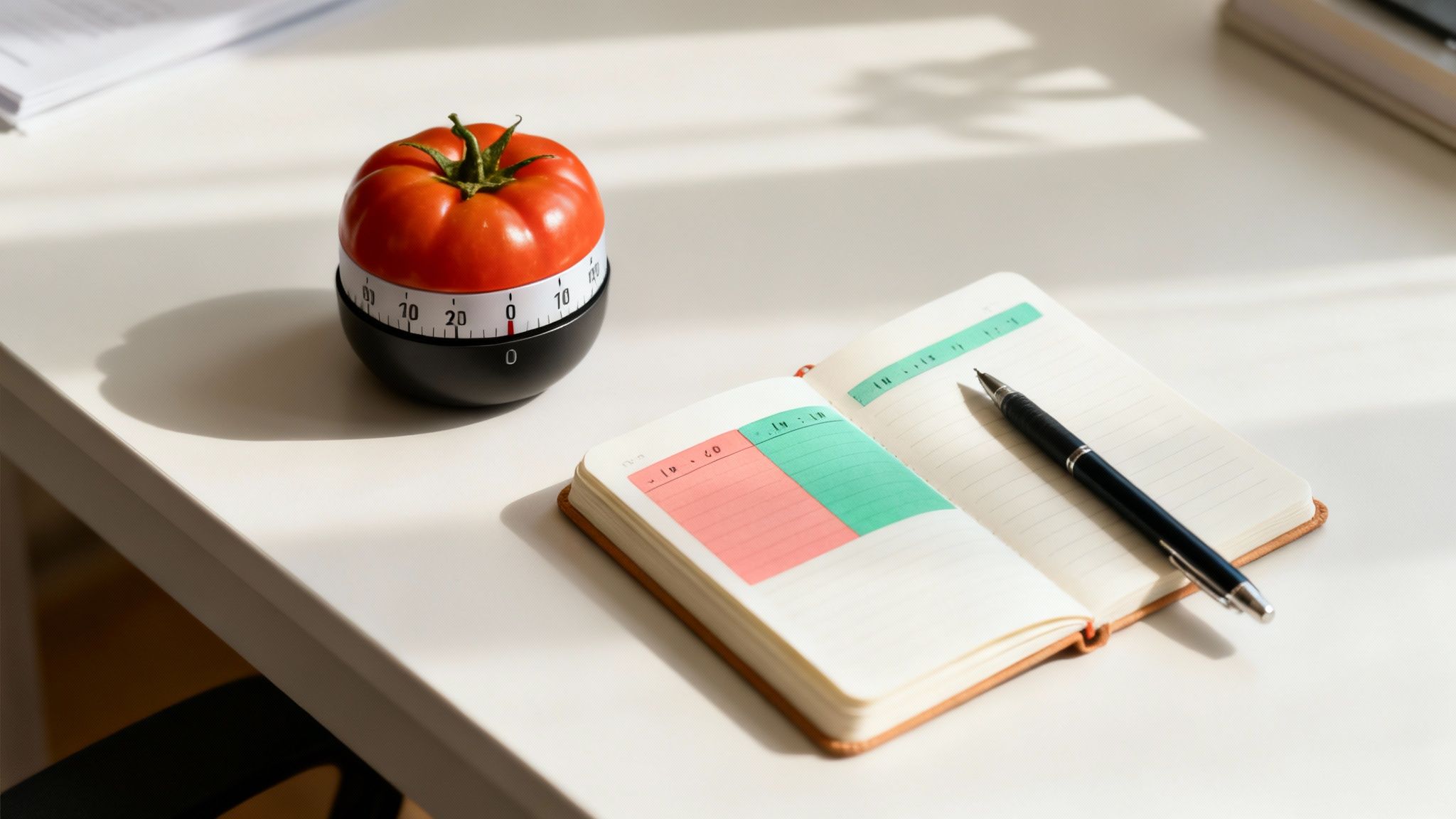
    A tomato timer on a desk is a visual aid for remote work best practices like the Pomodoro method.

    This approach involves dividing your day into distinct, single-task intervals. A marketer might block 90 minutes for writing a deep-dive blog post, followed by a 20-minute break, then a 50-minute block for answering high-priority emails. The core principle is proactive scheduling: you tell your time where to go, rather than reactively wondering where it went. This creates a powerful sense of control and accomplishment as you complete each focused session. A real-world example is a software developer who uses 50-minute blocks for coding specific features. After each block, he takes a 10-minute break to walk around, which he finds helps him solve coding problems faster when he returns.

    How to Implement This Practice

    Integrating structured time management requires discipline, but the payoff in focus and efficiency is immense. Start small and refine your approach based on your personal energy and attention patterns.

    • Start with the Pomodoro Technique: Begin with the classic 25-minute focus sprints followed by 5-minute breaks. This is an excellent entry point as the short duration feels less intimidating and helps build momentum. Use a visual timer to create a sense of urgency.
    • Align Blocks with Task Complexity: Match the length of your time block to the cognitive demand of the task. Reserve longer 90-minute blocks for deep, creative work like coding or strategy development, and use shorter 25- to 50-minute blocks for administrative tasks like clearing your inbox.
    • Schedule Your Breaks: Treat breaks as a non-negotiable part of the process. Schedule them before you feel exhausted to proactively replenish your cognitive resources. Step away from your screen, stretch, or hydrate.
    • Protect Your Time: Use calendar blocking to make your focus periods visible to colleagues. This prevents β€œmeeting creep” and signals that your deep work time is unavailable, reinforcing its importance.

    3. Optimize Your Digital Boundaries as a Best Practice for Remote Work

    Another of the most critical remote work best practices is proactively managing your digital environment to prevent constant attention fragmentation. Each notification, ping, or badge is a micro-interruption that pulls you out of a state of flow, forcing a costly cognitive context switch. Neurologically, this constant reactivity trains your brain to crave the dopamine hit of a new alert, depleting your finite capacity for deep, focused work and leading to digital burnout.

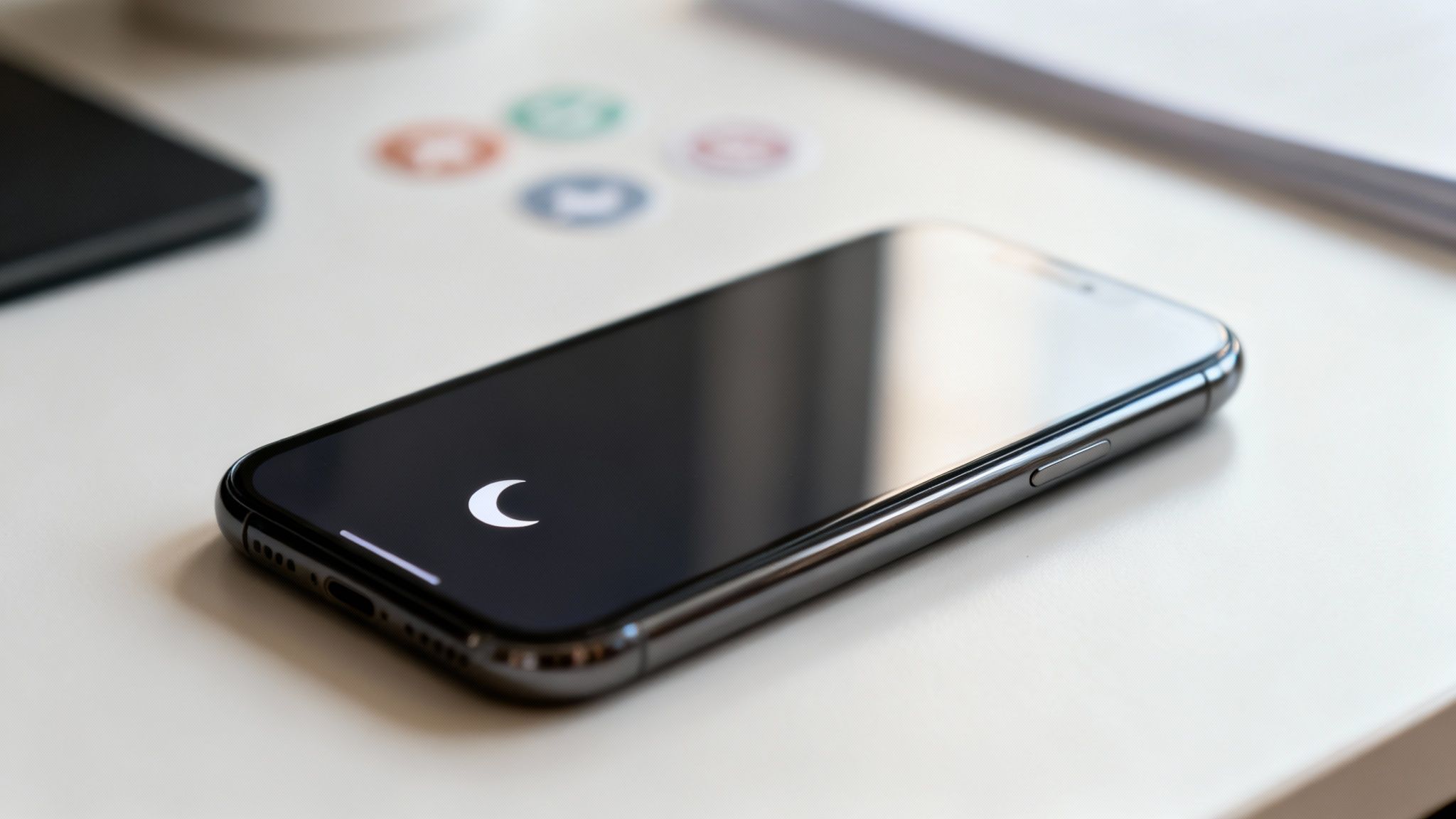
    Using 'do not disturb' mode on a smartphone is a key remote work best practice for focus.

    By setting firm digital boundaries, you shift from a reactive to an intentional mode of communication. Instead of letting your tools dictate your schedule, you control when and how you engage with them. This approach is central to methodologies like Cal Newport’s β€œDeep Work,” where practitioners schedule specific blocks for communication, preserving long, uninterrupted periods for high-value tasks. This is not about being unresponsive; it’s about being effective. For instance, a project manager might set up a rule where she only checks her email at 10 AM and 3 PM, allowing for long, uninterrupted stretches to focus on project planning.

    How to Implement This Practice

    Regaining control over your digital attention requires a conscious strategy to filter noise and prioritize signal. It’s about creating a system where you serve your goals, not your inbox.

    • Audit and Disable Notifications: Turn off all non-essential alerts on your phone and computer. This includes banners, sounds, and badge icons for email, social media, and most messaging apps. Leave on only calendar reminders and calls from designated emergency contacts.
    • Batch Your Communication: Schedule 2-3 specific times per day to check and respond to emails and messages (e.g., 9:00 AM, 1:00 PM, and 4:30 PM). This batching method prevents the constant β€œinbox-as-a-to-do-list” trap.
    • Leverage Status Indicators: Use the β€œDo Not Disturb” or β€œFocus” status on Slack and Microsoft Teams to clearly signal to colleagues when you are in a deep work session. This sets a clear expectation that you will not respond immediately.
    • Establish Channel Hierarchy: Define with your team which channels are for which type of communication. For example: a phone call is for true emergencies, email is for important but non-urgent matters, and instant messaging is for quick, asynchronous questions. For a deeper dive into reclaiming your focus, explore these effective digital detox tips on mindclarityhub.com.

    4. Create a Pre-Work Ritual for Better Remote Work Performance

    One of the most powerful remote work best practices involves intentionally creating a transition from your personal time to your professional tasks. A consistent pre-work ritual, even just 10-20 minutes, acts as a mental β€œon-ramp” for your workday. This practice leverages neuroscience by creating a behavioral cue that signals to your brain that it’s time to shift into a focused state. It primes your nervous system for focus and helps you enter a productive state without the abrupt context shift of simply opening a laptop.

    This ritual is not about adding more to your plate; it’s about setting a deliberate tone for the day. For example, a writer might use β€œmorning pages” (a stream-of-consciousness journaling practice) to clear mental clutter before creative work. A sales lead might spend five minutes reviewing their top three priorities for the day while drinking a glass of water before even touching their computer. The goal is to create a predictable sequence that signals to your brain, β€œIt’s time to focus,” making the transition into deep work smoother and more automatic.

    How to Implement This Practice

    Building an effective pre-work routine requires consistency and a focus on screen-free activities that activate your body and mind. The key is to find a simple sequence you can stick with daily.

    • Integrate Gentle Movement: Start with 10 minutes of stretching, yoga, or a short walk without your phone. This activates your nervous system and improves blood flow to the brain, enhancing alertness.
    • Delay Screen Time: Avoid checking emails or social media for the first 30-60 minutes after waking. This prevents your brain from starting the day in a reactive, high-cortisol state.
    • Activate Your Mind Intentionally: Instead of consuming content, create it. Journal three intentions for the day, practice a brief breathwork exercise (like 4-7-8 breathing) to calm your system, or read a physical book.
    • Time Your Caffeine: To avoid disrupting your body’s natural cortisol rhythm, try waiting 90-120 minutes after waking before your first coffee. This allows your natural energy to peak first. For more ideas on this, discover how a structured morning routine can rewire your focus on mindclarityhub.com.

    5. Use Asynchronous Communication: A Key Remote Work Best Practice

    One of the most transformative remote work best practices is shifting from a synchronous, β€œalways-on” culture to an asynchronous-first model. Asynchronous communication doesn’t require an immediate response, allowing team members to engage thoughtfully when their focus allows. This approach respects individual deep work schedules and different time zones, directly combating the meeting fatigue and constant interruptions that plague many remote environments.

    By prioritizing written documentation and tools like shared documents, project management boards, and video messages, teams create a single source of truth. This reduces repetitive questions and empowers employees with the autonomy to find information independently. For example, instead of a live meeting to review a new marketing campaign, the team lead records a 10-minute Loom video walking through the proposal and shares a link. Team members can watch it when they have a natural break in their work and leave comments with feedback, eliminating the need to coordinate schedules across multiple time zones.

    How to Implement This Practice

    Transitioning to an asynchronous model requires intentional changes to team habits and toolsets. It’s about creating systems that value focused work over immediate presence.

    • Audit Your Meetings: Review your calendar and critically assess which recurring meetings can be replaced with an email update, a Loom video walkthrough, or a documented proposal in Notion or Google Docs. Reserve synchronous time for brainstorming, complex problem-solving, and relationship-building.
    • Establish Clear Expectations: Create and share a communication charter that outlines expected response times for different channels. For example, specify a 24-hour turnaround for emails, a 4-hour window for Slack DMs, and immediate attention only for urgent tags.
    • Document Everything: Create a centralized knowledge base or wiki for processes, project decisions, and meeting notes. Use templates for recurring tasks like project kick-offs or decision logs to ensure consistency and prevent reinventing the wheel.
    • Embrace Video Messages: Use tools like Loom or Slack clips to record quick screen shares or updates. This provides the context of a meeting without the scheduling hassle, allowing colleagues to watch and respond on their own time. For those looking to dive deeper into practical applications, this guide offers insights into effective asynchronous communication tools to enhance remote productivity.

    6. Practice Regular Breaks and the Recovery Protocol for Sustainable Remote Work

    One of the most counterintuitive yet critical remote work best practices is scheduling and protecting regular breaks. Instead of viewing them as lost time, it’s essential to reframe breaks as strategic recovery periods for mental restoration. This approach is grounded in the cognitive psychology principle that our brains have finite attentional resources. Continuous focus depletes these resources, leading to decision fatigue and reduced cognitive performance. Properly structured breaks act as a reset, replenishing your ability to concentrate and solve complex problems.

    Taking a stretch break on a balcony demonstrates one of the most important remote work best practices for well-being.

    This practice involves actively stepping away from your screen to engage in activities that are genuinely restorative. Consider Maria, a graphic designer who used to work through lunch. She started scheduling a 30-minute walk outside, leaving her phone behind. She found that her most creative ideas for the afternoon often came to her during that walk, proving that the break wasn’t lost time but a crucial part of her creative process. Swapping a 5-minute social media scroll with simple stretches can significantly boost your afternoon productivity.

    How to Implement This Practice

    Integrating a recovery protocol requires shifting from a reactive approach (taking a break when you feel burnt out) to a proactive one (taking a break to prevent burnout). This deliberate scheduling helps sustain energy and focus.

    • Schedule Micro and Macro Breaks: Use a timer or calendar alerts to implement a rhythm like the Pomodoro Technique (25 minutes of work, 5 minutes of rest). Combine these short micro-breaks with at least one longer macro-break, such as a 30-minute lunch completely away from your desk.
    • Prioritize Screen-Free Activities: During your breaks, actively avoid digital screens. The goal is to give your eyes and brain a rest from constant information processing. Opt for physical movement, hydration, or simply gazing out a window.
    • Leverage Natural Light and Movement: Step outside for a few minutes whenever possible. Exposure to natural light helps regulate your circadian rhythm, improving mood and alertness. Gentle movement like stretching or a short walk increases blood flow to the brain.
    • Model the Behavior: If you are in a leadership position, make your breaks visible. Announce you are stepping away for lunch or a walk. This normalizes recovery and encourages your team to adopt healthy habits, creating a more sustainable work culture.

    7. Set Clear Priorities: A Foundational Remote Work Best Practice

    A cornerstone of effective remote work best practices is shifting from reactive busyness to intentional, high-impact work. Setting clear goals and committing to single-tasking leverages neuroscience principles to combat decision fatigue and the high cognitive cost of multitasking. Behavioral research shows that every time you switch tasks, your brain leaves behind β€œattention residue,” meaning part of your focus remains on the previous task. By defining your most important tasks upfront, you create a clear roadmap for your attention, ensuring your effort is channeled toward meaningful outcomes.

    This practice is about deliberately engineering your day around your most significant contributions. Frameworks like the β€œ1-3-5 Rule” (one big, three medium, five small tasks) or the Eisenhower Matrix help you filter the noise and focus on what truly drives progress. Imagine a consultant who starts each day by identifying the one client deliverable that, if completed, would represent the most significant progress. She blocks the first 90 minutes of her day to work only on that task, ensuring her peak energy goes toward her highest-impact work.

    How to Implement This Practice

    Integrating this focus system into your routine requires a weekly and daily commitment to strategic planning. It’s a proactive approach that puts you in control of your schedule.

    • Define Your Weekly Priorities: On Sunday evening or Monday morning, identify your top three most important goals for the week. These are the β€œbig rocks” that must be accomplished.
    • Identify Your Daily Peak Priority: Each morning, select the single most important task from your weekly list to tackle that day. This should be the task that, if completed, would make the day a success.
    • Timeblock Your Priorities: Before your calendar fills with meetings, schedule protected time blocks to work on your key priorities. Treat these blocks as non-negotiable appointments with yourself.
    • Filter Incoming Requests: Use a priority matrix (like the one explained in this Mind Tools guide to the Eisenhower Matrix) to categorize new tasks as urgent, important, both, or neither. This helps you confidently say β€œno” or β€œnot now” to requests that don’t align with your goals.
    • Keep Priorities Visible: Write your top three priorities on a physical whiteboard or a digital task board that is always in your line of sight. This constant visual reminder reinforces your commitment and keeps you on track.

    8. Leverage AI and Automation to Master Remote Work Productivity

    One of the most transformative remote work best practices is strategically offloading low-value, repetitive tasks to artificial intelligence and automation. This approach is rooted in the principle of conserving cognitive resources. Your brain has a finite capacity for deep, focused work each day. By automating routine activities like drafting emails, transcribing meetings, or scheduling appointments, you preserve that limited bandwidth for strategic thinking, creative problem-solving, and high-impact projects.

    Think of it as delegating tasks to a tireless digital assistant. A software developer can use GitHub Copilot to generate boilerplate code, saving hours of tedious typing. A marketer can leverage Jasper or ChatGPT to create dozens of A/B test variations for social media captions in minutes. A simple, real-world scenario is an HR manager who uses an AI meeting assistant like Fireflies.ai. It automatically joins her Zoom calls, transcribes them, and creates a summary with action items, saving her 30-45 minutes of manual note-taking and follow-up per meeting.

    How to Implement This Practice

    Integrating AI and automation effectively requires a thoughtful, iterative approach. The goal is to augment your skills, not replace them, by identifying and eliminating workflow bottlenecks.

    • Start with Low-Stakes Tasks: Begin by identifying high-repetition, low-creativity work. Use AI to draft internal email templates, create initial outlines for reports, or generate summaries of long documents.
    • Treat AI as a First-Draft Tool: Never accept AI output as final. Always review, edit, and personalize the content to ensure it meets quality standards and reflects your unique voice. This β€œhuman-in-the-loop” process is critical.
    • Automate Workflow Connections: Use tools like Zapier or IFTTT to connect the apps you use daily. For example, you could create an automation that saves email attachments from specific senders directly to a designated Dropbox folder.
    • Develop Prompting Skills: The quality of AI output depends entirely on the quality of your input. Learn to write clear, specific, and context-rich prompts. For a deeper dive, explore these techniques on how to use AI for productivity on mindclarityhub.com.
    • Document and Share Processes: When you discover a particularly effective prompt or automation workflow, document it. This creates a reusable asset for you and your team, standardizing efficiency gains across your organization.

    9. Build Recovery Rituals and Enforce β€˜Work Off’ Time to Prevent Burnout

    One of the most critical yet overlooked remote work best practices is creating a firm boundary between your workday and personal time. Without the physical transition of leaving an office, work can easily bleed into evenings and weekends, leading to an β€œalways-on” state. Establishing a clear shutdown ritual leverages the psychological principle of closure, signaling to your brain that the professional day is over, allowing your nervous system to downshift and begin genuine recovery.

    This practice is not about simply logging off; it’s about a deliberate, conscious transition. A consistent end-of-day sequence prevents the cognitive residue of unfinished tasks from occupying your mental space. A perfect example is a team leader who, at 5:30 PM every day, spends five minutes tidying his desk, closing all work tabs, and writing his top priority for the next day on a sticky note. He then closes his laptop and says β€œDone for today” out loud. This multi-sensory ritual provides a definitive end to his workday.

    How to Implement This Practice

    Creating a durable β€œoff switch” requires more than willpower. It involves building a new habit and structuring your environment to support it.

    • Create a 5-Minute Shutdown Ritual: Make the last five minutes of your workday consistent. This could involve closing all work-related tabs, reviewing your calendar for the next day, and identifying your top one or two priorities. This act of planning offloads mental clutter.
    • Set Digital Boundaries: Use technology to enforce your time off. Configure Slack and email apps to disable notifications outside your defined work hours. Use an β€œout of office” auto-responder during evenings and weekends to manage expectations.
    • Communicate Your Hours: Clearly state your working hours in your email signature and team communication channels. This transparency helps colleagues and clients respect your availability and reinforces your commitment to your personal time. Finding a sustainable rhythm is key, and you can explore more strategies for how to balance life and work on mindclarityhub.com.
    • Model the Behavior: If you are in a leadership role, actively model β€œwork off” time. Announce when you are logging off for the day and avoid sending non-urgent communications after hours. This gives your team permission to do the same, fostering a healthier company culture.

    10. Work with Your Chronotype for Peak Remote Performance

    One of the most impactful remote work best practices involves aligning your tasks with your body’s natural energy cycles. Instead of forcing productivity into a rigid 9-to-5 schedule, this approach leverages chronobiology, the study of our internal biological clocks. Each person has a unique chronotype, which dictates whether they are a β€œmorning lark,” a β€œnight owl,” or somewhere in between. Working with this rhythm, rather than against it, minimizes cognitive friction and maximizes output.

    By tracking your energy and focus, you can identify your personal β€œpeak performance windows,” which are the 2-4 hour blocks when your brain is most primed for complex, high-value tasks. For example, a β€œnight owl” data analyst might struggle with complex analysis at 9 AM but find they enter a state of deep focus around 3 PM. By shifting their deep work to the afternoon and handling emails in the morning, they produce higher-quality work and feel less frustrated. This strategy is about working smarter, not harder.

    How to Implement This Practice

    Systematically identifying and scheduling around your energy peaks requires a short period of self-assessment followed by deliberate calendar management.

    • Track Your Rhythms: For two weeks, rate your energy and focus on a scale of 1-10 three or four times daily (e.g., 9 AM, 1 PM, 4 PM, 8 PM). Note what you were doing and how you felt. This data will reveal your peak and trough periods.
    • Identify Your Peak Window: Analyze your log to pinpoint your 2-3 hour β€œgolden window” for deep work. For many, this is mid-morning, but for night owls, it could be late afternoon or even early evening.
    • Time-Block Your Calendar: Protect this peak window fiercely. Schedule your most important tasks, like writing, coding, or strategic planning, exclusively during this time. Push meetings, email, and routine admin work to your energy dips.
    • Communicate with Your Team: Share your findings with your manager and team. A simple β€œI do my best creative work between 10 AM and 1 PM, so I try to keep that time meeting-free” can set expectations and foster a more chronotype-aware culture. A flexible company may even allow you to adjust your start time to better align with your biology.

    Editor’s Take: What Actually Works for Remote Success

    After reviewing countless strategies, the most effective remote work best practices boil down to two core principles: intentional structure and proactive boundaries. The advice in this article is best for knowledge workers, creatives, and anyone whose role requires deep focus and self-management. It’s less critical for roles that are inherently reactive, like live customer support. The biggest caveat is that individual practices only work if your company culture supports them. You can’t practice asynchronous communication if your manager expects instant replies. The most impactful starting point for any individual is creating a dedicated workspace and a firm shutdown ritual. These two habits build the physical and temporal β€œcontainers” needed for all other practices to succeed.


    Disclaimers and Important Information

    • Affiliate Links: This article may contain affiliate links. Purchases made through these links may earn us a small commission at no additional cost to you, which helps support our content creation.
    • Educational Content: The information provided in this article, especially content related to psychology, neuroscience, and well-being, is for educational and informational purposes only. It is not intended as a substitute for professional medical advice, diagnosis, or treatment. If you are experiencing symptoms of burnout, anxiety, depression, or other mental health concerns, please consult a qualified healthcare or mental health professional.

    Frequently Asked Questions (FAQ) about Remote Work Best Practices

    1. What is the single most important remote work best practice?
    While all are important, creating a dedicated workspace is foundational. It establishes a psychological boundary between work and personal life, which is the root cause of many remote work challenges.

    2. How can I stay focused at home with so many distractions?
    Combine a dedicated workspace with the Pomodoro Technique and strict notification management. This creates a distraction-free physical zone and a structured mental zone, training your brain to focus in short, intense bursts.

    3. I feel like I’m β€œalways on.” How do I fix this?
    Implement a shutdown ritual and set clear digital boundaries. Disabling work notifications after hours and communicating your availability to your team are crucial steps to reclaim your personal time and prevent burnout.

    4. Are meetings bad for remote work?
    Not all meetings are bad, but excessive or unnecessary meetings are a major productivity killer. Adopt an asynchronous-first communication model, replacing status update meetings with written documentation or short video messages.

    5. How do I convince my team to adopt these practices?
    Start by modeling the behavior yourself. When your colleagues see the positive impact on your productivity and well-being, they’ll be more open to change. Share this article or suggest a small pilot, like trying a β€œno-meeting Friday afternoon.”

    Remote Work Best Practices: What If I Don’t Have Space for a Separate Home Office?

    6. What if I don’t have space for a separate home office?
    A dedicated workspace doesn’t have to be a room. It can be a specific corner, a particular chair, or even a β€œwork-in-a-box” kit you set up and put away each day. The key is consistency and association.

    7. How can AI realistically help me with my remote job?
    Start small. Use AI to automate repetitive tasks like transcribing meeting notes, drafting routine emails, or summarizing long documents. This frees up your cognitive energy for more important, creative work.

    8. What is a β€œchronotype” and why does it matter for remote work?
    Your chronotype is your natural tendency to be a β€œmorning person” or β€œnight owl.” Understanding your chronotype allows you to schedule your most demanding tasks during your biological peak performance hours, making you more effective and less stressed.

    9. How do I handle feelings of isolation when working remotely?
    While this article focuses on productivity, social connection is vital. Proactively schedule virtual coffee chats, participate in non-work-related team channels, and make an effort to connect with colleagues on a personal level.

    10. Is the advice in this article a substitute for medical help for burnout or anxiety?
    No, absolutely not. This content is for educational purposes only. If you are struggling with burnout, anxiety, depression, or other mental health challenges, it is essential to seek guidance from a qualified medical or psychological professional.

    Explore the Mind Clarity Hub Library

    Practical books on focus, digital habits, resilience, and building a calmer mind.

    The Power of Clarity β€” book cover

    The Power of Clarity

    Unlock mental focus, build momentum, and create the life you were meant to live.

    View book β†’
    AI & ChatGPT for Beginners β€” book cover

    AI & ChatGPT for Beginners

    No PhD needed β€” a 2025 guide to AI, prompts, and productivity without coding.

    View book β†’
    Zen in the Digital Jungle β€” book cover

    Zen in the Digital Jungle

    Mindfulness for a chaotic world.

    View book β†’
    The Slow Reset β€” book cover

    The Slow Reset

    Mindful living in a fast-paced world.

    View book β†’
    Perfectly Imperfect β€” book cover

    Perfectly Imperfect

    Stop self-criticism, set boundaries, and embrace the real you.

    View book β†’
    Reclaiming Silence β€” book cover

    Reclaiming Silence

    A dopamine detox guide to finding peace in a noisy world.

    View book β†’
    The Focused Freelancer β€” book cover

    The Focused Freelancer

    Productivity, pricing & positioning for independents in 2025.

    View book β†’
    ChatGPT Side Hustle System β€” book cover

    ChatGPT Side Hustle System

    Launch your AI-driven online business in 30 days.

    View book β†’
    Burnout, Interrupted β€” book cover

    Burnout, Interrupted

    A proven path to restore energy and reclaim your life.

    View book β†’
    Attention Unleashed β€” book cover

    Attention Unleashed

    Focus strategies for the distracted mind.

    View book β†’
    Side Hustle Launchpad β€” book cover

    Side Hustle Launchpad

    Your quick-start guide to extra income.

    View book β†’
    Digital Clarity β€” book cover

    Digital Clarity

    Rewire your brain, escape dopamine traps & regain focus.

    View book β†’
    Break the Scroll β€” book cover

    Break the Scroll

    Reduce screen time and take back control of your life.

    View book β†’
    Climate Compassion β€” book cover

    Climate Compassion

    Transform eco-anxiety into empowered action.

    View book β†’
    Village Mentality β€” book cover

    Village Mentality

    The power of community for mental wellness.

    View book β†’
    Restful Nights β€” book cover

    Restful Nights

    Overcoming sleep anxiety in a 24/7 world.

    View book β†’
    Connected Again β€” book cover

    Connected Again

    Combat loneliness and build meaningful relationships.

    View book β†’
    Focus Recharged β€” book cover

    Focus Recharged

    Mastering attention and productivity in the digital era.

    View book β†’
    Marketing Magic with ChatGPT β€” book cover

    Marketing Magic with ChatGPT

    AI-powered content, campaigns, and copywriting to grow faster.

    View book β†’
    The 6-Figure Creator β€” book cover

    The 6-Figure Creator

    Turn knowledge into passive income with books, courses & AI.

    View book β†’
    Burnout Breakthrough β€” book cover

    Burnout Breakthrough

    Reset your work-life balance and thrive in 2025.

    View book β†’
    The Emotionally Intelligent Man β€” book cover

    The Emotionally Intelligent Man

    A modern guide to self-awareness and communication.

    View book β†’
    AI Personalized Wellness β€” book cover

    AI Personalized Wellness

    Create your custom health plan with data-driven habits.

    View book β†’
    Everyday AI Made Easy β€” book cover

    Everyday AI Made Easy

    Use ChatGPT and smart tools to simplify life.

    View book β†’
    Money Mindfulness β€” book cover

    Money Mindfulness

    A financial wellness guide for Gen Z & Millennials.

    View book β†’
    Startup Smarter with AI β€” book cover

    Startup Smarter with AI

    ChatGPT strategies and tools to grow your business.

    View book β†’
    ChatGPT for Writers & Creators β€” book cover

    ChatGPT for Writers & Creators

    Unlock AI-powered brainstorming, drafting & editing.

    View book β†’
    Free download: 7-Day Mind Clarity Reset preview

    Free download: 7-Day Mind Clarity Reset

    A short daily reset you can actually stick with (no fluff).

    Helpful resources for your next step

    Affiliate disclosure: As an Amazon Associate, Mind Clarity Hub may earn from qualifying purchases at no extra cost to you. Use this link only if it genuinely helps your planning.

    If 10 Remote Work Best Practices for Sustainable Productivity in 2026 is a routine you want to keep using, a simple workbook, planner, or desk tool can make the steps easier to repeat.

    Compare related planners, workbooks, and organization tools on Amazon.