...

Tag: focus management

  • What Is Cognitive Overload and How to Fix It

    What Is Cognitive Overload and How to Fix It

    What Is Cognitive Overload and How to Fix It

    Jeremy Jarvis — Mind Clarity Hub founder
    Mind Clarity Hub • Research-aware focus & digital wellness

    Ever feel like your brain has too many tabs open? It slows down, stutters, and struggles with even the simplest tasks.

    That feeling has a name: cognitive overload. It’s not a personal failure but a biological signal that your mental workspace—governed by the prefrontal cortex—has hit its capacity. Grounded in neuroscience, this phenomenon is a direct result of pushing your brain’s processing limits.

    What Is Cognitive Overload?

    Cognitive overload happens when the demands placed on your working memory—the brain’s temporary scratchpad for processing information—exceed its capacity. Your prefrontal cortex manages this delicate space, and psychological research shows it can only juggle a few pieces of information at once.

    Affiliate Disclosure: This article may contain affiliate links. If you purchase through these links, we may earn a small commission at no extra cost to you. We only recommend products we trust.

    Think of it like a computer’s RAM. Open too many demanding programs, and the whole system starts to lag, freeze, or even crash. Your brain isn’t much different.

    This mental traffic jam isn’t just about “being busy.” It’s a specific neurological state explained by Cognitive Load Theory. When the total mental effort required of you becomes too much, performance plummets, stress skyrockets, and burnout becomes a real risk. To get ahead of it, we first need to understand where the strain is coming from.

    The Three Types of Cognitive Load

    The mental pressure you feel isn’t just one monolithic thing. Psychologists have broken it down into three distinct types. Knowing the difference helps you stop blaming yourself for not being “good enough” at focusing and start managing your mental energy with precision.

    • Intrinsic Load: This is the baseline difficulty of the task itself. Learning to add two numbers has a low intrinsic load. Trying to understand quantum physics, on the other hand, has a very high one. It’s the core complexity you can’t really change.
      • Real-World Example: A junior developer learning a new programming language for the first time faces a high intrinsic load because the concepts are inherently complex and new to them.
    • Extraneous Load: This is all the useless mental clutter created by how information is presented. Think confusing instructions, a poorly designed website, or a constant barrage of notifications. It’s the junk mail of cognition—it serves no purpose but still drains your energy.
      • Real-World Example: An employee trying to fill out a confusing expense report form with unclear fields and poor navigation is dealing with high extraneous load. The task itself isn’t hard, but the design makes it mentally taxing.
    • Germane Load: This is the “good” kind of effort. It’s the deep processing your brain does to connect new ideas to what you already know, forming durable, long-term memories. This is where real learning and insight happen.

      • Real-World Example: A strategist working on a complex problem takes time to sketch out a mind map, connecting new market data to past campaign results. This effort helps build a deeper, more nuanced understanding and is considered a valuable germane load.

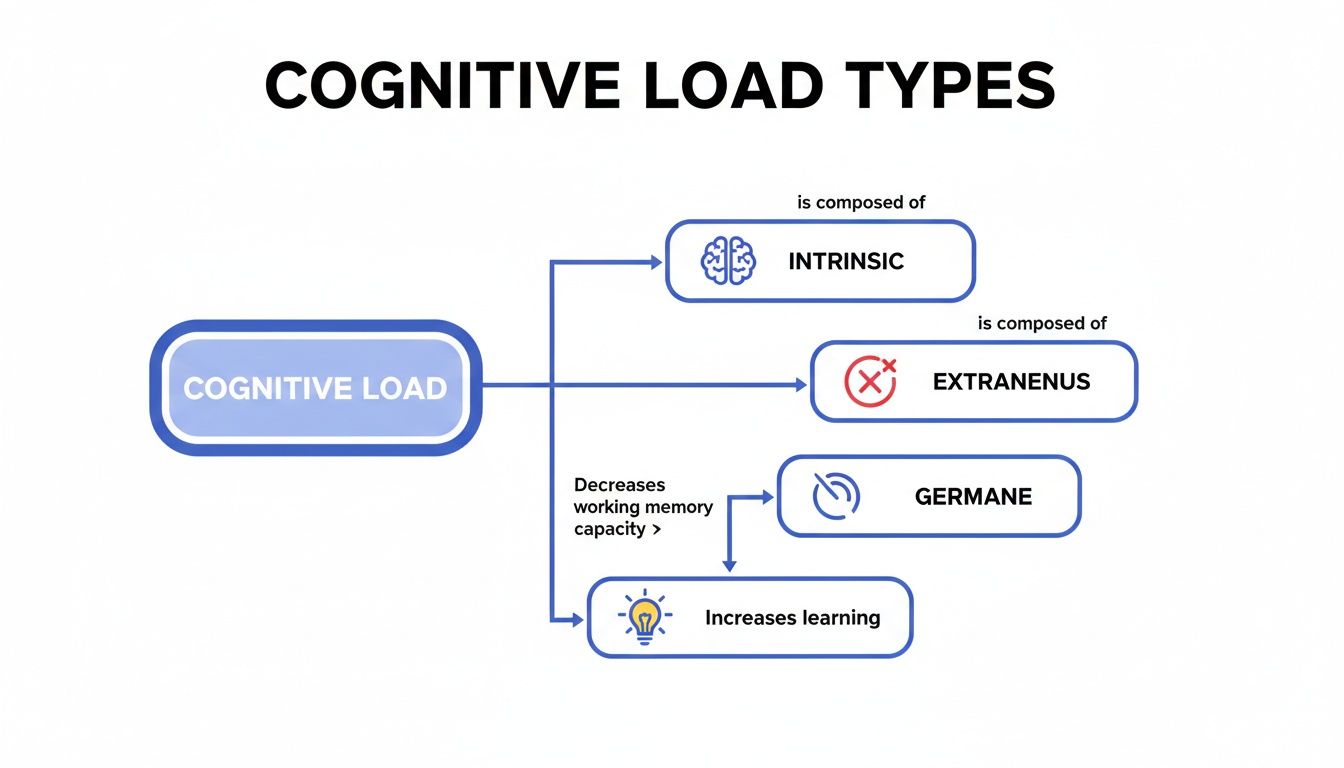
    This flowchart breaks down how these three forces interact to shape your mental state.

    Flowchart detailing cognitive load types: intrinsic, extranenus, and germane, influencing memory and learning.

    As you can see, the intrinsic load is mostly fixed, and the germane load is what we want more of. That leaves extraneous load as the prime target for reduction.

    The goal is not to eliminate all mental effort, but to minimize the distracting, unproductive load so your brain has more resources for the deep thinking that actually matters. This is the foundation of mindful productivity.

    How Extraneous Load Triggers Cognitive Overload and Drains Your Working Memory

    When extraneous load runs high—fueled by endless emails, clunky software, or the myth of multitasking—it eats up your limited working memory. This leaves almost no room for the germane load required for creativity and problem-solving.

    You end up feeling completely exhausted but with little to show for it. You can learn more about the mechanics behind this in our guide on the neurology of attention hijacking. Recognizing this dynamic is the first, most crucial step toward reclaiming your focus.

    Cognitive Overload at a Glance: Signs vs. Causes

    It’s easy to confuse the symptoms of cognitive overload with its root causes. The table below helps you quickly distinguish between what you’re feeling and what’s actually driving that feeling in your daily life.

    Common Signs (What You Feel)Common Causes (Why You Feel It)
    Difficulty making simple decisions (decision fatigue)Constant multitasking and context switching between apps and tasks
    Feeling mentally “foggy” or sluggishInformation overload from emails, news feeds, and social media
    Increased irritability and stressFrequent interruptions from notifications, alerts, and colleagues
    Making more careless mistakes than usualPoorly designed digital tools with confusing layouts (high extraneous load)
    Forgetting things you just heard or readTrying to learn complex new skills without breaking them down (high intrinsic load)
    A persistent feeling of being overwhelmed and “behind”A lack of clear priorities, leading to a sense of urgency for all tasks
    Procrastinating on complex or important tasksSensory overload from a noisy or visually cluttered environment

    Understanding this distinction is powerful. It shifts your perspective from “What’s wrong with me?” to “What in my environment can I change?” This simple reframe is the key to moving from a state of chronic overload to one of intentional clarity.

    The Hidden Costs of What Is Cognitive Overload

    Sustained cognitive overload does more than just leave you feeling drained. It systematically chips away at your performance, your well-being, and even your confidence. When your brain is constantly running at redline, it doesn’t just get sluggish—it starts making critical mistakes. This isn’t a personal flaw; it’s the predictable outcome of pushing a biological system past its design limits.

    What is cognitive overload alt text: A man clutches his head as swirling app icons and browser windows surround him, illustrating what is cognitive overload caused by constant digital distractions.

    The fallout ripples through every part of your professional life, creating a vicious cycle of stress and underperformance. But once you frame cognitive overload as a systemic issue—not an individual one—you can start finding real solutions in your environment and your routines.

    The Decline in Productivity and Accuracy

    One of the first and most obvious costs of mental fatigue is a steep drop in productivity. Research from companies like Neurable shows that cognitive and information overload can slash a knowledge worker’s effectiveness by as much as 40%. That’s a staggering hit, and it’s affecting millions of professionals.

    This isn’t just about working slower. It’s about a fundamental breakdown in the quality of your work.

    • Mini-Scenario: A project manager, swamped by endless Slack pings and back-to-back meetings, overlooks a critical project dependency. Their working memory is so full of notifications that there’s no space to process the project’s details deeply. Weeks later, everything grinds to a halt.

    In every case, the person is more than capable. Their mental resources are just so depleted that mistakes become inevitable.

    Impaired Decision-Making and Creativity

    Beyond simple errors, cognitive overload directly harms higher-level thinking, especially your ability to make sound decisions. The prefrontal cortex, the part of your brain responsible for planning and judgment, gets completely overwhelmed.

    When your mental bandwidth is tied up sorting through a firehose of information, you have very little left for careful, thoughtful choices. This leads to decision fatigue, where psychological studies show you find yourself picking the easiest option instead of the best one.

    This state is the enemy of innovation. When you’re just trying to keep your head above water, there’s no mental space left for proactive problem-solving or creative breakthroughs.

    Over time, this chronic strain can spiral into more serious conditions like burnout. It’s crucial to see how these daily pressures build up and learn how to recover from burnout before the damage becomes long-term. Recognizing these hidden costs isn’t about assigning blame. It’s about validating your own experience. That feeling of being overwhelmed isn’t just in your head—it has real, measurable effects on your work and your life.

    The Causes of Cognitive Overload in the Modern Workplace

    That persistent mental drain you feel isn’t just a sign of a busy day; it’s a direct response to specific triggers baked into the tools we rely on for work. Pinpointing these culprits is the first real step toward getting your energy back.

    While the modern digital workspace offers incredible flexibility, it also creates the perfect storm for mental fatigue. Once you understand the root causes, you can shift from feeling like a victim of your schedule to being an architect of your own focus.

    Let’s break down the main drivers behind this draining feeling.

    The Myth of Multitasking and Constant Interruptions

    Here’s the hard truth, backed by neuroscience: our brains don’t actually multitask. What we call multitasking is really just rapid context switching—jumping from one unrelated thing to another. And every single time you switch, your brain pays a mental tax, losing time and energy as it struggles to re-orient.

    Context switching is a silent thief of productivity and a major cause of mental exhaustion. Understanding what is context switching and how to fix it is non-negotiable for anyone trying to protect their mental space. This constant toggling fragments your attention, making the deep, focused work required for high-quality output nearly impossible.

    Neuroscience confirms that multitasking increases the production of the stress hormone cortisol as well as the fight-or-flight hormone adrenaline, which can overstimulate your brain and cause mental fog.

    • Mini-Scenario: A remote worker is trying to write a detailed project proposal. In just 15 minutes, they get five Slack pings about a separate project, three urgent emails, and a calendar reminder for an upcoming meeting. Each interruption forces their brain to disengage, process new information, and then try to get back on track. The result? A half-finished, subpar proposal and a profound sense of burnout.

    Hijacking Your Brain’s Reward System

    Digital tools are masterfully engineered to grab and hold our attention. Every notification from email, social media, and messaging apps triggers a tiny release of dopamine, the neurotransmitter tied to pleasure and reward. Behavioral research shows this creates a powerful, habit-forming loop.

    Your brain starts craving the novelty and satisfaction of clearing a notification, checking an email, or seeing a new message. Each “ping” yanks you away from meaningful work with the promise of a small, fleeting reward. This constant stimulation keeps your brain in a state of high alert, making it difficult to ever settle into deep work. Over time, this cycle is a huge contributor to that frazzled, drained feeling often called digital fatigue.

    Poorly Designed Digital Environments

    Finally, the very software we use can be a major source of cognitive strain. Cluttered interfaces, confusing navigation, and inconsistent design force your brain to work harder than it should just to perform basic tasks.

    • Mini-Scenario: A new project management tool has a non-intuitive layout, forcing you to hunt for essential features. You waste mental energy figuring out the system (high extraneous load) instead of doing your actual work.

    These design flaws add unnecessary friction to your workflow, creating a constant, low-level drain on your mental resources. When you combine them with endless interruptions and the lure of dopamine hits, you get an environment where cognitive overload is almost guaranteed.

    How to Spot the Signs of Cognitive Overload

    Recognizing cognitive overload before it spirals into full-blown burnout is one of the most critical skills you can develop. Think of these signs as your brain’s early warning system—the subtle (and not-so-subtle) signals that your mental bandwidth is dangerously low. These symptoms aren’t just in your head; they are real, observable changes in your thinking, mood, and even your physical state.

    Please note: While this article discusses topics related to mental well-being, including anxiety and burnout, it is for educational purposes only. It is not a substitute for professional medical or psychological advice, diagnosis, or treatment. Always seek the advice of a qualified health provider with any questions you may have regarding a medical condition.

    What is cognitive overload alt text: A focused young man uses a laptop and smartphone at a desk as floating bubbles represent information overload—showing what is cognitive overload in modern digital work.

    Learning to spot these indicators helps you shift from just reacting to stress to proactively managing your mental load. The symptoms usually show up in three distinct areas.

    Cognitive and Mental Signs

    These are often the first cracks to appear, directly hitting your ability to think clearly and perform well. When your working memory is maxed out, your higher-level brain functions start to stumble.

    • Brain Fog and Difficulty Concentrating: You find yourself rereading the same email three times or completely losing the thread of a conversation. Your mind feels sluggish and fuzzy, making deep, focused work feel impossible.
      • Real-World Example: During a team meeting, you realize you’ve zoned out and missed a key decision, even though you were trying to pay attention. Your brain simply doesn’t have the bandwidth to absorb more information.
    • Memory Lapses: You’re suddenly forgetting appointments, misplacing your keys, or can’t recall a piece of information you just learned five minutes ago. This isn’t just carelessness; it’s your overwhelmed brain failing to properly encode new information.
    • Decision Fatigue: Even simple choices, like what to have for lunch, feel monumentally exhausting. This often leads to procrastination or making impulsive, poorly thought-out decisions just to get them over with. At its most extreme, this can feel like your mind has gone completely blank, a phenomenon some call blank mind syndrome.

    Emotional and Behavioral Signs

    As the mental strain builds, it inevitably spills over into your mood and actions. The prefrontal cortex, which manages emotional regulation, becomes compromised when it’s overloaded with information processing. Your patience wears thin.

    • Increased Irritability and Impatience: You have a much shorter fuse than usual. You might find yourself snapping at colleagues or family over things that normally wouldn’t bother you.
      • Real-World Example: A coworker asks a simple question, and you respond with uncharacteristic sharpness. Your brain perceives the interruption as another threat to its limited resources, triggering a defensive, irritable reaction.
    • Feeling Overwhelmed or Anxious: A constant, low-grade sense of anxiety follows you through the day. You feel perpetually behind and can’t seem to catch up, no matter how hard you work.
    • Avoidance of Complex Tasks: You start putting off important projects in favor of ticking off easier, low-impact tasks. This is a subconscious attempt to protect yourself from further mental strain.

    Physical Signs and Symptoms

    Cognitive overload isn’t just a mental experience—it’s a physiological one. The chronic stress that comes from a constantly taxed brain can show up in very real, physical ways.

    Your mind and body are deeply connected. When your brain is under sustained duress from cognitive overload, your body often pays the price through stress-induced physical responses.

    Be on the lookout for these bodily signals:

    • Tension Headaches: A persistent, dull ache around your temples or at the back of your head is a classic sign of mental strain.
    • Chronic Fatigue: You feel bone-tired even after a full night’s sleep. This isn’t normal tiredness; it’s a deep-seated weariness that another cup of coffee simply can’t fix.
    • Sleep Problems: You might struggle to fall asleep because your mind is racing with unfinished thoughts, or you find yourself waking up frequently throughout the night.

    Actionable Strategies to Reduce Cognitive Overload

    Knowing what cognitive overload is and seeing the signs in your own day is the first step. Now for the important part: actively reclaiming your focus with a few practical, science-backed strategies you can put into practice today.

    The goal here isn’t to get rid of all mental effort. It’s to ditch the draining, unproductive load so you can pour your energy into the work that actually moves the needle. These methods are designed to build sustainable habits that protect your mental resources.

    Structure Your Day for Intentional Focus

    A reactive day is an exhausted day. When your inbox and notifications run your schedule, your brain is constantly playing catch-up. To break that cycle, you have to intentionally design your time around your most important tasks. This proactive approach is a powerful defense against mental clutter.

    • Time Blocking: This is exactly what it sounds like—scheduling specific blocks of time for everything on your to-do list, including checking email and taking breaks. By giving every task a home on your calendar, you eliminate the constant, energy-draining question of, “What should I be doing now?”
      • Real-World Example: A marketing manager blocks 9:00 AM to 10:30 AM for the “Q3 Strategy Document” and a separate 2:00 PM to 2:30 PM slot for “Email Triage.” This structure prevents low-value pings from derailing high-value work.

    Tame Your Digital Environment

    Your digital workspace is either working for you or against you. A cluttered, notification-heavy setup is a primary cause of cognitive overload, constantly splintering your attention with low-value interruptions. Taming this environment is non-negotiable for mental clarity.

    The most powerful change you can make? Embrace single-tasking.

    Neuroscientifically, single-tasking allows your prefrontal cortex to dedicate its full resources to one objective. This leads to higher-quality work, better memory formation, and significantly less mental fatigue.

    Here are a few practical steps:

    1. Disable Non-Essential Notifications: Turn off all the pop-ups, banners, and sounds on your computer and phone.
    2. Use a “Batching” System: Group similar tasks together and knock them out at once. Instead of answering emails as they land, set aside two or three specific times per day to process them all. For teams, specific strategies to reduce email overload in organizations are crucial.
    3. One Task, One Window: When you’re working on something, close every other unrelated browser tab and application. This simple act removes the visual temptation to switch contexts.
      • Real-World Example: A writer working on an article closes their email client, Slack, and all browser tabs except for their research sources and Google Doc. This creates a digital “cone of silence” that protects their focus.

    By consciously choosing to do one thing at a time, you align your workflow with how your brain operates best. You can dive deeper into the neuroscience of single-tasking and see for yourself why it has such a profound impact.

    Restore Your Mind with Strategic Disconnection

    Just like your muscles need rest after a workout, your brain needs downtime to recover from intense cognitive effort. In a culture that prizes being constantly connected, intentional disconnection has become a vital skill for preventing mental burnout. Mindful breaks aren’t lazy—they are essential for cognitive restoration. Behavioral research shows that short, deliberate breaks can significantly improve focus and creativity.

    • Practice the Pomodoro Technique: Work in focused 25-minute sprints, then take a 5-minute break completely away from your screen. After four of these cycles, take a longer 15-30 minute break.
      • Real-World Example: An analyst uses a timer for 25 minutes of intense data analysis. When the timer rings, they get up, stretch, and get a glass of water, deliberately not checking their phone. This short reset helps them return to the data with fresh eyes.

    Editor’s Take: What Really Works

    What is cognitive overload alt text: A person looks at an open planner on a white desk with a laptop, tea, and phone, illustrating what is cognitive overload in a busy digital workday.

    Let’s cut through the noise. While countless apps promise a quick fix for what is cognitive overload, the strategies that stick are almost always foundational and deeply personal. The real wins don’t come from downloading another tool; they come from intentionally designing your environment and daily rhythms.

    This advice is best for professionals in knowledge work who have some autonomy over their schedule and digital tools. It means getting aggressive with your notifications, scheduling non-negotiable blocks for deep work, and learning to truly disconnect at the end of the day.

    A critical caveat here: these habits demand consistency. They are powerful for individuals but cannot single-handedly fix systemic issues like a toxic work culture or unrealistic company-wide expectations. If your environment is the primary source of the overload, addressing it directly with your team or leadership is the only real long-term solution.


    Disclaimer: This article is for educational purposes only and is not a substitute for professional medical or psychological advice, diagnosis, or treatment. It may also contain affiliate links, which means we may earn a small commission on purchases at no extra cost to you. Always seek the advice of a qualified health provider with any questions you may have regarding a medical condition.

    FAQ: Your Questions About Cognitive Overload Answered

    Let’s wrap up by tackling some of the most common questions people have when they first start to unpack the idea of cognitive overload. Think of this as a quick-reference guide to help these concepts stick.

    1. How is cognitive overload different from stress?

    Think of it this way: cognitive overload is a specific cause (too much information for your brain to process), while stress is often the general effect. Stress is a broad response to any demand, but cognitive overload is the unique strain that happens when your working memory gets jammed, which then fuels your overall stress levels.

    2. How long does it take to recover from cognitive overload?

    For a single overwhelming day, a good night’s sleep might be enough. But for chronic overload lasting weeks or months, recovery takes longer and requires deliberate action, like taking real time off and rebuilding sustainable work habits.

    3. What is the role of sleep in preventing overload?

    Sleep is your brain’s maintenance crew. During deep sleep, your brain clears out metabolic waste and consolidates memories, moving information from your limited working memory to long-term storage. Skimping on sleep means you start the day with a “full” and cluttered brain, making you more susceptible to overload.

    4. Does cognitive overload affect long-term memory?

    Yes, absolutely. For new information to be stored long-term, it must first be properly processed by your working memory. When your working memory is overloaded, this encoding process fails. This is why you might forget something minutes after hearing it when you’re feeling overwhelmed.

    5. What is the link between cognitive overload and decision fatigue?

    They are two sides of the same coin. Your prefrontal cortex handles decision-making and runs on a finite amount of mental energy. Cognitive overload burns through that energy fast, leading directly to decision fatigue, where you start making poor or impulsive choices simply because your brain is too tired to think things through properly.

    6. What is the difference between information overload and cognitive overload?

    Information overload is about the sheer volume of data coming at you (the cause). Cognitive overload is the brain’s state of being unable to process it all (the effect). You can experience cognitive overload from too much information, but also from a single, highly complex task with no new information at all.

    7. Can cognitive overload impact my creativity?

    Definitely. Creativity requires mental “whitespace” to make new connections between ideas. When your working memory is clogged with notifications and to-do lists, there are no resources left for innovative thinking. An overloaded mind is a reactive mind, not a creative one.

    8. What are the best tools for managing cognitive load?

    Tools help, but only when paired with good habits. The best ones get things out of your head:

    • Task Managers: Todoist or Asana externalize your to-do list.
    • Focus Apps: Forest or Freedom block distractions.
    • Note-Taking Apps: A “second brain” in Notion or Obsidian offloads information for later.

    9. How can I talk to my manager about cognitive overload?

    Frame the conversation around shared goals like productivity and work quality. Instead of saying “I’m overwhelmed,” try: “I’ve noticed that constant context switching between projects is leading to more errors. Could we try blocking dedicated focus time for each one to improve the final output?” This positions you as a proactive problem-solver.

    10. Can physical exercise help reduce cognitive overload?

    Yes. Behavioral research shows that physical activity, even a short walk, can help reduce the effects of cognitive overload. Exercise increases blood flow to the brain, reduces stress hormones like cortisol, and provides a mental break, allowing your prefrontal cortex to reset and recover.


    At Mind Clarity Hub, our books and guides are designed to give you science-backed, actionable strategies to manage cognitive overload and build a more focused, intentional life. Explore our library to find the right roadmap for you at https://mindclarityhub.com.

    Explore the Mind Clarity Hub Library

    Practical books on focus, digital habits, resilience, and building a calmer mind.

    The Power of Clarity — book cover

    The Power of Clarity

    Unlock mental focus, build momentum, and create the life you were meant to live.

    View book →
    AI & ChatGPT for Beginners — book cover

    AI & ChatGPT for Beginners

    No PhD needed — a 2025 guide to AI, prompts, and productivity without coding.

    View book →
    Zen in the Digital Jungle — book cover

    Zen in the Digital Jungle

    Mindfulness for a chaotic world.

    View book →
    The Slow Reset — book cover

    The Slow Reset

    Mindful living in a fast-paced world.

    View book →
    Perfectly Imperfect — book cover

    Perfectly Imperfect

    Stop self-criticism, set boundaries, and embrace the real you.

    View book →
    Reclaiming Silence — book cover

    Reclaiming Silence

    A dopamine detox guide to finding peace in a noisy world.

    View book →
    The Focused Freelancer — book cover

    The Focused Freelancer

    Productivity, pricing & positioning for independents in 2025.

    View book →
    ChatGPT Side Hustle System — book cover

    ChatGPT Side Hustle System

    Launch your AI-driven online business in 30 days.

    View book →
    Burnout, Interrupted — book cover

    Burnout, Interrupted

    A proven path to restore energy and reclaim your life.

    View book →
    Attention Unleashed — book cover

    Attention Unleashed

    Focus strategies for the distracted mind.

    View book →
    Side Hustle Launchpad — book cover

    Side Hustle Launchpad

    Your quick-start guide to extra income.

    View book →
    Digital Clarity — book cover

    Digital Clarity

    Rewire your brain, escape dopamine traps & regain focus.

    View book →
    Break the Scroll — book cover

    Break the Scroll

    Reduce screen time and take back control of your life.

    View book →
    Climate Compassion — book cover

    Climate Compassion

    Transform eco-anxiety into empowered action.

    View book →
    Village Mentality — book cover

    Village Mentality

    The power of community for mental wellness.

    View book →
    Restful Nights — book cover

    Restful Nights

    Overcoming sleep anxiety in a 24/7 world.

    View book →
    Connected Again — book cover

    Connected Again

    Combat loneliness and build meaningful relationships.

    View book →
    Focus Recharged — book cover

    Focus Recharged

    Mastering attention and productivity in the digital era.

    View book →
    Marketing Magic with ChatGPT — book cover

    Marketing Magic with ChatGPT

    AI-powered content, campaigns, and copywriting to grow faster.

    View book →
    The 6-Figure Creator — book cover

    The 6-Figure Creator

    Turn knowledge into passive income with books, courses & AI.

    View book →
    Burnout Breakthrough — book cover

    Burnout Breakthrough

    Reset your work-life balance and thrive in 2025.

    View book →
    The Emotionally Intelligent Man — book cover

    The Emotionally Intelligent Man

    A modern guide to self-awareness and communication.

    View book →
    AI Personalized Wellness — book cover

    AI Personalized Wellness

    Create your custom health plan with data-driven habits.

    View book →
    Everyday AI Made Easy — book cover

    Everyday AI Made Easy

    Use ChatGPT and smart tools to simplify life.

    View book →
    Money Mindfulness — book cover

    Money Mindfulness

    A financial wellness guide for Gen Z & Millennials.

    View book →
    Startup Smarter with AI — book cover

    Startup Smarter with AI

    ChatGPT strategies and tools to grow your business.

    View book →
    ChatGPT for Writers & Creators — book cover

    ChatGPT for Writers & Creators

    Unlock AI-powered brainstorming, drafting & editing.

    View book →
  • A Science-Based Plan on How to Read More Books

    A Science-Based Plan on How to Read More Books

    A Science-Based Plan on How to Read More Books

    Jeremy Jarvis — Mind Clarity Hub founder
    Mind Clarity Hub • Research-aware focus & digital wellness

    The real secret to reading more isn’t about finding more time—it’s about understanding how your brain has been rewired by the digital world and then gently rewiring it back. Grounded in behavioral science, the key is to acknowledge that modern technology actively trains you for distraction, making deep, focused reading feel like a chore. Once you understand this, you can start building small, consistent habits to reclaim your focus and make reading a natural, effortless part of your day.

    Heads up: This article may contain affiliate links. If you make a purchase through one of these links, we may earn a small commission at no extra cost to you. It’s a great way to support our work and keep the insights coming!

    Why It Feels Harder Than Ever to Read Books

    Ever find yourself staring at a bookshelf full of unread titles, only to instinctively reach for your phone instead? You’re not alone. This isn’t a personal failure; it’s a predictable consequence of the digital world we live in. Our online environments are masterfully engineered to hijack our attention with a nonstop stream of quick, rewarding content.

    This constant firehose of notifications, short videos, and infinite scrolls is literally changing your brain’s reward pathways. From a neuroscience perspective, every ping and alert delivers a tiny hit of dopamine, the chemical messenger tied to pleasure and motivation. Over time, your brain’s reward system starts craving these instant rewards, making slower, more demanding activities—like getting lost in a good book—feel far less appealing.

    A man uses his smartphone to scan books on a bookshelf in a bright, modern living room. This illustrates a modern challenge to the goal of how to read more books.

    The Challenge of Deep Focus

    Sustained reading demands a totally different kind of mental muscle. It requires deep focus, a state that becomes harder to achieve when our brains are conditioned for rapid-fire task-switching.

    Every time you glance at your phone while trying to read, your brain pays a cognitive price called “attentional residue.” A part of your focus stays stuck on whatever you just looked at, making it nearly impossible to fully immerse yourself in the text. If this sounds painfully familiar, you’ll want to read our guide on why you can’t read long articles anymore, which dives deeper into this exact phenomenon.

    Real-World Scenario: Imagine a student trying to read a dense textbook. Their phone is on the desk, screen up. A text message notification flashes. Even if they don’t pick up the phone, a part of their brain is now wondering who texted and what they want. That cognitive “leak” makes it harder to absorb the complex information in the book, forcing them to re-read the same paragraph three times. This is attentional residue in action.

    This mental fragmentation is exactly why picking up a book can feel like an exhausting workout. Your brain, accustomed to the easy dopamine hits from a screen, resists the quiet, sustained effort that deep reading requires.

    The Reading Gap: Why Most People Struggle

    The gap between wanting to read and actually doing it often comes down to a few key habits and environmental factors. Here’s a quick look at how infrequent readers and consistent readers approach the same challenges differently.

    ChallengeTypical Approach (Infrequent Reader)Strategic Approach (Consistent Reader)
    EnvironmentPhone is always within reach, notifications are on. Reads in a high-distraction area.Phone is in another room or on Do Not Disturb. Creates a designated, quiet reading spot.
    Mindset“I don’t have time.” Feels guilty about not reading, which leads to avoidance.“I’ll start with 5 minutes.” Sees reading as a skill to be practiced, not a moral failing.
    StrategyTries to read for an hour straight, gets distracted, and gives up.Uses habit stacking (e.g., reads after morning coffee) and micro-reading (5-minute bursts).
    ToolsRelies on willpower alone to fight digital temptation.Leverages tools like Kindle’s “airplane mode” and read-later apps to reduce friction.

    Seeing these side-by-side makes it clear: consistent reading isn’t about having more willpower. It’s about having a better system. The national data reflects this struggle. It’s not that people don’t want to read; it’s that their environment and habits are working against them. Ultimately, understanding this dynamic is the first real step toward change. It’s not about forcing yourself to read through sheer will. It’s about creating an environment and building routines that make reading the easier, more compelling choice.

    Recalibrating Your Brain for Deep Focus to Read More Books

    Before you can build a reading habit that sticks, we need to address the real reason it feels so hard in the first place: your focus is likely fragmented. If picking up a book feels “boring” or difficult, that’s a huge clue. It signals that your brain has adapted to a high-speed, high-stimulus digital world. This isn’t a character flaw—it’s a predictable neurochemical response.

    Every notification and endless scroll delivers a quick, cheap hit of dopamine. Your brain’s reward circuitry, especially the limbic system, learns to crave these tiny, instant payoffs. The slower, more demanding reward of reading—which requires sustained attention from your prefrontal cortex—simply can’t compete. The first real step is to gently recalibrate this system.

    This isn’t about some punishing, extreme “dopamine fast.” Think of it more like a gentle digital declutter. The goal is to carve out small pockets of quiet in your day, giving your brain a chance to reset its baseline. Over time, this makes slower activities like reading feel engaging and rewarding again.

    Taming Digital Distractions to Improve Reading Habits

    The key is to turn down the volume on the constant, low-level stimulation that keeps your brain on high alert. Start by identifying and shutting down the noisiest interruptions.

    • Silence Non-Essential Notifications: Go into your phone’s settings and turn off alerts for everything except calls, texts from key people, and calendar reminders. Social media, news apps, and email can wait. Each notification you silence is a small win for your focus.
    • Create “No-Phone Zones”: Designate specific areas in your home where phones just aren’t allowed. The dinner table and the bedroom are the perfect places to start. This simple rule creates a physical boundary that helps you mentally disconnect.
    • Schedule Your Screen Time: Instead of checking email and social media whenever the urge strikes, block out specific times for it. Try checking your inbox at 10 AM, 1 PM, and 4 PM—and stay off it otherwise. This puts you back in control of your own attention.

    By consciously reducing digital inputs, you’re not just removing distractions; you’re retraining your brain’s reward circuitry. This process makes the quiet focus required for reading feel less like a chore and more like a welcome relief.

    Real-World Scenario: Imagine a freelance graphic designer who feels constantly wired. Their phone buzzes with client emails and Slack messages late into the evening. They want to read before bed but feel too mentally scattered to even try. They decide on one simple rule: after 7 PM, their phone goes on a charging stand in the living room, not on the nightstand. The first few nights feel strange, almost antsy. But by the end of the week, they notice they actually have the mental space to pick up a novel and read a chapter without feeling the phantom buzz of their phone. This small environmental shift recalibrated their entire evening routine, making reading an appealing choice again.

    Preparing Your Body and Mind for Reading

    Physical comfort is another huge, and often overlooked, part of sustaining focus. After staring at screens all day, our eyes are often shot. For a deep dive, check out this practical guide on how to reduce eye strain. Reducing physical discomfort makes it so much easier to stay locked in with a good book.

    This foundational work on your environment and your brain is crucial. By lowering the background noise of digital life, you create the mental stillness needed for deep reading to take root. This process is similar to what’s explored in techniques for limbic system retraining, where the goal is to calm an overstimulated nervous system to change automatic responses. You are teaching your brain that focus can be just as rewarding as distraction.

    Building a Reading System That Actually Sticks

    Recalibrating your focus is a great start, but good intentions alone won’t get you across the finish line. To make reading a permanent part of your life, you need a system—a set of simple, repeatable actions that work with your brain, not against it.

    Instead of white-knuckling it with motivation that comes and goes, we’ll use a couple of proven behavioral science techniques. These strategies make picking up a book feel less like a chore and more like an automatic, easy choice.

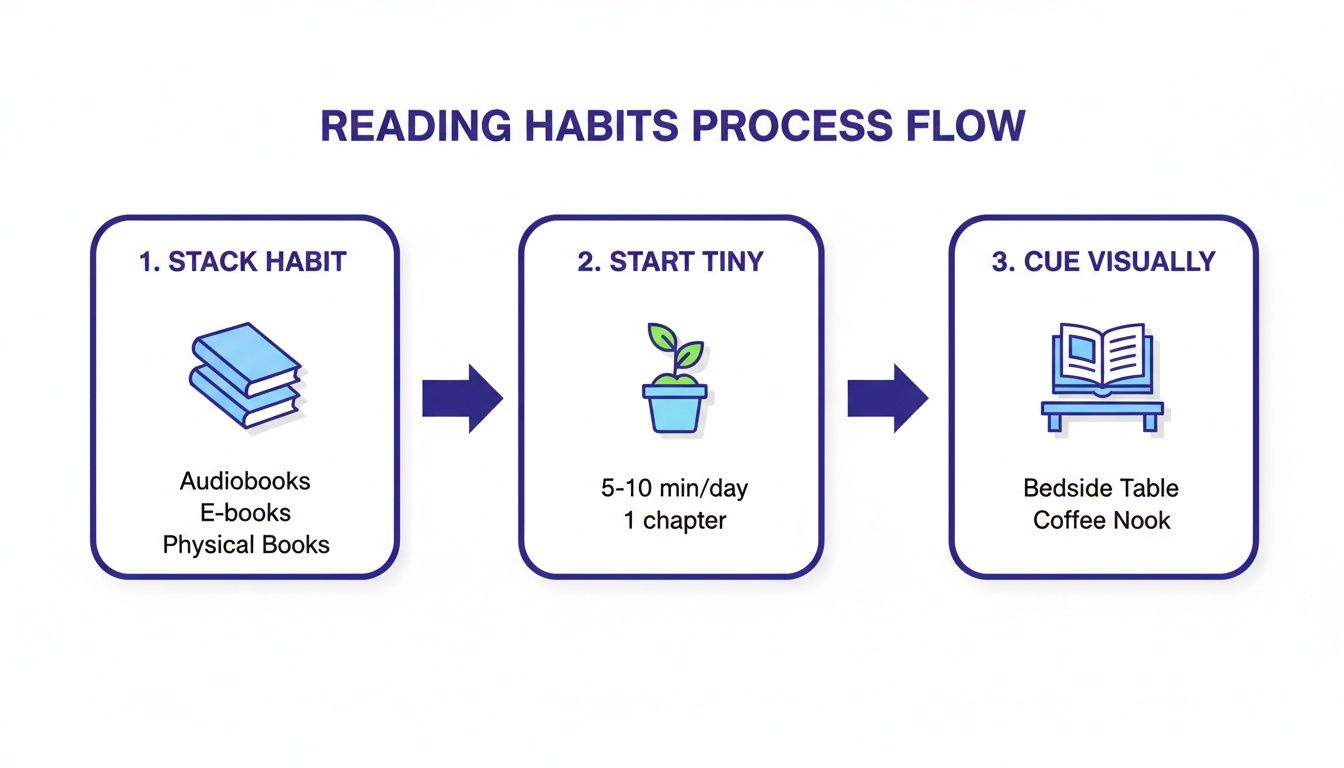
    A diagram illustrating a 3-step process for building effective reading habits, including how to read more books by stacking habits, starting tiny, and using visual cues. This diagram provides tips on how to read more books.

    Use Habit Stacking to Link Reading to Your Existing Routine

    The idea behind Habit Stacking, popularized by author James Clear, is elegantly simple. You just anchor your new desired habit (reading) to an old, deeply ingrained one. The formula looks like this:

    “After I [CURRENT HABIT], I will [NEW HABIT].”

    Your brain loves this because it doesn’t have to carve out a new routine from scratch. It just bolts the new action onto a neural pathway that’s already paved and smooth.

    Here’s how this looks in the real world:

    • Morning Coffee: “After I pour my morning coffee, I will read for five minutes.”
    • Lunch Break: “After I finish eating lunch, I will read one chapter of my book.”
    • Evening Wind-Down: “After I brush my teeth at night, I will get into bed and read until I feel sleepy.”

    The key is to pick an anchor habit that’s rock-solid—something you do every single day without fail. That existing habit becomes a powerful, automatic trigger that reminds you to pick up your book.

    Real-World Scenario: A busy parent wants to read more but their free time feels chaotic. They realize, however, that their toddler has a consistent 15-minute quiet time with puzzles right after lunch. They stack their reading habit onto this existing routine. The rule becomes: “When my child starts their puzzles, I will sit next to them and read my book.” It starts with ten minutes, but soon it becomes a cherished, non-negotiable part of both of their days.

    Start So Small You Can’t Fail with Tiny Habits

    Often, the biggest thing stopping us from reading more is that it feels like a massive commitment. The thought of tackling a 400-page book can be so intimidating that you never even start. This is where the “Tiny Habits” method, developed by Stanford behavior scientist BJ Fogg, is a game-changer.

    The whole point is to make your new habit so laughably small that it’s impossible to say no. You’re not committing to “read for 30 minutes every day.” You’re committing to something like:

    • “I will read one sentence.”
    • “I will open my Kindle app.”
    • “I will read one page.”

    This approach completely bypasses your brain’s natural resistance to effort. And once you’ve read one page, it’s so much easier to just keep going and read another. The goal isn’t the page count; it’s the consistency of starting. That tiny action builds momentum and reinforces your identity as “someone who reads.”

    Create a Reading-Ready Environment

    Your physical space sends constant, powerful signals to your brain about what actions are easy and expected. If your phone is on the coffee table and your book is on a dusty shelf upstairs, you’re making distraction the path of least resistance. To read more, you just need to flip that script. It all comes down to creating obvious visual cues that prompt you to read.

    • Leave a book on your nightstand instead of your phone.
    • Place a book on the coffee table right where you relax in the evening.
    • Keep your Kindle or a paperback in your work bag, ready for any unexpected downtime.

    Every time you see the book, it’s a gentle, passive reminder of your goal. You’re no longer relying on memory or willpower; you’re letting your environment do the heavy lifting for you. And as you read more, you might find you want to remember more of what you’re consuming. Learning how to take effective notes from a book can deepen your engagement and make the whole experience feel even more rewarding.

    Make Smart Tools and Formats Your Reading Allies

    Building a system for reading isn’t just about blocking out time; it’s about removing the tiny points of friction that stop you from picking up a book in the first place. In a life filled with commutes, chores, and endless to-do lists, a traditional paperback isn’t always practical. If you want to genuinely boost your book count, you have to make technology your ally and embrace reading in multiple formats.

    This means completely rethinking what “reading time” looks like. It doesn’t have to be an hour in a quiet armchair. It can be 15 minutes of an audiobook while you walk the dog, a chapter on your Kindle app while waiting for a meeting to start, or listening to a novel as you fold laundry. Using different formats turns moments of “dead time” into genuine reading sessions.

    A diagram illustrating a 3-step process to build effective reading habits, including stacking, starting tiny, and visual cues. A key strategy for how to read more books.

    As you can see, building a solid reading habit is all about attaching small actions to routines you already follow and using visual triggers to make reading the easiest, most obvious choice.

    Embrace Ebooks and Audiobooks Without Guilt

    Digital formats are built for the modern, mobile reader. Ebooks and audiobooks let you carry an entire library in your pocket, making it ridiculously easy to capitalize on any unexpected pocket of free time. Many people find that using multiple formats simply helps them read more books.

    One of the best features for anyone straddling both formats is Amazon’s Whispersync. This slick piece of tech syncs your Kindle ebook with its Audible audiobook counterpart, so you never lose your place.

    Real-World Scenario: You’re reading a non-fiction book on your Kindle during your lunch break. Later, you hop in the car to drive home, open the Audible app on your phone, and the audiobook picks up exactly where you left off reading. That seamless transition removes all the friction, letting you stay immersed in one book across different parts of your day. This is a practical application of how to read more books without finding new pockets of time.

    How to Use Your Digital Tools Strategically

    Just having the apps isn’t enough. To get the most out of digital reading, a few small practices can make all the difference.

    • Curate Your Digital Library: Treat your ebook library like a physical bookshelf. Only fill it with titles you’re genuinely excited about. Use wish lists and read sample chapters to make sure a book grabs you before you commit.
    • Fix Your Device Settings: Don’t let eye strain kill your reading vibe. Adjust the font size, screen brightness, and background color. Most e-readers and apps now have a warm, sepia-toned background that’s much easier on the eyes than a stark white screen.
    • Go into Airplane Mode: The single biggest advantage of a dedicated e-reader like a Kindle is its glorious lack of distractions. Put that thing in airplane mode to create a focused reading bubble, free from notifications and the siren call of the internet.

    Use AI as a Reading Assistant, Not a Replacement

    Finally, let’s talk about AI. Artificial intelligence can be a powerful assistant in your quest to read more, but its role is to make your reading time more effective, not to do the reading for you. For instance, you can use an AI tool to generate a quick, high-level summary of a dense non-fiction book to decide if it’s worth a full read. It’s also great for refreshing your memory on the key concepts from a book you finished months ago.

    For a deeper dive, check out our guide on the best AI tools for productivity to find systems that might fit your workflow.

    How to Protect Your Time for Deep Reading

    Let’s tackle the biggest hurdle: finding the time. The secret isn’t discovering some magical, empty hour in your day. It’s about getting brutally protective of your attention. You don’t find time; you make it. This means shifting from hoping for a free moment to deliberately carving out and defending your reading time like it’s a critical meeting.

    One of the most effective ways to do this is time blocking. It’s simple: treat your reading sessions with the same seriousness you’d give a doctor’s appointment. You schedule it directly into your calendar, turning a vague intention into a non-negotiable commitment.

    A cozy scene with an open book, hot tea, and a calendar marking 'READ' in sunlight. A great example of a setup on how to read more books.

    Real-World Scenario: A remote project manager felt her days were completely eaten by back-to-back video calls. To reclaim her focus, she started blocking out a 25-minute “Reading Break” in her Google Calendar right after her last meeting. That visual block was a powerful signal to herself and her team that this time was occupied, transforming a fuzzy goal into a solid daily practice. This is how to read more books even with a packed schedule.

    Capitalize on Small Windows with Micro-Reading

    Beyond blocking out bigger chunks of time, the art of micro-reading can radically change the game. This is all about using those small, often-wasted five-to-ten-minute gaps scattered throughout your day. Think about the time you spend waiting for a Zoom meeting to start, standing in line for coffee, or watching a file download. Most of us fill these moments by mindlessly scrolling our phones. Instead, these are perfect opportunities to knock out a few pages.

    From a behavioral psychology perspective, consistent, short sessions build stronger and more durable neural pathways for a new habit than rare, lengthy binges. Each tiny session reinforces your identity as a reader.

    Set and Communicate Your Boundaries

    Once you’ve scheduled your reading time, you have to protect it. This is where setting clear boundaries becomes non-negotiable.

    • Be Proactive: Let your family or roommates know about your reading block. A simple, “Hey, I’m taking the next 30 minutes to read and disconnect. I’ll be available right after,” can head off most interruptions.
    • Use Your Tools for Defense: Put your phone on “Do Not Disturb” mode. If you’re working, update your Slack or Teams status to “Focusing” or “Deep Work.” Let your tech signal your unavailability for you.
    • Create a Physical Barrier: If you can, close your office door. Putting on headphones is another universal sign that says, “I’m unavailable right now.”

    To really lock in these habits, you can dive deeper into practical approaches with these helpful Time Management Tips. And if digital distractions are your main enemy, our guide on actionable digital detox tips gives you the framework you need to create more space for focused reading.

    Editor’s Take: What Actually Works to Read More

    After trying just about everything, let’s be honest about what it takes to read more books in a world overflowing with digital noise. Forget the ambitious, shame-inducing goals for a minute.

    The single most effective strategy I’ve found is pairing a gentle digital declutter with the ‘tiny habits’ method. This combination works so well because it attacks the problem from two different angles.

    First, the declutter lowers your brain’s baseline craving for high-stimulus content. This is key. It makes the quiet, slow engagement of a book feel appealing again, not like a chore. Then, starting with a ridiculously small habit—like a “one-page” rule—bypasses the internal resistance and overwhelm that kills most reading goals before they even get off the ground.

    Who This Advice Is Really For

    This approach is tailor-made for busy professionals, students, and frankly, anyone suffering from screen fatigue who feels like their attention span is shot. It’s for those of us who have tried and failed with lofty goals like “read one book a week” because life, inevitably, got in the way.

    The crucial caveat here is that consistency over intensity is everything. It will take a few weeks for your brain to genuinely rewire its focus patterns and stop craving the next notification. Be patient with the process.

    Remember, the goal isn’t just to hit a number. It’s about reclaiming a quiet space for deep, focused thought in a world that constantly demands your attention.

    For people with long commutes or jobs that require staring at a screen all day, audiobooks are the ultimate game-changer. They seamlessly transform unproductive time into valuable reading time without adding more eye strain to your day. This multi-format approach isn’t cheating; it’s a practical solution for a modern problem.


    Disclaimer: This article is for educational and informational purposes only and is not a substitute for professional medical or psychological advice, diagnosis, or treatment. The content may reference topics like anxiety, depression, ADHD, or burnout, but it is not intended to be a substitute for professional care. Always seek the advice of your physician or other qualified health provider with any questions you may have regarding a medical condition. Some links in this article may be affiliate links, meaning we may earn a commission if you make a purchase, at no extra cost to you.

    FAQ: Your Questions About How to Read More Books

    As you start to build a more intentional reading habit, practical questions always come up. Here are answers to 10 common queries to help you find your rhythm.

    1. How many books a year is “well-read”?

    There’s no magic number. “Well-read” has more to do with the quality and diversity of your reading than the quantity. Instead of chasing a specific count, a much healthier goal is consistency. Aim to make reading a regular part of your life, whether that means one book a month or just 15 minutes a day. The real value comes from the ideas you engage with.

    2. What’s the best way to find books I’ll actually enjoy?

    The secret is to follow your genuine curiosity. Start with what you already love in other media, like movies or podcasts, and look for books in similar genres. Websites like Goodreads are fantastic for finding recommendations based on what you’ve enjoyed. Don’t be afraid to “try before you buy”—read the first chapter, and if it doesn’t grab you, move on.

    3. Is it better to read one book at a time or several?

    This is personal preference. Some people thrive on monogamous reading to stay fully immersed. Others find that juggling multiple books (e.g., one fiction, one non-fiction, and an audiobook) keeps things fresh and prevents reading slumps. Experiment to see what feels right. A great start is having one physical book for quiet time and one audiobook for your commute.

    4. How can I improve my reading speed without losing comprehension?

    Boosting reading speed is a skill. A common technique is to minimize subvocalization—the inner voice that says each word. You can practice this by using your finger to trace the lines of text, forcing your eyes to move faster than your inner voice. However, simply reading more will naturally increase your speed and processing efficiency over time.

    5. What are some good reading strategies for someone with ADHD?

    For a brain wired for novelty, a few strategies can be game-changers. Audiobooks engage auditory senses and allow for movement. Embrace “micro-reading” in short, timed bursts of 10-15 minutes. Also, picking books with short chapters or essay collections provides frequent “finish lines,” which can deliver a rewarding dopamine hit and keep you motivated.

    6. Do audiobooks really count as reading?

    Absolutely. Neuroscience shows that whether you listen to a story or read it on a page, your brain processes the language, narrative, and emotional content in remarkably similar ways. Audiobooks are an incredibly powerful tool for turning “dead time” like commutes or chores into productive reading time.

    7. How do I stop buying books and actually read the ones I own?

    This is a common struggle known as tsundoku in Japanese. A great fix is the one-in, one-out rule: you can’t buy a new book until you’ve finished one from your current pile. Another strategy is to “shop your own shelves”—pick up a book you already own and commit to reading just the first chapter. That’s often all it takes to get hooked.

    8. What should I do if I lose my reading streak?

    Don’t panic. An all-or-nothing mindset is the enemy of building any long-term habit. If you miss a day or a week, the most important thing is to simply start again the next day without guilt. A broken streak doesn’t erase your progress. The goal is consistency over perfection.

    9. How can I read more non-fiction without getting bored?

    Start with topics you’re genuinely passionate about. A well-written biography or science book from a skilled storyteller can be as gripping as a novel. It also helps to alternate non-fiction with fiction. And remember, you don’t have to read every single word; it’s okay to skim less relevant sections and dive deep into chapters that capture your interest.

    10. What is the best time of day to read for better retention?

    Research on memory consolidation suggests that reading just before sleep can be highly effective. During sleep, your brain processes and stores information, which can lead to better recall. That said, the true “best” time is simply the time you can consistently protect from interruptions. Consistency will always beat perfect timing.


    Ready to build a sustainable system for focus in a distracted world? At Mind Clarity Hub, we specialize in science-based guides that offer practical, step-by-step roadmaps to help you reclaim your mental space and achieve your goals.

    Explore our full library of books on focus, productivity, and digital clarity.

    Explore the Mind Clarity Hub Library

    Practical books on focus, digital habits, resilience, and building a calmer mind.

    The Power of Clarity — book cover

    The Power of Clarity

    Unlock mental focus, build momentum, and create the life you were meant to live.

    View book →
    AI & ChatGPT for Beginners — book cover

    AI & ChatGPT for Beginners

    No PhD needed — a 2025 guide to AI, prompts, and productivity without coding.

    View book →
    Zen in the Digital Jungle — book cover

    Zen in the Digital Jungle

    Mindfulness for a chaotic world.

    View book →
    The Slow Reset — book cover

    The Slow Reset

    Mindful living in a fast-paced world.

    View book →
    Perfectly Imperfect — book cover

    Perfectly Imperfect

    Stop self-criticism, set boundaries, and embrace the real you.

    View book →
    Reclaiming Silence — book cover

    Reclaiming Silence

    A dopamine detox guide to finding peace in a noisy world.

    View book →
    The Focused Freelancer — book cover

    The Focused Freelancer

    Productivity, pricing & positioning for independents in 2025.

    View book →
    ChatGPT Side Hustle System — book cover

    ChatGPT Side Hustle System

    Launch your AI-driven online business in 30 days.

    View book →
    Burnout, Interrupted — book cover

    Burnout, Interrupted

    A proven path to restore energy and reclaim your life.

    View book →
    Attention Unleashed — book cover

    Attention Unleashed

    Focus strategies for the distracted mind.

    View book →
    Side Hustle Launchpad — book cover

    Side Hustle Launchpad

    Your quick-start guide to extra income.

    View book →
    Digital Clarity — book cover

    Digital Clarity

    Rewire your brain, escape dopamine traps & regain focus.

    View book →
    Break the Scroll — book cover

    Break the Scroll

    Reduce screen time and take back control of your life.

    View book →
    Climate Compassion — book cover

    Climate Compassion

    Transform eco-anxiety into empowered action.

    View book →
    Village Mentality — book cover

    Village Mentality

    The power of community for mental wellness.

    View book →
    Restful Nights — book cover

    Restful Nights

    Overcoming sleep anxiety in a 24/7 world.

    View book →
    Connected Again — book cover

    Connected Again

    Combat loneliness and build meaningful relationships.

    View book →
    Focus Recharged — book cover

    Focus Recharged

    Mastering attention and productivity in the digital era.

    View book →
    Marketing Magic with ChatGPT — book cover

    Marketing Magic with ChatGPT

    AI-powered content, campaigns, and copywriting to grow faster.

    View book →
    The 6-Figure Creator — book cover

    The 6-Figure Creator

    Turn knowledge into passive income with books, courses & AI.

    View book →
    Burnout Breakthrough — book cover

    Burnout Breakthrough

    Reset your work-life balance and thrive in 2025.

    View book →
    The Emotionally Intelligent Man — book cover

    The Emotionally Intelligent Man

    A modern guide to self-awareness and communication.

    View book →
    AI Personalized Wellness — book cover

    AI Personalized Wellness

    Create your custom health plan with data-driven habits.

    View book →
    Everyday AI Made Easy — book cover

    Everyday AI Made Easy

    Use ChatGPT and smart tools to simplify life.

    View book →
    Money Mindfulness — book cover

    Money Mindfulness

    A financial wellness guide for Gen Z & Millennials.

    View book →
    Startup Smarter with AI — book cover

    Startup Smarter with AI

    ChatGPT strategies and tools to grow your business.

    View book →
    ChatGPT for Writers & Creators — book cover

    ChatGPT for Writers & Creators

    Unlock AI-powered brainstorming, drafting & editing.

    View book →
  • 10 Science-Backed Remote Work Productivity Tips for 2025

    10 Science-Backed Remote Work Productivity Tips for 2025

    10 Science-Backed Remote Work Productivity Tips for 2025

    Jeremy Jarvis — Mind Clarity Hub founder
    Mind Clarity Hub • Research-aware focus & digital wellness

    The shift to remote work offers unparalleled flexibility, but it also presents a unique set of challenges to our focus and efficiency. Without the built-in structure of a traditional office, the lines between work and life can easily blur, leaving even the most disciplined professionals feeling scattered and overwhelmed. Mastering a few powerful remote work productivity tips is essential. This guide is designed to cut through the noise with a comprehensive collection of actionable strategies, each grounded in principles of neuroscience and behavioral psychology. Subsequently, we move beyond generic advice to provide specific, evidence-backed techniques you can implement immediately.

    Remote work productivity tips: modern workspace with laptop on video call, desk lamp, plant, and ergonomic chair.

    This isn’t just another list of obvious suggestions. Instead, you’ll find a structured framework for redesigning your workday for maximum output and minimal stress. For example, we will explore how to create an optimized physical and digital workspace, master attention-management techniques like time-blocking and the Pomodoro method, and establish firm boundaries that protect your focus and well-being. Furthermore, you will learn to leverage asynchronous communication to reclaim your schedule and implement simple pre-work and end-of-day rituals that signal your brain when to switch on and off.

    Each tip is presented with a clear rationale, explaining why it works from a psychological or neurological perspective, alongside practical steps and real-world examples. Whether you’re a seasoned remote professional looking to refine your system or a student new to working from home, these strategies will help you build a sustainable, productive, and more balanced remote work life. Think of this as your toolkit for not just getting things done, but for thriving in a location-independent environment.


    Disclosure: This article may contain affiliate links. If you make a purchase through these links, we may earn a small commission at no extra cost to you. This helps support our work in creating valuable content.


    1. Establish a Dedicated Workspace for Better Focus

    Creating a physical and psychological boundary between your professional and personal life is one of the most impactful remote work productivity tips you can implement. When your living room couch doubles as your office, the lines blur, making it difficult for your brain to switch into “work mode” or fully disengage after hours. A dedicated workspace, consequently, acts as a powerful environmental cue, signaling to your brain that it’s time to focus.

    This concept is rooted in environmental psychology, which explores how our physical surroundings influence our thoughts, emotions, and behaviors. By associating a specific location with a specific activity, you create a conditioned response. In other words, stepping into your designated workspace primes your brain for concentration, while leaving it helps you transition back into your personal life, reducing the risk of burnout.

    How to Create Your Dedicated Space

    You don’t need a separate room with a door to reap the benefits. The key is dedication and consistency, not square footage.

    • Define Your Zone: Even a small corner in a quiet room can work. Use a room divider, a bookshelf, or even a rug to visually separate your work area from the rest of the living space.
    • Invest in Ergonomics: Your physical comfort directly impacts your focus. An ergonomic chair and an adjustable standing desk can prevent physical strain and boost energy levels throughout the day.
    • Optimize Your Setup: Ensure good lighting to reduce eye strain and keep the area free of personal clutter. The only items on your desk should be those essential for your work tasks.
    • Set Clear Boundaries: Communicate with family or roommates that when you are in your workspace, you are “at work” and should not be disturbed except for emergencies.

    Real-World Example: Sarah, a graphic designer in a one-bedroom apartment, uses a foldable screen to partition off a corner of her living room. When the screen is up, her partner knows she’s in “deep work” mode. This simple physical cue has drastically reduced interruptions and helped her mentally “leave” work at the end of the day.

    2. Implement the Pomodoro Technique to Boost Productivity

    Maintaining focus over long stretches can feel impossible, especially with the constant digital distractions of remote work. The Pomodoro Technique is a time-management method designed to break this cycle, leveraging timed intervals to maximize concentration and prevent mental fatigue. Consequently, it turns your workday into a series of focused sprints, making large tasks feel more approachable and manageable.

    This method is grounded in the psychological principle that frequent, short breaks can significantly improve mental agility. By working in focused 25-minute bursts (called “pomodoros”), you train your brain’s prefrontal cortex to concentrate intensely. Meanwhile, the built-in breaks allow for mental consolidation and recovery, preventing the cognitive decline associated with sustained effort. This rhythm helps combat decision fatigue and makes it one of the most effective remote work productivity tips.

    Remote work productivity tips: a red tomato-shaped timer set to 25 minutes on a desk with a laptop and notebook.

    How to Implement the Pomodoro Technique

    Getting started is simple. All you need is a timer and a commitment to honor the intervals.

    • Choose a Task: Select a single task to work on to avoid context switching.
    • Set Your Timer for 25 Minutes: Work on the task without interruption. Turn off all notifications to ensure an unbroken focus session.
    • Take a Short 5-Minute Break: When the timer rings, stop working immediately. Use this time to stretch, grab a glass of water, or simply rest your eyes away from the screen.
    • Repeat and Take a Longer Break: After completing four pomodoros, take a longer break of 15-30 minutes. This extended rest is crucial for recharging.

    Real-World Example: Alex, a software developer, uses the Pomodoro Technique to tackle complex coding bugs. He commits to one 25-minute pomodoro to investigate the issue. Often, the focused, uninterrupted time allows him to identify the root cause quickly. The mandatory breaks prevent him from getting stuck and frustrated, which used to lead to hours of unproductive effort.

    3. Set Clear Working Hours and Boundaries to Avoid Burnout

    Without the physical separation of an office, the digital nature of remote work can easily lead to an “always on” culture. Setting clear start and end times for your workday is one of the most critical remote work productivity tips for preventing overworking and burnout. Establishing firm boundaries protects your personal time, which is essential for mental and emotional recovery.

    This practice is grounded in the psychological need for structure and predictability. When work hours are ambiguous, your brain remains in a state of low-grade alert, anticipating the next email. This constant vigilance consumes mental energy and prevents deep rest. By defining a clear “end of day,” you create a cognitive trigger that allows your brain to fully disengage, promoting better sleep, reducing stress, and ultimately improving your focus during work hours.

    How to Enforce Your Work-Life Boundaries

    The goal is to create a clear and consistent separation between your professional responsibilities and personal life.

    • Communicate Explicitly: Announce your working hours to your team. Use your calendar status (e.g., in Microsoft Teams or Slack) to automatically reflect when you are available or offline.
    • Create a Shutdown Ritual: Develop a short routine to signal the end of your workday. This could include reviewing your to-do list for tomorrow, tidying your desk, and closing all work-related applications.
    • Leverage Technology: Set up automatic “out of office” email responses. Schedule emails to be sent during your working hours, even if you write them at night.
    • Separate Your Devices: If possible, avoid using your work computer for personal activities. This physical separation reinforces the mental boundary.

    Real-World Example: Maria, a project manager, updated her Slack status to automatically show a “brb” emoji during her 12:30-1:00 PM lunch break and a “powering down” emoji at 5:30 PM. This small, consistent signal has trained her team not to expect instant replies during those times, allowing her to take a real break and disconnect on time.

    4. Use Time-Blocking for Proactive Remote Work Productivity

    Simply having a to-do list is not enough. Time-blocking is a time management method that involves scheduling every part of your day in advance and dedicating specific “blocks” of time to particular tasks. This proactive approach transforms your calendar from a record of appointments into a strategic plan for your attention.

    This technique is a direct countermeasure to multitasking, which cognitive psychology shows can reduce productivity by as much as 40%. By assigning a specific job to each time slot, you eliminate the mental friction of deciding what to work on next. This preserves your cognitive resources for deep, focused work, turning your schedule into a powerful tool for intentional productivity.

    How to Implement Time-Blocking

    Effective time-blocking is about being realistic and strategic, not rigid.

    • Schedule Deep Work: Identify your peak energy hours (e.g., early morning) and reserve those blocks for your most cognitively demanding tasks.
    • Batch Similar Tasks: Group related activities. For example, create a one-hour “communications block” for answering emails instead of letting them interrupt you all day.
    • Block Distraction-Free Time: Explicitly schedule “Focus Time” on your shared calendar. This signals to colleagues that you are unavailable.
    • Plan for Breaks and Buffers: Schedule short breaks after intense focus sessions. Also, add 15-minute buffers between tasks for mental transition.
    • Review and Adapt Weekly: At the end of each week, review your calendar. Did your time estimates hold up? Adjust for the upcoming week.

    Real-World Example: Ben, a marketing manager, time-blocks his Mondays. He reserves 9-11 AM for “Strategy & Planning,” 11-12 PM for “Team Check-ins,” 1-3 PM for “Content Creation,” and 3-4 PM for “Email & Slack.” As a result, his week starts with clear direction and momentum, preventing him from getting pulled into reactive tasks. For a deeper dive into this, you can learn more about how to increase productivity at work.

    5. Minimize Distractions to Improve Remote Focus

    In a remote setting, your biggest productivity challenge is the battle against interruptions. From social media notifications to household noises, distractions can derail your focus. Minimizing these using technology and environmental adjustments is a critical remote work productivity tip for reclaiming your attention.

    This strategy is about proactively creating a “bubble” of focus. By leveraging digital tools to block out online noise and making small changes to your physical surroundings, you reduce the cognitive load required to constantly fight off interruptions. Consequently, this frees up mental energy, allowing you to direct your full concentration toward complex tasks, a concept central to improving your ability to focus better at work.

    Remote work productivity tips: modern remote work desk setup with a closed laptop, black headphones, and a smartphone on a tray.

    How to Minimize Your Distractions

    A distraction-free environment doesn’t happen by accident; it’s designed. The goal is to make focus the path of least resistance.

    • Deploy Digital Blockers: Use apps like Freedom or Cold Turkey to block distracting websites and applications during your scheduled focus blocks.
    • Curate Your Soundscape: Utilize noise-canceling headphones to eliminate ambient household sounds. For added focus, play concentration-enhancing audio from services like Brain.fm.
    • Manage Notifications Intentionally: Turn off all non-essential notifications on your computer and phone. Use “Focus Mode” or “Do Not Disturb” status in communication apps.
    • Create Physical Boundaries: A simple visual cue like a sign on your door or keeping your headphones on can signal to family that you’re in deep work mode.
    • Separate Your Digital Selves: Create separate browser profiles for work and personal use. This prevents personal bookmarks and social media from tempting you.

    Real-World Example: Chloe, a writer, creates a “Deep Work” profile in her Chrome browser that has no social media bookmarks and uses a distraction-blocking extension. When she switches to this profile, it’s a clear signal to her brain that it’s time to write, and the digital temptations are simply not there.

    6. Take Regular Breaks and Practice Movement

    Chaining yourself to your desk for hours is a direct path to mental fatigue. One of the most counterintuitive yet powerful remote work productivity tips is to intentionally step away. Integrating regular breaks and physical movement prevents cognitive decline, boosts energy levels, and sustains focus over the long term.

    This principle is rooted in how our brains manage energy. Sustained focus depletes cognitive resources, leading to decision fatigue. Short breaks, especially with physical movement, help replenish these resources. Movement increases blood flow to the brain, delivering more oxygen and nutrients, which enhances cognitive function, mood, and alertness.

    Remote work productivity tips: a person in athletic wear stretching on a yoga mat next to a standing desk with a water bottle.

    How to Integrate Breaks and Movement

    The goal is to make breaks a non-negotiable part of your workflow.

    • Implement the 20-20-20 Rule: To combat digital eye strain, every 20 minutes, look at something 20 feet away for at least 20 seconds.
    • Schedule Movement Alarms: Set a timer to go off every hour, prompting you to stand up, stretch, or walk around for just five minutes.
    • Embrace Walking Meetings: For one-on-one calls that don’t require a screen, take the meeting on the go.
    • Protect Your Lunch Break: Step completely away from your workspace to eat. Using this time for a brisk walk is crucial to learn how to recover from burnout.

    Real-World Example: David, a data analyst, sets a recurring calendar event at 2:30 PM every day titled “15-Min Walk.” By putting it on his shared calendar, it becomes a legitimate appointment he’s less likely to skip. He returns to his desk feeling refreshed and often solves problems that he was stuck on before the break.

    7. Master Asynchronous Communication for Deep Work

    Shifting your team’s mindset from real-time urgency to thoughtful, non-real-time collaboration is a transformative remote work productivity tip. Asynchronous communication, where interactions don’t require an immediate response, dismantles the culture of constant interruptions. It frees up long, uninterrupted blocks of time essential for deep, focused work.

    This approach is grounded in attention management. Cognitive psychology teaches us that every interruption incurs a “context-switching” cost, forcing our brains to disengage and then re-engage. By defaulting to asynchronous methods, you minimize these costly switches, preserving cognitive resources. It empowers individuals to engage with messages on their own schedule, leading to more considered responses.

    How to Implement an Async-First Culture

    Building an effective asynchronous system requires clear norms and the right tools. The goal is clarity and autonomy.

    • Default to Async: Train your team to ask, “Could this meeting be an email, a document, or a video message?”
    • Embrace Detailed Documentation: Use platforms like Notion or Confluence to create detailed project briefs and decision logs. This replaces the need for status update meetings.
    • Use Video for Nuance: For complex explanations, record a quick video using a tool like Loom. This provides context without needing a live call.
    • Set Clear Expectations: Establish and communicate expected response times, for instance, a 24-hour window for non-urgent requests. This removes the pressure for instant replies.

    Real-World Example: A globally distributed marketing team replaced their weekly 60-minute status meeting with an asynchronous update thread in Asana. Each team member posts their progress by Monday morning. This saves 60 minutes of meeting time for everyone and creates a written record of progress, all while respecting different time zones.

    8. Adopt a Task Prioritization System for Clarity

    Without a structured system to manage your workload, remote work can quickly devolve into chaos. Implementing a task prioritization system creates clarity, ensuring you focus on high-impact activities. This is one of the most essential remote work productivity tips for maintaining control.

    This approach is grounded in cognitive psychology principles related to executive functioning. By externalizing your workflow into a trusted system, you reduce cognitive load. Instead of trying to remember every to-do item, your brain is freed up to concentrate on complex problem-solving.

    How to Implement a Prioritization System

    The right system is one you will use consistently.

    • Adopt a Framework: Use a proven model like the Eisenhower Matrix to categorize tasks by urgency and importance. This helps you decide what to do now, schedule, delegate, or eliminate.
    • Visualize Your Workflow: A Kanban board (via tools like Trello or Jira) is excellent for visualizing work stages like “To-Do,” “In Progress,” and “Done.”
    • Break It Down: Overcome procrastination by breaking large projects into smaller, actionable sub-tasks. Checking off these smaller items builds momentum.
    • Set Daily Priorities: Before starting your day, identify your top 1-3 “Most Important Tasks” (MITs). This ensures you make meaningful progress.

    Real-World Example: A freelance consultant was overwhelmed by client requests. By implementing a simple Trello board, they created columns for “New Requests,” “This Week,” and “Waiting for Client.” This visual system immediately clarified their priorities and helped them communicate timelines more effectively, reducing their stress significantly.

    9. Develop Rituals to Start and End Your Workday

    In the absence of a physical commute, the psychological lines between home and work can dissolve. Developing pre-work and end-of-day rituals creates the clear mental “on-ramps” and “off-ramps” your brain needs to transition effectively. These consistent routines act as powerful triggers, signaling when it’s time to focus and when it’s time to disengage.

    This practice is grounded in the psychological principle of “transition rituals.” A pre-work ritual primes your brain for focus. Conversely, a shutdown ritual provides closure, allowing you to mentally “close the tabs” on work, which is crucial for preventing chronic stress. This makes it one of the most effective remote work productivity tips for long-term well-being.

    How to Build Your Rituals

    The power of these rituals lies in their consistency, not their complexity.

    • Design Your Morning On-Ramp (10-15 mins): Before opening email, dedicate time to prime your day. This might involve reviewing your calendar and identifying your top three priorities. For more ideas, explore powerful morning rituals for focus on mindclarityhub.com.
    • Craft Your Evening Shutdown (5-10 mins): Create a clear end to your workday. Review what you accomplished, prepare a preliminary task list for tomorrow, and physically tidy your workspace.
    • Use Physical Cues: Incorporate a tangible action, like making a specific type of tea to start your day or closing your laptop to end it.
    • Achieve Psychological Closure: After planning the next day, say a specific phrase aloud, like “Shutdown complete,” to signal to your brain that the workday is officially over.

    Real-World Example: At 5:00 PM, an account manager spends five minutes updating her CRM, then writes her top three priorities for the next day on a sticky note. Finally, she closes her laptop, puts it in a drawer, and says, “Work is done.” This simple, consistent ritual helped her stop checking emails in the evening.

    10. Optimize Communication Channels for Less Noise

    A chaotic communication environment is a silent killer of remote focus. When every message feels urgent, you spend your day context-switching. Optimizing communication channels means establishing clear, team-wide rules about what tool to use for which message, a powerful remote work productivity tip for reclaiming attention.

    This approach is grounded in the cognitive science principle of reducing cognitive load. Every time a random notification pulls you away, your brain pays a “switching cost.” By creating a predictable communication system, you minimize these interruptions, allowing for longer stretches of concentration.

    How to Implement a Communication Protocol

    The goal is to match the message’s urgency with the appropriate channel.

    • Document the Rules: Create a simple document outlining the protocol. For example: Use Slack for quick questions (response within 3 hours), email for formal decisions (response within 24 hours).
    • Segment Your Channels: In tools like Slack or Teams, create specific channels for different topics: #announcements, #project-alpha, and #social.
    • Define Urgency: Reserve a specific method (like a phone call) for true emergencies only.
    • Batch Your Responses: Schedule 2-3 specific times per day to check and respond to messages. This is a key strategy to manage email overload and prevent your inbox from dictating your schedule.

    Real-World Example: A support team was overwhelmed by constant Slack messages. They created a new channel, #urgent-support, and established a rule that it was only for system-down emergencies. All other questions went to the standard #support-questions channel. This immediately reduced interruptions for the on-call engineer by over 70%.

    Editor’s Note

    After reviewing countless strategies, what truly works for remote productivity isn’t a single “miracle app” but a foundational shift in mindset. The most effective tips are #1 (Dedicated Workspace) and #3 (Clear Boundaries). These create the psychological separation necessary for both deep focus and genuine rest. These tips are best for anyone feeling like their work and home lives have completely merged. A key limitation is that not everyone has the physical space for a separate office, but even a designated corner can make a huge difference. While techniques like Pomodoro are excellent, they are less effective if your environment and schedule are constantly bleeding into each other. Start by creating clear boundaries first, then layer on other techniques.


    Disclaimers and Important Information

    • Affiliate Disclosure: Please note that this article contains affiliate links. If you choose to make a purchase through these links, we may earn a small commission at no additional cost to you.
    • Educational Content: The information provided in this article is for educational and informational purposes only and is not intended as a substitute for professional medical or psychological advice, diagnosis, or treatment. Always seek the advice of your physician or other qualified health provider with any questions you may have regarding a medical condition or mental health concern.

    Frequently Asked Questions (FAQ)

    1. What is the single most important remote work productivity tip for beginners?
    For beginners, the most crucial tip is #1: Establish a Dedicated Workspace. Creating a physical boundary is the first step to creating a mental one. It signals to your brain—and others in your home—when it’s time to work, which helps build all other productive habits.

    2. How do I stay focused when I feel unmotivated working from home?
    When motivation is low, try #2: The Pomodoro Technique. The goal of working for just 25 minutes feels much more achievable than tackling a multi-hour task. The small wins from completing a few “pomodoros” can build momentum and reignite your motivation.

    3. My team is constantly messaging me. How can I get deep work done?
    Mastering #7: Asynchronous Communication is key. Propose clear communication guidelines to your team. Advocate for using email or project management tools for non-urgent updates and reserve instant messaging for true emergencies. Additionally, block out “Focus Time” on your calendar so colleagues know you are unavailable.

    4. I feel like I’m working all the time. How do I switch off?
    Implement #9: Pre-Work and End-of-Day Rituals. A simple 5-minute “shutdown ritual”—like planning your next day, tidying your desk, and closing your laptop—creates a powerful psychological cue that the workday is over, making it easier to disconnect.

    5. Are all these remote work productivity tips necessary?
    Not at all. The goal is to build a system that works for you. Start by identifying your biggest challenge—whether it’s distractions, blurred boundaries, or poor prioritization—and implement the one or two tips that directly address it.

    Ready to explore more strategies for mental clarity and peak performance? Browse other resources on Mind Clarity Hub or check out our productivity boards on Pinterest for visual inspiration.

    Explore the Mind Clarity Hub Library

    Practical books on focus, digital habits, resilience, and building a calmer mind.

    The Power of Clarity — book cover

    The Power of Clarity

    Unlock mental focus, build momentum, and create the life you were meant to live.

    View book →
    AI & ChatGPT for Beginners — book cover

    AI & ChatGPT for Beginners

    No PhD needed — a 2025 guide to AI, prompts, and productivity without coding.

    View book →
    Zen in the Digital Jungle — book cover

    Zen in the Digital Jungle

    Mindfulness for a chaotic world.

    View book →
    The Slow Reset — book cover

    The Slow Reset

    Mindful living in a fast-paced world.

    View book →
    Perfectly Imperfect — book cover

    Perfectly Imperfect

    Stop self-criticism, set boundaries, and embrace the real you.

    View book →
    Reclaiming Silence — book cover

    Reclaiming Silence

    A dopamine detox guide to finding peace in a noisy world.

    View book →
    The Focused Freelancer — book cover

    The Focused Freelancer

    Productivity, pricing & positioning for independents in 2025.

    View book →
    ChatGPT Side Hustle System — book cover

    ChatGPT Side Hustle System

    Launch your AI-driven online business in 30 days.

    View book →
    Burnout, Interrupted — book cover

    Burnout, Interrupted

    A proven path to restore energy and reclaim your life.

    View book →
    Attention Unleashed — book cover

    Attention Unleashed

    Focus strategies for the distracted mind.

    View book →
    Side Hustle Launchpad — book cover

    Side Hustle Launchpad

    Your quick-start guide to extra income.

    View book →
    Digital Clarity — book cover

    Digital Clarity

    Rewire your brain, escape dopamine traps & regain focus.

    View book →
    Break the Scroll — book cover

    Break the Scroll

    Reduce screen time and take back control of your life.

    View book →
    Climate Compassion — book cover

    Climate Compassion

    Transform eco-anxiety into empowered action.

    View book →
    Village Mentality — book cover

    Village Mentality

    The power of community for mental wellness.

    View book →
    Restful Nights — book cover

    Restful Nights

    Overcoming sleep anxiety in a 24/7 world.

    View book →
    Connected Again — book cover

    Connected Again

    Combat loneliness and build meaningful relationships.

    View book →
    Focus Recharged — book cover

    Focus Recharged

    Mastering attention and productivity in the digital era.

    View book →
    Marketing Magic with ChatGPT — book cover

    Marketing Magic with ChatGPT

    AI-powered content, campaigns, and copywriting to grow faster.

    View book →
    The 6-Figure Creator — book cover

    The 6-Figure Creator

    Turn knowledge into passive income with books, courses & AI.

    View book →
    Burnout Breakthrough — book cover

    Burnout Breakthrough

    Reset your work-life balance and thrive in 2025.

    View book →
    The Emotionally Intelligent Man — book cover

    The Emotionally Intelligent Man

    A modern guide to self-awareness and communication.

    View book →
    AI Personalized Wellness — book cover

    AI Personalized Wellness

    Create your custom health plan with data-driven habits.

    View book →
    Everyday AI Made Easy — book cover

    Everyday AI Made Easy

    Use ChatGPT and smart tools to simplify life.

    View book →
    Money Mindfulness — book cover

    Money Mindfulness

    A financial wellness guide for Gen Z & Millennials.

    View book →
    Startup Smarter with AI — book cover

    Startup Smarter with AI

    ChatGPT strategies and tools to grow your business.

    View book →
    ChatGPT for Writers & Creators — book cover

    ChatGPT for Writers & Creators

    Unlock AI-powered brainstorming, drafting & editing.

    View book →